Specs are compiled from manufacturer listings and verified buyer reviews and can change over time — please confirm the key details on the product page before buying.
Getting a keyboard to talk to Windows XP in a plain, no-drama way is easier than most people think — you want a wired board that plugs straight in and needs no driver hunt. The trick is picking one whose layout and switch type you can live with for years, because XP machines tend to be the ones you keep running long after everything else moves on. This guide covers nine wired keyboards that all connect without special software, explains which specs actually matter, and tells you who each one suits.
This guide is built by comparing the manufacturers’ published specifications and the patterns across verified customer reviews, so you get each pick’s real strengths and trade-offs instead of marketing spin.
A legacy PC build, a repair bench, or a spare desktop all come down to one thing: picking a keyboard that wakes up with your machine. That is the whole logic behind this shortlist of the best Windows XP Keyboard options, and every pick here is wired for exactly that reason.
Top Picks

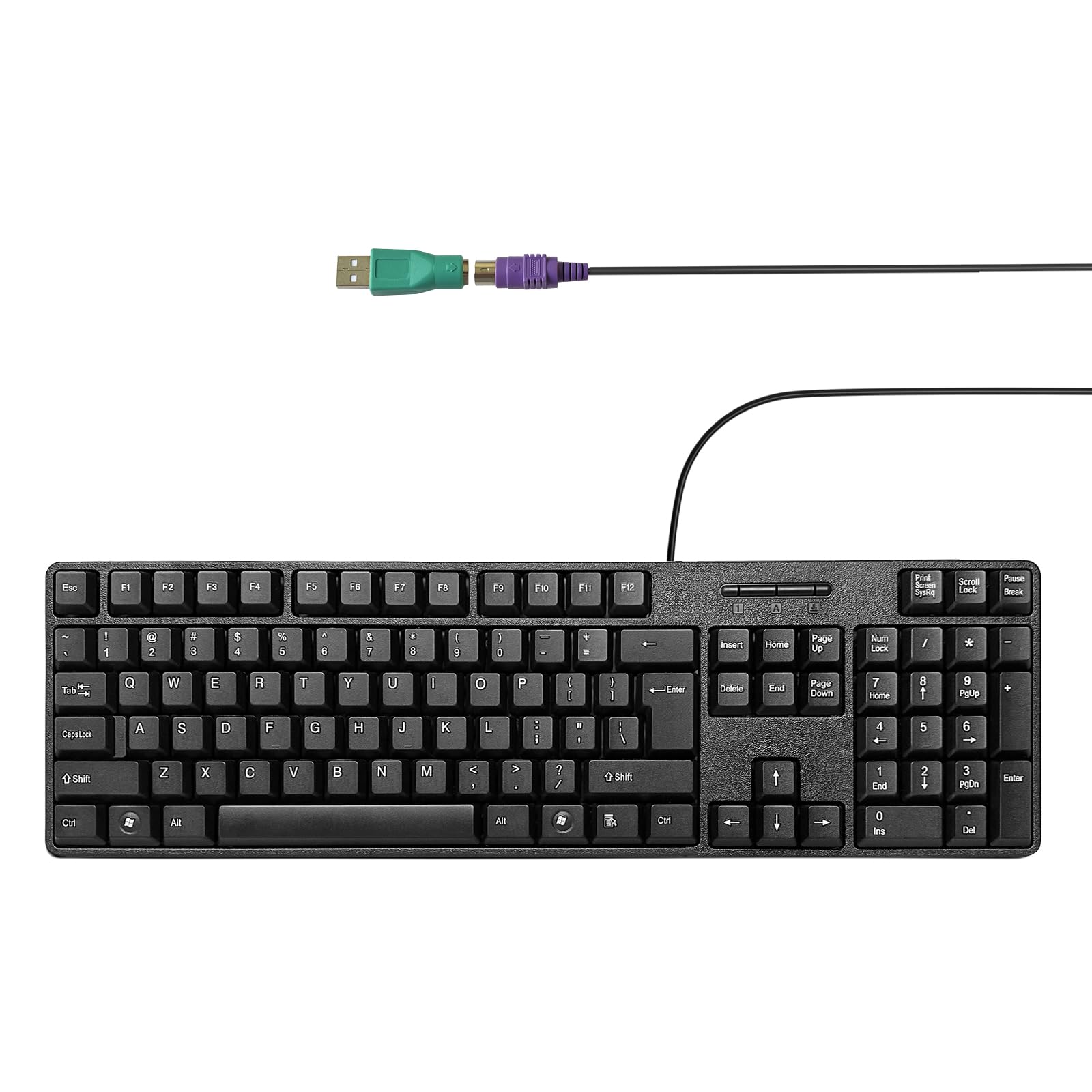

How To Choose A Keyboard That Still Speaks To An Old PC
The most common mistake is buying a modern board that needs a companion app before the media keys and lighting behave. Windows XP has no store to fetch that app from, so the only safe rule is: if the box mentions required software, walk away.
Port type decides everything first
Look at the back of your tower before you look at any keyboard. A round PS/2 socket (the small circular port, usually purple, with pin holes) takes a PS/2 board and nothing else. A flat rectangular USB-A port takes a USB board. Adapters exist, but they are fussy on old motherboards, so matching the port directly is the calm path.
If your machine has both, USB is the friendlier choice because you can unplug and move the board between computers without shutting down.
Key count and layout for actual work
A 104-key full-size layout gives you the number pad plus the navigation cluster — the Home, End, Page Up and Page Down block. On spreadsheets and long documents that cluster saves real time. A compact 88-key board drops the number pad to free up desk space, which matters on a bench or a small side table.
Readability and lighting
On several boards here, large print keycaps run roughly four times the size of standard legends, so you find a key at a glance without leaning in. Backlighting then decides whether that size advantage survives after dark. Look for adjustable brightness and an off switch, so you are not stuck with light you did not ask for.
Switch feel and noise
Rubber dome keys are quiet and cheap to build. Scissor switches, the flat mechanism found under laptop keys, sit lower and shorten the press. Neither is better in the abstract — pick dome if you want a familiar deep press, scissor if you want a low, quiet board. Both are represented here.
Side-by-Side Comparison
| Model | Best For | Connection | Key Count | Backlight | Amazon |
|---|---|---|---|---|---|
| KOPJIPPOM Large Print Backlit★ Best Overall | All-round legacy pick | USB-A | 104 | White LED, dimmable | Amazon |
| YORUNOHOSHI Wired PS2 104 KeysPS/2 Purist | PS/2 port machines | PS/2 | 104 | None | Amazon |
| Logitech MK200 ComboTwo-In-One | Keyboard plus mouse in one go | USB | Full size with number pad | Single color | Amazon |
| Dilter Typewriter Keyboard | Retro desk look | USB-A | 104 | None | Amazon |
| Perixx PERIBOARD-409P | Tight desks and benches | PS/2 | 88 | None | Amazon |
| EDJO Large Print Backlit | Office and low vision | USB-A | Full size with number pad | 7 colors, 4 levels | Amazon |
| X9 Performance Large Print | Night typing visibility | USB-A | 107 | 7 colors, 4 levels | Amazon |
| B.FRIENDIT KB1430 | Shared quiet spaces | USB-A | 105 | None | Amazon |
| Logitech G213 Prodigy | Gaming on an XP box | USB | Full size with number pad | 5 RGB zones | Amazon |
Detailed Reviews
1. KOPJIPPOM Large Print Backlit Keyboard
Our pick — 4.5+★ from 3,500+ verified ratings; the strongest balance of quality and price.
Big, lit letters and a plain USB plug — the closest thing to a set-and-forget board for an XP tower.
This is the board to pick if you want one keyboard that handles a legacy machine, a dim desk and a household of different eyes. It carries 104 keys in a full QWERTY layout with the number pad, connects over USB-A, and needs no drivers to light up and type. The cap legends run about four times larger than standard, so finding a key stops being a squint exercise.
Compare the footprint against the Perixx PERIBOARD-409P and the size difference is real rather than cosmetic: 17.7″L x 6.3″W x 0.98″H here versus 12.36″L x 5.75″W x 0.79″H there. That is desk you give up for the number pad and the wider spacing. What you get back is a hint of white LED you can dim or switch off entirely, which keeps the big legends readable at night without washing the room out.
The thing to know before buying is reliability. The board does what it says for a lot of people, but there is a genuine tail of units where keys stop registering or the lighting goes odd, and the build is not meant for a decade of hard service. Treat it as a solid, low-cost workhorse rather than a board you hand down. The spill-resistant top helps with a knocked-over mug, not a flood.
Where it earns its spot
- Legends roughly 4x standard size, so key-hunting is fast
- White LED backlight dims or switches fully off
- Full 104-key QWERTY with number pad, no relearning
- Plug-and-play USB with no drivers to install
What to weigh honestly
- A share of boards develop dead keys or flickering light over time
- It eats meaningfully more desk than a mini board
- Spill-resistant, not spill-proof — do not test it with a full cup
Take this one if: you want large lit legends, a number pad and a zero-setup USB connection in a single buy.
Think twice if: you are short on desk depth — the Perixx covers the same job in a much smaller footprint.
2. YORUNOHOSHI Wired PS2 104 Keys Computer Keyboard
A round-port board for the tower that has no USB socket to spare.
Some XP machines have a PS/2 socket and a stubborn refusal to recognize anything else. This board is built for exactly that case: a round PS/2 connector, 104 keys with the numeric keypad and full navigation controls, and a 5-ft cable that reaches from the tower under your desk up to the work surface.
Compatibility stretches wider than most listings bother to say — Windows 98 through 2000, XP, Vista and 7 all appear in its support list. First-time setup has one quirk the maker is upfront about: plug it into the PS/2 port, then restart the computer. Do that once and it behaves like any other board.
Rubber-dome keys give you the familiar deep press that older typists tend to prefer, and the whole thing is water resistant rather than dunkable. The honest read is that the volume of feedback is thin, so you are buying a proven-shape design rather than a widely stress-tested one. If your port is round and your patience is short, this is the direct answer.
Port check first: the single decision here is your socket. PS/2 goes here; USB goes to nearly every other board on this page.
Do the restart: the one-time reboot after plugging in is not optional — skip it and the deck may sit dead until you do.
Reach for this if: the machine in front of you has the round PS/2 socket and nothing else will do.
Look elsewhere if: you have a free USB-A port — you will get far more choice and a backlit deck.
3. Logitech MK200 Full Size Wired Keyboard and Mouse Combo
One USB cable pair covers the keyboard and the mouse, which matters when ports are scarce.
If your XP tower has one or two spare USB sockets and no more, buying the deck and the pointer together solves a problem before it starts. The keyboard is full size with a number pad and eight easy-access media keys for play/pause, volume, mute and the browser. The mouse is an optical model with a sculpted shell and a responsive cursor.
The weight is the part worth naming: 8 ounces for the set, against 14.56 ounces for the Perixx mini. On a desk that never moves that gap means nothing. On a bench where gear gets shoved aside, the lighter set is easier to shift and less likely to drag the cable off the edge.
Low-profile keys make the typing feel shallow and quick rather than deep and clacky, and the listed support runs from Windows XP through Vista, 7 and 8 or later. The trade-off comes with age. These are long-running designs, and the recurring story is keys going dead after a stretch of use — some sooner than anyone would like. Its tested spill rating covers up to 60 ml of liquid — a mug knock, not a flood.
The value case: two peripherals, one order, one plug-in routine — and the media keys work without installing a thing.
The age caveat: this is an older Logitech line. Expect the keys, not the software, to be the weak point over years of daily hammering.
Best for: a legacy desk that needs a keyboard and a mouse and has almost no USB room left.
Skip the pair if: you already have a mouse you like — the spill rating stops at 60 ml and immersion is off the table.
4. Dilter Wired Typewriter Keyboard
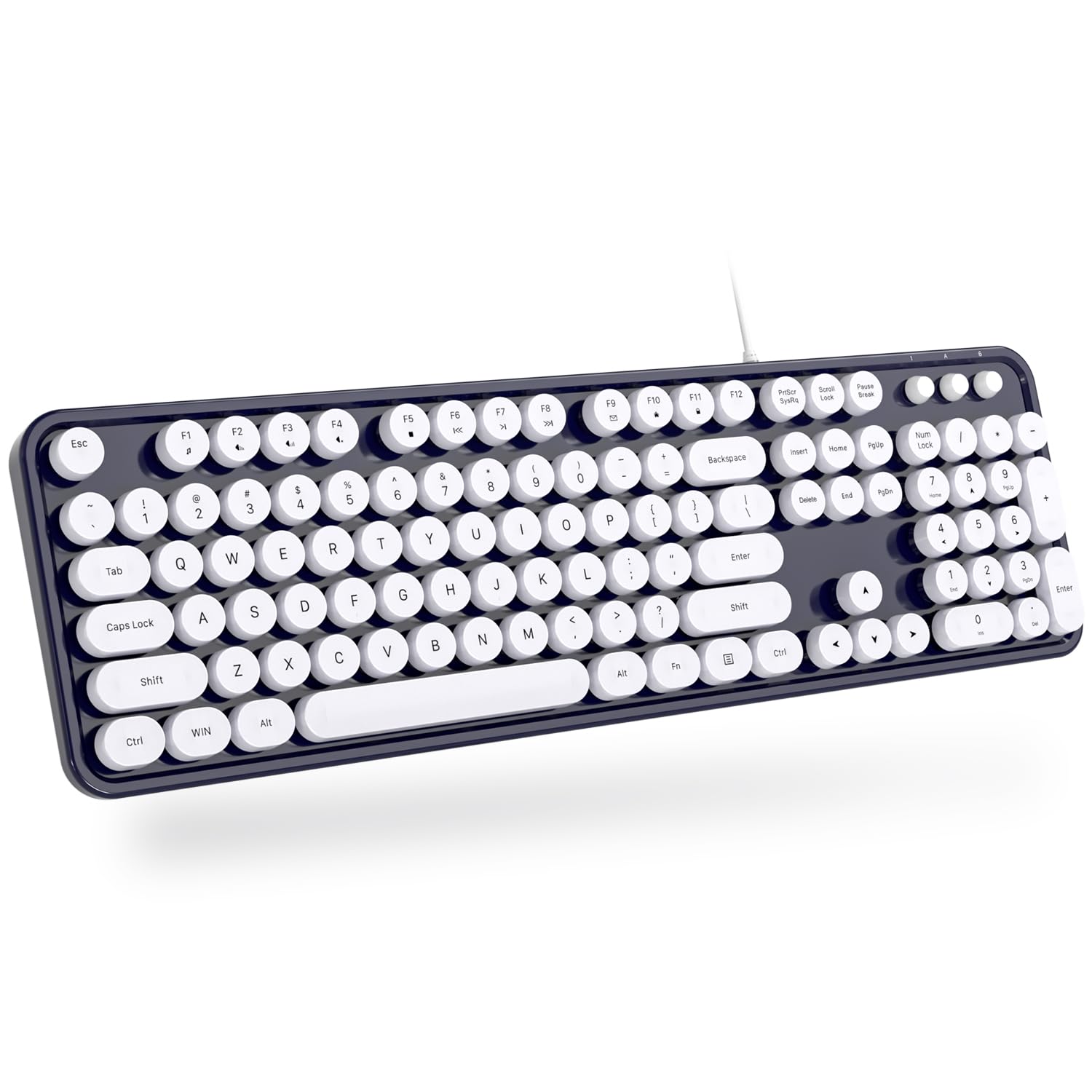
Round caps and a crisp clack, aimed at anyone who misses the sound of an old machine.
The reason people pick this board has nothing to do with ports and everything to do with feel. Round keycaps sit under your fingers differently than square ones, and the press produces a soft stroke with a clean, satisfying sound that stops well short of mechanical-keyboard racket. If the XP machine lives on a visible desk rather than in a closet, this is the one that looks like something.
It is a proper 104-key QWERTY layout with the number pad, connects over USB-A with no software, and adds a useful detail most cheap boards skip: dedicated indicators for Caps Lock, the keypad and power, so you can see a toggle state at a glance instead of guessing why your typing is shouting. A small cleaning brush ships in the box.
Support covers Windows 7, 8, 10, XP and Vista, plus Mac OS and iOS for general use — the maker notes it is not fully compatible with Apple systems, so media keys may not all respond. The cap material is ABS plastic with an ergonomic profile, and foldable stands at the back let you tilt it to taste.
What sells it: the look and the sound. This is a desk object you enjoy having in view, not just a tool.
Where it stops short: no backlight at all, so a dark room removes the whole advantage of those readable round caps.
Pick it when: the machine is on show and you want the typing to feel and sound like an occasion.
Pass when: the room is dark — with no lighting on the keys, you lose the retro charm exactly when you need the legends most.
5. Perixx PERIBOARD-409P Wired PS2 Mini Keyboard

An 88-key mini that fits where a full-size board simply will not go.
Bench work, rack shelves, a rolling cart, a keyboard tray on an old workstation — that is where this board makes sense. It measures 12.36″L x 5.75″W x 0.79″H and weighs 14.56 ounces, so it takes noticeably less surface than the 17.7-inch KOPJIPPOM. You give up the number pad to get that space back.
The connector is PS/2, the round port, and it works with Windows 2000, Vista, XP, 7, 8 and 10 machines that have that socket. A 5’9-foot cable reaches a tower on the floor without a stretch, and the rubber dome keys are quiet enough for an office or a shared room. Perixx keeps the shell logo-free, which is a small but real perk if the board sits in a rack or a client-facing setup where branding would be out of place.
There is a 12-month limited warranty behind it. The honest note is that a small share of buyers find the board does not behave for them, so testing it the day it lands is worth ten seconds of your time before the return window closes.
Space math: no number pad means your mouse arm gets roughly five inches back, and the quiet dome keys keep a small room calm.
Fits you if: your desk is genuinely tight and the machine has a PS/2 socket to use.
Not for you if: you type numbers all day — the missing keypad is a daily tax, not a minor trim.
6. EDJO Large Print Backlit Wired Keyboard
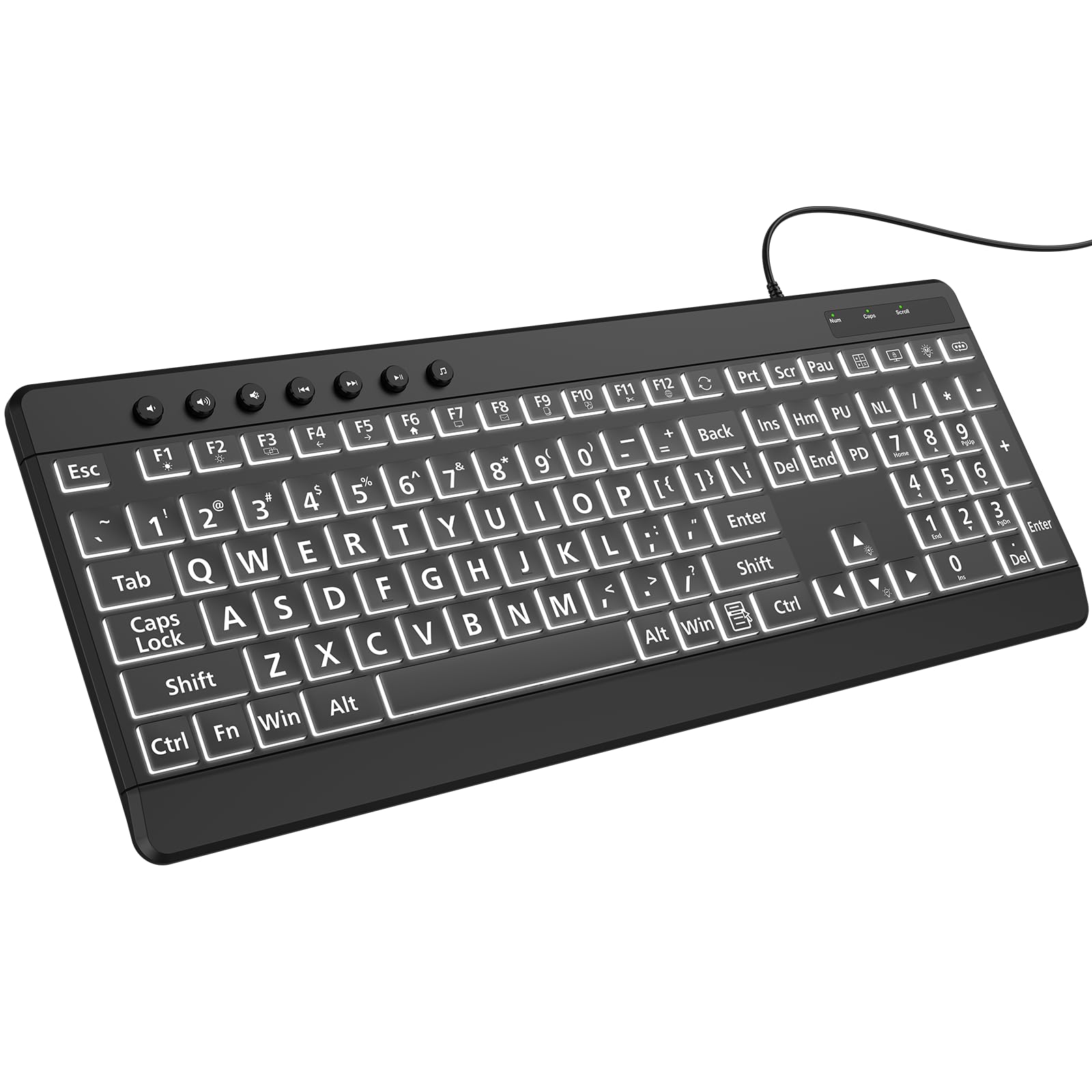
Seven backlight colors and four brightness steps, built around oversized letters for office work.
For a shared office or a library desk, this board solves the visibility problem with options rather than a single fixed glow. The legends print about four times larger than standard, and the backlight gives you 7 colors, 4 brightness levels and 2 lighting modes, all of which you can switch off when you do not want the attention. It measures 16.93″L x 6.52″W x 0.87″H and weighs 604 g.
The productivity side is where it earns its keep: 12 multimedia keys and 10 hotkeys jump straight to email, the calculator and other regular stops, so you are not digging through menus on a slow old machine. It connects by USB-A on a 5.25ft cable, needs no battery and no charging, and the response is snappy with nothing you would call lag.
Windows, PC, laptop, Mac OS and Chrome are all listed, with the familiar caveat that media keys may not fully answer on Mac. A one-year replacement warranty and round-the-clock seller support sit behind it, which is more backup than most boards at this level offer. Spill-resistant construction is on the sheet, defined loosely enough that you should still keep drinks at arm’s length.
Why it stands out: color and brightness control on a large-print deck is a rare pairing — most big-letter boards ship with one fixed color or none.
Great match for: an office or study desk where more than one person needs to read the keys in varied light.
Worth a second thought if: you want a plain black-and-white look — seven colors invites fiddling you may not want.
7. X9 Performance Large Print Backlit Keyboard
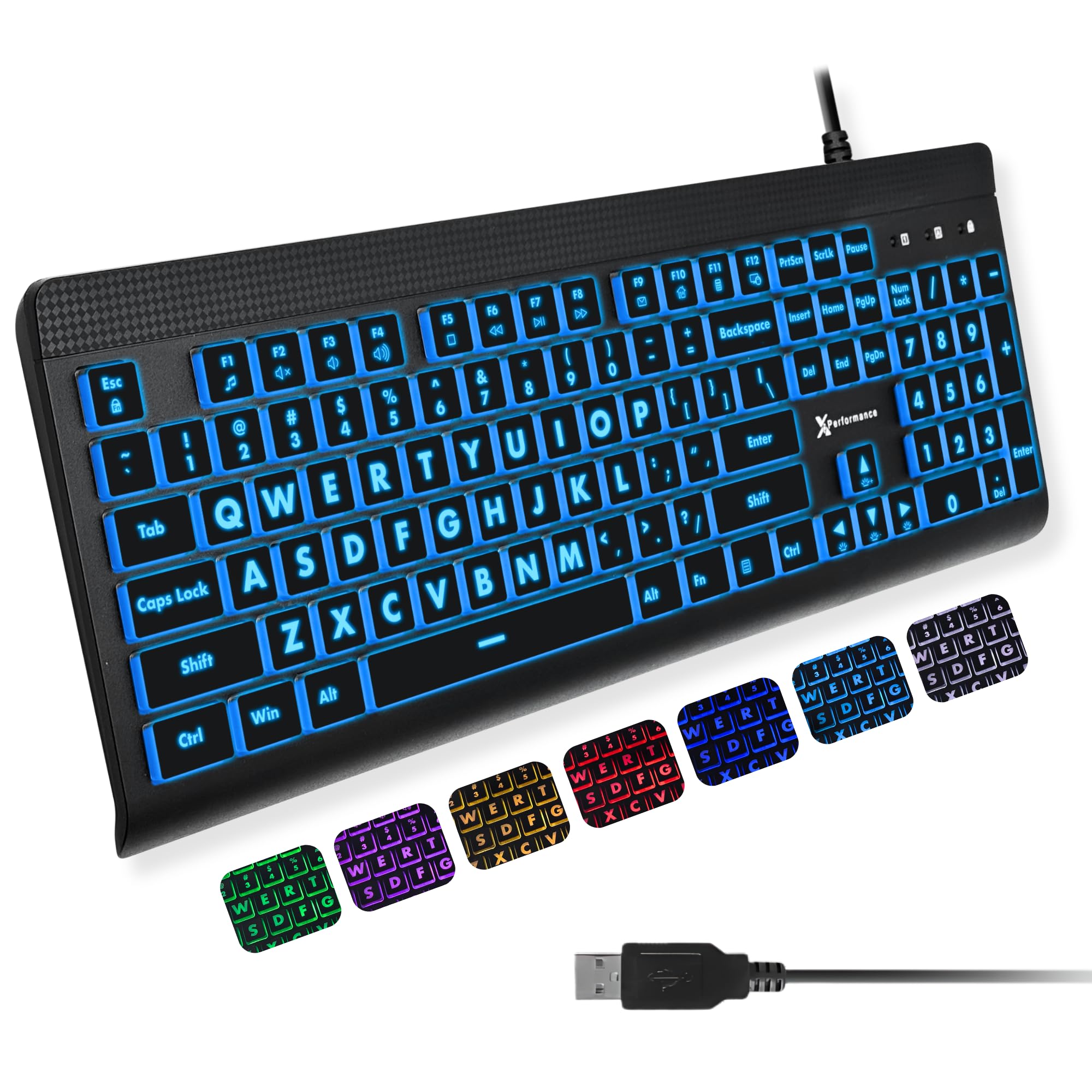
Two more keys than the standard full-size deck, plus lighting you can actually dial in.
Where most large-print boards stop at a layout, this one adds capacity: 107 keys, which is the full-size spread plus a couple of extras, with the number pad in place and 12 shortcut keys sitting above the top row. At 17.31″L x 6.15″W x 1.02″H it is a wide board, so measure your tray before you commit.
The lighting is what earns it the price difference over its neighbors. You get 7 colors at 4 brightness levels, and the legends are lit from behind the keys rather than around them, so the letters themselves glow instead of the space between. In a dark room that means you read the character, not a silhouette. Ten spare keycaps ship in the box for future swapping.
Setup is the easy part — a USB-A connection, no software, and you are typing on a PC, a laptop or a Chromebook. The compatibility list is written around Windows rather than legacy XP specifically, which is worth confirming against your machine’s port and OS before you order. For a late-night desk where the letters need to be unmistakable, this is the one that delivers.
Visibility edge: backlit legends that light the character itself beat a glowing backdrop when your eyes are tired and the room is dim.
Confirm the pairing: the support language centers on Windows generally — check your XP system before assuming a plug-in-and-go result.
Choose it for: a large, wide desk where the lettering has to be readable late at night.
Reconsider if: your keyboard tray is shallow — over 17 inches wide needs room.
8. B.FRIENDIT KB1430 Ultra-Slim Wired Keyboard
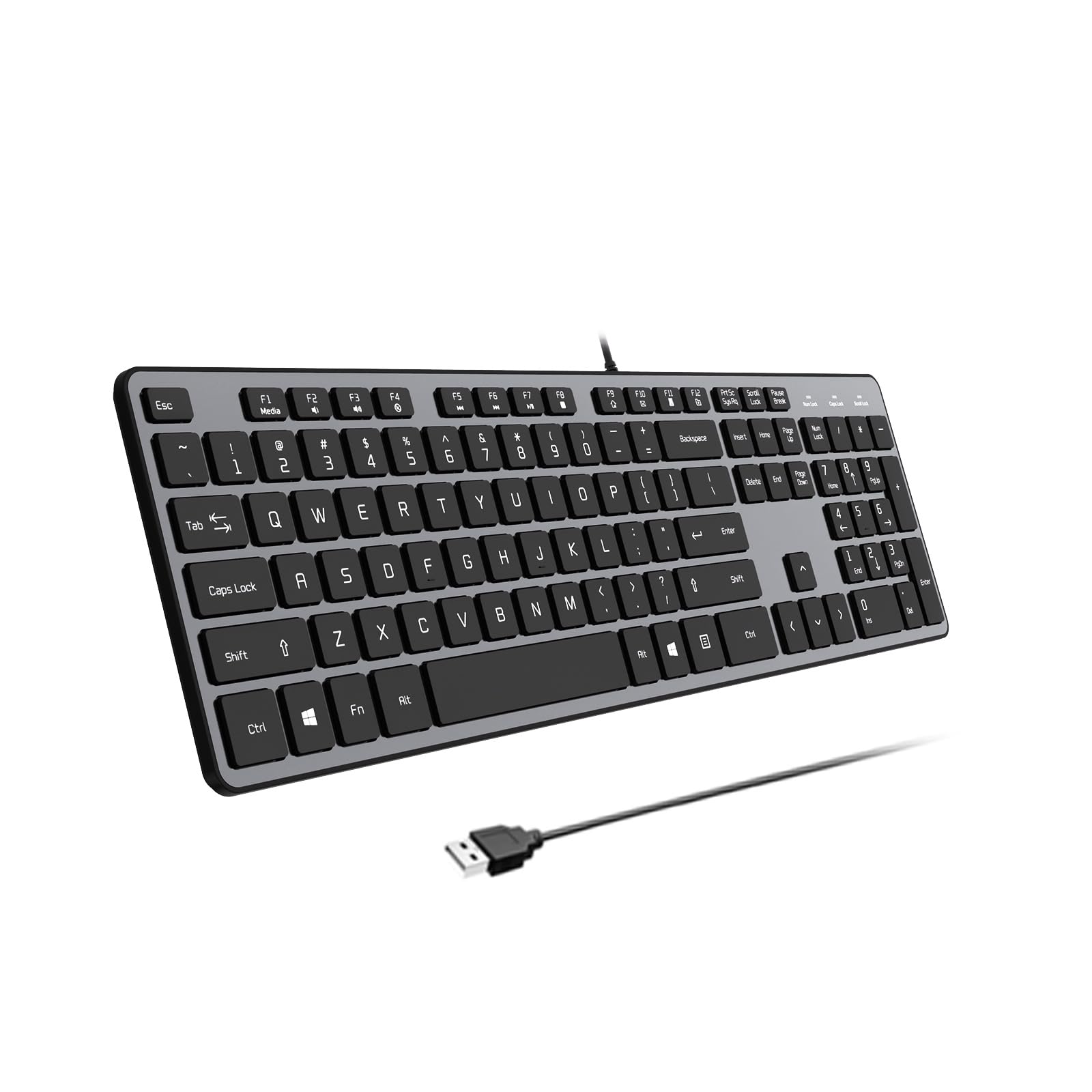
Laptop-style scissor keys rated for 90% noise reduction, made for a room you share.
If the XP tower sits in a bedroom, a study shared with a sleeping partner, or an open-plan office, sound is the spec that matters most and this is the board built around it. B.FRIENDIT fits 105 scissor-switch keys into a case just 0.3 inches tall, with 2mm of key travel and a soft rebound, and claims a 90% cut in noise versus a conventional deck.
Durability is quoted at up to 5 million keystrokes, and the matte UV-coated caps resist the shine that builds up on cheaper plastic. A folding stand at the back lifts the rear edge for wrist support during long sessions. The box also includes a free keyboard cover skin.
Compatibility is broad and explicitly stated — Windows 11, 10, 8, 7, 2000, XP and Vista, all plug-and-play with no drivers. That XP line is what makes it eligible here, and it is worth checking before you buy because the model is sold around modern Windows. The trade-off is the flat feel. If you want a deep, cushiony press, scissor keys will read as thin to you no matter how quiet they are.
Sound is the headline: the low-profile mechanism is the whole reason to pick this over a dome board, and it delivers on the promise of a near-silent desk.
Feel is the compromise: 2mm of travel is short, and typists raised on deep keys often need a week to adjust.
Made for you if: quiet typing in a shared or late-night space is worth more than key depth.
Not your board if: you want the deep, cushioned press of a classic dome keyboard.
9. Logitech G213 Prodigy Gaming Keyboard

An anti-ghosting gaming deck with a palm rest, for an XP machine that still gets played on.
Plenty of old XP towers survive because somebody still games on them, and this is the board aimed at that machine. The anti-ghosting gaming matrix (a key-scanning setup that keeps simultaneous presses from cancelling each other) is tuned for multi-key input, and the mech-dome keys give a tactile press that sits between a rubber dome and a true mechanical switch.
You get 5 customizable lighting zones across more than 16.8M colors, adjusted through Logitech G HUB software, and dedicated media controls for play, pause, mute and volume that work without diving into menus. An integrated palm rest and adjustable feet keep your hands comfortable through a long session, and the shell is built to shrug off liquids, crumbs and dust for easy cleaning.
The caveat is the one that always accompanies a software-driven board: G HUB is a modern-Windows app, and XP has no path to it. Lighting and macros will not be configurable on an XP install — the keyboard will still type, but the customization layer is off the table. At 8.58″L x 17.8″W x 1.3″H it is a deep deck, and the keys run loud by the standards of the quiet boards above.
The gaming read: anti-ghosting plus a palm rest is the combination that actually matters when fingers are flying, and the media bar saves alt-tabbing.
The software truth: G HUB lives on modern Windows. On a true XP box you get a very capable wired keyboard with its lighting stuck at default.
Built for: an XP gaming machine where multi-key presses and long sessions matter more than a quiet room.
Look past it if: you need configurable lighting on XP itself, or a shallow, silent deck.
Know the Specs
PS/2 vs USB — the one that decides your purchase
USB-A is the flat rectangular port you already know, and a USB keyboard is hot-swappable: unplug, replug, it just works. PS/2 is the small round socket with pins, usually purple, and it is not hot-swappable — plug it in while the machine is running and it may not register until you restart. Older XP-era motherboards sometimes have PS/2 only, which is why several boards here still ship with that plug.
Key count — 88, 104, or 105 and up
A full-size deck carries 104 keys: the main QWERTY block, the number pad, and the navigation cluster. Compact boards drop to 88 by removing the number pad to save desk width. A few boards list 105 or 107 because they add shortcut rows on top of the standard spread. Pick by what your hands do all day — number crunchers want the pad, bench users want the width back.
Backlight brightness and color control
Backlighting is the light behind or around the keys that lets you read legends in a dim room. Brightness steps matter more than color count for practical use — four levels let you drop to a low glow at night instead of a bright wash. Color choice is preference. An off switch matters too, so you can kill the light entirely when you do not need it.
Switch type — dome, scissor, mech-dome
Rubber dome keys use a soft rubber cup under each cap for a deep, quiet press. Scissor switches use a criss-cross mechanism like a laptop, giving a short, flat, very quiet stroke. Mech-dome sits between the two, adding tactile feedback without a full mechanical build. Travel distance — how far a key sinks — is the number that tells you how a board will feel before you buy it.
Common Questions
Will a modern USB keyboard work on a Windows XP machine?
How do I know whether my old PC needs a PS/2 keyboard?
Why does a PS/2 keyboard need a restart before it works?
Is a 104-key layout better than an 88-key mini keyboard?
Do large print keyboards actually help if you wear reading glasses?
Can a backlit keyboard’s light be turned off?
Does spill-resistant mean I can spill a drink on it safely?
Will a gaming keyboard’s RGB lighting work on Windows XP?
Do I need drivers for a wired keyboard on an old PC?
Can I use one of these keyboards on a modern PC later?
The Bottom Line
For most people hunting a windows xp keyboard, the KOPJIPPOM Large Print Backlit is the sensible buy — 104 keys, legends around four times standard size, dimmable white LED and a plain USB-A plug that needs no driver at all. If the machine only has the round PS/2 socket, the Perixx PERIBOARD-409P fits that port in an 88-key footprint that will not swallow your desk. And for a shared room where the click of a key is the enemy, the B.FRIENDIT KB1430 is the quiet one to reach for.
The single nudge worth giving: match the port to your tower before you fall for a layout. A gorgeous retro deck is useless if your only socket is round, and a perfect PS/2 board is a paperweight on a tower with no round port.
How we choose
We do not accept paid placement. Every pick is matched to a real buyer and a real use-case; we do not hands-on test units.
Sources
Specifications: manufacturer listings and product documentation. Review insights: verified customer reviews, as of November 2026. Pricing: not shown on this page (it changes often); check the current price via the retailer link.
As an Amazon Associate, Tactical Gear Guy earns from qualifying purchases. This does not affect which products we feature.