Specs are compiled from manufacturer listings and verified buyer reviews and can change over time — please confirm the key details on the product page before buying.
Your ultrawide deserves an arm that will not slowly tip forward every time you let go of the screen. That is the real test here: how much weight the arm holds, how far the tilt locks, and whether the desk clamp can grip your desktop without cracking it. A screen that big is heavy and front-weighted, so a wobbly stand turns a great display into a daily annoyance. The nine picks below cover everything from a budget pole stand to a modular arm built for a 57-inch panel.
This guide is built by comparing the manufacturers’ published specifications and the patterns across verified customer reviews, so you get each pick’s real strengths and trade-offs instead of marketing spin.
Weight rating and desk thickness decide more purchases than screen size, and both are checked before you buy. The stand that holds a 49-inch Samsung G9 without sagging is usually the one rated closest to that screen’s actual weight. Here is the honest breakdown of every widescreen monitor stand worth your desk space.
Top Picks

How To Choose The Best Widescreen Monitor Stand
Match the arm’s weight rating to your screen before you look at anything else. A 49-inch ultrawide can weigh close to the top of these arms’ range, and a stand rated just below your screen will droop at the tilt joint within weeks. Check the number on your panel’s spec sheet, then check the arm’s per-arm load limit.
Weight rating versus screen size
The screen-size number is a rough guide to span. The weight number is what actually holds the panel up. Several arms here cover 17 to 49 inches but differ sharply on load — the single-arm HUANUO carries 44 lbs, while the Mount-It! pole handles 22 lbs. A lighter arm is fine for a smaller curved screen and a poor match for a heavy 49-inch.
Clamp fit and desk material
A monitor arm grips your desktop from above and below with a C-clamp or a grommet base. Wood desks take both styles well. Glass and thin plastic are risky, and HUANUO asks for wooden desks only with no cross beams underneath. Measure your desktop thickness first: the range varies from roughly 0.4 inches up to 3.5 inches depending on the model.
VESA mounting pattern
VESA is the four-bolt square pattern on the back of your screen. Most monitors use a 75x75mm or 100x100mm square, and every arm on this list supports both. The Mount-It! goes further, up to 200x200mm for larger TV-style panels. If your ultrawide has no VESA holes at all, you will need an adapter plate the arm does not include.
Motion style: gas spring or pole
A gas spring arm lifts and holds the screen with internal nitrogen pressure, so you push it up and it stays. A pole stand slides up and down a fixed post and tightens with a screw. Gas spring gives wider reach and easier height changes. A pole is simpler, cheaper, and has fewer moving parts to fail.
Side-by-Side Comparison
| Model | Best For | Weight Limit | Screen Range | Mounting | Amazon |
|---|---|---|---|---|---|
| HUANUO TitanLift★ Best Overall | Heavy single ultrawide | 44 lbs | 17″–49″ | Dual C-Clamp | Amazon |
| Mount-It! Ultra-WideBest Value | Budget pole stand | 22 lbs | 13″–42″ | Clamp & Grommet | Amazon |
| ARES WING SingleTop Performer | Value gas spring | 44 lbs | 17″–49″ | Clamp & Grommet | Amazon |
| Triple Monitor Mount | Three-screen desk | 44 lbs center | 17″–49″ | C-Clamp | Amazon |
| Putilsen Stacked Dual | Small-desk stacking | 59.4 lbs per arm | 24″–57″ | Clamp & Grommet | Amazon |
| MOUNTUP Dual | Two side-by-side screens | 33 lbs per arm | 17″–43″ | Clamp & Grommet | Amazon |
| MOUNT PRO Dual | Tall vertical stack | 44 lbs per arm | 22″–49″ | Clamp & Grommet | Amazon |
| ARES WING Dual USB | Charging at the desk | 44 lbs per arm | 17″–49″ | Clamp & Grommet | Amazon |
| ULTRARM MA20P-S | 57-inch expandable rig | 44 lbs | 17″–57″ | Clamp & Grommet | Amazon |
Detailed Reviews
1. HUANUO TitanLift Monitor Arm
Our pick — 4.5+★ from 500+ verified ratings; the strongest balance of quality and price.
The all-aluminum arm that holds a 44-lb ultrawide without a hint of droop.
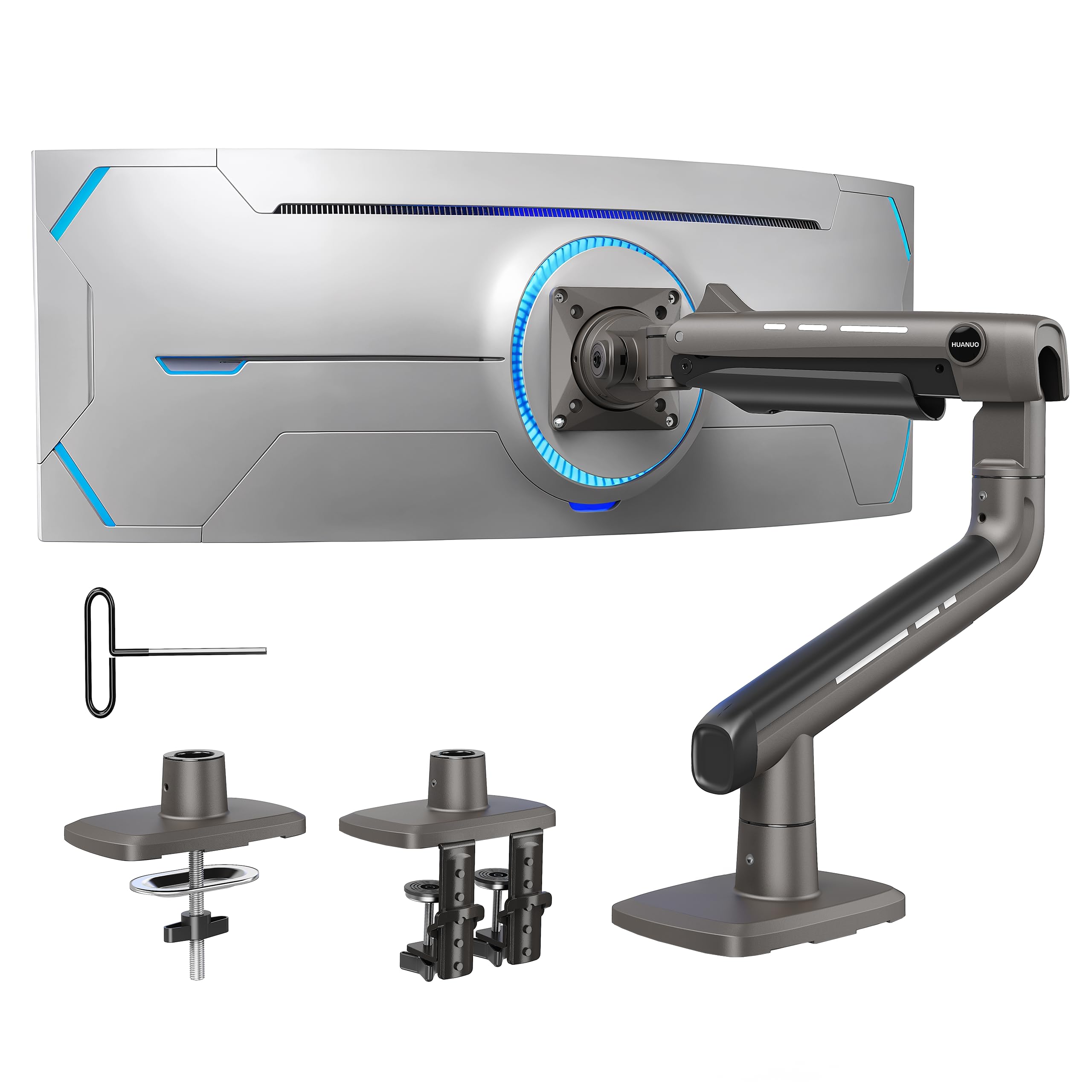
If you have a big curved panel and want it to hang exactly where you put it, this is the pick that survives the test. The TitanLift body is built from high-strength aluminum alloy, with a reinforced VESA head that is 20% thicker and arms 30% wider than the standard build, and it holds up to 44 lbs. That 44-lb ceiling is the number that matters: it clears the weight of a 49-inch ultrawide while leaving enough headroom that the tilt joint does not sag forward overnight.
What wins people over is how solid it feels once mounted. HUANUO ran this arm through 50,000 cycle motion tests and a 3X load test, and buyers report it holds a 49-inch Samsung G9 without sag. The tension knob works as a one-hand operation — you slip the supplied Allen key into the side bolt and tune the lock, so there is no guesswork if the screen feels a touch heavy at the top. Movement is wide too: tilt runs +50° to -50°, swivel 180° each way, rotation is 360° for screens up to 35 inches, and the arm reaches out up to 22.5 inches with 19.6 inches of height travel.
The catch is your desk. HUANUO recommends wooden desks only — no glass, no plastic — and the clamp needs a thickness somewhere between 0.8 and 3.5 inches with a clear underside free of cross beams. If you are on a flimsy standing desk or a glass-topped one, this is the arm that will not work, and you should look at the pole-style Mount-It! instead. For a solid wood or laminate desk with a heavy 49-inch screen, though, the TitanLift is the one that simply stays put.
TitanLift 49-inch hold
- Holds up to 44 lbs, clearing a 49-inch curved panel with weight to spare.
- +50° to -50° tilt for precise angle control without sagging.
- 50,000 cycle motion testing and 3X load test on the arm.
- One-hand Allen-key tension adjust takes the guesswork out of setup.
- Built-in cable management keeps the run tidy behind the screen.
needs firm desk
- Wooden desks only — glass and plastic are ruled out.
- Needs a 0.8″–3.5″ desk thickness and no cross beams underneath.
- 360° rotation is limited to screens up to 35 inches.
heavy panel owners: you are mounting one heavy ultrawide on a solid wood desk and want zero droop.
thin desks: your desk is glass or plastic, or thinner than an inch.
2. Mount-It! Ultra-Wide Single Monitor Arm Desk Mount
A budget pole stand that fits more mounts than the heavy-duty arms do.
The reason to pick this one over the TitanLift above is fit flexibility, not raw muscle. It carries 22 lbs — half the HUANUO’s 44-lb limit — but it spans screens from 13 to 42 inches and accepts VESA patterns up to a generous 200x200mm. If you have a lighter ultrawide or an oddball panel with a wide bolt pattern, this pole stand will likely mount it where a square-100 arm would not.
Stability comes from a heavy steel pole and a sliding carriage: you lift the screen up or down the 16.75-inch post to eye level and lock it. Tilt runs up to 30°, swivel and rotate both hit 360°. Setup is the part the reviews lean on — quality and installation come out ahead here, and owners mention it fits a 34-inch ultrawide, a 43-inch display snugly, and works well with 27-inch screens on the same pole. Cable routing and a tool holder keep the base area tidy.
The honest trade-off is the weight ceiling and the adjustability. At 22 lbs, a heavy 49-inch curved screen is over the limit, and the tilt mechanism is the one area people flag as fiddly. There is also a mounting gripe in the review history, so measure your desk and lay out the clamp before you tighten anything down. For a mid-size ultrawide on a budget, this pole stand is the low-drama choice.
broad screen range: 22 lbs will not carry the biggest curved panels, yet 13- to 42-inch coverage and 200x200mm VESA support make this the most forgiving mount on easy screens.
budget build feel: adjustability splits opinion — the tilt joint needs patience to set, and a mounting gripe shows up in the review history, so double-check your clamp fit.
wide coverage buyers: a lighter ultrawide or wide-aperture VESA panel on a tight budget.
premium seekers: your screen weighs near or above 22 lbs.
3. ARES WING Ultrawide Monitor Desk Arm
The mid-price gas spring that reaches 22.4 inches without letting go.
This arm carries the same 44-lb ceiling as the top pick, but it brings a gas spring and a lower entry point. The spring lifts the screen for you and holds the spot, so pushing your 49-inch panel up and back takes a nudge, not a hardware job. The arm also stretches out to 22.4 inches and gives you 8.7 to 18.7 inches of height travel — useful if you want to swing it aside for a standing session.
Tilt here runs from +50° down to -20°, a more downward-leaning range than the HUANUO’s symmetric 50/50, so it is set up for gaming-angle screening more than flat high work. The build is steel with a fatigue-tested internal spring, and buyers consistently call the quality strong and the assembly straightforward. The versatility is the other highlight — it is noted as great for ultrawide monitors and fine with a 49-inch Samsung 1000R curved model, which is a demanding panel to hang.
Adjustability, mounting, and value all split opinion in the reviews, which tracks with the two-mount geometry. The C-clamp takes desks 0.5 to 1.8 inches, while the grommet base goes slightly deeper to 2 inches. That clamp range is shallower than the HUANUO’s 3.5 inches, so a thick butcher-block top may not fit. If your desk is in the standard thickness band and you want gas spring movement without the top-tier cost, this arm earns its place.
- 44-lb capacity on a gas spring arm for less than the TitanLift tier.
- 22.4-inch arm extension with 8.7″–18.7″ height adjust for flexible layout.
- Fatigue-tested steel spring for stable hold under heavy panels.
- Handles flat and curved screens including 1000R curve.
- C-clamp maxes at 1.8 inches, shallower than thicker arms allow.
- Tilt stops at -20° on the downward side, less than a full ±50° sweep.
49-inch setups: gas spring movement on a standard-thickness wooden desk.
glass desks: your desk is thicker than 1.8 inches at the edge.
4. Triple Monitor Mount 49 inches

A three-screen rig built to put a 49-inch ultrawide in the middle and two wings around it.
This triple setup lets you run three screens at once: a central arm holds up to 44 lbs and a 49-inch screen, while two gas spring arms (spring-loaded arms that make lifting easy) each hold a 35-inch monitor at up to 26.4 lbs. The center arm’s 44-lb limit matches the best overall pick, but here it is part of a three-screen layout rather than a solo mount. All three arms use the standard VESA patterns (the hole spacing on the back of your monitor) of 75x75mm and 100x100mm, so most monitors fit.
What people praise most is the installation — buyers call setup straightforward, with a clear C-clamp process and clear instructions. Stability runs a close second, with screens holding firmly without sagging even when one is heavy. The cast aluminum base and arms go through durability testing, and the side arms extend and change height smoothly, so your peripheral wings find an angle without a wrench. Removable cable covers keep the whole thing clean from the front.
The trade is the desk fit and the one clamp style. It uses a C-clamp for desktops 0.4 to 1.8 inches thick, and there is no grommet option here, so a desk with a pre-drilled hole but a thick top is not the match. Manage your expectations on the outer weights too: the 35-inch wings cap at 26.4 lbs. For a three-screen trading or editing desk with one big center panel, though, this is a rare triple that goes all the way to 49 inches at the hub.
triple 49-inch frame: a 44-lb center arm for a 49-inch panel plus two 26.4-lb wings is a real triple-screen solution, and the install reports are strong.
desk strength limit: it clamps only, 0.4″ to 1.8″ thick — no grommet base, so a drilled desk will not use this one.
three-screen users: you run a 49-inch main screen with two wing monitors and want it all on one base.
small desks: your desk is set up for a grommet mount.
5. Dual Ultrawide Monitor Mount 24-57”

The stacked mount for two huge panels on a desk squeezed against a wall.
If your desk backs onto a wall or sits in a small room, two ultrawides side by side will not fit. This vertical stacked mount solves that by stacking them one above the other. Each arm carries a striking 59.4 lbs for a flat screen or 48.4 lbs for a curved one, and it spans 24 to 57 inches with the standard 75x75mm and 100x100mm VESA patterns. Two 49-inch or 55-inch panels on one tall post is exactly the use case it was designed for.
Setup is the virtue buyers cite most — it takes around 20 minutes, and the quick-release VESA plate plus top-side base clamp means you do not crawl under the desk to bolt it. Height and stability are consistently praised, with the mount holding heavy ultrawides securely. The 20° tilt is narrow next to the single-arm picks, so the focus is stacking height and a smaller footprint rather than deep angle swing.
Check the VESA question before you order. Some 49-, 55-, and 57-inch monitors need an extra steel adapter to match the bolt pattern, and that adapter usually comes with the screen, not the mount. Desk thickness fits via grommet from 0.39″ to 1.77″ and via clamp from 0.39″ to 1.97″. Get your adapters and thickness sorted, and this is the smart answer for a compact two-screen rig.
- 59.4 lbs per arm (flat) or 48.4 lbs per arm (curved) — serious load.
- Spans 24 to 57 inches at standard 75x75mm and 100x100mm VESA.
- Stacks vertically to save width for a wall-adjacent desk.
- Quick-release VESA plate keeps setup to around 20 minutes.
- Only 20° of tilt — limited angle range versus single arms.
- Some larger panels need a steel VESA adapter the mount does not include.
dual ultrawide rigs: you stack two big ultrawides and have no side-to-side space.
light arms: that your screen’s VESA adapter ships with the monitor, since this mount does not include one.
6. MOUNTUP Dual Monitor Stand for Max 43 inch Screens

Two side-by-side ultrawides with locking screws that stop the droop.
For two screens placed next to each other, this dual arm takes 17 to 43 inches at 2.2 to 33 lbs per arm — lighter per arm than the stacked Putilsen, but built for the horizontal layout. The defining feature is the anti-sag design: dual locking screws on the tilt mechanism pin the screen angle so it holds even at full extension with a heavy panel. That is the exact complaint most arms earn, and this one addresses it with hardware.
The motion set is full: 360° rotation, 180° swivel, ±30° tilt, up to 22.4 inches of height adjust, and 23.6 inches of extension. A spring system rated for 20,000 cycles carries the movement, and built-in cable channels hide the wires. The clamp and grommet options both fit desktops from 0.39 to 3.15 inches thick, one of the wider desk ranges here, so a thick top is not a problem. A three-year warranty backs it.
Two details to keep honest. The 43-inch ceiling is lower than the 49-inch-capable arms, so a big curved panel belongs on a different pick. And the review base is modest, so what is there is early praise for easy setup, solid construction, and value rather than long-term proof. For a matched pair of 32- to 43-inch screens on a thick desk, the locking-screw tilt is the draw.
no-droop hinge: the dual locking screws in the tilt joint are the reason to choose this over a cheaper dual arm, and the 0.39″–3.15″ desk range is generous.
size it right: max 43 inches per arm means a 49-inch ultrawide will not sit here.
43-inch duals: a two-screen setup where you want the angle locked and a thick desk accommodated.
oversized panels: a single 49-inch panel or anything wider than 43 inches.
7. MOUNT PRO Dual Monitor Arm

A tall stacked dual arm with a 25.8-inch height range for two 49-inch panels.
Two 49-inch ultrawides will not fit side by side on most desks, so this dual arm stacks them. The 18.2-inch pole and 25.8 inches of height adjustment let you raise the top screen to eye level and tuck the second one below. Each arm holds up to 44 lbs across 22 to 49 inches, and it supports flat and curved panels down to a tight 1000R curve, so a Samsung Odyssey G9 is in range.
Adjustability is the strong suit — tilt swings from -90° to +90°, swivel ±90°, and rotation covers 360°, so the portrait or landscape switch is quick. The reinforced tilt head is built to stop sag, and the gas spring is fatigue-tested. Buyers point to easy assembly and sturdy hold, with both a 27-inch and a 34-inch ultrawide sitting securely on the same post. Assembly and mount quality are what customers note first.
Two fit checks come with it. The C-clamp takes desks 0.39 to 1.97 inches and the grommet goes to 2.36 inches — deeper than the ARES WING but shallower than some single arms. And like every arm that stacks, the height you gain at the top is desk and ceiling space you need above the rig. If your monitor has no VESA holes, add an adapter. For a vertical twin-ultrawide desk, the tall pole does the work.
- Stacks two panels with 25.8″ of height adjustment and an 18.2″ pole.
- ±90° tilt and 360° rotation handle a full portrait/landscape flip.
- 44 lbs per arm and support for 1000R curved screens.
- Reinforced tilt head resists sag on heavy panels.
- Grommet option tops out at 2.36 inches of desk thickness.
- Vertical stacking needs clearance above the desk for the tall pole.
dual ultrawide desks: you want two ultrawides stacked vertically with a wide tilt swing.
single setups: your ceiling or shelf sits low above your desk.
8. ARES WING Dual Monitor Stand

Dual arms that reach 27.9 inches high and charge your phone on the way up.
What sets this mount apart is the charging built into the arms. Each of the two arms holds up to 44 lbs and fits screens from 17 to 49 inches, and the mount adds a USB-C port at 5V/2A and a USB-A port at 5V/2A, so you can charge a phone, watch, or headphones without running a cable to the wall. On a gaming desk with two big panels and a phone you keep close, that built-in power is a real convenience.
The motion matches the single ARES WING: 27.9 inches of maximum height, 22.4 inches of arm reach, tilt from -50° to +20°, ±90° swivel, and 360° rotation. The gas springs are industrial-grade and rated over 20,000 cycles, which resists the rebound bind common in cheaper springs. Reviewers point out it holds two Samsung 42-inch ultrawides without trouble. The build is aluminum for a steady hold on both arms.
Shoppers say a split verdict on this dual setup: sturdiness and fit get good marks, but installation, stability, and adjustability each get mixed comments, with some setups wobbling and some installs taking patience. That is a common pattern for a two-arm gas spring design, not a dealbreaker. If you want the USB ports and 27.9-inch height for a matched pair of large panels, the ARES WING earns the desk, as long as you tighten every base screw and confirm your VESA pattern first.
USB A/C on arm: USB-C and USB-A at 5V/2A each, plus 27.9″ of height, is a rare combo on a dual arm rated for 44 lbs per side.
slow assembly: installation and stability draw mixed feedback, so follow the picture and video guide and torque the base down firmly.
cable-free desks: a two-screen desk that wants built-in phone and watch charging.
quick installs: you want the simplest possible single-pole install.
9. ULTRARM Heavy Duty Monitor Arm

The arm that grows — a 57-inch single now, a stacked dual or triple later.
This is the pick for a screen most arms cannot handle. It holds up to 57 inches, a full size class beyond the 49-inch ceiling everywhere else on this list, at 44 lbs, and it scales down smoothly to 49 inches and all the way to 24 inches for flat or curved panels up to 1000R (a measure of how tightly a curved screen bends). The quick-release VESA bracket (a plate that lets you snap the monitor on and off) takes 75x75mm and 100x100mm patterns.
The base is what makes it different: an extra-tall pole rated to carry 88 lbs, with modular extension arms that let you upgrade the single into a dual stacked mount for two 49-inch panels, or a triple that adds a sideways screen. That means you buy once and add arms instead of a whole new mount. Movement includes 13 inches of gas spring height adjust, 180° swivel, and a 180° screen rotation.
The caution is the tilt and the pole length. Buyers also note the pole could run roughly 8 inches taller for taller users. The desktop fit runs 0.6″ to 3.3″ with the clamp and 0.6″ to 1.9″ with the grommet. Buy it for the 57-inch range and the upgrade path, and confirm your desk thickness first.
- Reaches 57 inches — the widest single arm here — at 44 lbs.
- 88-lb base upgrades to dual or triple with modular arms.
- 13 inches of gas spring height adjustment for a smooth lift.
- Supports curved screens up to 1000R.
- Narrow ±25° tilt, mixed for aggressive up-and-down angles.
- Pole can run short for taller setups, so check height before ordering.
giant panels: nothing else here reaches that size at 44 lbs.
mid-size screens: ±25° tilt means a level or lightly tilted screen, not a deep recline.
Know the Specs
Weight Capacity Per Arm
This is the load the arm is built to hold, measured in pounds. It is the single most important number for an ultrawide, because a heavy curved panel pushes forward and down at the tilt joint. When the screen sits near the arm’s ceiling, sag and drift show up fast. Go with an arm that clears your screen’s weight with room to spare.
VESA Pattern
The four-bolt square pattern on the back of a monitor, quoted as two numbers like 75x75mm or 100x100mm. Every arm here covers those two sizes, and one reaches 200x200mm for larger panels. If your ultrawide has no VESA holes, you will need an adapter plate that most arms do not ship with.
Desk Thickness Range
The clamp grips the desktop from above and below, so the thickness it accepts sets whether the mount will work at all. Ranges here run from roughly 0.4 inches to 3.5 inches depending on the model. Measure your desk edge before ordering — a clamp that is too short will not seat, and one for a thick top may not tighten on a thin one.
Tilt, Swivel, and Rotation
Tilt angles the screen up or down, swivel turns it left or right, and rotation spins it to portrait. A wider tilt range like ±50° gives more freedom to angle the panel; a narrower one like ±25° keeps you near level. The choice depends on whether you recline a screen for gaming or keep it flat for work.
Gas Spring vs. Pole
A gas spring uses internal pressure to lift and hold the screen, so height changes are a push. A pole mount slides a carriage on a fixed post and locks with a screw. Spring gives more reach and easy movement. Pole is simpler, has less to fail, and often fits a wider VESA range on a budget.
Cable Management
Channels and covers built into the arm route the screen and power cables out of sight. This matters most on a multi-screen rig, where loose cables tangle against the arms. Nearly every mount here includes it, and the removable covers make re-routing later far easier.
Common Questions
How do I know if a monitor arm will hold my 49-inch ultrawide?
Can I mount a widescreen monitor on a glass desk?
What does VESA 75x75mm or 100x100mm mean?
Will a single arm hold two ultrawide monitors?
Is a gas spring arm better than a pole stand?
How thick a desk can a monitor arm clamp onto?
My ultrawide has no VESA holes — can I still mount it?
How far can a monitor arm reach and how high does it go?
Why does my monitor keep tilting down slowly?
Can I stack two ultrawides on one mount?
The Bottom Line
For most desks, the widescreen monitor stand to beat is the HUANUO TitanLift, because its 44-lb aluminum build holds a heavy 49-inch ultrawide without sag and its tension dial lets you adjust with one hand. If you want gas spring movement and a lower entry point, pick the ARES WING single arm. And if you are mounting a 57-inch panel or want room to grow into a stacked dual, the ULTRARM MA20P-S is the arm that scales with you. Both the HUANUO and the ARES WING single clear 44 lbs, so the deciding factor is desk thickness and if you want that screw-tune pole or a spring lift.
How we choose
We do not accept paid placement. Every pick is matched to a real buyer and a real use-case; we do not hands-on test units.
Sources
Specifications: manufacturer listings and product documentation. Review insights: verified customer reviews, as of November 2026. Pricing: not shown on this page (it changes often); check the current price via the retailer link.
As an Amazon Associate, Tactical Gear Guy earns from qualifying purchases. This does not affect which products we feature.