Specs are compiled from manufacturer listings and verified buyer reviews and can change over time — please confirm the key details on the product page before buying.
You flash a fresh Raspberry Pi OS image, boot up, and the little board sees no wireless networks at all. That dead-air moment is why people buy the wrong dongle twice: the chipset driver is missing from the kernel. The fix is not raw speed — it is whether your kernel version already ships a driver for the stick’s chipset. A dongle whose chipset driver is already in your kernel enumerates as wlan0 the second you plug it in.
This guide is built by comparing the manufacturers’ published specifications and the patterns across verified customer reviews, so you get each pick’s real strengths and trade-offs instead of marketing spin.
Every pick below names the exact kernel version it supports, so you can match it to your board before you spend anything. The right wi-fi dongle for raspberry pi saves you a weekend of driver hunting.
Top Picks


How To Choose The Best Wi-Fi Dongle for Raspberry Pi
The single decision that matters most is whether the chipset inside the dongle is already baked into your kernel. Everything else — antenna size, band count, rated speed — only helps after the Pi can see the network. Confirm the chipset driver is in your kernel first, then compare megabit ratings.
Match the dongle to the kernel printed on your install
Linux speaks to wireless hardware through a driver that lives inside the kernel, the core of the operating system. If the chip’s driver is already in that kernel, the stick works the moment you plug it into a USB port. If it is not, you are compiling software before you get online.
This is why the specs sheets here list figures like kernel 5.18 or newer, or kernel 5.19 and up. Check uname -r on your Pi first, then compare that number to the listing. A dongle rated for kernel 5.18 will not load on a board running 5.10 without extra work.
Understand what the megabit rating really tells you
A figure like 150 Mbps or 300 Mbps is the link rate the radio can theoretically negotiate, not what you will download. The Pi’s own processor and the USB interface become the bottleneck long before those numbers. For everyday SSH sessions, package installs, and a small web server, a 150 Mbps stick is plenty.
USB 2.0 versus USB 3.0 changes how fast the link transfers
Older Pi boards expose USB 2.0 ports. Faster ones expose USB 3.0. A USB 3.0 dongle in a USB 2.0 slot still works, but it drops to the slower bus speed. Conversely, USB 3.0 radios can draw more power and can interfere with the 2.4 GHz band if the ports sit close together.
Side-by-Side Comparison
| Model | Best For | Rated Speed | USB Interface | Linux Requirement | Amazon |
|---|---|---|---|---|---|
| BrosTrend AXE3000 AX9L★ Best Overall | Modern kernels and full 6 GHz speed | 3000 Mbps | USB 3.0 | Kernel 5.18+ | Amazon |
| Nipeal AC600 Dual BandBudget Champion | Cheapest way to get the Pi online | 600 Mbps | USB 2.0 | Ubuntu 22.04, kernel 6.6.6 | Amazon |
| TP-Link TL-WN823N N300Compact Pick | Tiny frame tucked behind a tower | 300 Mbps | USB 2.0 | Kernel 2.6.24–4.9.60 | Amazon |
| MIAOERJING RT5370 | IPTV boxes and legacy Pi projects | 150 Mbps | USB 2.0 Type A | Plug and play on Pi | Amazon |
| Panda PAU04 Mid Range | Old kernels and vintage hardware | 150 Mbps | USB | Wide distro list | Amazon |
| EDUP AX3000M EP-AX1672 | Plug-and-play 6 GHz on newer Linux | 5000 Mbps | USB 3.0 | Kernel 5.19+ | Amazon |
| Panda PAU0F AXE3000 | Reliable 6 GHz link on Windows 11 and Linux | 1200 Mbps | USB 3.0 | Linux / Windows 11 | Amazon |
| TP-Link TL-WN722N | Long-range reception on legacy kernels | 150 Mbps | USB 2.0 | Kernel 2.6.18–4.4.3 | Amazon |
| BrosTrend AX1800 USB | Newest kernels with an extension cable | 1800 Mbps | USB 3.0 | Kernel 6.17+ | Amazon |
Detailed Reviews
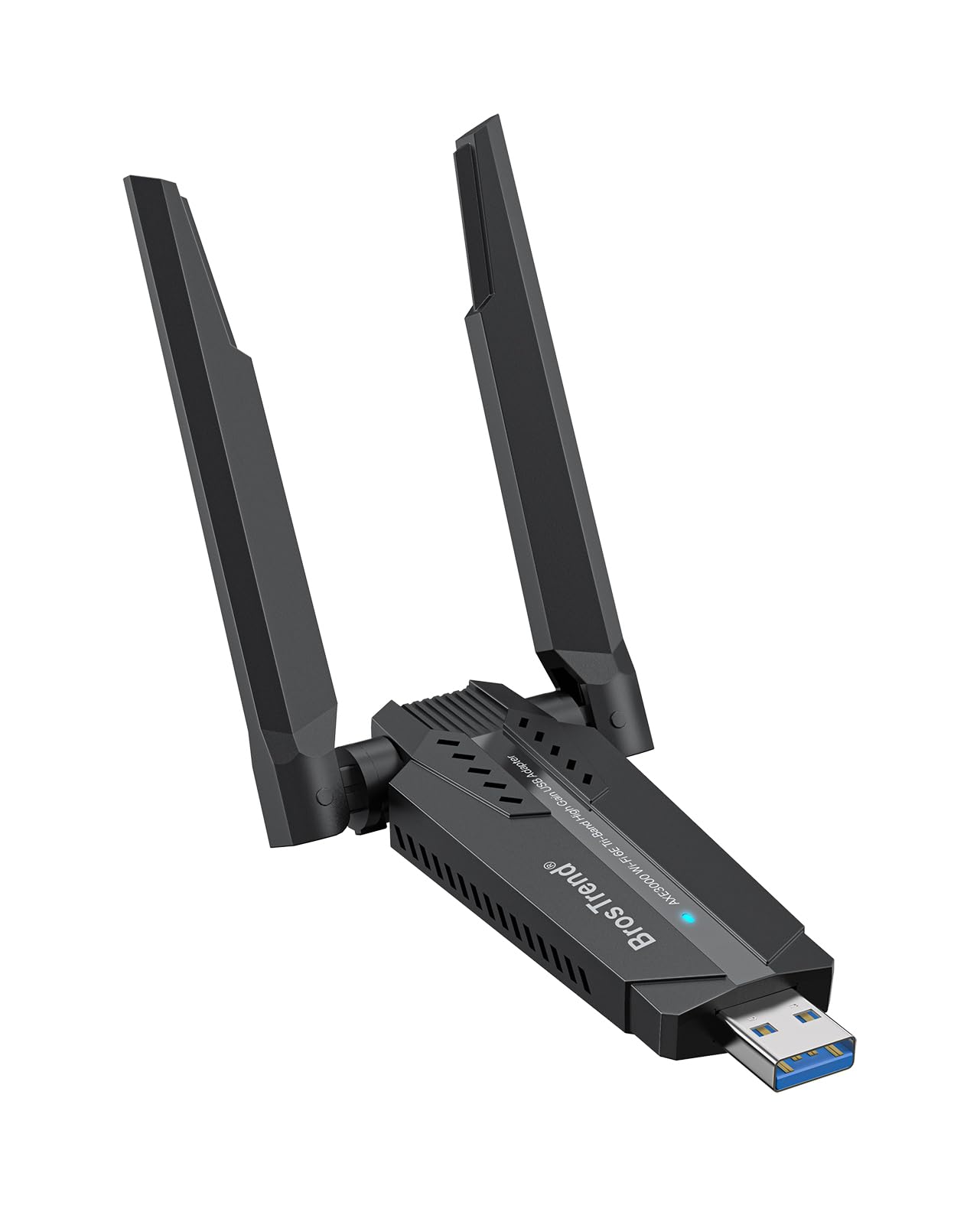
1. BrosTrend AXE3000 Linux WiFi Adapter (AX9L)
Our pick — 4.5+★ from 500+ verified ratings; the strongest balance of quality and price.
A 3000 Mbps tri-band radio that the Linux kernel already knows how to drive from the start.
This is the dongle you buy when the Pi has to actually move data, not just sit on the network. Its Mediatek MT7921AU chipset reaches up to 1201 Mbps on 6 GHz and 1201 Mbps on 5 GHz, with 574 Mbps on 2.4 GHz. It plugs into a USB 3.0 port so the bus can keep up with the radio instead of choking it. That matters if you push large files between the Pi and a NAS.
The kernel requirement is where the buying decision lives. It supports kernel 5.18 or newer, plus aarch64 and armhf hardware covering Raspberry Pi 2 and up. Booted on a recent Raspberry Pi OS image, the drive is already in the kernel and the stick comes up without a driver hunt. The dual adjustable antennas and Beamforming — which steers the radio signal toward your router — strengthen reception across a house. Owners describe signal jumping from 75 to 95 and logging onto Wi-Fi within five seconds.
Here is the honest catch: older kernels are not supported here, so a long-neglected install image means you flash a newer one first. The 6 GHz band also only shows up on recent Linux distros. The crowd is with it though — a 4.5+ rating across 500+ ratings, with plug-and-play the thing buyers point to most often, followed by raw speed.
The case for the AXE3000
- 3000 Mbps tri-band link across 6 GHz, 5 GHz, and 2.4 GHz
- USB 3.0 interface that keeps the radio fed
- Kernel 5.18+ support with a built-in driver, no manual install
- Dual adjustable antennas with Beamforming for range
What it asks in return
- Older kernels are not supported at all
- 6 GHz needs a recent distro to appear
- Needs a real USB 3.0 port to hit rated speeds
Buy this one when: your Pi runs a current kernel and you want the highest band count plus real transfer headroom.
Think twice if: your install predates kernel 5.18 — you would be flashing a new image first.
2. Nipeal AC600 Mbps Dual Band USB WiFi Adapter
The entry-level stick that gets a headless Pi onto Wi-Fi without a shopping decision spiral.
For a Pi running Ubuntu 22.04 or the kernel 6.6.6 build, this one is the simplest route to a working network link. The AC600 rating means a 600 Mbps link rate with the ability to hop between the 5.12–5.825 GHz and 2.4–2.4835 GHz ranges. It also supports soft AP mode, so the Pi can broadcast its own hotspot when you need to reach it directly. That is a handy trick for a robot or a field box with no router nearby.
What wins people over here is straightforward effectiveness and the lack of a driver dance. Ease of use is the second-most-talked-about thing among owners, and the listing covers a wide compatibility list touching Windows, Mac, and Linux builds including Armbian. Real buyers report it working with a Raspberry Pi without installing anything. The mini CD is included if you ever need the driver on an older Windows machine.
Be aware, the AC600 is a USB 2.0 device, so the ceiling is the older bus, not the radio. Speed and signal strength comments swing in both directions; when a room is far from the router, performance is the luck of the draw. At 4.0+ across 400+ ratings, it is the pick for someone who wants the Pi online cheaply and can live with the modest link rate.
What to expect: An inexpensive dual-band radio that covers Windows, Mac, and Linux builds and lets the Pi act as a hotspot. If you just need package updates, SSH, and a small dashboard, this is plenty.
Who should look elsewhere: Anyone moving large files across the network should still want the higher-rated tri-band radios above it.
Reach for this if: budget is the constraint and the Pi only needs basic connectivity.
Look past it if: you want consistent high throughput or plan to run 6 GHz.
3. TP-Link TL-WN823N N300 Mini USB Adapter
A thumb-sized 300 Mbps stick that hides behind a tower and disappears from view.
The TL-WN823N is the size-driven pick. At 1.54 by 0.72 by 0.31 inches, it slips into a USB port without hanging off the side of a case. That is the difference between a clean build and one where the dongle snags on a cable or a case panel. It pushes a 300 Mbps link over a single 2.4 GHz band and includes a hotspot button for turning the machine into an access point.
It is also the most widely owned dongle on this list by a wide margin, with a 4.0+ rating across 68,000+ ratings. Quality and raw functionality are the two things that come up most, and the compact size earns its own share of favorable notes. Many owners say it outpaces the built-in wireless card in their tower. The 2.12 ounce frame means it will not bend a port either.
The compatibility spec is where you must read carefully: Linux kernel 2.6.24 to 4.9.60. On a Pi already running a modern kernel, this is not the dongle for you. It is at home on an older install or on a Windows box. With 68,000+ ratings, some users run into driver support limits, so the kernel-version line is the one to verify.
Where it shines: A discreet 2.12 ounce body, 300 Mbps of 2.4 GHz throughput, and a hotspot button. For a Pi on an old kernel or a desktop that needs a clean profile, it is a tidy answer.
What to check first: The Linux spec is 2.6.24 to 4.9.60. A Raspberry Pi on a recent Raspberry Pi OS image is above that ceiling.
Best paired with: an older kernel install or a Windows machine where the small footprint is the point.
Not the one for: a brand-new Pi running a sliced-current kernel.
4. MIAOERJING RT5370 150Mbps USB Adapter

An old-school 150 Mbps radio built for IPTV boxes and first-gen Pi projects.
You plug this stick in and it just works, because the RT5370 chip (the radio chip that handles the Wi-Fi connection) has had its driver built into the Linux kernel for years. The listing says it is plug-and-play on Raspberry Pi and the Mag box line, with no driver to install. That is why it still sells while other dongles list a kernel wall (a minimum kernel version you must run). It works with the Pi, Pi 2, Pi 3, Pi 4, and Pi Zero W.
The 2dBi omni-directional antenna is modest, but it gives the radio some reach beyond a bare stick. Owners note it behaves with a Zozi DVR without fuss. The 150 Mbps link rate compares to the 3000 Mbps on the BrosTrend AXE3000 above — a 20x gap on paper — but for SSH and a light web server, the Pi’s processor is the real limit anyway. Quality is the most-praised factor here.
The compatibility record is mixed and worth sizing honestly. It works for some DVR and IPTV cases; there is a report of a unit failing after a year of use. At 4.0+ across a few dozen ratings, this is a narrow-purpose pick rather than a daily driver. Buy it for a legacy streamer box where the RT5370 chip is the known-good option.
Why the RT5370 still sells
- Plug and play on Raspberry Pi and Mag IPTV boxes
- 18-month warranty on the hardware
- Works with Pi, Pi 2, Pi 3, Pi 4, and Pi Zero W
- Omni-directional 2dBi antenna for basic reach
Where it stops short
- 150 Mbps ceiling is the lowest in the group
- A few units have stopped working after about a year
- Other operating systems need the driver installed first
Choose it when: you are replacing a dead dongle in an IPTV box or an original-generation Pi.
Move on if: you need current-generation throughput or a long service record.
5. Panda Wireless PAU04 Mid Range 150Mbps

The dongle that still talks to Fedora 15, Ubuntu 11, and even a PowerPC Mac.
Panda built this one for machines nobody else supports. It lists Windows CE and 2000, Mac OS X up to 10.8, Fedora 15, and Ubuntu 11 — a compatibility footprint that reads like a 2011 newsletter. It also names PowerPC G3 and G4 Mac support, which almost no other adapter bothers with. If you have an ancient Pi image or a museum PC that needs Wi-Fi, this one is in the short list.
The dimensions are the tell on form factor: 4 by 0.5 by 4 inches, with the 2dBi antenna standing off the body. Owners praise functionality and overall quality, and signal strength earns notes that include a report of 100% signal at 30 feet. Runtime to the Pi’s own USB port is fine at 150 Mbps. The security side is thorough too, covering WEP, WPA, WPA2, 802.1x, and Cisco CCX.
The speed ceiling is 150 Mbps, and while owners say it is worth the spend, connectivity on modern distros is not always as tidy as the legacy list suggests. At 4.0+ across 300+ ratings, this is a specialized pick for old hardware, not a 6 GHz speed dongle. Expect it to be the quickest answer for a truly elderly install, not the fastest link overall.
The reason to own it: It reaches operating systems that modern dongles abandoned years ago, including vintage Mac and early Fedora builds. The 802.11 b/g/n radio handles basic traffic cleanly.
The honest limit: 150 Mbps is the floor of this list, and the drivers behave best on the era of hardware the listing targets.
Go here if: you are keeping an elderly machine or Pi alive and the compatibility list is the deciding factor.
Pass if: you want speeds above 150 Mbps or 5 GHz bands.
6. EDUP AX3000M USB 3.0 WiFi 6E Adapter

A WiFi 6E radio that drops straight into Linux on kernel 5.19 or newer.
The AX3000M pairs the same Mediatek MT7921AU chip family as the BrosTrend AX9L above with dual 5dBi antennas — the gain figure that measures how much the antenna concentrates signal. The listing promises plug-and-play on Linux kernel 5.19 or newer, so a current Pi image is in the clear. Owners praise the connectivity above all else, with compatibility the next topic worth noting. Plugging it in and seeing networks appear without a driver install is exactly what you want on a fresh install.
On Windows the story flips: you need to load the driver from the included U disk before the adapter wakes up. On Linux, no driver install. The tri-band layout gives you up to 600 Mbps on 2.4 GHz and 1200 Mbps on both 5 GHz and 6 GHz, with 6 GHz requiring a compatible router and a recent Linux distro. Signal reports include picking up networks roughly 10m further away than the onboard radio.
Speed performance is the honest caveat here. Some owners see 300–500 Mbps while others crash into a 100 Mbps wall, likely a reflection of the host port and the router in play. At 4.0+ across a couple hundred ratings, it is a solid Linux-first dongle with the trade-off of inconsistent real-world speed depending on your setup.
What the EDUP gets right
- Plug-and-play on Linux kernel 5.19 and newer
- Dual 5dBi antennas for stronger range
- USB 3.0 interface for higher data throughput
- 6 GHz, 5 GHz, and 2.4 GHz bands on modern setups
What catches buyers out
- Windows requires a driver load from the U disk
- Speed comments range widely across owners
- 6 GHz requires a 6E router and new distro
Pick it when: your Pi runs kernel 5.19 or newer and you want tri-band reach with strong antennas.
skip it if: your kernel is older than 5.19 or you plan to drive it mostly on Windows.
7. Panda Wireless PAU0F AXE3000 Tri Band WiFi 6E

A tri-band adapter that reviewers keep describing as simply reliable, across Linux and Windows.
The PAU0F carries the 6 GHz band for low-latency, high-throughput traffic on a WiFi 6E router. The rated data transfer is 1200 Mbps, and the body weighs just 1 ounce — small enough to hang off a Pi without stressing the port. It supports WPA3 encryption alongside WPA2, WPA, and WEP, which is the newest security standard on the list. Dual adjustable antennas help you aim the signal.
Reliability is the headline for owners: it works from the start on Kali Linux, Windows, and Mac. Plug-and-play with no driver install is the second-most noted strength. Signal reports include improved reception inside flat rooms. The one requirement to flag is that 6 GHz needs Windows 11 (not Windows 10) or Linux, so pair it with a modern OS.
At 4.0+ across 200+ ratings, this is the easiest 6 GHz dongle to recommend for mixed-use setups. The catch is that virtual machines need a check-in with Panda support before you run it in a guest OS. Value is the mixed-note topic here, but for a reliably working tri-band stick, the trade-off is fair.
The strongest ownership story: It works on the first try across Kali, Windows, and Mac, and the 1200 Mbps link plus WPA3 security cover both speed and current security standards.
Where to read carefully: 6 GHz is Windows 11 or Linux only, and VM use requires checking with the maker first.
Reach for it when: you want a 6 GHz link that behaves on both a modern Pi and a Windows laptop.
Hold off if: your only OS is Windows 10 or you need VM support straight from the start.
8. TP-Link TL-WN722N Nano USB WiFi Dongle

A legacy-kernel dongle whose high-gain antenna pulls in weak signals from far away.
The TL-WN722N is the small, white stick that has been pulling signal out of stubborn corners for years. The high-gain antenna is the point of it: it reaches further and holds on longer than the onboard antennas in most laptops. The rated link is 150 Mbps, with support for both Infrastructure and Ad-Hoc operation. That second mode is what lets a Pi talk directly to another Pi without a router.
Compatibility and value are the two things that come up most from owners, and the compatibility list is deep — Linux kernel 2.6.18 to 4.4.3, plus Windows XP through 10 and Mac OS 10.9 to 10.15. It uses the same kernel range as the TL-WN823N, so modern Raspberry Pi OS images are above it. Signal strength and range earn consistent praise, and the WPS button makes secure pairing a single push.
The 25 gram body is small, and the package includes a USB extension cable so you can move the antenna away from the board’s noisy USB ports. At 4.3 across a large ownership base, it is a proven older dongle. The honest caveat is that the kernel window stops at 4.4.3, so a current Pi install will need a different stick.
Where the TL-WN722N earns its keep
- High-gain antenna for weak-signal locations
- USB extension cable in the box to escape port interference
- Works across a broad legacy Windows and Mac range
- WPS button for quick secure pairing
The fine print
- Linux support stops at kernel 4.4.3
- 150 Mbps ceiling limits heavy transfers
- Driver support is a mixed topic among buyers
Pair it with: an older Pi install or a laptop in a signal-challenged room where the high-gain antenna does the work.
Leave it alone if: your kernel is newer than 4.4.3 or you want dual-band throughput.
9. BrosTrend AX1800 Linux USB WiFi 6 Adapter

WiFi 6 built for the newest kernels, with a cable to move the antenna off the board.
The AX1800 is the newest-kernel pick here, and it takes that seriously: the driver is inside the Linux kernel starting at version 6.17, so no manual install is required on current distros. The Realtek RTL8832BU chipset reaches 1201 Mbps on 5 GHz and 574 Mbps on 2.4 GHz. The 3.3 foot USB 3.0 extension cable is the stand-out accessory, letting you lift the dual antennas into open air away from the Pi’s noisy USB bus.
On the width of support, the listing covers Ubuntu, Mint, Debian, Raspberry Pi OS, Kali, Fedora, Arch, and Manjaro. Older than 6.17, there is a manual installer script for Debian-based systems running kernels 4.4 to 7.0, so you are not trapped if you are behind. Beamforming helps hold the connection at range. Signal reports mention a 5–6 dB higher receive level, and owners note 240 Mbps down and 215 Mbps up on 5 GHz.
The catch is the kernel-split approach. Newest distros are simple, but a mid-generation install that sits between the current kernel and the manual script range can demand a bit of fiddling. At 4.0+ across 400+ ratings, it is a strong pick for anyone whose Pi runs a fresh image and who wants range from the included cable.
Why the AX1800 stands out: It carries WiFi 6 with Beamforming and ships the 3.3 foot USB 3.0 extension cable that most adapters make you buy separately. The 1800 Mbps dual-band link gives it real range.
The complication to note: Kernel 6.17 or newer gives you the automatic driver. Older Debian-based systems need the manual installer, and anything outside that support range is on its own.
The one for you if: you run a current Raspberry Pi OS image and value the included extension cable for range.
Consider another if: your kernel sits between the current version and 6.17 without a Debian-based distro.
Know the Specs
Kernel version support
The kernel is the core of the Linux operating system, and it carries the drivers that let a wireless chip talk to your Pi. When a listing says “kernel 5.18 or newer,” it means the driver is already part of any Linux built on that version. On an older Pi install, the system will not load the driver without extra work. Check your version with uname -r before you buy, and compare it to the number on the listing.
Rated transfer rate in Mbps
Mbps (megabits per second) is the link rate the radio can theoretically negotiate with a router, not what you will download. A 3000 Mbps tri-band stick and a 150 Mbps single-band stick both work fine on a Pi that never moves a large file. The Pi’s own processor and the USB bus cap throughput long before these figures. Use the number to pick the right tier, then let the rest of the setup decide real speed.
USB 2.0 vs USB 3.0 interface
Both versions plug into your Pi and both work. USB 3.0 moves data faster and gives the radio more headroom, which matters for a 6 GHz capable adapter. USB 2.0 is the safer bet on older boards or any setup where port interference is a concern. A USB 3.0 dongle in a USB 2.0 slot is fine — it just drops to the slower bus speed.
Antenna gain and Beamforming
Antenna gain, measured in dBi, describes how tightly the antenna focuses signal in one direction instead of spraying it everywhere. A 5dBi antenna on the EDUP or the dual adjustable antennas on the BrosTrend concentrates the signal more than a bare stick. Beamforming is a technology where the radio steers the signal toward your router instead of waiting for it to arrive. Both are useful for holding a link across a long room or a difficult wall.
Common Questions
Will a Wi-Fi dongle work with my Raspberry Pi without installing any drivers?
uname -r first and compare it to the listing.Which is better for a Raspberry Pi, USB 2.0 or USB 3.0?
Do I need a 6 GHz router to use a WiFi 6E dongle on Linux?
Can a Wi-Fi dongle turn the Raspberry Pi into a hotspot?
How fast a dongle do I need for streaming video from a Raspberry Pi?
Which dongles work with Python scripts and wpa_supplicant on Linux?
Will a USB Wi-Fi dongle work on a Raspberry Pi Zero W?
How do I get a WiFi 6 dongle working on an older Linux kernel?
What range should I expect from a Wi-Fi dongle on a Raspberry Pi?
Do I need to buy a separate USB extension cable for the dongle?
The Bottom Line
If your Pi runs a current image, you get the fastest, easiest setup from the wi-fi dongle for raspberry pi pick, the BrosTrend AXE3000 AX9L. It gives you a tri-band link with a 6 GHz band (a newer, less crowded Wi-Fi frequency), USB 3.0 (the fast USB standard), and a driver already built into kernel 5.18 and newer. That mix is the most capable option here with no manual install. Want a Linux-first 6 GHz alternative? Reach for the EDUP AX3000M. Running a classic Pi on an older kernel? The BrosTrend AX1800 pairs with the included extension cable and a current Raspberry Pi OS image. And if budget is your only constraint, the Nipeal AC600 quietly gets the Pi online with minimal fuss.
How we choose
We do not accept paid placement. Every pick is matched to a real buyer and a real use-case; we do not hands-on test units.
Sources
Specifications: manufacturer listings and product documentation. Review insights: verified customer reviews, as of November 2026. Pricing: not shown on this page (it changes often); check the current price via the retailer link.
As an Amazon Associate, Tactical Gear Guy earns from qualifying purchases. This does not affect which products we feature.