Specs are compiled from manufacturer listings and verified buyer reviews and can change over time — please confirm the key details on the product page before buying.
You want a white controller that matches your Switch, feels right in your hands, and doesn’t start wandering on screen three months in. That last part is the real test. The white Switch controller market is stuffed with pads that look sharp and drift early, so the picks below are sorted by what actually holds up: Hall Effect or TMR sticks (magnetic sensors with no physical contact, so they don’t wear out), honest battery numbers, and the extras that change how you play.
This guide is built by comparing the manufacturers’ published specifications and the patterns across verified customer reviews, so you get each pick’s real strengths and trade-offs instead of marketing spin.
Some pads here are built for tiny hands, some for marathon sessions, and one is a two-pack with a dock. Every pick is white, every number is from the maker’s own sheet, and the list below tells you which one fits your setup. The short answer: stick technology, not looks, decides whether you stay happy with a white Switch controller.
Top Picks
How To Choose The Best White Switch Controller
Pick a controller by fit first, then features. The white finish is the easy part — every pad here clears that bar. What separates them is what happens at hour fifty, when a cheap analog stick starts drifting and your character walks on their own.
Stick technology is the whole ballgame
Standard analog sticks use physical contact between parts, and that contact wears down over time — which is why drift shows up. Hall Effect sticks use magnetic sensing (a magnet tracks the stick’s position with no rubbing), and TMR sticks are a newer magnetic variant the makers here describe as smoother still. If drift has burned you before, buy a Hall Effect or TMR pad and skip the rest of the debate.
Match the size to the hands holding it
A full-size pro-style pad is right for adult hands and long sessions. A mini controller is a genuinely different product — one pick here is built specifically for children and smaller hands, and a big pad in small hands means stretched thumbs and dropped inputs. If the controller is for a kid, buy a mini pad sized for small hands.
Count your play hours before you count buttons
Battery capacity in mAh (milliamp-hours — roughly how much charge the pack holds) tells you how long you play between charges. The pads here range from a small 480mAh retro pack to 1000mAh models rated for 16 to 18 hours. Turbo speeds, RGB modes, and back buttons all drain that reserve, so treat the published hour figure as best-case.
Decide what the extras are worth to you
Back buttons let you map actions so your thumbs stay on the sticks. Turbo fires a button repeatedly at a set speed. NFC lets you tap an amiibo figure for in-game rewards. None of these are required to enjoy a Switch, but back buttons pay off fast in competitive Smash or grind-heavy RPGs.
Side-by-Side Comparison
| Model | Best For | Stick Tech | Battery | Extra Controls | Amazon |
|---|---|---|---|---|---|
| ECHTPower Switch 2 Controller★ Best Overall | All-round Switch 2 upgrade | Hall Effect | — | 4 back buttons, turbo | Amazon |
| QRD Junior E5Best For Small Hands | Small hands and kids | Standard analog | — | Turbo, 4 vibration modes | Amazon |
| 8Bitdo M30Retro Pick | Retro and classic gaming | Standard analog | 480mAh | 6-button layout | Amazon |
| ZRZLMVP Switch Pro | Long sessions, light shows | Standard analog | 1000mAh | 2 back buttons, 9 colors | Amazon |
| DBEPANK Switch Controller | Family and kids’ setup | Standard analog | 1000mAh | Back buttons, 10 colors | Amazon |
| MOBAPAD Chitu2 HD | Competitive play and amiibo | TMR Glide | 1000mAh | 2 back buttons, NFC | Amazon |
| Fliresy 2 Pack with Dock | Two-player households | Hall Effect | 800mAh | Turbo, RGB | Amazon |
| 8Bitdo Ultimate 2 | Deep customization | TMR | — | Rear buttons, R4/L4 bumpers | Amazon |
| NYXI Hyperion 3 | Switch 2 first adopters | Hall Effect | — | 2 back buttons, mechanical buttons | Amazon |
Detailed Reviews
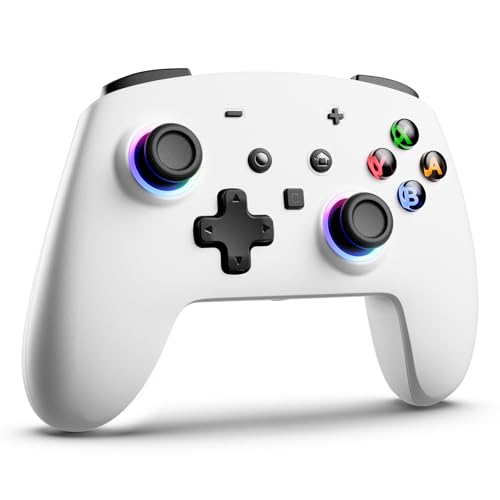
1. ECHTPower Switch 2 Controller with Hall Effect Joystick
Our pick — 4.5+★ from 250+ verified ratings; the strongest balance of quality and price.
The pad that pairs in seconds and keeps its aim months later
The reason this takes the top slot is that it solves the two things Switch 2 owners actually lose sleep over. It natively supports Switch 2, Switch OLED, and Switch Lite with no firmware ritual to get started — you pair it, you press the HOME button, and the console wakes. And its split Hall Effect joysticks use magnetic sensing (no physical contact between parts), so there is no rubbing surface to wear down. That combination is why it carries the best white switch controller badge here, and the owner feedback backs it up: 4.5+ stars across 290+ ratings, with the functionality and overall build drawing the most praise.
Where a pad like this could go cheap, this one goes the other way. You get four programmable back buttons that map complex macros without finger gymnastics, and the maker throws in a C key plus a 3.5mm audio jack — the headphone socket is the detail you notice the first time you play at night without waking the house. Vibration runs on dual rotor motors with five adjustable levels from 0 to 100%, so you can dial it from a subtle pulse down to near-silent or up to a proper rumble. RGB lighting rounds it out with multiple colors and four brightness levels.
The honest catch sits in the wake-up habit. The first-time wake method requires you to remove the Joy-Pad 2 from the console within 20 seconds after pairing, then press HOME — it works, but it is a sequence you have to learn once rather than a one-button magic trick. Beyond that, the motion side is solid: a 6-axis gyro sensor (the tilt-and-aim motion sensor) handles steering and aiming in compatible games, so Mario Kart turns and Splatoon aiming feel natural rather than tacked on.
What makes it the pick
- Hall Effect split joysticks with no contact wear, so drift has no bite
- Native Switch 2 support with one-key wake and no firmware dance
- Four back buttons for macro mapping and a C key on top
- Built-in 3.5mm jack and five vibration levels from 0 to 100%
Worth knowing before you buy
- First wake requires the remove-Joy-Pad-within-20-seconds routine
- RGB and turbo are pleasant extras, not core needs
Grab this one if: you own a Switch 2 and want a controller that behaves like a first-party pad without the first-party tax.
The trade-off: that one-time wake-up sequence takes a read-through of the tips, and it is the single most common fumble.
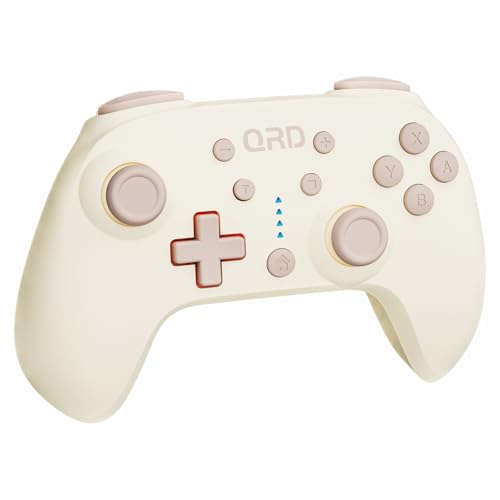
2. QRD Junior E5 Wireless Controller
A mini pad built for small hands that drop full-size controllers
If a standard pro pad leaves a child stretching thumb to stick, this is the answer. QRD designs the Junior E5 specifically for small hands at 5 by 3.31 by 2.13 inches, and it weighs 8.16 ounces — light enough that a nine-year-old can hold it through a full Mario session without the arms dropping. It carries 19 buttons, which is a genuinely full layout for a pad this compact. Owner sentiment settles on the size as the win, and it earns the most praise around pure functionality and how broadly it works across consoles.
The number that tells the story is the fit. One reviewer noted the small size is what lets them reach every button — a compliment a full-size controller cannot claim for a small-handed player. On compatibility, it does Switch, Switch OLED, Switch Lite, Windows PC, Mac, and Android, and it pairs over Bluetooth with a USB-C cable in the box for a wired session if you want one. The data sheets list a vibration range from 0% up to 100% across four modes, plus turbo at three speeds (8, 15, and 25 times per second) for games where mashing is required.
Here is the thing to know up front: QRD itself tells you to update the firmware from its official site to improve joystick accuracy and reduce drift. That is the manufacturer’s own instruction, and it tells you this is not a magnetic Hall Effect stick — it is a standard analog stick that needs the software help to stay sharp. Treat it as a kids-focused, multi-platform pad and it delivers. Expect it to feel as planted as a competitive-grade stick and you will be let down.
The kid-friendly read: mini footprint, 19 buttons, Bluetooth plus USB-C wired, and a motion gyro that responds to tilt — all in a Pearl White shell at 8.16 ounces.
The honest note: the firmware update is not optional fluff; it is the maker’s own fix for drift and accuracy, so budget five minutes for it on day one.
Made for: households where the small player is the main player, and PC or Android play matters as much as Switch time.
Skip the upgrade if: you are an adult who plays competitive and wants a magnetic stick — look at the TMR picks further down instead.
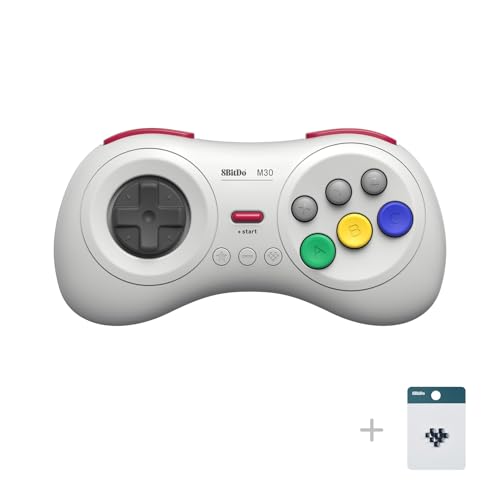
3. 8Bitdo M30 Wireless Bluetooth Controller
Six buttons, a clicky Sega-style d-pad, and the sturdy build 8Bitdo fans count on
Some pads are about modern features, and this one is about a d-pad you can feel. The 8Bitdo M30 is styled after Sega Genesis and Mega Drive controllers, and the eight-direction Sega-style d-pad is the star — click it once to nudge a character along, or roll it through eight directions for fighters and platformers. The button count is only 6, which is the whole point for retro play and a poor fit for modern games that want sticks and triggers. The owner base is loudest about the quality of that d-pad and the sturdy feel of the whole shell, and the retro crowd treats it as a go-to.
Battery is a small 480mAh cell rated for 18 play hours on a 1 to 2 hour charge, and it runs 147 by 74 by 31mm at 115g. Against the ZRZLMVP’s 1000mAh pack, this is less than half the capacity — a trade you make for the retro form factor. It does wireless Bluetooth plus wired USB-C, and it auto-reconnects to the last device, so you pick it up and it just pairs. Turbo is on the board too, though 8Bitdo’s own note says the turbo function does not apply to Switch, so PC and Android are where that feature lives.
The catch is compatibility, and the data says it plainly. The maker’s compatibility story is Switch, PC Windows, macOS, Android, and Raspberry Pi — that list does not include PS5, so if you are buying this to play on a PlayStation you are looking at the wrong pad. On Switch it works fine for classic titles, but six buttons and a d-pad-forward layout will feel strange in a game that expects analog sticks for movement. Buy it for the library it was built for.
Why retro fans rate it
- Sega-style eight-direction d-pad with a satisfying click
- 18 play hours on 480mAh, charged in 1 to 2 hours
- Wireless Bluetooth and wired USB-C with auto reconnect
- 115g and 147mm wide — easy to hold for a long session
Where it stops short
- Six buttons only, so modern shooters and racers need more
- Turbo does not function on Switch per the maker’s note
- No PS5 compatibility, so nail down your platform first
Right call for: Genesis-era libraries, fighting games, and anyone who judges a controller on its d-pad first.
Wrong call for: Switch 2 shooters that need analog sticks and a pile of face buttons.
4. ZRZLMVP Switch Controllers Wireless

The marathon pad whose 1000mAh pack will outlast your patience
If your sessions run long and the charger is across the room, this is the one to reach for. ZRZLMVP fits a 1000mAh battery inside and rates it for over 16 hours of gaming with the LEDs on, with a full charge landing in 2 to 3 hours. Compare it to the 8Bitdo M30’s 480mAh cell and you can see the trade — this pack holds roughly double, and it is aimed squarely at the player who does not want a mid-boss battery warning. The color-shifting lighting and solid connection to Switch, OLED, and Lite carry the most owner praise, and 4.5+ stars across 440+ ratings is a healthy signal.
The LEDs are the personality here. You get 9 colors with 5 modes — rainbow breathing, single-color breathe, static, flashing, and off — plus brightness steps from 40 to 100% so you can dim the show to a quiet glow. On the control side, up to 16 buttons can map to the two back buttons (M1 and M2), with both single and multiple mapping methods. Turbo offers 5, 12, or 25 shots per second, and the 4-level HD rumble runs from none up to strong. Add a 6-axis gyro for aiming, a screenshot button, and a non-slip satin texture that holds up to sweaty palms.
What you should factor in is the drift question, because the maker spent its spec sheet on lights and battery rather than magnetic sticks. This is a standard analog stick, and the owner reports reflect that some units arrive with drift or lag issues — a risk you take with any non-Hall pad, not a sign every unit fails. If drift-proofing is your top priority, the ECHTPower and MOBAPAD options above and below cover that need with magnetic sticks. If a long runtime and a look that stands out matter more, this one earns the spot.
For the long grind: over 16 hours on a 1000mAh pack with LED mode running, plus a 2 to 3 hour top-up over USB-C.
Factor in the stick: it is a standard analog design, so drift remains a small gamble that magnetic sticks eliminate — go magnetic if that worries you.
Pick it when: the light show and the all-night battery matter more to you than a magnetic stick.
Look elsewhere if: you have already lost a controller to drift and refuse to risk it again.
5. DBEPANK Switch Controller

A cheerful all-rounder that treats the whole family as the customer
DBEPANK approaches this category the way a thoughtful parent would: build something the kids will love holding and keep it friendly on the budget. The headline number is over 18 hours of playtime on a 1000mAh battery, topped up in 2 to 3 hours over USB-C — that is more rated runtime than the Fliresy 2-pack’s 800mAh cells offer in total per charge. Quality is what the owner base keeps coming back to, and the value framing shows up too, with plenty of parents glad to skip the official-pad sticker.
The lighting is where it becomes a crowd-pleaser. You get 10 colors across 4 LED modes — a dazzling mode, a light-changing mode, a flicker mode, and a fixed 7-color mode covering red, orange, yellow, green, cyan, blue, and purple — with brightness from 40 to 100% so it does not light up the whole room at night. Owners repeatedly mention how much kids enjoy the color options. The 6-axis gyro handles tilt aiming, dual vibration gives 4 levels from none to strong, and turbo can be set to 5, 12, or 25 shots per second.
The honest part is the function reports, and this is where the pad is a mixed bag rather than a dud. Some functionality and connectivity gripes exist, along with the usual questions around button responsiveness in a non-Hall analog stick. Weigh those against the quality and value that dominate the feedback, and the picture is a well-liked family controller that will not perform like a premium competitive pad. Also worth knowing: the PC connection requires the wired USB-C route, so plan for a cable if PC play is part of your routine.
What the family gets
- Over 18 hours on a 1000mAh battery with a 2 to 3 hour charge
- 10 LED colors in 4 modes with a fixed 7-color option
- Back buttons, turbo at three speeds, and 6-axis gyro aiming
- Non-slip body that stays put through sweaty sessions
The caveats that matter
- Standard analog stick, with some drift reports in the mix
- PC play is wired only, so a USB-C cable is part of the deal
- No NFC, so amiibo tapping is not on the table
Suits: a household that wants a bright, comfortable, long-running pad for a kid without chasing pro-level specs.
Think twice if: you play competitive online and need every input to be tight — the mixed responsiveness reports point you toward a magnetic-stick pad.
6. MOBAPAD Chitu2 HD Wireless Pro Controller

TMR sticks, mechanical clicks, and an amiibo reader for the serious player
The Chitu2 is the pick for someone who wants every input to feel engineered. Its TMR joysticks (a newer magnetic-sensor design the maker describes as smoother than standard Hall Effect) use no physical contact, so drift has no surface to wear — the maker’s own words are a “butter-smooth feel and zero-drift performance.” On top of that sit mechanical micro-switches with an ultra-short 0.7mm actuation distance and a 5 million-plus click lifespan, so button presses land like crisp clicks instead of soft mush. The owner base reserves its biggest praise for the overall controller quality and the tactile, mouse-click feel.
What makes it a genuinely premium pad is the extras. There is a built-in NFC reader for 100% compatibility with amiibo figures, which means you tap the figure directly to the pad for in-game rewards rather than hunting for your console. A 6-axis gyro handles motion aiming, and the dual ALPS linear vibration motors deliver layered tactile feedback rather than a blunt buzz. Two programmable back buttons let you record macros and remap full button sequences. The 1000mAh battery is rated 15 to 20 hours of playtime on a quick 2.5-hour charge, and it supports play-while-charging so a low battery is not a session-ender.
The trade you should know: an ultra-short mechanical switch is fast and clicky, and some players find it too different from the softer feel of a first-party pad. The triggers are also not analog, per owner reports — fine for most Switch titles but a genuine limit if you were hoping for pressure-sensitive racing. Weigh that against the swappable disc and cross-style D-pads in the box and the NFC reader, and you have a pad built for the player who wants control, not nostalgia.
The competitive case: TMR magnetic sticks, 0.7mm mechanical switches rated for 5 million-plus clicks, two macro back buttons, and a 1000mAh battery with 15 to 20 hours on a 2.5-hour charge.
The real limit: triggers are not analog and the mechanical click is a taste — try one before committing if you are used to soft buttons.
Choose it for: amiibo collectors and Smash players who want the fastest click and drift-free aim from the start.
Not for you if: you need pressure-sensitive triggers for a racing game — the mechanical click cannot deliver that.
7. Fliresy Switch Controllers 2 Pack with Charging Dock
Two white pads, one dock, and a tidy shelf instead of a cable mess
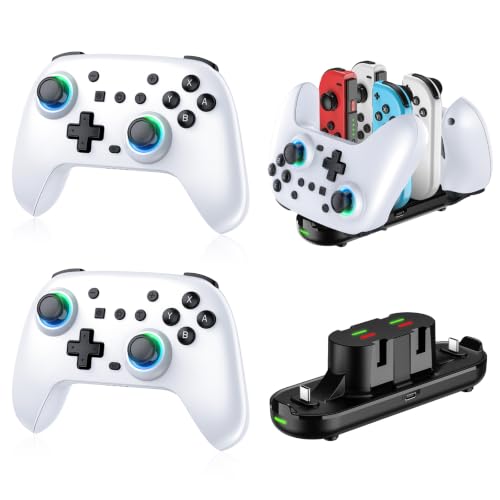
Two controllers that live on a dock and recharge between rounds solve a specific problem — the shared couch setup where one pad is always dead. Fliresy packs two pads and a charging dock in 2 Pcs White, and the dock handles 2 of these switch 2 Pro controllers plus 4 Joy-Con controllers (though the maker notes it does not work with Switch 2 Joy-Con). The dock brings built-in protection against over-charging, over-voltage, over-current, and short circuits, on a fireproof panel with anti-slip rubber feet. Owners gravitate toward that dock because it keeps controllers charged and organized, and the overall quality is what the feedback keeps returning to.
Each pad runs an 800mAh battery rated 10 to 12 hours, topped up in 2 to 3 hours, and auto-sleeps after 5 minutes idle so a forgotten pad does not drain flat. Vibration offers four levels from strong down to none, and turbo covers A, B, X, Y and seven other keys at speeds of 5 to 15Hz. The RGB setup gives 7 colors across 4 light modes. On the stick side, the maker describes Hall Effect buttons, which points to a more durable input design than a standard analog pad — an encouraging sign for a two-pack that has to survive kids and guests alike.
The one thing to weigh is the vibration and drift picture. Some buyers report stick drift alongside those who report none at all, so treat it as a mixed signal rather than a guaranteed clean run — a reasonable bet for a two-player household where the pads share duty, less of a sure thing if you want one flawless controller for solo ranked play. Consider the two-pack as two decent pads and a dock that keeps both full, and it makes practical sense.
Household math: two 800mAh pads rated 10 to 12 hours each, plus a dock that charges both and holds 4 extra Joy-Con controllers.
Mixed feedback: drift reports and clean reports both show up, so this is the pick for shared play rather than one obsessive solo setup.
Best for: a two-player home where controllers spend more time on a dock than in a drawer.
Look at a single pad if: you only ever play alone — the dock is the whole value here.
8. 8Bitdo Ultimate 2 Bluetooth Controller TMR Joysticks (White)

The tinkerer’s pad, with a trigger switch most controllers never offer
Most controllers make you pick a trigger feel and live with it. The Ultimate 2 lets you flip between linear Hall Effect triggers and tactile triggers on the fly — a trigger mode switch that instantly changes how a racing throttle or a shooter fire button responds. That one feature tells you who this pad is for: the player who wants to shape the controller to each game rather than the other way around. The TMR joysticks (magnetic, no-contact sticks) sit up top with wear-resistant rings and customizable RGB lighting around a fire ring. Owner feedback puts the quality of this pad, and its D-pad performance specifically, at the front of the conversation.
The pro-level customization goes further than most. You get two rear programmable buttons plus additional R4 and L4 bumpers, tactile feedback on the bumpers and D-pad, and support for up to 3 custom profiles through 8BitDo’s Ultimate Software V2 — so one profile for Smash and another for a platformer without rebuilding your layout. There is a multi-functional charging dock with a USB-C adapter included, and wake-on-shake means a shake of the pad wakes the console and gets you back in. Connectivity runs Bluetooth, 2.4G, or wired USB.
The caveat is Switch 2 support, and it is worth nailing down before you buy. For Switch 2 the maker says you need to update to the latest firmware on the official website, and if the update tripping you up is a deal breaker, that is a real step rather than a plug-and-play experience. On the original Switch it works from the start. If you are buying for a fresh Switch 2 and do not want to touch firmware, one of the native Switch 2 pads will be smoother for you.
What earns the premium
- Switch between linear Hall Effect and tactile triggers on the fly
- TMR joysticks with wear-resistant rings and RGB fire ring
- Two rear buttons, R4/L4 bumpers, and up to 3 custom profiles
- Charging dock and wake-on-shake for quick pickups
The fine print
- Switch 2 requires a firmware update before it plays nice
- Deep software customization is overkill if you just want to play
Reach for this if: you enjoy building profiles and want triggers that switch modes to match the game.
Look elsewhere if: firmware updates are a chore and you want native Switch 2 from the start.
9. NYXI Hyperion 3 Switch 2 Controller
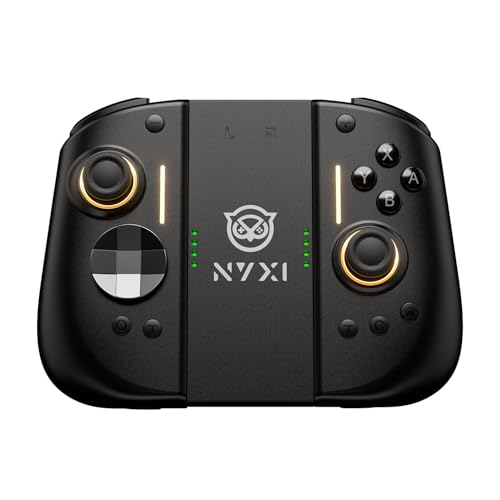
Built from scratch for the Switch 2, with a magnetometer for steadier aim
Most third-party pads are old designs with a new label. NYXI calls the Hyperion 3 the first true second-gen third-party Switch 2 controller, engineered from the chipset up for the console rather than adapted from an older model. It backs that claim with a 9-axis gyro that adds a magnetometer — a sensor that reads your controller’s orientation against the earth’s magnetic field — to steady motion aiming so a bow draw or a Mario Kart drift does not wander. Hall Effect joysticks cover drift prevention at the sticks themselves, using magnets instead of physical contact.
What people notice first is how it feels to hold, and it lands hard in the hand at 420g. That weight comes from a design owners describe as more comfortable than the Joy-Con for handheld stretches, with grips that fill the palms rather than punish them. Full mechanical buttons give every press a crisp snap, two programmable back buttons put jump or reload at your fingertips, and adjustable vibration lets you dial rumble down for late-night play. Sleep-mode charging and one-touch wake keep the handheld routine smooth.
The catch to weigh honestly is reliability. Some buyers have seen a bumper button give out within the first several months, and disconnects come up even among people who praise the comfort — the kind of mixed signal you want to know about before you commit to a premium pad. It is also built for Switch 2 only, so this is not the controller you buy to cover every console in the house. If you want the newest Switch 2 experience and value the wide grips, it is a serious pick; the long-haul question is whether the button hardware keeps up.
For the new console: a 9-axis gyro with magnetometer, Hall Effect joysticks, full mechanical buttons, and two back buttons on a 420g frame built for Switch 2.
The long-haul question: bumper and connection reports show up alongside the praise, so factor warranty time into your thinking.
Made for: Switch 2 owners who want the newest dedicated hardware and the widest grips available here.
Pause if: you need one controller to cover several consoles or you want the lightest pad in the bag.
Know the Specs
Hall Effect and TMR joysticks
Both are magnetic stick designs: a sensor reads a magnet’s position instead of parts rubbing together, which is why they resist drift. Hall Effect is the established version, and TMR is a newer magnetic variant that makers describe as smoother. If the listing says Hall Effect or TMR, you are getting the stick type that does not wear out from contact.
6-axis and 9-axis gyro
A gyro is a motion sensor that reads tilt and rotation, so leaning the controller steers a kart or aims a bow. A 6-axis gyro handles that tilt-and-aim tracking, and a 9-axis gyro adds extra sensing — like a magnetometer — to keep the orientation steadier over a session. Not every game uses motion, so treat it as a bonus for the titles that do.
mAh capacity and play hours
The mAh number is how much charge the battery pack holds, and the maker pairs it with a rated playtime. A 1000mAh pack here is rated for 16 to 18 hours, while a 480mAh retro pack is rated for 18 hours with lighter features. RGB lighting, turbo, and rumble all pull power, so the bigger the feature list, the shorter the honest runtime.
Turbo and back buttons
Turbo fires a held button repeatedly at a set speed, so you are not mashing for a rapid attack. Back buttons are extra inputs on the underside that you map to existing ones — the point is keeping your thumbs on the sticks during fast combos. Both are optional for casual play and valuable for action games and grind-heavy sessions.
Common Questions
Will a white third-party controller work with the Switch 2?
Do Hall Effect sticks really stop joystick drift?
How many hours will a white Switch controller actually last on a charge?
Is a mini controller better for a child than a full-size pad?
Can I use these controllers on a PC or phone as well as the Switch?
What does the NFC feature on the MOBAPAD Chitu2 HD actually do?
Do these controllers support motion control for games like Mario Kart?
Which pick makes sense if two people play in the same room?
Are the vibration levels adjustable on these white Switch controllers?
Can turbo speeds be changed per game?Yes, on the models that support it. The QRD Junior E5 offers 8, 15, or 25 shots per second, the ZRZLMVP and DBEPANK offer 5, 12, or 25 shots per second, and the Fliresy steps through 5 to 15Hz. Worth noting: 8Bitdo states the M30’s turbo does not apply on Switch, so that speed control is a PC and Android feature on that model.?
How do I connect a white Switch controller for the first time?
Do any of these come with a charging dock in the box?
The Bottom Line
For most people, the white switch controller worth buying is the ECHTPower Switch 2 Controller because it pairs natively with Switch 2, Switch OLED, and Switch Lite with no firmware work, and its Hall Effect joysticks remove the wear that causes drift. Add four back buttons and a 3.5mm jack, and it covers the everyday player’s needs without asking for a premium budget. If you want the newest Switch 2-specific hardware and the widest grips, grab the NYXI Hyperion 3. And for a two-player household that wants both pads charged and off the floor, the Fliresy 2 Pack with Dock is the one to reach for.
One last nudge: the ECHTPower still holds the strongest blend of native Switch 2 support, magnetic sticks, and owner confidence on this list, so if you are replacing a drifting pad and do not want to think about it again, that is the sensible buy.
How we choose
We do not accept paid placement. Every pick is matched to a real buyer and a real use-case; we do not hands-on test units.
Sources
Specifications: manufacturer listings and product documentation. Review insights: verified customer reviews, as of November 2026. Pricing: not shown on this page (it changes often); check the current price via the retailer link.
As an Amazon Associate, Tactical Gear Guy earns from qualifying purchases. This does not affect which products we feature.