Specs are compiled from manufacturer listings and verified buyer reviews and can change over time — please confirm the key details on the product page before buying.
If your case is white and your CPU runs hot, the cooler you pick has to do two jobs at once: pull real heat off the chip and stay quiet enough that you forget it is there. For a modern high-end CPU, a 360mm white liquid cooler is the safest bet: the bigger radiator lets the fans spin slower for the same cooling, which is where the quiet comes from. The picks below span budget value units to premium screens-and-lighting builds.
This guide is built by comparing the manufacturers’ published specifications and the patterns across verified customer reviews, so you get each pick’s real strengths and trade-offs instead of marketing spin.
Radiator size, fan speed and pump noise decide most of your experience here, and the white finish narrows the field fast. Below you will find the white liquid cpu cooler picks that balance all three without asking you to guess.
Top Picks


How To Choose The Best White Liquid CPU Cooler
The white part is easy to spot in photos and hard to verify in a listing — plenty of coolers are sold as white with black tubing or a dark pump cap. Check the radiator, the fans and the pump housing individually. If any of the three is dark, the build will not read as a clean white loop.
Radiator size: 240mm versus 360mm
A 360mm radiator holds three 120mm fans; a 240mm holds two. More fan surface means each fan can turn slower for the same heat removal, and slower fans are quieter. A 360mm unit also fills the front or top of a mid-tower case more completely, which matters if you care how the inside looks through a glass panel.
Fan speed range and what it means for you
Fan speed is measured in rpm — revolutions per minute, or how many times a fan blade spins in sixty seconds. A high maximum rpm gives you headroom for a hot day or a long render. A low minimum rpm is what keeps the PC quiet while you browse. You want both ends of that range.
The pump cap: blank, lit, or an LCD screen
Some pump caps are plain, some glow with addressable RGB, and some carry a small LCD panel that shows temperatures or images. An LCD cap needs a USB header on your motherboard and its own software. That is a real installation step, not a plug-and-play extra.
Side-by-Side Comparison
| Model | Best For | Radiator Size | Max Fan Speed | Noise Level | Amazon |
|---|---|---|---|---|---|
| be quiet! Light Loop 360mm White★ Best Overall | Quiet builds with a full white interior | 360mm | 2100 rpm | 36.8 db | Amazon |
| Thermalright FW 360 White ARGB V2Best Value | Screen-on-a-budget builds | 360mm | 3000 rpm | 23 db | Amazon |
| ARCTIC Liquid Freezer III Pro 360 A-RGBTop Performer | High-load cooling with cable tidiness | 360mm | 3000 rpm | — | Amazon |
| NZXT Kraken Plus 240 RGB LCD | Small cases with a screen up top | 240mm | 2800 rpm | 31.9 db | Amazon |
| MSI MAG Coreliquid A13 360 White | First-time AIO installs | 360mm | 5200 rpm | 14.4 db | Amazon |
| Lian Li Hydroshift II-C 360 LCD | Show builds with routed tubing | 360mm | 1700 rpm | — | Amazon |
| CORSAIR NAUTILUS 360 RS LCD | Long sessions on a premium loop | 360mm | 2100 rpm | 20 db | Amazon |
| ASUS ROG Strix LC II 360 ARGB White | Low-speed silence with ROG styling | 360mm | 840 rpm | 37.6 db | Amazon |
Detailed Reviews
1. be quiet! Light Loop 360mm White CPU Liquid Cooler
Our pick — 4.5+★ from 400+ verified ratings; the strongest balance of quality and price.
A full white loop that stays hushed when the CPU stops being polite.
You get a full white-to-colour glow across the whole assembly, not just a lit badge on the pump, thanks to 64 LEDs spread across the illuminated cooling block and three Light Wings LX 120mm PWM high-speed White fans. Each fan carries 16 of those LEDs scattered across the blades. If your case has a glass side panel, that is the detail that makes or breaks the look.
Cooling comes from a metal jet plate that speeds up coolant flow, plus a cold plate with a high-density fin stack aimed at flagship and high-end CPUs. A progressive IC in the motor trims switching noise, which is why the pump stays quiet rather than whining. Fan speed tops out at 2100 rpm and rated noise sits at 36.8 db — and that second figure is where this pick separates itself. Against the Thermalright FW 360 White at 23 db, the be quiet! is the louder of the two, so the Thermalright takes the silence trophy on paper.
The brand claims near-silent operation under heavy load, and the nine airflow-tune fan blades are shaped to cut the turbulence that normally creates the whoosh. Setup is genuinely simple too, with an ARGB-PWM-Hub that lets you run up to 6 PWM fans and 6 ARGB components off one PWM header and one ARGB header. It mounts with adhesive tape or the screw holes that match a 2.5″ SSD position.
Where it pays off
- 64 LEDs across a lit block and three 120mm white fans
- Hub drives up to 6 PWM fans and 6 ARGB parts from two headers
- 2100 rpm ceiling keeps the fans in their quiet range
- Refill port plus a bottle of coolant included for top-ups
What to weigh first
- 36.8 db is louder rated than the Thermalright’s 23 db
- At 1.5 kg the radiator and fans want a case with room up top
Go this way if: you want one of the quietest white 360mm loops going and you actually use a glass side panel.
Hold off if: your priority is the lowest rated noise figure possible, because the Thermalright below beats it there.
2. Thermalright FW 360 White ARGB V2 CPU Water Cooler
A screen on the pump head for people who thought that was a premium-only feature.
You get a feature you would not expect at this price: a detachable IPS LCD screen on the water block at 320 x 240 resolution, held on by magnets so you can steer it to face the right way. You can pick from preset screen layouts in the software. The radiator itself is a 360-spec all-white nano-painted aluminium fin stack, paired with three TL-P12W-S pressure fans.
The noise number is the headline. Rated at 23 db, this is dramatically quieter than the be quiet! Light Loop at 36.8 db — the gap is large enough that quiet-focused builders should notice it. Airflow sits at 70.84 cfm against the ARCTIC’s 77 cfm, so the ARCTIC moves more air while this one trades a little airflow for calm. Fan speed runs up to 2000 rpm with S-FDB bearings and blades shaped to cut vibration.
Buyers report it holds a Ryzen 7 9800X3D at 43°C — strong cooling for a loop rated at 23 db. ARGB syncs over the 5V 3-pin header and can be daisy-chained so you do not run out of lighting slots. Confirm your board has that 5V 3-pin connector before you order, and note the LCD screen is powered and fed by the motherboard’s 9-pin USB header, with software from Thermalright’s site.
The screen trade: an LCD block at this tier usually means corners cut elsewhere, but the 23 db rating and 70.84 cfm suggest they were not — the compromise is that you must verify both the 5V 3-pin ARGB header and the 9-pin USB header exist on your board.
Reach for this if: you want a lit, screened white loop and your motherboard has the right headers to feed it.
Look elsewhere if: you would rather not deal with screen software at all — pick a plain-cap cooler instead.
3. ARCTIC Liquid Freezer III Pro 360 A-RGB
The airflow leader that hides its fan cables inside the hose sleeve.
Two specs do the talking. First, 77 cfm of airflow — higher than the Thermalright FW 360 White at 70.84 cfm, which is the difference you feel when a long render pushes the chip hard. Second, a 3000 rpm maximum fan speed, against the be quiet! Light Loop’s 2100 rpm, giving you far more headroom to crank cooling on a hot afternoon. The P12 PRO fans are built to be more powerful and quieter than the P12 they replace, especially at low speeds.
Mounting is smarter than most. Native offset mounting shifts the cold plate center toward the CPU hotspot for more efficient heat transfer, and there is a contact frame for Intel LGA1851 and LGA1700 that spreads contact pressure more evenly. An integrated VRM fan cools the voltage converters with PWM control. Cable management is the quiet luxury: the radiator fan PWM cables are woven into the hose sheathing, so only one visible cable reaches the motherboard.
Cooling is what owners praise most, with systems staying below 60°C the running theme in reviews. Two areas split opinion: installation (some find the steps easy to follow, others hit real difficulty) and noise (some call it super quiet, others find the fans loud when pushed). Neither is a dealbreaker, but know which one you are. The unit weighs 2020 g and runs 15.7″ long, so measure your top clearance before committing.
Performance read: on raw cooling and airflow this is the strongest unit in the group, and the single-cable routing makes a tidy white build easy.
Built for: overclockers and long-session users who measure cooling in degrees, not decibels.
Worth knowing: the mounting steps divide opinion — set aside real time for the install rather than rushing it.
4. NZXT Kraken Plus 240 RGB LCD – White
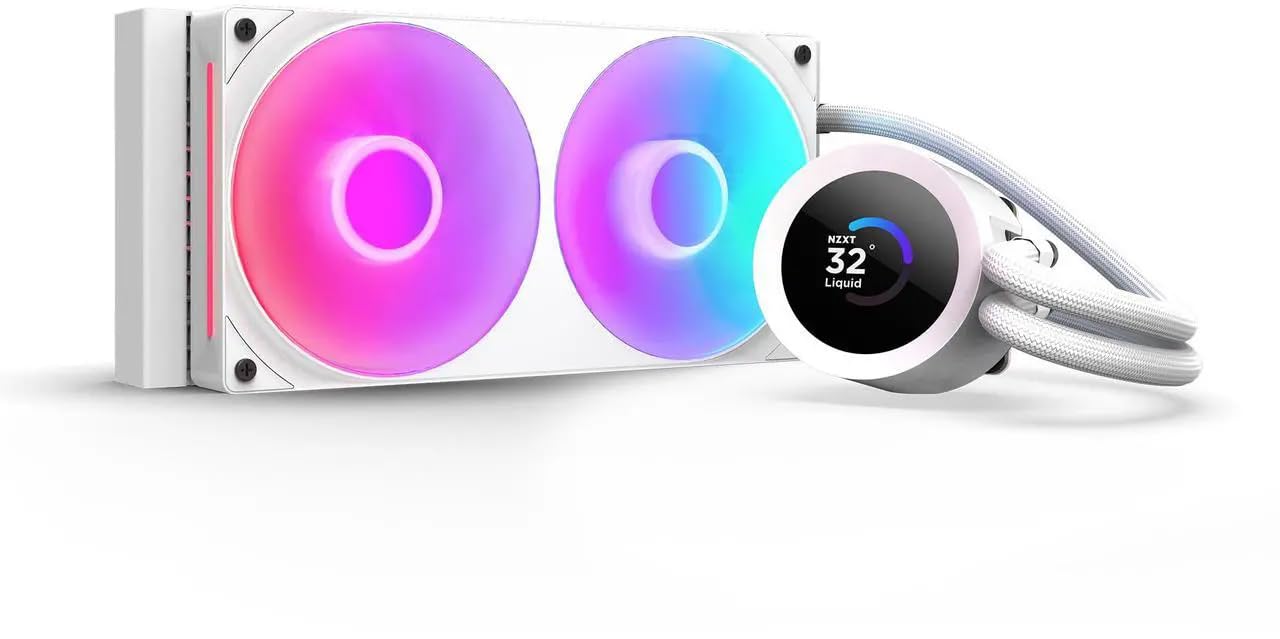
A two-fan loop for tight cases that still wants a screen on top.
You get the shortest radiator on the list at 11.02″ long, so if your case cannot take a three-fan rad, this is the pick that still fits — the ARCTIC Liquid Freezer III Pro 360 measures 15.7″. The payoff is a bright 1.54″ square LCD on the cap showing real-time system temps, animated GIFs, custom images, or web integrations like Spotify and YouTube, all managed through NZXT CAM software.
Cooling is handled by the NZXT Turbine pump, built for high flow and head pressure to keep things calm under heavy workloads. The RGB Core single-frame fan puts lighting and airflow in one unit — four screws and one cable, which is the whole install. Rated noise is 31.9 db with a 2800 rpm ceiling. Pre-applied thermal paste and a single breakout cable from the pump cap cut the wiring clutter further.
What owners come back to is the temperature control — keeping things low is the most-praised trait by a clear margin, with reliability behind it. Installation and looks round out the positives. Two honest notes: the display size splits opinion, and value for money does too, so this is a pick for someone who specifically wants a small white screened loop rather than the biggest radiator for the outlay. Tool-free brackets cover AM5 and LGA 1851.
Why it earns a slot
- 240mm size fits cases a 360mm rad cannot
- 1.54″ LCD shows temps, GIFs, images and web widgets
- One fan, four screws, one cable — the simplest install here
- Pre-applied paste and a single pump-breakout cable
The honest caveats
- Two fans mean less cooling surface than every 360mm pick
- The screen size does not satisfy everyone
Fits the bill when: case space is the constraint and you refuse to give up a display.
Think twice when: you have room for a 360mm radiator — the extra fan is free cooling you would be leaving on the table.
5. MSI MAG Coreliquid A13 360 White

One of the quietest rated loops here, and the friendliest for a first build.
Rated noise is 14.4 db, which is the lowest number on this entire page — quieter rated than the CORSAIR NAUTILUS at 20 db and the be quiet! Light Loop at 36.8 db. The pump helps: an integrated three-phase pump sits inside the split-flow aluminium radiator, running up to 3800 RPM on ceramic bearings, which is how it chases both cooling and quiet at once. Fan speed tops out far higher at 5200 rpm when you want to push it.
The build details matter for a first-timer. The 390mm water cooling tubes are triple-layered netted plastic under reinforced mesh sheathing, designed to keep coolant sealed inside the closed loop. The mounting bracket fits AMD (AM5, AM4 and down the stack) and Intel (LGA 1700, 1200, 1366, 2011, 2066 and others), with thermal paste in the box. LGA 1851 gets out-of-box support.
What owners value most is the build quality, and installation runs a close second — all fans arrive preconnected, so there is no nest of fan cables to route yourself. Owners mention it cooling 9800X3D-class chips without issues. If you are assembling your first liquid loop and dread the wiring, this is the one that removes the most work from the day.
Quiet and quick to fit: 14.4 db rated with pre-connected fans means a near-silent white loop that does not fight you on install day.
Pick it when: this is your first AIO and you want the wiring already sorted from the start.
Note before ordering: the 5200 rpm fan ceiling is a headroom figure — you will rarely need it, and running there trades quiet for cooling.
6. Lian Li Hydroshift II-C 360 LCD White

Tubing you can route like a cable, capped by a round 480×480 screen.
The sliding tube clamp is the feature nobody else has. It lets you align the liquid cooling tubes precisely, so the loop reads as deliberate rather than flopping wherever gravity takes it — and you can pull the clamp off entirely when you need tighter fan-to-motherboard clearance. Server-grade corrugated tubing handles the bends. On top sits a 2.1″ round IPS LCD at 480×480 resolution.
Three control modes change how much setup you do. Offline Mode adjusts LED and LCD content through a rotatable cap with no USB connection, showing coolant temperature and pump speed. Wireless Mode handles screen visuals and cap lighting over the L-Wireless Controller, syncing with other Lian Li wireless gear. Streaming Mode connects over USB for full customisation in L-Connect 3, including MP4 and GIF playback.
Owners describe real gains — an Intel 270K Plus kept cool with a big Cinebench improvement — and praise the display for working under Linux. Fan speed is 1700 rpm, the lowest ceiling on this list, which suits a quiet aesthetic build better than a record-chasing one. One setup tip matters: if L-Connect 3 cannot detect the unit, set the connected PWM port to PWM/DC mode in BIOS instead of Auto, and run it at full speed. This listing is the W/o Fans set, so budget for fans separately.
The design win: the sliding clamp plus removable clearance option makes this the most controllable tubing on the page, and the 480×480 round screen is a genuinely different look.
The right call for: a display-focused build where neat tubing is the whole point.
Double-check: that this set ships without fans — you will need to add three of your own.
7. CORSAIR NAUTILUS 360 RS LCD Liquid CPU Cooler – White
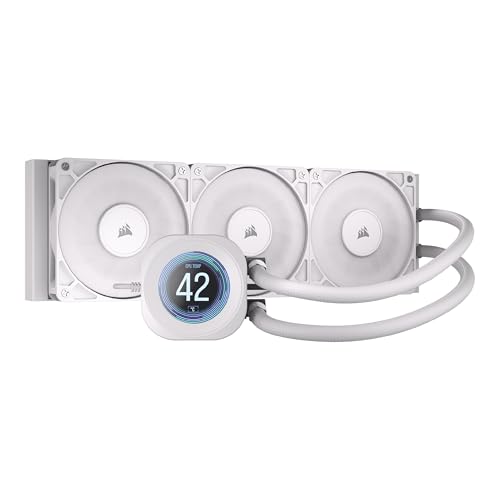
A whisper-rated pump and a convex cold plate built for full chip contact.
The pump is the story: it keeps coolant moving at a high flow rate while rated at just 20 dBA, which is quieter than the be quiet! Light Loop’s 36.8 db and the NZXT Kraken Plus’s 31.9 db. That matters because pump noise is the one sound you cannot tune away with a fan curve. Fans are RS120 units built for high static pressure to push air through the radiator, using CORSAIR AirGuide technology and Magnetic Dome bearings.
The cold plate is slightly convex, which increases contact with the CPU’s integrated heat spreader, and thermal paste comes pre-applied to speed the install. A 2.1″ IPS LCD screen on the cap adds the customisation most premium loops now carry. Fan speed ceiling is 2100 rpm. Length is 15.59″, so the usual top-mount measuring applies.
Build quality is the trait that wins people over here, more than anything else, and it shows in how the unit feels in the hand. Customers note temperatures around 45°C, and installation is simple. The split is noise: some hear nothing, while others notice a bubble sound from the pump at times — worth factoring if your case sits close to you on the desk. Functionality and appearance both land well, and the screen gets its own share of praise.
Where the money goes: a 20 dBA pump and a convex cold plate are the two upgrades you feel daily — the first in silence, the second in temperature.
Best suited to: builders who want premium fit-and-finish and have the desk space for a close-range case.
Consider the alternative: if pump bubbling would bother you near your ear, a capped unit keeps things simpler.
8. ASUS ROG Strix LC II 360 ARGB White Edition

The lowest pump floor here, wrapped in a sparkly white radiator and a six-year warranty.
A Seventh Gen Asetek pump runs with an operating range starting at 840 rpm — the lowest minimum on this list, and the reason this loop can idle close to inaudible. It is also the airflow leader: 81 cfm, higher than the ARCTIC Liquid Freezer III Pro’s 77 cfm and the Thermalright FW 360’s 70.84 cfm. The ROG-designed ARGB radiator fans are built for optimised airflow and static pressure to match.
Looks are deliberate. Individually addressable RGB and an NCVM-coating pump cover push the aesthetic toward a modern white build, and the design is meant to sit beside an ROG motherboard as the centrepiece. Tubing is reinforced and sleeved for durability. Socket support covers AMD AM4 and TR4, plus Intel LGA 1700, 1200, 115x, 1366, 2011, 2011-3 and 2066. Rated noise sits at 37.6 db, the highest figure here, which is the honest trade for that low idle floor.
Quality is the most-praised trait, with the high-quality LED on the pump head getting a specific mention, and the sparkly white radiator earns its own compliments. Cooling, installation and low noise all land positively. Performance does split, though — most report it working well, with an occasional unit where the pump does not work, so test it on first boot while your return window is open. The six-year warranty is the longest coverage on this page.
What stands out
- Pump range starts at 840 rpm — the quietest idle floor here
- 81 cfm airflow leads the whole group
- Six-year warranty, the longest listed
- NCVM-coated pump cover and a sparkly white radiator
Before you commit
- 37.6 db rated is the loudest on this page
- Performance reports split, so test it on day one
Made for: idle-silence lovers with an ROG-skewed build who want the longest warranty confidence.
Skip if: you need the lowest rated noise under full load — several picks here beat it on that number.
Know the Specs
Radiator size (240mm vs 360mm)
This is the physical length of the cooler’s radiator, measured by how many 120mm fans it holds. A 360mm unit holds three; a 240mm holds two. More fans spread the same heat across more surface, so each one can spin slower and quieter. A 360mm unit also needs about 15.5 inches of clearance in most of these designs — measure before you order.
Airflow in cfm
CFM stands for cubic feet per minute — the volume of air the fans move in sixty seconds. A higher figure generally means more heat carried away from the radiator fins. Compare within the same radiator size, since a 360mm unit with three fans will naturally move more air than a 240mm with two.
Fan speed in rpm
RPM is revolutions per minute — how fast a fan blade spins. A high maximum gives you cooling headroom for hot days and long workloads. A low minimum is what lets the machine stay quiet at idle. The best coolers give you a wide range and let software pick the point.
Pump noise and the dBA figure
The dBA number on a spec sheet is a rated sound level in decibels, adjusted for how human hearing works. Lower is quieter. Pump noise is different from fan noise because you cannot fix it with a fan curve — it runs constantly, so a low pump figure is worth more than a low fan figure for a desk-side case.
Common Questions
Will a 360mm white liquid cooler fit my mid-tower case?
Do I need a specific motherboard header for the LCD screen models?
What does the 5V 3-pin ARGB connector do?
Is a 240mm AIO enough compared with a 360mm one?
Why does one cooler’s noise rating differ so much from another’s?
How do I stop pump bubbling noises?
Can I top up the coolant myself?
Does a white cooler’s finish yellow or flake over time?
What warranty should I expect on a white AIO?
Do these coolers come with thermal paste?
The Bottom Line
For most builds, the white liquid CPU cooler worth starting with is the be quiet! Light Loop 360mm White — 64 LEDs across a fully lit white loop, a 2100 rpm fan ceiling, and the kind of real-world quiet that owners talk about first. If a screen on the pump head is what you are after, the Thermalright FW 360 White ARGB V2 delivers an IPS display at 23 db. And if raw airflow is the goal, the ARCTIC Liquid Freezer III Pro 360 leads the group at 77 cfm with its fan cables tucked into the hose sleeve.
How we choose
We do not accept paid placement. Every pick is matched to a real buyer and a real use-case; we do not hands-on test units.
Sources
Specifications: manufacturer listings and product documentation. Review insights: verified customer reviews, as of November 2026. Pricing: not shown on this page (it changes often); check the current price via the retailer link.
As an Amazon Associate, Tactical Gear Guy earns from qualifying purchases. This does not affect which products we feature.