Specs are compiled from manufacturer listings and verified buyer reviews and can change over time — please confirm the key details on the product page before buying.
You want a white AMD motherboard, but a board can look white in the photos and still show a black PCB (the main circuit board) the moment you open the box. Every pick below is genuinely white in the colorway, so you get the look you paid for. All of them run an AM5 socket (the CPU slot for AMD’s recent Ryzen chips) for Ryzen 7000, 8000, and 9000 chips. Beyond the paint job, three things decide how well the board serves you: the voltage hardware — the power stages that feed your CPU — how many M.2 slots (slots for stick-shaped fast storage) you get, and whether Wi-Fi 7 or 6E is on board.
This guide is built by comparing the manufacturers’ published specifications and the patterns across verified customer reviews, so you get each pick’s real strengths and trade-offs instead of marketing spin.
A motherboard is the hardest part to swap later, so match the board’s form factor to your case and its VRM to your Ryzen chip from day one. This breakdown of the best white AMD motherboard pairs each board’s power design and slot count with the build it actually suits.
Top Picks


How To Choose The Best White AMD Motherboard
Start with the socket, because every board here is AM5 and that is what lets you drop in a Ryzen 7000, 8000, or 9000 series processor. From there, the real decisions are power delivery, physical size, storage slots, and how white the board truly is once it is screwed into your case.
Check the VRM before the styling
The VRM (voltage regulator module — the cluster of power stages that feeds clean power to your CPU) decides whether a high-core Ryzen chip stays stable under a long load. You will see counts written like 14+2+2 or 12+2+1. More phases generally mean steadier power and cooler running, which matters if you plan to push a Ryzen 9. A 12+2+2 board is still perfectly capable for a mid-tier chip.
ATX or mATX changes your whole build
ATX boards are the full-size standard and usually carry more M.2 slots and expansion room. The mATX board here is a compact square that fits smaller cases but trims features to get there. Pick your case first, then match the board’s form factor to it — an ATX board will not fit an mATX case.
Know what Wi-Fi 7 gets you
Wi-Fi 7 is the newest wireless standard and needs a recent Windows 11 build to run at full speed. Several boards here carry it, and one steps back to Wi-Fi 6E. If your router is older, the difference will not show up in daily use, so do not pay extra purely for the newer label.
Side-by-Side Comparison
| Model | Best For | Chipset | Power Phases | Form Factor | Amazon |
|---|---|---|---|---|---|
| GIGABYTE B850 AORUS Elite WIFI7 Ice | All-round white ATX build | AMD B850 | 14+2+2 | ATX | Amazon |
| ASUS ROG Strix B850-A Gaming WiFi | Port-heavy AI builds | AMD B850 | 14+2+2 (80A) | ATX | Amazon |
| ASUS X870 MAX GAMING WIFI7 W | USB4 and 8-layer PCB | AMD X870 | 12+2+1 (80A) | ATX | Amazon |
| GIGABYTE B650 AORUS Elite AX ICE | Proven B650 value | AMD B650 | 12+2+2 | ATX | Amazon |
Detailed Reviews
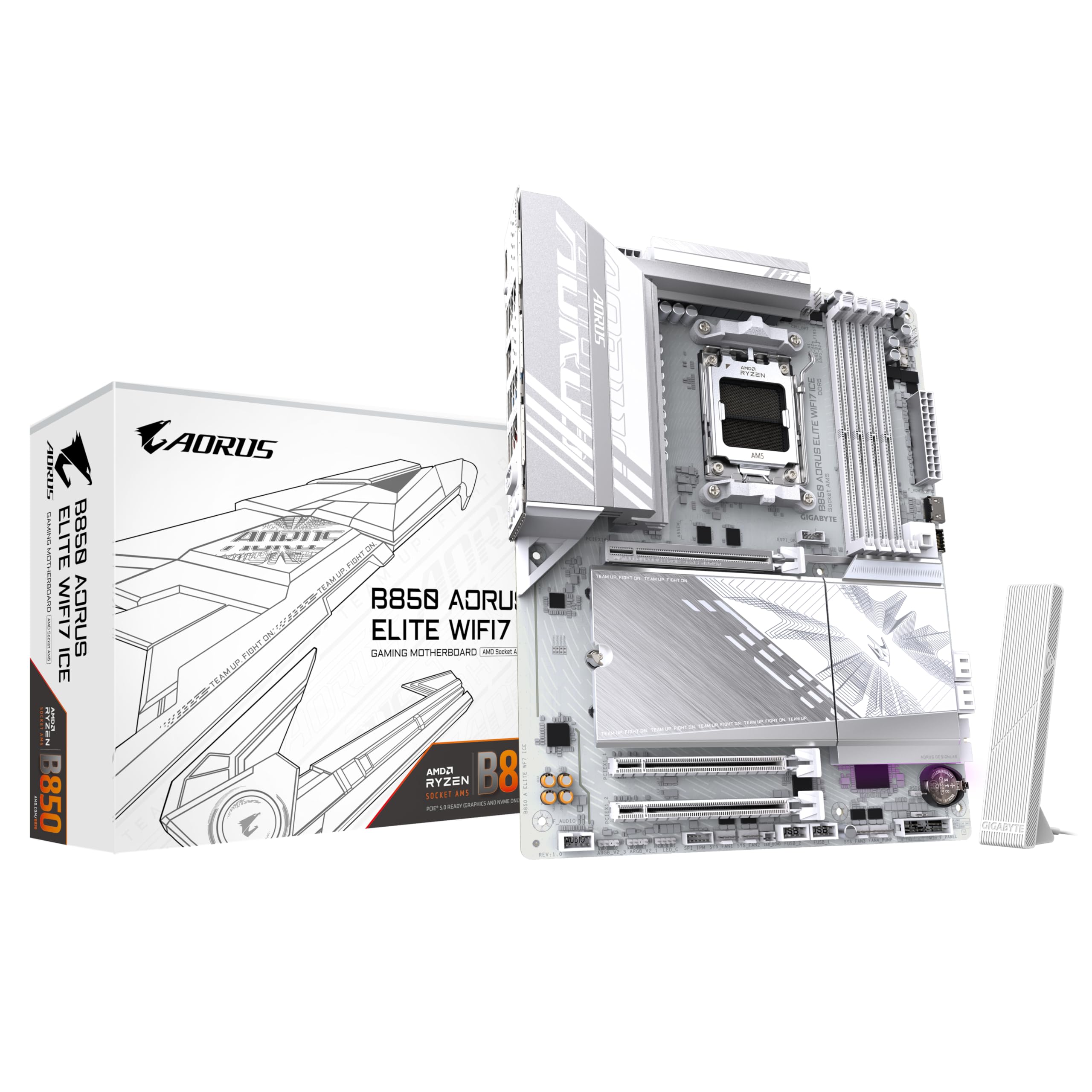
1. GIGABYTE B850 AORUS Elite WIFI7 Ice Motherboard
Eats a high-core Ryzen 9 for breakfast and still matches a white showcase build.
If you want one board that handles the whole job — a Ryzen 9, a big graphics card, fast storage, and a clean white look — this is the one to beat. Its 14+2+2 VRM (the power stages feeding your CPU) is the strongest in this group alongside the ASUS Strix, and that headroom is exactly what lets a power-hungry chip hold steady clocks. You get a PCIe 5.0 x16 graphics slot with an EZ-Latch Plus release button, so you swap a card without jabbing a screwdriver into the case. A fully covered MOSFET heatsink and an M.2 Gen5 slot round out the thermal side.
You get fast wireless without the fiddly setup: Wi-Fi 7 with an EZ-Plug antenna, so you clip the antenna on rather than thread two fragile connectors. Wired networking runs at 2.5GbE LAN (2.5 gigabits per second over an Ethernet cable), quick enough for a home NAS (network storage drive) or a fast router. Q-Flash Plus lets you update the BIOS (the board’s basic startup firmware) from a USB stick without a CPU installed, which rescues you if a newer Ryzen needs a firmware update before it will boot. The board runs four DDR5 DIMM slots (memory slots for the current RAM type), and its 2160 g weight reflects the kind of heatsink mass you feel when you lift it from the start.
Against the B650 AORUS Elite AX ICE, this board is the heavier of the two at 2160 g versus 2018 g, and that extra metal goes to the taller VRM heatsinks. The one honest caveat: at 12.01 inches wide it is a true full-size ATX board, so measure your case before you commit. Nothing about this board is compact.
What earns its spot up top
- 14+2+2 digital VRM with DrMOS stages keeps a Ryzen 9 stable
- PCIe 5.0 x16 plus an M.2 Gen5 slot give you the fastest lanes available
- Wi-Fi 7 with EZ-Plug antenna makes wireless setup a one-hand job
- Q-Flash Plus BIOS recovery works without a CPU in the socket
The part to plan around
- Full ATX width at 12.01 inches, so small cases are out
- White build means you also have to source white DDR5 to match
Reach for this if: you are building a white full-tower PC around a Ryzen 7 or Ryzen 9 and want power headroom plus Wi-Fi 7 in one board.
Look elsewhere if: your case is a compact mATX chassis — this board will not drop into it.
2. ASUS ROG Strix B850-A Motherboard
Four M.2 slots and a 192 GB memory ceiling make this the storage-first pick.
The ASUS ROG Strix B850-A is built around connectivity, and the headline is the quartet of M.2 slots. That is room for four fast SSDs before you touch a single SATA cable — a real advantage for a video editor or anyone juggling game libraries. Its 14+2+2 power stages are each rated for 80A, and the 8+8-pin ProCool connector feeds them through beefier pins than a standard plug. On the memory side it tops out at 192 GB across four DDR5 slots, which puts it well ahead of the compact GIGABYTE B850M board’s 128 GB ceiling.
ASUS packs in things a builder notices during the first hour: an integrated I/O cover, a Q-Antenna for tool-free Wi-Fi hookup, and USB 20Gbps Type-C. The AI Networking II and P tools are meant to simplify setup for someone who does not want to tune by hand. AEM
The trade-off is temperamental, not physical. Reliability and value draw split opinions in the reviews, with boot problems and BIOS access complaints showing up alongside buyers who had no trouble at all. Most owners describe a straightforward plug-and-play build with plenty of ports. If you want hands-off predictability above all else, run the BIOS update first thing. If you want four M.2 bays and a big memory ceiling, this board delivers.
Where it wins: four M.2 slots and a 192 GB DDR5 maximum give you more expansion room than any other board in this lineup.
The honest catch: the BIOS experience is the weak link — set aside time to flash it to the latest build before you assume something is broken.
Suits you when: storage capacity and a high memory ceiling matter more to you than the safest possible first boot.
Think twice if: you want to assemble and boot without any setup tinkering.
3. GIGABYTE B850M AORUS Elite WIFI6E Motherboard

A white mATX square that fits the cases full-size boards cannot enter.
The compact build is where this board lives. At 9.6 by 9.6 inches it drops into small-form-factor mATX cases that a full ATX board simply cannot enter. Compare that to the ASUS ROG Strix B850-A at 14.1 inches long and you see how much desk and case space the mATX format saves. You still get the AM5 socket for Ryzen 9000, 8000, and 7000 chips, plus 2x M.2 slots and PCIe 5.0.
Build quality is what buyers talk about moB850M AORUS Elite WIFI6E ICE.
Power comes from 12+2+1 80A DrMOS stages, and the DIY conveniences are where this board shines: a pre-mounted I/O shield, a PCIe Slot Q-Release button, BIOS FlashBack for updating without a CPU, and a flexible M.2 heatsink. Three Addressable RGB Gen 2 headers run through Aura Sync. Aura Sync runs through ASUS Armoury Crate for the lighting.
The caution here is boot behavior, not hardware. Reliability draws the most critical feedback, with booting and BIOS access complaints showing up more than once — this is a newer X870 board, and first-run BIOS updates carry more weight on a fresh platform. If you can flash the BIOS early and treat it as a platform to set up rather than a plug-and-boot deal, the white PCB and USB4 stand on their own. Buyers who already have a working PC to check the latest firmware on will be happiest.
Most useful detail: an 8-layer white PCB is a step above white-painted black boards, and USB4 at 40Gbps is the fastest port type here.
Fair warning: this is the newest platform in the lineup, and its boot reliability is the least settled — plan a BIOS update before you blame the parts.
Take this path: a white build that wants real white through the board, plus USB4 for fast external drives.
Leave it on the shelf if: you want a mature, proven platform with months of settled firmware behind it.
4. GIGABYTE B850 AORUS Elite WIFI7 ICE AMD AM5 ATX Motherboard

Three M.2 slots, Wi-Fi 7, and a 14+2+2 power design that does not blink at a heavy chip.
If you want room for a big game drive, a working drive, and a spare withouts been on the market long enough to have its quirks smoothed out, and that shows in how it behaves day to day. Build quality is what buyers highlight most, with the beautiful white design close behind. Stability and fast boot times come up repeatedly as the everyday reality. Boot behavior is the standout reason this board still sells alongside newer B850 options.
The hardware is not a throwback. Twin 12+2+2 phases ride on an 8-layer 2X copper PCB, which spreads heat and power more evenly than a basic board. You get PCIe 5.0, front and rear USB 3.2 Gen 2 Type-C, an M.2 thermal guard, and 4 DDR5 DIMM slots with Intel XMP module support. At 2018 g it is the lighter of the two full-size AORUS ICE boards next to the 2160 g B850 — not a big gap, but enough that the B850 clearly carries more heatsink metal.
Reliability draws mixed feedback, so treat this as a solid mid-tier board rather than a top-end one, and keep your expectations calibrated. Value and compatibility also get split reviews. For a Ryzen 7 build that needs to simply work, the long track record on this board is the whole pitch. It also carries the deepest price-to-track-record balance in this group.
The quiet argument for it
- Build quality leads buyer feedback, with the white finish right behind it
- 8-layer 2X copper PCB and twin 12+2+2 phases keep power and heat steady
- PCIe 5.0 plus front and rear USB 3.2 Gen 2 Type-C cover the fast lanes
Where it stays honest
- Reliability is a mixed picture rather than a guaranteed clean run
- B650 is the older chipset, so it lacks the newest platform features
My call: a safe, well-understood mid-tier board for a builder who values a long track record over the newest label.
Not for you if: you specifically want an X870 or B850 for the latest chipset features.
5. GIGABYTE X870 AORUS Elite WIFI7 Motherboard
Wi-Fi 7 versus Wi-Fi 6E
Wi-Fi 7 is the newer wireless standard and needs a recent Windows 11 build to run at full speed. Wi-Fi 6E is the previous standard and still more than fast enough for most home networks. On this list, most boards carry Wi-Fi 7 and the compact mATX board steps back to Wi-Fi 6E. If your router is older, both will perform similarly in daily use.
ATX versus mATX sizing
ATX is the full-size board standard and usually carries more slots and expansion. mATX is a smaller square that fits compact cases but trims features. Choose your case first, then match the board’s form factor — a full ATX board will not fit a case built for mATX, and an mATX board may leave empty space in a full tower.
Common Questions
Will a white AMD motherboard fit my existing Ryzen processor?
Do I need Wi-Fi 7 or is Wi-Fi 6E enough for gaming?
Will a full ATX white motherboard fit a mid-tower case?
What is the advantage of an 8-layer white PCB over a standard board?
How many M.2 slots do I really need?
Why does a reverse-connect board need a special case?
Can I update the BIOS without a processor installed?
Is Wi-Fi 7 working from the start on these boards?
What is X3D Turbo Mode and do I need a special chip?
Does a white motherboard actually look white in a case?
The Bottom Line
For most builders chasing the best white AMD motherboard, the GIGABYTE B850 AORUS Elite WIFI7 Ice is the pick that covers the most ground. Its 14+2+2 VRM (voltage regulator module — the power stages that feed your CPU) handles a high-core Ryzen, and you also get Wi-Fi 7 and a PCIe 5.0 graphics slot (the fastest current slot for a graphics card) in a full ATX frame. If you want four M.2 bays and the biggest memory ceiling, the ASUS ROG Strix B850-A earns its place. And for a compact white build in a small case, the GIGABYTE B850M AORUS Elite WIFI6E ICE fits where the full-size boards cannot. Measure your case, pick your chip, and match the board’s power design to it — that is the whole decision.
How we choose
We do not accept paid placement. Every pick is matched to a real buyer and a real use-case; we do not hands-on test units.
Sources
Specifications: manufacturer listings and product documentation. Review insights: verified customer reviews, as of November 2026. Pricing: not shown on this page (it changes often); check the current price via the retailer link.
As an Amazon Associate, Tactical Gear Guy earns from qualifying purchases. This does not affect which products we feature.