Specs are compiled from manufacturer listings and verified buyer reviews and can change over time — please confirm the key details on the product page before buying.
If your aim wanders on the final flick, the mouse in your hand may simply weigh the wrong amount for the way you move. A weighted gaming mouse lets you add or remove small metal slugs so the shell feels heavier in the back, heavier in the front, or heavier everywhere — the exact balance that keeps your crosshair steady. This guide covers eight mice that actually let you change their weight, sorted by what each one does best.
This guide is built by comparing the manufacturers’ published specifications and the patterns across verified customer reviews, so you get each pick’s real strengths and trade-offs instead of marketing spin.
You will see which shell takes six tiny weights, which one brings a thumb joystick, and which sensor pushes 26,000 DPI, all in plain numbers. By the end you will know exactly which of these deserves desk space if you want the best weighted gaming mouse setup your hand can settle into.
Top Picks


How To Choose The Best Weighted Gaming Mouse
Two numbers decide whether you enjoy a weighted mouse: how much weight you can add in grams, and whether the ballast sits where your hand wants it. Read the weight cartridge spec first, then the sensor, then the button count.
Weight range and where the slugs sit
Some mice ship with six small slugs, some with a single 10 g disc, and one gives you two differently sized ballast weights to fine-tune the front. The cartridge layout decides whether you can push the balance toward your palm or toward your fingertips. A heavier tail steadies big sweeping turns; a heavier nose keeps small corrections from overshooting.
Polling rate and what a hertz actually buys you
Polling rate is how many times per second the mouse tells your PC where it is, measured in hertz. Higher numbers mean the cursor updates more often during a fast swipe, so the path you draw lands closer to the path your hand made. Pursuing the highest figure only pays off if your monitor refreshes fast enough to show the difference.
Sensor ceiling versus sensor reality
Top DPI figures sell boxes, but most players sit well below the maximum. What matters is whether the sensor tracks cleanly at the speed you swing, and whether it holds a steady line without software smoothing. A sensor rated for high inches-per-second tracking handles a violent flick without throwing the pointer sideways.
Side-by-Side Comparison
| Model | Best For | Weight Tuning | Max DPI | Polling Rate | Amazon |
|---|---|---|---|---|---|
| Logitech G502 Lightspeed Wireless★ Best Overall | All-round wireless main mouse | Six adjustable weights | 25,600 | — | Amazon |
| Logitech G703 LIGHTSPEED WirelessBest Wireless Value | Wireless comfort with light tuning | 10 g optional weight | 25,600 | — | Amazon |
| Corsair M65 RGB Ultra WiredFastest Reports | High-refresh competitive FPS | Optional weights | 26,000 | 8,000 Hz | Amazon |
| Logitech G502 Proteus Core | Long-haul value build | Five 3.6 g weights | 12,000 | — | Amazon |
| Sharkoon Skiller SGM1 | MMO and work hybrid | Weight tuning system | 10,800 | — | Amazon |
| SteelSeries Rival 600 | Precise lift-off control | 256 center-of-gravity configs | 12,000 | — | Amazon |
| Redragon M908 Impact MMO | Side-button-heavy MMO play | Weight tuning cartridge | 12,400 | 1,000 Hz | Amazon |
| Lexip Np93 Alpha | Thumb-stick experimenters | 3.6 g and 18 g weights | 12,000 | — | Amazon |
Detailed Reviews
1. Logitech G502 Lightspeed Wireless Gaming Mouse
Our pick — 4.5+★ from 12,500+ verified ratings; the strongest balance of quality and price.
Six weights, a 25,600 DPI sensor and no cable to snag — this is the one most hands will want.
The G502 Lightspeed is the pick for anyone who wants their ballast and their freedom in the same shell. Six adjustable weights let you load the body until the mouse settles into your grip instead of skating past it. Logitech’s own design notes point to a thin-wall shell over an internal endoskeleton, which holds the shape while keeping the shell from feeling like a brick.
The HERO 25K sensor reaches 25,600 DPI, which is far past what most players need — think of DPI as how far the cursor travels per inch of hand movement. The useful part is the zero-smoothing behavior Logitech specifies: no software filtering nudging your line off the path your hand drew. Battery life runs to 60 hours, so a week of evening sessions passes before you think about the cable. It also works with Logitech’s POWERPLAY charging mat if you add one later.
Eleven programmable buttons and a dual-mode hyper-fast scroll wheel cover MMO binds and long spreadsheet scrolls in one shell. The scroll wheel’s free-spin mode is the one everyone either loves or immediately clicks back to detent mode. Owners call it their go-to gaming mouse and single out the macro keys, scroll behavior and tracking as landing where expected.
What earns the crown
- Six removable weights let you dial the balance by feel, not guesswork
- 25,600 DPI HERO sensor with no smoothing or acceleration added
- 60 hours of battery means charging is a weekly chore, not a nightly one
- 11 programmable buttons plus a hyper-fast scroll wheel for work and play
Where it asks patience
- The scroll wheel draws mixed reactions — some find it noisy and rattly in free-spin
- It is a full-size right-handed shell, so small hands and left-handers should look elsewhere
Worth it if: you want one mouse that tunes its own weight and runs cable-free through a full week of play.
Think twice if: you grip a mouse with your fingertips and prefer a small, narrow body.
2. Logitech G703 LIGHTSPEED Wireless Gaming Mouse
The lightest tuning here — one 10 g disc, rubber side grips, and a shape that disappears in your palm.
Where the G502 above carries six slugs, the G703 gives you a single 10 g optional weight. That is a smaller adjustment, but it is the right one for players who already like a light mouse and just want a touch more stability in the tail. The bare shell measures 95 g, and with the disc dropped in you feel the difference most on slow tracking shots rather than fast flicks.
The HERO 25K sensor is the same 25,600 DPI unit as the G502, with 1:1 tracking and 400+ IPS (inches per second — how fast you can swing before tracking gets messy). Battery life comes in at 35 hours of continuous play with default LIGHTSYNC RGB lighting on, against 60 hours on the G502 — so this is the pick for shorter sessions or anyone who keeps the charging cable within reach. Adding the POWERPLAY charging mat later removes battery math entirely, though that mat is a separate purchase.
Six programmable buttons with metal-spring tensioning keep the left and right clicks crisp and light under the finger. Owners describe the grip as comfortable and credit the 10 g weight for the feel, with the rubber side panels holding up over long sessions. The honest caveat is the narrower tuning range: one disc, not six.
Comfort-first tuning: rubber side grips plus a 10 g disc make this the easiest mouse here to just pick up and play, with no cartridge fiddling required.
The trade-off to weigh: 35 hours of battery against the G502’s 60 hours, and only one weight disc instead of six — fine for most, limiting if you want to reshape the balance properly.
The fit: wireless players who want a light shell with a small amount of added heft and will accept more frequent charging.
Keep looking if: you want to shift the center of gravity in meaningful steps rather than nudge it once.
3. Corsair M65 RGB Ultra Wired Gaming Mouse
An 8,000 Hz polling rate and a 26,000 DPI sensor — the spec sheet that wins on paper, and largely in hand.
This is the wired pick for anyone chasing every last reporting cycle. The M65 RGB Ultra sends your position to the PC 8,000 times a second, versus the 1,000 Hz the Redragon M908 further down this list offers. Its MARKSMAN optical sensor is rated at 26,000 DPI, ahead of the 10,800 DPI Sharkoon Skiller SGM1 further down, and it tracks at 650 IPS, so a fast arm never outruns the sensor.
Weight tuning comes as optional weights rather than a fixed cartridge, and the anodized aluminum frame gives it a stiffness that plastic shells do not have. The optical switches under the left and right click are built to keep their response over heavy use, and sensor fusion pairs a six-axis gyro with an accelerometer to hold an ultra-low lift-off distance — meaning the cursor stops moving the instant you lift the mouse to reposition.
Ergonomics draw praise for buttons that feel good under the finger and make the mouse a pleasure to use. Responsiveness splits opinion, though: some players call it amazingly responsive while others hit lag in certain setups, and that second point usually traces back to whether the system and game are actually keeping up with an 8,000 Hz report rate. It is a wired right-handed mouse with 8 buttons, so plan for a cable and a cable-management habit.
Numbers that matter: 8,000 Hz polling and 26,000 DPI put it at the front of this pack on raw specs, and the aluminum frame backs that up with real rigidity.
Honest catch: wiring in an 8,000 Hz mouse only pays off on a fast-refresh display, and the extra weight of that metal frame is the cost of the stiffness.
Point it at: competitive FPS players with a high-refresh monitor who want the fastest reporting cycle here and do not mind a cable.
Pass it over if: you play on a standard 60 Hz screen, where that polling headroom buys you very little.
4. Logitech G502 Proteus Core Tunable Gaming Mouse

Five 3.6 g slugs, a 12,000 DPI sensor, and a build owners keep running for years.
If you want to feel the weights actually change the mouse, this is the clearest demonstration on the list. Five 3.6 g slugs slot into the underside cartridge, and you choose the weight, the center of balance and the placement — heavy tail for sweeping turns, heavy nose for tight corrections. Surface tuning is the underrated feature: you calibrate the sensor to your specific mouse pad, so the tracking is matched to the cloth or hard surface you actually own.
On-the-fly DPI switching steps through up to 5 settings between 200 and 12,000, or temporarily downshifts for a sniping shot. The dual-mode hyper-fast scroll wheel gives you detented clicks for gaming and free-spin for long web pages. Eleven programmable buttons cover macro duty in whatever game wants them.
What has kept this shell in service for so long is durability and hand feel — the quality is the thing people talk about most, followed closely by how well it fits the hand. Customization and the weight system both get steady credit, and the value read is consistent: it is a lot of mouse for what it costs. The one honest note is button accessibility, which splits opinion — the side cluster sits forward enough that smaller hands have to stretch.
Why it endures: five 3.6 g weights, a surface-calibrated sensor and 11 buttons make it the most adjustable wired shell here — and buyers report years of use.
Size it up: the button layout rewards larger hands; if your grip is short, the forward side keys will feel like a reach.
Reach for it when: you want fine weight and balance control plus surface calibration from a wired shell with a long service record.
Not your mouse if: you play on a small desk with a light fingertip grip and prefer fewer, closer buttons.
5. Sharkoon Skiller SGM1 Wired Optical Gaming Mouse

Twelve programmable buttons on a 130 gram body — an MMO shell that also clocks in for work.
The SGM1 is the mouse for someone who binds everything and wants the software to keep up. Twelve programmable buttons sit under a right-handed shell, with 4-way scrolling on top, so your spreadsheet work and your raid rotation share the same hand. The weight tuning system lets you add ballast to the body, and Sharkoon ships a set of spare mouse feet and a transport bag alongside the mouse — small touches that matter if it travels between desk and bag.
The PixArt PMW3336 optical sensor runs an adjustable 800-10,800 DPI, enough for a fast-reaction playstyle without chasing the 26,000 DPI ceiling of the Corsair further up. At 130 grams with a 122 mm long body it is a substantial mouse — the kind you plant your palm on rather than push around with your fingertips. Sharkoon’s own notes pitch unpresumptuous RGB lighting that suits a desk that does not want a light show.
The real story here is the button count. Twelve programmable keys against the 6 buttons on the Lexip Np93 Alpha gives it more binding space for MMO rotations and hotbars. The trade-off is heft and a plastic enclosure that does the job without the metal-frame feel of pricier picks — nothing to complain about at this tier, but you notice the difference in hand.
The bind space: 12 programmable buttons and 4-way scrolling make it the busiest mouse here for MMO ability management.
The heft note: 130 grams and a 122 mm body reward palm grips; fingertip players will find it a lot of mouse to move.
Hands it fits: MMO players and desk workers who want a dozen binds and adjustable weight without abandoning one hand.
Where it falls short: the plastic body and 130 gram heft are a step behind the aluminum-framed Corsair if you want a lighter flicking shell.
6. SteelSeries Rival 600 Gaming Mouse

A second optical sensor just to detect lift — and 256 center-of-gravity setups behind it.
Most mice add weights and call it tuning. The Rival 600 also uses a second optical sensor to measure lift-off distance, and it can be set as low as 0.5 millimetres — picture lifting the shell a hair off the pad and the cursor stopping dead, so your reposition is invisible to the game. Its TrueMove3+ dual sensor offers 12,000 CPI (counts per inch, effectively the same idea as DPI) with 350 IPS tracking and 1-to-1 input.
The weight system is the most configurable on this list: 256 center-of-gravity configurations, letting you place ballast in the nose, the tail, or both. Split-trigger mechanical switches are rated at 60 million clicks, and silicone side grips are there for grip and durability over long sessions. The braided cable runs 2 meters, which gives you real slack from the tower to the desk.
Quality is what wins the room — the build and the sensor both earn praise that outweighs the gripes. The one that recurs is long-term reliability on the click and scroll assembly, which is worth knowing if you play for hours a day and want a shell you never think about. At 12,000 CPI it also sits well under the 26,000 DPI Corsair for raw ceiling, though almost no player runs near either figure.
Why it stands out
- 0.5 mm lift-off distance kills cursor drift when you reset your arm
- 256 center-of-gravity configurations — the finest balance control in this roundup
- 60 million click-rated mechanical switches and silicone side grips
- 2 m braided cable gives you generous slack
What to know before buying
- Long-term reliability on the right click and scroll wheel shows up as a recurring note
- 7 buttons is modest next to the 12 and 18-button MMO shells here
The best match for: players who lift and reset often and want the cursor to stay put until the mouse touches down again.
Look past it if: you need a wall of side buttons for hotbar-heavy games.
7. Redragon M908 Impact MMO Gaming Mouse
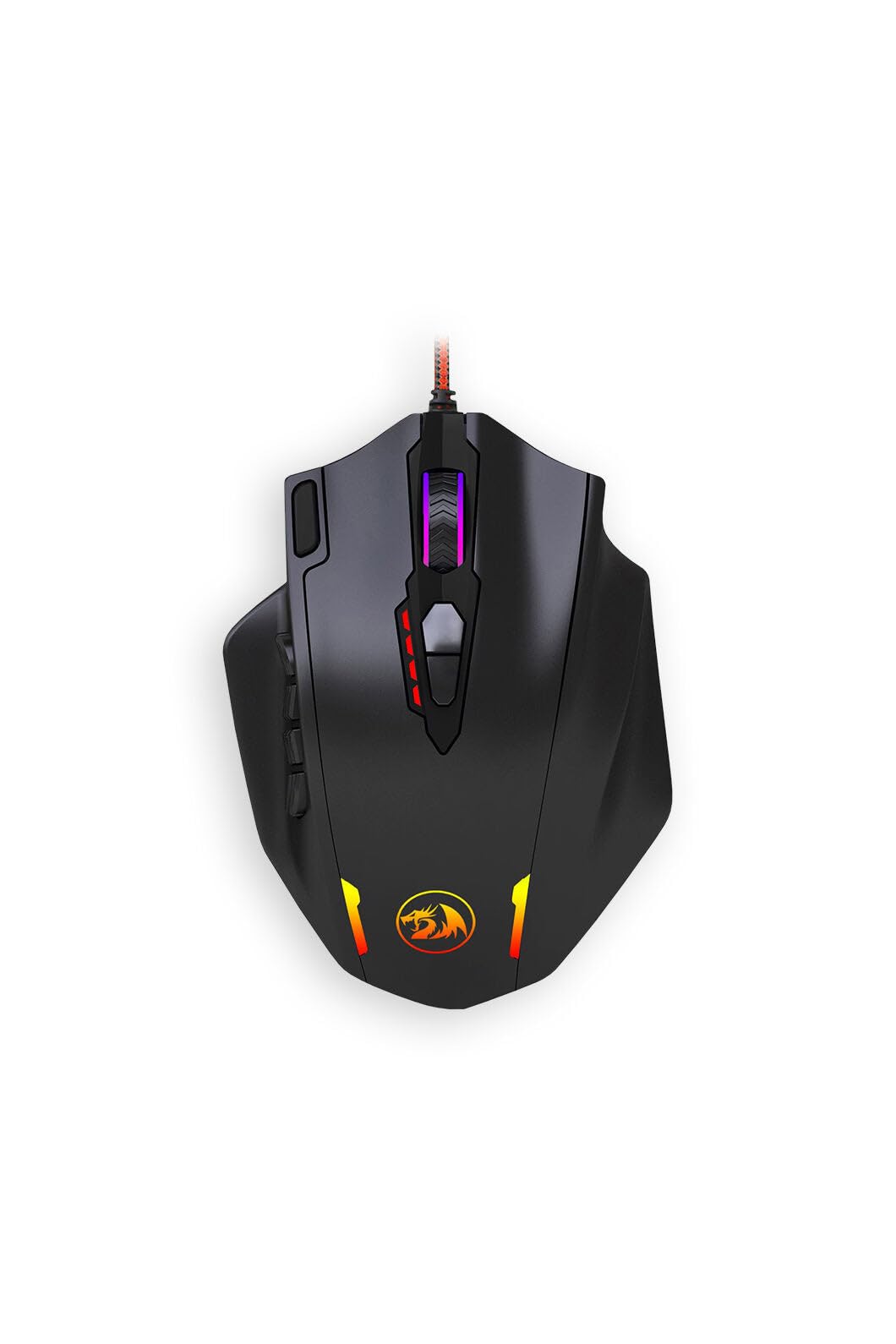
Eighteen programmable buttons and a weight cartridge — the most binds for the least outlay here.
If your MMO rotation lives on the side of your mouse, this is the shell built for it. Eighteen programmable buttons (18 out of 19 are customizable) against the 6 on the Lexip Np93 Alpha — more binding space on one hand. Twelve of those sit on the side, so your thumb covers a full hotbar without leaving the grip. The weight tuning cartridge lets you load the body to taste, and the ambidextrous hand orientation means both left and right-handed players can get on with it.
DPI is adjustable two ways. Mode 1 steps through fixed presets of 500/1000/2000/3000/6200 via the buttons, and Mode 2 lets you dial DPI freely in 100-step increments from 100 up to 12,400 through the programming software. The polling rate tops out at 1,000 Hz and is switchable across 125/250/500/1000 Hz, with 500 Hz as the default — a setting you will want to change if your monitor is fast.
The optical tracking system and metal-and-plastic enclosure keep the build honest at this tier. One thing to plan for: the software is where the fine DPI steps and macro assignments live, so budget a little setup time before your first game. It is not a plug-and-play tune, but the payoff is a huge bind set on a tuned weight body.
Binds per dollar: 12 side buttons and 18 programmable keys in total make this the value answer for hotbar-heavy play.
Set-up required: the 100-step DPI tuning and macros live in the software, and the default 500 Hz polling needs switching to 1,000 Hz by hand.
The right call for: MMO and action-RPG players who want maximum binds and a tunable weight body on a tight budget.
skip it if: you play shooters where a 12-button side cluster gets in the way of a clean grip.
8. Lexip Np93 Alpha Gaming Mouse

A thumb joystick under your grip and ceramic pads under the shell — the odd one out, deliberately.
This is the mouse for the player who wants a control nobody else offers. A second axis internal joystick sits under the thumb, letting you trigger an action without moving your hand off the mouse, and it pairs with 12 programmable macros and 6 buttons. DPI configures up to 12,000 and adjusts to the nearest step. The ceramic skates are the other headline: six ceramic pads in place of ordinary Teflon, which the maker says gives a smoother glide and longer life against friction.
Weight tuning is done with two differently sized ballast weights — 3.6 g and 18 g — which lets you push the balance harder than a single small disc. At 166 g it is the heaviest mouse on this list by a wide margin; the G703 sits at 95 g for comparison, so this is a shell you plant and steer rather than flick. The braided USB cable is built to run without added latency, and RGB lighting is customizable across 16 million colors.
The honest read is that this is a specialist tool, not a default pick. The thumb joystick takes real practice to use well in a firefight, and the 6 buttons trail the 18 on the Redragon above. Buy it because the extra axis solves a problem for you — a flight sim, a build game, an MMO where your thumb could be doing more — not because you want a conventional FPS mouse.
The one-of-a-kind bit: a thumb joystick plus ceramic skates give it a glide and control set nothing else here matches.
Weight warning: 166 g is a lot of mass to move, so fast-flick shooters will feel every gram of it.
Buy it for: the extra thumb axis and the ceramic glide, especially in sims, builders, or MMOs where a second stick earns its keep.
Leave it if: you want a light, fast flicking mouse — 166 g works against you there.
Know the Specs
Weight Tuning in Grams
A weighted gaming mouse carries a cartridge, disc or set of slugs you add or remove. The gram value of each slug tells you how fine the adjustment is: six small weights give you more steps than one heavier disc. Placement decides the center of balance — tail-heavy steadies sweeping turns, nose-heavy tightens small corrections. Match the total mass to your grip style, not to a number on the box.
Polling Rate in Hertz
Polling rate is how often the mouse reports its position to your PC each second. A higher figure means more position samples during a fast swipe, so the cursor path lands closer to the path your hand made. The payoff depends on your display’s refresh rate — on a slow screen the extra samples are largely invisible.
DPI and CPI
DPI and CPI both describe how far the cursor travels per inch of physical mouse movement. A higher ceiling lets you run a faster cursor at the same hand speed. Most players settle well below the maximum, so treat a big number as headroom, not a requirement.
Lift-Off Distance
Lift-off distance is how high you must raise the mouse before the sensor stops tracking. A lower figure — 0.5 millimetres, for instance — means the cursor stops the moment you lift, so a reposition or a re-grip does not drag your aim across the screen.
Common Questions
How much weight should I add to a gaming mouse?
Does a heavier mouse make your aim better?
What does an 8,000 Hz polling rate actually change?
Do weighted gaming mice work with a laptop?
How long does the battery last on a wireless weighted mouse?
Is a weight tuning cartridge different from removable weights?
Can a right-handed mouse be used by a left-handed player?
Will a weighted mouse work on a glass desk surface?
How many side buttons do I need for MMO play?
Does a higher DPI always mean better tracking?
The Bottom Line
For most hands, the weighted gaming mouse that gets the balance right is the Logitech G502 Lightspeed — six weights to tune, a 25,600 DPI HERO sensor that adds no smoothing, 11 buttons, and 60 hours between charges. If you want that same sensor with a lighter shell and rubber side grips, the G703 is the one to pick. And if you play on a fast-refresh monitor and want the quickest reporting cycle here, the aluminum-framed Corsair M65 RGB Ultra answers with its 8,000 Hz polling rate.
Across owner reviews, the mice people keep are the ones whose weight, balance and button layout match how they actually move, not the ones with the biggest number on the box. Pick the shell that fits your grip and your game, then tune the ballast until the mouse tracks the way your hand moves.
How we choose
We do not accept paid placement. Every pick is matched to a real buyer and a real use-case; we do not hands-on test units.
Sources
Specifications: manufacturer listings and product documentation. Review insights: verified customer reviews, as of November 2026. Pricing: not shown on this page (it changes often); check the current price via the retailer link.
As an Amazon Associate, Tactical Gear Guy earns from qualifying purchases. This does not affect which products we feature.