Specs are compiled from manufacturer listings and verified buyer reviews and can change over time — please confirm the key details on the product page before buying.
The short answer: a full-size tower needs the VIVO clamp-on mount, bolted to your desk’s side or to a stud wall. A small-form-factor box or a console gets the same job done with a slim universal bracket, using less space and less money. Three things decide whether your install works: how wide your case is, whether the bracket expects a drywall anchor or a real stud, and if you need to reach the rear ports without pulling the whole machine down.
This guide is built by comparing the manufacturers’ published specifications and the patterns across verified customer reviews, so you get each pick’s real strengths and trade-offs instead of marketing spin.
Below you’ll find nine brackets sized from slim mini-PC cradles to a fifty-pound steel frame, each matched to a real desk setup. Every pick states its weight limit and its mounting surface, so you can find the right one for your case and your wall before you drill anything into a stud. It’s a practical shortlist of the best wall mount for PC builds, mini rigs, and everything in between.
Top Picks


How To Choose The Best Wall Mount for PC
A mount is a simple piece of steel, and almost every failure you can read about comes from one of three mismatches. The case is wider than the bracket opens. The wall is hollow drywall when the bracket needed a stud. Or the frame sags because the machine sat at the top of the stated limit. Get those three right and the hardware itself rarely matters.
Measure your case width, not the box it came in
Every bracket here clamps the case’s left and right sides or straps its width, so the width is the number that decides everything. A range like 7.1″ to 11.9″ covers most custom gaming builds and standard mid-towers. A slim cradle that only opens 1.6″ to 3.8″ is built for mini PCs, NUCs, and consoles — a full tower simply will not go in.
Drywall or a stud — the weight rating changes
A stud (the timber frame behind the plasterboard) carries far more than bare drywall. One bracket here is rated to 66 lbs generally, but drops to 22 lbs when it’s fixed to drywall alone. Another states plainly that it cannot be mounted to drywall by itself. If you are renting and drilling into a stud isn’t an option, pick a bracket whose stated drywall capacity clears your case weight with room to spare.
How you reach the rear ports
Once the tower is off the floor, the back panel with your cables and USB ports becomes the awkward part. Swivel mounts fix this: a full 360-degree swivel lets you spin the case around to plug in a cable, and a 135-degree swivel gets the rear close enough to reach. Fixed strap-style brackets mean you lift the machine out or crouch down behind it.
Side-by-Side Comparison
| Model | Best For | Weight Capacity | Adjustable Width/Fit | Mount Type | Amazon |
|---|---|---|---|---|---|
| VIVO Adjustable Clamp-on PC Desk Mount★ Best Overall | Full-size custom gaming towers | 66 lbs (22 lbs on drywall) | 7.1″ to 11.9″ | Clamp-on / Wall | Amazon |
| StarTech CPUWALLMNTHeaviest Haul | Metal-case IT and workstation setups | 22 lb (10kg) | 4.8″ to 8.3″ | Wall Mount | Amazon |
| Oeveo SCM-143Strongest Steel | Heavy UPS units and big cases | 50 lbs | 10″H x 4.5″W x 12″D | Wall / Desk Side | Amazon |
| Mount-It! MI-7150 | Swivel access under a desk | 22 lbs | 3.5″ to 8″ | Under Desk / Wall | Amazon |
| HumanCentric Adjustable Mount | Compact towers, decluttered desk | 22 lbs | 3.5″ to 7.75″ | Under Desk / Wall | Amazon |
| VIVO Universal PC Wall Mount with Straps | Budget wall mounting on a stud | 22 lbs | 4.8″ to 8.3″ | Wall Mount | Amazon |
| JINGCHENGMEI Universal Bracket | UPS units and A/V components | 25 lbs | 6.0″W x 9.8″D | Wall / Desk Side | Amazon |
| Monzlteck Adjustable Wall Mount | Mini PCs, NUCs, consoles | — | 1.6″ to 3.8″ | Wall Mount | Amazon |
Detailed Reviews
1. VIVO Adjustable Clamp-on PC Desk Mount, Holds 22 lbs
Our pick — 4.5+★ from 250+ verified ratings; the strongest balance of quality and price.
The only bracket here rated to 66 lbs that also opens to 11.9″ wide for a loaded custom tower.
Most cradles cap out at 22 lbs. This VIVO frame is rated to 66 lbs when clamped to a desk or bolted to concrete or brick — enough for a loaded custom gaming tower with a big graphics card and a heavy steel case. The clamp grips the side of your desk, so the machine hangs beside the desktop instead of eating the space in front of your monitor.
Width is where this one pulls clear of the slim universal holders. It spans 7.1″ to 11.9″, and the comparison facts here put that against the 1.6″ to 3.8″ range of the Monzlteck mini-PC cradle — a huge gap in what will physically fit. The included padding protects the case’s paint from the rails, so a glossy panel does not come out scuffed.
The open frame keeps all four sides visible and lets air move across the case, which matters for a machine that runs hot. Raised side rails hold the tower without blocking a large side window. It is also built for height-adjustable standing desks — the clamp holds firm through the up and down travel, so your PC does not wobble when you raise the desk to work standing. What wins people over most is the build quality, and the setup is widely described as straightforward.
The catch is the drywall number. On bare drywall this bracket carries only 22 lbs, so a heavy tower needs a stud, concrete, or brick behind it. A handful of setups describe some sag once a big case is hung, which is your cue to respect that drywall figure and mount into something solid.
Where It Pulls Ahead
- 66-lb rating on a clamped or masonry mount for heavy custom towers
- 7.1″ to 11.9″ width range swallows large cases the narrow cradles reject
- Open frame keeps the case visible and air moving
- Holds steady when an electric standing desk goes up and down
What To Watch For
- Drywall alone drops the rating to 22 lbs
- A few builds note sag with a heavy tower, so mount into a stud
Go for this if: you have a full-size or custom-built tower and a solid stud or concrete wall to fix it to.
Think again if: your only option is hollow drywall and your case is a heavy one — that is where the 22-lb limit bites.
2. StarTech CPUWALLMNT Wall Mount
A 22-lb steel wall bracket for IT closets and metal cases, backed by five years and free lifetime tech support.
StarTech sells this one as the IT professional’s wall mount, and the details back the pitch. The metal frame is rated to 22 lb (10kg), the open frame leaves your case fully exposed, and you get a five-year backing with free lifetime multi-lingual technical support. For a small server closet or a workstation you actually maintain, that support line is the reason to pick it.
The width opens 4.8″ to 8.3″, so it takes mid-towers and slim metal cases comfortably. It is fixed rather than swiveling — no spin, no 360-degree access. That makes it the right choice for a machine you mount once and forget, not one you unplug and replug weekly.
Owners consistently report it does exactly what a wall mount should: sturdy mounting, easy installation, and no wobble once a case is fixed in place. The hardware is all in the box — the CPU mount, adjustable straps, screws, thumbscrews, and wall anchors. If your case has a metal chassis and a modest footprint, this is a quiet, reliable performer.
Why it earns its spot: the five-year backing and lifetime tech support beat what most consumer cradles offer, and the 22 lb capacity is plenty for a mid-tower.
Where it stays honest: there is no swivel, so reaching rear ports means going behind the case — pick a swivel model if you plug things in often.
Built for: a fixed workstation or closet build where reliability and support matter more than quick port access.
Pass on it if: you need to spin the case around to reach cables — this one stays put.
3. Oeveo PC Wall Mount SCM-143
A 50-lb carbon-steel side mount made in the USA, with a fixed 10″H x 4.5″W x 12″D frame.
Hanging a heavy uninterruptible power supply (a battery backup box that keeps your PC running through a power cut) or a large tower? The 50-lb weight capacity is the number that earns this one its place. It is cut from carbon steel with a black finish, and it mounts your computer vertically against the side of a wall, desk, or table. Reviewers praise the mounting quality above all — it fixes the machine flat and firm against the surface instead of dangling it.
The 10″ tall, 4.5″ wide, 12″-deep frame is a fixed shape rather than an adjustable cradle. It suits a machine that matches those proportions, and its real strength is its ability to carry substantial weight without flexing. For a server closet or a small office where a UPS and a tower both live on the wall, that combination is hard to match at this size.
Expect to pay for the steel and the American build — value complaints do show up in the reviews, and this is not the budget choice. It also comes as a multi-pack in some configurations, which is worth knowing if you plan to hang more than one device.
what separates it
- 50-lb rating handles heavy UPS units and big cases
- Carbon steel with a black finish and USA manufacturing
- Mounts vertically to a wall, desk side, or table
- Available in multi-packs for hanging several devices
Worth Knowing
- Fixed shape, not adjustable — check your case proportions
- Value complaints surface in the reviews; you pay for the steel
Reach for this if: your device is heavy, especially a UPS or a large tower, and you want it flat against a wall.
Look elsewhere if: you need an adjustable cradle for an oddly proportioned case.
4. Mount-It! CPU Under Desk Mount Bracket, 360 Degree Swivel

A 360-degree swivel brings the rear ports to the front, whether it hangs under the desk or on the wall.
A full 360-degree swivel is the whole point of this bracket. It turns the case in a complete circle, so the rear panel and its USB ports swing to the front whenever you need to plug in a drive or a cable. The frame clamps the top and bottom of the tower and adjusts from 11.8″ to 21″ in height and 3.5″ to 8″ in width, which covers most everyday towers.
It is rated to 22 lbs in high-strength steel, and sticky EVA pads (a soft foam-like material) protect both the case and the mount from scuffs. You can hang it under a desk or fix it to a wall, so a wall-mounted workstation is well within reach.
The honest note is installation. Owners split on it — some find the setup easy, others describe the fitting as tricky — because you have to get the width right before the clamps grip properly. Take the measurement before you drill and this stops being a headache.
The real win: 360-degree rotation makes rear-port access easy, and the 11.8″ to 21″ height range is generous for a mid-tower.
The honest trade: setup splits reviewers — measure your case width and height first, because a poor fit is what makes the install feel fiddly.
Ideal for: anyone who plugs into the back of their PC often and wants it to swing into reach.
Not for: a full tower wider than 8″ — it will not clamp.
5. HumanCentric Under Desk Computer Mount

A compact under-desk cradle for 3.5″ to 7.75″ wide cases, with a full 360-degree swivel.
A small desk and a floor full of cables are what this one solves: it lifts a compact tower off the floor and tucks it beneath the desktop. The frame fits cases between 12″ and 21″ tall and 3.5″ to 7.75″ wide, holding up to 22 lbs. It rotates a full 360 degrees, so the back ports come to you rather than the other way around. Felt padding dots protect the case’s finish.
Construction quality is the standout — a solid polycarbonate body that feels reassuringly built, and reviewers report it works especially well for small and compact towers. It comes with hardware for both under-desk and wall mounting, and the step-by-step manual makes getting it up straightforward.
Where the design shows its limits: the maximum width of 7.75″ is about 2 inches short for some full-size desktops, so a wider tower simply will not sit in it. A few setups also describe the hold as unsteady, which tends to track a case near the width limit. Measure first and a compact machine will sit happily here.
Why Buyers Like It
- Full 360-degree swivel for instant rear port access
- Built for compact and small towers — a snug, tidy fit
- Felt padding protects the case’s finish
- Hardware included for under-desk and wall mounting
Honest Limitations
- 7.75″ max width is roughly 2 inches short for some big desktops
- Cases near the width limit can feel unsteady
Pick this when: your tower is compact and you want it hidden under the desk with easy port access.
Steer clear if: your case is wider than 7.75″ — it will not go in this frame.
6. VIVO Universal PC Wall Mount with Straps, Holds 22 lbs

A 22-lb steel strap bracket that lifts a 4.8″ to 8.3″ wide mid-tower off the floor and onto a stud.
The pitch here is simple: lift the case off the ground, and it is out of reach of the vacuum, the foot traffic, and the dust that collects around the skirting. It is a steel bracket with adjustable straps for extra security, holding cases up to 10 kg (roughly 22 lbs), and it fits a width of 4.8″ to 8.3″ so most mid-towers go in.
At 4.9 pounds it is lighter than the HumanCentric mount, which tips the scales at 6.3 pounds — a small difference on the wall but worth knowing if you are lifting it overhead. The steel construction is the thing it gets right; mounting one to a stud produces a firm, no-nonsense hold that frees up floor space. It also keeps going through hardware upgrades, since the width range outlasts most case swaps.
The limitation is stated plainly by the maker: it cannot be mounted to drywall alone. It needs a stud. And be honest about the case size — the straps are on the short side and a full tower can be a fight, so this one is happiest with a standard mid-tower.
Where It Wins
- Frees floor space and keeps the case clear of dust
- Steel bracket rated to 22 lbs with adjustable straps
- Lighter than most swivel mounts at 4.9 pounds
- Width range outlasts most case upgrades
Where It Falls Short
- Cannot be mounted to drywall alone — needs a stud
- Short straps make a full tower a tight fit
Go with it if: you have a mid-tower and a stud to fix it to, and want the case off the floor for good.
Best avoid it if: you have only drywall to mount to, or your case is a full tower.
7. JINGCHENGMEI Universal Computer Wall Mount Bracket
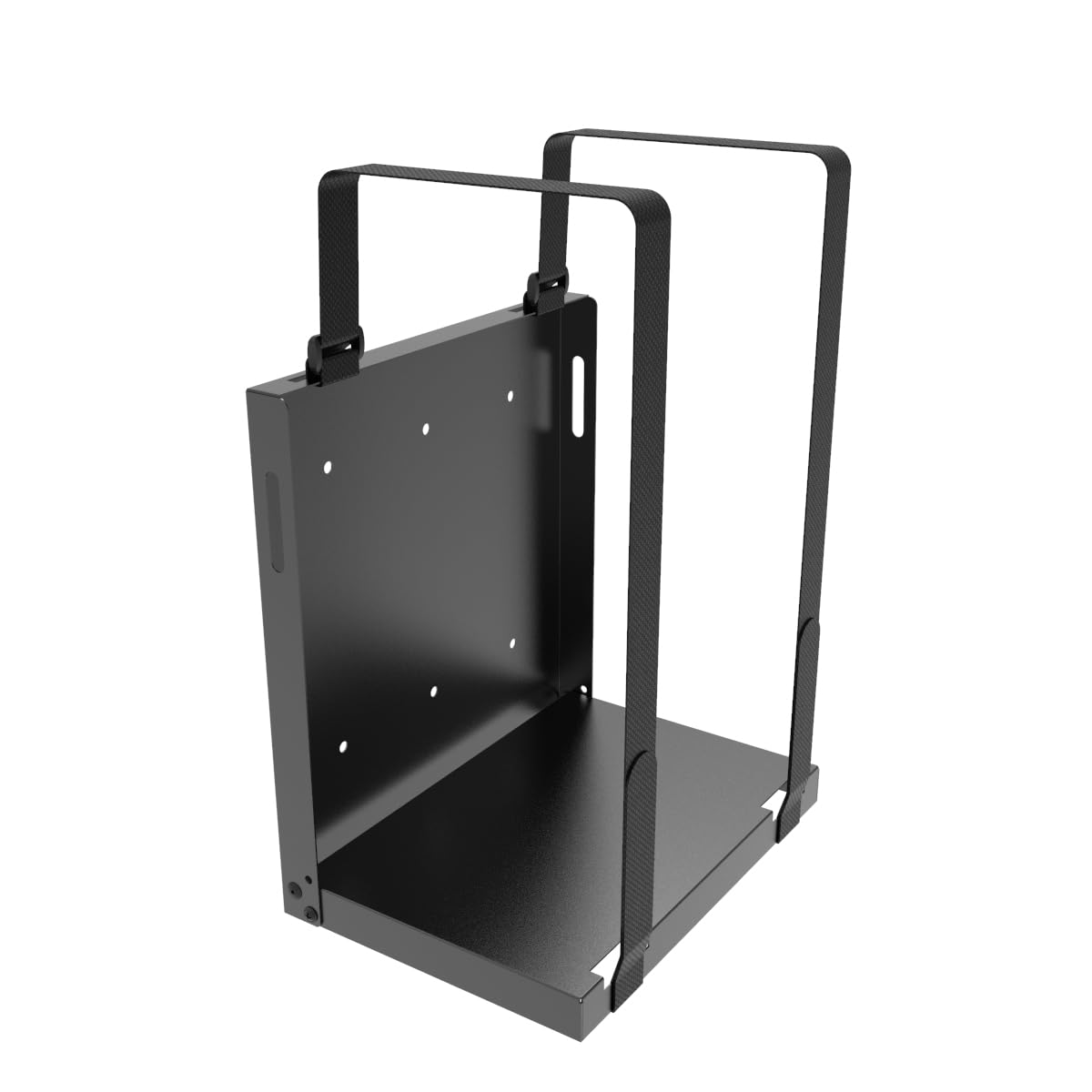
A 25-lb steel cradle with a 6.0″W x 9.8″D interior that arrives nearly assembled and folds flat.
The versatility is the draw. It fits desktop computers, PCs, CPUs, UPS units, computer towers, workstations, and A/V components, and the listing also names HP, Dell, Acer, Apple, APC, Tripp Lite, CyberPower, Xbox, and Lenovo gear. The 25 lb capacity with two 31″ straps covers the kind of everyday machines most people actually run.
Almost the entire mount arrives assembled — you unfold it and drive the included screws into drywall or wood studs. Usage space for the computer is 9.8″ high by 6.0″ wide by 9.8″ deep, so measure a slim or mid-size case before you commit. The whole point is getting the device off the floor and out of range of feet and dust.
Its main limit is that fixed internal size: it is generous in depth but only 6.0″ wide inside, which suits a UPS or a slim case better than a fat tower. For the money it is a workmanlike, foldable frame that does one job well.
The value read: a 25-lb, foldable steel bracket that arrives nearly assembled — a quick win for a UPS or slim case.
The fit note: only 6.0″ wide inside, so a wide tower will not sit in it — this is for slim cases and power boxes.
Built for: a slim case, UPS, or A/V box you want off the floor with minimal setup fuss.
Not ideal for: a wide mid-tower that needs more than 6.0″ of internal width.
8. Monzlteck Electronic Device Wall Mount
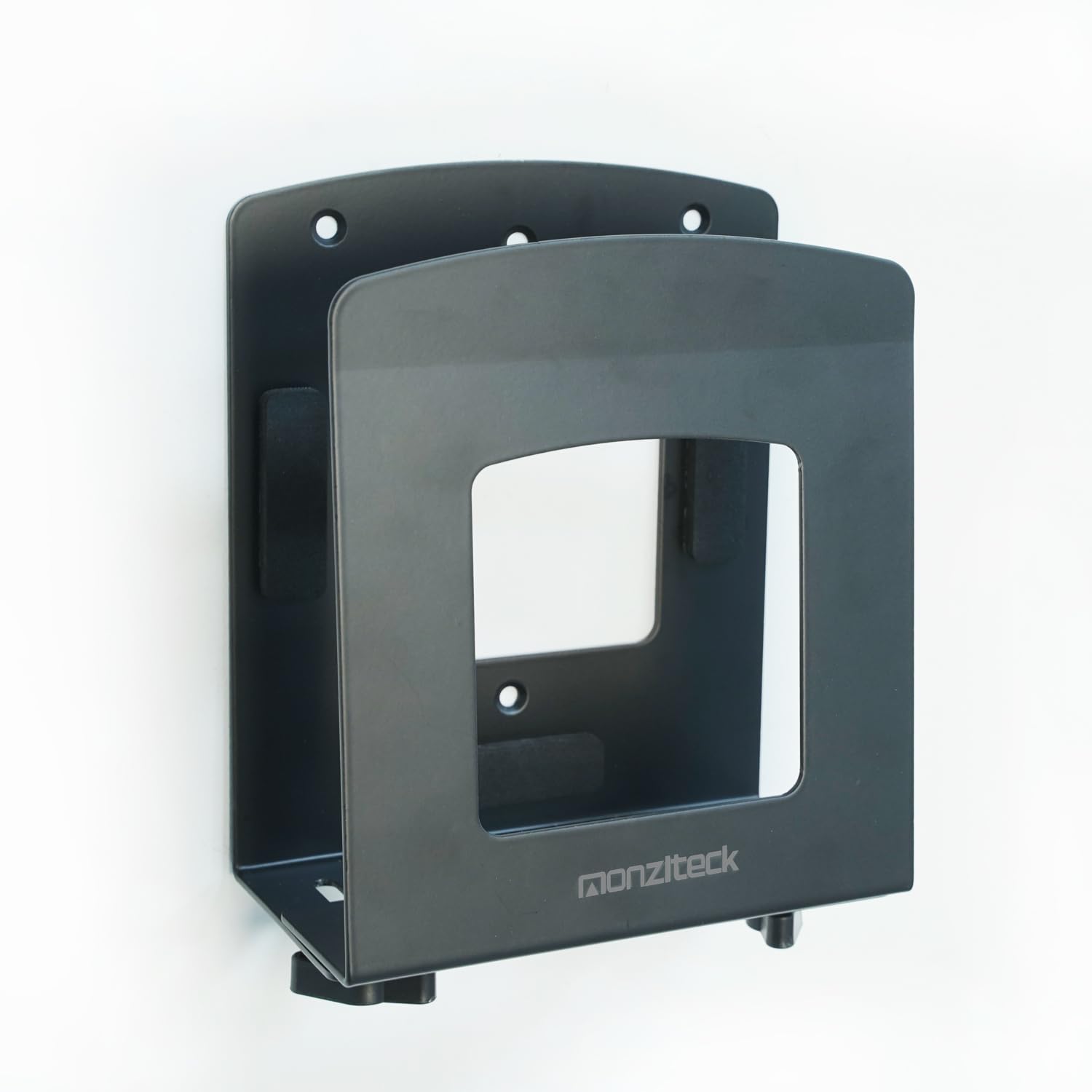
The slim steel cradle for mini PCs, NUCs, and consoles — and almost nothing bigger.
If your computer is a small-form-factor box or a gaming console rather than a tower, this is the bracket built for it. It fits anything less than 3.8″ thick and spans 1.6″ to 3.8″ in width, covering NUCs, OptiPlex-style minis, mini PCs, small form-factor desktops, UPS boxes, and consoles like the Xbox 360, Xbox One, and PS4. For reference, the VIVO clamp-on mount is built for cases 7.1″ to 11.9″ wide — this is a very different class of device.
The steel frame has EVA pads (a soft, rubbery foam) inside to keep your device unmarked, and the install is a simple walk-through with the included hardware: mount, four screws, four drywall anchors, and a manual. You can put it on a wall or behind a TV, choosing the position that suits the room.
The obvious catch is size — a standard mid-tower is way outside the 3.8″ limit, so this is no good for a gaming rig. But for the small machines it targets, it frees a surprising amount of shelf space.
Choose it if: your machine is a mini PC, NUC, or console that needs to be off the desk and behind a screen.
Not for: a mid-tower or full tower — the 3.8″ width ceiling rules it out.
Know the Specs
Weight Capacity and Drywall Limits
The capacity figure tells you the maximum load the bracket is built to hold, usually given in pounds or kilograms. What most buyers miss is that this number can change with the mounting surface. A bracket rated to 66 lbs on a desk clamp or masonry may drop to 22 lbs on bare drywall, because plasterboard alone simply will not carry the same load. Always check the drywall number specifically, and mount into a stud where you can.
Adjustable Width and Height
The width range is the size window your case has to fit inside — for example 7.1″ to 11.9″ on a wide cradle, or 1.6″ to 3.8″ on a slim mini-PC holder. Height works the same way on swivel mounts, with ranges like 11.5″ to 20.5″. Measure your case across and top-to-bottom before you buy, and give it a little room so the clamps and padding seat properly.
Common Questions
Can I mount a PC to drywall without a stud?
How do I measure my PC case for a wall mount?
Will a full tower case fit a universal PC wall mount?
What does a 360-degree swivel do that a fixed mount cannot?
Is an under-desk mount better than a wall mount for a tower?
Can I use a console or mini PC holder for a desktop tower?
Do these wall mounts work with a standing desk?
What is included in the box with these mounts?
Can I mount more than one device with a single bracket?
The Bottom Line
For most people, the wall mount for pc winner is the VIVO Adjustable Clamp-on PC Desk Mount. Its 66-lb capacity and 7.1″ to 11.9″ width range cover the full-size and custom towers that most other cradles reject. Want to spin the tower to reach the rear ports? Grab the Mount-It! CPU Under Desk Mount and its full 360-degree swivel. For a mini PC or console, reach for the Monzlteck Adjustable Wall Mount — but match its 1.6″ to 3.8″ width to your device first.
How we choose
We do not accept paid placement. Every pick is matched to a real buyer and a real use-case; we do not hands-on test units.
Sources
Specifications: manufacturer listings and product documentation. Review insights: verified customer reviews, as of November 2026. Pricing: not shown on this page (it changes often); check the current price via the retailer link.
As an Amazon Associate, Tactical Gear Guy earns from qualifying purchases. This does not affect which products we feature.