Specs are compiled from manufacturer listings and verified buyer reviews and can change over time — please confirm the key details on the product page before buying.
You want a desk phone that makes calls sound like the person is sitting across from you, and you do not want to discover at 8 a.m. that it needs a power brick you never bought. The short answer: if you want the most reliable all-rounder for a normal office desk, pick the Grandstream GXP2135 — it has 8 lines, 4 SIP accounts (the login slots that connect your phone to your VoIP provider) and a full-duplex speakerphone that lets both people talk at once. But the right phone for you depends on one thing above all: whether your desk is wired for Power over Ethernet, the technology that sends power and internet data down a single network cable. Almost every model here skips the power adapter, and that surprises a lot of buyers.
This guide is built by comparing the manufacturers’ published specifications and the patterns across verified customer reviews, so you get each pick’s real strengths and trade-offs instead of marketing spin.
A business phone is only as good as the network behind it and the cabling under your desk. The picks below run from a basic two-line desk set to a touchscreen executive console, so you can match the hardware to the desk before you buy. That is exactly how to judge the best VoIP Telephone Hardware — by ports, power and provisioning, not by looks.
Top Picks

How To Choose The Best VoIP Telephone Hardware
Start with your network, not the phone. Almost every desk set in this list expects to be powered from the network switch through its Ethernet cable — a standard called 802.3af PoE. If your switch does not push power down the cable, you will need to buy a separate adapter, and several of these phones plainly do not ship with one.
Count your lines and SIP accounts before anything else
A SIP account is a single registration with your VoIP provider — it is what makes the phone ring on a given number. A line key is a button on the phone you press to take a call on that number. A receptionist juggling several numbers needs more of both; a single-desk home office usually needs two. Buy too few and you are short of buttons every day, so match the account count to how many separate numbers you actually answer.
Wired or cordless: pick for where you stand
Wired desk phones give you a fixed spot and a sturdy handset. Cordless systems use DECT, a dedicated short-range radio link, so you can walk the floor and keep the call. A warehouse or a large open office often needs the cordless route; a fixed reception desk rarely does. Both styles here register to the same kind of VoIP system, so the choice is about feet, not plumbing.
Provisioning matters as much as the hardware
Provisioning is the auto-setup that pulls your provider’s settings onto the phone. Some phones provision cleanly from a provider’s admin portal; others need more manual work. If your IT person is doing the install, a phone that auto-provisions saves hours. If you are doing it yourself, look for a model that is easy to configure on a computer dashboard.
Side-by-Side Comparison
| Model | Best For | Lines | SIP Accounts | Display | Amazon |
|---|---|---|---|---|---|
| Grandstream GXP2135★ Best Overall | A busy desk that needs lots of buttons | 8 | 4 | 2.8-inch color | Amazon |
| Yealink T31GSimple Starter | A simple two-line home or small office desk | — | 2 | 2.3-inch graphical | Amazon |
| Poly VVX 411Reception Ready | Reception desks needing many line keys | 12 | — | 3.5-inch color | Amazon |
| Yealink W70B | Covering a floor with cordless handsets | — | 10 | — | Amazon |
| Grandstream GXP2170 | Heavy call volume with many shared lines | 12 | 6 | 4.3-inch color | Amazon |
| Yealink W73P | Roaming staff needing a cordless handset | — | 10 | 1.8-inch color | Amazon |
| Poly Edge E350 | Accessible setups and Wi-Fi offices | 8 line keys (up to 32) | — | 3.5-inch color | Amazon |
| Yealink T57W | Executives with a heavy call load | — | 16 | 7-inch touch color | Amazon |
Detailed Reviews
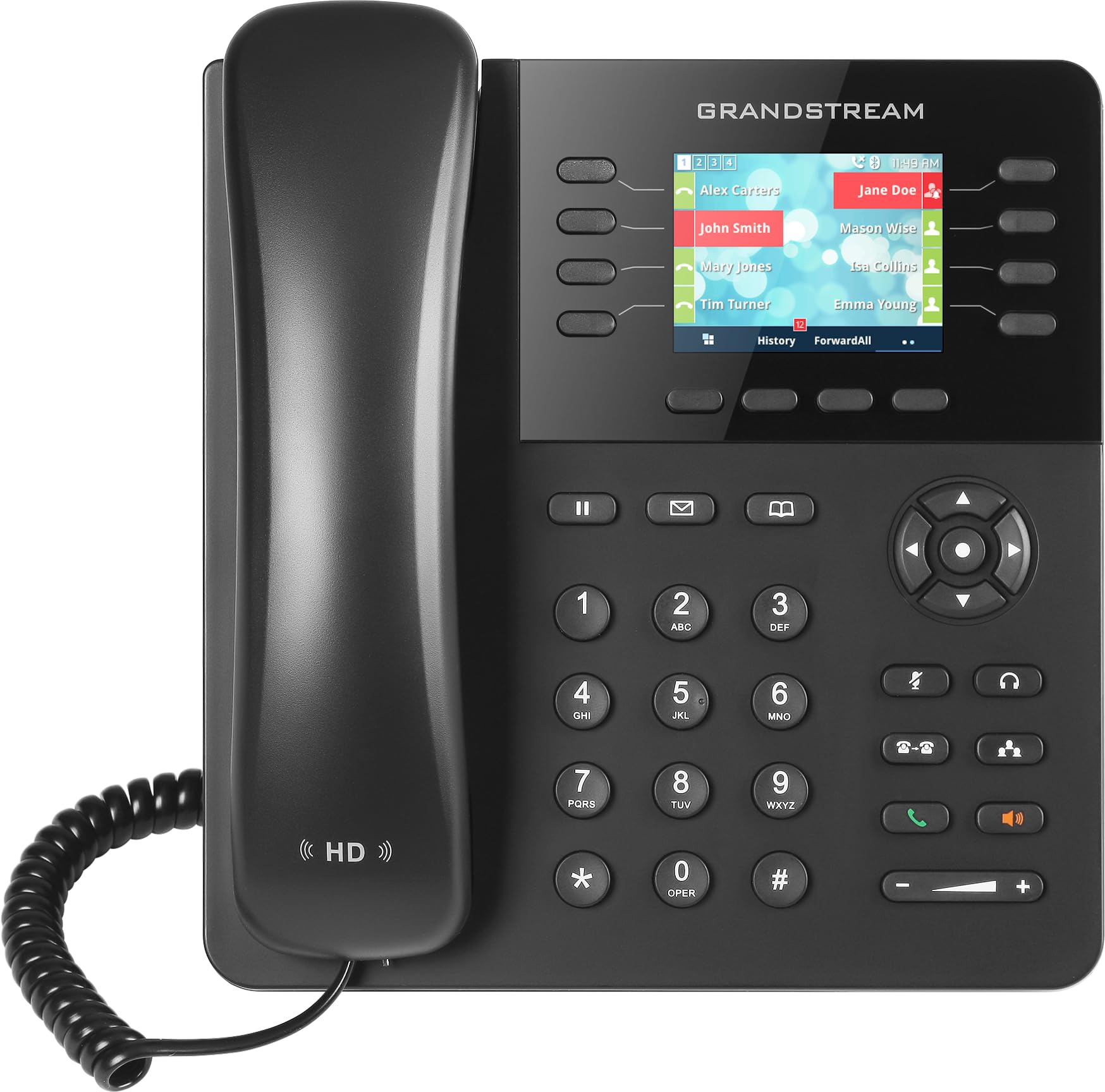
1. Grandstream GXP2135 IP Phone | 8 Lines, 4 SIP Accounts
Our pick — 4.5+★ from 250+ verified ratings; the strongest balance of quality and price.
The desk phone that gives a small office more buttons than it knows what to do with.
With 8 lines, 4 SIP accounts and 32 programmable BLF/speed-dial keys, this is the phone you give the person who answers for four people at once. Each BLF key (a button that lights up when a colleague is on a call) lets you see at a glance who is busy, so you stop interrupting people. It sits at 1.12 kg, a sturdy desk weight that stays put when you punch a key. For a small front desk or a shared admin station, it does the job of a much more expensive set.
The count of 32 keys is the standout: it beats the Poly VVX 411 for button room and it is a good deal simpler to buy than a console that needs add-on modules. Compared with the Poly Edge E350’s 8 line keys, you get considerably more programmable keys in one unit. Audio arrives in HD over both the handset and the speakerphone, and the speakerphone is full duplex — meaning both people can talk and be heard at once instead of taking turns. A built-in Bluetooth radio lets you pair a headset or phone for your contact book and calendar. All of it runs over two auto-sensing Gigabit ports with PoE built in.
The honest catch is the screen. At 2.8 inches it is small, and some users find the text hard to read at a glance. The ringer options are also limited, and if you need a fifth or sixth SIP account this phone simply is not the one — the 4-account cap is the ceiling. Configuration is easier on a computer dashboard than on the phone itself, so plan to set it up once from your desk and leave it alone.
What wins people over
- 32 programmable BLF/speed-dial keys give a reception desk real button room
- Full duplex speakerphone so both callers can talk naturally
- Built-in Bluetooth for headset and phone pairing
- Dual auto-sensing Gigabit ports with PoE onboard
Where it asks for patience
- The 2.8-inch display reads small and some find it hard to see
- Ringer choices are limited
- Four SIP accounts is the hard stop
Built for: the admin who juggles several extensions and wants the whole team visible as light-up keys.
Think twice if: you need more than four SIP accounts or a large, easy-read screen.
2. Yealink T31G IP Phone, 2 VoIP Accounts
Two accounts, one backlit screen, zero fuss for a single desk that just needs to ring.
If your desk answers one or two numbers and nothing else, the T31G does exactly that without clutter. It holds up to 2 SIP accounts and shows them on a 2.3-inch 132×64-pixel LCD with a backlight, so you can read caller info in a dim office. Dual-port Gigabit Ethernet lets you plug the phone into the wall and your computer into the phone, keeping one cable run for both. Power comes over the same cable through 802.3af PoE.
Compare its account count to the W73P’s 10 SIP accounts and the gap is plain: this is the small-scale option. The T31G is the desk set for the one-person office or the person who simply needs a reliable handset that connects to a hosted provider. Yealink HD Voice keeps the call audio clear, and a 5-way conference lets a handful of people join one call without a bridge service.
The thing to know before you order: the power adapter is not included, so the phone expects its power from a PoE switch. That is normal in commercial installs, but a home DSL or fiber router usually does not supply it — check your switch or plan for an adapter. Yealink lists a 2-year spare-part window for the T31G, so plan on replacing it sooner than the longer-supported models here.
The value read: a clean, honest two-line desk phone for a modest workstation, with Gigabit ports that keep the rest of your desk fast.
The setup note: plan the power source before the phone arrives, and confirm your switch pushes PoE.
Go here if: you answer one or two numbers and want a tidy, backlit desk phone.
Not the fit if: you need a pile of line keys or a color display.
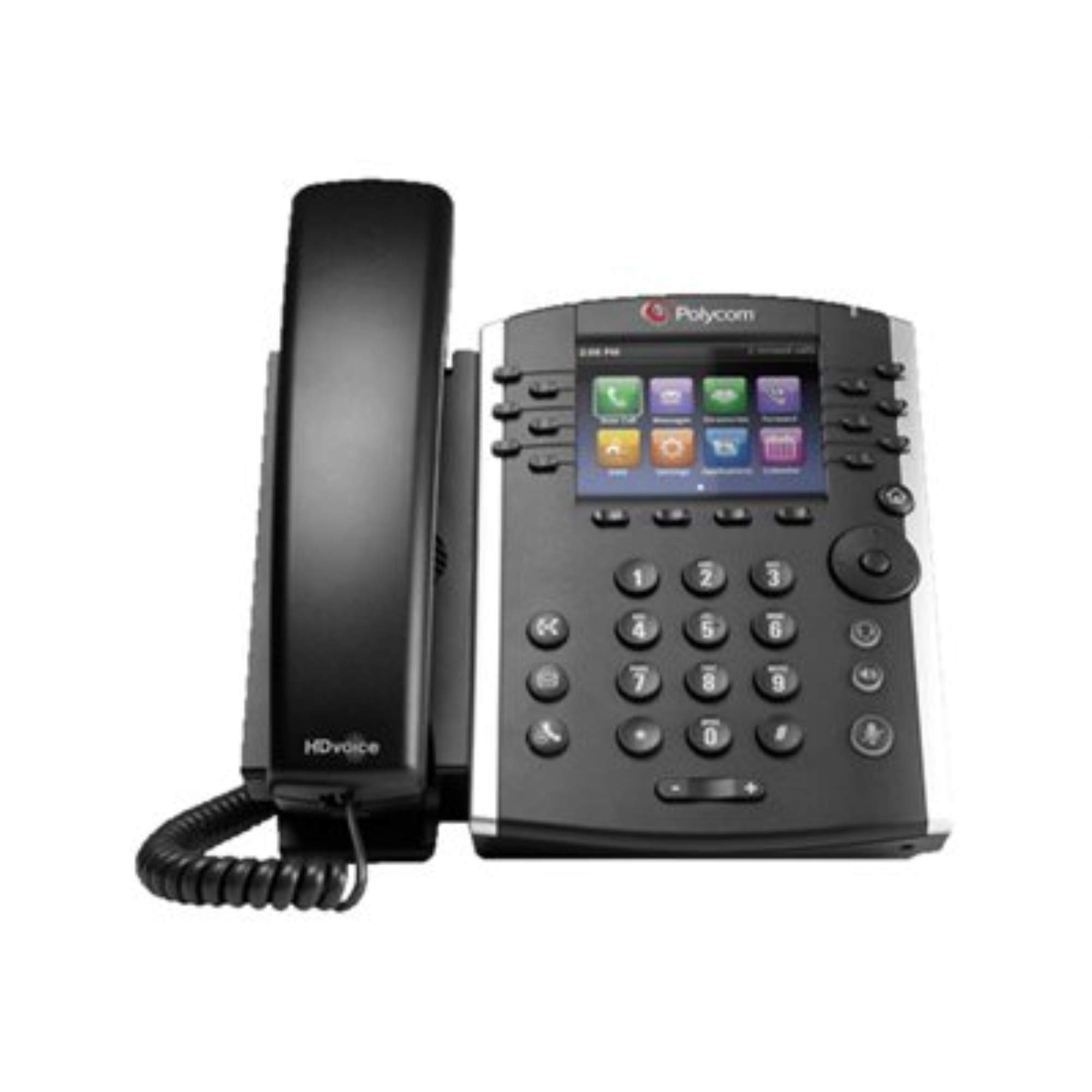
3. Plantronics Poly VVX 411 12-Line VOIP Business Phone
Twelve line keys and a 3.5-inch color screen for the person who answers every call.
This is built for a reception desk where one person fields calls on a dozen numbers. The 12 line keys can carry your own lines plus autodial or contact keys, so a colleague’s extension is one button away. Four context-sensitive soft keys change with the screen to surface transfer, conference and call park right when you need them, which cuts the button hunt mid-call.
Poly HD Voice pairs with Poly Acoustic Fence, which filters background noise on the handset so callers hear less of the room. A full duplex speakerphone uses Acoustic Clarity Technology to keep the back-and-forth natural. The display is a backlit 3.5-inch color panel, larger than the GXP2135’s 2.8-inch screen, so names and status are easier to read across a desk. Two high-speed 10/100/1000 Ethernet ports with an integrated switch let you daisy-chain a computer through the phone, and PoE cuts the desktop cable clutter.
Headset users get RJ9 and Electronic Hook Switch support, or a USB headset whose call, mute and volume controls sync back to the phone. Network-wise, it works across VoIP, PSTN and ISDN environments, though some note the feature integration is tighter on other brands when running FreePBX. The most-discussed gripe is power — no AC adapter is in the box, and the phone expects PoE, so confirm your switch before it shows up.
The big draw: 12 line keys plus a 3.5-inch color screen make this the natural reception console.
Sort out first: the missing power adapter has tripped up more than a few buyers — you need PoE or your own adapter.
Reach for this if: a front desk needs a long row of line keys and an easy-to-read color screen.
Look elsewhere if: you are setting up on a network that cannot deliver PoE power.
4. Yealink W70B DECT IP Base Station

A compact hub that puts up to ten cordless handsets on one VoIP system.
The base unit itself is small — 0.99 x 3.94 x 5.12 inches, so it tucks onto a shelf or a network cabinet without eating desk space. That is where this pick lives: it is the brain that registers up to 10 DECT cordless handsets (the walk-around phones) and handles up to 10 SIP accounts, with up to 20 simultaneous calls. For a shop floor or a two-story office, one base can cover a surprising amount of ground.
Compare those 10 SIP accounts to the T31G’s 2, and the base-station role is clear: this unit is shared infrastructure, not a single person’s phone. A Noise Reduction System with FNR (Flexible Noise Reduction) cleans up voice pickup, and Opus audio coding holds call quality when the network gets busy. It also handles TLS and SRTP security encryption to keep the call signaling and audio protected.
Notice what is missing: no handset. This is the base station only, so you pair it with compatible Yealink cordless handsets using the listed lineup. If you already have those, this is a clean way to add cordless coverage. If you do not, check the list of supported handsets first — buying the base alone leaves you with nothing to hold.
The practical upside
- Up to 10 DECT handsets and 10 SIP accounts on one base
- Noise Reduction System with FNR for cleaner calls
- TLS and SRTP security encryption
- Compact metal base fits in a cabinet
Where to check twice
- It is a base only — no handset or keypad included
- You must buy compatible Yealink handsets separately
Suits: an office that already owns Yealink cordless handsets and wants more coverage.
Pair it right: confirm your handset model is on the supported list before you commit.
5. Grandstream GXP2170 IP Phone | 12 Lines, 6 SIP Accounts

Twelve lines, a 4.3-inch screen and 48 on-screen keys for the call-heavy desk.
The 4.3-inch (480×272) color LCD is the first thing you notice, and it is what makes 48 digitally customizable BLF/speed-dial keys usable in the first place. On that larger screen you can actually see the status of 48 extensions at once. The GXP2170 supports 12 lines and 6 SIP accounts and holds a 5-way voice conference, so a supervisor can run a small huddle right off the phone.
Drop 48 keys next to the GXP2135’s 32 and you see why this is the heavier-duty pick. The GXP2135 caps at 4 SIP accounts; this one gives you 6. The screen is bigger too — 4.3 inches here against the GXP2135’s 2.8 inches. If the desk needs to reach 160 contacts, it supports up to four GXP2200EXT modules, an expansion add-on, for even more buttons. Dual Gigabit ports with integrated PoE keep it on a single cable, and the alloy steel enclosure gives it a sense of solidity.
Configuration is where opinions split. Some find this phone very easy to set up; others need more time, and a few describe it as a mixed bag. A recurring note is that it can freeze now and then and need a reboot, so keep that in mind if the phone runs a critical line. It plays best with FreePBX servers and Grandstream’s own UCM appliances.
Why it earns a spot: few desk phones show this many active extension keys at a glance, and the 4.3-inch screen is easy to scan.
Be ready for: a steeper learning curve for some, and the occasional reboot.
Best for: a call-heavy desk that needs a big display and dozens of programmable keys.
Skip if: you want plug-and-play simplicity for one or two lines.
6. Yealink W73P DECT Cordless IP Phone System

A cordless base and handset in one box, ready for a wireless office floor.
Here the base and the handset come together — the W70B base paired with the W73H handset. You get up to 10 DECT cordless handsets and up to 10 SIP accounts, and up to 20 simultaneous calls. The W73H handset is rated for up to 35 hours of talk time and 400 hours of standby, so it lasts a full shift off the charger. That combination of one box, a handset and long talk time is why the W73P is the more complete cordless pick.
The display is the small screen here: 1.8-inch 128 x 160 TFT color, well below the GXP2170’s 4.3-inch panel, so this is for voice mobility, not for seeing a wall of extension status. A Noise Reduction System and FNR (Flexible Noise Reduction) keep speech clear, and Opus audio coding helps when the radio signal is weaker. In a big building the DECT link is what lets you walk a warehouse floor and stay connected.
Setup is generally straightforward and the base is compatible with older and newer Yealink handset models. The screen is small, so glancing at it takes a moment compared with a desktop color panel. It is also a cordless system, which means chargers to place and batteries to keep topped up — a bit more housekeeping than a wired set.
Perfect when: staff move around the building and a handset in a pocket beats a tethered desk set.
The one caution: the 1.8-inch screen is small, so this is a voice-first phone, not a status board.
7. Poly Edge E350 IP Desk Phone

Built for people who need bigger fonts, spoken menus and Wi-Fi from the start.
The E350 stands apart for accessibility: it offers text-to-speech, screen color adjustments for color blindness, and bigger font settings. That makes it a thoughtful desk phone for someone who struggles with small labels or low contrast. It carries 8 line keys supporting up to 32 lines, features and contacts, so the button capacity is generous for a general office desk. The 3.5-inch color display keeps the essentials front and center.
Poly Acoustic Fence cuts background noise on the handset and wired headset, while Poly NoiseBlockAI does the same for the speakerphone. Integrated Bluetooth lets you pair your mobile phone or a headset without extra hardware. Included Wi-Fi means it can install in a home office or a hard-to-cable spot without a network run, which is a genuine convenience.
The catch is power. This phone runs on Power over Ethernet, and a power cord is not in the box — several buyers were surprised by that. If your setup has no PoE switch, plan to supply your own adapter before the phone arrives so you are not stuck at the first step.
Standout strengths
- Text-to-speech, color-blindness screen modes and bigger fonts
- 8 line keys supporting up to 32 lines, features and contacts
- Wi-Fi included for hard-to-cable desks
- Acoustic Fence and NoiseBlockAI for cleaner audio
What to plan for
- No power cord in the box — it relies on PoE
- You may need to buy a power adapter for a non-PoE desk
Choose it for: an accessible desk setup where spoken menus and bigger fonts matter.
Get the adapter ready: confirm your power source first, since no cord ships in the box.
8. Yealink T57W IP Phone, 16 VoIP Accounts

A 7-inch adjustable touchscreen with 16 SIP accounts for the busiest manager desk.
This is the top-end desk phone on the list for an executive with a heavy call load. The 7-inch 800×480-pixel color touchscreen is fully adjustable, so you tilt it to your eye and tap through menu options. It carries 16 SIP accounts and 29 touch keys, plus a USB port for call recording or a wireless USB headset. Few phones here offer this much screen and account room in one unit.
Next to the GXP2170’s 4.3-inch panel, the T57W’s 7-inch touchscreen is the larger display by a wide margin. Yealink HD Voice with Acoustic Shield keeps speech clear, and you can connect over 802.11ac Wi-Fi or dual-port Gigabit Ethernet with 802.3af PoE. A headset is a natural companion here, and many owners pair one for hands-free calling.
Across the reviews, the voice coming through it is a consistent point of praise, and so is the simple menu system once you are in. The friction is on the setup side and the power side. A few units arrive without a power cord, so if your setup lacks PoE you will need to supply an adapter. Provisioning can smooth out with the right admin console, but the initial setup varies by setup — one buyer found the first-run experience disappointing.
The centerpiece: a 7-inch touchscreen and 16 SIP accounts put this in executive-class territory.
Before you buy: get your PoE or power adapter sorted, since no power cord is included.
Ideal for: a manager’s desk that wants a big touchscreen and lots of accounts.
Check the power: the adapter is not included, so a PoE switch or your own power brick is a must.
Know the Specs
SIP accounts and line keys
A SIP account is a registration slot with your provider — one phone line, in effect. A line key is the physical button that picks up that line. More accounts let the same phone handle several separate providers or numbers, which matters for a shared desk; a home office often needs only two. Count how many numbers you actually answer, then match it to the account count.
PoE and power adapters
PoE (Power over Ethernet) delivers electricity and data on one network cable, so you skip the wall brick. Several phones here support 802.3af PoE but do not ship with an adapter. If your network switch supplies PoE, plug the phone straight into the cable. If not, you will need a separate adapter, so check before you order — it is the single most common surprise with business phones.
Common Questions
Does a VoIP desk phone work with my existing internet?
Do these phones need a separate power adapter?
What is the difference between SIP accounts and line keys?
Can a cordless DECT phone work with my hosted VoIP system?
Is a color touchscreen better for a busy reception desk?
Will a business VoIP phone work at home?
How many SIP accounts do I need for a small office?
Do these phones have a speakerphone for conference calls?
Can I connect a headset to a VoIP desk phone?
What does DECT mean on a cordless VoIP phone?
The Bottom Line
For most office desks, the voip telephone hardware winner is the Grandstream GXP2135 because it balances 8 lines, 4 SIP accounts and 32 programmable keys without the premium outlay. If your priority is a big touchscreen and plenty of accounts, the Yealink T57W gives you a 7-inch adjustable panel and 16 SIP accounts. And if staff move around the building, the Yealink W73P cordless system keeps them reachable with up to 35 hours of talk time. Just confirm your PoE switch before any of these lands, because several skip the power adapter by design.
How we choose
We do not accept paid placement. Every pick is matched to a real buyer and a real use-case; we do not hands-on test units.
Sources
Specifications: manufacturer listings and product documentation. Review insights: verified customer reviews, as of November 2026. Pricing: not shown on this page (it changes often); check the current price via the retailer link.
As an Amazon Associate, Tactical Gear Guy earns from qualifying purchases. This does not affect which products we feature.