Specs are compiled from manufacturer listings and verified buyer reviews and can change over time — please confirm the key details on the product page before buying.
If your office phone bill keeps climbing while your staff juggles cell phones and a shared handset at the front counter, the fix is not a more expensive carrier — it is a VoIP small business phone system that routes every call over your internet connection. The picks below cover the two halves of that job: a control unit (often called a PBX, the box that manages extensions and call routing) and the handsets or video phones your team actually picks up. Buying one without the other is the most common mistake in this category.
This guide is built by comparing the manufacturers’ published specifications and the patterns across verified customer reviews, so you get each pick’s real strengths and trade-offs instead of marketing spin.
The list starts with the strongest overall control unit, then adds cordless and desk phones that register with it, and ends with a video phone for front-desk teams that meet clients face to face. Below are spec-by-spec comparisons of the best VoIP small business phone systems, sorted by what each one does best.
Top Picks


How To Choose The Best VoIP Small Business Phone Systems
A small business phone system is really two purchases stacked into one: the controller that decides where a call goes, and the phones your team talks into. Get the controller right and any SIP handset registers with it. Get it wrong and you are stuck paying a monthly per-seat bill you did not plan for.
Know the difference between the box and the handsets
An IP PBX is the brain — it holds the extensions, ring groups, voicemail and call routing. The handsets are the endpoints that register with it. Products like the Grandstream UCM6301 and UCM6304A are brains; the Yealink W73P and W76P are handsets-plus-base combos that work with a controller or a hosted provider. Match the controller’s user capacity to your headcount before you buy a single handset.
Count your ports before anything else
FXO ports (the jacks that accept a traditional outside line) and FXS ports (the jacks that feed a legacy analog device like a fax machine or door phone) are fixed at the factory. The UCM6301 has 1 FXO and 1 FXS; the UCM6304A has 4 of each. If you plan to keep a landline as failover, the FXO count is your hard limit.
Decide if you need a corded desk phone or a cordless one
A warehouse, salon floor or kitchen has people moving all day — a DECT cordless handset such as those in the Yealink W73P and W76P bundles makes more sense than asking staff to sprint back to a desk. A reception desk or a manager’s office usually wants a corded phone with a screen that shows all lines at once, like the Cisco 7861 or Grandstream GXV3380.
Check the codec and network fit
Opus is a voice codec — a way of compressing voice so it travels efficiently over your connection. It sounds noticeably fuller than older narrowband codecs, and several picks here support it. Pair that with Gigabit ports and PoE+ (Power over Ethernet, which sends electricity down the network cable so the phone needs no separate power brick) and your install becomes a single cable per phone.
Side-by-Side Comparison
| Model | Best For | User Capacity | Ports / Lines | Form Factor | Amazon |
|---|---|---|---|---|---|
| Grandstream UCM6301★ Best Overall | Best overall control unit | Up to 3000 users, 450 concurrent calls | 1 FXO, 1 FXS, 3 Gigabit RJ45 with PoE+ | Desktop / wall-mount | Amazon |
| Yealink W73PBest for the Floor | Cordless handset for the shop floor | Up to 10 handsets, 10 SIP accounts | 1 base station, 1 handset included | Cordless DECT | Amazon |
| Grandstream UCM6302A | No monthly per-seat fees | 500 users | 2 FXO, 2 FXS, 3 Gigabit RJ45 with PoE+ | Desktop / wall-mount | Amazon |
| Yealink W76P Bundle | Two-handset bundle for a small office | Up to 10 handsets, 10 VoIP accounts | 1 base station, 2 handsets included | Cordless DECT | Amazon |
| Cisco CP-7861-K9 | Multi-line reception desk | 16 lines | 2 RJ45, Class 1 PoE | Corded desk phone | Amazon |
| Grandstream GXV3380 | Front desk video meetings | 16 lines / SIP accounts | Dual Gigabit, 802.11ac Wi-Fi, HDMI-In/Out | Corded video phone | Amazon |
Detailed Reviews
1. Grandstream UCM6301 IP PBX
Our pick — 4.5+★ from 90+ verified ratings; the strongest balance of quality and price.
The small box that lets three thousand people share one phone system
Most small businesses never outgrow the number this controller can handle: up to 3000 users and up to 450 concurrent calls (the count of people who can be on a call at the exact same moment). If you run a five-person shop, you will never touch those ceilings. If you add a second location in three years, you still will not need a new box.
Setup is the part that wins people over. Zero-configuration provisioning means Grandstream SIP endpoints find the controller and register themselves once you plug them in — no typing server addresses into each handset. It also carries a full conferencing and meetings platform that reaches desktop, the Wave app, and SIP endpoints, so a customer call can become a three-way meeting without extra hardware.
The honest catch is the front-door count. One FXO port means one traditional outside line, so if you want a landline plus a backup landline, this unit is full at one. The UCM6304A further down carries four. Physically this is the lightest controller on the list at 1.32 pounds — compare that to the GXV3380 video phone at 4 pounds and you see how much of a phone is actually handset and screen, not controller.
Security is built in rather than bolted on: secure boot, a unique certificate, and a random default password on first boot. There are three Gigabit auto-sensing RJ45 network ports with integrated PoE+ and a built-in NAT router, so it can sit between your modem and your switch and still power phones down the cable. An automated NAT firewall traversal service handles remote staff dialing in. It also supports the Full-Band Opus voice codec for clearer audio and H.264/H.263/H.263+/H.265/VP8 video codecs.
Where it pulls ahead
- Headroom for up to 3000 users and 450 concurrent calls leaves room for a growing team
- Zero-configuration provisioning means Grandstream SIP phones register without manual setup
- Built-in conferencing and meetings platform with Wave app access across desktop, Android, iOS, Chrome and Firefox
- Three Gigabit ports with PoE+ and a built-in NAT router simplify the whole install
- API access for CRM and PMS integrations keeps your business tools connected
What to weigh first
- Only 1 FXO port, so your traditional landline options are limited to one line
- Needs a Grandstream-compatible SIP setup to get the advertised provisioning benefits
- The lighter 1.32-pound build is a plastic desktop unit, not a rack appliance
Reach for this if: you want one controller that handles extensions, voicemail, conferencing and remote staff without a monthly per-seat plan.
Look elsewhere if: you need more than a single traditional phone line wired in — the UCM6304A has four FXO ports.
2. Yealink W73P DECT Cordless IP Phone System
A wireless handset that outlasts a double shift without hunting for a cradle
You get 35 hours of talk time and up to 400 hours on standby, both in ideal conditions, so the phone is ready when a call comes in — not blinking red on a charger someone forgot to dock. That makes it a fit for a restaurant manager, a warehouse foreman, or anyone who is only at a desk for a few minutes a shift.
DECT is the wireless standard here, and it is not the same as Wi-Fi — it uses its own dedicated band, so calls do not stutter when the office network gets busy. One base supports up to 10 cordless handsets and 10 SIP accounts, with up to 20 simultaneous calls. Start with the one handset in the box and add more handsets to the same base as your team grows.
What owners consistently talk about is the build feel and how well it slots into existing phone setups. The handset pairs with W60B, W70B, W80B and W90B DECT bases, which means if you already run a Yealink base, a spare handset is a drop-in rather than a new system. The base is also reported to work with a Zoom Phone setup, which is a useful thing to know if your business line runs through a hosted service rather than a controller.
The 1.8-inch 128 x 160 color screen is the compromise. It is readable and the menu is straightforward, but it does not display a lot of text at once, so long contact names in the directory will scroll. That is a screen-size trade for the cordless freedom, not a defect. Noise Reduction System and FNR (Flexible Noise Reduction) help keep speech clear in a noisy space, and Opus support matches the voice codec on the Grandstream controllers above.
Screen over specs: the 1.8″ 128 x 160 TFT color display is small; keep directory names short and the menu stays quick to navigate.
Grows without a new base: adding a second or third handset to the same W70B base avoids buying a whole new system as staff grows.
The clear pick when: your team walks and talks — a shop floor, a kitchen, a clinic corridor — and needs one handset that survives a full day unplugged.
Pass on it if: you need a big screen for directory browsing or a front-desk phone that shows eight lines at a glance.
3. Grandstream UCM6302A Audio IP PBX

Two phone lines in, five hundred extensions out, zero per-seat billing
The pitch here is written plainly in the product description: no monthly per-seat fees, an all-inclusive telephone system. For a business used to paying a hosted provider a fixed amount per employee per month, that is a different cost structure entirely — you buy the box once and it holds up to 500 users.
Compared to the UCM6301 at position 1, this version doubles the outside-line capacity: 2 FXO ports and 2 FXS ports instead of one of each. That extra FXO is the difference between a single landline and a landline plus a second outside line or a failover circuit. The desktop-to-wall-mount form works the same way, and it weighs 2.5 pounds.
What it does not do is video conferencing — the listing calls this an audio IP PBX with no video conferencing, which is the main thing separating it from the UCM6301 and the UCM6304A. If your conference room needs video, look at the other two Grandstream controllers. If your calls are voice and instant messaging, this is the middle-sized option that sits between them on both port count and user count.
Instant messaging, audio conferencing and web meetings are all built in, reachable from computers, mobile devices and SIP endpoints. The free Wave app handles voice and IM from desktops, web, and Android or iOS. On the network side: three Gigabit auto-sensing RJ45 ports with PoE+, a NAT router, automated NAT firewall traversal, and the same security package — secure boot, a unique certificate, a random default password. An API opens the door to CRM and PMS integrations.
Where the value lands: the no-monthly-fee structure paired with 500-user capacity is the reason to pick this one over a hosted service for a team that plans to stay put.
One limitation to note: audio only — no video conferencing, so an office that hosts video client calls should step up to the UCM6301 or UCM6304A.
Built for: the front office that wants two real phone lines, a voicemail and conferencing system, and no recurring per-seat charge.
Wrong fit if: your team regularly needs face-to-face video calls — this unit deliberately leaves video out.
4. Yealink W76P IP Phone Bundle

One base station, two handsets, two people reachable at once
The W76P bundle ships with a W70B base station and two W56H handsets, which is the practical answer for a small office that needs two people covered without buying two separate systems. The base still scales to 10 DECT handsets and 10 VoIP accounts, and it handles up to 20 simultaneous calls — so the second handset in the box is a starting point, not the ceiling.
The 2.4-inch 240 x 320 color display is noticeably larger and sharper than the 1.8-inch screen on the W73P above, which matters if staff actually browse a directory or read caller names at a glance. The 3-way conference capability is also on the spec sheet, so a reception handset can pull a manager into a live call without transferring.
Here is the fair warning. Buyers report mixed results on reliability and sound quality — some setups work exactly as advertised, and some have trouble hearing clearly or never settle in. Test the pair before rolling it out to a whole office, and buy from a seller with an easy return if your first unit misbehaves. It is compatible with PSTN (the traditional copper phone network), ISDN (an older digital phone line) and VoIP services, so it will slot into most existing phone setups.
What’s actually in the box: a W70B base plus two W56H handsets means two people are covered from the first day, and the base still takes 10 handsets total.
Honest read on feedback: some units work flawlessly, others have sound or reliability trouble — treat this as a first-order-and-test pick rather than a blind rollout.
Start here when: two handsets from the start is the simplest way to cover a small office without buying a base and handset separately.
Measure twice if: you need guaranteed sound quality on the first install — test one unit before ordering for the whole team.
5. Cisco CP-7861-K9= 7861 Voip Phone, Black
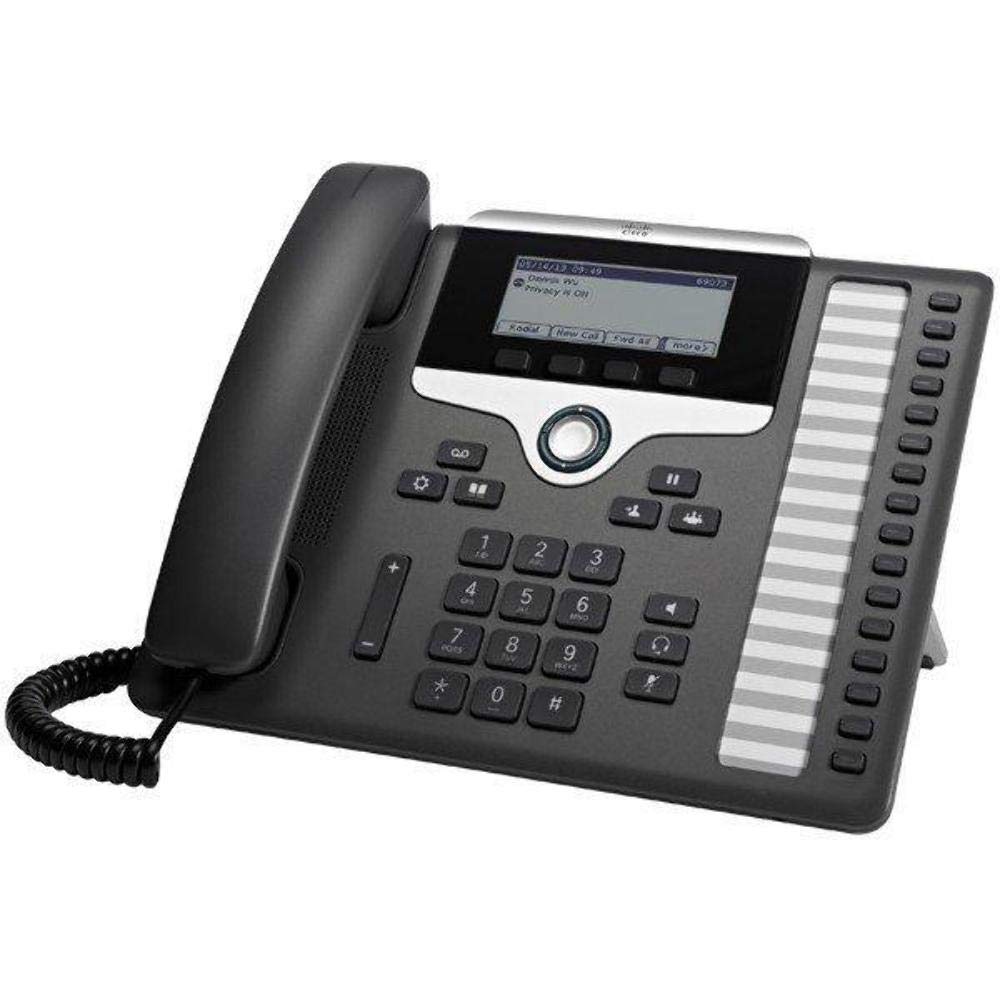
The desk phone built for the person who answers a dozen lines a day
Sixteen lines is the number that decides this pick. A manager or an administrative assistant who lives on the phone needs every line visible at once, and that is what the 7861 was built for. The fixed function keys put service, messaging, directory, hold/resume, transfer and conference within one touch — no menu diving mid-call.
Programmability is the second thing that makes it useful: line keys can be set up as directory numbers or as features like speed dialing. That flexibility is how one desk phone covers both a receptionist’s extensions and a manager’s favorites. Network connection is Class 1 PoE through two RJ45 ports, so it powers from the switch and passes a connection through to a computer.
Where the 7861 shows its age is the network port speed and the ecosystem: it is a 10/100BASE-T phone, not Gigabit like the Grandstream controllers in this list. It is also physically the biggest of the desk units here at 13.6 x 9.4 x 2.8 inches, compared to the GXV3380 at 8 x 5 x 11 inches, so measure the desk footprint. The 1-year limited hardware warranty is on the short side for a phone meant to sit on a desk for years.
Built for the busiest desk: with sixteen visible lines and one-touch hold, transfer and conference, this is the phone for the person fielding every call rather than a shared handset.
The size and speed trade: the largest and slowest-network desk phone in the group at 10/100BASE-T — pair it with a desk that has the room.
Ideal for: a reception or admin desk that needs sixteen lines at a glance and hardware keys instead of a menu.
Think twice if: you are building on Gigabit switching — this phone’s 10/100BASE-T port will be the slow point on that cable run.
6. Grandstream GXV3380 VOIP Video Phone for Android

An Android desk phone that lets a client see who they are talking to
The 8-inch 1280×800 capacitive touch screen turns a phone call into a face-to-face conversation, and the 2-megapixel camera ships with a privacy shutter so the lens is covered when it does not need to be. That shutter is a small detail that matters in a reception area where staff want to control when the camera is live.
Android 7.0 open up a different way of working — the phone runs apps, and with 16 lines or SIP accounts it can hold multiple extensions. Dual Gigabit ports with PoE/PoE+ mean one cable for power and data, while integrated dual-band 802.11ac Wi-Fi and Bluetooth 4.2 give you a wireless option when cabling a desk is awkward. HDMI-In is for remote screen sharing; HDMI-Out, USB and Micro-SD round out the connections.
Video and voice both get serious treatment: 3-way local conferencing with 1080p30 H.264 video, and 48KHz full-band audio via Opus for calls where every word matters. The build is often the first thing people comment on — it feels rock solid in the hand, and that matches its 4-pound weight, which is heavier than the lightest controller here. Responsiveness is the mixed part of the story: the touch screen and call response are praised when they work, and a smaller share of feedback finds it can lag.
The video feature that earns it: 1080p30 H.264 video, a 2-megapixel camera with privacy shutter, and 48KHz full-band Opus audio make this the front-desk pick for businesses that meet clients face to face.
The trade to plan around: touch-response speed is the part of the experience that varies — test it in your workflow before making it the only phone on the desk.
Built for: a reception area or clinic front desk where video calls and screen sharing with clients are part of the job.
Not the phone for: a busy warehouse or production floor — the touch-centric Android interface and 4-pound build want a desk, not a pocket.
Know the Specs
Users and Concurrent Calls
User count is the number of extensions the controller can register; concurrent calls is how many live conversations can happen at once. The UCM6301 lists up to 3000 users and 450 concurrent calls, while the UCM6302A lists 500 users and the UCM6304A lists 1000 users. For a small office, the concurrent call figure is the one that matters day to day — it tells you whether everyone can be on the phone at once during a busy hour.
FXO and FXS Ports
An FXO port accepts a traditional outside phone line from your carrier, and an FXS port feeds a legacy analog device such as a fax machine or a door phone. Ports are fixed at the factory, so the count decides your ceiling. The UCM6301 and UCM6302A each offer 1 or 2 FXO/FXS pairings, while the UCM6304A carries 4 of each. If you plan to keep a landline as backup, check the FXO count before you buy.
DECT and Handset Scaling
DECT is a dedicated wireless standard for cordless office handsets and is separate from Wi-Fi, so calls do not share bandwidth with your staff’s laptops. The Yealink W73P and W76P base stations each support up to 10 DECT cordless handsets and 10 SIP accounts. That means a small office can start with one or two handsets and add more without replacing the base.
Codecs: Opus and Full-Band Audio
A codec compresses voice so it travels efficiently over the network. Opus is a full-band codec that carries a wider range of sound than older narrowband codecs, which is why the Grandstream controllers and Yealink handsets list it. The GXV3380 adds 48KHz full-band audio for video calls. In plain terms, a call over Opus tends to sound more natural and less thin than one over an older codec.
Common Questions
Can I use a Grandstream UCM6301 with Yealink handsets?
How many phone lines does the UCM6301 support on the traditional side?
Do I need a desk phone if my team already has a VoIP app on their cell phones?
What is the difference between FXO and FXS ports on a small business phone system?
Will the Yealink W73P handset work with an older W60B base?
How far does a DECT cordless handset reach from its base?
Does the Grandstream GXV3380 need a separate power adapter?
Can I run a fax machine on a VoIP small business phone system?
Is the Cisco 7861 harder to set up than a Grandstream controller?
The Bottom Line
The best all-around controller here is the Grandstream UCM6301: 3000 users, 450 concurrent calls, built-in conferencing, the Wave app and a NAT router in a 1.32-pound desktop box. If two traditional lines and no video conferencing fit your setup, the Grandstream UCM6302A gets you the same no-monthly-fee build at 500 users with 2 FXO and 2 FXS ports. For a team that is always on the move, add the Yealink W73P — its 35-hour talk time and 10-handset scaling turn a desk system into one that follows staff around the floor.
Pick the front desk carefully too: if clients meet your staff face to face, the Grandstream GXV3380 brings 1080p30 video and 48KHz full-band audio to the desk. Where video is not needed, the Cisco 7861 gives a receptionist sixteen lines with one-touch transfer and conference. Whatever controller you choose, buy a handset for each person who answers calls — the system is only as good as the phones registered to it.
How we choose
We do not accept paid placement. Every pick is matched to a real buyer and a real use-case; we do not hands-on test units.
Sources
Specifications: manufacturer listings and product documentation. Review insights: verified customer reviews, as of November 2026. Pricing: not shown on this page (it changes often); check the current price via the retailer link.
As an Amazon Associate, Tactical Gear Guy earns from qualifying purchases. This does not affect which products we feature.