Specs are compiled from manufacturer listings and verified buyer reviews and can change over time — please confirm the key details on the product page before buying.
Two things decide whether a vinyl sticker maker works for you: how wide it cuts and how well it holds your material flat. Get those wrong and you will spend evenings peeling vinyl off a crumpled backing sheet instead of decorating anything. Every machine below is a real electronic vinyl cutter, so it slices sheets or rolls into decals and stickers rather than printing labels — and each one is matched to a different kind of buyer.
This guide is built by comparing the manufacturers’ published specifications and the patterns across verified customer reviews, so you get each pick’s real strengths and trade-offs instead of marketing spin.
You will see which cutters suit a kitchen-table beginner, which ones handle a full 12-inch sheet in one pass, and where each machine quietly asks more of you than the listing admits. The crowd favorite here — 4.5+ stars across 900+ owners — is a Silhouette, and its 15-inch cut width and electrostatic mat show why.
Top Picks
How To Choose The Best Vinyl Sticker Maker
The first question is not which brand you like — it is what size sticker you want to peel off the machine without hand-splicing it together. A narrow cutter finishes small die-cut stickers beautifully but forces you to tile anything larger. A wide one eats a full sheet of US Letter cardstock or a whole vinyl roll, which matters the moment you move from party favors to a run of door signs.
Cutting width versus mat size
Cutting width is the widest strip of material the blade can reach, and mat size is the sheet it sits on. They are not the same number. A machine advertising a 15-inch cut still needs a mat at least that wide to hold the vinyl. If you plan on standard US Letter sheets, a cutter rated for 8.5 inches keeps the whole project in one pass, while a smaller one asks you to split the artwork.
How the material stays flat
Thin adhesive vinyl lifts, curls, and catches under a moving blade. Some machines use an electrostatic mat (a surface that grips with static, not glue) that holds a sheet up to 0.5mm thick flat without any tacky adhesive. Others rely on a low-tack cutting mat (a sticky sheet you peel the vinyl off) or matless “smart” vinyl that feeds straight from the roll. Each choice changes your setup time — and how often you replace a mat that has lost its grip.
Software and design access
This is where the daily frustration lives. Some cutters ship with desktop Studio software and a paid design store, others lean on a phone app with built-in AI that turns a typed or spoken sentence into a cut-ready design. If you already own artwork in SVG or PNG format, check that your machine imports those files directly. If you have never designed anything, an AI-first app saves a long learning curve.
Side-by-Side Comparison
| Model | Best For | Cut Width | Material Surface | Connection | Amazon |
|---|---|---|---|---|---|
| Silhouette Cameo 5 Alpha Plus★ Best Overall | Large single-pass decals | 15 in | 15 in x 16 ft | Studio software | Amazon |
| Cricut Maker 4 Beginner BundleBest for Beginners | First-time crafters | — | 144 sq in | Bluetooth | Amazon |
| Cricut Maker 4 Digital BundleMost Versatile | Mixed materials and volume | — | 270.25 sq in | Design Space app | Amazon |
| Silhouette Cameo 5 Alpha | Quiet studio cutting | 12 in | 12 in x 24 in | Studio software | Amazon |
| VEVOR Vinyl Cutting Machine | Budget 12-inch cutting | 12 in | 144 sq in | USB, Bluetooth, USB drive | Amazon |
| Likcut S41 | US Letter print-then-cut | 8.5 in | 8.5 x 11 in | USB-C, Bluetooth 5.0 | Amazon |
| Likcut S501 | Tight desks and beginners | 4.5 in | 180 sq in | Bluetooth 5.0, USB 2.0 | Amazon |
Detailed Reviews
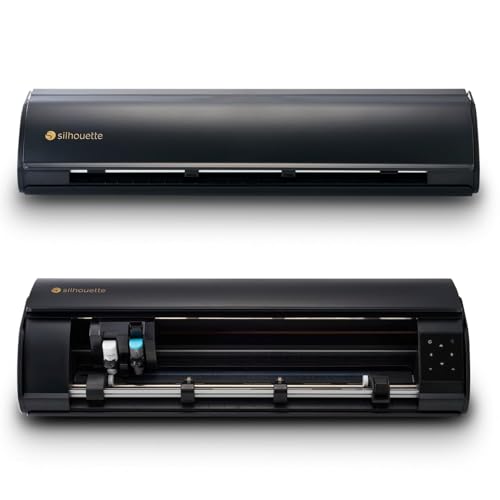
1. Silhouette Cameo 5 Alpha Plus 15″ Vinyl Cutter
Our pick — 4.5+★ from 950+ verified ratings; the strongest balance of quality and price.
Fifteen inches of cutting width, so a whole poster decal comes off in one clean pass.
If you are making anything bigger than a phone-case sticker, width is the spec that decides your whole workflow. The Cameo 5 Alpha Plus cuts up to 15 inches wide across an active surface area of 15 inches by 16 feet, so a long vinyl roll feeds through and keeps going instead of stopping at a sheet. Compare that to the Likcut S501 at 4.5 inches and the gap is dramatic — a 3.3x difference in cut width. You finish a full banner decal here where the small cutter would have you piecing three strips together.
The material handling is the quieter win. Instead of a tacky cutting mat, this machine uses an electrostatic mat that supports sheets up to 0.5mm thick and holds them flat without curling or tearing. That flat hold is what stops glossy vinyl from curling up and catching under the blade mid-cut. The AutoBlade also sets its own blade depth, so you are not guessing how hard to press down before every different material.
Speed tops out at 400mm/s with a 4-point registration mark system — those are the small alignment marks that let the blade find a printed design precisely, which is what makes printed-then-cut stickers land inside their outlines. Fast Sketch Mode draws designs quicker without losing detail, and the Power Slide Lid opens and closes on its own for a tidier workspace. It ships with Studio software, 100 exclusive designs, sketch pen adapter and a 1-month Design Store subscription, and it is rated 4.5+ stars across 900+ owners, which is the highest score in this guide.
Where it earns its keep
- 15-inch cut width handles large decals in a single pass
- Electrostatic mat holds up to 0.5mm material flat with no adhesive tack
- AutoBlade sets blade depth automatically between materials
- 400mm/s cutting with 4-point registration for accurate print-then-cut stickers
What to plan around
- It is a substantial bench machine at 12.7 pounds, so it wants a permanent spot
- Design work runs through Studio software, which takes learning
- The 1-month Design Store subscription is a trial, not a permanent library
Worth it for: anyone cutting wide decals, multi-color layered vinyl, or long roll runs who wants one pass and no splicing.
Look elsewhere if: your desk is a shared kitchen table — the Cricut Joy Xtra bundle takes far less room for small labels.
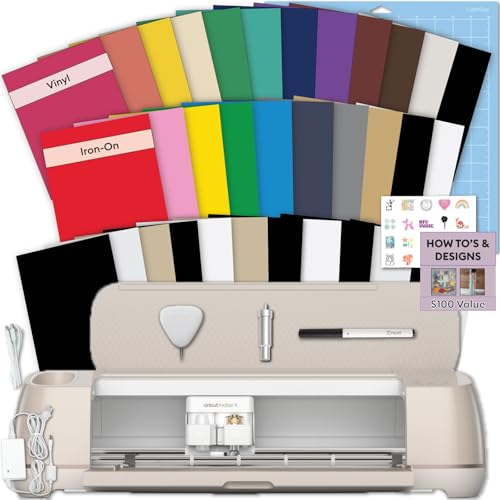
2. Cricut Maker 4 Beginner Bundle with Vinyl & Iron-On
Everything a first-timer needs to cut a sticker and press a shirt in the same afternoon.
Most people buying their first cutter underestimate how many separate things they have to buy. This bundle kills that problem: you get the Maker 4 machine, a cutting mat, blade, tools, and both an adhesive vinyl and heat-transfer vinyl sampler, plus project inspiration sheets. That means you can cut a laptop decal and press a design onto a t-shirt from one box. The active surface area is 144 square inches, and it is a do-it-all machine for both simple and detailed work.
What wins people over here is sheer build quality — the finish and cut consistency are what get talked about most. Setup runs through Cricut Design Space, which is the software that connects to every Cricut cutter and carries a free library of 3,000+ images and 100+ fonts, with an optional Access subscription on top. It also has Bluetooth, though wireless pairing is the recurring gripe. A handful of buyers hit dropped connections, so if your workspace has a lot of interference, plan on a wired session or keeping the machine close to your router.
One honest caveat on the bundle itself: the sampler sheets are samples, not a full stash of material. Some owners expected larger quantities and found the vinyl amounts modest. Treat this as your starter supply, then buy full rolls once you know which material you actually reach for — the machine is the real purchase and the savings are in not buying tools separately.
Best reason to start here: a complete first project in the box, so the learning curve is about designing rather than shopping for blades and mats.
The Bluetooth question: pairing is the weakest link for a small share of owners — wired design sessions sidestep it entirely.
Reach for this if: you have never cut vinyl and want the tools, blade and two material types already sorted.
Think twice if: you want a big material library upfront — the sampler sheets run out fast on real projects.
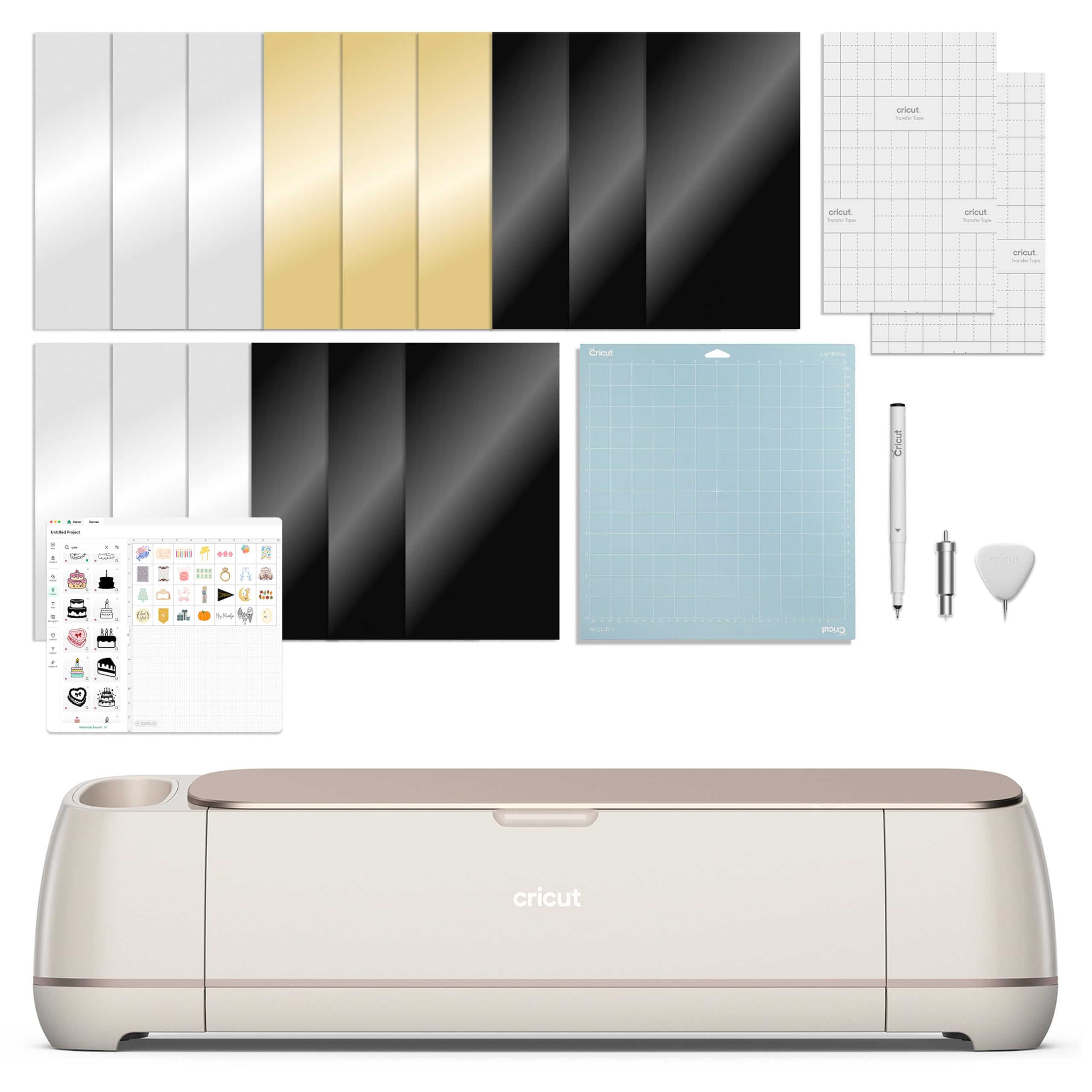
3. Cricut Maker 4 Smart Cutting Machine Digital Bundle
It does not just cut vinyl — it foils, scores and engraves, with a 270.25 square inch bed behind it.
Here is a machine for the person whose sticker hobby quietly turns into a small craft business. The Maker 4 works across 300+ materials including leather, wood, vinyl, iron-on HTV (heat-transfer vinyl you press onto fabric) and cardstock, and it draws, foils, scores, engraves, debosses and perforates on top of cutting. That 270.25 square inch active surface area is the largest workbed in this guide. It also pairs with most inkjet printers through Print-Then-Cut, so you can print a full-color design on sticker paper and let the machine trace around it.
Quality is the headline — 70+ owners discuss it and 90% of those mentions are positive, making it the most-praised aspect of this machine. Reliability and speed come next, with speed singled out as a time-saver. The bundle adds a Fine-Point Blade, materials sampler covering Smart Vinyl, Matless Vinyl, Smart Iron-On, Matless Heat Transfer Vinyl, cardstock and transfer tape, a fine point pen, a Light Grip Mat, a weeder and 30 bonus images in Design Space.
The Tradeoff is the value question, and it is a real one to weigh. The machine is a genuine multi-craft workhorse, but the maker’s own optional Cricut Access subscription is what open up the full 1,500,000+ image library, 1,000+ fonts and 100,000+ projects. Without it you work from the free content tier. The starter supplies in the sampler are small quantities too, so budget for full rolls of the material you settle on.
The multi-material read: if you only ever cut vinyl, you are paying for engraving tips and scoring wheels you may never touch — the Silhouette Cameo 5 Alpha covers pure vinyl duty for less.
Print-then-cut reality: full-color stickers need a working inkjet printer plus sticker paper, so factor that into your plan.
Suits you if: your projects jump between vinyl decals, engraved blanks and foiled cards and you want one bed big enough for all of them.
Not your machine if: stickers are the entire job — this is more capability than that needs.
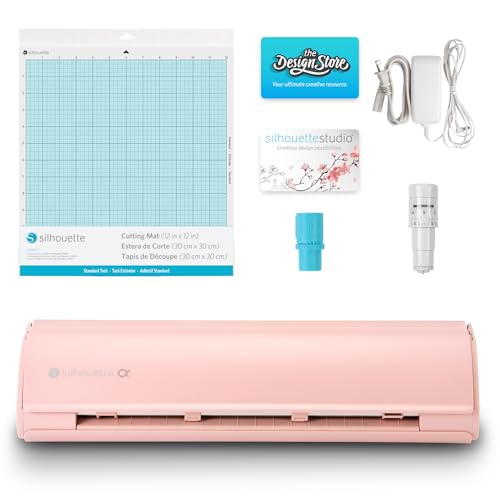
4. Silhouette Cameo 5 Alpha 12″ Smart Cutting Machine
A 12-inch cutter built for the corner of a living room, not a workshop.
The pitch here is noise and material range. The motor cuts at speeds up to 400mm/s while running quietly, which matters if your crafting table sits in a shared space or you cut in the evening while someone else watches TV. The 12-inch by 24-inch active surface handles materials up to 3mm thick, so the machine moves from adhesive vinyl to fabric, cardstock and heat transfer without an equipment change. It cuts, sketches and embosses with the same setup.
Accuracy comes from the 4-point registration system, with vertical and horizontal corrections that align printed designs before the blade goes anywhere near them. That is what keeps a printed sticker inside its cut line. Fast Sketch Mode speeds up drawing without softening detail, and Intelligent Path Technology reorders the cut sequence so the blade works efficiently and puts less stress on the material. Owned by 600+ buyers at 4.0+ stars, the overall performance is what gets praised most.
Now the honest part. Cutting accuracy and ease of use are genuinely mixed across owner experience — some machines run flawlessly, others reportedly barely cut and frustrate their owner. The software side draws the harshest notes, with download difficulties mentioned. This is a fine machine when it behaves, but it is the one pick on this list where checking the return window and testing a cut immediately after unboxing is genuinely wise.
Why the quieter motor counts: 400mm/s with low noise means long cut jobs in a shared room without headphones.
Test it early: run a simple vinyl cut on day one so any cutting fault surfaces while you can still swap it.
Suit this to: a home studio, craft room or shared apartment where a loud machine is a daily annoyance.
Consider the Alpha Plus instead: if wide decals matter more than quiet operation, its 15-inch width beats this 12-inch bed.
5. VEVOR 12 Inch Vinyl Cutting Machine with 20000 Designs
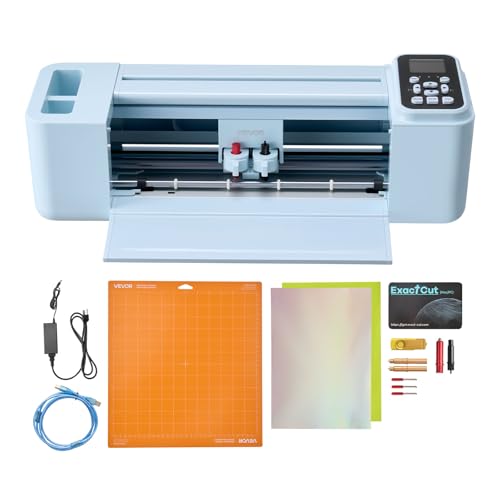
Full 12-inch cutting plus a design bundle, without a subscription asking for more money.
If your worry is being nickel-and-dimed by software, this one addresses it head-on. The VEVOR ships with design software included and 20000 designs, working online or offline without recurring payments. It imports PNG, JPG, SVG and TIF files directly, so your own artwork goes in as-is rather than being flattened. The active surface area is 144 square inches with a 12-inch working width, which is proper mid-size territory for decals, cups and greeting cards.
Connections are the widest of any machine here: USB, Bluetooth and USB drive access, compatible with Mac, Windows, Android 5.1+ and iOS 11.0+. It also switches between cutting, writing/drawing and scoring, so folded cards and creased projects come out of the same machine. Value is a genuine strength — 12 of 10+ owners discussing cost call it excellent value, and the physical build gets good marks too.
The catch sits in the software, which is the one area owners rate mixed rather than positive. It works, but it will not feel as polished as Cricut Design Space or Silhouette Studio. If you are comfortable tinkering with settings and importing your own files, that is a fair trade for the price tier. If you want the software to hold your hand, look elsewhere.
Budget wins that matter
- 20000 designs and no recurring software fee
- Imports PNG, JPG, SVG and TIF without conversion
- USB, Bluetooth and USB drive cover every device in the house
- Cutting, writing and scoring in one 12-inch machine
Budget compromises
- Software is functional but not polished
- 18.1 pounds and a 22.8-inch body want permanent bench space
- Learning the interface takes patience before the first clean cut
Pick it for: budget-conscious crafters with their own design files who want a 12-inch cutter and no subscription.
Skip it for: hand-held app-first design — the Likcut AI workflow is smoother for that style.
6. Likcut S41 Vinyl Cutter with Print Then Cut
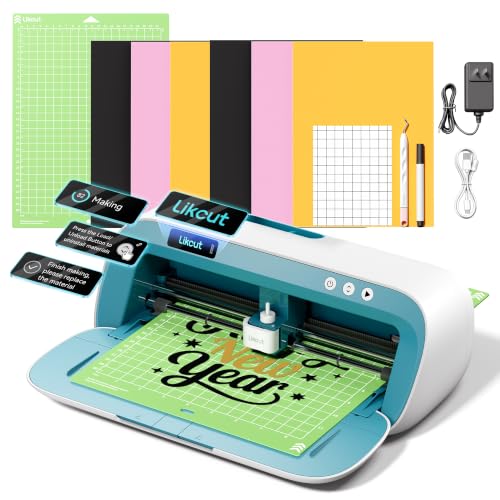
Built around the US Letter sheet, so a full page of stickers comes out in one run.
Cutting width jumps to a maximum of 8.5 inches here, matched to an 8.5 by 11 inch active surface. That means a standard US Letter sheet of cardstock or sticker paper is handled in a single process — no partitioning, no splicing small elements together. It is a meaningful step up from the Likcut S501’s 4.5 inches, and it is the balance for a home crafter who buys materials by the ream.
Precision is the engineering story. The system achieves an accuracy tolerance of 0.2mm, and the sensor plus smart algorithm recalibrates the cutting path as it goes to keep it stable. Combined with Print-Then-Cut, that is what lets a printed sticker sheet come out cleanly outlined. The app strips out redundant steps and guides you through each click, while the built-in screen shows real-time status with Start/Stop and Load/Unload on the machine itself. Performance is clearly the strength — best-received aspect of the machine by a distance.
It also carries the same voice-and-text AI design generator as the S501: type or speak a prompt and get a cut-ready design back. The whole unit weighs 3.9 kg, which is noticeably heavier than the 2.65 kg S501 and wants a proper spot rather than being tucked in a drawer.
Letter-size logic: an 8.5-inch cutter plus 8.5 x 11 material equals zero wasted sheet and zero hand-tiling.
Where it sits: between the S501’s tiny 4.5-inch bite and the Cameo’s wide-format ambition.
Fits you if: US Letter sticker sheets, cardstock and room-decor decals are your main material.
Think again if: you need wide poster work — 8.5 inches will cap your largest design.
7. Likcut S501 AI Sticker Cutter
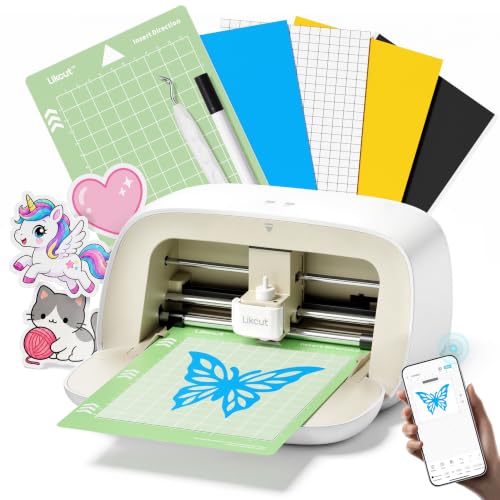
Say what you want out loud and watch a cut-ready sticker design appear.
This is the entry point to vinyl cutting for someone who has never touched design software and never wants to. The S501 turns a spoken sentence or typed prompt into a cuttable sticker design — say “a cute retro cat eating ice cream” and the machine returns an image ready to cut. That skips the entire learning curve of complex design applications. The design store behind it carries over 1 Million designs and more than 1,200 fonts, which is a deep library for party favors and classroom projects.
For what it costs, the build surprises people. Quality is the single most-discussed aspect and it comes out positive, described as an amazing little machine. Value and ease of use for beginners both land well, and compact size gets its own praise — it is the machine that fits on a small desk or a shelf. The 180 square inch active surface is more than double the Cricut Joy Xtra’s 68.75 square inches, so it fits more per pass than its 4.5-inch cut width suggests.
Setup is quick too: Bluetooth 5.0 and USB 2.0 connect in about 3 seconds, and the blade is rated to cut over 4,610 meters before replacement. It handles over 50 material types, cuts at up to 3.2 inches per second, and the front cover doubles as tool storage. The trade-off is scope — 4.5 inches caps your projects at small stickers, labels and party favors. For anything wall-sized you will want the S41 or a wider machine.
Why beginners love it
- Voice and text-to-design AI needs no software skills
- Bluetooth 5.0 and USB 2.0 pair in about 3 seconds
- Blade rated for over 4,610 meters of cutting
- 1M+ designs and 1,200+ fonts in the design store
Where it caps out
- 4.5-inch cut width rules out large decals
- Manual operation mode means you manage the feed yourself
- Plastic body is light, so it can shift on a slippery surface
My pick for: first-time sticker makers, parents doing party favors, and anyone who wants AI to do the drawing.
Move up if: your designs are bigger than a coaster — the S41’s 8.5 inches covers letter-size work.
Know the Specs
Cutting width (in inches)
Cutting width is how wide a strip of vinyl the blade can reach in a single pass. A 4.5-inch cutter makes small die-cut stickers and party favors without hand-splicing. An 8.5-inch cutter matches a US Letter sheet exactly. A 12-inch or 15-inch machine handles full poster decals and long roll runs, and the biggest width in this guide beats the smallest by more than three times. Pick the width your largest project needs and nothing more.
Active surface area (in square inches)
Active surface area is the total workbed the material sits on, measured in square inches. A larger area means more stickers per sheet and less reloading. A compact machine around 69 square inches suits labels and tags, while a 270 square inch bed is built for batch work. The area and the cut width are different numbers — the bed can be long while the blade only reaches partway across.
Registration and cut accuracy
Registration marks are small printed alignment points that let the machine find a design before cutting near it. A 4-point registration system corrects both vertically and horizontally, which matters for print-then-cut stickers where the cut must sit inside a printed outline. Some cutters state the tolerance directly — a 0.2mm accuracy figure means the blade holds its path to within a fraction of a millimeter through bends and corners.
Materials and blade handling
An AutoBlade adjusts cutting depth on its own between materials, while a manual blade means setting depth yourself. Material thickness matters too: an electrostatic mat supporting up to 0.5mm handles most vinyl and cardstock, while a machine rated for up to 3mm takes fabric and heavier stock. If you switch materials often, automatic blade adjustment saves real setup time.
Common Questions
Do I need a cutting mat for vinyl stickers?
Can these machines make stickers from my own artwork?
What does print-then-cut actually do?
Is a wider cutter always better?
How long does a cutting blade last?
Do I have to pay a subscription to use these cutters?
Which cutter fits on a small desk?
Can a vinyl cutter also cut cardstock, fabric or iron-on?
What is AI voice-to-design and is it useful?
Will these machines connect wirelessly?
The Bottom Line
For most people, the vinyl sticker maker worth buying is the Silhouette Cameo 5 Alpha Plus, because its 15-inch cut width and electrostatic mat mean wide decals in one flat, uncrumpled pass. If you are starting from zero and want the tools and sampler materials already in the box, the Cricut Maker 4 Beginner Bundle gets you cutting on day one. And for a tight desk with an AI design habit, the Likcut S501 pairs in about 3 seconds and does not need a cutting mat or a design degree.
Buy the width your biggest regular project needs and you will rarely regret it — a 4.5-inch cutter caps you at small stickers, while a 15-inch machine handles full poster decals.
How we choose
We do not accept paid placement. Every pick is matched to a real buyer and a real use-case; we do not hands-on test units.
Sources
Specifications: manufacturer listings and product documentation. Review insights: verified customer reviews, as of November 2026. Pricing: not shown on this page (it changes often); check the current price via the retailer link.
As an Amazon Associate, Tactical Gear Guy earns from qualifying purchases. This does not affect which products we feature.