Specs are compiled from manufacturer listings and verified buyer reviews and can change over time — please confirm the key details on the product page before buying.
Handheld phone footage wobbles. That is the plain truth, and it is the first thing you notice when you watch your own clip back on a bigger screen. The fix is not a new phone — it is a gimbal, cage, or tracking tripod clipped onto the one in your pocket. This guide covers nine add-ons that turn shaky handheld clips into smooth, watchable video, sorted by shooting style.
This guide is built by comparing the manufacturers’ published specifications and the patterns across verified customer reviews, so you get each pick’s real strengths and trade-offs instead of marketing spin.
Some picks stabilize with motors, some lock your phone into a rigid frame, and a few do the tracking for you. Below you will find the honest differences between them, so you can pick the right video camera for phone setup.
Top Picks

How To Choose The Best Video Camera for Phone Setup
Every one of these add-ons answers the same question: how do you keep a phone steady while you move? The answer splits into two families. Motorized gimbals cancel out your handshake with tiny motors, while rigid cages and rigs lock the phone into a frame so your hands become the stabilizer. Knowing if you need motorized smoothing or a rigid frame is half the decision.
Gimbal or cage: pick your shaking problem
A gimbal (a motorized arm that counter-moves to cancel your handshake) is what you want for walking shots, tracking a moving subject, or filming yourself. A cage (a metal frame that clamps around the phone and adds handles) is what you want when you need to bolt on a microphone, a light, and a tripod at the same time. Gimbals smooth motion; cages build a rig.
Check the phone-width range before anything else
Cages list a width range in millimeters, and that number decides whether your handset fits. The NEEWER cage takes phones from 56–101.5mm, while the SmallRig kits list 57mm~90mm with a case on. Measure your phone with its case before you buy, because a case can push you past the limit.
Tracking, audio, and light: the three extras that matter
AI face tracking lets a tripod pan to follow you around the frame with no camera operator, the biggest upgrade for solo creators. Audio is the next weak point on any phone clip, so add a wireless mic or a cage-mounted shotgun mic. Finally, a small fill light rescues footage shot in dim rooms or at night.
Side-by-Side Comparison
| Model | Best For | Stabilization Type | Phone Fit / Load | Battery / Runtime | Amazon |
|---|---|---|---|---|---|
| DJI Osmo Mobile 8 + Mic Mini★ Best Overall | Solo vloggers who want tracking plus audio | 3-axis gimbal | Cellphone / iPhone | 10-hour battery | Amazon |
| Acer Auto Face Tracking TripodBest Tracking Value | Hands-free shooting with no app | 360° rotating gimbal head | Extends to 64 inches | — | Amazon |
| Insta360 Flow 2 ProBest Premium Gimbal | iPhone creators using many apps | 3-axis + 360° pan | Up to 300 g | 10-hour battery | Amazon |
| hohem iSteady V3 Ultra | Solo shooters who want a remote screen | 3-axis + 360° pan | Up to 14.11 oz | 9-hour runtime | Amazon |
| SmallRig Universal Rig Kit 3384D | Live streamers building a full station | Rigid cage + handles | 57mm~90mm wide | 2200mAh LED, 105-min | Amazon |
| SmallRig Cage Rig 4121 | Handheld filmmakers on a budget | Rigid cage + handles | 57mm~90mm wide | — | Amazon |
| NEEWER PA009 Rig Cage | Wide-phone owners mounting mics and lights | Rigid cage + handles | 56–101.5mm wide | — | Amazon |
| Magnetic Vlogging Kit | Creators wanting tracking, mic, and light together | 360° AI tracking tripod | Extends to 71 inches | Mic 12 hrs / light 6 hrs | Amazon |
| Yeaki Vlogging Kit VK01 | Beginners buying a first complete kit | Flexible tripod + ball head | 4.7 to 7 inch phones | — | Amazon |
Detailed Reviews
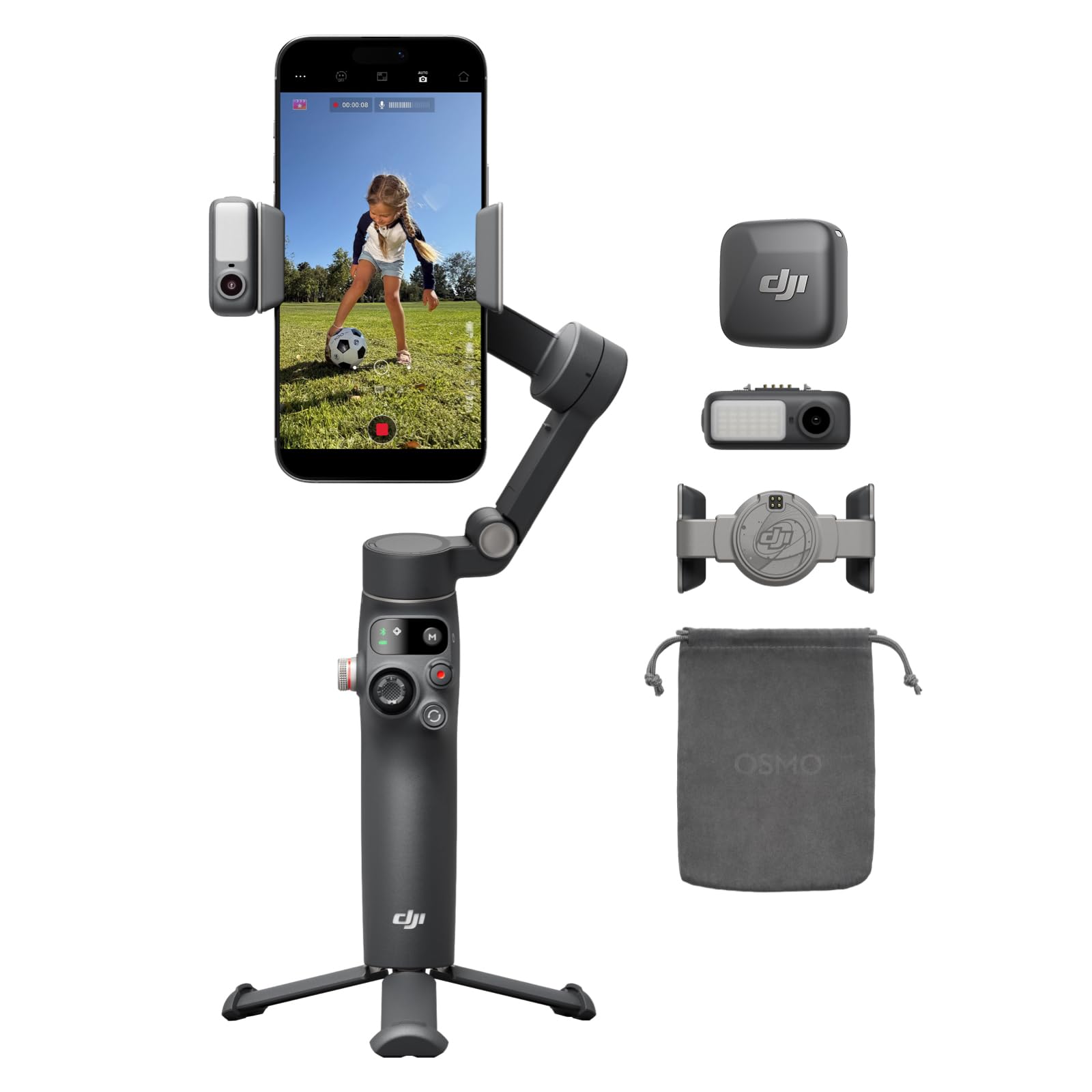
1. DJI Osmo Mobile 8 + Mic Mini Transmitter (Infinity Black)
Our pick — 4.5+★ from 14,000+ verified ratings; the strongest balance of quality and price.
A folding gimbal that watches your face, records your voice, and holds a charge all day.
The headline here is a 10-hour battery that also charges your phone while you film. That means a full festival day, a wedding, or a long travel shoot without hunting for a wall socket. The gimbal itself folds down to 7.5″L × 3.7″W × 1.8″H, so it slides into a side pocket instead of needing its own bag.
Stabilization is handled by a 3-axis gimbal (a motorized arm that cancels your handshake on three planes) paired with 360° horizontal pan rotation. In plain terms, that lets you walk and follow a subject without the horizon swinging. It also ships with the DJI Mic Mini Transmitter, so your voice records straight into the rig instead of across a room — a real upgrade from a bare gimbal or a phone cage.
What wins people over is the build and the software — one-tap editing and built-in tutorials get a beginner to a shareable clip fast. The catch is the app relationship: DJI’s Mimo app has been removed from Google Play, so you have to grab the latest version from DJI’s own website before your first shoot. That extra step trips up some Android owners, and app compatibility varies by handset. The stabilization is also honest about its limits — it is excellent at smoothing a walk, not a substitute for a shock-proof mount on a bike.
What earns it the top slot
- 10-hour battery that doubles as a phone charger
- 3-axis stabilization plus 360° pan rotation
- Bundled Mic Mini Transmitter for clean audio
- Folds to 7.5″L × 3.7″W × 1.8″H for pocket carry
Where it asks for patience
- DJI Mimo app is no longer on Google Play
- Stabilization is built for walking, not action sport
Reach for this if: you film yourself and want tracking, audio, and a tripod all in one folding rig.
Know the workaround: download the DJI Mimo app from DJI’s website, not the Play Store, or you will stall at setup.
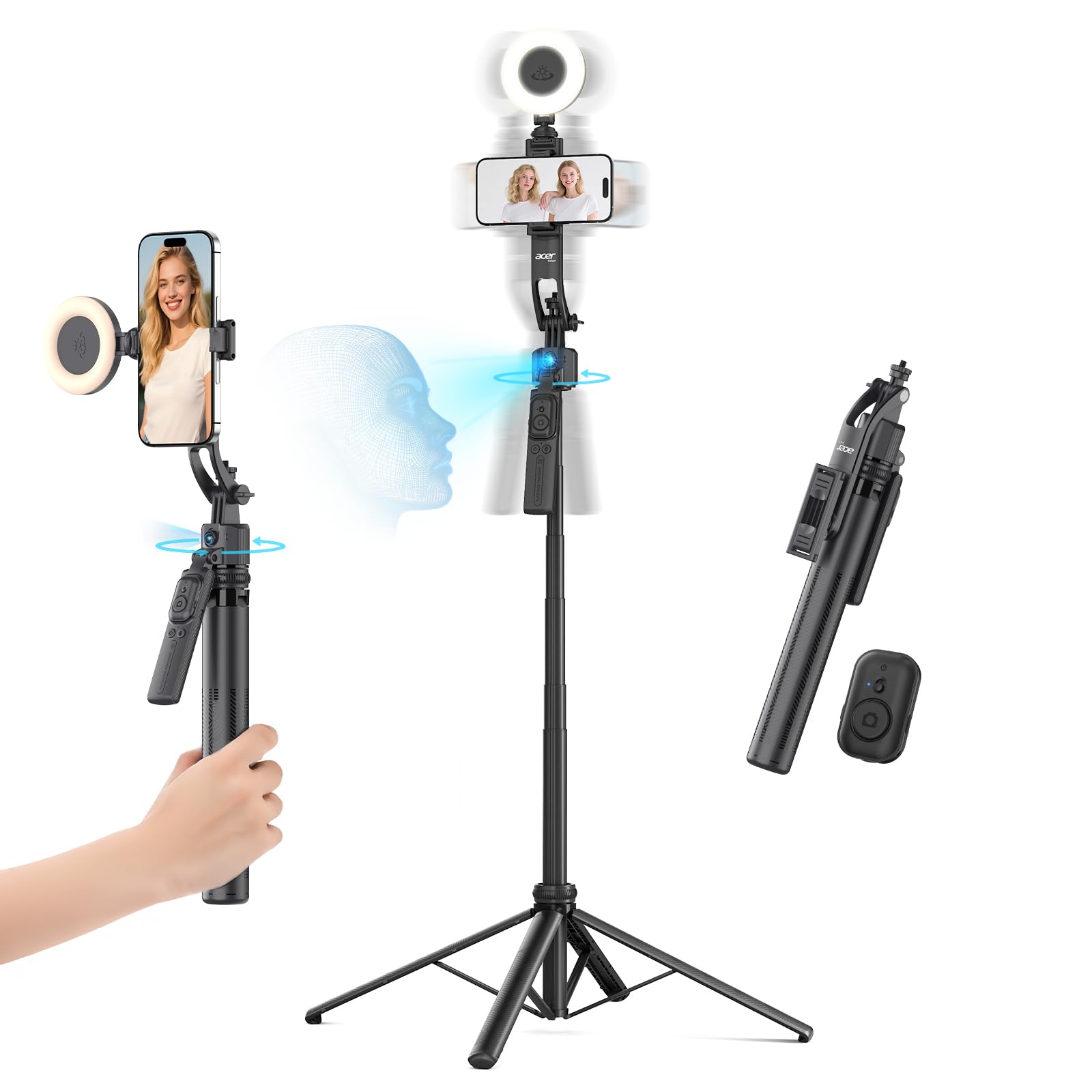
2. Acer Gadget Auto Face Tracking Tripod for iPhone
A no-app tripod that follows your face on its own — 360° of tracking without a second person.
The feature that sells this one is a total absence of setup software. It uses 360° AI face tracking built into the tripod head, so it recognizes and follows your face or body with no app at all. For anyone who has fought a gimbal companion app, that is a genuine relief — unfold it, mount your phone, and shoot.
Unlike the DJI gimbal above, this is a tripod, not a handheld stabilizer. It extends up to 64.4 inches on a quad-foot base made of aluminum alloy, so it stands on the floor as a floor stand, drops to a desktop tripod, or folds to 13 inches to travel. It also responds to gestures: an OK sign starts tracking and an open palm pauses it. A detachable remote handles one-click shooting, and the working distance runs 0.5–5m, which is plenty for a room.
There is a detachable mini ring light with 3 color modes (warm, cool, and natural) for dim rooms, and an integrated 1/4-inch screw that takes a camera, a GoPro, or an extra light. At 0.8 kg it is 23% heavier than the NEEWER cage at 0.65 kg, which is the trade for a stand that reaches over five feet. What owners keep returning to is the raw build and the ease of setup; the one caveat is that a stationary tripod cannot smooth a walking shot, because tracking keeps you centered but does not cancel a bouncy step.
Who it fits: solo creators filming at a desk, on a stage, or in a kitchen who need the camera to follow them, not to glide with them.
The honest limit: this tracks, it does not stabilize walking footage — pair it with a gimbal if your shot moves.
Best pick when: you want hands-free tracking and zero app hassle on a stand that reaches over five feet.
Look elsewhere if: your footage is handheld follow-cam work, which this stand cannot smooth.
3. Insta360 Flow 2 Pro Grey
The foldable gimbal that tracks you inside more than two hundred iOS apps.
Here is the number that separates this gimbal from every other pick on the list: 200+ compatible iOS apps. It is the flagship feature, powered by Apple DockKit, and it means tracking works inside the apps you already use, not just the maker’s own. Video calls, live streams, and online meetings all follow you around the frame.
The pan rotation is 360° and continuous, so the gimbal never hits a stop mid-shot. Active Zoom Tracking holds a subject even at up to 15x zoom, which is aimed at sports and stage performances where the action is far away. Multi-Person Tracking reframes to keep a whole group in shot for gatherings and camping trips.
It carries a phone up to 300 g, packs a built-in tripod and selfie stick, and folds to 97.9×178.4×36.7mm at 385 g. Battery life is rated at 10 hours. The real-world trade-off is learning time: the feature set is deep enough that setup is not instant, and the app relationship in mixed environments can be fussy. Compared to the DJI above, it carries a higher phone load at 300 g and lives inside more apps — the DJI counters with a bundled wireless mic and a longer 10-hour rating of its own.
Why iPhone shooters gravitate here: DockKit reach into everyday apps turns your iPhone video calls and streams into tracked shots.
The cost of that power: the feature stack has a learning curve, and Bluetooth pairing is not always frictionless.
Choose it when: you shoot mostly on iPhone and want tracking baked into the apps you already open daily.
Weigh the alternative if: you want zero setup friction, where a simpler no-app tripod wins.
4. hohem iSteady V3 Ultra 3-Axis Gimbal Stabilizer
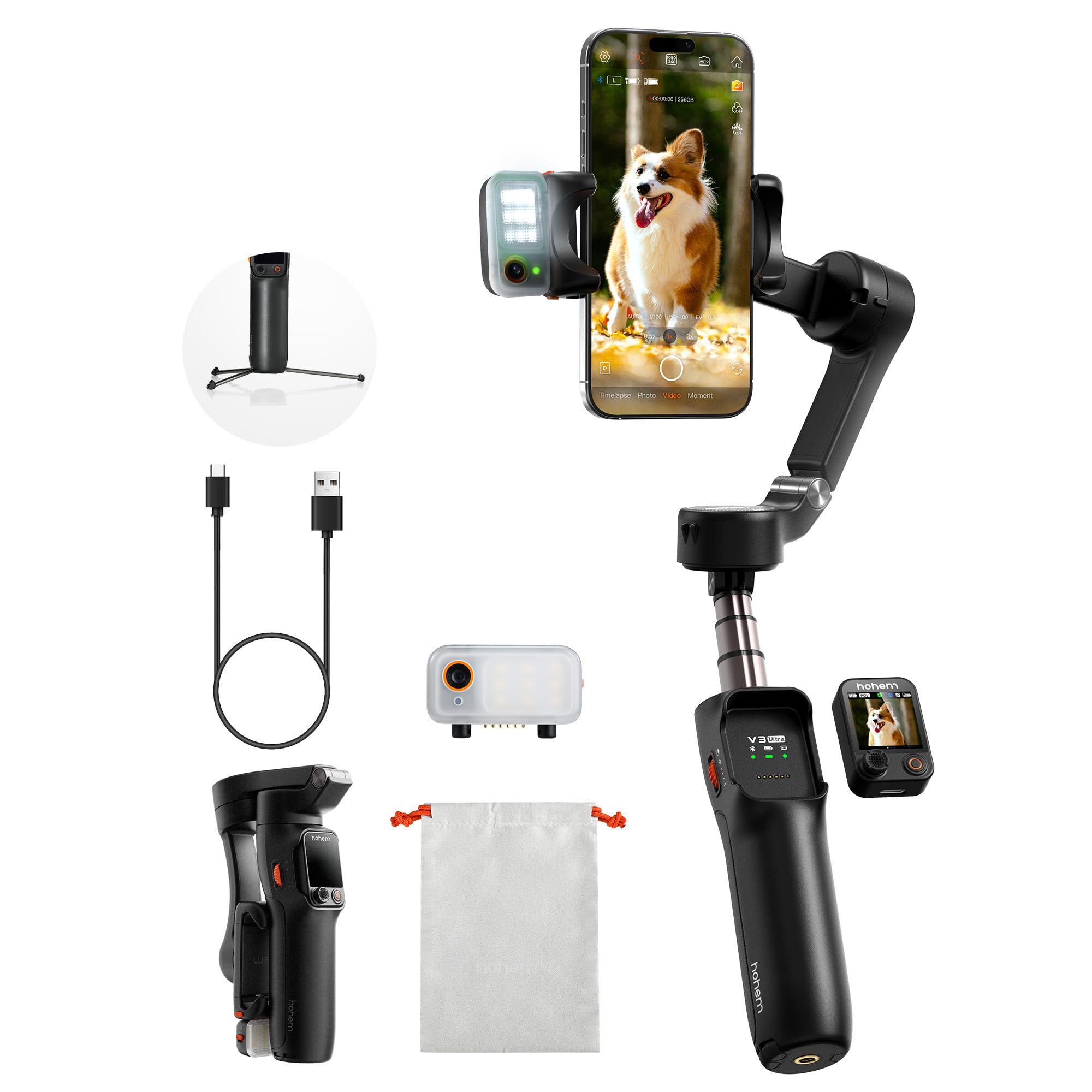
A gimbal with a detachable 1.22-inch screen so you can watch yourself from across the room.
The standout is a detachable 1.22″ touchscreen remote that gives you full control from up to 33 ft away. You can preview the shot and adjust tracking without walking back to the phone. For solo creators filming at a distance, that solves the constant run-back-to-check problem in a way the Acer tripod’s remote cannot, since that one only triggers a shot.
Tracking is powered by AI that follows faces, pets, and objects with 360° panning. Stabilization runs on iSteady 9.0 tech, a 3-axis system that keeps the phone steady through a walk or a jog. There is a built-in fill light you can dim and shift in color temperature from the remote, plus an 8-inch extension rod and a built-in tripod for low and high angles.
It folds to 6.3 inches and weighs 15.1 oz, and it supports phones up to 14.11 oz with up to 9 hours of runtime. The honest limit is load: 14.11 oz covers most flagships, but a heavy phone in a thick case could bump the ceiling. Stability is very good for walking footage, though fast whip-pans occasionally outrun the motors.
What it gets right
- 1.22″ detachable touchscreen remote with 33 ft range
- iSteady 9.0 3-axis anti-shake
- 8-inch extension rod plus built-in tripod
- Folds to 6.3 inches at 15.1 oz
What to watch
- 14.11 oz phone limit leaves little headroom for heavy cases
- Very fast pans can outrun the motors
Made for you if: you film solo and want to see the frame from across the room.
Know before you buy: weigh your phone with its case against the 14.11 oz ceiling first.
5. SmallRig Universal Phone Cage Rig Kit 4121

A one-piece aluminum cage with two handles that quietly turns your phone into a two-handed camera.
This kit is a rigid cage with two side handles, a one-piece aluminum alloy frame that clamps around your phone. It is not a motorized gimbal and does not claim to be one. The stabilization comes from your grip: two hands on two handles turn a jittery one-handed shot into a steadier two-handed one, and the anti-slip silicone coverings keep your palms planted.
The cage fits phones 57mm~90mm wide with the case on, which covers the full iPhone 18 / 17 / 16 / 15 / 14 / 13 / 12 Pro and Pro Max range plus Samsung Galaxy S24 / S23 / S22 Ultra and Pixel 8/7/6/5 series. There are shoe mounts on top of the handles for a light or a microphone. A built-in Allen wrench lets you change the grip direction and height without hunting for a tool.
Sturdiness is what earns its place here — the frame is solid aluminum, and owners repeatedly describe the build as rigid in the hand. The full kit weighs 600 g, so it is heavier than the NEEWER rig at 0.65 kg by a small margin, and that weight is the price of the metal feel. The fit is the honest fit-note: the cage is generous around wide handsets, so a very small phone can feel loose inside it.
The case for it: an aluminum one-piece cage with two handles and top shoe mounts is a serious handheld base for mic-and-light filming.
Set expectations: a cage steadies your grip, but it will not cancel a walking bounce the way a 3-axis gimbal does.
Pick this if: you want to add a mic and a light and film two-handed with a rock-solid metal frame.
skip it if: what you need is motorized smoothing for moving shots.
6. NEEWER Upgraded Phone Rig Cage Vlogging Kit, PA009
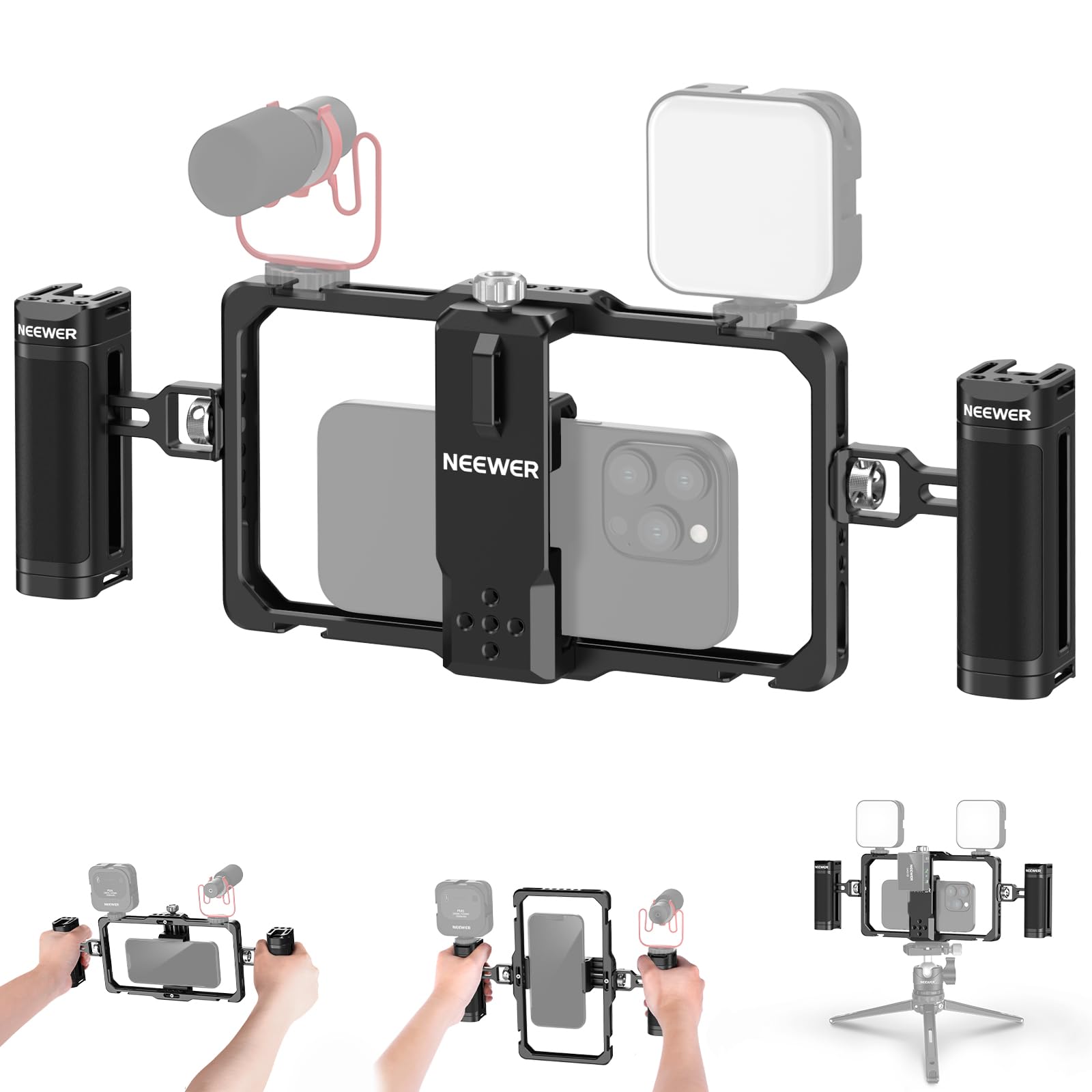
The cage that reaches further than any other here — from 56mm all the way to 101.5mm wide.
Start with the number that sets this one apart: an adjustable span of 2.2–4 in (56–101.5mm). That is the widest phone range on this list, and it means a large phone in a chunky case still fits. The holder works with iPhone 18 Pro, 18 Pro Max, 17, 16, Samsung Galaxy S26 Ultra, Google Pixel 9, and other Android handsets.
The handles use a trapezoidal interface that locks them secure, with foam coating for a comfortable hold. You can loosen the hex key and slide them up or down for the grip that suits your hands. For accessories there are 1/4″ threads for ball heads and magic arms, two cold shoes for a microphone and an LED fill light, and a back slot sized for a Rode Wireless Go II transmitter.
It mounts to a tripod, monopod, or handgrip in vertical or horizontal orientation through those 1/4″ threads. The build is CNC aluminum alloy, made to resist scratches and shocks, and it weighs 0.65 kg. That makes it 23% lighter than the Acer tripod’s 0.8 kg, though the two do different jobs — this is a handheld cage, that is a standing tracker. The design draws mixed opinions; some find it clever, while a few note aesthetic flaws. Function-wise it works right and holds phones steady.
What it solves: the widest phone fit here at 56–101.5mm, with cold shoes for a mic and a light and a slot for a Rode transmitter.
Fair warning: design polish is the split opinion — the function is solid, the finish is what gets debated.
Best for: owners of extra-wide phones or thick cases who need a cage that will actually close around the handset.
Be realistic if: you want motorized smoothing — this cage only steadies what your hands hold.
7. Magnetic Vlogging Kit Auto Face Tracking
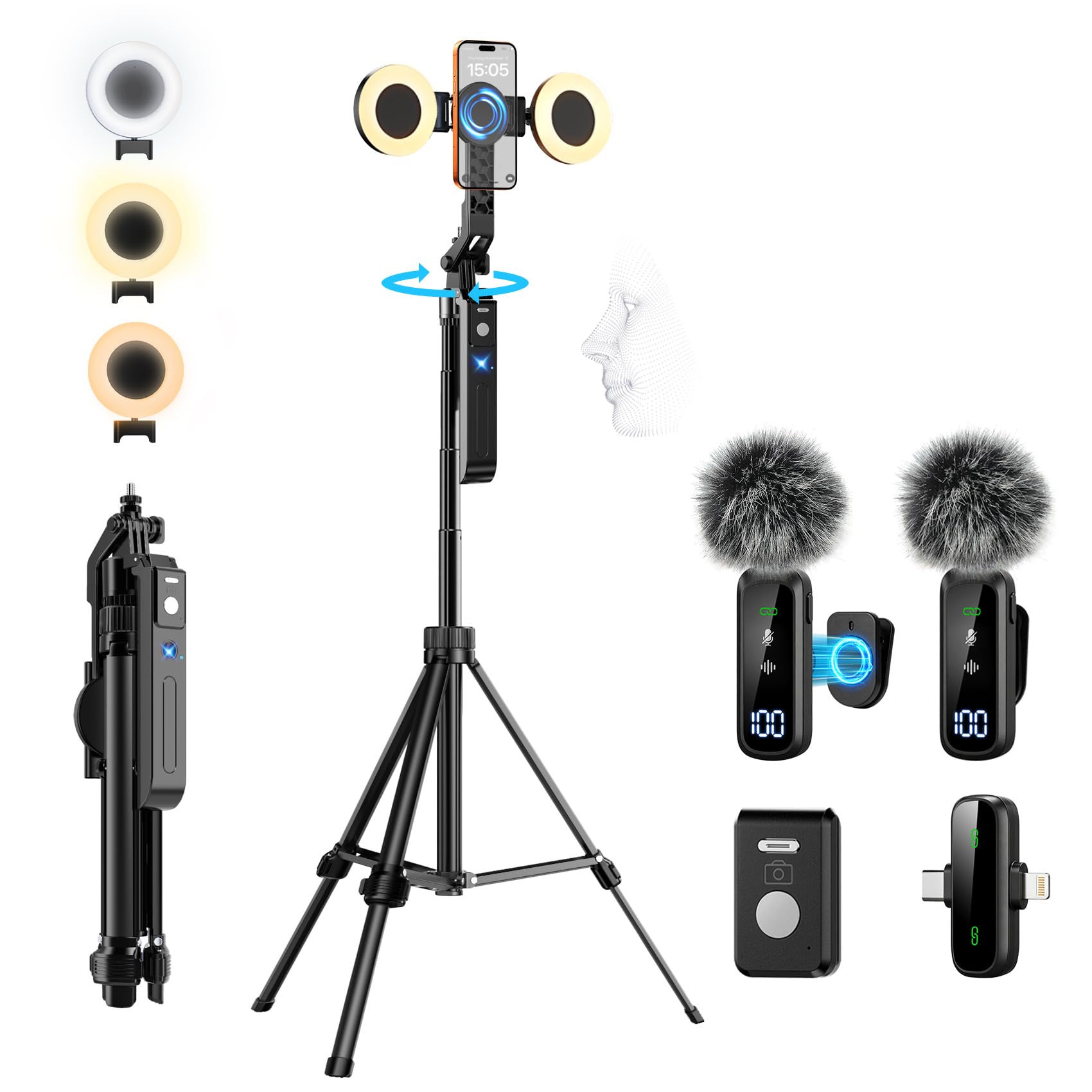
One box with the tracking tripod, the mic, and the lights — a creator starter kit in a single package.
The pitch here is completeness: a smart 360° auto-tracking tripod, two fill lights, a magnetic wireless mic kit, and a storage bag. Setup is designed to be app-free, and gesture control runs it — an OK sign starts following, an open palm stops it. It replaces the juggling of buying a tripod, a mic, and a light separately.
The audio side is compelling for a kit. The magnetic mic strips let you clip discreetly, and it runs up to 12 hours on a charge with a recording distance up to 66 feet. The fill lights charge in about 2 hours and run 6 hours, with 3 color temperatures and 3 brightness steps. The tripod extends to 71 inches, so it stands tall for full-body shots.
The trade-off is structure. Stability is the split opinion in this kit — some find it sturdy, while others note it can feel unstable when fully raised. That is the honest caveat for a tall stand holding lights and a phone: keep it planted indoors and it does its best work.
Why the bundle wins
- Tracking tripod, 2 fill lights, and magnetic mic in one box
- Mic lasts up to 12 hours with 66 ft range
- Lights run 6 hours across 3 colors and 3 brightness levels
- Extends to 71 inches for full-body framing
Where it needs care
- Fully raised, the stand can feel shaky
- 0.85 kg with everything fitted is a stationary setup
Good match when: you want tracking, light, and sound handled in one purchase without piecing together accessories.
Think twice if: you need something to toss in a bag — this kit lives best in one spot.
8. SmallRig Universal Phone Video Rig Kit – 3384D

A complete vlogging station — cage, handles, tripod, LED light, shotgun mic, and a power bank holder.
This kit is sold as the whole setup, and the spec list backs that up. You get the phone cage, two side handles, a desktop tripod, a mini LED light, a Type-C shotgun microphone, a power bank holder, and a carrying case. It is a single-purchase rig for live streaming and vlogging rather than one accessory you bolt onto a rig you have not built yet.
The LED light is more capable than a thumbnail would suggest. It has 0-100% brightness control, a CRI95 rating (a color-rendering score that keeps skin tones looking true), and a color temperature range from 2700K to 6500K. It runs from a built-in 2200mAh battery with a 105-minute operating time at maximum brightness. The shotgun mic uses a cardioid pattern to focus on what is in front of the camera, and it is battery-free and plug-and-play.
The cage fits phones 57mm~90mm wide with the case on and offers 1/4″-20 threads plus cold shoe mounts for more accessories. Stability is the strength here — the frame holds your phone rigid and steady in the hand. The honest caveat is the included audio chain: some buyers report trouble with the iPhone Lightning adapter, so test audio before a live stream. At 1.2 kg with everything fitted, it is a desk-and-tripod rig, not a pocket carry.
The all-in value: cage, handles, tripod, CRI95 LED, and shotgun mic in one case is a lot of station for a single buy.
The catch to plan for: the Lightning adapter is the weak link for some iPhone setups — validate your audio path early.
Goes to work for: streamers and creators who want an assembled rig with lighting and directional sound ready on arrival.
pass on it if: you need to carry the whole thing around — 1.2 kg and a full cage are desk furniture.
9. Yeaki Vlogging Kit for iPhone/Android – VK01
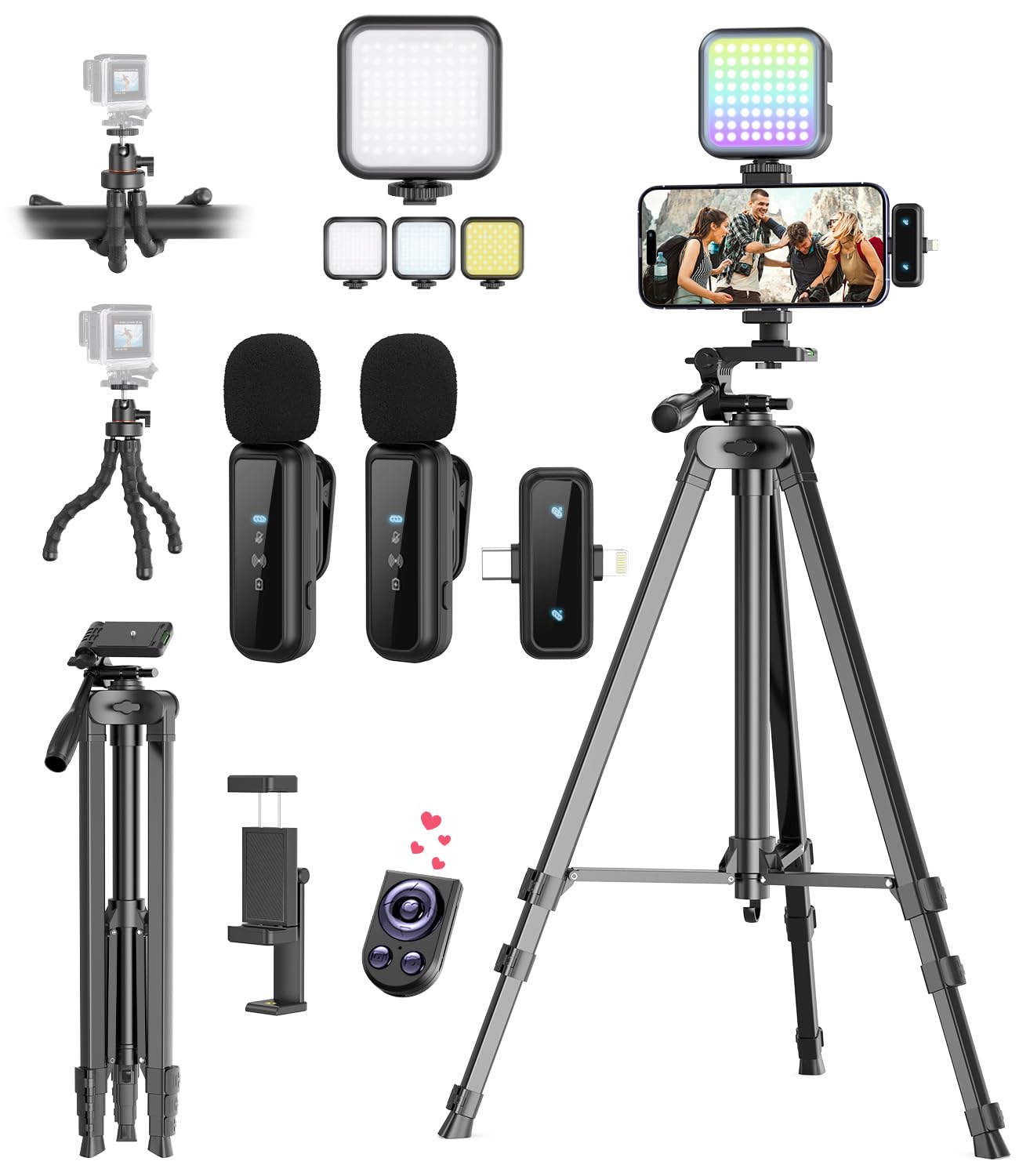
A first-timer’s kit with a tall tripod, a bendable tripod, an RGB light, and a wireless mic.
For someone starting from zero, this kit covers the bases in one box. You get a camera tripod that extends to 57 inches, a flexible tripod whose legs wrap around railings and posts, an RGB fill light with 10 brightness levels and 6 modes, and a wireless microphone. Add a phone clamp and a Bluetooth remote and you have a full first setup for recording without a second person.
The phone clamp fits devices from 4.7 to 7 inches, which covers both iPhone and Android handsets, and it rotates 360° on two planes for any angle. The Bluetooth remote pairs over up to 33 feet and charges by Type-C. The RGB light’s cool, warm, and natural tones handle skin tones, and the RGB modes can shift the mood of a shot.
Setup is where this kit asks for patience. The instructions are the recurring gripe — assembly is easy for some and confusing for others, so this is not a rig to buy ten minutes before a shoot. The tripod’s sturdiness is the other split: it holds a phone fine on flat ground but is not built for a windy outdoor filming session. As a learning kit to build confidence, though, it delivers the essentials from one purchase.
Where it shines: RGB lighting with 10 brightness levels plus a wireless mic and two tripods is a complete beginner setup from one buy.
The learning curve: the manual is thin and the tripod is light-duty, so it rewards a calm first afternoon of setup.
Start here if: you are brand new to video and want lighting, sound, and two tripods in a single package.
Hold off if: you are filming outdoors or in wind, where the light tripod works against you.
Know the Specs
Stabilization type: gimbal vs cage
A gimbal uses motors on 3 axes to cancel your handshake as you move, so it is the right pick for walking and follow shots. A cage is a rigid frame that adds handles so you hold the phone with two steady hands, and its job is to hold the phone still and give you mounting points for a mic and light. The gimbal smooths motion; the cage builds a rig. If your footage moves, go gimbal. If your footage is planted and needs audio and light, go cage.
Tracking and phone compatibility
AI face tracking lets a tripod pan to follow you around the frame with no operator, the biggest upgrade for solo creators. Look for the fine print: some trackers need a companion app (DJI uses the Mimo app, Insta360 uses the Insta360 app), while others track with no app at all. Phone width matters too — cages list a range like 56–101.5mm or 57mm~90mm, and a case pushes you toward the top of that range. Measure before you buy.
Common Questions
Do I need a gimbal if I film with a phone cage?
Will a phone cage fit my phone with a case on?
Which tracking tripod works without an app?
How much weight can a phone gimbal carry?
Can a phone rig improve my audio as well as my footage?
Is a fill light worth it for phone video?
How long do the batteries last on these rigs?
Can I mount a microphone and a light on the same cage?
Does a gimbal still work for photos as well as video?
The Bottom Line
For most people, the video camera for phone answer is the DJI Osmo Mobile 8, because it combines a 3-axis gimbal, a bundled Mic Mini Transmitter, and a 10-hour battery that also charges your phone — one purchase that covers motion, sound, and power. If you shoot mostly on iPhone and want tracking inside the apps you already use, the Insta360 Flow 2 Pro carries a phone up to 300 g and reaches into more than two hundred iOS apps. And if your footage is planted and your priority is audio and light, the SmallRig 3384D delivers a full station with a CRI95 LED and a shotgun mic in one case. Figure out whether your footage moves or sits still — that single question routes you to a gimbal or a cage.
How we choose
We do not accept paid placement. Every pick is matched to a real buyer and a real use-case; we do not hands-on test units.
Sources
Specifications: manufacturer listings and product documentation. Review insights: verified customer reviews, as of November 2026. Pricing: not shown on this page (it changes often); check the current price via the retailer link.
As an Amazon Associate, Tactical Gear Guy earns from qualifying purchases. This does not affect which products we feature.