Specs are compiled from manufacturer listings and verified buyer reviews and can change over time — please confirm the key details on the product page before buying.
If you want the shortest answer: the NavePoint 6U is the one most people should buy. It holds 200 lbs of gear, it is 16 inches deep for real servers, and it takes roughly five minutes to bolt to a wall. Everything else on this list is a different answer to a different problem — a tiny 4U bracket for a switch and a patch panel, a swing-out frame for deep equipment in a tight closet, or a 12U two-post rack for a full network build.
This guide is built by comparing the manufacturers’ published specifications and the patterns across verified customer reviews, so you get each pick’s real strengths and trade-offs instead of marketing spin.
A vertical rack mounts flat against the wall, so your gear sits in a column instead of eating floor space. The catch buyers hit first is depth — a 4U bracket will not swallow a full-length server. Here is how to read capacity, depth and mounting holes before you commit to the best vertical wall mount rack for your gear.
Top Picks


How To Choose The Best Vertical Wall Mount Rack
The mistake almost every first-time buyer makes is shopping by rack size alone. A 6U rack and a 12U rack can both hold 19-inch gear, but one is a shallow bracket you hang behind a closet door and the other is a two-post frame that needs real wall behind it. Measure your deepest chassis and count your rack units before you compare prices.
Start with rack units, not inches
Rack units (U) are the slots your equipment occupies — one U is one horizontal slice of a standard 19-inch rack. A single network switch is usually 1U, a patch panel is 1U, and a full server can run 1U to 4U or larger. Count the total U of everything going on the wall, then add one or two spare slots so you are not rebuilding next year.
Depth decides whether a server fits
On a vertical rack the depth figure is the space behind the mounting face, so it tells you how far your equipment sticks out from the wall. Shallow brackets that measure a few inches deep suit switches, routers, patch panels and power strips. If you plan to hang an actual server chassis, you need a deep frame — the 16-inch and 18-inch depth racks on this list exist for exactly that reason.
Check the hole spacing against your wall
Wall mounting holes spaced 16 inches center to center line up with standard construction framing, which means you can drive bolts straight into studs instead of hunting for anchors. That single number is the difference between a rack that feels welded to the wall and one that creeps loose over a year of vibration from spinning drives and fans.
Read the weight capacity honestly
A rack rated for a static load is rated for equipment sitting still. Sliding load is what it holds when you pull a tray or swing the frame out, and it is always lower. Add up your gear’s real weight, leave headroom, and remember the wall itself is part of the system — drywall alone will not carry a loaded rack.
Side-by-Side Comparison
| Model | Best For | Rack Units | Weight Capacity | Depth | Amazon |
|---|---|---|---|---|---|
| NavePoint 6U Wall Mount Rack★ Best Overall | Most home and small-office builds | 6U | 200 lbs | 16″ | Amazon |
| RackPath 4U Vertical Wall Mount RackBest Value | Patch panels and switches in a closet | 4U | 125 lbs | 7.67″ | Amazon |
| StarTech 4U Vertical Wall-Mount Bracket | EIA-compliant AV and network gear | 4U | 121.2 lbs (55 kg) | 8.2″ | Amazon |
| Reinforced Heavy Load 6U Rack | Small studio and audio racks | 6U | 66–99 lbs | 11.57″ | Amazon |
| Tecmojo 9U Wall Mount Rack | Rear cable access in tight spaces | 9U | 110 lbs static | 18″ | Amazon |
| StarTech 12U 2-Post Wall Mount Rack | Full network builds | 12U | 90 kg | Adjustable 12–20″ | Amazon |
Detailed Reviews
1. NavePoint 6U Wall Mount Rack
Our pick — 4.5+★ from 750+ verified ratings; the strongest balance of quality and price.
A 200-lb open-frame 6U rack with 16 inches of depth for a full server chassis.
Here is what makes this one the pick for most people: it is the only 6U rack on this list that carries a 200-lb weight capacity while still offering a 16-inch depth. That depth is the number that matters — it means a full-length server chassis and its cables sit inside the frame instead of hanging off the front. Build it from 1.5mm SPCC cold rolled steel (a stiff, heavy-gauge sheet steel) and you get a frame that does not flex when you push a patch cable home.
The open-frame layout is the second reason it earns the top slot. With no side panels, air moves straight through your gear, and you can reach the back of every device with your hands instead of a flashlight and luck. NavePoint includes slots and tie points for cable organization, so the run from switch to patch panel stays tidy. It ships flat-packed and can also be set up as a 2-post mount if your closet is tighter than your ambition.
The trade-off is honest and simple: it is a heavy steel frame, so you will want a helper and a stud finder before you start. Order a spare set of rack screws and you will never think about it again. What wins people over is the sheer rigidity of the thing, and the crowd backs it at 4.5+ stars across 780+ ratings.
What earns it the top slot
- 200 lbs of carry capacity on a 6U frame — plenty of headroom for a loaded server and switch stack.
- 16 inches of depth, versus the 7.67 inches of the RackPath 4U below, so long chassis fit.
- Open frame with cable slots and tie points keeps airflow and rear access wide open.
- Works as a 2-post rack too, which gives you a second layout from one purchase.
Where owners push back
- The supplied screw count runs short for some, so plan on extra rack hardware.
- Cold rolled steel at this size is a two-person lift onto the wall.
Buy this one: you have a server, a switch and a patch panel to hang, and you want the depth and capacity to do it once.
Look elsewhere: your whole install is two shallow gadgets — a 4U bracket below will save you the wall space.
2. RackPath 4U Vertical Wall Mount Rack
A 1.5-pound 4U steel bracket rated for 125 lbs of switches and patch panels.
The number that jumps out here is the weight ratio. The RackPath weighs 1.5 pounds and is rated to hold 125 lbs — a huge spread that comes from 2mm cold rolled steel and a powder-coated finish. Compare that to the 24.9-pound Tecmojo frame further down and you see the trade immediately: this is a bracket, not a cabinet, and it disappears against the wall once your gear is bolted on.
Mounting is where this rack actually shines. The wall holes are spaced 16 inches center to center, matching standard construction framing, so you drive into studs instead of guessing. It ships with wood screws and washers plus 18 M6 screws and cage nuts. Buyers use it in utility rooms, closets, garages and small office setups, and the design also lets you flush-mount it horizontally under a desk if the wall plan changes.
The honest limit is depth. At 7.67 inches deep it is built for patch panels, switches, routers and PDUs — not a full server chassis. If your equipment is short, this is the tidy, low-profile answer. The quality of the steel is what gets talked about, and 4.5+ stars backs that read.
Where it wins: 125 lbs of capacity from a 1.5-pound bracket, 16-inch stud spacing, and 18 M6 screws and cage nuts in the box. For a closet patch panel and switch, that is the whole job covered.
Where it stops: 7.67 inches of depth rules out a server, and the hardware bag is fine but not generous — check your device screw count before you start.
Reach for this if: you are hanging switches, a patch panel or AV gear and want the smallest footprint that still holds real weight.
Pass on it if: anything in your stack is a deep server chassis — go up to the NavePoint or Tecmojo.
3. StarTech 4U Vertical Wall-Mount Bracket

An EIA-310 compliant 4U bracket for installs that must match the 19-inch hole pattern exactly.
Compliance is the whole story here. This StarTech bracket is EIA-310 compliant (the industry standard that defines 19-inch rack hole patterns), so it lines up with standard rack-mountable servers, patch panels, NAS boxes and networking gear of various depths. Rated for 121.2 lbs (55 kg), it is built from 14-gauge cold rolled steel — 2mm thick — with a scratch-resistant powder coat. Forget the marketing: what that gauge buys you is a mounting point that does not shift when a heavy NAS leans on it.
Its footprint is the tightest of the group. At 8.2 inches high against the wall it barely registers in a hallway closet, which is why it fits home theaters, AV studios and home security installs so naturally. Four keyhole wall holes let you hang the bracket, then lift it off again without unscrewing the whole frame. StarTech also ships it in ISTA-6 packaging, which is a drop-tested shipping standard — a small detail that matters when steel arrives bent.
Read the 5.3-pound weight and 8.2-inch depth together and you get the real constraint: this is for shallow gear only. Compared with the 16-inch NavePoint above, it will not take a full server. For everything shorter than that, the build quality and included M5 cage nuts and screws do the job cleanly.
Confident buy for: AV and network installs where EIA-310 compliance and a stripped-down footprint matter more than rack units.
The catch: 8.2 inches of depth means shallow equipment only — no server chassis.
4. Reinforced Heavy Load 6U Rack
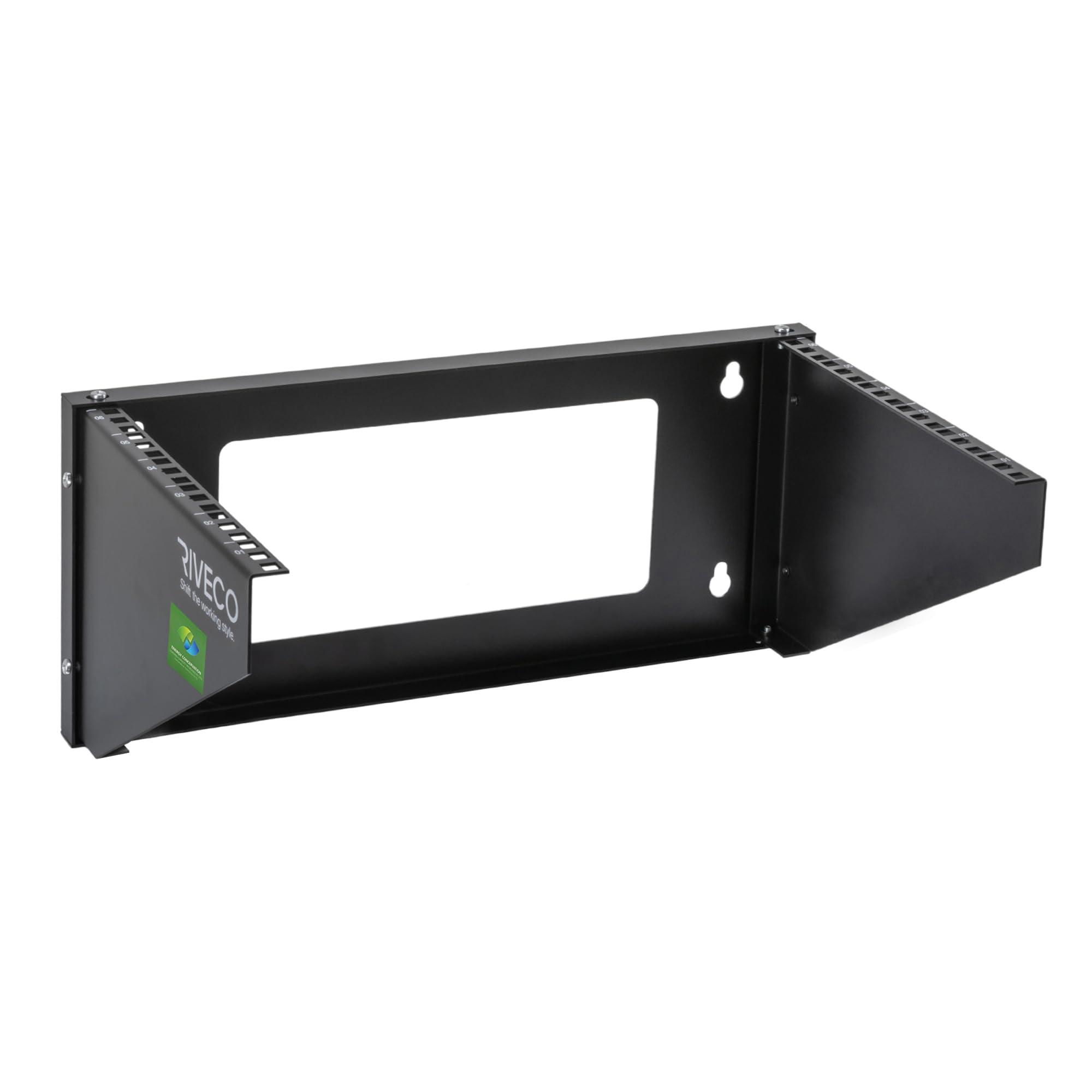
A folding 6U frame that mounts vertically on a wall or horizontally under a desk.
This is the rack for the person who has not decided where the gear is going yet. It is a folding 6U open frame that mounts vertically to a wall or horizontally under a desk, and it takes standard 19-inch width equipment — routers, switches, NAS boxes, audio gear and power equipment. The 11.57-inch depth is the middle ground of this list: deeper than a RackPath bracket, shallower than the 16-inch NavePoint or the 18-inch Tecmojo.
What holds it together is the materials. The frame is 2.0mm cold rolled steel with 0.2mm of powder coating and a reinforced back plate, which is where the torsion resistance comes from — a fancy way of saying the frame resists twisting when you load one side heavier than the other. Rated capacity runs 66–99 LBS, so weigh your stack before you commit. For reference, the NavePoint above is rated to 200 lbs, which gives you a sense of where this one sits.
The hardware package is unusually complete: 8 sets of M6 screws and cage nuts, 4 sets of M5 rack screws and 4 wall mounting bolts all come in the box. Where the friction shows up is assembly, which draws the most criticism of any point here — buyers routinely find they need extra M5 screws beyond what ships. Budget a few minutes and a spare parts run, and the result is a solid wall or desk rack.
The case for it: dual vertical or horizontal mounting, 19-inch compatibility across routers, NAS and audio gear, and 11.57 inches of depth that handles more than a bare switch.
Before you buy: the 66–99 LBS rating is the lowest load ceiling on this list, and assembly calls for more M5 screws than the box provides.
Ideal for: studio, audio and small-network setups where the frame may move between a wall and a desk.
Not ideal for: a heavy server stack — the 66–99 LBS ceiling is the tightest here.
5. Tecmojo 9U Wall Mount Rack

A 9U rack with a 180-degree swing gate for rear access without unmounting gear.
Cable access is the reason to buy this one. The 180-degree swing gate opens the rear of the rack from both sides, so you can work on the back of a router or switch without unmounting anything. Pair that with 18 inches of depth and a 24.9-pound steel frame, and you have the most room-to-work rack on this list — noticeably chunkier than the 8.2-inch-deep StarTech above, and built for gear that actually needs the space behind it.
Capacity is where you need to read carefully. Static load is 110 lbs (50kg), but sliding load is 55 lbs (25kg) — the second number is what it holds when the gate is swung open with equipment mounted. Load it past that and you are stressing the hinge, not the wall. Square holes or tapped holes can be swapped to match your cage nuts, and the open frame keeps air moving over heat-generating gear.
What owners value most is quality of construction, though the mounting hardware is the sore spot — the M3*6 holes are reported as oversized for their screws, so check fit before you torque anything down.
Why the hinge changes the job
- 180-degree swing gate gives rear access from both sides without unmounting gear.
- 18-inch depth handles deep equipment that a shallow bracket cannot.
- Square or tapped hole styles switch to match your hardware.
- 9U of space — more slots than every 4U and 6U option here.
What to watch before you load it
- Sliding load drops to 55 lbs (25kg) from the 110-lb static rating once you swing the gate.
- The M3*6 mounting holes run oversized for their screws on some units.
Worth it when: your rack lives in a tight closet and you need to reach the back of the gear regularly.
Think twice if: you plan to load it near capacity and swing the gate open often — the 55-lb sliding limit is the real ceiling.
6. StarTech 12U 2-Post Wall Mount Rack

A 12U SPCC steel two-post rack with rails adjustable from 12 to 20 inches.
Adjustable depth is the headline spec that separates this from every other rack here. The rails slide from 12 to 20 inches, so you set the frame to your deepest piece of equipment instead of shopping around your chassis. Twelve rack units give you room for a full stack — switch, patch panel, router, UPS and a couple of servers — without the add-on purchases a 4U bracket forces on you. The frame is SPCC cold rolled steel with M6 cage nuts and screws, rated for a heavy-duty 90 kg capacity.
Assembly holds up under real load. The two-post design with vertical rails and both front and rear horizontal brackets spreads the weight across more anchor points than a flat bracket does, which is why this one holds steady with a full stack bolted in. Buyers describe it supporting heavy loads without wobble. The adjustable rails also mean you can tune the centre of gravity closer to the wall instead of letting a deep chassis cantilever out.
Price and weight are the honest trade-offs to plan around. This is the premium pick of the group, and its 14.6 kg frame (about 32 pounds) means you want two people and solid studs for the hang. The included hardware draws mixed feedback, so confirm your device screw count before you start. If you are building the whole network wall at once, though, the 12U capacity and 12–20 inch depth range cover gear that no bracket on this list will hold.
The one to pick: you are mounting a full rack of equipment and want adjustable depth to fit every chassis you own.
Not the one: a single switch and patch panel — a 4U bracket does that job with far less steel.
Know the Specs
Rack Units (U)
A rack unit is one horizontal slot in a standard 19-inch rack, and each device you mount consumes a set number of them. A switch or patch panel usually takes one U, while a server can take two or four. Add up the U of everything going on the wall, then leave one or two spare slots for future gear. Buying a 4U bracket for a stack that needs six U leaves you shopping again in a month.
Weight Capacity and Static vs Sliding Load
Capacity tells you how much weight the rack is rated to hold, but static and sliding loads are different numbers. Static is the equipment sitting still; sliding is the equipment moving — a tray pulled out or a swing gate opening. The Tecmojo here is rated 110 lbs static but only 55 lbs sliding, so the second figure is your real ceiling if you plan to swing the frame open with gear loaded. Always leave some headroom, and remember the wall carries the load too — a rack bolted into studs behaves very differently from one hanging on drywall anchors.
Common Questions
Will a 4U vertical bracket hold my server?
What do the mounting holes spaced 16 inches apart actually mean?
Can I mount a vertical rack horizontally instead?
How much weight can I really put on a vertical wall rack?
Do these racks work with standard 19-inch equipment?
Are the screws and cage nuts included?
Does an open-frame rack need extra cooling?
Can I mount a vertical rack on drywall alone?
What is the difference between square holes and tapped holes?
How deep are these racks and does depth include cables?
The Bottom Line
The vertical wall mount rack that earns the top spot is the NavePoint 6U. It gives you a 200-lb capacity, 16 inches of depth for real server hardware, and an open frame that keeps airflow and rear access clear — the combination most home and small-office installs actually need. For a compact wall job with shallow gear, grab the RackPath 4U, which holds 125 lbs from a 1.5-pound bracket. And if you are building out a full network wall with deep chassis, the StarTech 12U 2-Post gives you 12 rack units and adjustable 12–20 inch depth. One nudge: match your deepest piece of equipment to the rack’s depth first — that single number narrows this list faster than anything else on the spec sheet.
How we choose
We do not accept paid placement. Every pick is matched to a real buyer and a real use-case; we do not hands-on test units.
Sources
Specifications: manufacturer listings and product documentation. Review insights: verified customer reviews, as of November 2026. Pricing: not shown on this page (it changes often); check the current price via the retailer link.
As an Amazon Associate, Tactical Gear Guy earns from qualifying purchases. This does not affect which products we feature.