Specs are compiled from manufacturer listings and verified buyer reviews and can change over time — please confirm the key details on the product page before buying.
You want your speed, water temperature, and voltage floating in front of you instead of buried down at the dash. But most cheap HUD units wash out in direct sun or refuse to talk to your car’s computer. The real fork in the road is OBD2 or GPS. An OBD2 connection plugs into your car’s diagnostic port and reads what the engine computer actually knows (speed, RPM, coolant temp, voltage). A GPS unit works on any vehicle by satellite but skips the engine data. Pick the wrong connection type for your car and the unit has no data to show. This guide walks through seven units sorted by what each one does best, so you buy the one that fits your dashboard and your car’s year.
This guide is built by comparing the manufacturers’ published specifications and the patterns across verified customer reviews, so you get each pick’s real strengths and trade-offs instead of marketing spin.
Below you’ll find the practical checks that decide whether a unit works on your car at all, a side-by-side comparison of the seven, and full breakdowns of each pick. The short version: the vehicle hud display you want is the one that talks to your car’s diagnostic port and stays readable in daylight.
Top Picks
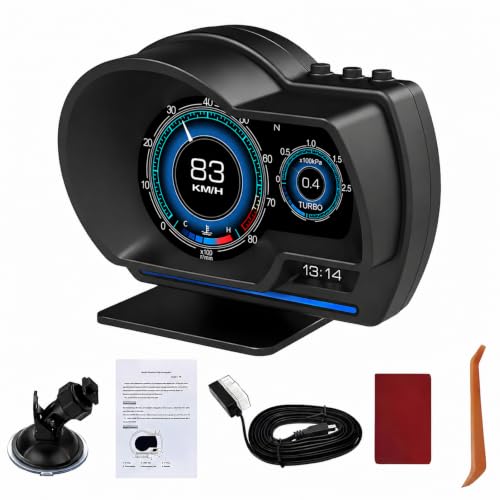

How To Choose The Best Vehicle HUD Display
The single decision that matters before you spend anything is whether your car will hand over data through the OBD2 port. OBD2 (on-board diagnostics, the standard plug under your dash that mechanics read) became common on cars built after 2008. A GPS unit sidesteps that entirely because it pulls speed from satellites. Get this wrong and an OBD2 unit has no engine data to display.
Check your car’s year and fuel type first
Most OBD2 HUDs in this set are built for gasoline cars from 2008 onward. Diesels, hybrids, pickups, RVs, and cars with a modified engine computer are frequently listed as incompatible — that is the manufacturer’s own compatibility note, and it is worth taking seriously. If your car falls outside those lines, a GPS unit is the safe move.
Brand-specific exclusions also show up. Several units here explicitly name Dodge, Jeep, Chrysler, Suzuki, and certain French and Italian models as not compatible with OBD2 mode. Read the exact list for the unit you are considering before you buy.
Decide between a projected image and a dashboard screen
A windshield-projection HUD bounces the numbers off your glass so they appear to float at eye level — your eyes barely move off the road. A dashboard LCD sits on the dash and you glance down at it. The projection style keeps your view closer to the road; the LCD style is simpler to position and usually easier to read in bright light because the panel is backlit.
Look hard at daylight readability
Sunlight is the enemy of every HUD. A bright panel with automatic dimming handles midday glare better than a dim one. If you drive into the sun often, prioritize a unit whose brightness adjusts on its own or can be raised manually.
Match the data to what you actually watch
If you only care about speed, a GPS unit with a speed alarm is plenty. If you want to keep an eye on coolant temperature, voltage, and RPM — the numbers that warn you something is going wrong — you need the OBD2 route and a unit that displays those parameters.
Side-by-Side Comparison
| Model | Best For | Connection | Key Data | Weight | Amazon |
|---|---|---|---|---|---|
| LORPHEIR L5010 OBD2+GPS HUD★ Best Overall | Overall dual-system pick | OBD2 + GPS | 20+ parameters | 10 ounces | Amazon |
| MH OBD2+GPS HUD (MH-P6)Best for Diagnostics | Fault-code scanning | OBD2 + GPS | Speed, RPM, temp, volt, turbo | 4.16 ounces | Amazon |
| MAIMEIMI Windshield HUD (MA-A8) | Windshield projection | OBD2 | Speed, RPM, temp, volt, L/100KM | 8 ounces | Amazon |
| wiiyii G10 GPS Speedometer | Sunlight-viewable GPS unit | GPS | Speed, altitude, clock, alarms | 150 g | Amazon |
| MAIMEIMI P24 OBD2+GPS HUD | Color interface fans | OBD2 + GPS | Speed, temp, volt, RPM | 6.72 ounces | Amazon |
| Mulcort Solar GPS HUD | Solar charging | GPS | Time, temp, altitude, speed | 164 g | Amazon |
| Qiilu OBD2 HUD | Budget plug and play | OBD2 | Speed, temp, volt, mileage | 124.74 g | Amazon |
Detailed Reviews
1. OBD2 GPS Dual System Car HUD Display
Our pick — 4.0+★ from 70+ verified ratings; the strongest balance of quality and price.
The one that covers both bases: diagnostic-port data for newer cars, satellite speed when it can’t connect.
Here is the thing that separates this LORPHEIR from nearly every other HUD on the list: it carries both OBD2 and GPS radios in one housing. On a gasoline car built after 2008 it can pull real engine data through the diagnostic port. On an older or specialty vehicle, GPS mode takes over and gives you 100% vehicle compatibility by satellite. That dual-system fallback is the reason it sits at the top — you are not gambling on whether your car will talk to it.
What it can show you is unusually deep for this tier: over 20 parameters, including speed, RPM, water temperature, voltage, fuel consumption, altitude, driving time, distance, turbo pressure, intake pressure, oil temperature, and navigation coordinates. The whole point of a HUD is that your eyes stay up — so having coolant temperature and voltage in that same eye-line, not just speed, is the real payoff. Its dual-core processor is rated for data accuracy within 1% variance, and the unit is rated to operate from -40°C to +80°C at 10% to 95% humidity.
Mounting is flexible in a way that actually matters. You get a 360° rotating suction cup bracket for the windshield, a console base, and adhesive tape for a permanent spot — so you can position the numbers where they don’t block your view. It weighs 10 ounces, and several buyers mention the build feels solid, with quality the most-discussed point in the reviews. The honest caveat: functionality draws divided opinions — some cars link up cleanly and some don’t, which is a compatibility question, not a defect. Verify your vehicle against the 2008-and-later OBD2 requirement before you commit.
Where it wins
- OBD2 and GPS in one unit, so older and specialty vehicles still get a working speed readout
- Over 20 parameters including coolant temp, voltage, and turbo pressure
- 360° rotating suction mount plus console base and adhesive tape for flexible placement
- Rated from -40°C to +80°C for hot and cold climates
Worth knowing
- OBD2 mode needs a gasoline vehicle from 2008 or later; older cars fall back to GPS only
- Some owners find the OBD2 link won’t connect to their specific model — check compatibility first
Go for it if: you want one unit that will work whether your car is a 2015 sedan or a 2005 beater, and you want engine data, not just speed.
Check compatibility first if: your car is a diesel, hybrid, or has a modified engine computer — those fall outside the OBD2 support here.
2. MH Head Up Display for Car
A HUD that also reads and clears your check-engine codes — the mechanic’s tool on your dash.
The stand-out here is not the speed readout — it is the fault diagnosis. This MH unit scans your car’s computer for stored trouble codes and shows them, then lets you short-press OK to clear them. It also runs acceleration and brake tests and reads live data streams. For a driver who likes to know why the check-engine light is on before paying someone to tell them, that is a genuinely different feature from the rest of this list. It weighs 4.16 ounces, making it the lightest unit here.
Data coverage runs wide: speed, tachometer, fuel consumption, water temperature, drive time, altitude, mileage, turbo pressure, compass, clock, and voltage. The engine data comes through the OBD2 port on cars from 2008 onward. You can set alerts for speed (5-200 km/h), engine temperature (50-200°C), voltage (10.0-15.0V), and RPM (1000-8000) — which means the unit beeps before a number gets dangerous, not after. Brightness is adjustable across 8 levels, 1 the darkest and 8 the brightest, and you can switch between °C/°F and km/mph.
Compatibility is where you need to slow down and read. This one is built for OBDII/EOBD-compliant gasoline cars after 2008 and specifically does not support OBD I or JOBD. The manufacturer names diesels, hybrids, pickups, RVs, and modified ECUs as non-starters, plus Jeep, Peugeot, Citroen, Fiat, Renault, DS, Lamborghini, SIMCA, and Suzuki. If your car lands on that list, you get GPS mode only — speed, voltage, satellite time, altitude, direction, mileage, and drive time. The functionality gets praise from owners, but reliability is the most-discussed topic in the reviews and it splits both ways, so treat this as a unit for a compatible car you’ve verified, not a universal fit.
The diagnostic edge: reading and clearing engine fault codes is a real, useful extra that most HUDs skip entirely.
Set your limits: the speed, voltage, temperature, and RPM alarm ranges let you choose when it warns you — five to 200 km/h for speed, 10.0 to 15.0V for voltage.
Pick this one when: your car is a post-2008 gasoline model outside the excluded brands and you want to see and clear fault codes yourself.
Think twice if: your vehicle is a hybrid, diesel, or one of the named incompatible brands — GPS mode is all you’ll get.
3. MAIMEIMI Windshield Heads Up Display MA-A8
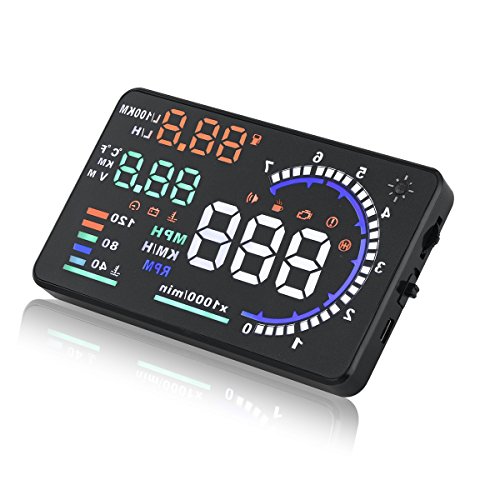
Numbers that float on your glass, not a box on your dash — the closest thing to a factory HUD.
If you want the effect a luxury car gives you — speed hovering out on the windshield at eye level — this is the one built for it. Instead of a panel sitting on the dash, the MAIMEIMI projects onto the windshield itself in large font, so your eyes stay up near the road. That eye-level projection is the reason to pick this unit over a dash-sitting LCD.
The data comes through the OBD2 port on gasoline cars from 2008 onward, and the manufacturer makes the case that the wired connection gives more real-time and accurate numbers than a plain GPS unit. It displays speed, plus switchable RPM, trip, water temperature, voltage, and fuel figures in L/h and L/100KM. Four alarms cover overspeed, fatigue driving, speed, and engine failure. A built-in light sensor adjusts brightness to conditions automatically, and you can fine-tune it by hand if you want more control.
The trade-off is the same one every OBD2 unit on this list carries: it only works with OBDII/EOBD-compliant cars, meaning gasoline vehicles from 2008 and later. The manufacturer explicitly rules out OBD I and JOBD, plus a long list — Dodge, Jeep, Chrysler, French and Italian models, Suzuki, Mazda 6, several Infiniti and Lexus models, certain Hondas, Kia, and hybrids and diesels. Owners describe the install as easy and the value as fair, but the functionality and accuracy split both ways, and a recurring theme is the speed reading drifting off more the faster you go. That drift is fixable through the setting mode’s manual fine-tune, which is worth doing on day one.
Worth the look
- True windshield projection keeps your eyes up near the road, factory-style
- Automatic brightness adjustment via built-in light sensor
- Four alarms including overspeed and engine-failure warnings
Plan around
- OBD2 only — no GPS fallback for older or incompatible cars
- Speed accuracy can drift at higher speeds; run the manual fine-tune after installing
- Long list of excluded brands and vehicle types to check against
The match: a post-2008 gasoline car and a driver who wants that floating-on-glass look with the road in view.
The mismatch: an older or unusual vehicle, or a hybrid or diesel — there’s no GPS backup here to save the day.
4. wiiyii G10 Digital Speedometer for Car — GPS Head Up Display

Works on any car by satellite, with a screen that brightens itself to fight the sun.
A GPS unit sidesteps the compatibility headache entirely — no diagnostic port, no 2008 cutoff, no brand exclusions. This wiiyii G10 pulls speed from satellites, so it works on all models, and it adjusts its brightness automatically to the light, which directly addresses the biggest failing of most HUDs. The display is a large 5.5-inch panel in a sleek blue-and-white body, and it weighs 150 g — light enough that a suction mount holds it steady.
Beyond speed, it shows altitude, driving time, clock, acceleration time, driving distance, direction angle, that satellite icon, longitude, latitude, and mileage. Accuracy holds up well at lower speeds, which is exactly the range where a speed display is most useful in town. Two alarm functions add real value: a three-stage overspeed alarm and an eight-hour fatigue-driving reminder, both of which you can set. Setup is via the included USB cable into your car’s charger port, plug and play, with a non-slip mat and rotary suction cup holder included.
Compare the size to the Mulcort below — the G10’s 5 x 2 x 1-inch footprint is a taller panel built for at-a-glance reading. The honest limit is bright direct sunlight: some drivers find the display hard to see when the sun is full on it, despite the auto-dimming. That is the trade-off you accept for a large screen at this tier. If you drive a car old enough that no OBD2 unit will talk to it, this is a no-brainer pick.
Screen-first thinking: the auto-adjusting brightness and 5.5-inch panel make this the easiest dash-mounted unit to glance at.
Gets low speeds right: accuracy is dependable up through town speeds, which is where a speed HUD earns its keep.
Great fit for: older cars, diesels, and any vehicle where OBD2 is a gamble — satellite speed needs no cooperation from the car.
Accept this: full direct sun can still wash out the display, so park it out of the strongest glare angle when you mount it.
5. MAIMEIMI P24 OBD2 & GPS HUD with Car Inclinometer
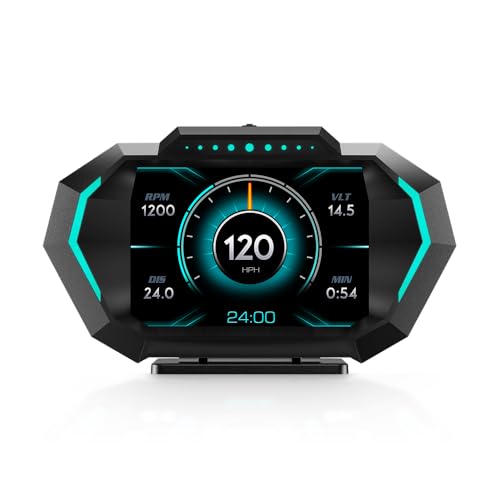
Twelve data layouts, switchable color themes, and an inclinometer — the tinkerer’s pick of the bunch.
Some drivers want their dash to look a certain way, and this MAIMEIMI leans hard into that. You get 12 switchable data modes and multiple color UI interfaces, plus adjustable ambiance lighting on the body itself. If the plain black housing of most HUDs bores you, this one lets you restyle the display to suit your interior. It also adds an inclinometer — a tilt readout — that the others don’t list.
On the data side it runs both OBD2 and GPS. OBD2 mode reads speed, water temperature, oil temperature, voltage, fuel consumption, RPM, clock, one-way driving distance, one-way driving time, and travel direction on gasoline cars from 2008 on. GPS mode gives you altitude, GPS speed, driving distance, distance time, and date. The tilt angle, speed, and a dozen other readings can be seen without shifting your eyes down off the road. It also beeps for 10 situations, including overspeed, voltage, water temperature, oil pressure, engine temperature, and RPM alarms.
Where this gets tricky is compatibility, and the manufacturer is unusually upfront about it. The OBD2 mode is incompatible with Dodge, Jeep, Chrysler, French and Italian models, Suzuki, Mazda6, hybrids and diesels, trucks, RVs, modified ECUs, Infiniti QX50/Q50, Lexus IS250/ES300H, Honda Jazz/CRV, Kia, and the 2013 Toyota Avanza. It weighs 6.72 ounces and measures 5.03 x 2.89 x 1.47 inches. The accuracy reads mixed among owners, with some finding the OBD2 data spot-on and others finding it doesn’t tie in — so check your model against the list before buying. When it works, the custom look is a genuine reason to choose it over a plainer unit.
Built for: a confirmed-compatible post-2008 gasoline car and a driver who wants to tweak how the dash looks, not just what it shows.
Worth pausing on: the long incompatible-models list, plus speed accuracy that goes both ways in owner reports.
6. Mulcort Car Wireless Solar GPS HUD Display with LCD Screen

A GPS screen that charges itself off the sun and clips to your dash with no wiring at all.
No cord, no OBD2, no compatibility quiz — the Mulcort gets its speed from satellites and its power from a large solar panel across the top. It supports both solar charging and USB power as a backup, and it carries a built-in battery for darker stretches. Buyers report up to 16 hours of runtime per charge, enough for a full day of driving. That cord-free setup makes it the easiest unit here to move between cars or drop on the dash without running anything under a floor mat.
All data comes from GPS: time, temperature, altitude, and speed, shown in large fonts on an LCD (a flat screen you read at a glance). The solar panel doubles as a light sensor — it reads the ambient brightness and adjusts the display so it stays clear day or night. Overspeed and fatigue-driving alarms are both included, and you can set both speed and time thresholds. At 164 g (5.8 oz) it is a compact unit and among the most self-contained here.
The catch, and it is a real one, is daytime brightness. Several owners find the display too dim when the sun is bright, which undercuts the whole point of a heads-up readout. On accuracy and overall quality the reviews split both ways. So this is a buy for a driver who values the solar, cord-free convenience and mainly drives in mixed light — not someone chasing the brightest possible screen at midday. Its 3.94 x 3.15 x 1.18-inch body is compact enough to sit out of your way on the dash.
What makes it convenient
- Solar charging plus USB backup means no cord to the dash
- Up to 16 hours of runtime per charge in buyer reports
- Large LCD fonts with auto brightness sensing
- Works on any vehicle by GPS — no OBD2 cutoff or brand list
Set your expectations
- Screen can be too dim in bright daytime sun
- GPS only — no engine parameters like water temp or RPM
- Weighs 164 g
Reach for this if: you want a cord-free, self-charging speed display you can move car to car and don’t need engine data.
Not ideal if: you drive into blazing sun often and need every digit lit up — a brighter panel will serve you better.
7. Qiilu OBD2 HUD

The simplest plug-in of the bunch — into the port, and speed, temp, and voltage light up.
For the driver who just wants the basics on the glass without fiddling, the Qiilu is the most stripped-down pick here. You plug the OBD2 connector in — it has a buckle design to keep the connection firm on rough roads — and it starts showing speed, water temperature, voltage, and one-way mileage. It weighs 124.74 g and is built from ABS plastic the maker says is chosen for heat resistance and toughness. There is no GPS fallback and no engine diagnostics, but there is also nothing to configure beyond mounting it.
It carries a full set of alarms — overspeed, water temperature, voltage, and fault warnings, plus a fatigue-driving reminder — and an adaptive light sensor that keeps the backlight clear by day and softer at night. The reflective film is included so the numbers stay visible without ghosting. Installation needs no mechanical knowledge: plug it in, mount it, drive.
The honest picture here is sunlight. Owners mention it reads fine in direct sun for some and not at all during the day for others, and that visibility split is the most-discussed part of the reviews. Quality and value come through as solid for the tier, but this is not the unit to buy if you need guaranteed daylight legibility. It is the one to buy if you want the barest, cheapest plug-in OBD2 readout and mostly drive in mixed or evening light. Its compatibility runs to cars with an OBD2 interface and protocol — the same 2008-and-later gasoline expectation as the rest.
Keep it simple: plug in, mount, done — no app pairing, no GPS setup, no menus to learn.
The sun is the limit: daytime visibility reads mixed, so weigh how much of your driving is in bright sun before committing.
The right call for: a compatible OBD2 car, a tight budget, and a driver who wants speed, temp, and voltage with zero setup hassle.
skip it if: guaranteed bright-daylight legibility is your priority, or your car lacks an OBD2 port.
Know the Specs
OBD2 vs GPS connection
OBD2 is the on-board diagnostics port every mechanic plugs into — on a supported car it hands the HUD real engine data like RPM, coolant temperature, and voltage. It typically needs a gasoline vehicle from 2008 onward and skips diesels, hybrids, and several brands. GPS mode pulls speed from satellites, so it works on any vehicle but gives only speed and positional data, not engine readings. Pick OBD2 for depth and GPS for guaranteed compatibility.
Windshield projection vs dashboard screen
A windshield-projection unit bounces the numbers off your glass so they appear at eye level — your gaze barely leaves the road. A dashboard LCD (a backlit panel that sits on the dash) makes you glance down at it. Projection keeps your view higher but can be dimmer in sun; the LCD tends to be easier to read in bright daylight. Neither is universally better — it depends on where your eyes naturally rest.
Daylight readability and brightness
Every HUD fights the sun. Units with an automatic light sensor adjust their own brightness, and some let you raise it manually across multiple levels. If you drive toward the sun, prioritize a bright panel with auto-dimming — a dim screen that washes out defeats the whole purpose of a heads-up display.
Alarms and what they warn about
Most units here offer overspeed, voltage, water temperature, and fatigue-driving alerts. Some let you set the exact ranges — speed from 5 to 200 km/h, voltage from 10.0 to 15.0V, temperature from 50 to 200°C. Setting realistic limits turns the HUD into an early warning for a hot engine or a charging problem, not just a speed readout.
Common Questions
Will an OBD2 HUD work on my car?
What is the difference between an OBD2 HUD and a GPS HUD?
Why does my HUD wash out in direct sunlight?
Do these HUDs show water temperature and voltage?
Can a windshield-projection HUD damage my glass?
How accurate is a HUD speed reading?
Can I move a HUD from one car to another?
What does the fatigue-driving reminder actually do?
Do I need to install anything to mount a HUD?
Will a HUD block my view of the road?
The Bottom Line
For most drivers, the vehicle hud display that earns the top spot is the LORPHEIR L5010 dual-system HUD, because it carries both OBD2 and GPS in one unit — so newer gasoline cars get deep engine data and older or specialty vehicles still get satellite speed. If reading and clearing fault codes is what you’re after, the MH dual-system unit does that diagnostic job and nothing else here matches it. And if you drive a car that no OBD2 unit will talk to, the wiiyii G10 gets speed from satellites with a screen that brightens itself — just mount it out of the strongest glare.
The one honest nudge before you buy: verify your car’s year and fuel type against the compatibility list on whichever unit you choose. That single check decides whether your HUD shows live engine data or falls back to GPS speed only.
How we choose
We do not accept paid placement. Every pick is matched to a real buyer and a real use-case; we do not hands-on test units.
Sources
Specifications: manufacturer listings and product documentation. Review insights: verified customer reviews, as of July 2026. Pricing: not shown on this page (it changes often); check the current price via the retailer link.
As an Amazon Associate, Tactical Gear Guy earns from qualifying purchases. This does not affect which products we feature.