Specs are compiled from manufacturer listings and verified buyer reviews and can change over time — please confirm the key details on the product page before buying.
You buy a fast charger, plug it in, and nothing seems faster. A USB port tester is the tiny inline gadget that sits between your cable and your phone and shows you the real numbers: how many volts are arriving, how many amps are flowing, and whether your cable is quietly choking the power. It replaces guesswork with a live voltage and amperage readout. Read the digits and you can tell a weak cable from a weak charger before buying either.
This guide is built by comparing the manufacturers’ published specifications and the patterns across verified customer reviews, so you get each pick’s real strengths and trade-offs instead of marketing spin.
Some testers are dumb voltmeters, some read charging protocols and cable chips, and the gap between them is wider than the price tags suggest. Here is the honest shortlist of the usb port tester options worth your money today.
Top Picks


How To Choose The Best USB Port Tester
The first decision is not brand or display size. It is what you are actually trying to catch. A tester that only sees USB-A is useless on a USB-C laptop charger, and a tester built for USB-C cannot read the four-pin USB-A ports on an older wall brick without an adapter. Decide which ports your gear actually has, then match the tester to that.
Voltage and current range decide what you can test
Every tester lists a voltage window and a maximum current. The voltage window is the range of power it can safely measure — 3.6V-32V covers a laptop charger at the high end and small accessories at the low end. The current ceiling matters because it caps what you can load-test. A tester rated to 3A will not survive pushing a modern power bank, while one rated to 12A handles fast-charge currents without complaint.
USB-A, USB-C, or both
A USB-A tester drops inline between a standard rectangular plug and the device. A USB-C tester uses the reversible oval connector and can often read the E-Marker chip inside a cable — the tiny chip that tells the charger how much power the cable can carry. If you own a mix of older bricks and new USB-C chargers, a dual-port unit saves you from buying two testers.
What the display actually shows you
A basic meter shows volts and amps. A better one adds watts, accumulated capacity, energy in watt-hours, and a running timer. Those extras are what let you measure a power bank’s real stored energy over a full charge cycle instead of guessing from the label. Color screens and rotation help you read the numbers when the tester is hanging upside down, which happens more than you’d think.
Side-by-Side Comparison
| Model | Best For | Voltage Range | Max Current | Ports | Amazon |
|---|---|---|---|---|---|
| Klein Tools ET900★ Best Overall | Cable and port troubleshooting | 3 to 20V DC | 3A | USB-A | Amazon |
| Plugable USB-C Power MeterTop Performer | High-power USB-C charging checks | 4.5V-50V | 6.5A | USB-C | Amazon |
| YOJOCK USB Tester MeterMost Versatile | Rotating screen on tight ports | 4.5V-24.0V | 8.0A | Micro USB / Type-C | Amazon |
| DROK USB Tester | Dual-port bench checking | 3.2-30V | 5A | USB-A USB-C in, dual USB 2.0 out | Amazon |
| YEREADW USB C Tester 4-30V | Protocol hunting on a budget | 4V-30V | 12A | USB-C | Amazon |
| Power-Z C240 | Pocketable 240W testing | — | — | USB-C in/out | Amazon |
| FNIRSI FNB58 | Deep protocol and cable analysis | 4V minimum | 7A | USB-A / Micro-USB / Type-C | Amazon |
| Power-Z KM003C | Serious PD protocol analysis | Up to 50V | 6A | Dual USB-C + HID | Amazon |
Detailed Reviews
1. Klein Tools ET900 USB Power Meter
Our pick — 4.5+★ from 300+ verified ratings; the strongest balance of quality and price.
The one tester that behaves like a proper bench instrument instead of a novelty keychain.
Klein’s ET900 wins on one very specific strength: it will keep watching a port for up to 1000 hours without you touching it. That 1000-hour window is what separates a diagnostic instrument from a quick-glance meter. Sit it between a wall brick and a phone overnight and it records voltage, current, capacity delivered, energy, and resistance over the whole stretch. Come back in the morning and you know exactly what happened.
The working window is 3 to 20V DC with current from 0.05 to 3A. In plain terms, it comfortably handles every standard USB-A brick, phone, and tablet you own, plus Qualcomm Quick Charge ports. The 3A ceiling is the honest limit — it is not built for modern high-current fast charging on a USB-C laptop. What it does cover, it covers with a hi-resolution LCD that stays legible in a dim room, which matters when you are chasing a flaky cable behind a desk at night.
Owners talk first about how much it gets done, and second about build quality — this thing feels like it belongs in a toolbox, not a drawer of spare adapters. The single most cited flaw is accuracy on certain readings, so treat it as a great relative tool: it will show you clearly that one cable is dropping voltage while another holds steady, but for calibration-grade numbers you would look to the analyzer-tier picks further down. The durable cable on the end reaches ports that are buried deep.
Where the ET900 pulls ahead
- Runs unattended for up to 1000 hours — long enough to profile a full night of charging
- Stores and recalls up to 10 readings so you can compare cables back to back
- Voltage and current overload detection flags a bad port before it damages anything
- Tests Quick Charge ports alongside standard USB-A
What you give up
- 3A current ceiling rules it out for heavy USB-C fast-charge testing
- USB-A only — no oval connector on this model
- Accuracy draws fair criticism compared with analyzer-grade meters
Buy it for: anyone hunting a failing cable or a weak wall charger across standard USB-A gear, where the 1000-hour log does the detective work for you.
Think twice if: your charging world has moved entirely to USB-C at high wattage, because that 3A limit will bite.
2. Plugable USB C Power Meter Tester
Built for the laptop-charging era, where 100W is normal and 240W is coming.
Most testers top out where modern chargers are just getting started. The Plugable handles up to 240W and spans 4.5V-50V with a 50mA-6.5A operating range, so it sits comfortably inline with a USB-C laptop brick pushing serious wattage. It also works in either orientation, which matters because USB Extended Power Range — the higher-voltage charging standard — needs the tester facing the right way round to read correctly.
The standout feature is directional current display. It shows you which way the electrons are actually travelling, so you immediately know if a power bank is charging or discharging. That direction readout tells you instantly whether a dock is feeding your laptop or draining it. Data pass-through and USB-C Alt Mode video support mean you can leave it inline while a monitor is connected, though note it will not work with Thunderbolt 3 devices.
What owners keep coming back to is usefulness — this is treated as a tool you keep in the bag, not a gadget you use twice. It tells volts, amps, watts, and direction in one glance on an OLED screen that reads clearly. The USB-C-only design is the trade-off to accept: USB-C docking stations, chargers, and accessories are home turf, but a USB-A brick from a few years back is not. It is 18.14 g and small enough that most phone cases stay on.
The pocketable angle: at 18.14 g and sized to sit inline without forcing you to peel off a case, this is a tester you can genuinely carry daily — a smaller footprint than the heavier 0.05 kg YEREADW 2-in-1 above, though that one adds USB-A.
The catch worth knowing: no USB-A port and no Thunderbolt 3 support means older bricks and high-end docks fall outside its reach.
Reach for this if: your daily carry is a USB-C laptop and a high-wattage charger, and you want to see exactly where the power is going without a bench setup.
Look elsewhere if: you still own a drawer of USB-A wall bricks that need testing.
3. YOJOCK USB Tester Meter
Four buttons, five ports, and a screen that turns so you can read it from any angle.
The 1.44-inch color display rotates a full 360 degrees here, and that is not a gimmick. Plug a tester into a car charger down by the footwell, or into a wall brick behind furniture, and the screen is often facing the wall. Press the button for the horizontal menu bar and the readout flips upright. Five connection ports and four operation buttons give you Micro USB and Type-C options side by side.
Numbers run 4.5V-24.0V and 0-8.0A, with QC 2.0/3.0 fast charge recognition and cable impedance measurement built in. Impedance is the one that quietly saves you money. It tells you whether a cable is resisting the current, which is the difference between a slow charge and a fast one that you blamed on the phone. The gold-plated USB contacts resist scratches and stains, and the unit cuts output automatically if something goes wrong while saving your data through a sudden power cut.
One operating quirk to absorb before you plug in: when PD power is not connected, the tester supplies no output by default, and both the charger and the device need to support quick charge. Because the protocol design is one-sided, the screen can stay dark — flip the Type-C cable and it lights up. Knowing that beforehand stops the “dead unit” panic.
What earns its place: display clarity is the feature that gets called out most, and that 360-degree rotation is the reason — awkward port angles stop being a problem.
Before you buy: the one-sided PD protocol means a dark screen is usually a flipped cable, not a return.
Fits you if: you test in tight spots — car chargers, bedside bricks, behind the couch — and want the readout facing you regardless.
Worth noting: the 24V ceiling keeps it below the Plugable’s range, so very high-voltage USB-C charging sits outside it.
4. DROK USB Tester
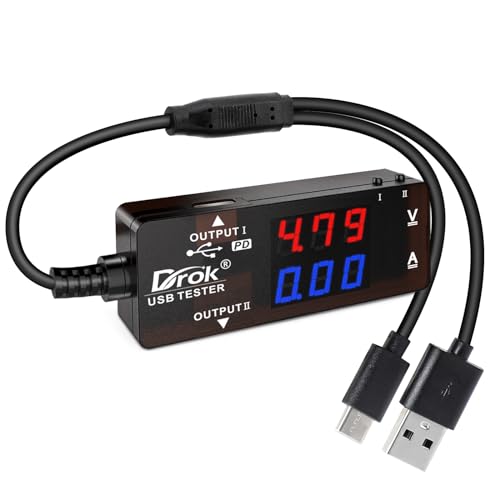
One button cycles seven readout layouts, so you pick the numbers you want to stare at.
DROK takes a different approach from the single-screen crowd. A color LED display flips through seven modes: voltage and current together, capacity alone, power alone, then combinations of all three. Three of those are fixed displays. The last four cycle — and if the cycling annoys you, the button drops you back to the fixed trio. Locking to the fixed trio keeps the same three numbers on screen every time you plug in.
The working window is 3.2-30V and 0-5A, which stretches up to 30V for solar panel and 24V setups. It is genuinely a dual-port unit: USB-A and USB-C inputs feed dual USB 2.0 outputs supporting PD and QC 3.0 fast charge protocol at 3.6V to 12V 3A. Output one does charging and data; output two is charge-only. At 0.04 kg it is lighter than the 0.05 kg YEREADW 2-in-1 that sits below, which matters if you are tossing it into a laptop sleeve.
It also raises alarms — over voltage, under voltage, over current, and short circuit — so a failing charger announces itself rather than quietly cooking. Capacity checking and clearing round out the toolkit. The genuine caveat is the USB-C side: feedback on that port is split, so if USB-C is your main testing target, the Plugable or a YEREADW serves you better. For USB-A-heavy checking with a data pass-through, it earns its keep.
The button-first design: two buttons total, one to cycle modes and one to clear — you are testing power within seconds of plugging in.
Where it stalls: the USB-C measurement is the weaker half, so treat it as a USB-A workhorse that happens to have a C port.
Pick it for: bench-style checking across solar panels, power banks, and 24V bricks where dual outputs and alarm modes earn their place.
Not the one if: USB-C accuracy is your priority — several buyers report that port letting them down.
5. YEREADW USB C Tester Power Meter 4-30V

Reads eight fast-charge protocols and draws the voltage curve while it does it.
Chargers negotiate. They talk to your phone, agree on a voltage, and adjust. This tester listens in. It supports PD2.0/3.0, QC2.0/3.0, FCP, SCP, AFC, PE, DASH VOOC, and Super VOOC — so when a charger fails to hit its advertised speed, you see which protocol it actually settled on instead of guessing.
The measuring range is 4V-30V and 0-12A, running through a 12A high-current terminal for stability. Accuracy is quoted at ± (1%+5), which means the reading stays close enough for real-world diagnosis of chargers, phones, tablets, and power banks. The 1.06-inch ISP color display packs a lot in: voltage, current, power, capacity, energy, time, maximum voltage, maximum current, maximum power, current direction, and even CPU temperature. Double-click rotates the display content.
The curve function is the part that separates it from a numbers-only meter. Long-press the button and you set a recording window of 5mins, 15mins, 60mins, or 2hrs, and it plots live voltage and current across that span. A 60-minute plot exposes a charger that holds 9V at idle and drops to 5V once the phone pulls real current.
What makes it useful: the curve recorder turns a snapshot into a story — a 60-minute plot exposes a charger that fades after ten.
Fair warning: the 30V ceiling stops short of the Plugable’s 50V, so very high-voltage USB-C chains need a different tool.
Your tester if: you want to know why a fast charger is not fast, and a 12A terminal plus protocol list gives you the answer.
Consider another if: you need USB-A testing too — this one is USB-C only.
6. Power-Z C240 Portable USB-C Tester

A metal-shell tester that handles 240W and slips into a coin pocket.
At 11.61 g, the C240 is among the lightest testers here, and it reads as well-built the moment you pick it up. The metal shell shrugs off an accidental drop, which is the failure mode that kills plastic-bodied testers. It supports up to 240W with PD3.1 and QC5.0, giving you headroom for the highest-wattage USB-C chargers now shipping on the market.
The 1.14-inch color display shows voltage, current, power, current direction, energy, timer, D+, D-, and CC. That D+ and D- readout is how you spot a data cable that is charge-only, and the CC reading tells you what the cable is advertising. Current is bidirectional, so you can watch both the discharge of a power bank and the charging behaviour of a wall charger in the same session.
Reliability is the point to weigh honestly. Most units work exactly as expected — that metal shell and bright IPS display regularly get praised — but a small number stop working within days of arriving. That is not the typical experience, but it is a real one, so buy with a return window in mind. The USB-C to USB-A adapter needed for older ports is not included either.
The compact win: 11.61 g and a metal body make this the tester that actually lives in your pocket.
Honest caveat: a handful of units fail early, and the USB-A adapter is sold separately.
Made for: USB-C-only folks who want 240W headroom in a tester small enough to forget you’re carrying.
Skip if: you want USB-A testing from the start or need guaranteed longevity above all else.
7. FNIRSI FNB58 USB Tester

The tech’s tool: reads cable chips, plots ripple, and triggers protocols on command.
This is the tester you graduate to when a simple volt reading stops being enough. It runs a 2.0-inch TFT LCD, spans USB-A, Micro-USB, and Type-C, and pairs with app software over a gravity sensor. The 16-bit ADC and PD protocol physical chip put it in a different league from the color-screen crowd — this is measurement equipment with a UI, and it acts like it.
The features stack up fast. It reads E-Marker cable chips and DASH cable data, records startup time, and measures onboard temperature. It can plot low-speed waveforms at 2 to 100 samples per second, and draw ripple at up to 4M samples per second — ripple being the small power fluctuation that can stress sensitive electronics. It triggers QC2.0/3.0, FCP/SCP, AFC, PD2.0/3.0, VOOC/WARP, and Super VOOC 1.0/2.0, with MTK-PE automatic detection and even QC2.0-to-PD2.0 protocol conversion.
Functionality is the feature that gets the most praise by a wide margin, and the versatility shows. Two things to plan for: the documentation, which is thin enough that some buyers find the learning curve steep, and the printer-free manual policy — you get a QR code for the manual and firmware updates instead of paper. The user interface is also described as cumbersome by part of the audience. Note the 7A current ceiling and the 4V minimum too.
Why the tech crowd keeps it in the bag
- Reads E-Marker cable chips so you know what a cable is really rated for
- Ripple drawing up to 4M samples per second exposes power quality issues
- Triggers a long list of protocols including VOOC and Super VOOC
- Six-digit voltage, current, and power display with 10 switchable capacity sets
What will slow you down
- No printed manual — you rely on a QR code for docs and firmware
- The user interface earns a mixed reception for being clunky
- 7A ceiling sits below the 12A terminal on the YEREADW curve model
For the tinkerer: anyone who wants to know what a cable’s chip actually says and how clean the power really is.
Not for the impatient: the learning curve and clunky interface ask for time you may not want to spend.
8. Power-Z KM003C Portable USB-C Tester

The PD protocol analyzer that hands you ten million data points at a time.
There is a clear ceiling in this category, and this is it. The KM003C runs an ARM Cortex-M4 processor with a 20-bit ADC, supports up to 50V and 6A with 240W in PD, and can pull 10 million pieces of data at a time through its PC software. That 10-million-point capture is meant for PC software, not a glance at the inline screen.
It handles PD3.2, which is the newest version of the USB power delivery spec, and its tests go beyond voltage and current into capacity, energy, E-marker reading, PDO analysis, and protocol analysis. Two USB-C ports carry current in and out, with an extra HID port for PC and power connections. The 1.54-inch LCD is larger than the previous generation, supports gravity rotation, and uses a high-contrast UI.
Weigh it honestly. Functionality draws the strongest praise — it does everything its buyers ask and then some — but the screen arrives smaller than many expect, and the PC software divides opinion sharply. Value and documentation also draw mixed reactions, largely because the manual lives on the official website rather than in the box. If you want the deepest read on a USB-C chain and don’t mind the sharp learning curve, this delivers; if you just want a quick volt check, it is far more tool than you need.
The power angle: the ARM Cortex-M4 and 20-bit ADC combination put the 50V / 6A measurement window in analyzer territory, well past the 30V ceiling of the value picks.
Fair warning: the screen is smaller than the spec sheet implies and the software is polarizing — plan for a learning curve.
Reserve this for: people who analyze USB-C power for work and want PD3.2 plus real software behind the numbers.
Overkill if: you only want to confirm a charger is delivering — a simple meter answers that faster.
Know the Specs
Voltage range
This is the window of power the tester can safely measure. A narrow range like 3 to 20V suits standard bricks and older phones. A wide one like 4.5V-50V reaches into the high-voltage USB-C charging standard, so you can test a laptop charger without worrying about clipping. Match the range to the highest-voltage charger you own, not the lowest.
Current ceiling
The maximum amperage a tester can carry, which caps what you can load-test. A 3A tester handles phones and tablets. An 8A or 12A unit handles power banks and fast-charge bricks. Push past the ceiling and you risk the tester itself, so check the rating against your fastest charger before you buy.
Protocol detection
Chargers and devices negotiate a charging standard — PD, QC, VOOC, and others. These are the rules that decide how much power flows. A tester that names the protocol in use tells you why a fast charger is not running fast: the negotiation failed or settled low. Without protocol detection, you only see the resulting numbers, not the reason behind them.
Capacity and energy measurement
Capacity (in Ah or mAh) and energy (in Wh) are what let you measure a power bank’s real storage. Run a full charge and the accumulated figures tell you what it actually held, not what the label promised. Divide the Wh reading by the battery voltage to get Ah — that is how the manufacturer’s own example arrives at 9.46Ah from 35Wh at 3.7V.
Common Questions
Will a USB-A tester work on a USB-C charger?
Can a USB port tester measure my power bank’s real capacity?
Does a USB tester slow down my charging?
What does E-Marker reading mean and do I need it?
Is a USB tester the same as a multimeter?
Why does my tester show zero amps at first?
Can a USB tester read the fast-charge protocol a charger uses?
What is USB PD3.1 and PD3.2 and why does it matter?
Do I need a USB-A tester for older wall chargers?
How do I tell if a cable is bad using a tester?
The Bottom Line
For most everyday diagnostics on USB-A gear, the Klein Tools ET900 is the pick, because that 1000-hour logging window tells you what actually happened over a full charging session rather than a single snapshot. If your daily carry is USB-C laptops and high-wattage chargers, jump to the Plugable USB C Power Meter for 240W headroom and directional current display. And if you want to know exactly which protocol a charger negotiated and why it is running slow, the FNIRSI FNB58 reads the cable chip and plots the ripple while it does it. Match the tester’s ports to your gear — USB-A, USB-C, or both — and one session will show you where the power is going.
How we choose
We do not accept paid placement. Every pick is matched to a real buyer and a real use-case; we do not hands-on test units.
Sources
Specifications: manufacturer listings and product documentation. Review insights: verified customer reviews, as of November 2026. Pricing: not shown on this page (it changes often); check the current price via the retailer link.
As an Amazon Associate, Tactical Gear Guy earns from qualifying purchases. This does not affect which products we feature.