Specs are compiled from manufacturer listings and verified buyer reviews and can change over time — please confirm the key details on the product page before buying.
You want a keyboard that frees up desk space without typing like a toy. That means a corded USB mini keyboard with no number pad, solid-feeling keys, and no Bluetooth pairing to manage. All nine picks below run on a plain USB cable — several also accept USB-C — so they work the moment you plug them in.
This guide is built by comparing the manufacturers’ published specifications and the patterns across verified customer reviews, so you get each pick’s real strengths and trade-offs instead of marketing spin.
The catch most buyers miss is layout and operating system: a Mac-only board will fight a Windows PC, and a 78-key deck drops the numeric pad on purpose. Below you will find the honest differences spelled out, including which small deck suits a cramped desk, a server rack, or a bag, so you can choose the right USB Mini Keyboard without guessing.
Top Picks


How To Choose The Best USB Mini Keyboard
A mini keyboard saves desk space, but the wrong one costs you daily frustration in exchange. Three things decide whether you love it or resent it: the connector, the operating system it was built for, and whether the layout keeps the shortcuts you actually press.
Match the connector to the port you have
A USB-A plug is the classic rectangular end that fits older laptops, desktops, and USB hubs. A USB-C plug is the smaller oval end that newer MacBooks and many tablets use. Some boards ship with both plugs or a USB-C to USB-A adapter, so you can move between an old desktop and a new laptop without hunting for a dongle. If your device is USB-C only, buy a board that lists USB-C directly — adapting down adds a loose part you can lose.
Check the operating system before anything else
Mac-only boards map their keys for macOS, and on a Windows PC the special keys can misbehave or do nothing. The reverse is also true: a Windows-first board may not give a Mac user the Command and Option keys where the fingers expect them. Check the compatibility line in the listing, not the product photo. Boards that list Windows, macOS, Linux, and Chrome OS are the safe pick for a shared or mixed household.
Decide whether you can live without the number pad
Dropping the numeric keypad is what makes these boards mini. A 78-key layout keeps letters, numbers, and the main shortcuts but moves the number pad off the deck. If you type long columns of figures all day, that is a real loss. If you mostly write, browse, and code, the smaller footprint puts your mouse closer and clears space on a tight desk.
Think about key feel and noise
Scissor-switch keys are the flat, laptop-style keys that sit low and travel a short distance. They tend to be quieter than tall mechanical keys, which matters in an open office or a shared room. A slight tilt angle and rubber feet underneath keep the board from sliding while you type. None of these boards need drivers or batteries — the cable is the power and the connection at once.
Side-by-Side Comparison
| Model | Best For | Connection | Key Count | Layout / Notes | Amazon |
|---|---|---|---|---|---|
| Perixx PERIBOARD-409H★ Best Overall | Desk space plus extra ports | USB-A | Compact, no number pad | 2 built-in USB hubs | Amazon |
| TECKNET Wired Mac KeyboardQuietest Typing | Mac users wanting quiet typing | USB-A, USB-C | Low-profile scissor | macOS only, 8° tilt | Amazon |
| Powboro Upgraded MiniCross-Platform Pick | Mixed Windows and Mac desks | USB-A | 78 | Cross-platform, quiet | Amazon |
| YORUNOHOSHI Ultra-Slim | Mac and PC with a pop of color | USB-A, USB-C | 78 | Media hotkeys, Pink | Amazon |
| Perixx PERIBOARD-422 | Tablets and USB-C devices | USB-C | 79 | 12 multimedia keys | Amazon |
| OMOTON Wired Mac Keyboard | Mac desk work and study | USB-C, USB-A | 78 | macOS 11.3+, 8° tilt | Amazon |
| Macally Small Wired | Minimalist Mac and PC setups | USB-C, USB-A | 78 | 13 shortcut keys | Amazon |
| MCSaite Super Mini | Industrial and tight-fit installs | USB-A | 78 | PVC build, 1.5 m cable | Amazon |
Detailed Reviews
1. Perixx PERIBOARD-409H Wired USB Mini Keyboard
Our pick — 4.0+★ from 700+ verified ratings; the strongest balance of quality and price.
The mini that hands two USB ports back to you instead of taking them away.
Most small keyboards are a one-way trade: you give up desk space and get nothing in return. This Perixx flips that. It frees up your desk and still gives you somewhere to plug things in. The footprint is 12.36″L x 5.75″W x 0.79″H, and two built-in USB ports sit on the side. Your mouse, a numeric keypad, or a flash drive plugs straight into the keyboard instead of a crowded hub. That is why it sits at the top of this list — it solves the desk-clutter problem from both directions.
The keys are ABS plastic with a durable UV coating, and Perixx rates the membrane switches at 10,000,000 press cycles. In everyday terms, the letters are printed to resist wearing off and the keys are built to keep responding through years of daily typing. Setup is genuinely plug and play: no driver, no software, just a USB 2.0 port and the attached 5’9″ cable. That length reaches a tower sitting under the desk, which is where most of these boards end up.
The honest limit is the number pad. There isn’t one, and the layout is built around Windows 7, 8, and 10, so a Mac user will find some keys in unexpected spots. The keys are also taller and more traditional than the flat scissor decks here — closer to a laptop with a bit more travel. What wins people over, though, is the hub: the built-in port for a standard mouse is the detail owners keep coming back to, and it turns a space-saving board into a small desk hub of its own.
Where it earns its keep
- Two extra USB ports on the side for a mouse, keypad, or flash drive
- 10,000,000-cycle membrane keys with UV-coated lettering
- 5’9″ cable reaches a tower under the desk without an extension
- Plug and play on Windows 7, 8, and 10 — no driver at all
What to weigh first
- No number pad, so heavy spreadsheet work gets slower
- Windows-first layout; Mac keys land in different places
- Taller keys than the flat scissor boards in this list
Reach for this if: you want one small board to clean up a cramped desk and reclaim two USB ports at the same time.
Look elsewhere if: you live in a spreadsheet and need the numeric keypad within reach.
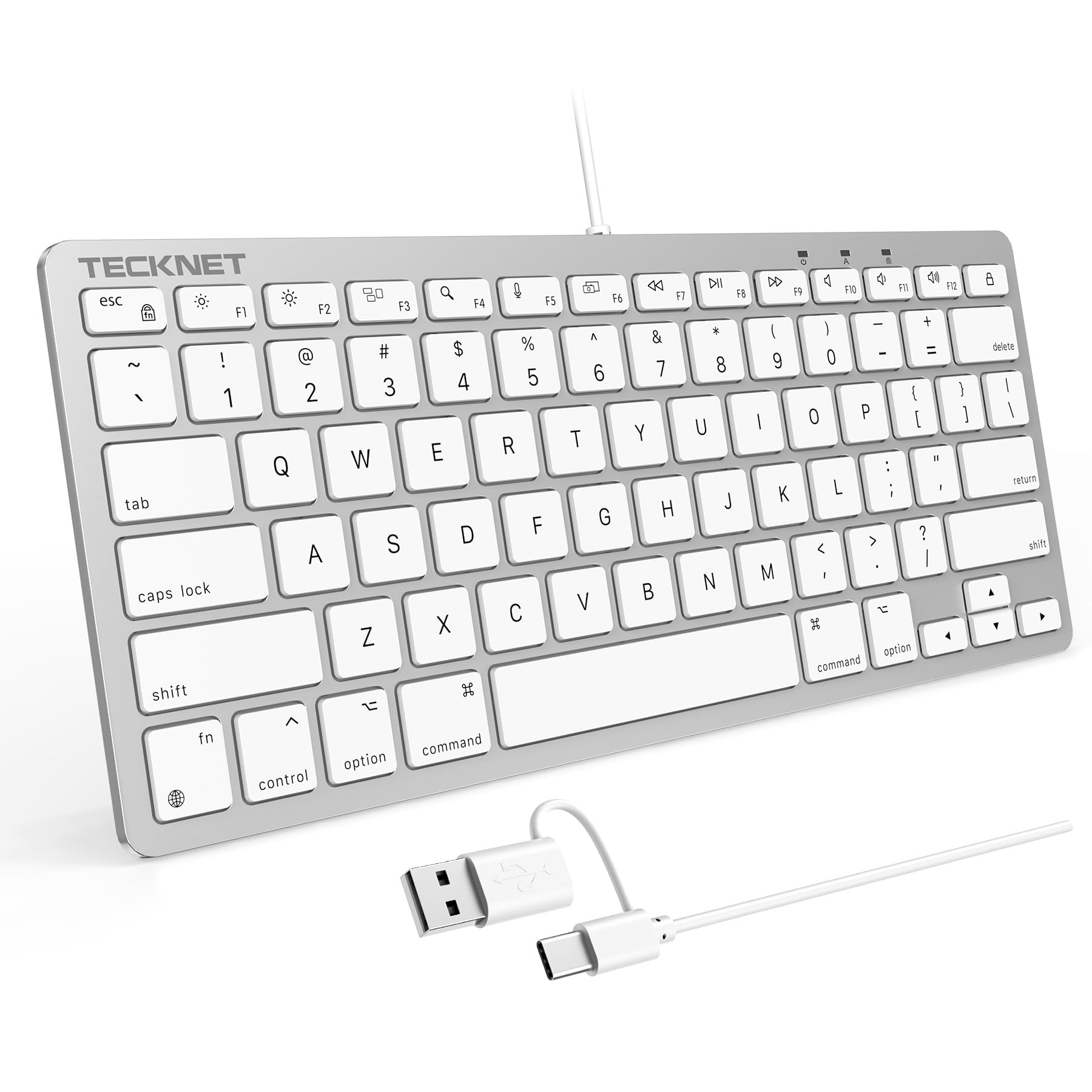
2. TECKNET Wired Keyboard for MacOS Devices with Dual Interface
A near-silent Mac deck with a dual plug that fits old and new machines alike.
If your typing happens in a shared office, a library, or a bedroom where someone else is asleep, noise becomes the deciding spec. This TECKNET uses a precision scissor-switch mechanism under low-profile keys, and the maker positions it against noisy mechanical boards and many mainstream membrane keyboards on exactly that point. You get a short, crisp press instead of a clack. The dual-interface design carries both a USB-C and a USB-A connection, so the same board plugs into a newer MacBook and a traditional desktop without an adapter.
The comfort details are specific: an 8° tilt angle puts your wrists at a flatter, more natural line, and four anti-slip silicone pads underneath hold the board steady so each press lands where you aimed. It is plug and play with no Bluetooth pairing to break. What owners tend to notice first is simply that it works the instant it connects, and it lines up cleanly with iMac and MacBook setups. Build quality and value come through as the other recurring themes in the feedback.
There is a hard boundary you must respect: this is a macOS-only board. On a Windows or Chrome machine the multi-function keys will not behave, and the Option key is mapped to do the job of Alt. Several buyers also describe it as genuinely small, so measure the space where the number pad used to sit before you commit. Power matters too — the listing warns that a low-power or unpowered port can make the keyboard misbehave, so plug into a live port, not a dead hub.
The Mac-first build: dedicated macOS compatibility, not a compromise board that half-works on both systems.
Confirm your port is live: a low-power USB port can leave this keyboard unresponsive, per the listing.
Best fit: Mac owners who type late or in open rooms and want the quietest scissor deck on this list.
Wrong turn for: anyone on Windows, Chrome OS, or Linux — the special keys are not built for it.
3. Powboro Upgraded Mini USB Wired Keyboard for Mac and Windows
One 78-key deck for a house where Windows and Mac share the same desk.
Here is the practical difference between this and the Mac-only TECKNET above: the Powboro lists Windows XP/7/8/Vista, Win 10, Mac, and Linux on the compatibility line. That makes it the board you hand to a mixed household or a small office where machines change hands. It slips in at 11.2″L x 4.72″W — narrower than the Perixx PERIBOARD-409H at 12.36″L x 5.75″W — so it tucks into a bag and gives back a little more desk real estate. The 78 scissor keys keep the essentials and drop the number pad on purpose.
Noise is its quiet trick. The scissor key design gives a soft, near-silent click rather than a heavy thunk, which suits late-night typing without waking the room. The cable runs 1.5 m (about 4.9 ft) from a plain USB-A plug — no drivers, no batteries, no pairing screen. Owners most often flag that it pairs well with tablets, iPads included, and that the quiet typing holds up in real use.
Where it asks patience is in consistency. Feedback on quality control and long-term reliability is genuinely mixed, and typing feel draws some critics. It is a budget board and reads like one. If you want a deck that feels premium in hand and arrives flawless, look past this budget board. If you want a cheap, quiet, cross-platform spare that goes where you go, it does that job without drama.
Go here for: a low-cost second keyboard that works on Windows, Mac, and Linux and travels easily.
Think twice if: you expect a premium feel and tight quality control — the feedback here is mixed on both.
4. YORUNOHOSHI Ultra-Slim Wired Keyboard
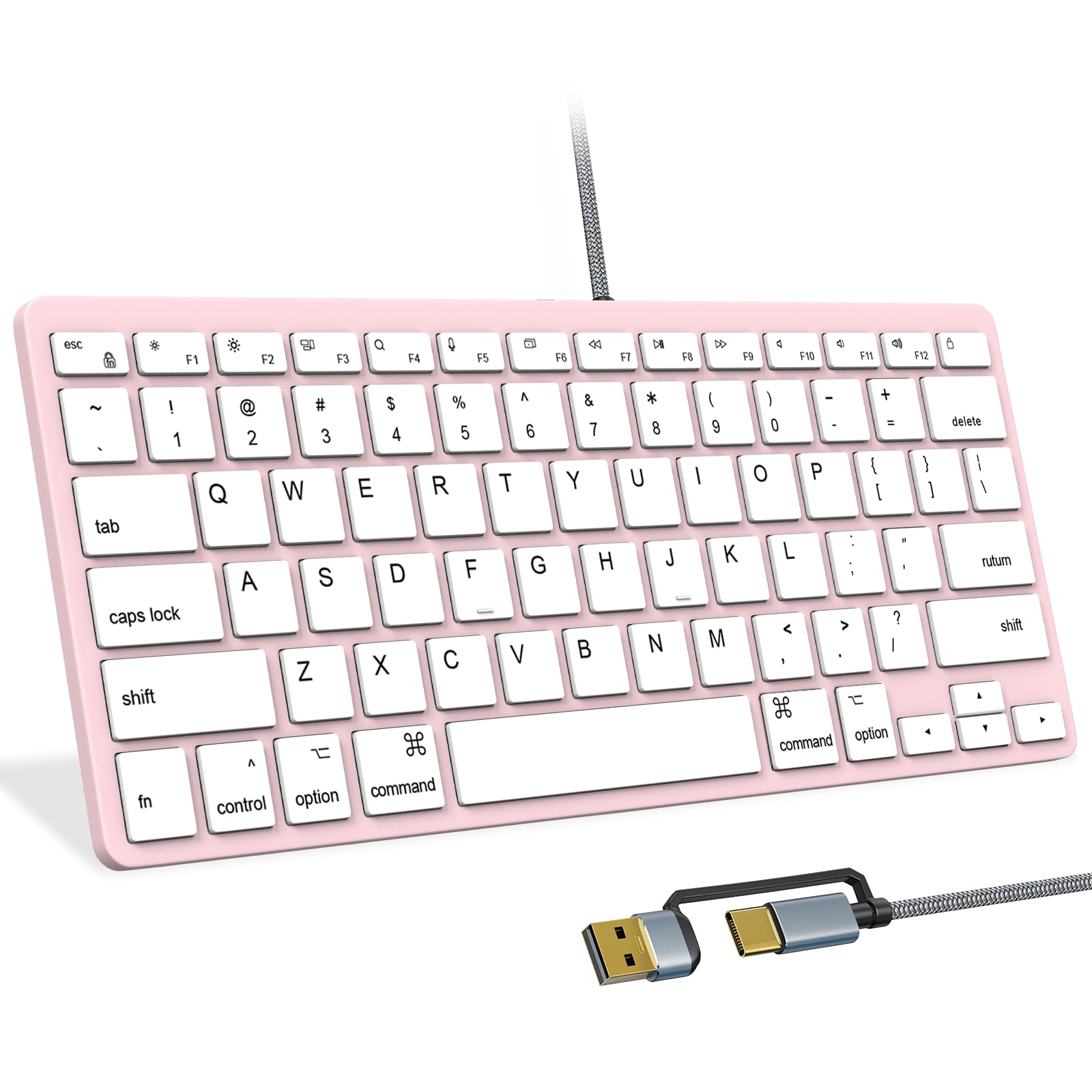
The pink ultra-slim that works on a MacBook and a Windows desktop alike.
You look at your keyboard all day, so the finish matters — and this YORUNOHOSHI comes in pink while still giving you a full 78-key layout. It connects two ways, with a dual USB-C and USB-A interface (USB-C is the small oval plug, USB-A the older rectangular one). A USB-C to USB-A adapter ships in the box, so an older desktop and a newer MacBook both get a clean connection from one board. The 59-inch nylon braided cable reaches a tower on the floor, and there is no battery or charging routine to manage.
The 78 keys keep cut, copy, paste, and the media hotkeys within easy reach — Mac shortcuts on Apple machines, multimedia keys on Windows. Owners most value that it simply works: it registers with a laptop right away, and the quality reads as solid for the price. For a compact deck that has to look good on a desk and behave on two different systems, that combination is the draw.
The one note to size up honestly is the dimensions. Some find it smaller than the photos imply, so check your hand span and desk space before committing. A very small deck can feel cramped for long typing sessions even when it looks tidy. If you want a roomy board, this is not it. If you want a slim, colorful, plug-and-play keyboard that speaks both Mac and PC, it fits neatly.
Two systems, one cable: dual USB-C and USB-A with a bundled adapter means no dongle hunting.
Measure before you buy: the ultra-slim body reads smaller in person than in the product shots.
Right for you if: you want a compact Mac-and-PC board with visible personality on the desk.
Not your board if: you need a wide, spacious deck for marathon typing sessions.
5. Perixx PERIBOARD-422 Wired USB-C Mini Keyboard

A USB-C-native mini board built to plug straight into a tablet, no adapter needed.
If the device you type on most is a tablet, adapters get old fast. This Perixx takes a USB-C connector directly, so it seats into a USB-C tablet or laptop and stays put — no dongle, no pairing, no battery to charge. At 11.46″L x 5.43″W x 0.77″H and 0.68 lb, it travels easily and still fits a 79-key layout with 12 multimedia function keys reached through Fn + F1–F12 for audio and media control.
The keys are durable ABS with quiet membrane switches and 3 mm of key travel — a laptop-style press rather than a deep clack. Because it is wired, it also sidesteps wireless interference and the security questions a classroom full of Bluetooth boards raises, which is why it suits group learning and shared setups. Owners find it works across an unusually wide spread of devices, from Kindle Fire to a Nintendo Switch Lite, and the long cord makes connecting simple.
The trade-off to know is that the multimedia keys are built for Windows only. On macOS, iPadOS, or Chrome OS the main typing works, but those shortcut keys may not do what the icons promise. It is also a compact deck — smaller than a full computer keyboard by design — so give your hands a week to adjust. Perixx backs it with a 12-month limited warranty handled through their site, with replacements typically processed in 48–72 hours.
Connector-first design: USB-C straight in, which keeps a tablet setup clean and one-piece.
Shortcut caveat: the media keys are Windows-only, so Mac and iPad users get typing but not every shortcut.
Made for: USB-C tablet owners and classroom or lab setups that want zero wireless interference.
Skip the shortcut dream: if you are on macOS or iPadOS and need the media keys to work.
6. OMOTON Wired Keyboard for Mac, Compact 78-Key

A Mac-only deck that feels and looks enough like the real thing to fool your hands.
Owners of this OMOTON keep circling back to one impression — it looks and feels like a genuine Mac keyboard. That matters, because a Mac user’s fingers expect low-profile scissor keys (flat keys that press like a laptop), the 78-key layout, and an 8° tilt that keeps your wrists flatter. The board spans 11.2 in x 4.7 in, small enough for a dorm room, a home office, or a cramped classroom desk. It connects with a 2-in-1 USB-C and USB-A setup, so both new and older Macs work without an extra adapter.
Setup is the strength. It works right from the start and pairs with an iMac, iPad, or iPhone for the connection. There is no Bluetooth drop-out and no battery to think about — the cable is the whole story. The dual-port design also means you can plug into a USB-A slot on an older Mac and use the USB-C end on a newer one. One catch: when you go that route, seat the Type-C connector fully into the USB-A adapter.
Two limits deserve your attention before you commit. This board is for macOS 11.3 or later and devices made from 2013 onward; an older Mac will not recognize it. And it is macOS only — it will not talk to Windows, Android, or Chrome OS. Feedback on long-term durability is mixed, with a share of buyers reporting wear over time, so treat it as a solid daily driver rather than a buy-once-forever board.
Why Mac users warm to it
- Familiar scissor-key feel that reads like a real Mac board
- Dual USB-C and USB-A for old and new Macs
- 8° tilt and low profile for long work and study sessions
- Works right from the start with no pairing or charging
Limits to respect
- macOS 11.3+ and 2013-or-later devices only
- No support for Windows, Android, or Chrome OS
- Long-term durability feedback is mixed over time
Ideal when: you are on a modern Mac and want a familiar-feeling wired deck that behaves like the stock one.
Hold off if: your Mac predates 2013 or runs an older macOS — this board will not connect.
7. Macally Small Wired Keyboard for Mac and PC, Dual USB C + A
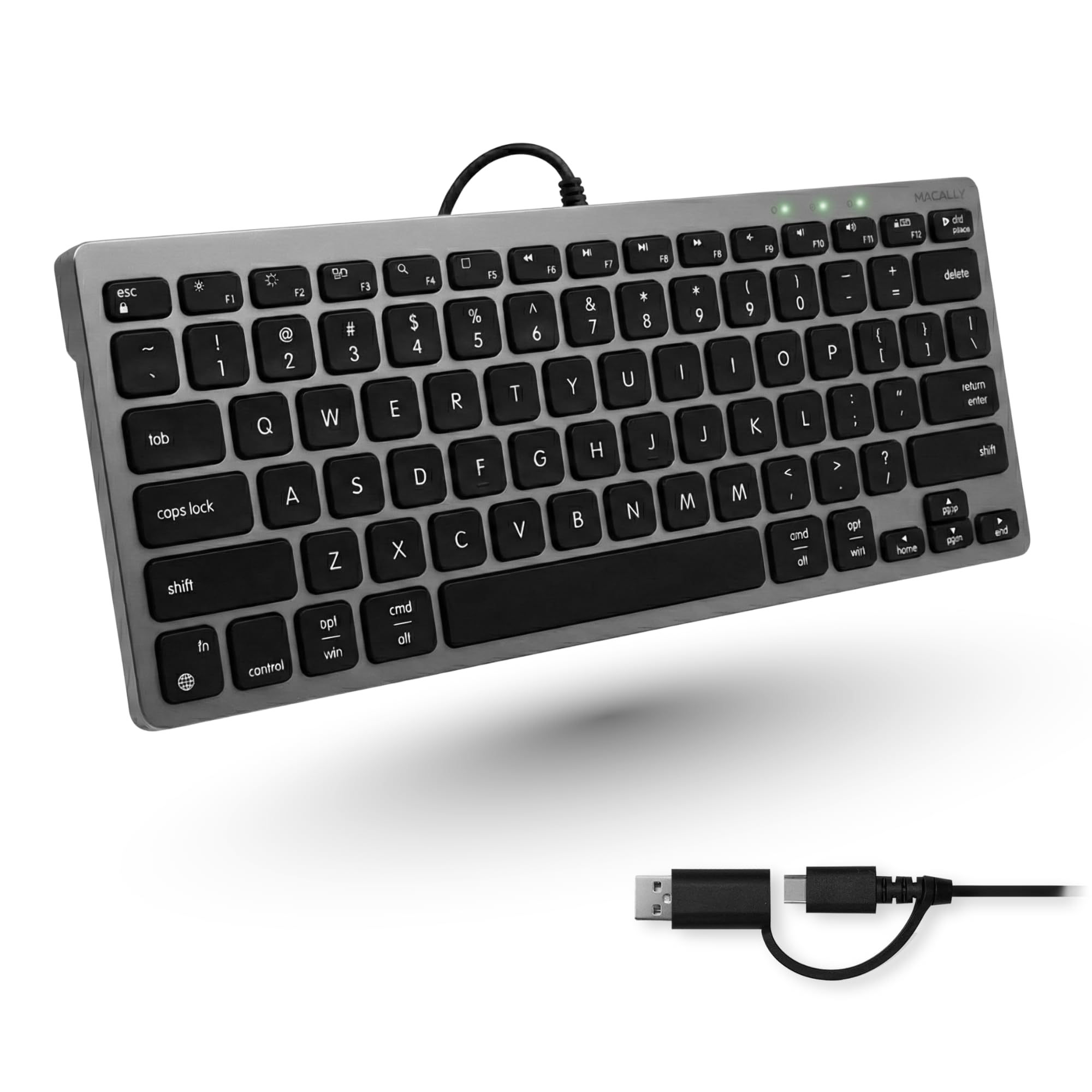
Thirteen dedicated shortcut keys, in a space-gray body that slips under a bag flap.
The headline here is the shortcut row. This Macally packs 13 dedicated keys for Mission Control, brightness, media, and volume — the controls a Mac user reaches for without thinking. Pair that with 78 scissor-switch keys and you get a low-profile deck with reduced noise and shorter key travel, closer to typing on a MacBook than on a desktop slab. It answers both Mac and PC with a built-in USB-C and USB-A plug, so no adapter has to live in the cable.
Portability is a real draw. It is slim and space-efficient, which makes it a natural fit for a minimalist desk, a small table, or a travel setup — and at 12 ounces it disappears into a backpack without adding noticeable weight. No batteries, no charging, no wireless drop-outs. The responsive scissor keys give a soft touch that owners tend to like for mobile and desk work alike, and the space-gray finish keeps the whole setup looking deliberate.
The honest catch is that its Mac focus leaves some of the 78 keys doing double duty on Windows, so a PC user will need a little adjustment for the shortcut row. The deck is also compact rather than roomy, so give your hands a day or two to settle in. For a Mac owner who wants fast access to Mission Control and volume without leaving the keys, the choice is easy.
Shortcuts that earn their row: 13 dedicated keys cover Mission Control, brightness, media, and volume in one reach.
Windows needs a tune: the shortcut layout is Mac-first, so a PC user adjusts for a while.
Pick it if: you want Mac shortcuts at your fingertips in a light, packable, space-gray deck.
Look past it if: you work mostly on Windows and want shortcuts in the expected places from the first keystroke.
8. MCSaite Super Mini Wired Keyboard, 78 Keys

The smallest body in this lineup — 8.66 inches wide — for racks and tight installs.
Sometimes the space you have is not a desk, it is a shelf in a server rack or a panel beside a machine. This MCSaite is the deck for that: just 8.66″L x 4.65″W x 0.76″H and built in a small-stature PVC body with a 1.5 m cable. It keeps 78 keys, so the letters and numbers are still there, but the footprint is the tightest in this lineup. It is plug and play over USB-A and works with desktop and laptop computers.
The keypad is laser-engraved, so the legends resist rubbing away, and a mat underneath keeps it from sliding during use — the maker cites stability testing at 1 million cycles. Owners like it for specific jobs where a compact wired board is the point, the Raspberry Pi 3 running a 3D printer being the example that stands out. It fits neatly into spaces where a full-size board simply will not go.
The trade-off is that small and industrial cuts both ways. The 8.66-inch width makes the keys crowded together, so it suits occasional or task-specific typing better than all-day writing. The look and materials are functional rather than refined. If you need the smallest possible wired board for a fixed spot, this is your fit; if you want a comfortable daily typer, choose a wider deck.
Made for: server racks, industrial panels, and Pi or printer setups where the smallest board wins.
Pass it up if: you type all day and want room between the keys.
Know the Specs
USB-A versus USB-C connectors
USB-A is the familiar rectangular plug found on older desktops, hubs, and laptops. USB-C is the smaller oval plug that newer MacBooks and many tablets use. A board that lists both, or ships a USB-C to USB-A adapter, saves you from keeping a dongle in the cable. If your device only has USB-C, buy a board that lists USB-C directly.
What a 78-key layout means
A 78-key board keeps the letters, numbers, and main shortcuts but removes the numeric keypad. That is what makes these boards mini and saves desk space. The cost is speed if you type long columns of numbers. If most of your work is writing, browsing, or coding, the smaller footprint is a win.
Scissor switches explained
Scissor switches are the flat, low-travel keys used on laptops. They tend to be quieter than tall mechanical keys and give a shorter, crisper press. Boards here that use them are the better choice for shared offices and late-night typing. Many also add a slight tilt angle and rubber feet to hold the board steady.
Wired reliability
A wired keyboard draws power and sends data through one cable, so there is no battery, no pairing, and no Bluetooth drop-out. Plug-and-play means no driver or software. Note that a low-power or unpowered USB port can leave some boards unresponsive — plug into a live port on your machine or a powered hub.
Common Questions
Will a Mac-only mini keyboard work on a Windows PC?
Can I connect a USB-C keyboard to an older USB-A laptop?
Is a 78-key keyboard missing any keys I need?
Do these mini keyboards need drivers or software?
Will a mini keyboard work with an iPad or Android tablet?
Is a scissor-switch keyboard quieter than a mechanical one?
How do I know if a keyboard is backlit?
Why does my keyboard not work when I plug it into a hub?
Can a mini keyboard survive daily office use?
Do these keyboards have a number pad?
The Bottom Line
For most buyers, the usb mini keyboard winner is the Perixx PERIBOARD-409H because it does something the others do not — it hands you two extra USB ports on the side. Your mouse and flash drive plug straight into the keyboard, so your desk gets cleaner, not just smaller. It carries a strong rating across a large review base, and the two side-mounted USB ports are what put it at the top.
If quiet typing in a shared room is what you care about, reach for the TECKNET and its scissor-key silence — as long as you are on a Mac. For a dark room or a server rack, the white LED glow of the Perixx PERIBOARD-332 makes the keys readable without a lamp. And if your space is a tight install, the 8.66-inch MCSaite tucks in where a full-size board cannot go.
How we choose
We do not accept paid placement. Every pick is matched to a real buyer and a real use-case; we do not hands-on test units.
Sources
Specifications: manufacturer listings and product documentation. Review insights: verified customer reviews, as of November 2026. Pricing: not shown on this page (it changes often); check the current price via the retailer link.
As an Amazon Associate, Tactical Gear Guy earns from qualifying purchases. This does not affect which products we feature.