Specs are compiled from manufacturer listings and verified buyer reviews and can change over time — please confirm the key details on the product page before buying.
Your laptop is not slow — it is hot, and heat is the reason frame rates stutter and fans scream. A USB cooling pad is a slab of moving air that sits under your machine and pushes heat out before the chip inside starts slowing itself down to survive. The direct answer for most people: buy the pad whose fan speed and airflow match your laptop’s size, not the one with the prettiest lights. Below you get nine real options, sorted by what each one is genuinely good at.
This guide is built by comparing the manufacturers’ published specifications and the patterns across verified customer reviews, so you get each pick’s real strengths and trade-offs instead of marketing spin.
A pad that fits badly or blows too weakly does nothing except add a hum to your desk. So pick by size, fan count and tilt range first, then worry about the extras. Here is how the strongest options shake out when you want a usb laptop cooling pad that actually moves air.
Top Picks


How To Choose The Best USB Laptop Cooling Pad
Most people buy a cooling pad for one reason: the laptop gets hot, the fans roar, and games or heavy work start to stutter. A pad fixes that only if air actually reaches the vents on the bottom of your machine. So the first question is not which pad is best — it is where your laptop’s intake vents sit and how big the chassis is.
Match the pad to your laptop’s size first
A 13-inch ultrabook on a 17-inch pad sits over empty space, and the airflow spills past the chassis instead of feeding the vents. Check the pad’s stated range before anything else. Some pads list 12 to 17.3 inches, others go up to 17.3 inches only, and one pad in this list supports 15 to 21 inches, which is unusual and useful for big gaming rigs.
Fan count is not the same as airflow
Five small fans and one large fan can move similar amounts of air, and the large fan often does it more quietly. What you want to know is the fan size and the speed it spins at. A single 4.72-inch turbo fan rated to 3500 RPM moves a lot of air through one concentrated column. A 160 mm fan spinning near 1500 RPM spreads slower, wider air across the whole underside instead.
Height settings and tilt range
Raising the back of the laptop does two jobs at once. It tilts the keyboard toward a more comfortable typing angle, and it opens more gap underneath for air to escape. Pads here offer anywhere from 2 height settings up to 9 adjustable tilts spanning 10° to 45°. If you type for hours, more settings give you a finer angle. If you mostly game, a couple of solid positions is enough.
Power and ports
Every pad on this list runs off USB, so there is no wall adapter to hunt for. The catch is that the pad’s own cable eats one port. Look for a pad with a built-in USB hub or pass-through so you get that port back — several here offer two ports, one offers four USB 3.0 ports, and one warns that its ports are for peripherals only, not for charging a phone.
Side-by-Side Comparison
| Model | Best For | Fans / Speed | Laptop Fit | Stand Settings | Amazon |
|---|---|---|---|---|---|
| llano V10★ Best Overall | Serious gaming rigs | 1 fan / up to 3500 RPM | 13″–17.3″ | 3 levels | Amazon |
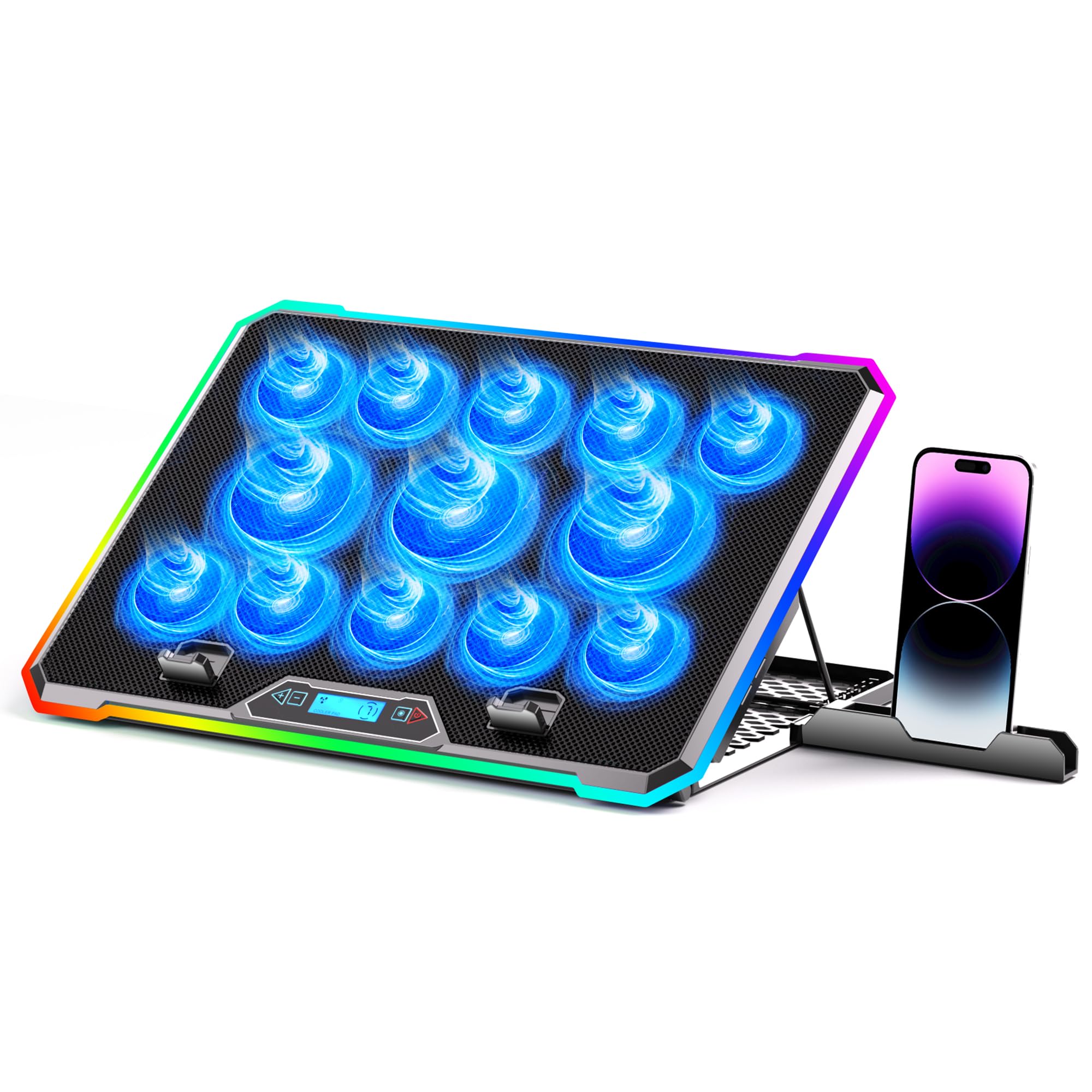
| KYOLLY 13-Fan LCD CoolerBiggest Airflow | Big 15″–21″ laptops on a lap | 13 fans / LCD-controlled | 15″–21″ | 9 tilts, 10°–45° | Amazon |
| SOUNDANCE LS2Best for Posture | Desk work and posture | 1 fan / 140 mm | Up to 17.3″ | Adjustable height and angle | Amazon |
| havit HV-F2056 | Quiet everyday cooling | 3 fans / ultra-quiet | 15.6″–17″ | 2 heights | Amazon |
| Kootek LCP04 | Fine-tuning fan groups | 5 fans / switch-controlled | 12″–17″ | 6 heights | Amazon |
| Amazon Basics HCP09 | USB-A and USB-C owners | 6 fans / knob control | Up to 17″ | 6 heights | Amazon |
| LIANGSTAR 6-Fan | Cheap high-volume airflow | 6 fans / two-speed switches | 12″–17.3″ | 3 heights | Amazon |
| Cooler Master NotePal X-Slim | Thin, light travel setup | 1 fan / ~1500 RPM, 160 mm | 15″ and 17″ | 2 heights | Amazon |
| AICHESON AA3 | Gaming laptops plus RGB | 8 fans / 2600–3000 RPM | 14″–17.3″ | 7 slots, 10°–30° | Amazon |
Detailed Reviews
1. llano V10 Gaming Laptop Cooling Pad
Our pick — 4.5+★ from 750+ verified ratings; the strongest balance of quality and price.
One big turbo fan instead of a swarm of small ones, and it wins the desk.
If your machine heats up hard under load, this is the pad to beat. Instead of scattering many small fans, the llano V10 runs a single 4.72-inch turbo fan driven by a pure copper motor that spins up to 3500 RPM. That concentrated column of air is the highest top speed in this lineup — the AICHESON AA3 by comparison tops out at 2600–3000 RPM. Fewer fans, faster air, and a pad that pushes real volume down one channel.
Cooling is the number one praised point on the listing. Buyers report 10–13°C drops under sustained gaming load, not just idle browsing. Under real load that is the difference between a machine that throttles and one that keeps its frame rate steady.
Practical details are handled thoughtfully. You get 3 levels of ergonomic tilt, front anti-slip baffles to stop the laptop sliding, and a removable dust filter that keeps the airflow clean over time. Dual USB ports — one USB-A and one USB-C — mean you do not lose your spare port by plugging the pad in. It fits 13-inch through 17.3-inch laptops, and llano includes extra foam inserts for 13–14-inch machines so a smaller laptop sits snug instead of floating.
What sells it
- 3500 RPM from a single 4.72-inch turbo fan — the fastest top speed on this list
- Dual USB-A and USB-C ports replace the port the pad uses
- 12 RGB modes with a memory function that recalls your last setting
- Foam inserts keep 13–14-inch laptops from rattling around
Where it asks patience
- Noise is the most-discussed mixed point — a 3500 RPM fan makes itself heard
- One fan means the airflow is concentrated, not spread evenly edge to edge
- Physical buttons are deliberate, so expect to press rather than tap
Built for: gamers and heavy workstation users on 13 to 17.3-inch machines who want the strongest single-fan airflow available.
Think twice if: you need near-silent operation in a shared room — crank this fan high and you will hear it.
2. KYOLLY 13-Fan Laptop Cooler with LCD Screen
Thirteen fans, an LCD readout, and enough tilt positions to fix your neck.
Thirteen fans against the llano’s single turbo tells you the design philosophy here: spread the air wide rather than concentrate it. That is a 13-to-1 fan count, and the mix is 3 large fans plus 10 small ones working across the whole underside of your machine. For a big gaming laptop with vents spread across the base, that coverage is exactly what you want.
The LCD screen is the detail that changes daily use. You see your fan speed on a readout instead of guessing, so you can dial it back for browsing and push it up for a game. Color options and lighting are what owners call out as the highlight of this pad — the 10 dynamic RGB modes include static, breathing and color cycles, and your last setting is remembered automatically. One touch kills the lights entirely when you need to work.
Where it earns its place is versatility. The 9 adjustable tilts span 10° to 45°, which is the widest range here, and a built-in silicone phone holder keeps your handset from sliding off during a session. Non-slip base grips on laps, beds and uneven desks — the pad supports laptops from 15 up to 21 inches, the largest fit range on this list. Dual USB ports let you run a mouse and keyboard without giving up your laptop’s only slot.
The argument for it
- 13 fans (3 large, 10 small) cover the whole base, not one hot spot
- LCD screen shows fan speed so you can set it instead of guess it
- Supports 15–21-inch laptops, the broadest range in this lineup
The honest catch
- 13 small fans can only compare to one big turbo by total airflow, not by raw speed per fan
- The RGB is a background glow, not a light show across every fan hub
- The pad is substantial, so it is not one you tuck into a slim laptop sleeve
Worth it for: owners of oversized 17 to 21-inch gaming laptops who game on the sofa, the bed or the desk and want wide coverage.
Less ideal for: anyone wanting a pad thin enough to slide into a bag beside a 13-inch notebook.
3. SOUNDANCE Laptop Cooling Pad with USB 3.0 Hub
Built for the desk worker who wants ports, posture and quiet air in one frame.
This is the pad for someone who treats a laptop as a workstation rather than a gaming rig. It runs a single 140 mm fan, which moves air more slowly and quietly than the 3500 RPM turbo in the llano — but it still pushes a wide, even stream across the base of the machine. A blue LED tells you at a glance whether the fan is running.
The real distinction is the port situation. Four USB 3.0 ports sit along the back — enough to plug in a mouse, a keyboard, a charging cable and one more accessory without a separate hub. A separate USB power port feeds the fan itself.
Stability gets real attention here. A unique shaft design holds the weight of a laptop on a raised incline without the sagging you get from flimsier frames, and rubber mats and feet keep things from sliding or scratching your desk. Aluminum in the build adds to that solid feel. It fits laptops from 10 up to 17.3 inches, so a compact Chromebook works as readily as a big MacBook Pro. Outdoor use is part of its reputation too — the stability under tough conditions is why one DJ setup keeps it around for gigs.
What stands out: four USB 3.0 ports and a sturdy shaft design make this the most useful pad here for a fixed desk setup where you plug in several peripherals and want the machine raised to eye level.
Worth knowing: the fan is chosen for quiet over raw speed, so a heavily overclocked gaming laptop will want the faster turbo fan of the llano instead — this one cools steadily, not aggressively.
Choose it when: you sit at a desk all day, want four extra USB 3.0 ports, and value a stable raised angle and quiet operation over maximum fan speed.
Not the pick for: pushing a hot gaming laptop to its limits, where a high-RPM turbo fan moves more air.
4. havit HV-F2056 Laptop Cooling Pad

The pad that has quietly cooled thousands of desks, and still does.
Three fans is a modest count next to the Kootek’s five or the KYOLLY’s thirteen, but this pad has earned its keep the old-fashioned way: it works, it is quiet, and it has been around long enough that the reviews have piled up. Quality is the most praised point in its review history, with functionality close behind.
Day to day it does exactly what a cooling pad should. Three ultra-quiet fans push air under the laptop without a distracting whine, and the metal mesh surface gives the machine a stable platform. Two adjustable height settings raise it to a comfortable typing angle, and the extra USB port lets you plug something back in so you are not down a slot. Slim and light, it slips into a bag and travels with the laptop it protects.
The honest caveat is durability. It is the mixed point buyers raise most, and while plenty of these pads soldier on for years, an occasional unit gives out early. That is a small share of a very large crowd, not a pattern across the board. The other detail is connectivity: the included cable is USB-to-USB, so a USB-C-only laptop needs a USB-C to USB-A adapter, which is not in the box.
Why people keep it
- Three quiet fans keep a laptop cool without a distracting whine
- Two height settings for comfortable typing and airflow
- Slim and light enough to travel with the laptop
- Extra USB port replaces the one the pad uses
Keep in mind
- Durability is the mixed point — treat the fan assembly with care and store it flat
- USB-A only on the cable, so USB-C machines need an adapter you supply
- Two height settings give fewer angle choices than the six on the Amazon Basics
Good fit for: anyone who wants dependable quiet cooling for a 15.6 to 17-inch laptop and does not need RGB, LCD screens or turbo speeds.
Look elsewhere if: your laptop is USB-C only and you would rather not buy an adapter.
5. Kootek LCP04 Laptop Cooling Pad
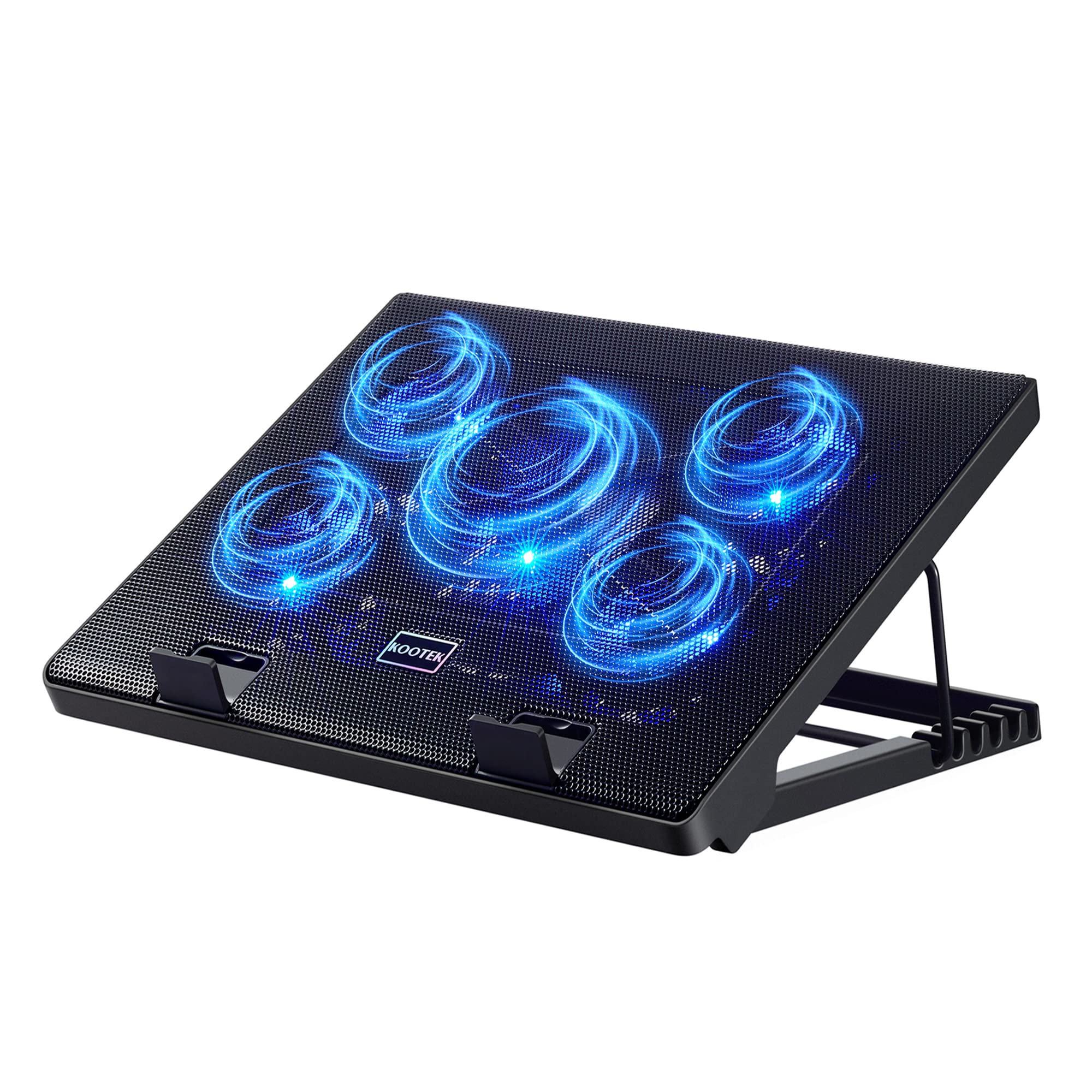
Five fans you can group however you like, with a fan for every mood.
Five fans sounds like a middle-of-the-road count, but the control here is the point. Two on/off switches let you run one fan, four fans, or all five together, all with blue LEDs. That grouping is genuinely useful — leave a single fan running for light browsing, then bring the full set up when the machine starts to sweat. The mix is one small fan alongside larger ones, all sized to cover a 12 to 17-inch laptop.
The stand does the ergonomic work with six adjustable height settings, which is more positions than most pads give you and lets you dial in the exact angle for gaming, movie watching or typing for hours. Two stoppers on the front surface keep the laptop from sliding forward on the incline. The metal enclosure gives it a substantial, stable feel rather than the flex you get from all-plastic frames.
One power tip worth flagging: for best results, plug the pad’s USB cable into a 5V 1A adapter rather than your laptop’s port. Without enough juice the fans can fail to spin or run very slowly. That is the one thing that catches new owners out. When powered properly, it cools steadily and the dual USB hub means the pad’s own cable does not cost you a port.
The value read: six height settings and switchable fan groups give you more control over both airflow and angle than most pads at this level, and the metal build adds a solid feel.
One honest note: the fans are built for quiet, not for raw speed — it is not super quiet at the top group, and a power-hungry gaming laptop will cool better under a turbo pad with more RPM.
Best if you: like the idea of turning fans on and off in groups and want six angle choices for long desk sessions.
Pass if: you want the strongest possible airflow — this one favors control and quiet over raw RPM.
6. Amazon Basics Laptop Cooling Pad Stand

The one that finally respects laptops with only USB-C ports on board.
Most pads here ship a USB-A cable and leave USB-C owners hunting for an adapter. This one includes both — a USB-A hub and a USB-C hub sit right on the frame, and a USB-A to USB-C cable is stored in a dedicated cable slot on the pad itself. If your laptop lost its USB-A ports years ago, that is a very practical difference.
Cooling comes from six built-in ultra-quiet fans that pull heat from multiple angles rather than one direction. A turn knob adjusts the fan speed, and a blue LED shows you when the fans are running. Six adjustable-height settings cover the ergonomic side — enough tilt variety for typing, gaming or watching something in bed. It fits laptops up to 17 inches, including MacBooks, Dells, HPs and ASUS machines.
Two things are worth knowing before you buy. The USB ports are for peripherals like a mouse or keyboard, not for charging a phone — the maker is explicit about that, so use a dedicated charger for devices. And the pad is a solid weight rather than a featherweight, so it lives on a desk more than in a bag. Neither is a flaw; both just steer it toward a home or office setup.
Where it fits best: laptops that are USB-C only, or desks where you want one cable solution that meets the machine on its own terms.
Fair warning: the hub ports will not charge a phone or tablet, so plan on a separate charger for your devices.
Right for: USB-C laptops and anyone who wants six tilt settings plus a hub that includes both port types.
Wrong for: buyers who need the hub to top up a phone — the ports are for peripherals only.
7. LIANGSTAR 6-Fan Laptop Cooling Pad

Six fans, two switches, and a metal surface that will not flex under a full-size laptop.
Six fans split the airflow strategy down the middle. You can run all six together, or run three large and three small fans separately with two switches, adjusting speed freely from zero to max. That is more granular control than a single speed knob gives you. The fans carry blue LEDs, and the blue shell on the frame matches.
The cooling numbers are real: the pad pulls CPU temperatures down, and the adjustable speed fans are the part buyers like most. It works with a 17-inch screen laptop, and it covers almost every 12 to 17.3-inch machine — Dells, MacBook Pros, Alienwares, ThinkPads, Lenovos, HPs and ASUS models. The metal mesh surface does double duty, helping heat move away from the chassis while holding up better than a plastic deck over time.
The honest side is that noise and airflow split opinion. Some owners find the six fans quiet with good circulation, others say it is louder than expected and the airflow feels modest for the fan count. That is a mixed point, not a dealbreaker — the fans run at their strongest when all six are engaged. Ergonomically you get three height settings and two non-slip baffles plus a thickened anti-skid pad underneath. Just prepare a USB-C to USB-A adapter if your laptop lacks a USB-A port, since the cable is USB to USB.
What earns it a spot
- Six fans with two switches for separate speed control of the big and small sets
- Metal mesh surface dissipates heat and holds up over time
- Fits almost any 12–17.3-inch laptop
- Three adjustable heights for comfort
What to weigh
- Noise and airflow are the mixed points — the fans are not silent at top speed
- Cable is USB-A, so USB-C laptops need an adapter
- Three heights is fewer angle choices than the six on the Kootek
Suits you if: you want plenty of fans and per-group speed control without spending much, and your laptop has a standard USB-A port.
skip it if: silence is your top priority — this one makes a little more noise than the havit when pushed.
8. Cooler Master NotePal X-Slim

One big fan, a thin frame, and cable grooves so your desk stays tidy.
A single 160 mm fan spinning at roughly 1500 RPM is a very different approach from the 3500 RPM turbo on the llano. Rather than blast air down one channel, this fan spreads a slow, even layer of cooling across the whole mesh surface. That is ideal for an Ultrabook or netbook where the vents are wide and the heat is modest — it keeps the laptop comfortable without the noise of a high-speed fan.
The physical design is the reason to pick it. The X-Slim is genuinely thin for a cooling pad, and the cable grooves allow for simple cable management so the USB lead does not tangle. Two different height settings tilt the laptop to a comfortable angle. USB power runs through a pass-through so you do not lose the port the pad occupies — a small convenience that matters when your machine only has a couple of them. It supports 15-inch and 17-inch laptops.
Gaming and light entertainment both work well on it — playing Sims for hours without the machine heating up is what this pad’s reputation is built on. The honest caveat is noise and durability, both of which split opinion. Some find it near-silent, others hear the fan working; a few report long-term reliability issues over the years. On a thin, light pad those are expected trade-offs, and it earns them with a low profile and a strong value.
The travel case: thin enough to tuck under a laptop in a sleeve, with a pass-through USB so you keep your port, makes this the most portable option in the lineup alongside the havit.
The honest limit: one low-RPM fan is built for steady, gentle cooling, not for ripping heat out of an overclocked gaming laptop.
Best for: thin laptops and travel setups where you want a genuinely slim pad with a pass-through USB port.
Not for: a hot-running gaming rig, where a faster multi-fan pad moves far more air.
9. AICHESON AA3 Laptop Cooling Pad

Eight fans at gaming speeds with RGB that turns the whole base into a light show.
Eight fans running between 2600 and 3000 RPM is a serious amount of airflow for a gaming laptop, and the speed is adjustable with a roll switch on the side. The RGB here is the most over-the-top feature in the set — 10 lighting modes with a fingerprint touch control so you can cycle colors or shut the side lights off with a long press. If you want your setup to look mean, this is the pad that delivers.
Ergonomics get their own treatment. Seven positions spanning 10° to 30° raise the screen to a more comfortable viewing height, which takes strain off your neck and shoulders over a long session. Two USB ports let you plug accessories back in, and the footprint at 15.75 by 11.77 inches fits laptops from 14 to 17.3 inches. The kickstand is built strong and designed to be a stable base with a hidden anti-slip pad at the back.
The caveat you need to weigh is longevity. Durability is the weak point in its history, with a recurring concern that some fans fail within about nine months of buying. That is the one honest reservation worth repeating, because a cooling pad whose fans quit is a paperweight. On the bright side, the quality and cooling performance are exactly what gamers want from it, and the 1-year warranty gives you some backup if your unit acts up early.
Why it will appeal: eight high-speed fans at 2600–3000 RPM plus the flashiest RGB on the list make it the obvious pick for a gaming desk that needs to look as fast as it runs.
What to accept: keep a receipt and register the warranty — a recurring fan-failure worry is the one genuine risk that comes with this much airflow and lighting.
Pick it for: gaming laptops from 14 to 17.3 inches where you want maximum fans, 7 tilt angles and RGB that dominates the desk.
Consider alternatives if: long-term reliability matters more to you than fan count and lighting — a slower pad like the havit tends to age better.
Know the Specs
Fan speed (RPM)
RPM stands for revolutions per minute — how fast the fan blades spin. A higher RPM generally means more air moved per minute, but it also means more noise and more strain on the motor over years. Pads here range from around 1500 RPM on a single large fan to 3500 RPM on a turbo fan. For a hot gaming laptop, higher RPM helps. For a light ultrabook, a slower, larger fan often cools just as well and stays quieter.
Fan size and count
A large fan moves more air per turn at a lower speed, which is why a single 160 mm fan can match several small ones for cooling while staying quieter. Small fans spin faster to move the same air. The count matters less than total airflow — a pad with 13 small fans covers more surface area, while a pad with one 4.72-inch fan pushes a concentrated stream. Match the design to where your laptop’s vents sit.
Laptop fit range
The fit range tells you which laptop sizes the pad supports. A pad rated 12–17.3 inches handles almost any standard laptop. A pad rated 15–21 inches is built for oversized gaming rigs. If your laptop is smaller than the pad’s minimum, the vents can end up floating over empty air instead of over airflow. Check the fit before you buy — it is the single most common reason a pad underperforms.
USB power and hubs
USB-powered pads draw their electricity from your laptop, so there is no adapter to find. The trade-off is the pad occupies one USB port. Hubs and pass-through ports give it back: two ports here, four USB 3.0 ports on the SOUNDANCE, and a split USB-A and USB-C hub on the Amazon Basics. A few pads warn their ports are for peripherals only, not for charging phones — keep a separate charger for those devices.
Common Questions
Will a USB laptop cooling pad work with my USB-C only laptop?
How much can a cooling pad actually lower my laptop temperature?
Are cooling pads noisy enough to distract me during work?
Which pad is best for a big 17-inch gaming laptop?
Does the pad use up my laptop’s only free USB port?
Can I use the extra USB ports on the pad to charge my phone?
Will a cooling pad extend my laptop’s battery life?
What is the difference between a 1-fan, 5-fan and 13-fan cooling pad?
Do I need to plug the pad into a wall adapter instead of my laptop?
Is a metal mesh surface better than a plastic one?
The Bottom Line
For most people, the winner is the llano V10, because a single 4.72-inch turbo fan at 3500 RPM moves more concentrated air than any other pad here, and its dual USB-A and USB-C ports mean you do not give up a port to cool down. It is the highest-rated pick in this lineup.
If your case is a big gaming laptop and you want coverage acrossthe whole base plus an LCD speed readout, grab the KYOLLY 13-fan cooler instead. And for a desk-only setup that wants four USB 3.0 ports and a sturdy raised angle, the SOUNDANCE LS2 is the one to reach for.
The havit HV-F2056 has quietly cooled desks for years on three fans and a reputation for near-silence, which is exactly the point — a good cooling pad never asks for attention. Pick the airflow and fit your laptop actually needs, plug in, and stop feeling the heat.
How we choose
We do not accept paid placement. Every pick is matched to a real buyer and a real use-case; we do not hands-on test units.
Sources
Specifications: manufacturer listings and product documentation. Review insights: verified customer reviews, as of November 2026. Pricing: not shown on this page (it changes often); check the current price via the retailer link.
As an Amazon Associate, Tactical Gear Guy earns from qualifying purchases. This does not affect which products we feature.