Specs are compiled from manufacturer listings and verified buyer reviews and can change over time — please confirm the key details on the product page before buying.
Typing a Wi-Fi password with a TV remote is the slowest, most frustrating five minutes in home entertainment. A USB keyboard for your smart TV fixes that in one plug. The trick is picking the right shape: a tiny handheld with a built-in trackpad for couch surfing, or a full-size board with a number pad for real typing. Below are nine boards that connect over USB or Bluetooth, sorted by what each one is genuinely good at. The Logitech K400 Plus is the crowd favorite — 4.0+ stars across 40,000+ owners — because its lap-sized body and large touchpad split the difference between handheld and full-size.
This guide is built by comparing the manufacturers’ published specifications and the patterns across verified customer reviews, so you get each pick’s real strengths and trade-offs instead of marketing spin.
Most smart TVs accept a USB receiver without any setup at all, so the board that works best is the one whose layout matches how you sit. Here is how each pick handles the couch, the desk, and everything between when you shop for a usb keyboard for smart tv.
Top Picks


How To Choose The Best USB Keyboard for Smart TV
The first thing to settle is how you actually sit when you use the TV — sofa, lap, or desk. If you are on the sofa with the screen across the room, a handheld board with a trackpad saves you from reaching for a mouse. If you are at a desk with a monitor acting as a display, a full-size board with a number pad and familiar key spacing is faster to type on.
USB receiver versus Bluetooth pairing
A 2.4GHz USB receiver is a small dongle you plug into the TV’s USB port, and it works the moment you plug it in. Bluetooth skips the dongle but needs a pairing menu, which some TVs bury or skip entirely. Several boards here include both, so you can plug in on a stubborn TV and pair wirelessly on a phone or tablet.
Touchpad size and button count
The touchpad is what replaces your mouse pointer, so its size and gesture support decide how quickly you can scroll a streaming menu. Button count tells you how much typing room you get: a 71-key handheld fits in one hand, while an 86-key compact board still gives you arrow keys and a full row of shortcuts.
Power, backlight, and where it lives
A built-in rechargeable battery means no hunting for AAAs at midnight, but you do need to remember the charging cable. Standard batteries last longer between swaps but cost more over time. Backlighting matters if you watch films with the lights down and still need to find a key.
Side-by-Side Comparison
| Model | Best For | Connection | Touchpad | Power | Amazon |
|---|---|---|---|---|---|
| Logitech Signature Slim K950★ Best Overall | Typing-heavy setups | Bluetooth + USB | No | — | Amazon |
| K809 Mini Wireless KeyboardBest Handheld | Pocket-sized couch control | Bluetooth 5.2 + 2.4GHz | Yes | 1000mAh rechargeable | Amazon |
| MRSVI Dual-Mode Mini KeyboardMost Versatile | Presentations and travel | Bluetooth + 2.4GHz | Yes, rotating | Rechargeable USB-C | Amazon |
| Bnnwa Multi-Device Keyboard | Switching between three devices | Bluetooth + 2.4GHz | Yes, multi-touch | 2x AAA | Amazon |
| Rii Mini Bluetooth Keyboard | Replacing your TV remote | Bluetooth + 2.4GHz | Yes | Rechargeable | Amazon |
| Logitech K400 Plus | All-round living room pick | Unifying receiver | Yes, large | 2x AA | Amazon |
| Arteck Stainless Steel Keyboard | Full-size typing comfort | 2.4GHz nano receiver | No | Rechargeable lithium | Amazon |
| Kensington KB415 | Quiet wired desk use | Wired USB-C | No | Wired | Amazon |
| CZUR K5S | Wired or wireless flexibility | Bluetooth + wired USB | Yes | Rechargeable | Amazon |
Detailed Reviews
1. Logitech Signature Slim K950 Wireless Keyboard
Our pick — 4.5+★ from 500+ verified ratings; the strongest balance of quality and price.
The full-size board that treats your TV like a laptop you happen to type on.
If your smart TV is really a PC plugged into a big screen, this is the pick that feels normal under your hands. It is a full-size membrane keyboard with a number pad and a QWERTY layout, so typing a long search or filling a form is no different from your desk. It connects over Bluetooth or a Logi Bolt receiver, so you have a USB path if your TV ignores pairing menus.
It also pairs to three devices at once — a laptop, a tablet, and a phone — and you switch between them with a single tap. The customisable keys run through the Logi Options+ app, which the manufacturer lists as available on Windows and macOS. That one-tap switching is the most-praised trait here: typing quality sits at the top of what buyers talk about, and the keyboard’s flat laptop-style feel is the reason.
The catch is weight and shape. At 685 g it is far heavier than the handheld picks here — the K809 mini comes in at 89 g, and that gap tells you which one lives on your lap versus on a surface. It also has no touchpad, so on a TV you still need a mouse or a remote to point. This is a typist’s keyboard, not a couch navigator.
Where the K950 earns its keep
- Full-size QWERTY with number pad — proper typing, not thumb-pecking
- Switches between three paired devices with one tap
- Quiet membrane keys so late-night typing does not carry
- USB receiver option gives you a fallback when Bluetooth pairing stalls
Where it asks something of you
- No touchpad, so TV navigation still needs a pointer
- 685 g is heavier than any handheld pick here
- Logi Options+ shortcuts are Windows and macOS only, not TV OS
Made for: anyone whose smart TV is fed by a PC and who types as much as they click.
Leave it be if: you want one small wand to control the whole living room from the sofa.
2. K809 Mini Wireless Keyboard with Touchpad
A bright orange handheld the size of a phone, with a touchpad under your thumb.
This one is built for the sofa. It weighs 89 g and measures 5.94″L x 2.32″W x 0.48″H, which puts it in phone territory — easy to keep on the armrest or slide into a bag. The 71 keys sit on an aluminium frame, and the sensitivity comes from a touchpad that replaces your on-screen arrow-key shuffle entirely.
You get two ways in: Bluetooth 5.2 or the included 2.4GHz USB receiver, with a claimed range up to 33 ft (10 m). The receiver is the important part for a TV — plug it in and you are done, no pairing menu. A 1000mAh lithium-ion battery recharges over USB-C, and the RGB backlighting cycles colours so you can find keys in the dark.
What won people over is the look and feel of it — appearance is the top trait talked about, ahead of plain functionality, and a crisp, tactile keypress gets its share of mentions too. The honest note is the layout. On a board this size the keys are small, and the compact shape gets mixed reaction; some buyers want exactly this, others find the buttons cramped for long typing. Set expectations accordingly: this is a navigation tool that can type, not a word processor.
The size trade-off: the same 5.94-inch body that makes it slip into a pocket makes long messages a chore. Buy it to control the TV, and it shines; buy it to write emails and you will feel the squeeze.
Suits: the couch surfer who wants a backlit trackpad wand that plugs in and never drops.
Think twice if: touch typing of any length is on the agenda.
3. MRSVI Mini Keyboard with Touchpad and Laser Pointer
A trackpad that turns 90 degrees to match however you are pointing.
Most mini keyboards hand you a fixed trackpad and hope it works. This one lets you rotate it — hold Fn and Alt and the pad turns a quarter-turn to line up with your screen, so vertical scrolling on a phone feels the same as wide navigation on a TV. You can nudge the cursor speed with Fn plus the spacebar, and there are dedicated mouse buttons for selecting and editing.
At 6.02″L x 2.32″W x 0.51″H it is a touch longer than the K809 above, and it adds a built-in laser pointer for presentations plus a 7-colour backlight. It connects over Bluetooth or the included 2.4GHz USB receiver, and the battery charges over USB-C with auto sleep and wake to protect the charge. The manufacturer recommends a full 2-hour charge on first setup.
What buyers talk about most is how well it just works across the room, alongside its size — owners rate it among the best mini keyboards they have used. The 7-colour backlit keys and button responsiveness draw their own share of praise. Two things to size up honestly: connectivity gets mixed reaction, so test your TV’s USB port early, and the compact body means small keys. The laser pointer is a bonus for slides, not a living-room feature.
Clever touches worth the money
- Rotating touchpad lines up with portrait or landscape screens
- Fn + spacebar changes cursor sensitivity on the fly
- Built-in laser pointer for presentations
- USB-C rechargeable with auto sleep and wake
What to expect going in
- Small keys on a compact body
- Connectivity feedback is split, so confirm your TV takes the receiver
- The 7-colour backlight adds little to a bright living room
Reach for this if: you present as much as you stream, and want one board for both.
Look elsewhere if: you need full-size keys for long typing sessions.
4. Bnnwa Multi-Device Wireless Keyboard with Touchpad
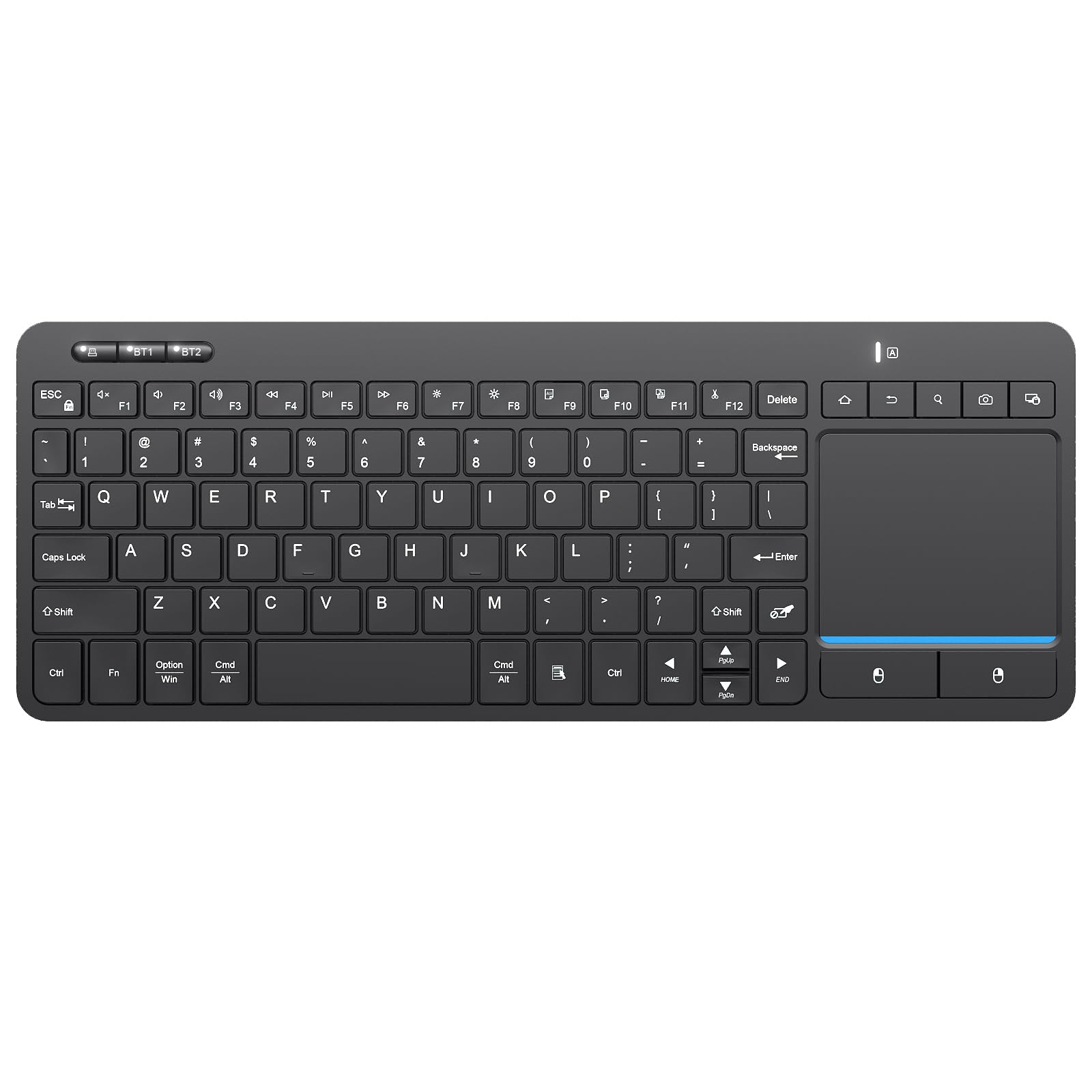
One keyboard, three gadgets, and a trackpad that handles gestures.
If your living room has a TV, a tablet on the coffee table, and a phone in your pocket, this board tries to serve all three. It holds a connection to three devices and switches between them with one key press, over Bluetooth or a 2.4GHz receiver with a claimed 33 feet (10 m) range. The multi-touch trackpad supports pointing, zooming, and scrolling, so you can pinch to zoom on a slide or flick through a page without touching a mouse.
It is a 90-key layout on a compact body measuring 12.83″L x 4.86″W x 0.7″H, with the direction keys kept where you expect them. The body is wear-resistant ABS, and the maker says the key legends resist rubbing off. Power comes from two AAA batteries with auto-sleep after 30 minutes of idleness — press any key to wake it.
The thing owners agree on is build quality, with functionality running it close. The recurring honest note is responsiveness: the touchpad gestures land well for some, while others find performance laggy. Size splits opinion too — some call it full-size, others find it extremely small for the width. If you type constantly and want a big comfortable board, this is not the one; if you want one remote-ish keyboard for several gadgets, it earns its spot.
What it does well: three-device memory plus gesture control means you are not re-pairing every time you pick it up. The 33 feet of claimed range covers a normal living room.
The honest limit: speed is the complaint that surfaces most. Treat it as a navigation board for menus and messages, not a typing marathon.
Pick it for: a household juggling a TV, tablet, and phone from the same seat.
Skip the gesture life if: you want a pure desktop typing board.
5. Rii Mini Bluetooth Keyboard with IR Learning

The board that learns your TV remote’s buttons and lets you retire it.
IR learning is the trick that sets this one apart. You line the keyboard up with your old remote, hold the button you want to teach for three seconds, then press the matching key on the remote — the light blinks twice and the key is copied. That gets you 10 learned keys, so power, volume, and input switching can all live on the keyboard. It is the difference between a second controller and a full replacement.
Physically it is a handheld: 5.9″L x 2.3″W x 0.4″H, a QWERTY layout, and a multi-finger touchpad with left and right mouse buttons for type, copy, and paste. Eight hotkeys speed up page browsing, and it charges over a Type-C port with auto sleep and wake. A backlit mode helps in a dark room, and it runs Bluetooth or the 2.4G nano receiver that stows in the box.
For what it costs, owners treat it as a solid value, and a rechargeable battery that pushes through a full day of heavy use is part of that reputation. The compatibility list is wide: Android TV boxes, smart TVs, PCs, laptops, and streaming sticks. The realistic caveat is the keyboard side — at 5.9 inches your thumb does the typing, so this is a remote with a keyboard attached, not a typist’s tool.
Best for: cutting the clutter down to one bedside or sofa device that still controls the TV directly.
Not the one for: filling long search boxes or writing anything more than a Wi-Fi password.
6. Logitech K400 Plus Wireless Touch TV Keyboard

The board built specifically for TVs, and the one most living rooms settle on.
This is the pick that was designed for exactly what you are doing. It has an integrated touchpad, quiet keys, and 84 buttons on a body that sits on your lap rather than a desk. Plug the Unifying receiver into a USB port and it is ready — no pairing, no software needed to start. The touchpad measures 2.99 in tall by 1.85 in wide, which is big enough to steer a streaming menu without hunting.
Range is up to 33 ft, and the battery claim is the standout: up to 18 months on the two included AA batteries, with an on/off switch to stretch it further. It works with Windows 7 and later, Android 7 or later, and Chrome OS. The maker also notes a spill-resistant design, which matters when the board lives near a coffee table.
What buyers appreciate most is the overall quality, with versatility for home theater PCs right behind it — this is the board that gets left on the couch and never complained about. Compatibility is the split point: it works with Samsung smart TVs, but it does not work with iOS or Apple products. Check your TV’s OS before you commit, because a Fire TV or Android set is fine while an Apple screen is not.
Why it holds the living room
- Plug-and-play Unifying receiver, no pairing menu to fight
- Large 2.99 by 1.85 in touchpad for proper cursor control
- Up to 18 months on the included AA batteries
- Quiet keys and a spill-resistant build for coffee-table duty
Check before you buy
- No iOS or Apple product support
- Size draws mixed reaction, so lap fit is personal
- No backlight for dark-room typing
The safe bet for: Windows, Android, or Chrome-based smart TVs where you want one board for search and streaming.
Not for: an Apple TV or iPad, where it simply will not talk to the device.
7. Arteck 2.4G Wireless Stainless Steel Keyboard

A steel-backed full-size board that types like a laptop and recharges instead of eating batteries.
For pure typing on a TV-connected PC, this is the comfortable middle. The stainless steel body gives it a solid, built-to-last feel, while the low-profile scissor keys stay quiet and laptop-familiar. It is full-size: 11.02″L x 5.31″W x 0.17″H at 10.2 oz, thin enough to slot under a monitor and wide enough for real key spacing. Setup is a nano USB receiver into the port, nothing more.
The rechargeable lithium battery is rated for 6 months per charge, based on 2 hours of non-stop use a day — a useful figure if you leave the board by the screen. A USB charging cable comes in the box, along with a 24-month warranty.
Typing feel is what this board is loved for: the sound and smoothness of the keys draw more comment than anything else, with functionality close behind. Owners describe a laptop-style typing experience, and one called the construction tank-like. The honest caveat is durability over the long run, which sees some split opinion — the steel shell is the sturdy part, so keep drinks clear of the keys.
The typing case: a 6-month charge cycle and quiet laptop-style keys make it the easy pick if the TV is really a PC display and you want to type without a charging ritual.
Where to be careful: no touchpad means a mouse is still required, and long-term durability is the one point buyers disagree on.
Worth it for: desks and media setups where typing volume is high and the board stays put.
Pass if: you need pointer control built in.
8. Kensington KB415 USB-C Wired Compact Keyboard

A wired board with scissor keys, for desks that never want a battery to die.
The appeal here is simple: no receiver, no battery, no pairing. A 5ft (1.5m) USB-C cable goes straight into the TV or a hub, and the board runs at zero latency for as long as the cable holds. Scissor-switch keys are quiet and responsive, which suits a shared room or a late-night setup. It is compact at 86 essential keys, measuring 12.49″L x 4.92″W x 0.73″H.
For power users there are 16 programmable keys plus a dedicated Copilot AI key (Windows only) and Function Lock, so macros and shortcuts sit one press away. A Caps Lock status light gives quick confirmation, and the outer case uses recycled plastic with 42% post-consumer content in FSC certified packaging.
Here is the honest part this pick demands. It is a wired USB-C board, so it will not work on a TV with only USB-A ports unless you have an adapter. And durability is the trait that splits feedback most — some units have had keys fail within days, and the low review base means a handful of bad units carries more weight than it would on a 40,000+ review product. Buy it for a desk with a cable run you trust, and keep a spare board in mind for a living-room setup.
Go for it when: the TV connects to a PC by wire and you want quiet scissor keys with zero charging routine.
Walk away if: your TV only has USB-A ports or you need the board to roam.
9. CZUR K5S Bluetooth Keyboard with Touchpad

A slim touchpad board that switches cleanly between Bluetooth and a USB cable.
Some TVs take Bluetooth and some only take a cable, and this board covers both. It pairs wirelessly or runs from a wired USB connection, so you can start unplugged and fall back to a cable if the TV is fussy. Multi-OS shortcuts make the switch easy — Fn + A for Mac and iOS, Fn + S for Windows, Fn + D for Android — so the keys line up with whatever you are driving.
It is slim and light at 13.2″L x 4.3″W x 0.3″H, thin enough to slide into a bag for travel or a work-from-home desk. The touchpad handles cursor control and there are media keys for volume and playback. A built-in rechargeable battery charges over the included cable, and the board sleeps after 10 minutes idle, waking on any key. Note the maker’s own warning: the keycaps are slightly smaller than a standard full-size keyboard, and there is no backlight, which the maker says is deliberate to protect battery life.
The touchpad is the part people warm to — its sensitivity and responsiveness get steady praise, and the board’s light, portable build gets mentioned alongside it. What to watch: the 19-button count in the specs is far short of what you will actually press, so treat that as the source being rough rather than a real limit. And with no backlight, typing in a dark room means knowing the layout by touch.
The flexibility win: Bluetooth when the TV accepts it, a cable when it does not — you are never stuck with a bricked board.
Know before you buy: smaller-than-standard keycaps and no backlight make this a daylight, short-session board.
Choose this if: you split time between a TV, a tablet, and a laptop and want one board that adapts to all three.
Give it a miss if: you type in the dark or want full-size keycaps.
Know the Specs
2.4GHz USB Receiver vs Bluetooth
A 2.4GHz receiver is a small dongle that plugs into a USB port and creates its own short-range link, so the keyboard works the instant it is plugged in — no pairing menus. Bluetooth skips the dongle but needs the TV to support and list the keyboard. Several boards here carry both, which lets you plug into a stubborn TV and pair wirelessly elsewhere. Range claims in this group run up to 33 ft (10 m).
Touchpad Sensitivity and Button Count
Button count tells you how much typing surface you get — a 71-key handheld is navigation-first, while an 86-key compact board still fits arrow keys and shortcuts. The touchpad is what replaces your mouse, so its size and gesture support decide how fast you move through a streaming menu. Some boards add DPI-style sensitivity control so you can speed up the cursor to match your screen.
Common Questions
Will a USB keyboard work on my smart TV without any setup?
Can I use a USB keyboard on a TV that only has Bluetooth?
Which uses fewer batteries, a rechargeable board or one that takes AAAs?
Can a mini keyboard replace my TV remote completely?
Do these keyboards work with an Apple TV or an iPad?
Is a wired USB-C keyboard better than a wireless receiver for a TV?
How long does it take to charge one of these keyboards?
Will a mini keyboard with a touchpad work with a TV box or streaming stick?
Can I use one keyboard across a TV, a tablet, and a laptop?
Do these keyboards need software to work on a TV?
The Bottom Line
For most living rooms, the usb keyboard for smart tv winner is the Logitech K400 Plus because it was built for exactly that job — a plug-in receiver, a large touchpad, and a battery claim measured in months rather than days. If you want a backlit handheld that fits in one hand, the K809 Mini is the one to reach for. And if your TV is really a PC display and you want a proper typing board, grab the Logitech K950. The K400 Plus earns its place on volume alone — more owners have lived with it than any board here, and its 4.0+ star score has held.
How we choose
We do not accept paid placement. Every pick is matched to a real buyer and a real use-case; we do not hands-on test units.
Sources
Specifications: manufacturer listings and product documentation. Review insights: verified customer reviews, as of November 2026. Pricing: not shown on this page (it changes often); check the current price via the retailer link.
As an Amazon Associate, Tactical Gear Guy earns from qualifying purchases. This does not affect which products we feature.