Specs are compiled from manufacturer listings and verified buyer reviews and can change over time — please confirm the key details on the product page before buying.
You want one cable to tame every spinning fan and every glowing strip in your case, and you want the software to actually cooperate. That is the whole job of a USB fan controller. This shortlist covers four controllers that each run fans and ARGB lighting over a USB link, and each one solves a different problem: too many fans, too little lighting control, or a temperature that climbs while you work. One quick note before the picks: this list uses flexible, human-like matching for the USB connection interface, so not every unit here is the exact model name you typed into the search bar. The nearest same-type controller that serves the same purpose is included instead, so you always know what you are buying.
This guide is built by comparing the manufacturers’ published specifications and the patterns across verified customer reviews, so you get each pick’s real strengths and trade-offs instead of marketing spin.
Motherboard headers run out fast, and the software that ships with most hubs is where builds go wrong. Below you will find real port counts, LED limits per channel, and the control mode each unit actually uses, so you can pick a USB fan controller that fits your rig the first time.
Top Picks

How To Choose The Best USB Fan Controller
Appearance rarely decides this purchase. Three questions do: how many devices you need to drive, whether those devices are fans or lights, and whether the controller follows your motherboard or takes orders from you. Answer those three and the shortlist narrows to one.
Count the ports before you count the fans
A hub with 8 ARGB ports and 8 PWM fan ports lets you run a lighting array and a cooling array at the same time. If your case only holds four fans, a 5-port unit is plenty and leaves less cable to hide. Count the strips and fans you plan to add next year, not just what is screwed in today.
Know the LED limit on each ARGB channel
Every 5V 3-pin ARGB channel has a ceiling on how many LED beads it can drive, because each one draws a small slice of current. Push past that ceiling and the far end of the strip drops color or flickers. Check the per-channel LED figure against your longest run before you buy.
Decide between automatic and manual speed control
Automatic mode reads a temperature probe and raises fan speed when things heat up. Manual mode hands you direct control of the PWM duty cycle and stays wherever you set it. A controller with both modes is the safer buy, because you can start automatic and switch to manual when you want quiet over cool.
Side-by-Side Comparison
| Model | Best For | ARGB Channels | Fan Ports | LEDs Per Channel | Amazon |
|---|---|---|---|---|---|
| Airgoo 2-in-1 USB ARGB Controller★ Best Overall | Full dual control of lights and fans | 8 | 8 PWM | 256 | Amazon |
| Delinx 12V 4-Pin PWM Fan Speed Controller | Thermal control for cabinets and servers | — | 5 | — | Amazon |
| Nollie 8 ARGB Controller Fan Hub | Budget lighting expansion | 8 | — | 126 | Amazon |
| AsiaHorse Umbra V2 ARGB Hub | Big lighting builds with preset effects | 10 | PWM via software | 120 | Amazon |
Detailed Reviews
1. Airgoo 2-in-1 USB ARGB Controller
Our pick — 4.0+★ from 50+ verified ratings; the strongest balance of quality and price.
Two controllers in one shell: eight light channels and eight fan channels on a single board.
Most hubs make you choose between lighting and cooling. This one refuses the trade-off, because it carries 8 channels of 5V 3-pin ARGB for the glow and 8 channels of 12V 4-pin PWM for the fans on the same board. Each light channel handles up to 256 LED beads, which means a long strip run and a full fan array can share the controller without either one losing color or speed at the far end.
The setup caveat is real and the manufacturer states it plainly: download the correct software first. SignalRGB or OpenRGB has to be installed and the latest release pulled before the controller configuration becomes available at all. Do that step and the payoff is granular control, with lighting that reacts to games, music, and apps in one interface. Motherboard header limits stop mattering because the hub re-unifies multi-brand lighting gear under one screen.
Fan speed follows your motherboard’s CPU_Fan header signal, so cooling rises and falls with actual temperature instead of a fixed curve. Fan speed monitoring only works for a single fan wired to port F1, which is a motherboard limitation rather than a flaw in the hub. An auto-resetting fuse guards against overloads and shorts, and the magnetic fixture lets the whole unit snap onto any steel surface inside the case. Windows handles SignalRGB, while OpenRGB also covers Linux and macOS.
Where this hub earns its keep
- 8 ARGB channels at up to 256 LEDs each, so long strips stay bright end to end
- 8 PWM fan ports synced to the motherboard’s own CPU_Fan temperature signal
- Magnetic mounting snaps it to any steel panel with no drilling
- Auto-resetting fuse protects the connected RGB gear from overloads
- OpenRGB opens the door to Linux and macOS, not just Windows
The parts you should plan around
- Nothing configures until SignalRGB or OpenRGB is installed — software first, always
- Fan speed monitoring covers port F1 only
- Needs a SATA power lead and a free USB 2.0 9-pin motherboard header
The right call if: you are running both a lighting array and a stack of fans, and you want one device to answer to your motherboard for speed and to your software for color.
Go elsewhere if: you only need light control or only need fan control — you would be paying for the half you never wire up.
2. Delinx 12V 4-Pin PWM PC Fan Speed Controller
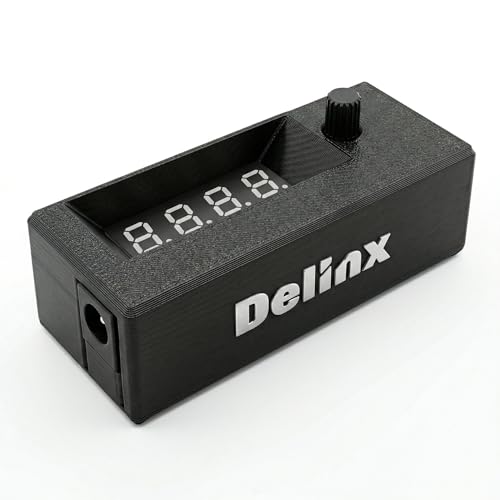
For the cabinet, server rack, or amplifier that cooks itself quietly while you are not watching.
This is not a pretty box for a glass-paneled show build. It is a cooling brain for the hardware you hide in a closet, a NAS chassis, or a machine room. The temperature probe reads from -13°F to 248°F and the display can switch to fan speed up to 50,000 RPM, so you can watch the thing that matters instead of guessing. When heat rises, the controller raises fan speed on its own, then drops it back down when the air cools.
Power comes from any PD USB-C charger through the included 3.2ft USB-C PD to 12V adapter cable, which carries a 3A on/off switch. From there the 5-channel hub drives up to 5 fans at once. The voltage range spans DC 5V to 30V with a max 5A output, and it supports 5V, 12V, and 24V 4-pin PWM fans. That spread is what makes it useful outside a PC tower at all: 3D printer enclosures, audio amplifiers, greenhouses, and aquarium setups all show up in its own stated applications.
Pull the temperature probe and the module switches itself to manual mode, handing you direct control of the PWM duty cycle. Adjustable start and full-speed temperatures plus a 0 to 27°F hysteresis keep the fans from hunting up and down at a single threshold. Settings survive a power-off. Over-voltage, over-current, and reverse polarity protection sit between your charger and your fans. The housing measures 76.5mm by 24.5mm by 22mm, so it tucks into tight builds, and the controller itself is listed at 40 dB of noise.
What you are really buying: hands-off thermal regulation for anything with a fan in it. The dual display toggles between temperature and speed, which saves you from adding a separate gauge to the build.
The honest catch: there is no ARGB port anywhere on this unit. If you want your fans to glow as well as spin, this is the wrong tool and the Airgoo above is the right one.
Pick this for: NAS boxes, AV cabinets, amplifier shelves, and server closets where the fans need to respond to heat without your input.
Pass on it for: a display build that needs addressable lighting, since this controller has no lighting channel at all.
3. Nollie 8 ARGB Controller Fan Hub
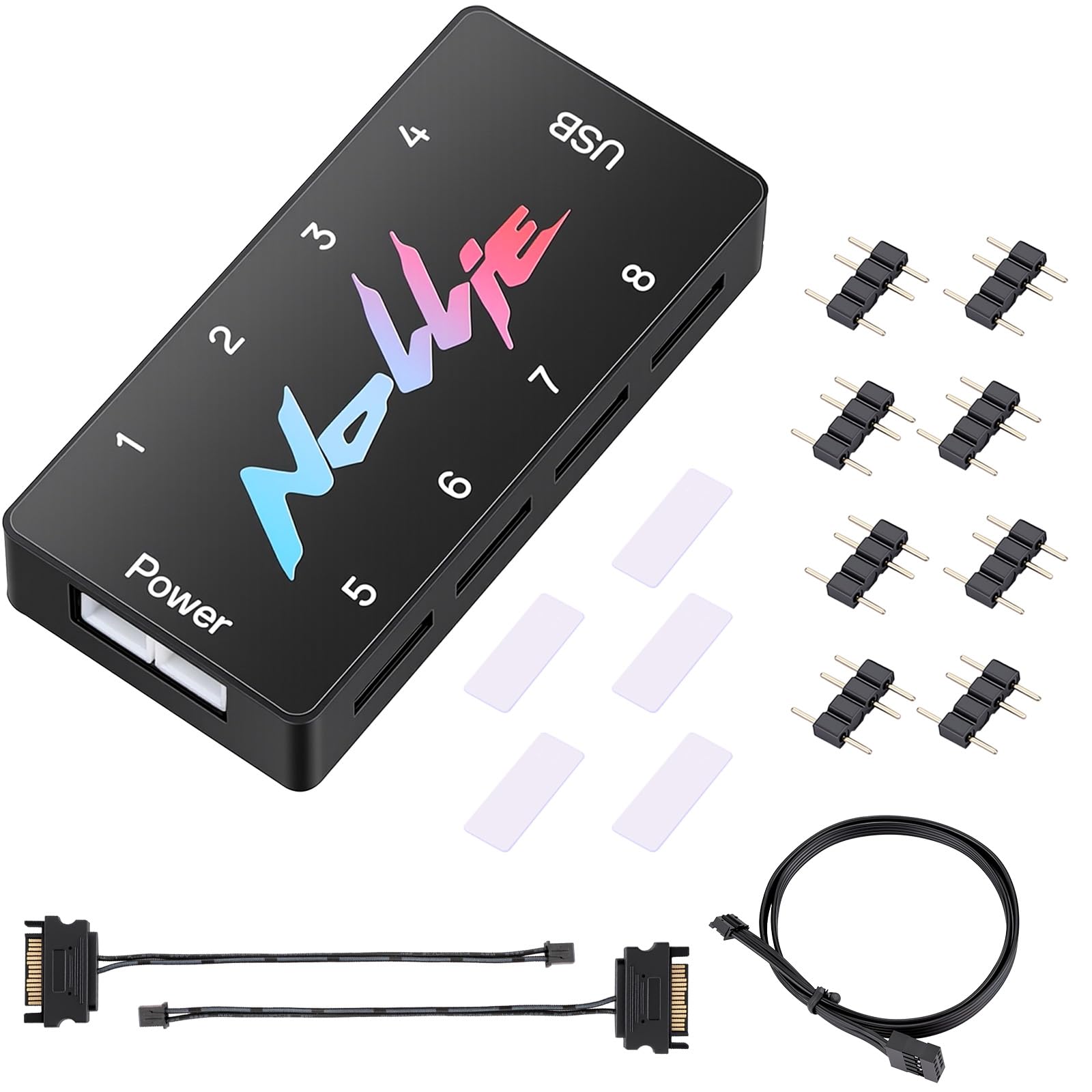
Eight light channels for one lighting array, sold as a no-tools expansion board.
When the motherboard has one ARGB header and you have eight devices that want it, this splitter is the cheap way out of the corner. It carries 8 ports of 5V 3-pin ARGB and each channel powers up to 126 LED beads, roughly 1,000 across the whole board. An 8-fan lighting rig fits within that budget, and each channel keeps individual control rather than forcing everything into one shared pattern.
Your fans get steady power on heavy builds because dual SATA power feeds the array through two 6.30in cables. Short cable runs lose voltage, and voltage drop is what makes the last fan in a chain dim or flicker. Your colors sync and your effects stay in one ecosystem, since the software is certified for SignalRGB and compatible with OpenRGB (two lighting-control programs). A single USB 9-pin port handles the signal, and the 19.69in cable gives you reach across the case. The housing is FR4 and PETG (two rigid plastics) at 2.68 by 0.47 by 1.30 inches, so it slips into tight corners behind a motherboard tray.
Once it is wired, the lighting array comes up with the system at power-on. The honest note is build quality and long-term board reliability, which buyers treat as a mixed bag. Keep each channel under its 126-LED ceiling and it behaves. There are no fan speed channels here at all, so plan on your motherboard headers for the fans themselves.
Where it fits: a lighting-heavy build on a tight parts budget. Eight ARGB channels, an adhesive pad, adapter pins, and both SATA cables come in the box, so nothing extra needs ordering.
What to weigh: the board quality is the trade-off, and there is no PWM fan control on this unit — it is a light controller, not a cooling controller.
Best match: a first-time builder adding eight ARGB devices to a board with almost no lighting headers.
Think twice if: you also need the hub to manage fan speed, because this one only moves light.
4. AsiaHorse Umbra V2 5V 3-Pin ARGB Hub
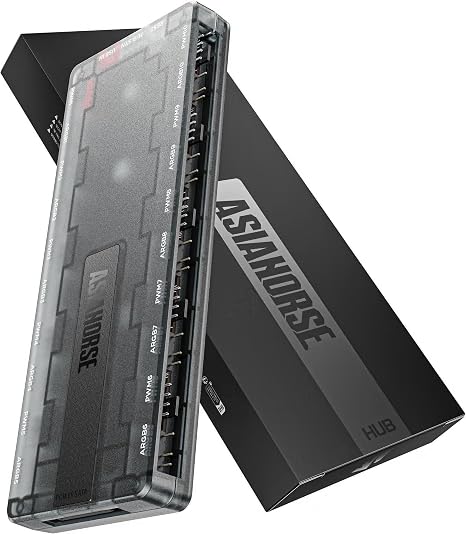
Ten independent light channels and a preset library, for the build that keeps growing.
Sheer channel count is the headline here. Ten dedicated 5V 3-pin ports each support up to 120 LED beads, and the hub now supports up to 50 devices, expanded from 20 for future growth. Compare that to the Airgoo’s 8 ARGB channels and the extra ports are the reason to look this way. There is no daisy-chaining required, so each device keeps its own control. Direct SATA power feeds the board and keeps the lighting steady under heavy loads.
Lighting is where the software earns attention. Zone tuning splits a single fan into left, center, and right sections, and per-fan color adjustment works across 2-fan and 3-fan arrays. The preset library runs past 100 effects, including canvas mode, screen sync, and music rhythm, plus saved profiles for your own setups. The maker claims launch speed improved by over 90% after system boot, and a Linux demo version is included.
You also get control over fan speed. The hub supports both motherboard BIOS and Umbra software PWM adjustment (pulse-width modulation, the standard way fans change speed), with a custom curve you tune against your own radiator and chassis. Protective resistors handle high power loads, and the included USB 2.0 cable carries a self-recovering fuse against static damage. Weigh this before you buy: the 10 ARGB channels are the strong half, and the Umbra software splits opinion. Bugs and a learning curve come up often enough that a first-time builder should expect a setup session, not a five-minute install.
Why the channel count matters
- 10 ARGB channels with 120 LEDs each — more independent ports than the Airgoo’s 8
- 50-device capacity leaves room for the next round of fans and strips
- 3-zone control and per-fan color tuning on the same device
- PWM curve adjustment through either BIOS or the Umbra software
Set your expectations here
- The software is the mixed part — expect some bug-hunting and a learning curve
- Wide compatibility is tied to the V2 fan series and standard 5V 3-pin gear, so check your own hardware list first
Reach for this if: your lighting plan already runs past eight devices and you want presets and screen sync without a second hub.
Look elsewhere if: you want a plug-in-and-forget setup — the simpler boards here ask less of you on day one.
Know the Specs
ARGB channels and the LED ceiling
An ARGB channel is a port that sends both color data and power to a strip or fan. Each channel has a ceiling on how many LED beads it can drive, and that ceiling exists because every bead pulls a small amount of current. A channel rated for 256 LEDs means a long strip run can hang off one port without the far end dimming. A channel rated for 120 or 126 LEDs suits a single fan or a short strip. Add up the beads in your longest run before you connect it.
PWM speed control, auto versus manual
PWM stands for pulse-width modulation, which is a switching method that sets fan speed by rapidly cutting power on and off. Automatic mode reads a temperature probe and raises that switching rate when heat climbs, then eases back when the air cools. Manual mode hands you the dial and holds wherever you set it. A probe that reads in a wide range, such as -13°F to 248°F, covers everything from a cold closet to a hot amplifier shelf.
Why SATA power beats a motherboard header
A motherboard lighting header supplies limited current, so a big array gets dim or flickers at the end of the chain. SATA power comes straight from the power supply and carries far more. That is the whole reason these hubs exist: the data rides on a USB 9-pin cable while the muscle comes from SATA. Short SATA cable runs also matter, because long thin leads lose voltage along the way.
Software support is part of the hardware
SignalRGB and OpenRGB are the two open lighting platforms most of these controllers name, and they are what let lighting from different brands sit under one screen. Windows is the usual floor for SignalRGB, while OpenRGB adds Linux and macOS. Some hubs refuse to configure at all until the right software is installed and current, so read that step as part of the build, not an optional extra.
Common Questions
Do I need to install software before the USB fan controller will work?
How many fans can one of these controllers actually drive?
Will a USB fan controller work with my 5V 3-pin ARGB fans?
Can I run this controller from a USB-C charger instead of my PC?
What happens if I overload one ARGB channel?
Is automatic temperature mode better than manual fan speed?
Why does the controller need SATA power as well as a USB cable?
Do these hubs work on Linux or macOS?
Can I monitor fan speed on every port?
Which controller fits a small case or a tight cabinet?
The Bottom Line
For most builds, the usb fan controller that earns the top spot is the Airgoo 2-in-1. It is the only pick here that runs 8 ARGB channels (addressable RGB, meaning each LED is controlled separately) and 8 PWM fan ports on one board, so a single magnetic hub handles both lighting and cooling. If heat control for a NAS, amplifier, or server cabinet is the actual problem, the Delinx thermal controller reads a probe and adjusts fan speed without any PC software involved. And when your lighting plan runs past eight devices, the AsiaHorse Umbra V2 gives you 10 independent channels and more than 100 presets, as long as you go in expecting to spend an evening with its software.
How we choose
We do not accept paid placement. Every pick is matched to a real buyer and a real use-case; we do not hands-on test units.
Sources
Specifications: manufacturer listings and product documentation. Review insights: verified customer reviews, as of November 2026. Pricing: not shown on this page (it changes often); check the current price via the retailer link.
As an Amazon Associate, Tactical Gear Guy earns from qualifying purchases. This does not affect which products we feature.