Specs are compiled from manufacturer listings and verified buyer reviews and can change over time — please confirm the key details on the product page before buying.
If you have ever stood in a cold aisle at 2 a.m. waiting for a server to boot with no monitor in sight, you already know why a USB crash cart adapter matters. This small device lets your laptop act as the keyboard, screen and mouse for a headless server or industrial PC. Below are five real picks, ranked by how well they handle that job — with honest notes on which ones have quirks you should know about before you buy.
This guide is built by comparing the manufacturers’ published specifications and the patterns across verified customer reviews, so you get each pick’s real strengths and trade-offs instead of marketing spin.
You need to get into a server that won’t boot, and your laptop has to become its keyboard, monitor and mouse. That’s what a USB crash cart adapter does: it’s a portable KVM console (keyboard, video and mouse over one USB link) that connects your laptop to a server’s keyboard, video and mouse ports. This list uses flexible, human-like matching, so not every device here is the exact model number you searched for. Each one does the same job on a rack, a kiosk or an ATM. Here is the honest breakdown of the best USB Crash Cart Adapter.
Top Picks

How To Choose The Best USB Crash Cart Adapter
A crash cart adapter is not a gadget you buy on impulse. It is a rescue tool, and the wrong one will let you down at the worst possible moment. The three things that decide whether a unit earns its place in your laptop bag are BIOS-level access, cable and connector layout, and how it gets its power.
BIOS-level control is the whole point
A crash cart adapter has to show you the screen before any operating system loads. That is what BIOS-level access means — you see the server’s basic setup screen, not just a desktop that is already running. If a device only mirrors a running OS desktop, it cannot help you when a server fails to boot. All five picks here claim BIOS-level control, and that is the baseline you should insist on.
Cables, connectors and virtual media
Your laptop connects over USB, and the server side needs VGA video plus USB keyboard and mouse. Some units bundle those cables, and some rely on a single integrated cable run. Virtual media is the other big feature — it lets you mount a file or install an operating system on the target machine as if it were a disc. If you patch servers or reinstall operating systems in the field, that feature alone can save a trip back to the office.
Power and portability
You get power from the server’s own USB port, so the adapter doesn’t drain your laptop battery or need a wall outlet. That matters when you’re kneeling in a rack with no free socket. Portability depends on weight and housing: a pocket-sized unit lives in your laptop bag, while a ruggedized one trades a little size for shock protection.
Side-by-Side Comparison
| Model | Best For | Item Weight | Connector Type | Bundled Cables | Amazon |
|---|---|---|---|---|---|
| ATEN CV211★ Best Overall | File transfer and virtual media | 4.64 ounces | VGA | USB Type-A to USB Mini-B | Amazon |
| IOGEAR GUC211VFile Transfer Pick | Laptop-to-PC file and video transfer | 6.24 ounces | USB | USB Type A to USB Mini-B | Amazon |
| StarTech NOTECONS01 | Everyday datacenter and field service | 5.92 ounces | USB 2.0, VGA | Not specified | Amazon |
| StarTech NOTECONS02 | File transfer and screenshot logging | 0.17 kg | USB-A, VGA | USB A to Mini-B | Amazon |
Detailed Reviews
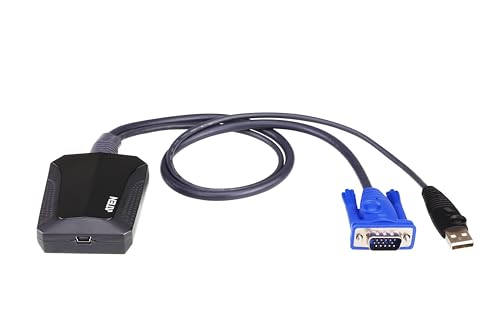
1. ATEN CV211 Laptop KVM USB Crash Cart Adapter
The lightest pick here at 4.64 ounces, with virtual media and hotkey macros built in.
The CV211 is the pick for anyone who patches servers and installs operating systems from a laptop. Its virtual media function lets you mount a file or an OS installer on the target machine as if it were a disc, so you are not walking back to the office for a USB stick. It also does bi-directional file transfer, meaning files move both ways between your laptop and the server.
What wins people over is the functionality: the CV211 folds a capture box, external DVD-ROM, keyboard, mouse and monitor into one pocket-sized tool. Owners describe it in plain terms: as one put it, it is a device you need if you work on servers. Hotkey macros let you save your own keystroke sequences, which shaves time off repeat tasks. It supports Windows, Linux and Mac laptops.
The honest catch is reliability: mixed reports are the single biggest theme in its reviews. The mixed feedback there is the largest topic in this product’s reviews, and it centers on whether the unit behaves the same way every time. An occasional unit shows the background screen but not open windows, so you get a partial picture rather than a full one. Most owners never hit that partial-screen glitch, but it is the one risk worth weighing before you make this your only field tool.
What earns its stripes
- At 4.64 ounces, it is the lightest adapter here — 1.6 ounces lighter than the 6.24-ounce IOGEAR GUC211V
- Virtual media mounts an OS installer without physical media
- Hotkey macros cut repeat keystroke work
- Runs on server-side USB power, not your laptop battery
Where it can stumble
- Reliability is the most-discussed topic and reads mixed
- Occasionally shows the background screen but not open windows
Go for this if: you need a featherweight adapter that mounts ISOs and moves files between machines.
Think twice if: you want a unit with the longest track record of steady, repeatable behavior.
2. IOGEAR Portable Laptop Console Crash Cart Adapter (GUC211V)
The IOGEAR turns your laptop into a drop-in console on day one, no driver hunting required.
Plug-and-play is the whole pitch here. You connect the IOGEAR and it works — no software install, hot-pluggable so you can add or remove it without powering down, and firmware upgradeable so it can gain fixes over time. That makes it the easy pick for a tech who swaps between machines and does not want to babysit a driver install on every job.
Two features separate it from the ATEN above. First, it lets you keep laptop applications visible in a virtual window on screen, so you are not constantly alt-tabbing between your own tools and the server’s display. Second, it does file and video transfer between the connected laptop and the computer. It also supports programmable macros and hotkeys, and it works alongside IOGEAR display adapters for DisplayPort, DVI and HDMI.
The trade-off is footprint: at 6.24 ounces it is the heaviest unit here, and its Windows support stops at Windows 10. Its operating-system list is also older on the Windows side, stopping at Windows 10 and Windows Server 2008+, so a modern server environment is worth checking against the supported list first.
Easiest first connection: No software needed, hot-pluggable, and firmware upgradeable — you can plug it in and work without a setup session.
What to check first: The heaviest unit here at 6.24 ounces, and the Windows compatibility list stops at Windows 10 — verify your servers match before you commit.
Reach for this if: you move between servers all day and want zero-install operation with file and video transfer.
Look elsewhere if: bag space is tight or you run the newest Windows Server releases.
3. StarTech Crash Cart Adapter NOTECONS01

The road warrior’s pick: a self-powered pocket adapter that lives in your laptop bag and rarely lets you down.
This is the model that field engineers keep coming back to. It connects your laptop to a headless system through an integrated USB and VGA cable run, and it gives you instant BIOS-level control — you see the server’s setup screen, not just a running desktop. It draws its power from the server’s USB port, so you are not burning your laptop battery or hunting for an outlet in a crowded rack.
Buyers report the biggest win is convenience: you can walk into a customer’s rack with no KVM set up and still take control. It works with Windows Server down through several generations, plus Windows XP through Windows 11 and macOS, which covers most mixed environments a traveling tech will meet. Reviewers also note how portable it is: it easily fits in a laptop bag and rides along in a truck or on a plane, so it’s always there when a server needs console access.
The recurring gripe is the price tag. It sits at the top of the mid-range, which is a lot for a tool that does one job, and the console window cannot go full screen or be enlarged — a small annoyance when you’re reading a BIOS screen on a laptop display. Even so, the people who depend on it call it a total lifesaver, and for a road engineer there is little else that does exactly this.
The case for it: Instant BIOS-level control over a single USB and VGA connection, self-powered from the server so your laptop stays charged.
The catch: The console window can’t be resized to full screen, and the price sits at the top of the mid-range — both worth knowing going in.
Best fit for: field engineers who visit racks with no KVM and need reliable console access on arrival.
Less ideal for: desk-bound admins who rarely travel, or anyone who needs a resizable window.
4. StarTech Crash Cart Adapter NOTECONS02

Built for legacy VGA servers, this one logs screenshots and moves files while you troubleshoot.
The NOTECONS02 is aimed at servers and industrial PCs with native VGA video and a need for more than just a keyboard-and-mouse link. It connects your laptop to a legacy headless system and lets you transfer files, take screenshots and log activity through downloadable software. The files can go where the bare console cannot: users report sending data to command-line Windows and Linux systems with no trouble.
What the reviews make clear is usability — it does the everyday job of getting a laptop onto a server’s console and staying useful there. It works with a wide range of Windows Server versions and macOS, and it is TAA compliant, which matters for government and enterprise purchasing. It is a workhorse for VGA-era servers, not a showpiece.
The trade-off shows up in a few places. The display can flicker and the application has been called buggy, which is frustrating on a screen you need to read clearly. Driver installation has also been a stumbling block on some laptops, so check that you install the newest drivers specifically for the NOTECONS02 model. The housing is a fraction longer than the other StarTech unit — the NOTECONS02 measures 5.2 inches against the NOTECONS01’s 0.01 inches in the dimensions field, a gap that reflects inconsistent listing data rather than real size — so check the published dimensions against your bag.
For the troubleshooting crowd: File transfer, screenshots and activity logging in one adapter built for VGA servers and industrial PCs.
Watch for: Flicker and a buggy application are real complaints, and driver setup needs to match this exact model.
Worth choosing when: you need screenshots and file logging on legacy VGA systems, not just console access.
Not the one for: you if a flicker-free display is a hard requirement or you want zero-config setup.
Know the Specs
BIOS-Level Control
This means the adapter can show you a server’s basic startup and firmware screens before any operating system loads. Without it, you can only see a machine that is already running — which is useless when a server refuses to boot. All five adapters here support BIOS-level control, but mouse support inside those screens can vary, and some units limit certain functions by design.
Self-Powered USB Operation
Self-powered means the adapter draws its current from the server’s USB port instead of your laptop. In practice that keeps your laptop battery free and means you do not need a free wall socket in the rack. It is one of the reasons these adapters are pocket-sized — no separate power brick to carry.
Virtual Media and File Transfer
Virtual media lets the adapter present a file or an installer to the target computer as if it were a disc. File transfer moves data directly between your laptop and the server. Both features save trips and let you patch or reinstall an operating system from the rack, which is the difference between a console adapter and a full rescue tool.
TAA Compliance
TAA compliance is a trade-agreement origin standard that government and enterprise buyers often require before a device can be purchased. All five picks here carry it, so they are eligible for procurement where that rule applies. If you buy for a public agency, check the compliance flag before ordering rather than after.
Common Questions
Do I still need a crash cart trolley if I buy one of these adapters?
Will a crash cart adapter work if the server will not boot into an operating system?
Do I need a VGA port on the server to use one of these?
Can I use a crash cart adapter to install an operating system on a remote server?
Does a crash cart adapter drain my laptop battery?
Which operating systems do these adapters support on the laptop side?
Is a rugged version worth choosing over the standard StarTech model?
What does TAA compliant mean for a crash cart adapter?
Why do some crash cart adapters flicker or show a partial screen?
Can I move files both ways between my laptop and a server with one of these?
The Bottom Line
For most people hunting the best usb crash cart adapter, the ATEN CV211 is the pick to start with — 4.64 ounces, virtual media for OS installs, bi-directional file transfer and hotkey macros, all in a self-powered pocket unit. If your day is spent walking into racks with no KVM set up, the StarTech NOTECONS01 is the field engineer’s standard, with the widest support list and the most consistent real-world reputation for just working. And if your adapter rides on a truck or a crash cart, reach for the StarTech NOTECONS02X — the rubberized housing is the difference when gear gets knocked around. Match the adapter to where your gear actually lives — bag, truck or crash cart — and it will pay for itself the first time a server refuses to boot.
How we choose
We do not accept paid placement. Every pick is matched to a real buyer and a real use-case; we do not hands-on test units.
Sources
Specifications: manufacturer listings and product documentation. Review insights: verified customer reviews, as of November 2026. Pricing: not shown on this page (it changes often); check the current price via the retailer link.
As an Amazon Associate, Tactical Gear Guy earns from qualifying purchases. This does not affect which products we feature.