Specs are compiled from manufacturer listings and verified buyer reviews and can change over time — please confirm the key details on the product page before buying.
Most wireless keyboards still ship with an old micro-USB cable, which is the single most annoying detail in this whole category. A USB-C wireless keyboard fixes that one problem — the same cable that charges your phone tops up your keyboard. What you buy after that depends on one question: do you want quiet office typing, a lumpy mechanical thock, or a portable board that folds into a bag?
This guide is built by comparing the manufacturers’ published specifications and the patterns across verified customer reviews, so you get each pick’s real strengths and trade-offs instead of marketing spin.
You will see the layout size, the battery capacity and the connection types spelled out for each model, plus the honest trade-offs nobody puts on the box. Here is the shortlist of the best USB-C wireless keyboard choices for a desk, a commute and a cramped bag.
Top Picks

How To Choose The Best USB-C Wireless Keyboard
Start with the cable, not the keys. A true USB-C wireless keyboard charges over USB-C — that means one charger for your phone and your board, and no drawer full of adapters. Every model here clears that bar.
Layout size decides your desk space
A full-size board gives you a number pad and stretches past 16 inches wide on some models. A 75% layout drops the numpad but keeps the arrow cluster and function row, which is why so many desk setups land there. A folding board shrinks to pocket size but forces a smaller key layout.
Connection type: Bluetooth, 2.4GHz or both
Bluetooth pairs with a tablet or phone with no dongle. A 2.4GHz receiver (the little USB plug) tends to hold a steadier signal for a desktop. Tri-mode boards give you Bluetooth, 2.4GHz and a USB-C wired fallback in one unit.
Battery capacity and how often you charge
Capacity is listed in mAh (milliamp-hours — the size of the battery tank). A 5500mAh cell lasts far longer between charges than a 300mAh one, though backlighting and screen widgets drain it faster. Check the claimed life, then halve your expectations if you run RGB at full brightness.
Switch type: quiet, tactile or creamy
Mechanical switches give a distinct feel and a click. Scissor and low-profile switches stay quiet and thin, which suits a shared office or a late-night desk. If you share a room, prioritise a quiet board over a thocky one.
Side-by-Side Comparison
| Model | Best For | Layout | Battery | Connection | Amazon |
|---|---|---|---|---|---|
| YUNZII C75★ Best Overall | Desk showpiece with a creamy thock | 75%, 84 keys | 5500mAh | BT 5.0 / 2.4GHz / USB-C | Amazon |
| Arteck HB305-2Thinnest Pick | Ultra-thin travel typing | Full size, 109 keys | 6-month claimed | Bluetooth (3 devices) | Amazon |
| Wave KeysBest Comfort | All-day office comfort | Full size, 107 keys | 1 AA battery | 2.4GHz + USB-C adapter | Amazon |
| TECKNET Foldable | Bag-and-flight portability | 64 keys, folding | 300-day standby | Bluetooth (3 devices) | Amazon |
| Lenovo Multi-Device | Lightweight tablet companion | 75 keys, 10.07″ long | 300mAh, 62-hour | Bluetooth + USB-C cable | Amazon |
| Nulea Split | Wrist-friendly split typing | Split QWERTY | 200-hour | 2.4GHz + Bluetooth | Amazon |
| AULA S98 Pro | Gaming with a live LCD screen | 96 keys with numpad | 5000mAh | BT 5.0 / 2.4GHz / USB-C | Amazon |
| Apple Magic Keyboard | Mac and iPad pairing | US English, 12.13″ long | About a month+ | Bluetooth + USB-C | Amazon |
| Logitech MX Keys S Mac | Multi-device Mac workstation | 78 keys, low-profile | 10-day claimed | Bluetooth (3 devices) | Amazon |
Detailed Reviews
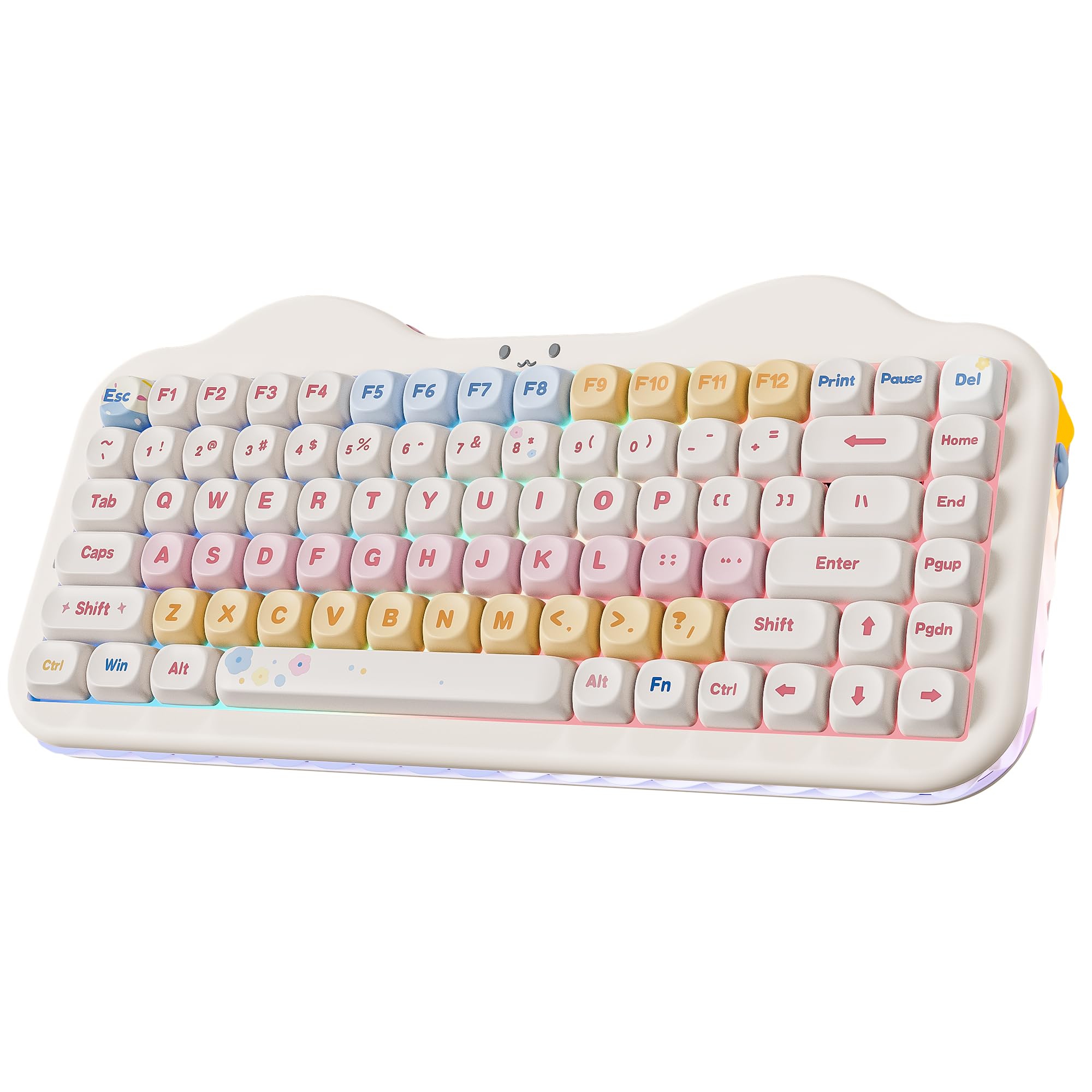
1. YUNZII C75 Cute 75% Wireless Mechanical Keyboard
Our pick — 4.5+★ from 700+ verified ratings; the strongest balance of quality and price.
A gasket-mounted 75% board with a creamy thock and a hot-swap PCB that takes 3-pin and 5-pin switches without soldering.
Pre-lubed linear switches and stabilisers give each keystroke a soft, low landing instead of a sharp, hollow one. The creamy sound comes from a gasket structure (the plate floats on soft mounts instead of sitting on hard plastic) plus multiple layers of sound-absorbing filling. Pre-lubed linear switches and stabilisers finish the job, so each keystroke lands soft and low instead of sharp and hollow.
The 5500mAh cell is the largest battery in this lineup, and tri-mode covers Bluetooth 5.0, a 2.4GHz dongle and USB-C wired. You get a hot-swappable PCB that takes both 3-pin and 5-pin switches — meaning you can pull any switch and drop in a tactile or clicky replacement with zero soldering. The 5500mAh battery is the biggest capacity on this list, and it pairs with tri-mode connectivity: Bluetooth 5.0, a 2.4GHz dongle, and USB-C wired. It remembers up to five devices, so your Mac and your gaming rig can share one board.
The catch is weight and height. At roughly 1.01 kg, this is a board you keep on the desk rather than carry to a café. And at 1.73 in tall it sits far above the 0.24 in profile of the Arteck below, so you will want a wrist rest if you type long sessions. The 75% layout drops the numpad, so spreadsheet number-crunchers should look at the AULA further down.
What earns the top spot
- 5500mAh battery — the largest capacity in this lineup, so fewer charging days
- Hot-swappable PCB accepts 3-pin and 5-pin switches without soldering
- Tri-mode: BT 5.0, 2.4GHz dongle and USB-C wired in one board
- Gasket mount plus sound-absorbing layers for a soft, creamy keystroke
- Three-zone RGB covering keys, cat-face emblem and side underglow separately
Where it gives ground
- 1.01 kg is desk furniture, not a travel board
- 1.73 in height calls for a wrist rest on long sessions
- 75% layout has no number pad
Made for: the desk builder who wants creamy mechanical sound, RGB and swappable switches from a USB-C board.
Think twice: if you carry a keyboard daily or live in a spreadsheet — the weight and missing numpad will bite.
2. Arteck HB305-2 Universal Multi-Device Bluetooth Keyboard
Full-size keys in a slab thin enough to slide into a laptop sleeve.
At 0.24 in thick, it slides into a laptop sleeve without a bulge. It measures 14.3 x 4.5 x 0.24 in — that 0.24 in profile is a fraction of the 1.73 in YUNZII above, so it slips into a bag pocket without a bulge. It still crams in 109 keys with full-size keycaps and media shortcuts, so the thin body does not force tiny keys.
The multi-device switching is the practical win. One key press hops between three paired devices — a Windows laptop, an iPad and an Android phone, all supported. The rechargeable lithium battery is rated for six months between charges based on two hours of steady use a day, and the box includes a USB-C charging cable.
What people talk about most is the build and the reliability — the quality of the board and its steady connection come up again and again in owner feedback. The honest trade-off is feel: this is a plastic, low-travel slab, not a mechanical board with a satisfying thock. If you want a springy, characterful typing experience, the YUNZII is the better fit; if you want thin and steady, this is it.
Who this fits: commuters and hot-deskers who want three-device Bluetooth in a 0.24 in package, with a six-month battery claim and a USB-C charging cable in the box.
The honest limit: the flat plastic chassis gives you no tactile character — it is a tool, not a toy.
Reach for this if: your keyboard has to disappear into a bag and you juggle three devices daily.
Leave it if: you want mechanical feel or a number-heavy layout with a softer stroke.
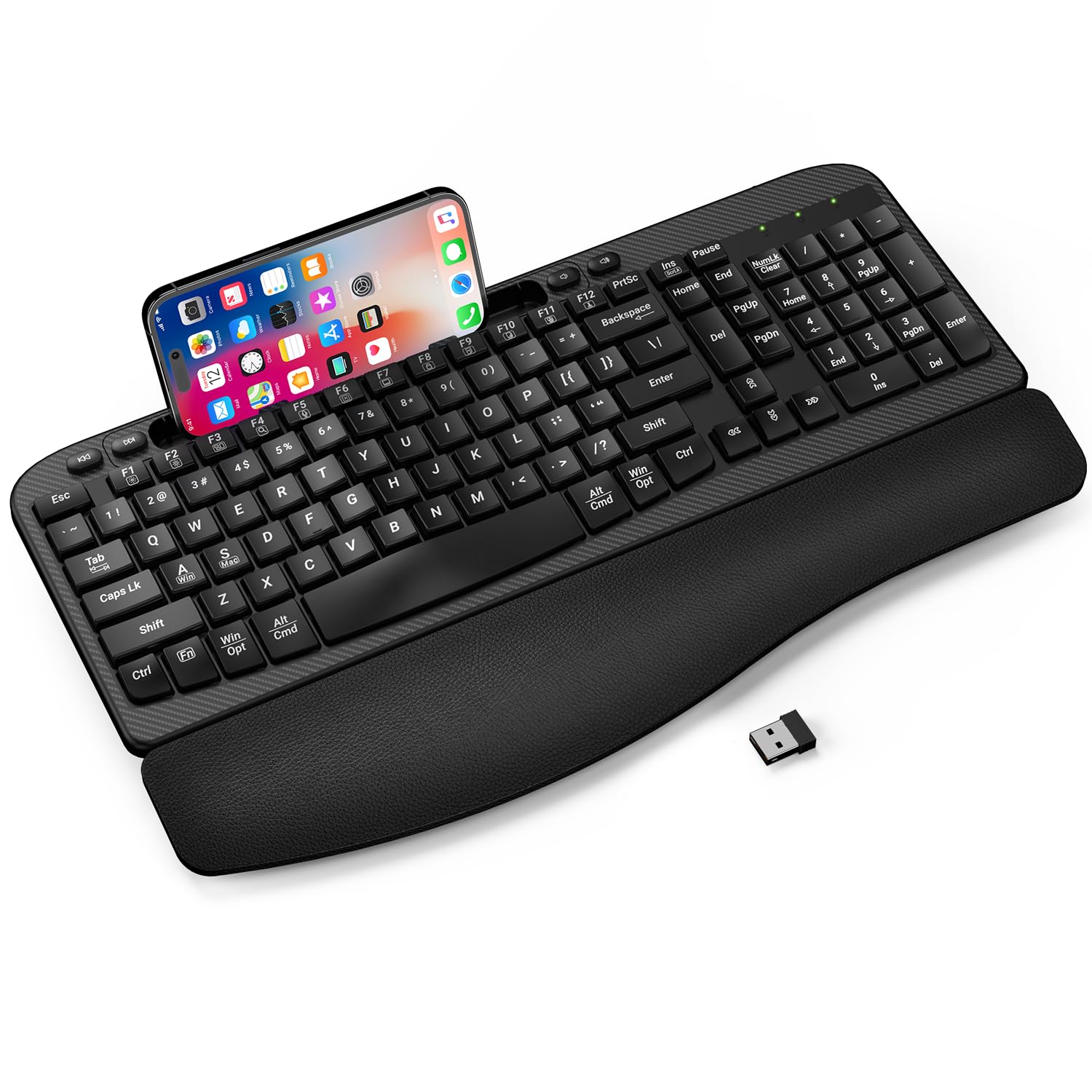
3. Wave Keys Wireless Ergonomic Keyboard
A cushioned, wave-shaped full-size board built for eight-hour desk shifts.
A curved wave-shaped key layout and a high-density memory foam wrist rest aim to hold your hands in a natural posture through six to eight hours of typing. It leads with a curved wave-shaped key layout and a high-density memory foam wrist rest, aimed at getting your hands into a natural posture across six to eight hours of daily typing. The keyboard is a full-size unit at 16.57 in long and 9.01 in wide — the biggest footprint here, versus the TECKNET’s 7.1 x 4.2 in folded size.
The quiet factor is what people notice most. Owners rate its noise level as the standout strength, which matters in a shared office or an open-plan home. It connects over 2.4GHz RF with a stated range up to 33 feet and no driver install, and the box includes a USB-C adapter so it works with Windows, Mac OS and Chrome OS machines. There is also a built-in 7.28 in device slot that holds a phone or small tablet upright or flat.
Two honest notes. It runs on one AA battery that is not included, so budget for one on day one. And the reliability feedback is mixed, so treat it as a desk board rather than something you throw in a bag. It also has no claimed rechargeable battery like the Nulea split board below — that one is rechargeable, this one is not.
The comfort case: memory foam wrist rest, wave keys and dual 8/12 degree tilt legs give you a board tuned for posture, with a splash-proof structure.
The fine print: AA battery not included, and the reliability picture is mixed — keep it parked on a desk.
Best for: office workers and students who type all day and want wrist support built in.
Skip if: you need a rechargeable battery or a board that travels.
4. TECKNET Foldable Bluetooth Keyboard

Folds to 7.1 inches long, weighs 235 g, and hides a touchpad in the deck.
It tri-folds to 7.15 x 4.22 x 0.63 in and weighs 235 g. It tri-folds down to 7.15 x 4.22 x 0.63 in and weighs just 235 g, versus the Wave Keys full-size board at 16.57 x 9.01 in. That is a fraction of the Wave Keys at 16.57 in — this one lands in a handbag, a backpack or a seat-back pocket on a flight.
The clever part is the multi-mode touchpad. It switches between Touchpad Mode for scrolling and clicking, Numeric Keypad Mode for fast number entry, and Touch-Off Mode so a stray palm does not move your cursor. The 64-key layout includes 12 multimedia shortcuts, and it pairs with up to three devices, hopping between them in under a second without re-pairing. iOS, Windows, Android and macOS are all covered via Fn+Q/W/E/R.
The battery story is genuinely travel-ready: USB-C charging with an auto-sleep function that stretches standby to 300 days, and an indicator that turns red under 20% so you top up before a trip. Pack-out includes a foldable stand, a storage pouch and a USB-C cable — note that the cable is for charging only, not connecting. Compact size and build quality are what buyers call out as the strengths.
For the road warrior: 300-day standby, three-device switching and a built-in touchpad in a 235 g folder — plus 36 months of support from TECKNET.
Where it compromises: 64 keys means a smaller layout, and functionality feedback is mixed, so give yourself a day to learn the key spacing before relying on it in a meeting.
Reach for this if: you work from cafés, flights or a hotel desk and want one pocketable board with a touchpad.
Leave it if: you touch-type at speed on a full-size layout and hate relearning key spacing.
5. Lenovo Multi-Device Wireless Keyboard

A 177 g slab that pairs with three devices and charges over USB-C.
Portability here comes from weight, not folding. This Lenovo tips the scale at 177 g (0.39 lb) with a slim 5.6 mm profile without the rubber stand, so it adds almost nothing to a bag. It measures 10.07 x 4.17 x 0.22 in and runs 75 keys with a 1.3 mm key travel and 18 mm key pitch — enough travel to feel deliberate, low enough to stay quiet.
For connection, you choose Bluetooth to link up to three compatible devices, or a USB-C cable for a wired session. The 300 mAh battery is rated for up to 62 hours, which covers a work week or two of light use before a charge. Twelve function keys handle the shortcuts you actually reach for, and it covers iOS, Android, Windows and even listed Fire tablet models.
The keyboard itself is the strength — the typing feel and value come out best in owner feedback, with the soft-touch surface getting a mention. Watch the connection side: the feedback there is mixed, with some units dropping connection after a stretch of use. It is not a heavy mechanical board, so if creamy thock is the goal, the YUNZII above is the different animal entirely.
What it does well: 177 g, a 62-hour battery and 1.3 mm key travel make it a genuine bag companion for tablet typing.
What to watch: connectivity feedback is mixed, so buy from a seller with easy returns and give it a long test week.
Best for: tablet and laptop users who want the lightest board with a real battery.
Skip if: you need rock-solid long-session connection or mechanical keystrokes.
6. Nulea Ergonomic Split Wireless Keyboard
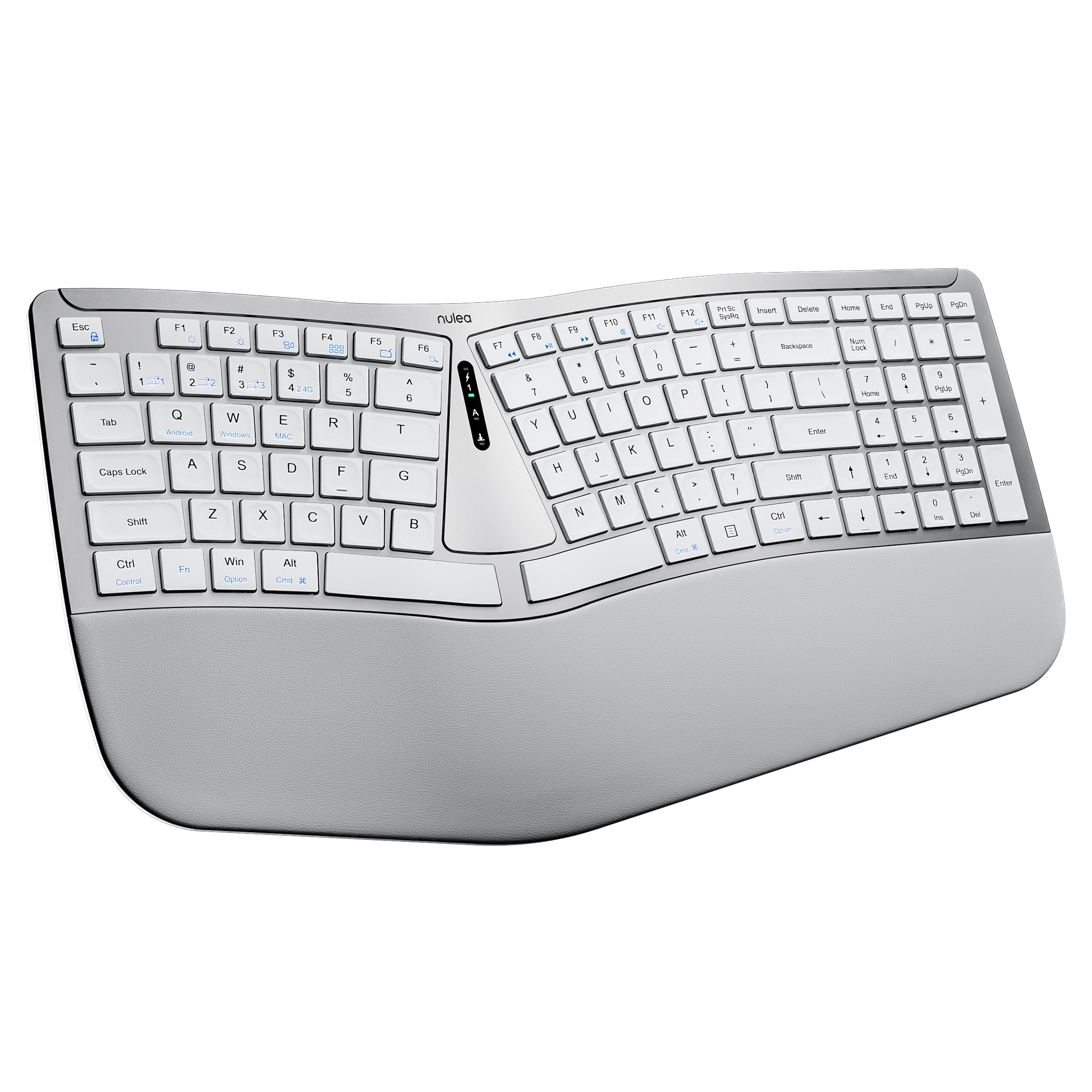
A split deck that angles each hand outward to stop your forearms twisting inward.
The split layout is the whole point. Each half of the board angles outward so your forearms do not roll inward all day, and the soft palm rest keeps wrists supported through long sessions. If you have ever finished a day with tight forearms from a flat keyboard, this shape is the direct answer.
It runs scissor-switch keys, which means a short, stable stroke with fast rebound rather than a deep mechanical throw. Battery is rechargeable, rated at 200 hours — far longer than the 62 hours of the Lenovo above, though shorter than the 5500mAh cell in the YUNZII. Dual-mode connectivity covers both 2.4GHz and Bluetooth, so you can switch between a laptop and a tablet, and it charges over USB-C.
The typing quality and comfort are what buyers enjoy — this is a board people describe simply as comfortable to use. Understand the trade-off before buying: a split layout means retraining your hands for a week or two, and the board sits in a fixed shape on the desk rather than folding away. It is a commitment to comfort, not a grab-and-go board.
The posture pitch: split halves, a cushioned palm rest and 200 hours of rechargeable battery, on 2.4GHz or Bluetooth, charged via USB-C.
The learning curve: a split deck takes a week or two of retraining and stays put on the desk.
Made for: long-hour typists with wrist or forearm fatigue who want a split deck with a palm rest.
Think twice: if you share the keyboard between rooms or want a folding travel board.
7. AULA S98 Pro Wireless Mechanical Gaming Keyboard
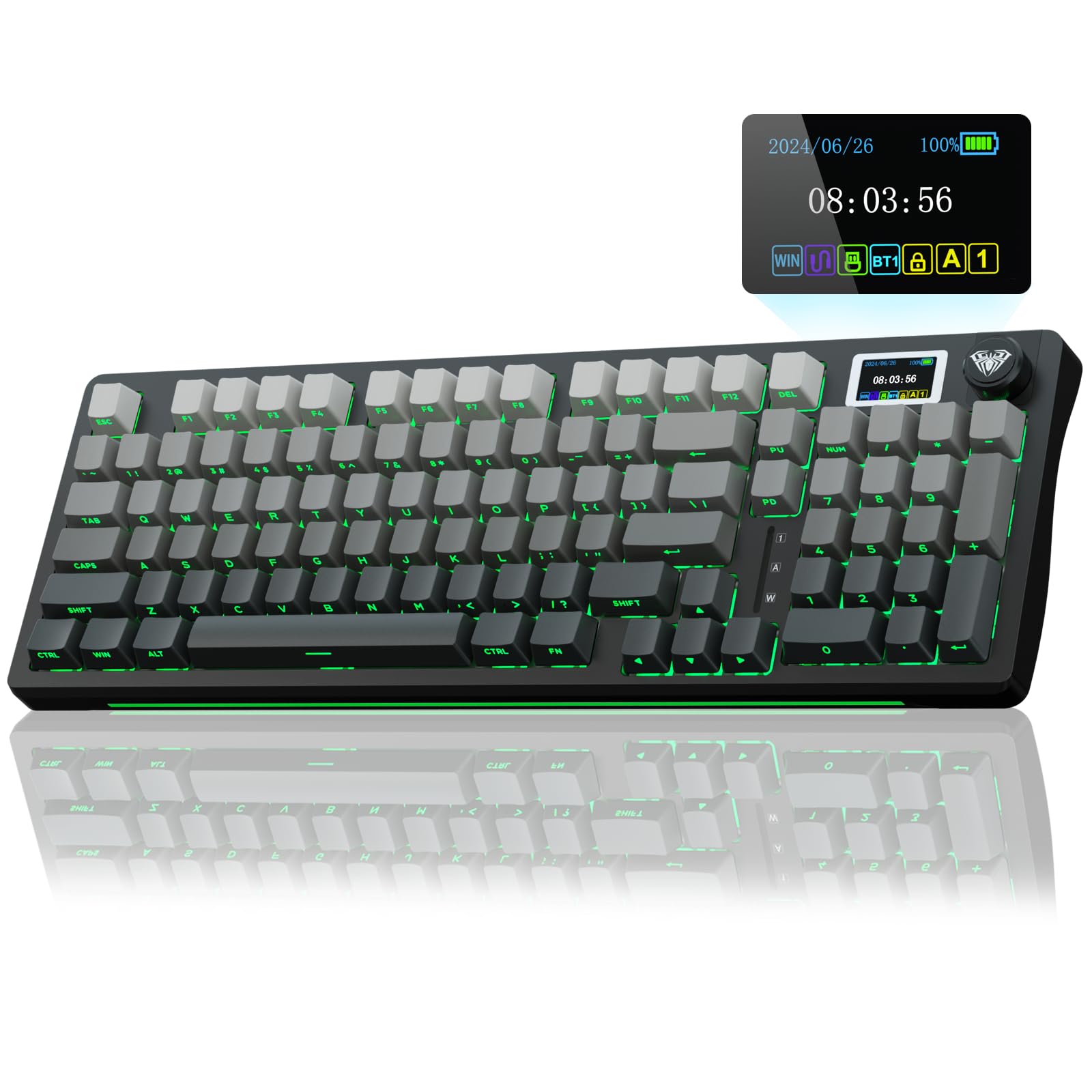
A 96-key mechanical board with a live LCD screen and a knob — the full-desk gaming rig.
This one earns its price with the extras. The smart LCD screen shows date, time, battery level, system and connection mode, and the multi-function knob scrolls through volume, RGB mode, language and screen image. That is a control layer you do not get on the plainer boards above — and the keyboard quality is the single most praised trait in owner feedback.
It packs 96 keys including a number pad, so spreadsheet work and gaming share one board. Tri-mode connectivity covers Bluetooth 5.0, 2.4GHz and USB-C wired, and it saves up to five devices, which you switch with the knob. The 5000mAh battery is close to the largest here, and the hot-swappable base accepts 3-pin or 5-pin switches with a puller included. Five layers of sound-deadening material and pre-lubed stabilisers give it that creamy mechanical voice.
Expect real desk furniture. It measures 16 in long, 5.43 in wide and 1.78 in tall and weighs about 2 pounds, so this is not a travel board. Reliability feedback is mixed, so it is the sort of purchase to test thoroughly in the first weeks. Programming the screen and GIFs requires the Windows-only wired driver, which locks Mac users out of that one feature.
The buying case
- LCD screen plus multi-function knob for volume, RGB and connection control
- 96 keys with a number pad — work and gaming on one board
- 5000mAh battery and hot-swappable 3-pin/5-pin base
- Five layers of sound deadening for a creamy, thocky voice
The honest edges
- 2 pounds and 1.78 in tall — desk only
- Screen/GIF programming needs the Windows-only wired driver
- Reliability feedback is mixed, so test it early
Best for: gamers and desk workers who want a number pad, a knob and an LCD screen in one mechanical board.
Skip if: you only use a Mac for setup or need to carry your keyboard around.
8. Apple Magic Keyboard – US English

The plainest board here — and the one that just works across a Mac and iPad.
If you live inside Apple’s world, this is the frictionless pick. It pairs automatically with your Mac the moment it is nearby, so there is no pairing dance to learn. The typing is precise and deliberate, and the classic build quality is the thing buyers rate highest about it.
Charging is modern at last: a USB-C port plus a woven USB-C charge cable in the box lets you pair and charge from your Mac’s USB-C port. The internal battery is rated for about a month or more between charges, which beats the 62-hour figure on the Lenovo above on paper. It stays small and light — 12.13 x 6 x 0.73 in and 14.4 ounces — so it fits a shallow desk drawer or a laptop bag.
The honest edge is compatibility. It pairs happily with iPads, but it does not work with older Macs, and connectivity feedback is mixed overall, so check your machine generation before you buy. There is also no backlight and no number pad, so it is a typing tool rather than a feature showcase. If you need lighting or a numpad, the MX Keys S below is the better fit.
The Apple advantage: automatic pairing with a Mac, a USB-C port with a woven USB-C cable, and about a month or more per charge in a 12.13 in body.
The Mac-only flip side: older Macs are cut out, and feedback on connection consistency is mixed — confirm your model first.
Reach for this if: you use a recent Mac or iPad and want zero setup and a month of battery.
Leave it if: you own an older Mac, need backlighting, or want a number pad.
9. Logitech MX Keys S Mac Wireless Keyboard

Spherically dished keys that light up as your hands approach — built for a Mac desk.
The keys themselves are the feature here. Each one is spherically dished, meaning it dips slightly in the centre to cradle your fingertip, on a laptop-like low profile. That shape is designed for fast, precise typing, and the flat angle is set up to suit wrist posture over a long workday. Add auto-illumination that lights the keys as your hands approach, and it is a board built for dim rooms.
For a Mac-heavy setup, the value is in the workflow. It pairs with up to three devices over Bluetooth Low Energy across macOS, iPadOS and iOS, and you can jump between an iPad and a Mac without touching a cable. Logi Options+ adds Smart Actions — shortcuts that fire several steps from one key — and you can move text and files between three Apple computers if you pair it with the MX Master 3S for Mac. It charges over USB-C, and the plastic parts include certified post-consumer recycled content.
Two things to weigh. The 10-day battery claim is short next to the month-plus Magic Keyboard above and the multi-week boards on this list — but that figure reflects the backlight running; dim it and you go longer. And it is Mac-mastered, meaning a Windows-only household should look elsewhere. For a mixed Apple desk that wants lighting and shortcuts, nothing here matches the workflow piece.
The premium payoff: dished keys, hand-proximity backlighting, three-device Bluetooth and Smart Actions shortcuts — with USB-C charging and a 10-day rated battery.
The cost of it: 10 days is the shortest charge cycle among the rechargeable picks, and the Mac focus leaves Windows users out.
Best for: Mac and iPad users who move between three devices and want backlit, shortcut-driven typing.
Skip if: you need long stretches between charges or run a Windows-only desk.
Know the Specs
Battery capacity in mAh
Milliamp-hours (mAh) is the size of the battery tank. A 5500mAh cell and a 300mAh cell both run the keyboard, but the larger one lasts far more sessions before a charge. Backlighting and screens swallow power faster, so a bright RGB board can still run flat sooner despite a big tank. Match the capacity to your lighting habit.
Layout size: full, 75% and folding
A full-size layout includes the number pad and stretches wide. A 75% board drops the numpad but keeps the arrows and function row, saving desk width. A folding board shrinks to pocket size but forces a smaller key layout. Decide what you type before you decide the size.
Hot-swappable PCB
A hot-swappable board lets you pull a switch and drop in a replacement without a soldering iron. That matters because the switch — not the case — defines the feel and the sound. A hot-swap board is future-proof: swap linear for tactile if your taste changes.
USB-C vs Bluetooth vs 2.4GHz
Bluetooth pairs without a dongle and jumps between devices. A 2.4GHz receiver tends to hold a steadier signal on a fixed desk. USB-C wired is the fallback that never drops and charges at the same time. Tri-mode boards give you all three in one.
Common Questions
Will a USB-C wireless keyboard charge from my phone charger?
Can I switch a wireless keyboard between a Mac and a Windows PC?
Does a 75% layout still have arrow keys?
How long does the battery actually last between charges?
Is a mechanical keyboard better than a scissor-switch one for typing?
Can I change the switches on a hot-swappable keyboard?
Do these keyboards work with an iPad or Android tablet?
Is a folding keyboard comfortable enough for daily typing?
Why does my wireless keyboard disconnect from time to time?
Can I use a Mac-tuned keyboard with a Windows PC?
The Bottom Line
The best USB-C wireless keyboard for most desks is the YUNZII C75 — a 5500mAh battery, hot-swappable switches and tri-mode connectivity in a 75% board that thocks. For commuters, the TECKNET Foldable folds to 7.1 in with a touchpad and 300-day standby. If you are Mac-first and want dished keys with proximity backlighting, the Logitech MX Keys S Mac is the premium reach.
The YUNZII earns the top slot on a 5500mAh battery, hot-swappable switches and tri-mode connectivity at a mid-range price, backed by 4.5+ stars across 700+ ratings.
How we choose
We do not accept paid placement. Every pick is matched to a real buyer and a real use-case; we do not hands-on test units.
Sources
Specifications: manufacturer listings and product documentation. Review insights: verified customer reviews. Pricing: not shown on this page (it changes often); check the current price via the retailer link.
As an Amazon Associate, Tactical Gear Guy earns from qualifying purchases. This does not affect which products we feature.