Specs are compiled from manufacturer listings and verified buyer reviews and can change over time — please confirm the key details on the product page before buying.
A USB-C power meter is a tiny pass-through gadget that sits between your charger and your device and shows you exactly what is flowing through the cable — volts, amps and watts, live on a screen. If your laptop charges slower than you expect, if a cable feels warm, or if you just want proof that the charger you bought is doing what the box promised, this little tool answers the question in seconds.
This guide is built by comparing the manufacturers’ published specifications and the patterns across verified customer reviews, so you get each pick’s real strengths and trade-offs instead of marketing spin.
Nearly every pick here reads a 240W-class load, but they differ wildly in what they show you beyond watts — protocol triggers, ripple graphs, E-Marker chip data — so choosing carefully matters more than chasing the highest wattage.
Below I break down what each tester actually measures and who it is for, so you can pick the right USB-C Power Meter the first time instead of guessing by the spec list.
Top Picks


How To Choose The Best USB-C Power Meter
The hardest part of buying a cable tester is realizing the spec sheet rarely tells you what the screen actually shows. A tester that reads 240W sounds impressive, but if it cannot tell you whether your cable is the bottleneck, you are still guessing. This section breaks down the handful of specs that separate a useful tool from a charger-shaped toy — and which ones you can ignore.
Start with the voltage and current range, not the wattage claim
Most USB-C chargers top out at 20V, but the latest Power Delivery spec pushes to 48V. A tester rated to 4.5V–50V and 50mA–6.5A covers everything on the market today, including laptop bricks and high-power power banks. If you only test phone chargers, a 3.6V–32V / 0–8A range covers every handset and 65W laptop brick you own. Ignore the wattage badge on the box until you have checked the underlying volt and amp figures — that is what determines whether a high-wattage charger reads correctly.
Display readability is the real daily trade-off
The screen is the part you live with. OLED panels give deep contrast and a compact footprint, but the digits can be small. LCD is easier to read in a bright workshop but looks washed out in a dark room. IPS is a middle path — bright, color, and readable from an angle. If you regularly test in daylight, favor a bright IPS or LCD over a dim OLED. If you mostly work indoors, a color OLED with a 180° flip is the nicer experience.
Protocol and cable-readout features are what make a tester actually useful
A basic unit shows live volts, amps and watts. A serious tester goes further: it reads the E-Marker chip inside your cable (the small chip that tells the charger what wattage the cable can handle), triggers specific fast-charge standards to test whether the handshake works, and records the maximum wattage hit during a charging session. If you are troubleshooting why a laptop refuses to take 100W, these features save you hours. If you only want live volts, amps and watts from a known-good charger, skip the E-Marker and protocol features and save the budget.
Build and port orientation matter more than you think
Look for a bidirectional design — meaning the tester reads power flowing in either direction, so you can see both what goes into a power bank and what comes out. A reinforced male-to-female USB-C connector is also worth checking; a flimsy plug that works loose mid-test will cost you a reading and, in the worst case, a device. A compact body that slips into a bag without breaking the connector off is the difference between a tool that lives in your kit and one that stays in a drawer.
Side-by-Side Comparison
| Model | Best For | Voltage Range | Current Range | Display | Amazon |
|---|---|---|---|---|---|
| Plugable USB C Power Meter★ Best Overall | All-round testing of USB-C power and charging | 4.5V–50V | 50mA–6.5A | OLED (rotating) | Amazon |
| Eversame PD3.1 (AT085)Tiny and Capable | Battery capacity and curve reading | 4.5V–50V | 0–12A | 6-color LCD | Amazon |
| YEREADW UT003Budget Workhorse | Budget power bank capacity testing | 3.6V–32V | 0–8.0A | IPS color (8 interfaces) | Amazon |
| UNI-T UT658Dual | Engineering and production testing | 4V–24V | Max rating per spec sheet | Dual LCD | Amazon |
| Power-Z C240 | Portable high-power testing on the move | Up to 48V (240W capable) | Per 240W rating | 1.14-inch color | Amazon |
| StarTech USBC-PWRTESTER | IT pros troubleshooting docking stations | 4.5V–50V | 50mA–6.5A | Digital (180° flip) | Amazon |
| FNIRSI FNB58 | Deep protocol and ripple analysis | 4V+ (up to 28V per model) | 7A max | 2.0-inch TFT | Amazon |
| K2B (AVHzY) | High-resolution lab-grade monitoring | 3.3V–36V (K2B version) | 0–6A (10A peak) | 1.54-inch IPS | Amazon |
| Power-Z KM003C | Professional PD3.2 analysis | Up to 50V | Up to 6A (240W PD) | 1.54-inch LCD | Amazon |
Detailed Reviews
1. Plugable USB C Power Meter Tester
Our pick — 4.5+★ from 400+ verified ratings; the strongest balance of quality and price.
The tester that just works in any orientation, no flipping, no fussing, no dead reads.
The defining trait of the Plugable is its bidirectional design combined with an extended voltage range that stretches from 5 to 48 volts. That means it reads Power Delivery Extended Power Range — the newest USB-C fast-charging standard — without requiring you to physically flip the connector. Plug it in either way and the screen reports current flow direction, volts, amps and watts. For a tester sitting at 18.14 grams, it does a remarkable amount of measuring for a device barely bigger than your thumb.
What makes it the crowd favorite is how much it packs into a no-nonsense package. The OLED display is the upgraded version on this model, with clearer digits than the previous generation, and the new orientation button rotates the screen in 180° if you are testing in an awkward spot. The 50mA–6.5A operating range covers everything from trickle-charging earbuds to a 240W laptop brick. No swapping units, no squinting. It also passes USB data through, supports USB-C Alt Mode video, and works as a power-quality meter for docking stations and chargers — though Plugable is explicit that it does not work with Thunderbolt 3 devices.
The trade-off here is size. At 3 x 3 x 1 inches in its package dimensions, it is noticeably bigger than some keychain-sized rivals, and the 18.14 g weight is heavier on the scale than the Eversame at 9.93 g. Neither figure is a burden, but if you want something you forget is in your pocket, the Eversame wins that fight. The Plugable wins the fight you actually care about: it reads 240W through a full 5-to-48V sweep with a screen you can rotate, and it does it without a manual.
Where it earns its keep
- Bidirectional read from 5 to 48V — no flipping the connector, it just works
- OLED display with a dedicated orientation button for a 180° flip
- Handles the full 50mA–6.5A range, from trickle charge to 240W laptop brick
- Also a power-quality meter for docking stations and chargers
What to expect going in
- Will not work with Thunderbolt 3 devices, by design
- At 18.14 g it carries more body than the 9.93 g Eversame
- Its 3 x 3 x 1-inch package size takes up more drawer room than a keychain tester
Reach for this if: you want the most straightforward read on a charger or cable with no additional software and no protocol buttons to press.
Look elsewhere if: you need to read Thunderbolt 3 devices — this tester explicitly does not support them.
2. Eversame PD3.1 Digital Multimeter
A pocket-sized tester with a 0–12A ceiling and a real battery-capacity calculator inside.
With a 4.5V–50V / 0–12A measurement range, the Eversame can read the full spread of USB-C fast charging. That is the widest current ceiling in this group — 12 amps versus the 6.5 amp ceiling on the Plugable and the StarTech and 8 amps on the YEREADW. At just 9.93 grams and 1.7 x 0.98 x 0.4 inches, it is dramatically lighter and smaller than the Plugable, which weighs 18.14 g at 3 x 3 x 1 inches. If you want a tester that disappears into a bag pocket, this is your pick.
Owners talk about functionality first, and the number of reviews backs it up as genuinely popular. The AT085 chip does six LCD color display modes, real-time curves that you can pause and resume to examine fluctuations, peak voltage/current/power recording, and a battery capacity calculator that works out the internal battery size of whatever you are charging. A gravity sensor (a motion sensor that detects orientation) automatically rotates the screen so you can read it upside down if you need to. Add 18-month support and CE/RoHS certification (CE and RoHS are safety and environmental compliance marks), and it punches far above its size.
The catch is the button layout. A few owners find the controls less than intuitive, especially the direction-lock shortcut that requires pressing the confirmation key five times in a row. The screen is also small given how much data it holds — that is the same physical trade-off that comes with any tester this compact. For most testers, the readout you lose in screen area you gain back in portability, and the color display at least keeps the digits distinct.
Why testers pick it: The 0–12A range and the battery capacity calculator make this one of the few pocket testers that can actually tell you whether a power bank is holding the mAh it claims. That is functionality you will use repeatedly, not a one-time novelty.
Worth noting: At under 10 grams, it will not weigh down a toolkit. But the small body means small buttons and a small screen — if you have large fingers or work in a hurry, the layout takes a session or two to get comfortable.
Best for: anyone who wants to verify power bank capacity without pulling out a laptop, in a tester that fits in a coin pocket.
Worth flagging: the direction-lock shortcut — five quick presses of the confirm key — is easy to forget between sessions.
3. YEREADW UT003 USB C Tester
The tester that cuts the power when something goes wrong and remembers your data afterward.
The safety shutdown is the feature that sells this one. The YEREADW actively watches for over-voltage, over-current, under-voltage and low-energy conditions, and cuts the power if it detects a problem. It also saves your test data through a sudden power outage. For anyone testing unknown or cheap chargers, that protection is not a nice-to-have — it is the reason you buy a tester in the first place. The other standout is the price-to-feature ratio: an IPS color display with eight switchable screens, a 3.6V–32V / 0–8.0A range, and a full quick-charge protocol set at an entry-level tier that undercuts nearly everything else here.
The protocol support is broader than you would expect at this level. It handles PD3.0/2.0 (Power Delivery fast-charge standards), QC3.0/2.0 (Quick Charge standards) and BC1.2 (a basic USB charging standard), which covers the charging standards you are likely to run into on iPhones, MacBooks, Dell XPS units, Chromebooks and Surface Pro machines. There is a USB-A port and a Type-C port, so you are not locked into one cable type. And the power bank capacity test is more informative than most: it shows you how to divide a Wh (watt-hour) reading by the battery voltage to get an amp-hour figure, which is genuinely useful when you are trying to confirm that a power bank is not shorting you on capacity.
The honest note is the screen size. That is the most-discussed weak point on this model, and it is fair — a small display showing that much information can be hard to read in poor light. It is an IPS panel so color and contrast help, but if readability is your top priority, look at the 1.54-inch screen on the K2B or the larger 2.0-inch TFT on the FNIRSI. What you lose in screen space you gain in the most safety features per dollar on this entire list.
The safety argument: Over-voltage, over-current, under-voltage and low-energy protection all cut the cable automatically. If you test unknown chargers or cheap power banks, that protection makes the YEREADW a safer first tester than a basic meter that only reads numbers.
The size argument: It is one of the smallest screens in this lineup. A workaround is using the screen-zoom view for the values you check most, but you are still reading them on a compact display.
Go here if: safety protection and protocol coverage matter more than a big display, and you want the confidence of an automatic cut-off.
Think twice if: you regularly read a tester outdoors or in bright rooms — the small display is the one consistent note on this model.
4. UNI-T UT658Dual USB-C Digital Tester

The dual-module bench tester that shows every number on one screen and remembers ten sets.
Where most testers make you cycle through pages, the UT658Dual solves the readability problem by showing voltage, current, power, capacity and circuit resistance all at once. That same-screen readout is the reason it appeals to engineers and DIY builders. The body is 1.97 x 1.57 x 0.79 inches and weighs 2.8 ounces — noticeably chunkier than the tiny pocket testers like the Eversame, but that extra body houses two separate modules: USB-A and USB-C. Ten groups of stored data means you can run a series of tests and come back to review them without a laptop.
The intended user is clearly the production-verification or bench-test crowd. It will read the D+ and D- voltage of a data cable, check circuit equivalent resistance, and monitor anything from a portable power source to a USB charger. The two-module setup matters, though: the USB-A port input must go to a USB-A output, and the USB-C to a USB-C output. Cross the two — Type-C in, Type-A out — and the A port will not respond. That is a design limitation, not a defect, but it is the kind of thing you want to know before your first test.
Function and display performance draw a mixed picture. USB-C/PD works correctly on plenty of units, but some buyers report the USB-C portion failing to power up or only showing voltage. That is a minority read on a tester that has been around for a while. If your work is USB-A first and USB-C second, it is a reliable bench companion. If your stack is all USB-C, a tester dedicated to Type-C — like the Plugable or the Power-Z units — is less likely to leave you guessing which module you are on.
Why bench techs like it: The side-by-side layout shows everything at a glance, and the 10-group memory turns a messy series of charge tests into a clean dataset you can review later.
The module caveat: You must pair the right input with the right output. Type-C in and Type-A out will not register, so budget a little time to learn the port-mapping rule before your first run.
Reach for this if: you want a bench tool that shows every value at once and stores multiple test sessions without an app.
Look elsewhere if: your entire workflow is USB-C — the dual-module design asks you to respect its port-mapping rules.
5. Power-Z C240 Portable USB-C Tester
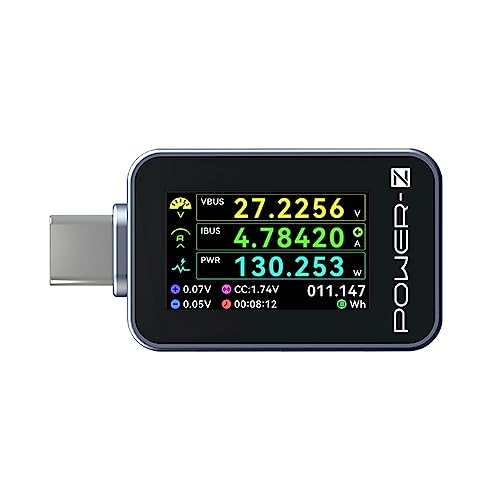
A metal-shell tester with a bright color display that proves your charger is doing its job.
At 1.14 inches, the color display is small even by tester standards, but it packs in more data per pixel than most. It shows voltage, current, power, current direction, energy, timer, D+, D- and CC all in one place. The 240W ceiling and PD3.1/QC5.0 support mean it can read the output of the newest high-power chargers, so you are not going to outgrow it when you upgrade your laptop. The metal shell is a practical choice — it takes a drop or two and still works.
The bidirectional current sensing is handy on its own. It reads both the discharge side of a power bank and the charging side of the charger, so you can test the full chain. If you need to test a USB-A device, you can add a USB-C to USB-A adapter (sold separately) and keep using the same unit. That makes it more versatile than a Type-C-only tester, even if the adapter is not in the box.
Reliability is the mixed note on the C240. Most units work without a hiccup, but the occasional report of it stopping after a few days is worth knowing before you rely on it as your only tester. That is rare, and for a portable pickup that lives in your laptop bag it is a reasonable risk. Just do not treat it as the only tool in your kit if you are diagnosing a critical charger problem.
The daily-use case: A metal-bodied tester that you can throw in a bag and trust to read a 240W charger in seconds. The bright color screen is legible even in average indoor light.
A note for the cautious: There is the odd report of a unit quitting early. Test it on day one with a known-good charger, and keep the return window in mind.
Best fit: someone who wants a durable, portable tester for checking charger performance on the go, especially with the latest high-wattage hardware.
Keep in mind: the display is genuinely small at 1.14 inches, and reliability has a faint question mark on a minority of units.
6. StarTech USB-C Power Tester (USBC-PWRTESTER)

The docking-station diagnostic tool that checks power while passing full data speed through.
Where most testers sacrifice data throughput to measure power, the StarTech passes up to 10Gbps through the same port — including DisplayPort Alt Mode video. That makes it the one on this list built for diagnosing a docking station issue without pulling the dock out of the user’s setup. The 4.5V–50V / 50mA–6.5A range and 240W PD 3.1 EPR support give you the same measurement headroom as the Plugable, but the additional data pass-through is the difference. At 12 grams and 0.9 x 2.3 x 0.4 inches, it is compact enough to live in a laptop bag.
The intended buyer is the IT pro on the move. You can test cables for full power transmission, verify VBUS and voltage drop on ports, and confirm whether a USB-C docking station is actually delivering what it should. The 180° flip display is a practical touch when you are working under a desk. It also reads in either direction, so you can see both what the dock is sending and what the connected device is taking.
The catch is the same one that applies to the Plugable: no Thunderbolt 3 support. If your environment is Thunderbolt-based, you need a different tool. It also has fewer buyer reports than the bigger names here, so you are relying more on the spec sheet than on a broad body of owner experience. For a diagnostic tool from an established brand, that is a fair position — but know that you are buying on specs and reputation rather than a huge review base.
The data-through advantage: The 10Gbps pass-through with DP Alt Mode is the feature that separates this from the rest. You can diagnose a docking station without unplugging the video and data connections — a real time-saver in a working IT environment.
Where it stops: Thunderbolt 3 is not supported. If your fleet runs Thunderbolt docks, this tester will not give you a meaningful result on them.
Pick this if: you troubleshoot docking stations and USB-C port issues for a living and need data to keep flowing while you test.
Skip if: your devices are Thunderbolt 3 — the StarTech explicitly does not support them.
7. FNIRSI FNB58 USB Tester

A 2.0-inch screen bench instrument that reads E-Marker cables and draws ripple graphs.
The FNB58 is not a casual read-the-numbers tester. It is a full protocol and signal analysis tool aimed at people who want to know why a charger behaves the way it does. The 2.0-inch TFT LCD is the largest display on this list, which makes a genuine difference when you are scanning six-digit voltage/current/power readouts and waveform plots. The external 16-bit ADC and dedicated PD protocol physical chip are what separate it from simpler meters. Functionality is the thing it earns its reputation on — owners treat it as a proper tool, not an accessory.
The feature set is the deepest in this group. It reads the E-Marker chip inside a cable to confirm what wattage the cable is rated for. It records 10 sets of switchable capacity and power data. It supports low-speed waveform drawing at 2 to 100 samples per second and ripple drawing at up to 4 million samples per second. It handles QC2.0/3.0, FCP/SCP, AFC, PD2.0/3.0, VOOC/WARP and Super VOOC 1.0/2.0 protocols. For a 1.6-ounce device, that is a laboratory-grade toolkit.
The honest downside is a steep usability curve. The interface is not friendly, and the documentation situation is worse — the tester arrives without a printed manual, and you have to chase the QR code for firmware updates and app info. The PD function switch must be toggled on and the correct input port selected before you get meaningful readings; otherwise the unit falls back to 5V and limits what you can measure. The payoff is there once you have the hang of it, but the first day or two will involve some trial and error.
What you get for the effort
- Largest screen here at 2.0 inches, with six-digit voltage/current/power readouts
- Reads E-Marker cable chips so you know what the cable can actually handle
- Ripple and waveform drawing up to 4 M samples per second for deep analysis
- Full protocol trigger coverage: QC, FCP/SCP, AFC, PD, VOOC/WARP, Super VOOC
- 10 sets of switchable capacity and power recording
What you trade for it
- Steep interface — the functionality is real but the learning curve is steep
- No printed manual in the box; you have to scan the QR code for documentation
- PD switch and input-port selection are easy to miss, which can limit your reading
Built for: the tinkerer or repair tech who wants protocol-level detail and cable-chip reading in a pocketable form.
Not recommended for: plug-and-play users — the interface and missing paper manual will frustrate anyone who just wants a quick voltage readout.
8. K2 USB Voltage & Current Meter (K2B)
One-hundred-thousandth-of-a-volt resolution, on a 1.54-inch IPS screen that shows ripples.
The resolution number is the one that matters here. The K2 reads current down to 0.0001 amp and voltage down to 0.0001 volt, which is a level of detail the other testers here do not match. That is the figure a bench engineer cares about — the difference between a charger that is holding steady and one that is drifting slightly over a long charging session. The K2B version handles 3.3V to 36V, and the 24P straight-through USB-C port is built to minimize insertion loss, so the reading you see is closer to what the device actually receives.
The display is also stronger than its size suggests. The 1.54-inch color IPS screen shows 240 x 240 resolution and reads voltage, current, power, capacity in Ah/Wh, ripple detection and waveform frequency analysis all together. The USB-HID interface means you can connect it to a PC for firmware updates and curve recording, so it is not just a standalone meter. For a tester that has only been on the market recently, that is a lot of capability for a first-generation product.
The main thing to know is that the money you spend goes into resolution rather than into a large library of reviews behind it. That is not a criticism — it is the reality of a newer, more niche tool. The other consideration is the display: 1.54 inches is small for that much data, so plan on getting close to it. You are paying for precision, not screen real estate, and the specs back that up.
The precision case: A 0.0001V and 0.0001A resolution puts this in the lab-equipment category. If you are chasing small voltage drops across a long cable run, this is the pickup that will show them.
The practical case: The IPS screen is bright and color, but it is small at 1.54 inches. You are trading display size for resolution and analysis depth.
Best for: engineers and hobbyists who need 0.0001-level voltage and current resolution and want PC curve recording built in.
Not for you if: you want a large, easy-to-read display — the 1.54-inch panel is dense, not roomy.
9. Power-Z KM003C Portable USB-C Tester

The ARM-powered flagship that reads 10 million data points per session through PC software.
This is the tester that the C240 points to when it says “if you need professional-grade accuracy, choose KM003C.” The ARM Cortex-M4 processor (a fast microcontroller) and 20-bit ADC (analog-to-digital converter, which turns electrical signals into precise digital readings) are the hardware inside that statement — they are what allow the KM003C to hold 50V / 6A and 240W in PD, with enough processing headroom to capture 10 million data points that you can pull into the PC software. The 1.54-inch LCD is larger than the C240’s 1.14-inch screen and adds gravity rotation (a motion sensor that flips the screen), so it stays readable when you are holding the device at any angle.
The test suite is built for a serious charging engineer. It covers voltage/current detection, capacity/energy testing, E-Marker chip reading, PDO analysis and protocol testing. The dual USB-C ports handle current input and output, and the additional HID port lets you connect to a PC and power supply at the same time. The screen is a high-contrast UI that makes the most of its size, and the silver metal body reads as a professional tool rather than a consumer accessory.
The honest limit is that the software and the documentation are the weak points, not the hardware. The screen is smaller than the photos suggest, which is a common first impression, and the software draws mixed reactions — great for one user, frustrating for another. The manual also requires you to visit the official website. None of that changes the fact that this is the most capable meter on this list, but you do have to accept the learning curve and the fact that you are paying a premium for the horsepower inside.
What the flagship delivers
- ARM Cortex-M4 processor and 20-bit ADC for serious measurement throughput
- 50V / 6A and 240W in PD, with 10 million data points per software session
- Full test suite: capacity/energy, E-Marker, PDO, protocol, and more
- 1.54-inch LCD with gravity rotation and a high-contrast UI
What you accept with it
- Screen is smaller in person than it looks in photos
- Software gets mixed reactions — some find it great, some find it rough
- Manual is only on the official website, not in the box
Go premium if: you need PD3.2 protocol-level analysis and a PC software workflow, and you are willing to learn the interface.
Stay with the C240 if: you want the same brand’s portable tester in a simpler package — the KM003C’s power is only worth it if you will use the analysis tools.
Know the Specs
Voltage and current range
The voltage range tells you what chargers you can safely test. A range like 4.5V–50V covers everything from a standard 5V phone charger up to the 48V high-power bricks used for gaming laptops. A narrower range like 3.6V–32V is fine for phones and standard laptops but will not read a charger that pushes over 32V. The current range works the same way — a 6.5A ceiling handles most laptops, while a 12A ceiling gives you headroom for high-power power banks and fast-charging phones. Always match the range to the devices you actually own.
E-Marker and protocol support
An E-Marker is a small chip inside a USB-C cable that tells the charger what wattage the cable is rated to carry. Not all testers can read it. A tester with E-Marker reading lets you confirm that the cable you are using can actually handle the charger’s full output — which explains why some high-wattage charging sessions run slow. Protocol support (PD, QC, FCP, AFC, VOOC) is a second layer: it lets you test the handshake between charger and device, not just the raw voltage. If you are troubleshooting why a phone or laptop is not fast-charging, these are the features that matter.
Display type and readability
OLED gives the best contrast and smallest footprint, but the digits can be small. LCD is brighter in a well-lit room but softer in dim light. IPS is the middle ground — bright, color and readable from an angle. Refresh matters too: a tester that updates its numbers slowly will not show you a quick voltage drop or a brief current spike. A faster refresh and a graph or curve view are worth having if you are hunting for intermittent problems.
Direction and bidirectionality
A bidirectional tester reads current in either direction — both the power flowing into a power bank and the power flowing out. A one-way tester only shows half the picture, so you cannot test a power bank’s discharge performance. The testers here that are bidirectional, like the Plugable and the StarTech, are more versatile for diagnosing charging issues because they show you the full chain. If you only ever test chargers, one-way sensing is enough, but for power-bank testing bidirectional sensing is essential.
Common Questions
Will a USB-C power meter work with my iPhone 15 or 16 charger?
Can a USB-C power meter test a 240W laptop charger?
Do I need a USB-C power meter with an E-Marker reader?
What does bidirectional mean on a power meter?
How do I test the real capacity of a power bank?
Will a power meter slow down my charging speed?
Can I use a USB-C power meter to check if a cable is faulty?
What is the difference between a USB-C tester and a basic USB multimeter?
Will a USB-C power meter work with Thunderbolt 3 devices?
Do I need a color display on a power meter?
Can I leave a USB-C power meter plugged in all the time?
What does ripple detection measure on a power meter?
The Bottom Line
For most people, the right tester reads volts, amps and watts without making you press extra buttons — and the usb-c power meter that does this best is the Plugable USB C Power Meter. It covers the full 5-to-48V range, reads bidirectionally, and has a rotating OLED screen that stays legible in any orientation. If you want to verify power bank capacity without a laptop, reach for the Eversame PD3.1 and its 0–12A range. And if you are troubleshooting protocol-level issues on high-power chargers, the Power-Z KM003C is the one built for the job.
One thing worth keeping in mind: the picks with the biggest followings — the Eversame, the FNIRSI FNB58 and the YEREADW — are the ones that have earned their reputations through repeat use, not one-time novelty.
How we choose
We do not accept paid placement. Every pick is matched to a real buyer and a real use-case; we do not hands-on test units.
Sources
Specifications: manufacturer listings and product documentation. Review insights: verified customer reviews, as of November 2026. Pricing: not shown on this page (it changes often); check the current price via the retailer link.
As an Amazon Associate, Tactical Gear Guy earns from qualifying purchases. This does not affect which products we feature.