Specs are compiled from manufacturer listings and verified buyer reviews and can change over time — please confirm the key details on the product page before buying.
You want one cable or adapter that snaps onto your USB-C port instead of grinding into it every night — and the truth is that most magnetic USB-C chargers only do part of that job. Some top out at low wattage and will barely trickle into a laptop. Some snap on weakly and let go mid-transfer. The picks below split cleanly into two groups: magnetic cables for phones and small devices, and magnetic adapters that carry laptop-grade power and data through a 90-degree or straight connector. Match the group to your device first, and the rest gets easy.
This guide is built by comparing the manufacturers’ published specifications and the patterns across verified customer reviews, so you get each pick’s real strengths and trade-offs instead of marketing spin.
Magnetic connectors wear out differently than plain plugs, and wattage ceilings decide what actually charges. Here is a shortlist of the usb-c magnetic charger options worth your time, sorted by what each one realistically powers.
Top Picks


How To Choose The Best USB-C Magnetic Charger
The first fork in the road is cable versus adapter. A magnetic cable replaces your charging cord entirely, with a tiny tip that stays in the device. A magnetic adapter sits between your existing cable and the port, so your current USB-C cord snaps on and off. Choose a cable for a phone, tablet, or handheld. Choose an adapter when you already own good cables and want to stop yanking on the laptop port.
Match the wattage to what you’re charging
Wattage is the ceiling on how much power can flow through the connector. A 60W cable is fine for a phone or tablet. A laptop with a heavy load wants a 100W cable or a 240W adapter, because the power ceiling is set by the weakest link in the chain. If you plug a 240W adapter into a 60W wall charger, you get 60W — the adapter doesn’t create power, it just passes it through.
Pin count decides whether tips can swap
Magnetic tips come in different pin counts, and they are not interchangeable across brands or even across generations of the same brand. The 24-pin adapters here carry full data and video, while 9-pin cables are built mainly for charging. Before you buy a second set of tips, check that the pin count matches exactly. Mixing a 9-pin cable with a 24-pin tip is the fastest way to get a connector that snaps on but never charges.
Think about where the magnet does its best work
A magnet that holds firmly on a desk can let go in a bag or on a moving lap. The stronger the suction, the more secure the connection, but a very strong magnet also grabs stray metal dust and paper clips. If you work around metal shavings or a messy bag, clean the contacts regularly. Indoor and outdoor use both appear in these listings, but the connector itself still wants to stay free of grit.
Side-by-Side Comparison
| Model | Best For | Power Ceiling | Data Speed | Connector Style | Amazon |
|---|---|---|---|---|---|
| N. NETDOT Gen10 2-in-1 Cable★ Best Overall | Phones and small devices | 9V/2A | 480 Mbps | 2-in-1 cable, 6.6ft | Amazon |
| Tciogrxp 240W USB4 90° AdapterTop Performer | Laptop power and video | 240W | 40Gbps | 90-degree adapter, 2-pack | Amazon |
| DuHeSin 240W Straight Adapter | Docking station and Quest 2 | 240W | 40Gbps | Straight adapter, 2-pack | Amazon |
| CNakdDG 100W 2-in-1 Cable | Mixed phone and laptop bag | 100W (20V, 5A) | 480 Mbps | 2-in-1 cable, 4/6.6ft | Amazon |
| Magtame 240W Straight Adapter | Port wear on notebook | 240W (5A) | 40Gbps | Straight adapter, 2-pack | Amazon |
| Aripps 60W 2-in-1 Cable 3-Pack | Handhelds and phones | 60W | 480 Mbps | 2-in-1 cable, 3-pack | Amazon |
| 3C’S 240W Straight Adapter | Thunderbolt desktops | 240W | 40Gbps | Straight adapter, 2-pack | Amazon |
Detailed Reviews
1. N. NETDOT Magnetic Charging Cable Gen10
Our pick — 4.0+★ from 550+ verified ratings; the strongest balance of quality and price.
One 2-in-1 tip that charges both USB-C and Micro-USB phones without swapping cables.
Three cables in one box at 6.6 feet each give you reach across a whole desk. The headline trick is the 2-in-1 build: the same cable handles USB-C and Micro-USB devices, so an older handset and a newer phone can share charging duty. It supports 9V/2A fast charging and sync, which is plenty for a phone overnight or a tablet on a slow day.
What wins people over is build quality — the nylon braid and the connectors feel like a step above generic magnetic cords, and that is the aspect the review pages dwell on most. The magnetic attachment itself draws mixed reports. Some units snap firmly and hold; others let go more easily than you would like. The practical answer is to seat the tip fully into the port and keep the contacts clean.
Before you mix sets, know that this Gen10 is not interchangeable with Gen7 or Gen12 cables or connectors. That is a real limitation if you already own NETDOT tips from another generation. Treated as a one-brand system, though, it is the most flexible cable pick here for people with a drawer full of mixed devices.
Where this cable earns its keep
- One cable runs both USB-C and Micro-USB devices
- 6.6ft length and a three-pack cover desk, bag, and travel
- Nylon braid holds up better than thin rubber cords
- Connector doubles as an anti-dust plug for the port
Where it asks you to adapt
- Magnets are inconsistent unit to unit
- Gen10 tips won’t fit Gen7 or Gen12 hardware
- 9V/2A ceiling is not laptop territory
Buy it for: households juggling several phones and older devices who want one cord to rule the nightstand.
Keep looking if: you need laptop wattage — a 240W adapter is the right tool for that job.
2. Tciogrxp 240W USB4 90° Magnetic USB-C Adapter
Laptop-grade power and 8K video through a right-angle magnetic joint that saves your port.
At 240 watts and 5 amps, this adapter is built for the kind of power a MacBook Pro or a Dell XPS actually draws. It reads 48 volts on the input spec and adapts its output to whatever the device asks for.
Data is the other half of the story. 40Gbps over USB4 and 8K@60Hz video output make it a viable path for a docking station or an external monitor. Compared with the CNakdDG cable further down, which manages 480 Mbps, this is the pick for anyone moving large files or running a display. Two adapters come in the box, so a laptop and a handheld can each get one.
Functionality is the clear strength — it simply works, including on business laptops like a Dell Latitude convertible. The honest catch is magnet strength, which splits opinion: some find it strong, others say it lets go too easily, and a few say durability hasn’t held up over time. Treat the joint as a connection you seat, not one you trust to yank.
Straight-line power: 240W and 5A cover high-draw laptops, and the adapter steps its own output up or down to match the device.
Size budget: at 0.03 kg it’s about 0.10 kg lighter than the NETDOT Gen10 cable above — the kind of thing you never notice in a bag.
Reach for this if: you charge a laptop at a desk and want the port saved from nightly plug wear.
Skip the swap if: you expect the connection to survive a rip from a moving arm — seat it deliberately.
3. DuHeSin USB-C Magnetic Adapter 240W
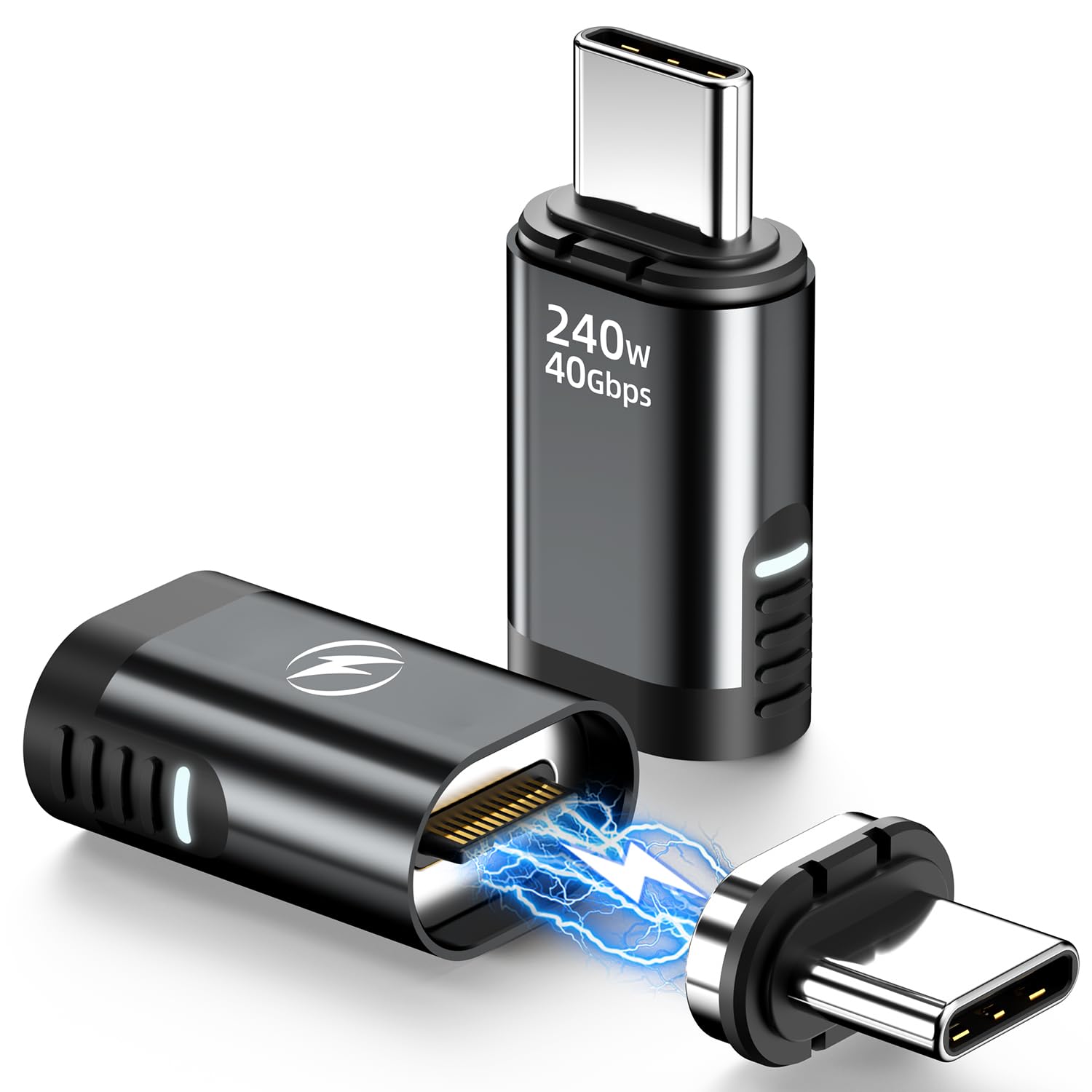
A straight adapter with an LED that tells you the connection actually caught.
The small light on this one earns its place. You get a visible confirmation that the magnetic joint is seated and power is flowing, which saves the guesswork of nudging a cable and hoping. It carries 240W like the other USB4 adapters here, plus 40Gbps data and 8K@60Hz video through 24 gold-plated pins.
The brand calls out the Quest 2 headset and docking stations by name, and those are sensible fits: a headset that gets set down and picked up constantly is exactly where a snap-on connector beats a friction plug. It ships as a two-pack with two little black string straps to keep the adapters from wandering off.
Performance is the strongest part of the story, and that holds whether you’re pushing data or video. Magnet strength is the recurring question mark — the connection holds steady in normal use, but it isn’t the kind of grip you’d test by swinging the cable. The straight body also sticks out, so a snug laptop sleeve is worth checking before you buy.
Built for repeat plugging: the magnetic joint and LED work together to make reconnecting a one-second operation you can do blind.
Best matched to: headset and dock owners who reconnect a dozen times a day and want a visual all-clear.
One thing to know: the straight connector adds depth at the port, so clear it with your sleeve or case first.
4. CNakdDG 100W 2-in-1 Magnetic USB-C Charging Cable

PD 100W and four spare tips — the cable that stretches from phone duty to laptop duty.
This is the connector for the person who refuses to carry two cords. Run it USB-C to USB-C and it pushes 20V at 5A, which the listing rates at 100W with a matching PD charger. Run it in the other configuration and it drops to 9V/3A for iOS devices. That flexibility, plus 480 Mbps data, covers phones, tablets, and a light laptop without a second bag slot.
Build is a genuine highlight. The nylon braid is rated to 20,000+ bending tests, and the built-in E-mark smart chip (a small controller that negotiates safe charging) adjusts the power automatically. A built-in LED makes the port easy to find in the dark, and the magnet is strong enough that the phone hangs on rather than dropping.
Two cables at 4 and 6.6 feet plus four magnetic tips give you a tip in most of your devices at once. The mixed part is reliability: reports of a cable that stops charging and of weak magnets on some units do show up alongside plenty of praise for the higher-than-expected build. It’s a strong everyday cable, just not a guarantee-on-every-unit one.
What’s in the box that matters
- PD 100W over USB-C to USB-C
- Two cables and four magnetic tips
- Braided jacket rated to 20,000+ bends
- LED makes night charging easy
The trade-offs to weigh
- Some units show weak magnets
- A few cables stop charging early
- Only 480 Mbps, so no fast data or video
The right fit: one-cord travelers who want laptop wattage and phone flexibility in a single kit.
Look elsewhere if: you need to move large files or drive a display — this one is a charging specialist.
5. Magtame 240W Straight Magnetic USB-C Adapter

Built around one job: ending the wear and tear on a notebook port from nightly plugging.
The pitch here is repair avoidance. Each time you jam a cable into a laptop port, the metal spring contacts inside flex a little. This adapter stays put and lets your cable snap on and off instead, so the wear moves to the adapter rather than the port you can’t easily replace. The 24-pin connector is reversible at 180 degrees, and a charging indicator light shows the current state.
Power is rated to 240W at 5A, and the adapter includes over-current, over-voltage, and over-charging protection. Video tops out at 4K@60Hz rather than the 8K some rivals list, and data runs 40Gbps — though the listing notes the real speed depends on your cable and devices. That 4K ceiling is the main spec gap against the Tciogrxp and DuHeSin adapters above.
Reliability carries this pick; it does the unglamorous job without drama, and the finish is metallic with a clean grey look. The magnetic grip draws mixed notes — firm enough for desk use, but the connection can come loose under a snag. A little care seating it goes a long way.
The long-game read: a two-pack spreads the wear protection across two machines and costs far less than a port repair.
Pick this when: your worry is a worn laptop port, not top-end video resolution.
Choose another if: you need 8K output — the 4K@60Hz ceiling here falls short of the USB4 adapters.
6. Aripps 60W 2-in-1 Magnetic USB-C Charging Cable

Three lengths that cover desk, couch, and car, with a connector that works one-handed.
A 3.3-foot stub lives at the desk, and two 6.6-foot runs handle the couch and the car. The 2-in-1 build covers both USB-A to USB-C and USB-C to USB-C, so it plugs into whatever wall adapter you already own. Power is rated at 60W with PD 3.0 and QC 3.0 support, and the listing is blunt about its limit: USB-A to USB-C cannot charge a laptop, so keep the C-to-C run and a 45W-or-higher adapter for that.
The one-handed operation is the feature that sells this to handheld players and drivers. Snap the tip to the cable with one hand while the other holds a Switch, a Steam Deck, or a steering wheel. The magnet has been strengthened to hold firmly, and the connector doubles as a dust plug when the cable is away.
Quality gets the highest marks from owners, who consistently rate the cables as better than expected for the price. The catch is maintenance: these 9-pin tips are not compatible with 1, 5, or 7-point magnetic tips, and the magnet grabs any stray metal dust, so the contacts need cleaning or charging silently fails. Remove a thick case before use, too.
Why it suits handheld duty
- Three-pack with mixed lengths
- One-hand snap-on for gaming and driving
- Works with PD 3.0 and QC 3.0
- Connector guards the port when unused
Where it needs care
- 9-pin tips won’t match 1/5/7-pin gear
- Magnet collects metal dust, needs cleaning
- Case must come off to connect
Made for: Switch and Steam Deck players who want to top up between sessions without hunting for a port.
Not the one for: laptop-heavy setups — the 60W rating and USB-A limitation make a dedicated adapter the better call.
7. 3C’S USB-C Magnetic Adapter 240W, Straight, 24-Pin (2-Pack)

Gold-plated pins, 8K video, and a straight body that stays out of the way on a desk.
Gold plating on all 24 pins is the detail this adapter leans on, and the payoff is a contact surface that resists the kind of corrosion that dulls a cheap connector over time. It carries 240W of Power Delivery and 40Gbps data, and outputs 8K@60Hz video and audio to any compatible display. The straight design keeps the cable running in line with the port rather than off to one side.
Inside the box are two adapters, which suits a desktop and a laptop sharing the same Thunderbolt dock. Compatibility reaches across MacBook Pro and Air, ROG Ally, PS5 and PSVR2, iPad Pro and Air, and Galaxy phones, so a single set covers a mixed household of devices.
Functionality and quality are what the review pages return to again and again, including a note that it plays nicely with higher-wattage hardware — the reassurance people want before trusting a magnetic joint with a 240W charge. The magnetic grip is the softer spot, holding well in normal use but not as tenaciously as some buyers expect.
Where the money goes: the 24-pin gold build is the reason this carries full USB4 speeds and 8K video rather than being a charge-only connector.
The natural pick for: Thunderbolt desktop and laptop owners who want one set of adapters across a whole workstation.
Worth a beat of thought: if you need the joint to survive rough handling, a stronger magnet may suit you better than gold pins.
Know the Specs
Power Delivery wattage
Wattage is the power ceiling for the whole charging chain, and it is set by the smallest link. A 240W adapter only delivers 240W if your charger and cable also support that much. A phone draws a fraction of what a laptop pulls, so a 60W cable is fine for a handset but will underfeed a heavy laptop. The adapters here list 240W at 5A, and the cables range from a 9V/2A phone ceiling to PD 100W. Match the number to your device, not to the biggest figure you can find.
Data rate and video output
Magnetic connectors split sharply on data. The 24-pin adapters list 40Gbps, which is fast enough for external drives and docking stations, and several output 8K@60Hz video. The cables top out at 480 Mbps, which is fine for charging and slow file moves but not for a monitor. If you plan to run a display through the connector, buy an adapter rated for video, not a charging cable. Several listings also note the real speed depends on the cable and devices on both ends.
Common Questions
Will a 240W magnetic adapter actually charge my MacBook at full speed?
Can I use a magnetic USB-C adapter for video output to a monitor?
Are magnetic tips interchangeable between different brands?
Do magnetic connectors wear out the laptop port faster?
Why does my magnetic connector stop charging on its own?
Can I charge a laptop with a 60W or 100W magnetic cable?
Is a 90-degree adapter better than a straight one?
Will a magnetic adapter work with a phone case on?
Can I leave the magnetic adapter in my device all the time?
Do these adapters add lag to data transfers or video?
The Bottom Line
One cable that covers a drawer full of phones and small gadgets is the NETDOT Gen10 2-in-1 cable. It works with both USB-C and Micro-USB (the older, smaller oval plug), comes in three lengths, and has a nylon braid that holds up to daily use. If you charge a laptop at a desk every night, the Tciogrxp 240W adapter carries 240W of power and 8K video (a very high-resolution picture signal) while saving your laptop’s port from wear. And if you just want the port to stop taking a beating from constant plugging, the Magtame 240W adapter does that unglamorous job and does it reliably.
Before you buy, check your charger and your device: match the wattage ceiling (the most power the charger can send), confirm the pin count, and decide if you need data or just power. Do that, and any of these seven will earn its place in your bag.
How we choose
We do not accept paid placement. Every pick is matched to a real buyer and a real use-case; we do not hands-on test units.
Sources
Specifications: manufacturer listings and product documentation. Review insights: verified customer reviews, as of November 2026. Pricing: not shown on this page (it changes often); check the current price via the retailer link.
As an Amazon Associate, Tactical Gear Guy earns from qualifying purchases. This does not affect which products we feature.