Specs are compiled from manufacturer listings and verified buyer reviews and can change over time — please confirm the key details on the product page before buying.
If your laptop charger died or you are tired of packing a separate brick for every device, the short answer is this: buy by wattage first and port count second. You want a USB-C charger that can push enough power to your laptop on its own, and enough leftover ports to feed your phone and tablet too. One quick note before we start — this list uses flexible matching on that laptop-class USB-C output (roughly 45W or higher, not a phone-only puck), so not every pick is the exact number or model you typed into the search bar. The nearest same-type wattage serves the same job.
This guide is built by comparing the manufacturers’ published specifications and the patterns across verified customer reviews, so you get each pick’s real strengths and trade-offs instead of marketing spin.
Below you get nine chargers sorted by what they actually do — desktop hubs, travel blocks, and single-laptop bricks — so you can match one to your bag instead of guessing. I ranked these by real output, port behavior, and how they hold up in daily use, and this is the breakdown of the best USB-C charger for laptop duty you can buy right now.
Top Picks

How To Choose The Best USB-C Charger for Laptop
The mistake most people make is buying a charger that lists a big total wattage and assuming their laptop gets all of it. It doesn’t. Power gets split between ports the moment you plug in a second cable, so the number that matters for your laptop is the single-port maximum — the most one USB-C port will hand out when it is the only thing plugged in. Get that right and everything else is convenience.
Match the single-port wattage to your laptop
Look at the charger that came with your laptop and note its wattage. That figure is your floor. A 100W charger covers most thin-and-light machines, and a 140W unit is what a large 16-inch performance laptop wants. If you buy under your laptop’s rating, the machine still charges — just slowly, and sometimes only while it is asleep.
Count your ports honestly
A three-port brick sounds generous until you realize your laptop, phone, and earbuds are all fighting for the same wattage. Decide if you need a desk hub that stays put and feeds everything, or a pocket block that travels light. These are different products with different jobs, and the picks below split cleanly between them.
Check the plug and the input voltage
Foldable prongs save your bag lining and stop the brick from digging into your back through a laptop sleeve. If you travel outside North America, look for a wide input range — a charger rated for 100–275V handles different voltage regions without a converter, while a fixed 240V ceiling is fine for domestic use only.
Side-by-Side Comparison
| Model | Best For | Max Single-Port | Total Output | Ports | Amazon |
|---|---|---|---|---|---|
| UGREEN Nexode 200W 8-Port★ Best Overall | Whole-desk charging | 100W | 200W | 6 USB-C + 2 USB-A | Amazon |
| Amazon Basics 120W Nano GaNBudget Champion | Budget travel block | 100W | 120W | 2 USB-C + 1 USB-A | Amazon |
| Belkin 100W Compact GaNCompact Pick | Single-laptop travel | 100W | 100W | 1 USB-C | Amazon |
| Belkin 112W 3C1A | Four-device desk duty | 100W | 112W | 3 USB-C + 1 USB-A | Amazon |
| UGREEN Nexode 100W 4-Port | Crowd-favorite all-rounder | 100W | 100W | 3 USB-C + 1 USB-A | Amazon |
| MFish 140W PD 3.1 | Big-laptop power | 140W | 140W | 3 USB-C + 1 USB-A | Amazon |
| Anker Universal 100W | International travel | 100W | 100W | 3 USB-C + 1 USB-A | Amazon |
| SHARGE 140W 3-Port | Watching your watts | 140W | 140W | 3 USB-C | Amazon |
| Apple 96W USB-C Power Adapter | MacBook owners only | 96W | 96W | 1 USB-C | Amazon |
Detailed Reviews
1. UGREEN Nexode 200W GaN Charging Station
Our pick — 4.5+★ from 500+ verified ratings; the strongest balance of quality and price.
One 200W brick with 8 ports that clears the adapter pile off your desk.
This is the pick for someone whose power strip is a graveyard of orphaned chargers. The Nexode pushes 200W total across 8 ports — six USB-C and two USB-A — with any single USB-C port handing your laptop up to 100W when used alone. That single-port ceiling is what charges a MacBook Pro, XPS 13, or HP laptop at full speed, while the remaining ports soak up phones, tablets, and a Steam Deck without anyone unplugging anyone else.
Compare it to the Amazon Basics travel block: this station gives you 6 USB-C ports against the Basics’ 2, and 200W against 120W. If your desk is the problem rather than your carry-on, that gap settles it. A 6ft extension cord means the brick sits on the floor or behind the monitor instead of hogging a wall outlet, which is the quiet reason people buy a desktop unit in the first place.
The GaN internals (gallium nitride chips) are the reason 200W fits in a plastic shell this small — the manufacturer rates them 65% more efficient than traditional chargers, and while that figure is theirs, the practical effect is a brick that runs cooler than its wattage suggests. Charging performance is what wins people over here, and it’s the one thing that comes up again and again in owner feedback. The trade-off is honest: it’s a desktop fixture, not a pocket charger. You are not sliding this into a jacket pocket for a coffee shop run.
Why It Earns The Top Spot
- 200W total with a 100W single-port ceiling — full laptop speed plus seven more devices
- 6 USB-C ports is the widest count here, against 2 on the Amazon Basics block
- 6ft cord frees your wall outlet and gets the brick off the desk surface
- Built-in temperature control and protection circuitry for overnight charging
The Honest Limits
- Desktop form factor — it lives on a surface, not in a bag
- 200W is a shared pool, so heavy multi-device loads split the wattage
Settle in here if: your problem is a desk full of devices and you want one brick to end the adapter sprawl.
Keep walking if: you need something that slips into a laptop sleeve for daily commuting.
2. Amazon Basics 120W USB-C Nano GaN Wall Charger
A folding 120W brick that hands one USB-C port 100W — enough for a laptop.
Here is the number that matters: one USB-C port on this brick delivers up to 100W, which is enough for a USB-C laptop on its own. Total output is 120W across two USB-C and one USB-A, and the split is spelled out — 60W+60W across both C ports, 100W+12W when you pair a C with the A, or 60W+45W+12W with all three in use. Foldable prongs and a 100-240V input range make it a genuine travel piece.
Device compatibility is the strongest part of the story — it works with MacBooks, iPads, iPhones, Samsung phones, and Huawei laptops alike. What you should know before buying is the power reality: some buyers report it can’t hold the advertised 120W under load, and the size runs bigger than the “nano” name suggests. That is a fair caveat on a value-tier brick rather than a reason to pass, but if you expect a matchbox, adjust the expectation.
What You’re Actually Buying
- 100W from a single USB-C port — laptop-class power at entry-tier cost
- 100-240V input means it works on overseas voltage without a converter
- Foldable plug protects bag lining and pockets
Where Expectations Should Bend
- Some owners find it can’t sustain the full advertised wattage
- Bulkier in person than the compact marketing photos imply
The smart-money move: a second charger for the office bag, where losing one wouldn’t ruin your week.
Think twice if: your laptop draws near the ceiling and you need every watt to hold steady through a long render.
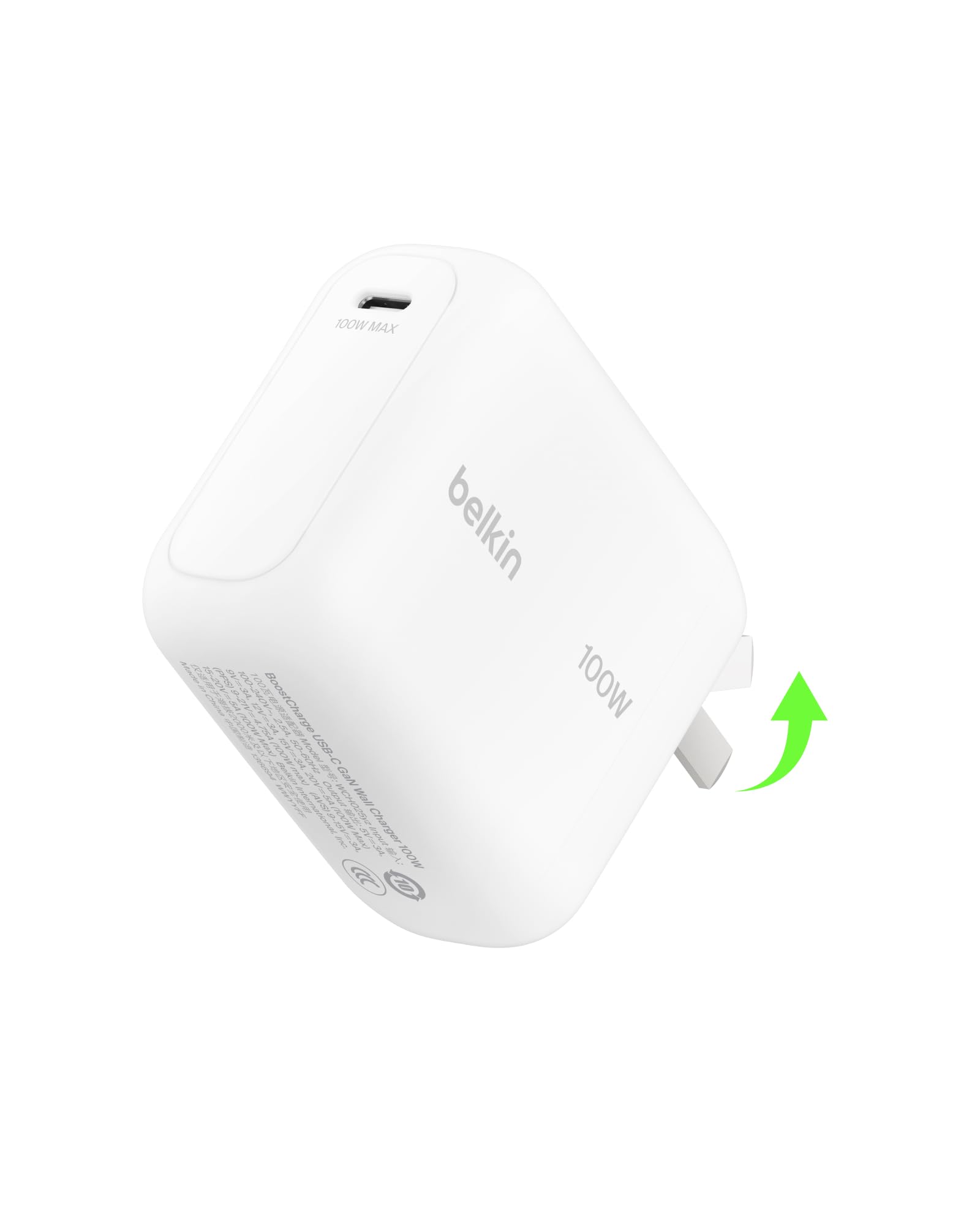
3. Belkin MacBook Charger, 100W Compact GaN USB C Charger Block
Includes a 5ft USB-C cable, folds flat, and runs 33% smaller than Apple’s 96W brick.
If you are replacing a dead MacBook charger and don’t want to buy a cable separately, this is the cleanest path. Belkin rates it to take an iPhone 17 Pro from 0-50% in 21 minutes and a MacBook Air 13″ from 0-50% in 20 minutes, and it comes with a 5ft USB-C to USB-C cable in the box. One USB-C port, 100W max — a single-device specialist rather than a desk hub.
The safety story is more detailed than most: an 8-point system covers over-voltage, over-wattage, short circuit, surges, over-temperature, over-current, signal interference, and ESD (electrostatic discharge — a sudden static zap). Against the UGREEN 200W station, though, it gives up a lot of real estate — 1 USB-C port versus 6, and 100W total versus 200W. That trade is exactly what makes it small and pocket-friendly.
Charging performance carries this one, with fast charging right behind it — owners consistently describe it charging phones, iPads, and laptops without fuss. The honest catch sits in the power delivery: some find the output drops toward 61 watts on certain devices, and a few describe it warming up to the touch. Neither is unusual for a 100W GaN block, and both are worth knowing before you expect a cool-running brick all day. Belkin backs it with 2-year coverage.
Who it fits: the traveler who wants a cable in the same box and a little more confidence than a generic brick delivers. The foldable prongs and included 5ft cable make it a one-item grab for a go-bag.
Go with this if: you want one cable, one port, and nothing to think about on a work trip.
Look elsewhere if: you routinely charge a laptop plus two other devices at once — this has only the one port.
4. Belkin 112W 3C1A GaN USB C Charger Block
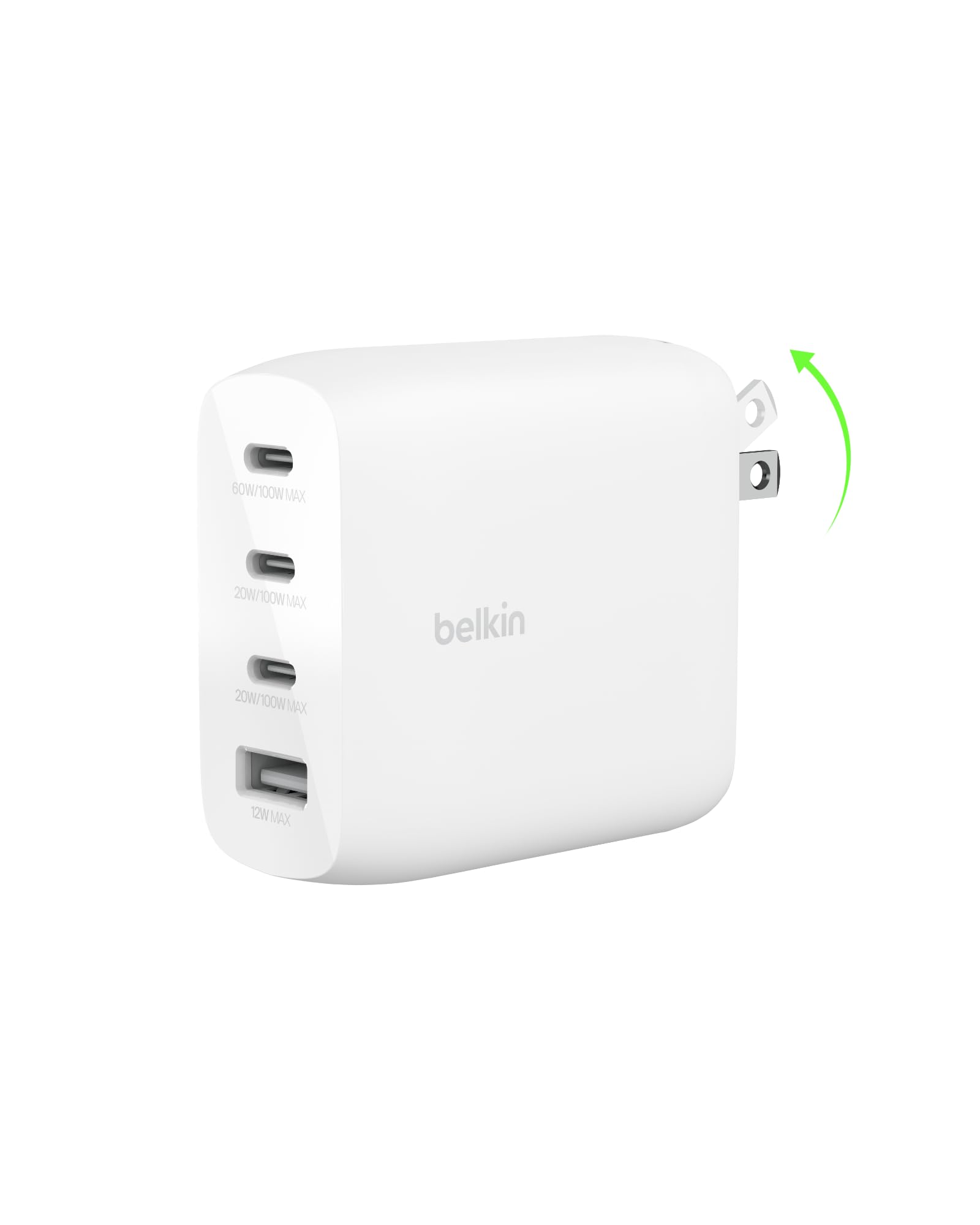
Four ports with the split spelled out: 100W alone, 70W+30W with two in use.
Most multi-port bricks make you guess. This one tells you the math up front: 100W from one USB-C port alone, 70W plus 30W with two in use, 60W/20W/20W across three, or 60W/20W/20W/12W with all four filled. That transparency is a genuinely useful thing when you’re deciding whether your laptop keeps fast charging once the phone goes in.
Quality is what carries it — owners describe it as well made and rate it among the better chargers they’ve used, with power output and the four-port layout close behind. It runs an integrated GaN chipset with PPS and PD (PPS is a fast-charge protocol that lets a device request exactly the voltage it wants, so phones charge efficiently). Foldable pins hold tight in a loose outlet.
Two things to weigh. It is heavier and bulkier than a single-port brick, which is the price of four ports and foldable pins. And reliability is the one split point — most units do exactly what they say, with durability concerns surfacing as the recurring gripe. Treat it as a desk-and-hotel resident rather than something you yank in and out of a bag daily and it lands comfortably.
The practical read: the best pick here for someone who leaves the charger in one place but needs laptop, phone, watch, and earbuds covered from a single outlet. Belkin’s 2-year coverage softens the reliability question.
Pick it for: a fixed desk or hotel room where four devices need feeding from one socket.
Pass it up if: featherweight matters more than port count — the extra metal shows in your hand.
5. UGREEN Nexode 100W GaN USB C Charger

Palm-sized 100W brick rated to take a MacBook Air M3 to 55% in under 30 minutes.
Palm-sized is the whole pitch here — a GaN chipset and foldable plug cram 100W and four ports (three USB-C, one USB-A) into a brick you genuinely forget is in your bag. Plug a single USB-C device in and it feeds up to 100W, which the maker rates at taking a MacBook Air M3 to 55% in under 30 minutes. That speed is the thing everyone raves about, and it tops the list of what owners care about most here.
Set it against the Nexode 200W station above and the family resemblance is obvious — same maker, same idea, just stripped down for travel. You lose half the total power and four ports, and you gain something you can actually pocket. For a commuter with a laptop and a phone, the smaller sibling is the smarter carry.
One limitation the maker states plainly: due to the charging protocol on some Dell and Lenovo laptops, those machines can’t be charged at full speed. Heat is the other honest note — some owners find it runs very hot under a heavy load. Dynamic temperature sensors and a PWM chip (a controller that trims power when things warm up) are there to manage exactly that, but the warmth is real and worth expecting on a full-speed laptop charge.
Where It Shines
- 100W single-port output with four ports for laptop, phone, tablet, and watch
- Foldable plug and palm-sized body — a real travel piece, not a desk brick
- Dynamic temperature sensors and a PWM chip guard your devices
Set Your Expectations
- Dell and Lenovo laptops won’t hit full speed because of their charging protocol
- Runs warm under sustained high-power charging
The traveler’s answer: a MacBook or iPhone owner who wants one small brick that keeps up and never complains about bag space.
Not for you if: you own a Dell or Lenovo laptop and want the full rated speed — the protocol won’t allow it.
6. MFish 140W USB C Charger Block
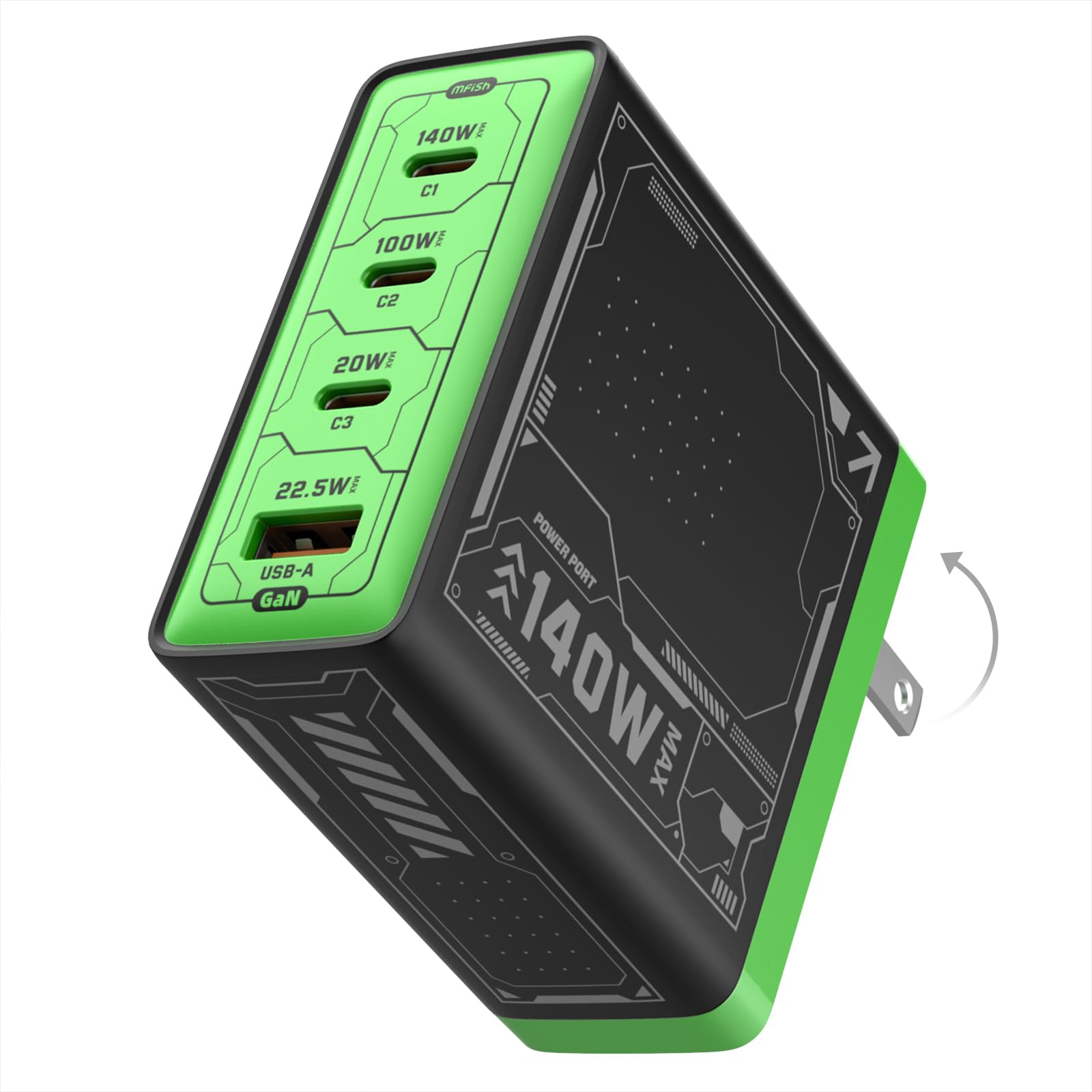
PD 3.1 at 140W — the headroom a 16-inch MacBook Pro needs.
PD 3.1 is the spec that matters for a big machine — it’s the charging standard that lets a brick pass more than 100W down a single cable, and this one goes to 140W. That is what a 16-inch MacBook Pro class of laptop wants for proper fast charging. You get three USB-C ports and one USB-A, with smart power distribution shuffling the load so a laptop, phone, and tablet can share one adapter instead of three.
At 10.89 oz and roughly credit-card-sized in two dimensions, it stays carry-able despite the extra wattage, and the foldable plug keeps it bag-safe. Quality is the standout — owners describe it as a solid unit and rate reliability close behind, with photographers and drone pilots specifically calling out that it charges their gear without drama.
Against the 100W Belkin Compact above, this is the pick for the laptop that needs more headroom, not less. The one thing to sort out before you buy: it ships with a user manual, not a cable. Budget for a USB-C to USB-C cable rated for the wattage, or your speed ceiling drops to whatever the cable allows.
The wattage argument: if your laptop’s stock charger is over 100W, buying anything less here means a permanent slow-charge. This matches the demand, runs cool enough that owners note it doesn’t get hot, and adds three more ports for the rest of your kit.
Buy this when: you’re driving a large performance laptop and want full-speed charging from a bag-friendly brick.
Add to cart: a proper high-wattage USB-C cable — this one comes without.
7. Anker Universal Charger, 100W GaN USB C Travel Fast Charging
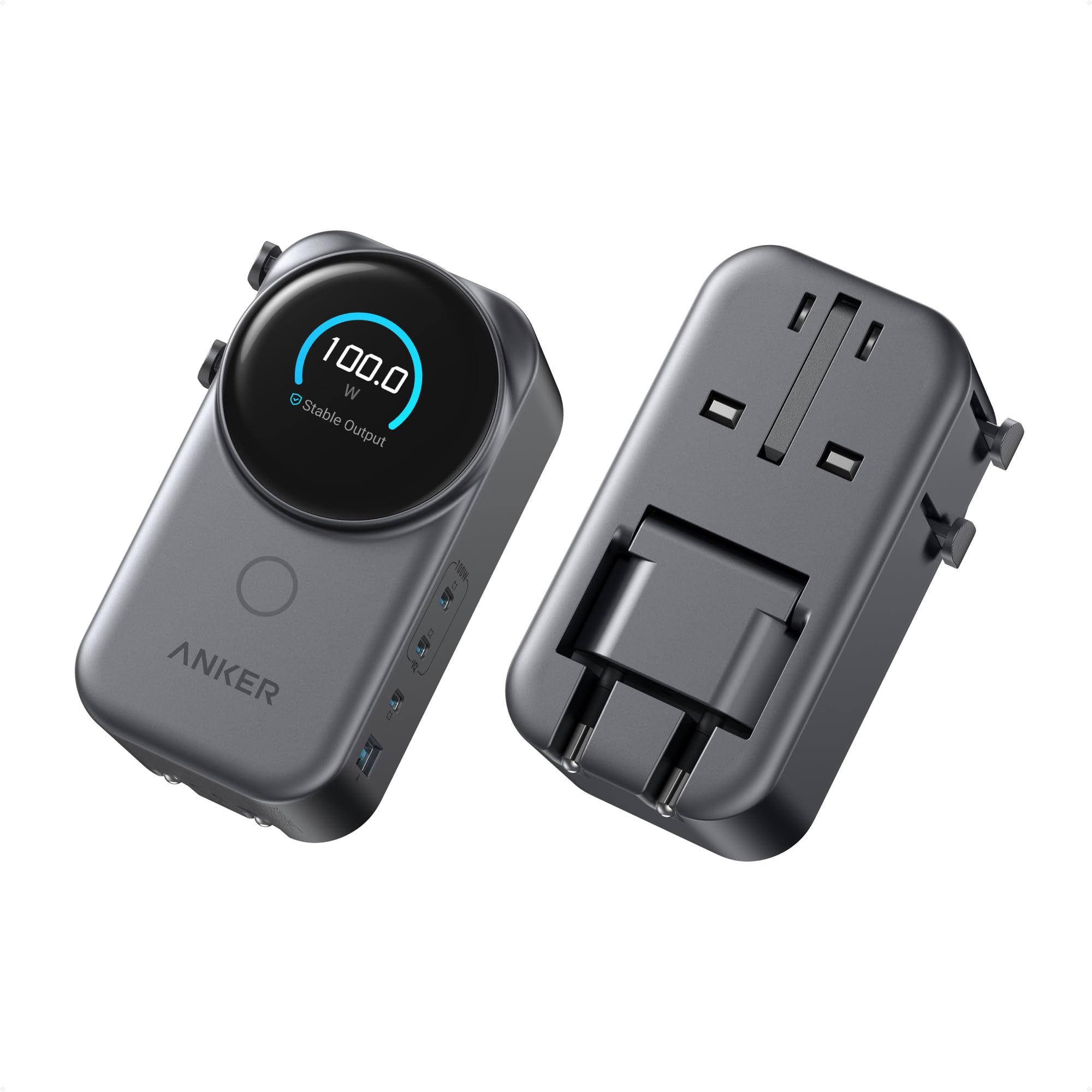
Built-in US, UK, and EU plugs plus a 1.3-inch LCD showing voltage, wattage, and temperature.
If you cross borders, this is the one worth the extra spend. It carries built-in US, UK, and EU plugs — Type A, Type G, and Type C outlets — so you are not hunting for a travel adapter in an airport. It handles 100-275V input ranges and detects local voltage in about a second, showing the zone, power output, and temperature on a 1.3-inch LCD. That screen is the gadget-lover’s detail, and it’s a genuine help when you want to know whether your laptop is pulling full power.
Charging capacity is real: three USB-C and one USB-A, with USB-C1 or C2 delivering up to 100W individually for laptop speed. It weighs 9.3 oz — comparable to a full drink can, per the maker — and measures roughly a credit card’s footprint. Quality leads the feedback and travel-friendliness is right behind it.
Two honest notes. It does not support Type I outlets (Australia, New Zealand, Argentina), so that trip needs a separate adapter. And it is not a battery — it powers devices from a wall, nothing more. The compatibility split in the feedback centers on specific regions like South America, so verify your destination’s socket before you pack it.
Why Frequent Flyers Like It
- Built-in US, UK, and EU plugs — no separate travel adapter for those regions
- 1.3-inch LCD shows voltage zone, power output, and temperature in real time
- 320V overvoltage protection and NRTL certification for loose-outlet confidence
Know Before You Board
- No Type I support — Australia, New Zealand, and Argentina need a separate adapter
- It’s a wall charger, not a power bank; nothing charges unplugged
Pack it for: a multi-country itinerary where one brick has to work in London, Berlin, and New York.
Reconsider for: a trip that lands in Australia or New Zealand — you’ll need another adapter anyway.
8. SHARGE 140W 3-Port GaN Laptop Charger with Display
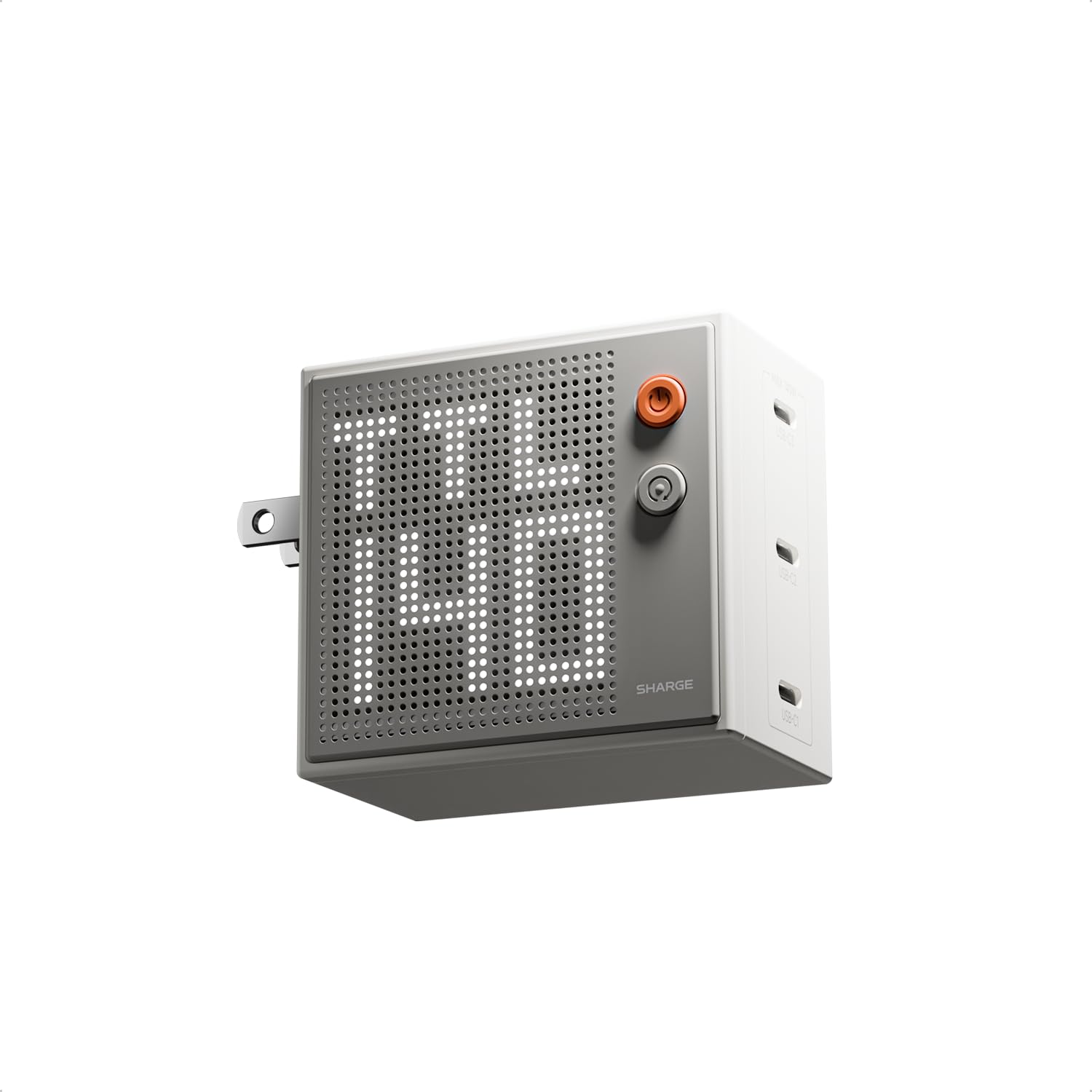
A 140W PD 3.1 brick with a dot-matrix screen showing real-time wattage per port.
PD 3.1 pushes this to 140W, and the maker rates it taking a 16-inch MacBook Pro from 0-50% in 25 minutes. All three ports are USB-C and each can deliver the full 140W when connected alone, so there’s no “wrong port” to find in the dark. It’s 47% smaller than the original 140W MacBook Pro charger, per SHARGE, which is the difference between a brick that lives in a drawer and one that travels.
The dot-matrix screen is the reason to choose this over the MFish 140W above. It shows real-time wattage for each port, and you can adjust brightness and orientation — useful on a desk, and a quick eyeball check that your laptop is pulling what you paid for. Fifth-gen GaN with a PFC+LLC architecture (a power-conversion design) keeps the size down while holding efficiency.
The honest trade: power distribution is the split in owner experience — some find it shares plenty across devices, others find the split uneven when everything’s plugged in. And it can run hot under heavy multi-device load. Neither is a deal-breaker for a solo laptop charge, which is the scenario this brick is built around.
The case for it: if you like knowing exactly what your charger is doing, the per-port readout is a tool, not a gimmick. It’s portability that gets the most consistent praise from owners — small footprint, real power in a small package.
Choose it if: you want 140W in a compact brick and the per-port wattage screen is worth having.
Look at the MFish instead if: you need a USB-A port or prefer not to manage a display.
9. Apple 96W USB-C Power Adapter

The safe answer for a MacBook — if you don’t need ports or foldable prongs.
Apple recommends pairing this with a 14-inch MacBook Pro (2021 or later) using a USB-C to MagSafe 3 cable or USB-C charge cable for fast charging, and rates it at up to a 50% charge in around 30 minutes. One USB-C port, 96W, nothing else. It’s reliable and it’s the genuine article — the reason owners keep coming back to it is authenticity, not versatility.
Functionality and quality are what hold this pick together in owner experience. It just works, and it’s the adapter Apple built for the machine. If you’re already in the MacBook ecosystem and your only goal is a direct replacement, that certainty has real value.
The catch is everything around the brick. No cable is included — you supply the USB-C cable yourself — and the value question splits almost evenly, with as many owners feeling it’s overpriced as calling it the best value. Compare it to the Belkin 100W Compact: that one includes a 5ft cable, runs 33% smaller than the original 96W MacBook charger per the maker, and folds flat, all while matching 100W. If you’re not wedded to the Apple logo, the alternatives give you more for the same job.
Straight talk: buy this when you want the exact replacement Apple intended and don’t want to think about it. Buy it knowing the cable is on you and there’s no second port for your phone.
The no-thought pick: a MacBook owner replacing a dead adapter who values the real thing over extra ports or a bundled cable.
Then look at the Belkin if: you’d rather have the cable, foldable prongs, and a smaller shell in the box.
Know the Specs
Total Wattage vs. Single-Port Wattage
Total wattage is the whole pool the brick can hand out; single-port wattage is the most one port gets when it’s alone. Your laptop only cares about the single-port number. A 140W brick with a 100W single-port ceiling treats your 140W laptop the same as a 100W brick does. Always check both figures, and check the split when multiple ports are in use.
PD 3.1 and PPS Explained
PD (Power Delivery) is the standard that lets a charger and device negotiate voltage and current. PD 3.1 raises the ceiling above 100W, which is how a brick reaches 140W down one cable — the spec a large performance laptop needs. PPS is a finer-grained version that lets a phone request exact voltage steps, so it charges efficiently without excess heat. Neither matters for a basic laptop charge; both help when you’re topping up a phone fast.
GaN and Why Bricks Got Smaller
GaN (gallium nitride) is a chip material that switches power more efficiently than older silicon, which means less energy lost as heat and a smaller shell for the same output. That’s how a 100W brick fits in your palm. The practical result is a charger that runs cooler and packs smaller — but GaN doesn’t magically make a brick cold, so expect some warmth under a sustained laptop charge.
Input Voltage and Travel Plugs
Input voltage is the range of wall power the charger can accept. A 100-240V or 100-275V range covers most of the world, while a fixed 240V ceiling is a domestic-only piece. Plug type is separate — a charger with built-in US, UK, and EU prongs avoids adapters for those regions, but it still won’t fit an Australian or Argentinian outlet without help.
Common Questions
How many watts does my laptop actually need from a USB-C charger?
Will a 100W charger charge a 140W laptop safely?
Why does my laptop charge slowly when I plug in my phone too?
Do I need a special USB-C cable to reach full charging speed?
Can I use a GaN desktop charger when I travel?
Will these chargers work with a Dell or Lenovo laptop?
Is it safe to leave a GaN charger plugged in overnight?
Do I need a travel adapter for Europe with the Anker Universal?
Can I charge a phone-only puck’s job with a laptop charger?
Does a foldable plug really make a difference for a travel charger?
The Bottom Line
For most people, the usb-c charger for laptop winner is the UGREEN Nexode 200W 8-Port Charging Station because it delivers a 100W single-port ceiling for full laptop speed and still has six more ports left over for everything else. If you want something you can actually pocket, grab the UGREEN Nexode 100W 4-Port. And for cross-border travel where the wall socket keeps changing, the Anker Universal 100W is the one to reach for.
One last nudge worth a moment: the value of any pick here depends on matching its single-port wattage to your laptop’s demand. Buy for the machine you own, not for the biggest number on the box. If your laptop is a 140W performer, the MFish 140W is your ceiling-matched pick; if it’s a thin-and-light, any 100W option above will serve you well.
How we choose
We do not accept paid placement. Every pick is matched to a real buyer and a real use-case; we do not hands-on test units.
Sources
Specifications: manufacturer listings and product documentation. Review insights: verified customer reviews, as of November 2026. Pricing: not shown on this page (it changes often); check the current price via the retailer link.
As an Amazon Associate, Tactical Gear Guy earns from qualifying purchases. This does not affect which products we feature.