Specs are compiled from manufacturer listings and verified buyer reviews and can change over time — please confirm the key details on the product page before buying.
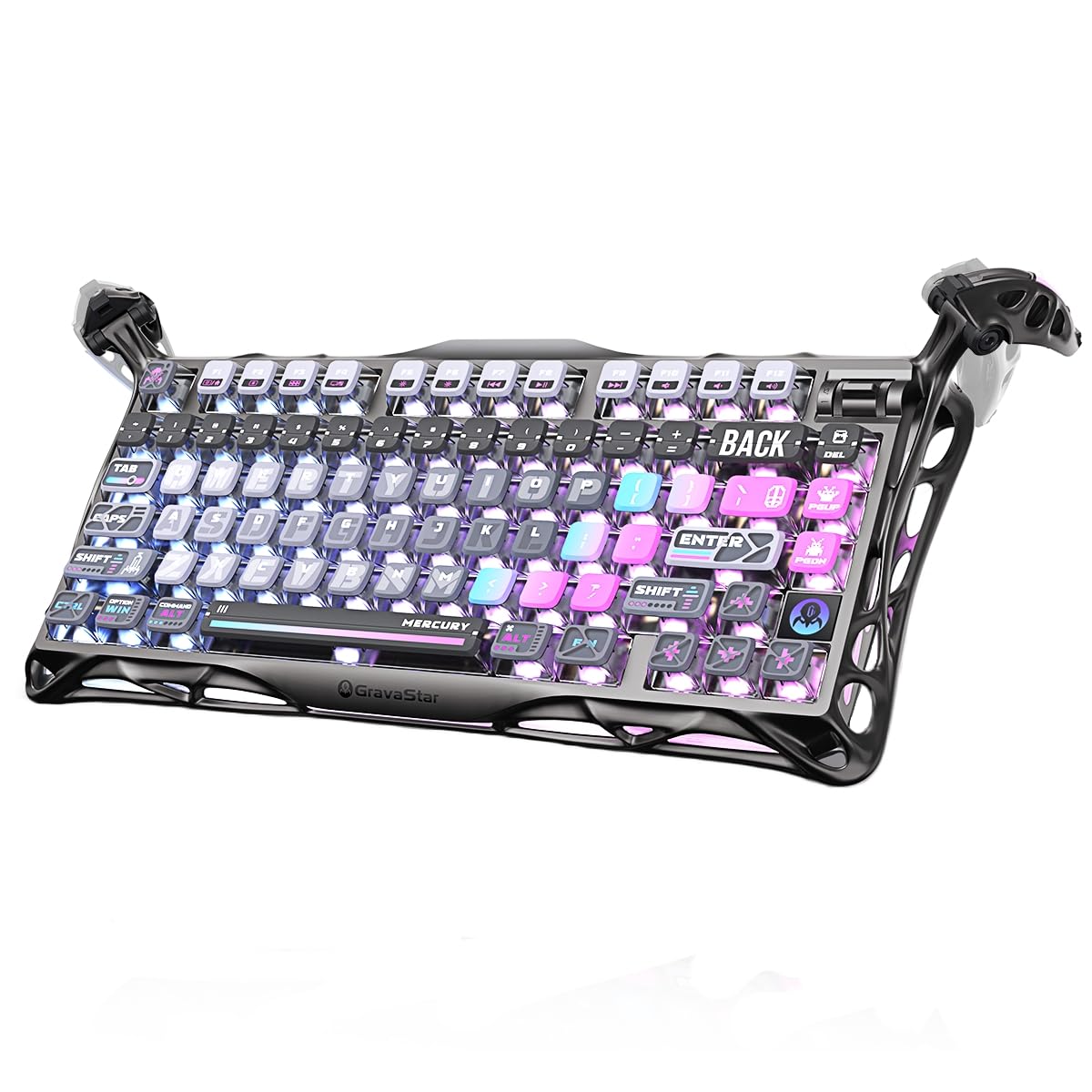
Your keyboard sits in front of you all day, so it may as well look and feel like something. The strongest all-round unusual pick here is the GravaStar Mercury K1 Pro: a 75% layout (a compact board that keeps the arrow keys and drops the number pad), 79 keys, an aluminum exoskeleton (a metal frame around the body) and a genuinely deep “thock” (a low, satisfying typing sound). The rest of this list splits into two camps — retro typewriter keycaps with round keys and a clicky blue switch, and split or compact boards that rearrange your hands rather than your décor. Which camp you belong to depends on one question: do you want people to notice the keyboard, or your wrists to stop noticing it?
This guide is built by comparing the manufacturers’ published specifications and the patterns across verified customer reviews, so you get each pick’s real strengths and trade-offs instead of marketing spin.
Below you will find eight keyboards judged on layout, switch type, connectivity and the honest day-to-day catches. What matters most with unusual computer keyboards is matching the switch feel and key shape to how you actually type, so here is the full breakdown.
Top Picks

How To Choose The Best Unusual Computer Keyboards
An unusual keyboard is a trade. You give up some familiarity — a number pad, a flat key surface, a quiet room — and you get back personality, a better hand angle, or both. Know which trade you are making before you buy, because the spec sheet rarely spells it out.
Start with the switch, not the keycap
The switch (the mechanism under each key) decides how the board feels and sounds far more than the keycap shape does. A linear switch (like the Speedy Mint in the GravaStar, at 45gf actuation force) pushes down smoothly with no bump and no click. A blue switch (used in several typewriter boards here) adds a tactile bump plus an audible click on every press. If you share a room or take calls at your desk, linear is the calmer choice; if you want that vintage typewriter report, blue is the whole point.
Decide how many keys you can live without
Compact boards count keys rather than inches. A 60% board like the M67 drops to 67 keys and loses the number pad and often the function row, so shortcuts move onto layers (hold a modifier, press another key). A 75% board keeps most of what you use in a tighter footprint. A full 104-key board keeps everything but eats desk space. Count what you press before you commit.
Check the keyboard you actually type on
Split and tented boards exist to stop your wrists rolling inward, and the height and angle controls are what you adjust. The Nulea offers three tilt angles; the RK S70 offers 8 adjustable feet plus a fixed wrist rest. If flat boards make your shoulders creep up by mid-afternoon, a split or tented board is worth a look. If you mostly game, a split layout will fight your muscle memory for the first week.
Side-by-Side Comparison
| Model | Best For | Key Count | Connectivity | Switch Type | Amazon |
|---|---|---|---|---|---|
| GravaStar Mercury K1 Pro★ Best Overall | Desk showpiece with deep sound | 79 keys + knob | 2.4GHz / Bluetooth / USB-C | Kailh Speedy Mint linear | Amazon |
| Nulea Split ErgonomicWrist Saver | Wrist-friendly work sessions | 86 keys | Bluetooth / 2.4G | Membrane | Amazon |
| Redragon TypewriterFull-Size Retro | Retro look with a full key set | 104 keys | 2.4GHz / Bluetooth / USB-C | Blue clicky | Amazon |
| HITIME x XVX M67 | Compact programming and gaming | 67 keys | 2.4G / Bluetooth 5.0 / USB-C | Pre-lubed linear, hot-swap | Amazon |
| Taiahiro Retro Typewriter | Typewriter feel on a budget | 83 keys | Bluetooth / USB-C | Blue clicky, hot-swap | Amazon |
| Adventurers Typewriter-Style | Night typing with white LED | 83 keys | Bluetooth / USB-C | Blue clicky | Amazon |
| RK ROYAL KLUDGE S70 | Split layout with macros | 74 keys | 2.4GHz / Bluetooth / USB-C | Silver linear, hot-swap | Amazon |
| YUNZII QL75 | Retro style with phone stand | 84 keys | Bluetooth / 2.4GHz / USB-C | Pre-lubed, hot-swap | Amazon |
Detailed Reviews
1. GravaStar Mercury K1 Pro Keyboard
Our pick — 4.5+★ from 900+ verified ratings; the strongest balance of quality and price.
A skeletal aluminum frame that sounds as deep as it looks, and keeps going for days.
The frame is where this starts: an aluminum alloy exoskeleton with an open skeletal structure, so the board reads as a piece of furniture rather than a peripheral. What people notice first, though, is the sound. A gasket-mounted FR4 plate sits over a 5-layer foam dampening stack, and the result is that low, rounded “thock” at moderate volume instead of a sharp clack. That is the single spec doing the most work here — the layers are what stop the noise from echoing around a room.
The switches are GravaStar’s collaboration with Kailh: Speedy Mint linear, at 45gf actuation force and 1.2mm pre-travel, rated to 70,000,000 keystrokes. In plain terms, a light press with a short distance to the trigger point — fast for gaming, easy on your fingers for a full workday. They are hot-swappable, so you can pull them and drop in something else without a soldering iron. The 75% layout gives you 79 keys plus a dedicated control knob for volume and mute, which is the kind of thing you miss the moment you go back to a board without one.
Wireless endurance is the headline spec: up to 470 hours with lighting off, or up to 40 hours with lighting on. Set beside the split Nulea’s 200-hour figure below, that is roughly 2.4 times the runtime — so this is a board you can carry between desk and couch for a long stretch before the cable comes out. Connectivity runs three ways (2.4GHz wireless, Bluetooth, wired USB-C), and the dual RGB system offers 16.8 million colors across 13 lighting modes through a web-based driver. The trade-off worth knowing: that aluminum construction carries real weight, which is the price of the solid, steady feel during heavy typing sessions.
What earns its keep
- Gasket mount plus 5-layer foam gives a deep, controlled “thock” that suits late-night typing.
- Aluminum exoskeleton feels steady under hard keypresses instead of sliding around.
- Up to 470 hours with lighting off means weeks between charges for most desks.
- Hot-swap sockets and an included switch puller let you change the feel later.
- Knob handles volume and mute without leaving the keyboard.
Where it pushes back
- Hefty on the desk — a plus for stability, a chore if you shuttle it between rooms.
- Only 79 keys, so no number pad at all.
Made for: a gaming or writing desk where the keyboard is part of the décor and the sound is part of the experience.
Think twice if: you need a number pad or you move your board room to room every day and want something airy.
2. Nulea Wireless Ergonomic Keyboard
The board that splits your hands apart so your shoulders stop climbing toward your ears.
An 86-key split layout is the whole idea here: the two halves angle out so your forearms sit in line with your body instead of caving inward. Underneath, a membrane sheet rather than mechanical switches keeps the typing soft and near-silent — nobody will hear you working. The oversized wrist rest is covered in a leatherette material, and it is what this board is built around. Reviewers consistently praise the comfort, saying the split angle eases the arm, wrist and shoulder fatigue that builds up over a long workday.
Three adjustable support tilts let you set the angle you actually want, and connectivity runs Bluetooth plus 2.4G wireless so you can flip between a laptop and a desktop. A 200-hour rechargeable battery via USB-C covers the bulk of a work month on one charge, though here is the catch: battery life is genuinely polarizing. Some report excellent endurance while others find a charge barely gets through a day. If you use heavy backlighting or long sessions, plan to top up more often than the headline figure suggests.
One more thing worth flagging before you commit: this model ships in a Colemak layout, which moves several common letters away from where a QWERTY-trained hand expects them. If your fingers are locked to QWERTY, expect an adjustment period. If you have been curious about Colemak anyway, it is a genuine head start.
Go for it if: you type all day at a desk and want your wrists flat and quiet without touching a mechanical switch.
Look elsewhere if: you need the number pad layout of a standard board or your hands refuse to relearn letters.
3. Redragon Typewriter Mechanical Gaming Keyboard
A typewriter look that keeps every key you already use, number pad included.
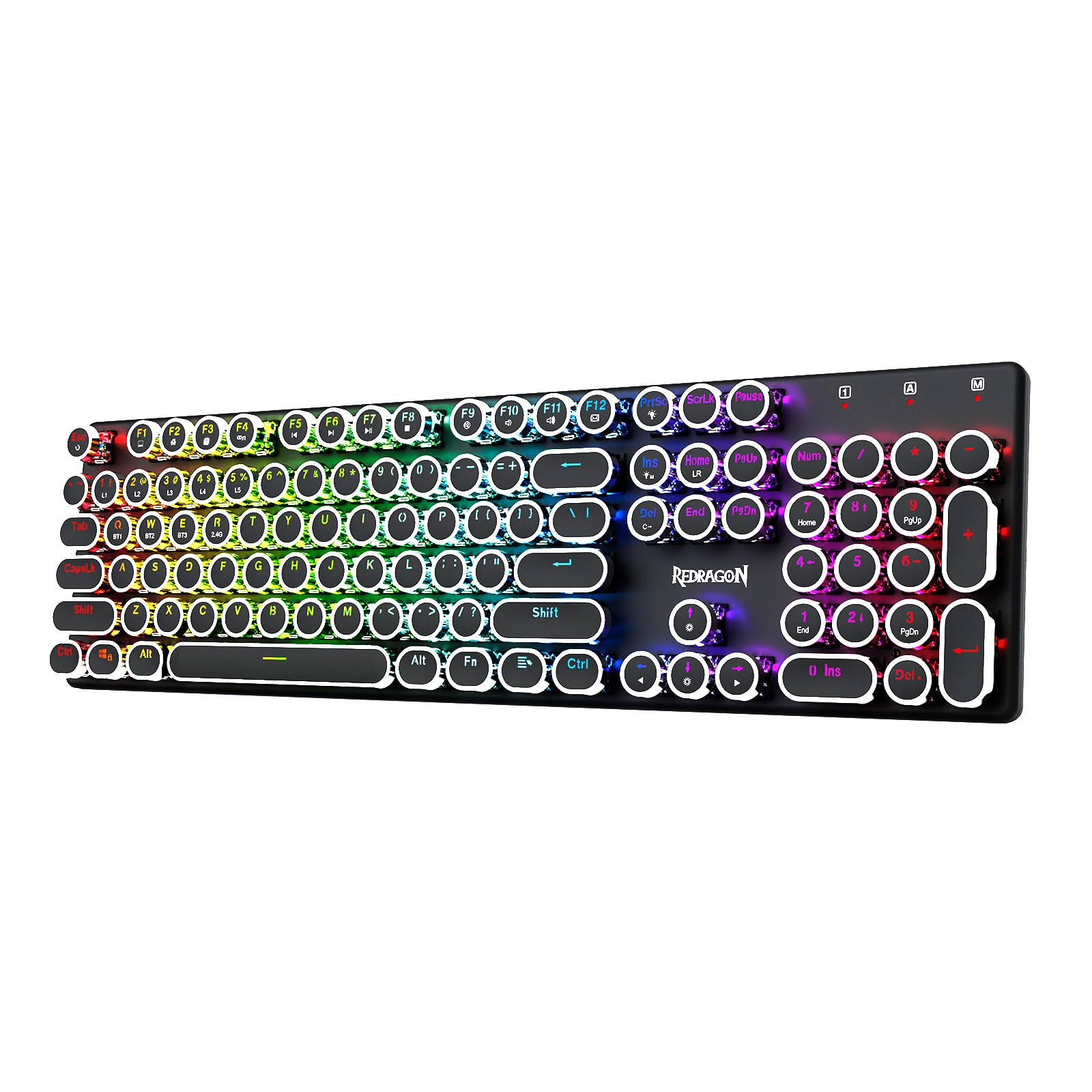
Where the compact picks force you onto layers, this one simply refuses to shrink. The round steampunk keycaps sit on blue switches with medium resistance, an audible click and a tactile bump. That click is the point of the whole product; the users’ verdict is that it sounds like an old-time typewriter, and that is why people buy it.
So why so much simpler? Because the RGB grid on this one is the sort of thing you actually play with. Each key can take a different color out of seven solid options, and there are up to 16 preset backlighting modes you can cycle from the board or the software. A 4000mAh battery keeps the wireless side going. That said, the plastic rings around the keycaps have shown up as the weak spot for a portion of owners, so a gentler touch on the round keys will help this one last.
At 950 g it is no featherweight, and the solid metal panel is exactly why it sits still under heavy keypresses. If you are coming from a flat scissor keyboard, the lift in height and the audible click take a day or two to settle in. After that, the tactile feedback is genuinely hard to give up.
The honest math: you are buying a full-size keyboard that happens to look vintage, not a novelty that happens to type. The number pad is real, the 104-key anti-ghosting is real, and the click is the flavor you are paying for.
The one caveat: all that click carries. A shared office or an open-plan room will know every word you write.
Reach for it when: you want the typewriter look but cannot surrender the number pad, and you like an audible click.
Pass if: quiet is a hard requirement or you dislike round keys under your fingertips.
4. HITIME x XVX M67 Keyboard

A 60% slab whose keycaps glow through a topo pattern — and you can remap all of it.
The trick up this board’s sleeve is IMD technology — the keycap legends are printed so light passes through the pattern itself, not around it. Combined with 2 LEDs under each stabilizer and 5 LEDs under the space bar, the lighting is the reason to pick this one over the cheaper 60% competition. It gets 4000mAh of battery, the same figure as the Redragon above, but in a 67-key footprint that takes up dramatically less desk room.
The hands-on part: pre-lubed transparent linear switches, rated to 80 million keystrokes, on a gasket-mounted body with four layers of filling between the PCB, plate and switches. That stack is what turns the sound creamy and thocky rather than hollow. It is hot-swappable for both 3-pin and 5-pin switches, and the VIA support means you can remap every key on macOS, Windows or Linux — though remapping itself has to happen in wired mode before it applies wirelessly.
Connectivity covers Bluetooth 5.0, 2.4GHz and USB-C, with switching across 5 devices. More than 17 built-in backlight modes run the range from full color to monochrome, and you can tune color saturation from the board itself. The obvious limit is that 60% layout: no number pad, no dedicated arrows or function row on the face. If your day involves spreadsheets or layers-heavy shortcuts, budget a week of retraining.
What the VIA crowd gets: a board you can genuinely program down to the key. Open-source firmware means layouts, macros and light effects are all yours to redefine.
The 60% tax: everything you use every day is still there — it just moved to a layer you have to remember.
Pick it if: you game or code on a tight desk and want a compact board that you can remap to your own logic.
Not the one if: you use a number pad daily or you hate relearning where the arrow keys went.
5. Taiahiro Retro Mechanical Keyboard

The typewriter click without a number pad, wrapped in a wood-finish metal frame.
You get more desk space without losing keys: an 83-key layout drops the number pad but keeps everything else, in a metal-framed body with a wood finish. The blue switches give you a real click and tactile bump (a small physical jolt as each key registers) — the thing people are buying when they want typing to feel like 1940. The levers on the side are a nice touch you will not find elsewhere: a stainless-steel lever adjusts the backlight, the left and right knobs handle brightness and volume separately, and there are 14 backlight modes to cycle through.
What separates this from the other typewriter boards here is the hot-swap design. You can pull keycaps and switches without tools, so the clicky blues are a starting point rather than a life sentence. The case is built from metal and aluminum with a build the maker says puts it through quality checks before shipping. Bluetooth covers 3 paired devices alongside a USB-C wired option, which makes it the rare typewriter board that hops between a laptop, a tablet and a phone.
The trade-off is desk real estate. It is only 12.6″ long by 7″ wide, but the round keycaps sit high and the metal frame is chunky, so it will not vanish under your monitor. If you write for a living and want the click, this is a sensible landing spot. If you flinch at noise, this is not the room for it.
Best match for: writers who want the vintage report and the option to swap switches later.
skip it if: you need a number pad or you type in a shared, quiet space.
6. Adventurers Retro Mechanical Keyboard

A 1940s-style round-key board that lights the legends in plain white after dark.
Round keycaps, a 1940s silhouette and blue switches that click on the way down — this one leans hard into the vintage look. The 83-key layout drops the number pad for desk space, and the anti-collision design (n-key rollover, which registers each key you press at the same time) lets you roll multiple keys at once without dropping inputs. That matters in fast games and even for keyboard shortcuts that demand several keys at once. You can pair 3 devices over Bluetooth, and the compatibility list spans Windows, Linux, Android, iOS and Mac.
The lighting is deliberately single-color: a white LED backlight behind the keycaps so you can read the legends in the dark. That makes it the calmest-looking board in this bunch, and for a lot of buyers that is the whole appeal. The printed legends are laser-engraved, which the maker says makes them hard to fade under fingers.
The honest caveat: build quality splits opinion here. Some feel it is solid, while others describe the case as flimsy, and pairing has occasionally been a headache for a few. Cleaning the old pairing list before connecting a new device is the fix the listing itself recommends. If you want a heavy, tank-like board, look to the Redragon above; if you want the look and the click without the weight, this hits the mark.
Reasons it wins a desk
- White LED lighting keeps the key legends readable in a dim room.
- 83-key body frees up desk space without losing the letter rows.
- Bluetooth handles 3 paired devices across iOS, Android, Windows, Linux and Mac.
- Laser-engraved legends resist fading from daily clacking.
What you are signing up for
- The case reads plastic-light to some hands rather than substantial.
- Occasional Bluetooth pairing hiccups can ask for a cleared device list.
Fits you when: you want the vintage silhouette and a quieter, single-color light for late sessions.
Give it a miss if: you want the solid weight of a metal-bodied board or a number pad on the deck.
7. RK ROYAL KLUDGE S70 Split Keyboard

Two halves, eight feet and five macro keys — a split board built for work as well as play.
The split design uses 8 adjustable feet, so you can raise and tent each half to whatever angle keeps your forearms level. A coiled cable links the two halves, and a fixed wrist rest sits under your palms for long sessions. The ergonomic pitch holds up in reviews: owners who spend the day at the board report shoulder pain easing off, and comfort is what this model leads with.
The clever part is the left half having its own battery, which keeps wireless connectivity and the macro keys alive on that side alone — so you can type or game one-handed with the other half set aside. Five programmable macro keys sit on the left edge, and RK’s software handles remapping and RGB for Windows. Silver linear switches respond faster than red switches per the maker, on a 3/5-pin hot-swap PCB socket so you can swap in a different switch if the feel is not yours.
The 75% layout keeps 74 keys, and connectivity covers low-latency 2.4GHz, Bluetooth and USB-C across Windows, Mac and Android. A 3150mAh battery gives up to two weeks of use with the backlight off. The catch is sound: the clicky side of the ledger is not where this board lives, but a portion of owners still find it annoyingly loud, so consider the switch swap if your desk is shared. Note also that the case is plastic, not metal — the low weight is the trade-off.
Set it up once: the 8 feet and fixed wrist rest mean you spend ten minutes finding your angle, then forget the board exists. That is the win.
Where it surprises: the one-handed mode and the 5 macros give it a working life beyond the gaming desk.
The right call if: your shoulders or wrists want a split angle and you like having macros within thumb reach.
Try something else if: you need a metal body, a number pad or dead-silent keys.
8. YUNZII QL75 Retro Typewriter Hot Swap RGB Keyboard, Wood
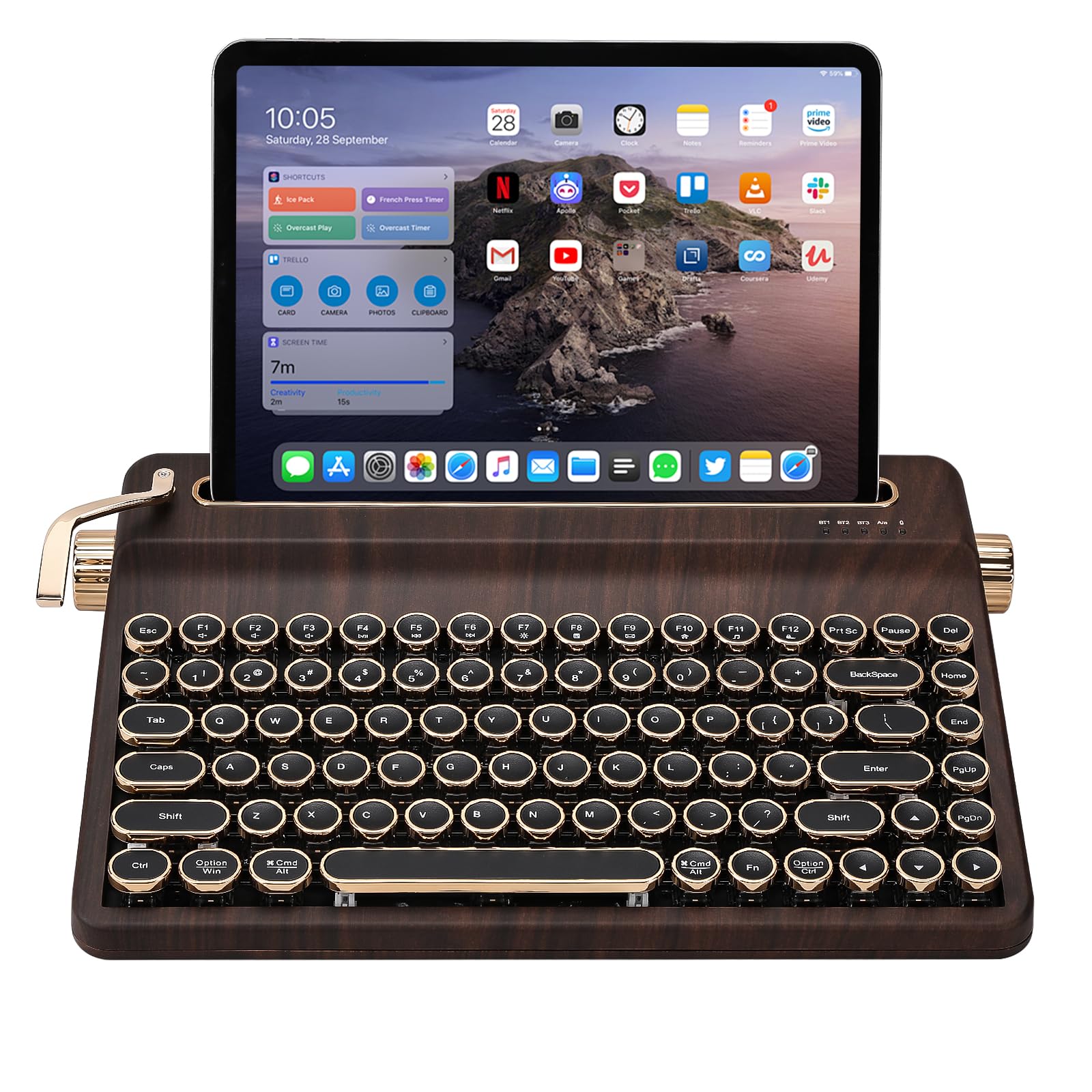
A typewriter board with a built-in stand that props your phone right behind the keys.
Most retro boards stop at the keycaps. This one adds a built-in stand holder for a pad, phone or tablet, so your second screen sits right where the retro look belongs. The 75% layout runs 84 keys, each row stepping up in height rather than sitting flat, with round keycaps and pre-lubed switches for that typewriter click. The users’ verdict is that it turns an iPad into something that looks like an old-school machine, and the enjoyment people get from using it is what stands out most.
Underneath the look sits a genuinely modern board. It is fully hot-swappable on a PCB that takes both 3-pin and 5-pin switches, so you can slide in tactile or linear switches to tune the click. QMK/VIA support makes every key remappable, and the RGB backlighting runs through dynamic effects. Connectivity covers USB-C, Bluetooth and 2.4GHz across Windows, macOS and Android, with switching across 5 devices and a large built-in battery for long sessions.
The trade-off is footprint: at 12.9″ by 8.4″, the built-in stand makes it deeper than other boards in this list. It also skips a number pad, so heavy spreadsheet work will not love it. For a desk where the keyboard is meant to be seen and the phone is meant to sit nearby, though, this is the most thought-through retro design here.
Pick it when: you want a retro showpiece that doubles as a phone and tablet stand on a shared desk.
Choose another if: desk depth is tight or your workflow lives on a number pad.
Know the Specs
Switch Type and Feel
The switch is the mechanism under the keycap, and it decides both the sound and the effort of typing. A linear switch travels smoothly with no bump — like the 45gf Speedy Mint or the silver linear in the S70 — which is popular for gaming and quiet offices. A blue switch clicks audibly on the way down and gives a tactile bump, which is the typewriter feel you get on the Redragon and Taiaho boards. Neither is better — they are different flavors, so match the switch to the room you type in.
Key Count and Layout
A keyboard’s percentage or key count tells you how much you are giving up. A 104-key board has everything, including the number pad. A 75% board keeps the essential keys in less width, often with a knob. A 60% board like the 67-key M67 drops the number pad and function row, moving those functions onto layers you reach with a modifier key. Count the keys you press daily before you choose a compact board; that count is the real dividing line.
Connectivity Modes
Tri-mode means the board can connect by 2.4GHz wireless (a USB dongle in your computer), Bluetooth (for laptops, tablets and phones) and USB-C wired. The advantage is device switching without unplugging cables, which is why most boards here offer multiple pairing slots. Wired mode is also handy for remapping and charging, so a tri-mode board tends to be more flexible than a Bluetooth-only one.
Hot-Swap and Programmability
Hot-swap means you can pull a switch and push in another without soldering, so the feel is not permanent. Programmability (VIA and QMK are the common open-source options) means you can remap any key to whatever you like, from macros to a different letter layout. If you want a board you can reconfigure later, look for both; if the stock setup suits you, neither is essential.
Common Questions
Will a 60% keyboard work with my Mac without extra drivers?
How loud is a blue-switch typewriter keyboard in a shared office?
Can I swap the switches on a hot-swap keyboard for quieter ones?
How long does the battery last on these wireless keyboards?
Is a split ergonomic keyboard harder to learn to type on?
Do these retro keyboards work with a PS5 or console?
Can I use a 104-key keyboard and a compact keyboard on the same computer?
What is the difference between a linear and a blue switch for typing?
Do the round typewriter keycaps make typing harder?
Is a compact 75% keyboard better for small desks?
The Bottom Line
For most people looking at unusual computer keyboards, the GravaStar Mercury K1 Pro is the best balance — an aluminum skeletal frame, a gasket-mounted 5-layer foam stack (a soft mounting and foam layers that produce a controlled thock), and up to 470 hours of battery with the lights off. It is the board that looks unusual and still lets you work a full day. If you want your wrists level and the room quiet, the Nulea split ergonomic delivers the comfort angle. And for someone who wants the typewriter ritual — click, number pad and all — the Redragon 104-key is the one to reach for. Pick the switch feel first; layout and keycaps follow from it.
How we choose
We do not accept paid placement. Every pick is matched to a real buyer and a real use-case; we do not hands-on test units.
Sources
Specifications: manufacturer listings and product documentation. Review insights: verified customer reviews, as of November 2026. Pricing: not shown on this page (it changes often); check the current price via the retailer link.
As an Amazon Associate, Tactical Gear Guy earns from qualifying purchases. This does not affect which products we feature.