Specs are compiled from manufacturer listings and verified buyer reviews and can change over time — please confirm the key details on the product page before buying.
Your status light has to stay green while you step away — and the gadget that keeps it green must not leave a fingerprint IT can spot. That is the whole job here. A fixed, metronome-perfect cursor hop is the tell that gets flagged; a physical mover that nudges the cursor on a random schedule looks like a person at the desk. This shortlist covers seven gadgets that keep a PC awake without software so much as installed, and the ones near the top lean on pure mechanics rather than anything the system can read.
This guide is built by comparing the manufacturers’ published specifications and the patterns across verified customer reviews, so you get each pick’s real strengths and trade-offs instead of marketing spin.
You want your work laptop to stay awake without leaving a software trace. The trick is random cursor motion, not a cheap repeating loop. Below is a side-by-side table and full breakdowns of every pick, so you can see which undetectable mouse mover keeps a work laptop awake without tripping detection.
Top Picks


How To Choose The Best Undetectable Mouse Mover
Buying the cheapest gadget that spins does not settle it. Three things decide whether a mover protects you: the cursor path must not be a repeating loop, no software may be left on the machine, and the device must physically fit the mouse you already own. Get those three right and the rest is convenience.
Random movement, not a drumbeat
Think of it this way — a cursor that jumps exactly every 30 seconds, forever, is a pattern no human ever produces. That is the thing monitoring software keys in on. The stronger picks here simulate movement through mechanical friction, dual turntables, or built-in randomization so the timing and direction stay uneven. When a listing brags about “random” or “non-patterned” travel, check that the design actually explains how the randomness happens.
No software on the machine
The cleanest movers never talk to the computer at all. A mechanical turntable physically wiggles the mouse sitting on top of it, so there is nothing to install and nothing for an IT scan to read. Some models now use pass-through USB, which routes the real mouse through the unit so the computer only sees the mouse. Both approaches keep the gadget invisible to the system. The one to treat with care is anything that needs an app, because app support and connectivity are the most common sore spots in that style.
Optical-sensor alignment and mouse size
Here is the assumption that trips up first-time buyers: that you can drop any mouse on any pad and walk away. Cheaper single-turntable units force you to line the optical sensor up with the spinning disc, and they still fail on oversized mice. A dual-turntable or large traction pad design removes the aiming entirely — you set the mouse down, hit power, and it works. If you use a big ergonomic mouse, favor the models that specifically call out coverage for large mice.
Interval settings and noise
Adjustable intervals let you space the movements out so they look less robotic — most of these offer a short interval for aggressive activity and longer gaps for lighter use. Noise matters too, because a whirring box on your desk is its own kind of giveaway. Read the part of each listing that names the motor; a “silent” or “ultra-silent” motor is the difference between a tool you forget and something you reach over and unplug.
Side-by-Side Comparison
| Model | Best For | Movement Type | Interval Range | Undetectable Method | Amazon |
|---|---|---|---|---|---|
| Starsiki Dual Turntable Jiggler★ Best Overall | Best all-round pick | Dual turntable | 5s to 90s | Pure physical, no driver | Amazon |
| Vaydeer Dual Turntable Turbo 3Most Popular | Best for setting and forgetting | Twin turntable | 10s, 30s, 3min, random | Pure physical, no driver | Amazon |
| Giecy Ultra Slim Mover | Best for travel | Single turntable | Adjustable, 10s default | Plug-in, no software | Amazon |
| Vaydeer M4 with APP | Best for remote control | Turntable | Timer function | External power, no driver | Amazon |
| Meatanty Big-Pad Mover | Best for large mice | Single large turntable | 5s to 60s | Pure physical, no driver | Amazon |
| Starviky Dual Turntable Jiggler | Best durability build | Dual turntable | 10s, 30s, 3min, random | Pure physical, no driver | Amazon |
| Vaydeer X3 Plus | Best with IT pass-through | Jiggler with USB pass-through | 0 to 30 min auto-start | Pass-through USB | Amazon |
Detailed Reviews
1. Starsiki Dual Turntable Mouse Jiggler
Our pick — 4.5+★ from 250+ verified ratings; the strongest balance of quality and price.
Two turntables that spin together so the cursor path looks like a hand, not a machine.
If you want the best single gadget for the job, this is the one. It runs on two turntables that rotate in the same direction at the same time — a mechanical trick that makes the cursor travel across the screen look truer and more natural than a single spinning disc can. Because the whole thing is powered by an external wall plug rather than drawing from the PC, there is no software handshake and nothing for a monitor to flag. Add a digital display that shows the interval at a glance and you have a mover that tells you exactly what it is doing at any moment.
Buyers praise functionality most across its reviews, with quiet operation close behind — the upgraded motor is engineered so you will not hear it running, even in a silent room. The second turntable adds a practical win: you place the mouse down without lining up the optical sensor, and because two discs carry the mouse, it will not drift to the edge or get stuck mid-cycle. It handles oversized mice where single-disc units struggle.
The catch is small and specific: the interval adjustments move in 5-second jumps, from 5 seconds up to 90 seconds, so there is no fine-dial precision for anyone trying to fine-tune timing. For most desks that range is plenty. Set it toward the long end and it looks like someone glancing at the screen every minute — which is exactly the point.
Why it earns the top spot
- Dual turntables simulate a more natural, less machine-like cursor path
- No sensor alignment — set the mouse down and press power
- Handles oversized mice that single-turntable movers fight with
- Digital display shows interval and working status clearly
- Silent motor you cannot hear in a quiet room
Where it asks for a little patience
- Interval moves in fixed 5-second steps rather than fine increments
- Needs an external plug, so it occupies an outlet near the desk
Start here if: you want one gadget that covers a standard or oversized mouse, runs silent, and leaves no software trace.
Think twice if: you want a single-digit-second fine control — this one steps in 5-second blocks.
2. Vaydeer Dual Turntable Turbo 3 Mouse Jiggler
The desk regular with four interval stages and a design that never needs the mouse aimed.
The standout here is the four-stage interval timer — 10 seconds, 30 seconds, 3 minutes, and a 1–60 second random auto-start time. That random auto-start is the honest answer to detection paranoia: the pad does not run on one fixed drumbeat, so the movement between cycles varies. It sits on silicone pads that help deaden sound, and the manufacturer builds in a compact micro-motor rather than the noisier kind found in older mechanical movers. The protruding turntable and raised edge mean the mouse can be set down freely without aiming at the disc, and it will not slide off.
Functionality is the aspect praised most across its reviews, and it fits wired or wireless optical mice between 70 and 140mm long and 70 to 85mm wide. That covers the standard and large models most people own. An ON/OFF button makes it easy to kill between sessions, and the indicator light on the left confirms when it is running. It even addresses heat — the device will not build up high temperature after long use, which is a fair concern for a pad that runs all day.
Movement is where this one deserves an honest note. Some buyers find the travel less natural than they hoped, which is the ergonomics feedback you will see mixed in. It is not a reason to avoid it — most people never notice once it is going — but if you want the most lifelike cursor path possible, the dual turntable design here is solid rather than perfect. Pair it with a standard optical mouse and it does the job.
Best reason to pick it up: the 1–60 second random auto-start time plus the four preset stages give you more timing variety than most movers at this level — which is the whole game when you want to look human.
Reach for this if: you want preset intervals plus a random auto-start and a pad that fits a normal or large optical mouse.
Pass if: you need the most lifelike cursor path available — some find the motion here less natural.
3. Giecy Ultra Slim Mouse Mover
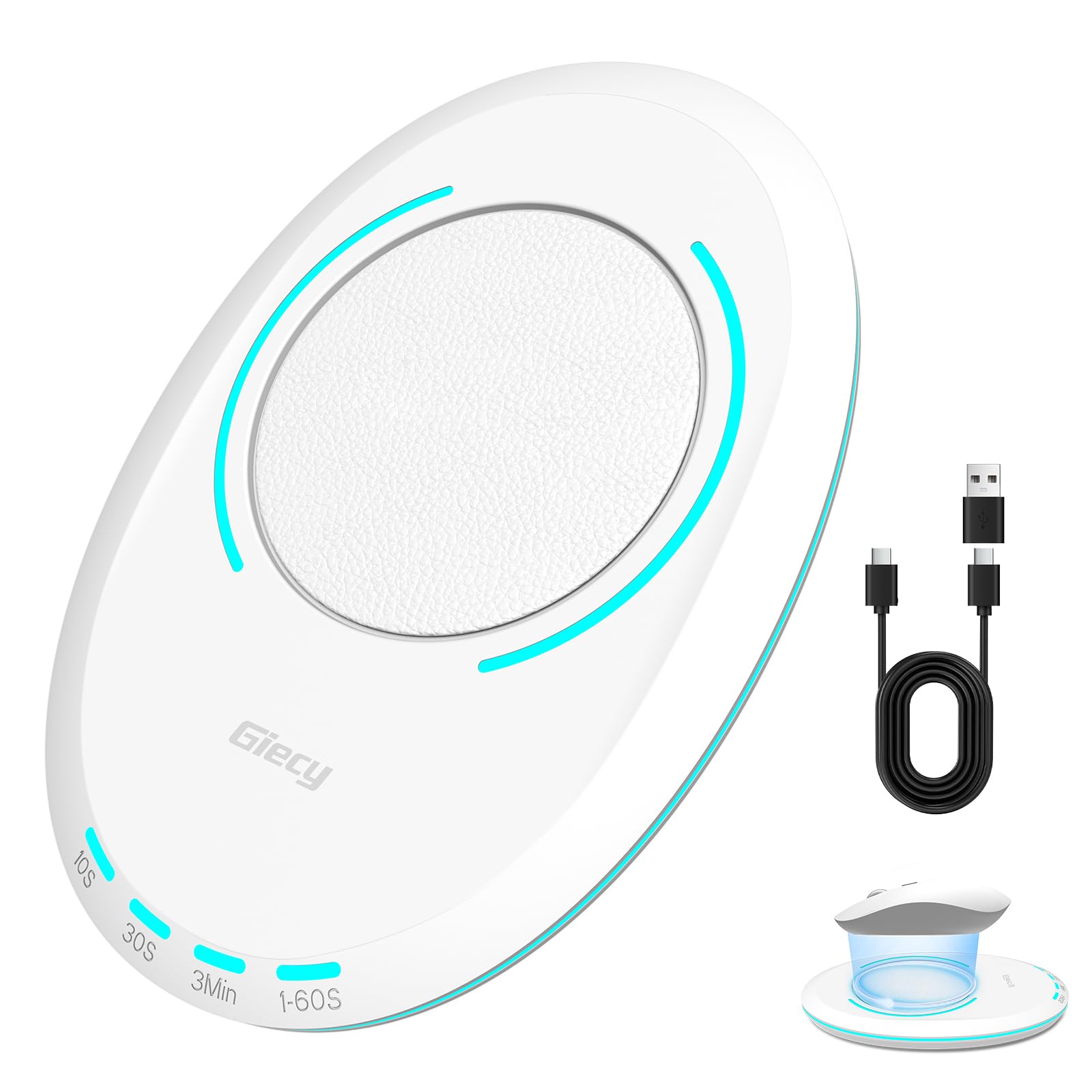
Sixteen millimeters thick — thin enough to slide into a laptop bag when your desk moves with you.
If you shuffle between the office and the kitchen table, the 16mm thickness is the headline — among the most portable movers in this lineup. A breathing light gives a quiet visual cue that it is running. It plugs in over Type-C (a reversible USB-C connector) with no software installation, sets an adjustable interval to keep the system from dropping to a locked screen, and simulates natural cursor travel well enough that the manufacturer calls it undetectable by most systems. It works on Mac, Windows, and Linux.
One detail matters before you buy: the “power button” actually pauses the turntable while the internal timer keeps running. When you press it back on, the disc may not rotate until it finishes the leftover countdown. To fully reset, you unplug the USB and replug it, which restores the default 10-second setting. That is worth knowing so a short pause does not feel broken.
On noise, buyers are split. Some find the operation quiet, others describe it as noisy — enough that the noise feedback outweighs the positive notes in the review pattern. If your desk is near where you take calls, that is the trait to weigh. It handles the basics fine and carries a rechargeable battery with wired connection, but this is a mover to pick for portability first and silence second.
The portability win: 16mm thin and Type-C powered make it the pick that travels with you.
The size trade-off: the pause button keeps the internal countdown running, so resuming can feel like it lags until the old timer clears — unplug and replug for a clean reset.
Best fit: remote workers who carry their setup between locations and want a thin, plug-in gadget.
Not your pick if: quiet operation tops your list — the noise pattern here is the main gripe.
4. Vaydeer M4 Mouse Mover with APP

The one that runs on external power and never even touches your computer’s USB port.
Here is the cleanest undetectability story on the list. The M4 can run off a 5V/2A power adapter with a cable, so it does not plug into the laptop at all — no device shows up, no software install, no hardware scan to read. It carries ISO/IEC27001:2013 certification, and the manufacturer states its physical mouse movement is undetectable to hardware scans and company IT. You get an ON/OFF switch so you are not yanking a cable every session, plus remote control and a timer function so you can start and stop it without reaching across the desk.
Its ultra-silent motor is rated under 45dB, the quietest spec in this lineup. Functionality is what owners praise most, and the silencing clearly lands — quiet operation and ease of use follow right behind it as the recurring positives. It is plug-and-play, and it sits on a 5.12 by 5.12 inch footprint weighing 140 grams, small enough for a crowded desk.
The honest catch is the app. Remote control and the companion app are the weakest part — app compatibility draws more negatives than positives, partly because some users struggle to find it on Google Play and partly because others find it unnecessary. Treat the app as a bonus, not the reason to buy. The reason to buy is the external power path plus the sub-45dB motor.
What sold us on it
- Can run off an external adapter, so it never appears on the PC at all
- ISO/IEC27001:2013 security certification on the record
- Motor rated lower than 45dB — the most silenced model here
- ON/OFF switch plus remote control and timer
What to keep in mind
- App support gets more criticism than praise — some cannot locate it on Google Play
- You still need to sit the mouse sensor over the spinning wheel before switching on
Buy it for: the external-power, zero-USB-touch approach and the quietest rated motor in this lineup.
Do not buy it for: the app — treat remote control as a convenience on top of a solid physical mover.
5. Meatanty Big-Pad Mouse Mover

A big traction pad sized for oversized mice, so you never have to aim the sensor again.
If your day-to-day mouse is a large ergonomic model, this is the one built around it. The pad measures 6.14 by 5.90 inches and handles a bigger turntable than the compact movers, with an edge-protection design so the mouse will not suddenly get stuck or slide off. You set it down, flip the ON/OFF switch, and walk away — no calibrating the cursor position first, which is a step most of the cheaper single-disc units still force on you.
Frequency is adjustable in 5-second steps from 5 to 60 seconds, shown on an LED display so you can see the setting at a glance. It is driver-free and plugs into any Windows, Mac, or Linux system, and it can be powered either from an external adapter or the USB port of your PC, laptop, or hub. The motor is rated under 20dB, among the quietest ratings in this lineup. The maker also backs it with a 5-year free replacement policy and ISO27001:2013 registration.
The fair caveat is that noise opinions split — some report complete silence, others catch a sound — and a subset of buyers find the value hard to justify compared with cheaper pads. Nothing here is broken; it is a bigger, heavier pad sold as such. If you run oversized mice and want the aiming hassle gone, it is the right tool.
The oversized-mouse answer: a 6.14 by 5.90 inch pad with a large turntable and edge protection is what removes the aiming step for big mice.
Reach for this if: you use a big ergonomic or wireless mouse and want a pad that takes its full footprint.
Look elsewhere if: you want the smallest possible desk gadget — this is a big-pad design, not a pocket mover.
6. Starviky Dual Turntable Mouse Jiggler

Twin turntables that change direction each turn so the cursor never falls into a rhythm.
The mechanics here are the selling point. Two turntables run together at the same speed, but different friction at different positions on the pad produces a more uneven travel path — and the turntables change direction after each turn. That is how this design earns its random-movement claim. Add edge protection so the mouse will not drop off, and you can place it without aiming at the cursor. It handles wired, wireless, and optical mice, plus trackballs that sit within the pad footprint.
Buyers praise reliability most across its reviews, and it holds up over long stretches — the pattern is a mover that keeps a computer from going to sleep rather than one that quits after a week. Quiet operation is praised too, with the motion said to be inaudible in a room. The interval selector gives you 10 seconds, 30 seconds, 3 minutes, and a 1–60 second random option, with a dedicated interval button on the side and an ON/OFF switch for day-to-day use.
Two honest notes. A handful of durability reports describe failures well into the second year, so treat it as a two-year-plus device rather than a forever one. And some users feel the movement is not truly random despite the twin turntables. Both are minority views against a long reliability record — but if a perfectly unpredictable path is your number-one requirement, the mechanical turntable class has limits by nature.
Why we rank it high on staying alive: the twin-turntable arrangement and reliability record point to a gadget you can leave running for long stretches between chores.
Pick it if: you want a long-haul mover with directional changes built into the mechanics and a clear interval selector.
Skip if: you need guaranteed randomness — some buyers still find the travel less random than advertised.
7. Vaydeer X3 Plus Smart Mouse Jiggler
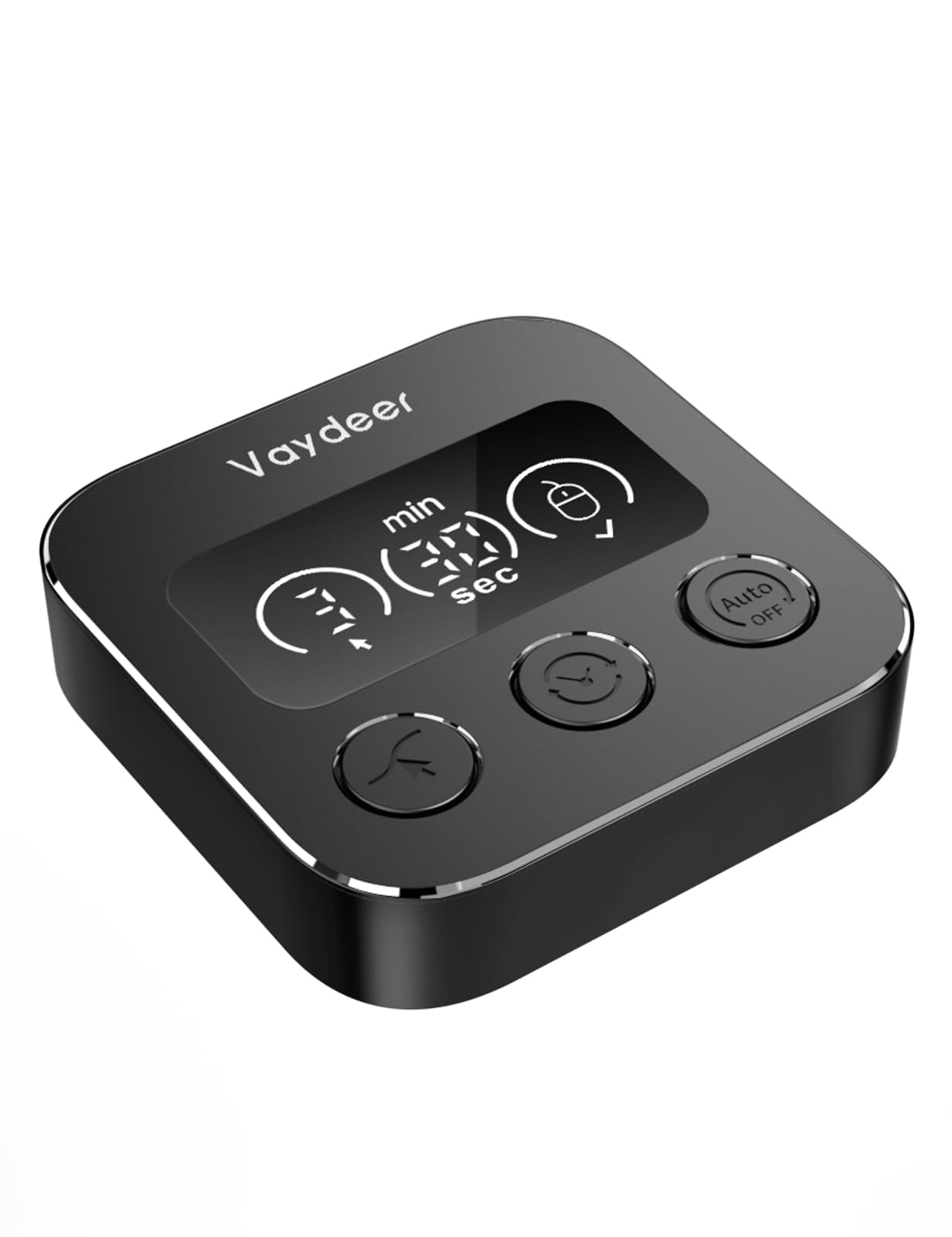
A different approach entirely — it sits between your mouse and the PC so only the mouse is seen.
Most movers work by physically wiggling the mouse on a spinning pad. The X3 Plus uses “pass-through” technology instead, routing your real mouse through the unit so the computer only detects the connected mouse and not the jiggler itself. The manufacturer states this makes it 100% undetectable to IT systems, since there is no electronic handshake with the PC. It also auto-activates when you step away after a customizable idle period of 0 to 30 minutes, then stops when the mouse is back in use.
Three movement tracks — small, wide, or a slight jiggle — show on an LED display, and the cursor path randomizes on its own to mimic natural use. There is no driver and no PC communication, so it is genuinely plug-and-play. It is compatible with Windows, macOS, and Linux, and comes in a sturdy metal casing that adds durability.
The wire-free design is the appeal for anyone whose IT setup actually matters. The trade-off is that you are relying on pass-through reliability rather than the brute physical certainty of a spinning turntable — a very different bet. Performance is praised across its reviews and the jiggling itself performs as expected, but the smart auto-sensing is the real draw.
Why the pass-through route makes sense
- Computer sees only the connected mouse, not the jiggler
- Auto-runs after an idle period of 0 to 30 minutes
- Three movement tracks via LED display, plus random cursor path
- sturdy metal casing, no driver, no PC communication
What you give up
- Reliance on USB pass-through rather than pure mechanical wiggling
- Won’t physically move the mouse the way a turntable pad does
Best for: buyers who want the computer to see only the real mouse, with auto-start and auto-stop built in.
Think carefully if: you trust the spinning-turntable method more than a USB pass-through — that is the core difference here.
Know the Specs
Random vs. fixed movement
“Random” or “non-patterned” movement means the gadget does not repeat the same cursor hop on a fixed clock. A dual-turntable design, directional changes, or a built-in random interval are the mechanical ways to achieve this. The point is to avoid a detectable loop, since a perfect every-30-seconds pulse is the giveaway. Most movers in this lineup claim the random path through physics rather than software.
Interval timer
The interval is how long the gadget waits between cursor movements. Shorter intervals mean more aggressive activity; longer ones look like a person glancing over now and then. Ranges here run from 5 seconds up to 90 seconds, with some offering preset stages of 10 seconds, 30 seconds, and 3 minutes. An adjustable interval helps you space moves so they do not look robotic.
Physical vs. pass-through design
A physical mover sits under the mouse and spins it, so nothing connects to the PC and no software runs. A pass-through design routes the real mouse through the unit so the computer only sees the mouse — again no driver needed. Both are ways to avoid leaving a software trace; the physical pad is the more established of the two, while pass-through adds auto-start and auto-stop smarts.
Compatibility and noise
Most movers work with optical mice — wired or wireless — but check the pad footprint against your mouse size. Big ergonomic mice need a large turntable or a wider pad. On noise, look for a “silent” or “ultra-silent” motor rating; manufacturer figures in this lineup include less than 20dB and a class rated under 45dB. A quieter motor is a desk gadget you can forget about.
Common Questions
Will a mouse mover work with my oversized ergonomic mouse?
Does a mouse mover need software installed on my computer?
How is a mouse mover different from an auto-clicker app?
What intervals should I set so the movement looks natural?
Can I power the mover from my computer’s USB port or a wall adapter?
Is the movement actually random or just marketed that way?
How quiet are these movers in a shared or quiet office?
Will a mouse mover keep my screen on and stop it locking you out?
Do these movers work with Mac, Windows, and Linux?
How long will a mouse mover last with daily use?
The Bottom Line
The all-round winner is the Starsiki Dual Turntable Jiggler — two turntables that produce a more natural cursor path, no sensor aiming, and a silent motor that suits a shared desk. If random auto-start and preset intervals are what you are chasing, the Vaydeer Turbo 3 gives you a random start option plus four stages. And if undetectability means running off an external adapter so nothing ever touches your PC, the Vaydeer M4 is the one to reach for. Whichever you choose, the aim is the same: keep the screen awake while leaving no obvious pattern behind.
How we choose
We do not accept paid placement. Every pick is matched to a real buyer and a real use-case; we do not hands-on test units.
Sources
Specifications: manufacturer listings and product documentation. Review insights: verified customer reviews, as of November 2026. Pricing: not shown on this page (it changes often); check the current price via the retailer link.
As an Amazon Associate, Tactical Gear Guy earns from qualifying purchases. This does not affect which products we feature.