Specs are compiled from manufacturer listings and verified buyer reviews and can change over time — please confirm the key details on the product page before buying.
You want your PC tower off the floor and out of kicking range, but you are not about to put a drill through a standing desk you paid good money for. That is exactly the problem a no-screw clamp mount solves — it grabs a desk edge or a desk leg, hangs the case, and leaves your desktop untouched. The catch most buyers hit first is fit, not strength: the wrong clamp width or the wrong leg size is the reason these get returned, so the picks below are sorted by what they actually grip.
This guide is built by comparing the manufacturers’ published specifications and the patterns across verified customer reviews, so you get each pick’s real strengths and trade-offs instead of marketing spin.
Some mounts clamp to a flat desk edge, others grip the desk leg itself, and a few do both — the difference decides whether your tower moves with the desk or stays put. Below you will find the strongest clamp-on options, matched to real desk sizes and real case widths, so you can pick the best under desk PC mount with no screws for your exact setup on the first try.
Top Picks


How To Choose The Best Under Desk PC Mount with No Screws
The first thing to settle is where the clamp goes. A clamp-on mount grabs the flat edge of your desktop, so it works on almost any table. A leg-clamp mount grabs the square leg of a standing desk, which means it travels up and down with the desk and keeps your cables at a constant length. Measure your leg footprint or desktop thickness before ordering — a clamp that misses the size will not close.
Measure your desk leg and your desktop edge first
If you are going the leg-clamp route, your desk leg has a fixed footprint and the mount must match it exactly. Leg-clamp mounts often come in specific sizes like 65×45mm or 75×45mm, and a mount built for one size will not close on another. Edge-clamp mounts are more forgiving and list a thickness range instead, so check how thick your desktop actually is with a ruler at the edge.
Match the width range to your actual PC case
The width range is the measurement between the two side rails, and it needs to bracket your case. A mount rated for a narrower band than your tower will not clamp at all, while one that is too wide may leave the case loose. Measure the widest point of your case, including any side-panel bulge, and compare it to the published range rather than guessing from the model name.
Check the weight rating against your build
Every mount here lists a load capacity, and that number is the safe ceiling for the whole tower. A big air-cooled gaming build with a heavy graphics card sits well above a basic office PC, so weigh yours if you are close to the limit. Staying under the rating keeps the clamp from shifting as a standing desk travels up and down.
Side-by-Side Comparison
| Model | Best For | Weight Rating | Case Width Fit | Mount Style | Amazon |
|---|---|---|---|---|---|
| CoJewe Under Desk PC Mount No Drill Clamp★ Best Overall | Standing desk legs | 40 lbs | 5.7″ to 9.84″ | Desk-leg U-clamp | Amazon |
| VIVO Adjustable Clamp-on PC Desk MountMost Versatile | Large custom gaming builds | 66 lbs (22 lbs on drywall) | 7.1″ to 11.9″ | Desk-edge C-clamp / wall | Amazon |
| Suptek Adjustable Under Desk and Wall PC MountFour-Way Mount | Desk, beam or leg mounting | 44.0 lbs | 3.74″ to 8.26″ | Clip-on, desk/beam/leg/wall | Amazon |
| TOPSKY Under Desk PC Mount | White electric standing desks | 50 lbs | 6.89″ to 11.22″ | Desk-leg clamp | Amazon |
| TooCust Adjustable Under Desk PC Mount | Thick desktop edges | 50 lbs | 5.5″ to 9.8″ | Desk-edge clamp | Amazon |
| monTEK Clamp-On Under Desk PC Mount | Airflow around the tower | 66 lbs | Not listed | Desk-edge clamp | Amazon |
| monTEK Under Desk PC Mount | Heavy towers, 7-level height | 66 lbs | 7.1″ to 11.8″ | Under-desk clamp | Amazon |
| Mount-It! Heavy Duty Under Desk PC Mount | Shared workstations | 66 lbs | Not listed | Desk-edge clamp, slide-out holder | Amazon |
Detailed Reviews
1. CoJewe Under Desk PC Mount No Drill Clamp Holder
The leg-hugging clamp that lifts your tower and never once asks for a drill bit.
If your desk has square or inverted legs, this is the mount that clicks into place and stays there. It grips the table leg itself with a U-clamp, so your PC rides up and down with an electric standing desk instead of being left behind on the floor. The steel frame is rated to 40 lbs, enough for a standard tower plus a mid-range graphics card.
Two numbers decide whether it works for you. The mount is built in fixed leg sizes — 65×45mm, 75×45mm or 80×50mm — so measure your leg footprint before ordering, not after. On the case side it accommodates towers from 5.7″ to 9.84″ wide, which is a wider adjustment band than the Suptek mount’s 3.74″ to 8.26″ and gives bigger mid-towers room to breathe. Buyers on sit/stand setups are the happiest crowd here, and the clamp is the reason: the tower stays put through the whole up-and-down cycle.
What wins people over is build quality — the most-praised trait on this listing by a wide margin, with the steel finish and the tight top-and-bottom grip drawing the most credit. Still, the honest caveat is the leg sizing. The fit category draws the most mixed feedback precisely because this mount is not universal, so a wrong leg measurement means it will not close. Measure your leg footprint twice and the U-clamp closes tight and stays tight.
Where It Earns Its Place
- U-clamp grips the desk leg with zero drilling, so your desktop stays clean.
- 40 lb steel frame with non-slip pads that protect the case finish.
- 5.7″ to 9.84″ case width range suits mid-towers and wider builds.
- Open-frame design keeps airflow moving around the tower.
Before You Order
- Sold in three fixed leg sizes — a mismatched leg means no install.
- 40 lbs caps out below the 66 lb mounts further up this list.
Made for: standing-desk owners with square or inverted legs who want the tower to travel with the desk, no tools at all.
Think twice if: your desk leg falls outside 65×45mm, 75×45mm or 80×50mm — no amount of tightening will fix that.
2. VIVO Adjustable Clamp-on PC Desk Mount, Holds 22 lbs
The mount built for the biggest, heaviest custom tower in the room.
Custom water-cooled builds and full-size gaming cases are where most under-desk mounts give up. This one does not. The width range runs 7.1″ to 11.9″, so it brackets the large cases the narrower mounts on this list cannot hold.
There is a second life built in. An optional wall assembly lets you hang the same PC on drywall or brick, and that flexibility is why it earns the versatile label. One number matters when you go that route: on drywall alone the capacity drops to 22 lbs, so a heavy tower needs a stud, concrete or brick behind it. On a desk clamp you get the full 66 lbs.
The open frame keeps every side of the case visible while raised side rails hold it in place, and the padding prevents dents regardless of case size. It is built for height-adjustable standing desks, with the clamp holding firm through the electric desk’s travel. The realistic limit is the drywall number — if you were planning to hang a big build on a hollow wall, the 22 lb drywall rating stops you well short of 66 lbs.
Value read: You are paying for headroom. The 66 lb steel body, the 7.1″ to 11.9″ width band and the drywall-or-brick option cover more setups than most clamp mounts at this tier.
The trade-off: Drywall mounting caps at 22 lbs, a quarter of the frame’s capacity, so wall hangs demand real masonry.
Pick this when: your tower is genuinely heavy or unusually wide and you still want a no-drill clamp on the desk side.
Look elsewhere if: you only ever plan to mount on plain drywall — the 22 lb limit will not carry a gaming build.
3. Suptek Adjustable Under Desk and Wall PC Mount
Four mounting spots, a swing-out bracket, and the widest height window on the list.
Most mounts give you one install location. This one gives you four — table board, table beam, table leg or wall — and each of those takes a surface up to 3.85 inches thick. That reach is uncommon, and it means you can find a home for it on a desk that has no clean edge to clamp.
The height range is where it pulls ahead. It adjusts from 11.41″ to 20.66″, which sits lower than the TooCust mount’s 14.5″ to 22.4″ at the top and leaves room for shorter towers. Width runs 3.74″ to 8.26″, the tightest band here, so a compact office case fits well while a wide gaming chassis does not. Cold rolled steel holds 44.0 lbs, and hanging the case off the floor helps heat escape.
The 360-degree rotation is the feature you will actually use — it swings the CPU to a better angle and lets you reach the back panel for cable work without pulling the whole case. One clear limitation, straight from the maker: when the bracket is mounted on desk legs, it cannot rotate a full 360 degrees. Save the swing for board and beam installs.
What It Does Well
- Mounts to the table board, beam, leg or wall — four real options.
- 360-degree rotation simplifies rear cable swaps on board and beam installs.
- Height adjusts from 11.41″ to 20.66″ for shorter cases.
- Powder-coated cold rolled steel rated to 44.0 lbs, with a protective pad included.
The Fine Print
- 3.74″ to 8.26″ width range is narrow — wide towers will not fit.
- No full rotation when mounted on desk legs.
Worth it for: compact and mid-size cases that need a mount placed where no flat desk edge exists.
Not the one for: wide gaming towers — the 8.26″ width ceiling rules them out.
4. TOPSKY Under Desk PC Mount White
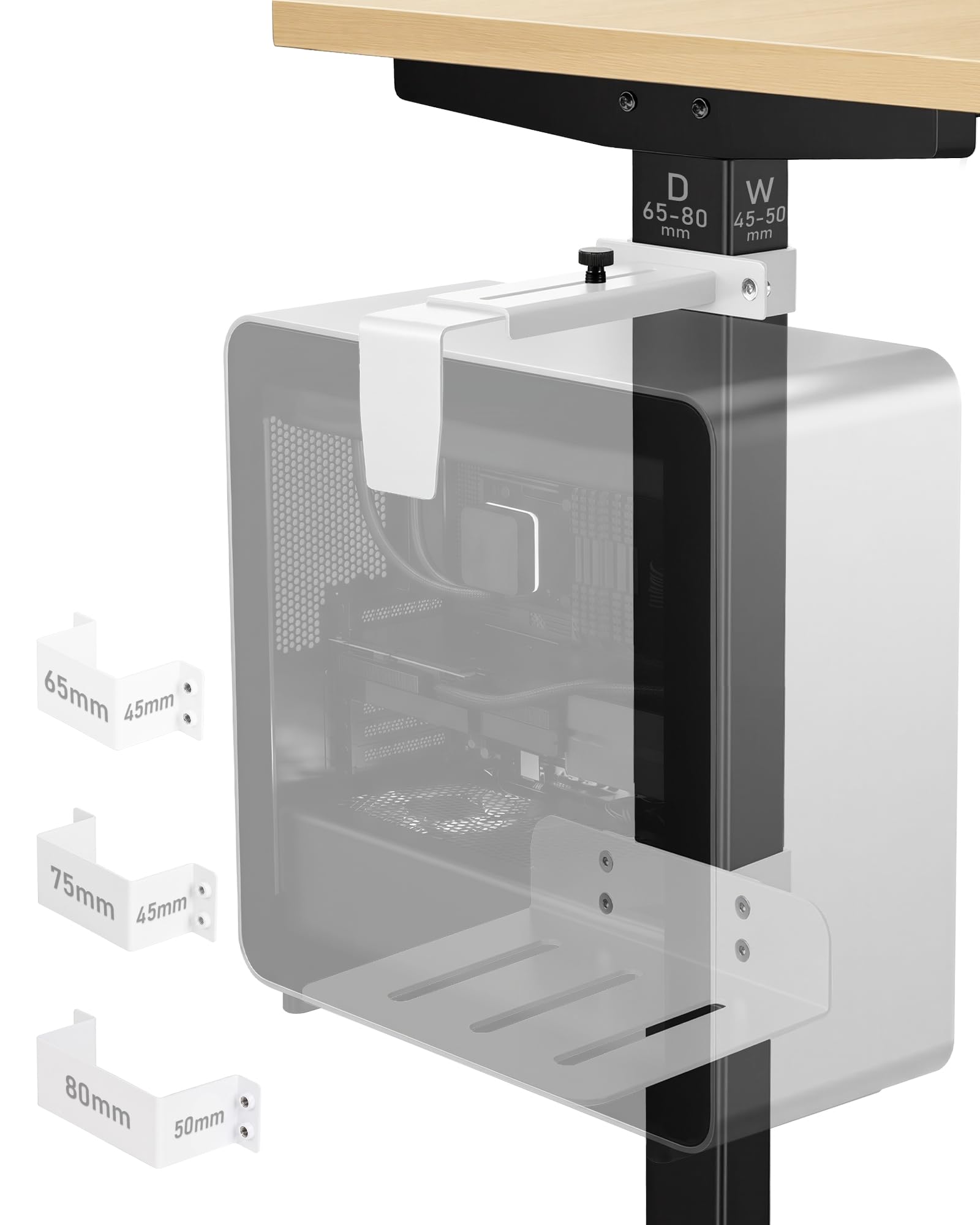
A white steel leg clamp for desks where a black bracket would look out of place.
Most under-desk hardware only comes in black, which is fine until your desk and legs are white. This TOPSKY mount ships in white and clamps straight onto the electric desk leg, so your tower rides with the desk and the hardware blends in. The reinforced steel frame is rated to 50 lbs.
It takes PC cases 6.89″ to 11.22″ wide, with a recommended maximum height of 21.65″, and it likes inverted desk legs best. Installation is three steps — clamp the leg, seat the tower, lock it — with no drilling and no special tools. The design leans on top-and-bottom clamping for a steady hold during height changes, and the open frame keeps air moving.
The catch is compatibility, and the maker is upfront about it. It only fits legs sized 65×45mm, 75×45mm or 80×50mm, and it does not support circular or non-standard case designs. Sturdiness and stability read mixed in owner feedback, so the fit has to be right — a correct leg match is what keeps it rock solid. Match the leg size and the top-and-bottom clamp holds the tower steady through every height change.
Where it fits in: the 50 lb frame and 6.89″ to 11.22″ width band cover most standard towers on an electric desk, and the white finish is a genuine differentiator.
Watch the leg size: outside those three leg footprints, stability suffers.
Go for this if: you have an electric standing desk with inverted legs and want hardware that matches a white workspace.
Choose another if: your desk legs are round or an odd size — the mount will not seat properly.
5. TooCust Adjustable Under Desk PC Mount

Thick butcher-block desks finally get a clamp that closes around them.
A lot of clamp mounts top out around a thin desktop and simply cannot grab a chunky wood top. This TooCust clamps edges up to 2.5 inches thick — the widest desktop thickness on this list — so heavy solid-wood desks are in play. The thickened alloy steel frame carries 50 lbs without deforming.
Case fit is generous at both ends. Width adjusts from 5.5″ to 9.8″ and height from 14.5″ to 22.4″, and that top height of 22.4″ clears taller towers than the Suptek mount’s 20.66″ ceiling. A black powder-coated surface resists rust and corrosion and matches most office furniture, and hanging the case clears floor dust, improves airflow and protects the tower from kicks and spills.
What people praise most is plain functionality — it does the mounting job without fuss, and owners note it can even be clamped to bars beneath the desktop. Stability is the split point. Seat the clamp squarely on the 2.5-inch edge and the 50 lb steel frame stays put.
The Strong Points
- Clamps desktop edges up to 2.5 inches thick — the thickest desk support here.
- 50 lb thickened alloy steel frame that resists deformation.
- 5.5″ to 9.8″ width and 14.5″ to 22.4″ height cover tall cases.
- Powder-coated finish resists rust and corrosion.
Real-World Limits
- Wobble reports mean the clamp has to be seated squarely.
- 50 lbs is the ceiling — heavier builds need the 66 lb mounts.
Best matched to: solid-wood or thick-top desks that thinner clamps cannot grip.
Skip if: your tower weighs in near 50 lbs and you want margin to spare.
6. monTEK Clamp-On Under Desk PC Mount, 16.1-25.6″, 66 lbs

A round-top frame shaped to let hot air climb straight off the tower.
When a PC hangs under a desk, heat has fewer places to go. This monTEK mount answers that with an open round-top structure that improves airflow around the case, which matters during long gaming sessions or heavy workloads. Reinforced steel takes the load up to 66 lbs, and anti-slip pads on the base and back stop the tower sliding or scuffing.
Desk fit runs from 0.59″ to 2.36″ thick, so it works with most home and office desktops. Height adjusts all the way from 16.1″ to 25.6″, the tallest window on this list — 3.2″ more reach at the top than the TooCust mount’s 22.4″ — which accommodates tall full-tower cases. Just leave at least 8.9 inches of space under the desk for the clamp to install.
Build quality is the trait that leads owner feedback, and the mounting quality gets consistent praise. The one place to tread carefully is fit — it shows up as the mixed category, so the 8.9-inch clearance and the height range are worth checking against your actual desk before you commit. Clear the 8.9-inch gap and fit the height range, and the round-top frame clamps on and vents heat.
The ventilation angle: a 360-degree open round top is a real advantage over closed frames for a tower stuffed into a tight under-desk slot.
Check first: the 8.9″ clearance requirement — a short under-desk gap blocks installation.
Reach for this if: you run a tall case and worry about heat once the tower is off the floor.
Look elsewhere if: you cannot free up 8.9 inches under the desktop.
7. monTEK Under Desk PC Mount 16.1-25.6″

Heavy full-tower builds meet their match in a seven-position steel cradle.
Large gaming chassis and workstation towers need a mount that both fits them and holds them. This monTEK handles both: reinforced steel tested to 66 lbs, plus a 7.1″ to 11.8″ width range and a 16.1″ to 25.6″ height range. That width band brackets full towers that the narrower Suptek mount’s 8.26″ ceiling leaves out.
The seven-level height adjustment is the practical detail — it lets you dial the cradle to the exact case so nothing hangs loose. Built-in non-slip pads protect both the PC case and the desktop from scratches while improving grip and long-term stability. Mounting it off the floor cuts dust buildup, ends accidental kicks and frees up room for cables.
Owners call it a solid, long-lasting piece of hardware, and sturdiness is praised consistently. Where it splits is stability and fit — reports cross from secure to a slanted base, so level the desk and tighten evenly. One desk-specific note surfaced from buyers: it does not work with the SecretLabs Magnus desk line, so check that before you buy if you own one.
Why It Stands Out
- 66 lb tested steel frame supports heavy gaming and workstation towers.
- 7-level height adjustment from 16.1″ to 25.6″ dials in a snug fit.
- 7.1″ to 11.8″ width range covers large cases.
- Non-slip pads shield both case and desktop from scratches.
Honest Friction
- A slanted base shows up in some feedback — tighten evenly to avoid tilt.
- Reported not to fit the SecretLabs Magnus desk lineup.
Fits the picture for: big full-tower builds that need 66 lbs of support and a width band wide enough to clamp them.
Check compatibility if: you own a SecretLabs Magnus desk — this one reportedly does not play well with it.
8. Mount-It! Under Desk PC Mount
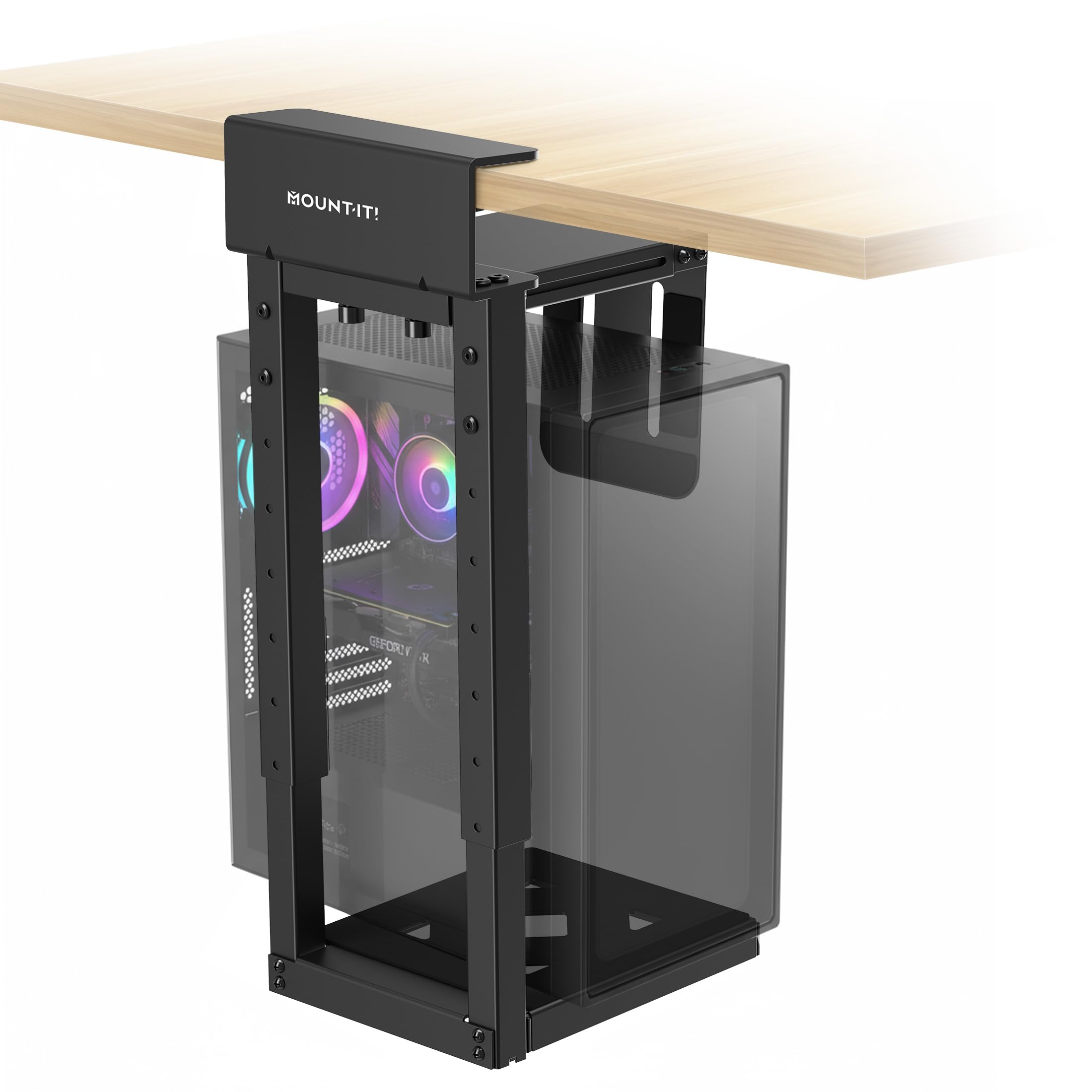
Steel, a lifetime warranty, and a holder that slides out for maintenance.
A standing desk moves every day, and a plastic or flimsy bracket will not survive that grind. This Mount-It! is all steel and rated to 66 lbs, built to stay steady through each height change — once a day or a dozen. It clamps desktops from 0.59 to 2.4 inches thick with a tightening clamp, so a screwdriver is the only tool involved and your desk stays undrilled.
You can pull the tower out for maintenance without touching the clamp, because the horizontal holder slides in and out on its own. On a shared workstation, the slide-out holder lets each user pull the tower forward for cable swaps without loosening the clamp. Padded contact points cushion both the clamp surface and the case finish, so neither gets scratched. Open sides keep air moving around the case.
The standout promise is the lifetime manufacturer warranty, backed by US-based product support — coverage most under-desk mounts at this tier do not offer. It fits mid-tower and full-tower cases, and it suits home offices, gaming setups and IT teams outfitting a whole floor of standing desks. For a workstation you plan to keep, the lifetime warranty and US-based support are the reason to pay more.
Long-game pick: a 66 lb steel frame plus a lifetime warranty and US support is a combination worth paying a little more for on a workstation you plan to keep.
The honest trade: the published listing does not spell out a case-width range, so confirm your tower’s width against it before ordering.
Choose it for: a shared or heavy-use standing desk where you want a slide-out holder and long-term coverage.
Verify first: your case width — the width fit is not published for this model.
Know the Specs
Weight rating (load capacity)
This is the most weight the steel frame is rated to carry, and it covers the whole tower including the graphics card and cooling. A 40 lb or 50 lb mount suits a standard office PC, while 66 lb models are built for heavy gaming and workstation builds. Leave margin under the rating so the clamp stays tight through a standing desk’s vertical travel.
Case width range
The width range is the gap between the two side rails, and your case’s widest point has to sit inside it. A mount rated for a narrower band than your tower will not clamp closed, and one that is far too wide can leave it loose. Measure the widest part of your case, side-panel bulge included, and compare it with the published numbers.
Desk leg vs desk edge clamping
A leg clamp grips the square or inverted leg of a standing desk and carries the PC up and down with it. An edge clamp grips the desktop’s flat edge, which fits nearly any table and holds the tower at a fixed height. Some mounts like the Suptek do both, plus beam and wall options, when no clean edge is available.
Steel frame and airflow
An all-steel or powder-coated frame resists deforming and helps the clamp hold firm under load, and the coating guards against rust. An open-frame design lets air move around the case once it is off the floor, which helps keep the tower cooled in the tighter space under a desk.
Common Questions
Will a no-drill PC mount work on a standing desk that moves up and down?
How do I know which desk leg size my clamp mount needs?
What weight rating do I need for a gaming PC tower?
Can I mount a full-tower case, or only small PC cases?
Does clamping a PC under the desk affect cooling?
Can a no-drill mount be attached to a wall instead of a desk?
How much space do I need under the desk to install one of these?
Will the clamp scratch my PC case or my desktop?
Do I need tools to install a clamp-on PC mount?
Is a leg-clamp mount better than an edge-clamp mount?
The Bottom Line
Most standing-desk owners should buy the CoJewe Under Desk PC Mount, the best under desk pc mount with no screws for this setup. It clamps onto the desk leg with no drilling, holds 40 lbs, and rides up and down as your desk moves. If your build is heavy or wide, pick the VIVO Clamp-on PC Mount instead: its steel frame carries 66 lb and fits cases 7.1″ to 11.9″ wide. For a shared workstation, the Mount-It! Heavy Duty Mount gives you a slide-out holder plus lifetime coverage.
How we choose
We do not accept paid placement. Every pick is matched to a real buyer and a real use-case; we do not hands-on test units.
Sources
Specifications: manufacturer listings and product documentation. Review insights: verified customer reviews, as of November 2026. Pricing: not shown on this page (it changes often); check the current price via the retailer link.
As an Amazon Associate, Tactical Gear Guy earns from qualifying purchases. This does not affect which products we feature.