Specs are compiled from manufacturer listings and verified buyer reviews and can change over time — please confirm the key details on the product page before buying.
Your Philips remote is dead, or half its buttons stopped answering, and you need a replacement that works the moment the batteries go in. The seven remotes below all talk to Philips TVs over infrared — the same line-of-sight light signal your original used — but they are not interchangeable. The one you pick has to match your TV’s own model number, and for Philips sets the split is real: Roku TVs, Android and Google TVs, and older LED sets each use a different remote code set.
This guide is built by comparing the manufacturers’ published specifications and the patterns across verified customer reviews, so you get each pick’s real strengths and trade-offs instead of marketing spin.
Several of these remotes skip setup entirely, but the ones with voice search ask you to hold two buttons to pair before the microphone wakes up. Grab your TV’s model code off the back panel first — every pick below lists its compatible set, and matching that code is the whole game.
Top Picks


How To Choose The Best TV Remote Control for Philips TV
The wrong buy here is almost always a model mismatch, not a bad remote. Philips TV remotes are keyed to specific set families, so a remote built for a Philips Google TV set can leave you with dead volume keys on a Philips Roku set. Find your exact model number, then buy the remote that lists it.
Match The Model Code, Not The Brand Name
Philips uses long alphanumeric codes like 55PFL4706/F7 or 65PUL7552/F7, and each listing above spells out the sets it fits. Write your code down off the sticker on the back of the TV before you order. If your code falls outside a listing’s list, keep scanning — a remote that “sort of” works becomes a shelf ornament.
Decide if you want Voice Search
Voice remotes carry a microphone and let you speak a title instead of typing it letter by letter on an on-screen grid. That convenience comes with a setup step: you hold the volume-down key and the mic key together for a few seconds to pair the remote with the TV. Plain button remotes skip that entirely — batteries in, done.
Range, Response And Battery Type
Infrared remotes need a clear line of sight to the TV, so range matters if you sit far back or control the set from a doorway. Sellers here list anywhere from 10 meters to 40 feet. Check the battery type too — most of these run on AAA cells that are not included, so factor a pack into your plan.
Side-by-Side Comparison
| Model | Best For | Buttons | Max Range | Setup | Amazon |
|---|---|---|---|---|---|
| OEM Replacement Remote for Philips Roku TV URMT21CND016★ Best Overall | Philips Roku TV owners | 25 | 10 meters | Plug-and-play, no pairing | Amazon |
| NH800UP RF402A-V14 Remote for Philips Android Smart TVBest Value | Philips Android LED sets | 4 shortcut keys | 33 feet | No programming, batteries in | Amazon |
| PZL Voice RF439A-V06 Replacement Remote | Voice control on Android sets | 20 | 40 feet | Two-button voice pairing | Amazon |
| Ozuly Remote Control for Philips Smart TV | Extra reach across a large room | — | 15 meters | No setup or programming | Amazon |
| Xtrasaver OEM Remote for Philips Google TV RF553A | Philips Google TV sets with short keys | 26 | 30 feet | No pairing, batteries in | Amazon |
| Angrox Voice Remote for Philips Google TV | Voice search on Google TV sets | 15 | — | Volume-down + mic pairing | Amazon |
| Gvirtue Big Button Universal Remote | Seniors and low-dexterity households | 39 | 10 meters | No programming needed | Amazon |
Detailed Reviews
1. Philips Roku TV URMT21CND016 Remote Control
Our pick — 4.5+★ from 750+ verified ratings; the strongest balance of quality and price.
The drop-in replacement that behaves like the remote that came in the box.
If your Philips set runs the Roku system — the tile-grid home screen with the purple accents — this is the remote to start with. It carries 25 buttons, which puts the full Roku navigation cluster and playback row under your thumb rather than tucked into an on-screen menu. Nothing to program and nothing to pair: you put batteries in and it answers.
Shortcut keys cut straight to Netflix, Disney+, Apple TV and HBO Max. At 9 p.m., one press beats scrolling three menus deep to find something to watch. The ergonomic, lightweight body is shaped for one-handed use on the couch.
It works over a 10-meter infrared link, so line of sight from your seat to the TV is what keeps it responsive. The listing spells out its exact compatible Philips Roku models, including 75PFL4756/F7, 65PFL4756/F7, 55PFL4756/F7, 50PFL4756/F7, 43PFL4775/F7, 40PFL4775/F7, 32PFL6472/F7, 32PFL6452/F7, 32PFL4664/F7 and 24PFL4764/F7. Cross-check your code against that list before you buy — that is the one box this pick cannot tick for you.
Infrared range is shorter than some rivals in this group: the PZL voice model below reaches 40 feet, next to this one’s 10 meters. If your couch sits far from the set or you like controlling the TV from another doorway, that gap matters. For a normal living-room viewing distance it is a non-issue.
What earns it the top slot
- Full 25-button layout mirrors the original Roku remote, so nothing moves on you
- No pairing step at all — batteries in, remote live
- Four streaming shortcut keys for Netflix, Disney+, Apple TV and HBO Max
- Ergonomic, lightweight shell built for one-handed couch use
Where it asks you to check first
- Built for Philips Roku sets only — Android and Google TV models need a different pick
- 10-meter infrared range is the shortest listed here alongside the Gvirtue
Right remote if: your back panel shows one of the Philips Roku codes this listing names, and you want zero setup.
Wrong remote if: your set runs Android or Google TV — the button map will not line up.
2. NH800UP RF402A-V14 Remote Control
Built for the Philips Android sets, with a signal that reaches further than the originals did.
This one targets Philips Android LED and LCD 4K sets, and the maker’s upgraded smart chip pushes its infrared beam over 32 feet farther than a standard remote. The response window between keypress and TV reaction is listed at under 0.5 seconds, so menu taps feel immediate rather than laggy. A multi-angle infrared sensor keeps it catching the signal even when you aim a little off.
Four dedicated shortcut keys open Netflix, VUDU, YouTube and Google Play with one press. You install 2 AAA batteries and it is ready — no programming, no pairing ritual. The 33-foot maximum range sits between the shorter 10-meter models and the PZL’s 40 feet.
The catch is the button count in the spec sheet reads 4, which reflects those shortcut keys rather than the full keypad — this is a normal-function replacement, not a voice-enabled one. It also names a long, specific compatibility list spanning codes from 24PFL6704/F7 up through 75PFL5704/F7, so confirm your model appears there. Owners consistently report that setup takes only batteries.
What buyers find: the no-programming setup and the pairing-free start are the two things this remote gets consistently right.
Honest read: at 33 feet it reaches further than the 10-meter OEM Roku remote above, but it will not wake a voice assistant the way the PZL below can.
Reach for this if: your Philips Android set’s code appears on its list and you want a straightforward, no-fuss keypad.
Look past it if: you want to talk to the TV — there is no microphone here.
3. PZL RF439A-V06 Remote Control

The voice remote that still reaches the TV from across a long room.
Speak a title instead of hunting letters on the on-screen keyboard. This PZL model adds voice search to 20 physical buttons, and its infrared link is rated to 40 feet — the longest reach in this group and a 21% edge over the NH800UP’s 33 feet. The maker lists a response time under 0.2 seconds, so the cursor follows your thumb without a visible pause.
Voice control does not work the second you unwrap it; it needs pairing first. Hold the volume-down key and the mic key together for 3 to 5 seconds until the signal indicator light flashes — that is the whole handshake. The shell uses a new ABS material with an ergonomic arc, and the maker rates the keypad for over 120,000 click tests.
The compatibility list is narrow and specific — codes like 55PUL7472/F7, 43PFL5766/F7, 65PFL5766/F7 and 50PFL5766/F6 plus their variants. It is also the lower-volume listing of the group, so fewer buyers have road-tested it than the big sellers below. If your code is on the list, the pairing step is the only thing standing between you and hands-free search.
Standout spec: 40 feet of range with a sub-0.2-second listed response, which is why it leads on reach among the voice options.
Before you commit: batteries are not included, and the voice function waits for a two-button pairing hold before it listens.
Made for: a large room where the couch sits well back from a Philips Android set and you would rather talk than type.
Let it pass if: you refuse a setup step — the voice pairing is mandatory before the mic works.
4. Remote Control for Philips Smart TV Remote Control (Ozuly)

Fifteen meters of reach for a TV you control from the far doorway.
You can point this Ozuly remote from across a big room and it still works. It uses an upgraded chip with a 15-meter infrared range (infrared means it sends an invisible light beam to the TV) — 50% more reach than the 10-meter OEM Roku remote in the top slot, so the signal still lands from the far side of a large room. There is no setup and no programming: drop in AAA batteries and it covers every function the original had.
Shortcut keys for Netflix, VUDU and YouTube sit where your thumb expects them. The listing backs it with a one-year warranty and a 360-day return window, so a dead-on-arrival unit is a swap, not a loss.
Buyers most often report that it works with their Philips set and feels solidly built. Two hundred-plus owners have rated it 4.5+ stars, and the sense across the reviews is a remote that behaves like the factory part. The honest limit is line-of-sight: infrared means a cushion or a couch arm between you and the TV can block the beam, same as the original.
Best for: long living rooms and anyone who likes controlling the set from across the house.
Skip if: you want voice input or a specific model guarantee past the codes listed — cross-check yours first.
5. Xtrasaver RF553A Remote

A 26-button Google TV remote tuned for the newer Philips sets.
If your Philips is a Google TV model, the button map is different from the Roku and Android remotes here, and this Xtrasaver RF553A matches it. Twenty-six buttons cover the full Google TV navigation, and four shortcut keys open Netflix, YouTube, Discovery+ and Tubi. Setup is a battery-only affair — no programming, no pairing.
The list of compatible sets runs from 43PUL7652/F7 and 43PUL7672/F7 up through 50PUL7552/F7, 55PUL7672/F7, 65PUL7552/F7 and 75PUL7552/F7, so it covers a wide spread of screen sizes in that family. Range is rated at 30 feet, and the maker uses an upgraded chip for stable performance over the long haul.
This is a compact remote — about 5.5 inches long and 1.5 ounces — which keeps it light in the hand and easy to lose behind a cushion. Reviewers rate its build quality above the remote that shipped with the TV. One limit: it is built specifically for the newer Philips Google TV sets, so older Philips LED owners should look at the Android pick above instead.
The draw: a full 26-button Google TV layout with streaming keys, ready the moment the batteries go in.
Size the trade-off: at 30 feet it reaches less far than the 40-foot PZL, so line of sight to the TV still matters.
Fits you if: your Philips Google TV code lands on this remote’s list and you want a tidy, lightweight keypad.
Not your pick if: you want voice search — this one is button-only.
6. Angrox Voice Remote Control for Philips Google TV

Talk to your Google TV and skip the on-screen keyboard entirely.
This Angrox remote is the voice-first option for Philips Google TV sets. A built-in microphone paired with an advanced chip for precise recognition lets you say a title or ask for a genre instead of paging through rows. Fifteen buttons keep the layout clean, and four shortcuts jump to Netflix, YouTube, Google Play and Tubi.
You do have to pair it once. Press power to wake the TV, then hold volume-down and the mic button for 5 seconds until the handshake finishes — after that it is ready. It runs on 2 AAA batteries, which are not included. The set compatibility list names codes like 75PUL7552/F7, 65PUL7552/F7, 55PUL7552/F7, 50PUL7552/F7 and 43PUL7652/F7.
Buyers report it matches the original Google TV remote’s button layout and pairs in about two minutes. Where it asks for care: those same five-second pairing steps come before voice works, and if you do not have the codes on the list it is not the right fit. For a Google TV set you want to talk to, it is a clean choice.
Pick this if: your Philips Google TV model is on the list and you want voice control without hunting buttons.
Shop on if: you have a Roku or older Android Philips set — the codes here will not match.
7. Gvirtue Big Button Universal Remote for All TV
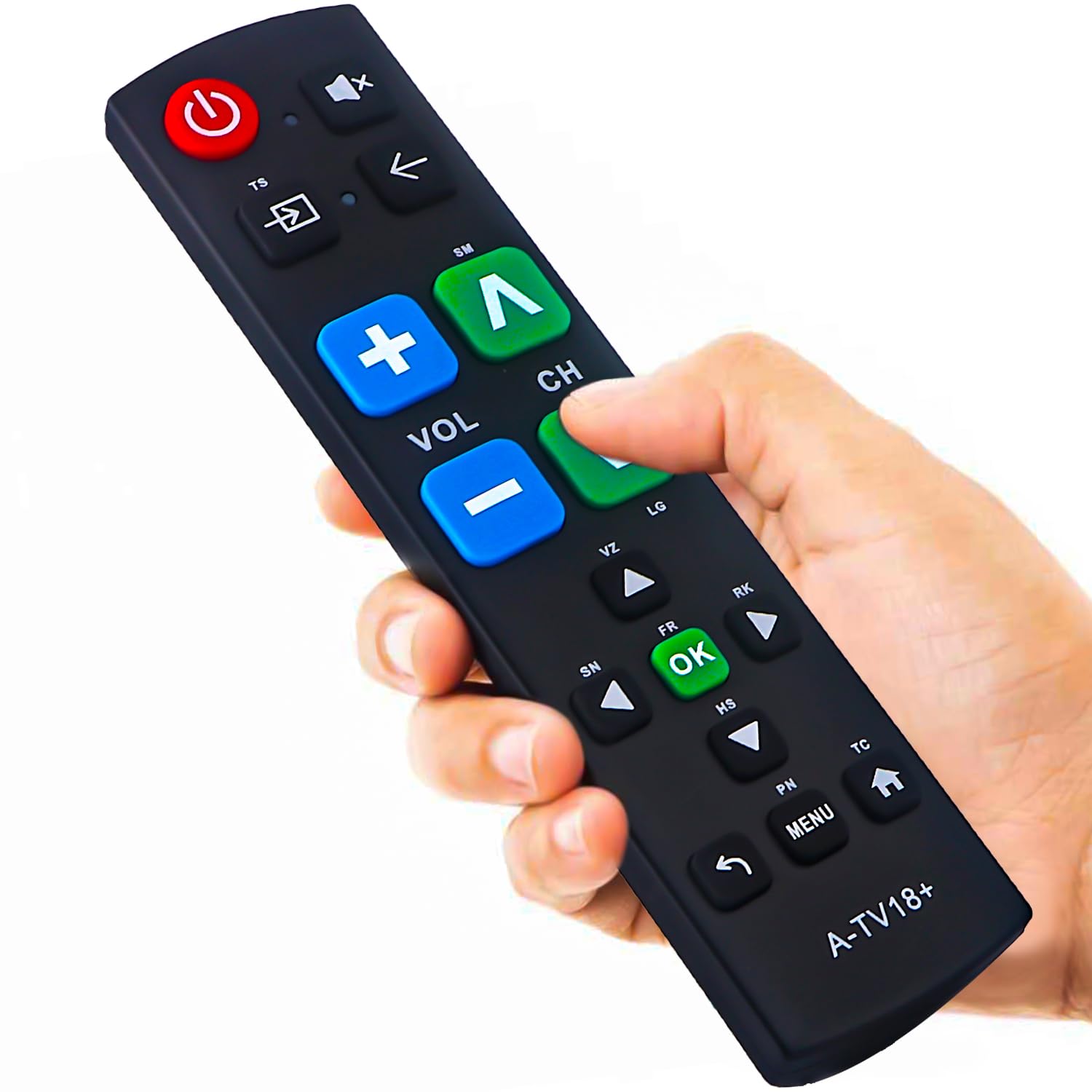
Thirty-nine oversized buttons for a household where tiny keys are the enemy.
This is the pick for grandparents and anyone with limited dexterity or eyesight. It carries 39 buttons with tactile feedback and an extra-large enter key, so pressing the right one does not require pinpoint aiming. It also works across Samsung, LG, VIZIO, Sony, Hisense, Philips, Panasonic and Sharp TVs — a broad spread.
Compatibility with every brand is also where you have to read carefully. The listing is universal, and the mix on function buttons is what people flag most; some keys may not map the way they do on your original. It does not work with streaming devices or cable boxes, so this is a TV-only remote. Setup needs no programming — batteries in and it runs.
It works the moment the batteries go in, with no programming, which makes it a practical gift for a relative who finds the factory remote’s small keys fiddly. Range is 10 meters, in line with the OEM Roku pick.
Why a senior household likes it
- 39 big buttons with tactile feedback and an extra-large enter key
- Works with Philips plus Samsung, LG, VIZIO, Sony, Hisense, Panasonic and Sharp
- No programming — batteries in and it responds
- Free replacement inside a 90-day warranty
What to know going in
- Universal, not Philips-specific — some function keys may not map exactly like your original
- Does not control streaming devices or cable boxes
Choose it if: small buttons are the daily frustration and you want one big-keypad remote for a Philips TV in a mixed-brand house.
Different pick if: you want an exact-match Philips keypad for a specific model — check the model-specific picks above.
Know the Specs
Infrared Range (Feet and Meters)
Infrared is the invisible light beam your remote fires at a sensor on the TV. It needs a clear line of sight, so range tells you how far back you can sit. Sellers list it either in meters (10 to 15 here) or feet (30 to 40), and both measure the same thing — distance to the TV sensor. Larger numbers mean more tolerance for a long room or controlling the set from a doorway. A cushion or couch arm in the path of the beam will block it, no matter the rating.
Button Count and Shortcut Keys
More buttons usually means the full original layout is present, so volume, channel, input and playback all live on the keypad. Fewer buttons with dedicated shortcut keys favor speed — one press opens Netflix, YouTube, Google Play or Tubi. When a spec sheet shows a low number like 4, check whether that counts the shortcut keys rather than the whole keypad. The full keypad, voice button and streaming shortcuts are what you actually use every night.
Voice Search and Pairing
A voice remote has a microphone you activate to speak a title. Before it works, most of these pair with the TV by holding volume-down and the mic key together for a few seconds until an indicator light flashes. Once paired, the pairing is remembered. Remotes without voice skip that step entirely, so if you want zero setup, choose a button-only model.
Battery Type and Power
Most remotes here run on AAA alkaline cells, and several listings note batteries are not included. That is the small hidden cost — buy a pack when you order. A few run on 2 AAA batteries; check the item’s own listing for the exact count before you unbox.
Common Questions
Will a generic universal remote control my Philips TV without a model match?
How do I find my Philips TV model number before ordering?
Do these remotes work on older Philips Roku TV devices?
Can the voice remotes control an ordinary Philips TV?
What is the difference between a Philips Roku remote and a Philips Google TV remote?
Do I need to pair a replacement remote or will it just work?
How far away can I be and still change the channel?
Are batteries included, and what type do these remotes use?
Can the big button remote control a streaming device instead of the TV?
The Bottom Line
For most Philips owners, the tv remote control for philips tv winner is the OEM URMT21CND016 because it drops straight into a Philips Roku set with zero programming and a 25-button layout that mirrors the original. If voice search is what you are after, grab the PZL RF439A-V06 for its 40-foot reach and talk-to-search pairing. And for a senior household where small keys are the fight, the Gvirtue big button remote is the one to pick up. Each pick here matches a specific Philips set family, and the top-rated model carries 4.5+ stars across 700+ owners.
How we choose
We do not accept paid placement. Every pick is matched to a real buyer and a real use-case; we do not hands-on test units.
Sources
Specifications: manufacturer listings and product documentation. Review insights: verified customer reviews, as of November 2026. Pricing: not shown on this page (it changes often); check the current price via the retailer link.
As an Amazon Associate, Tactical Gear Guy earns from qualifying purchases. This does not affect which products we feature.