Specs are compiled from manufacturer listings and verified buyer reviews and can change over time — please confirm the key details on the product page before buying.
If your flat-screen or old tube TV still turns on but suddenly shows nothing but static, the fix is a small box that pulls free broadcast channels out of the air and feeds them into your set. These boxes receive ATSC digital signals (the over-the-air TV standard used in the US) through an antenna, then send a clean picture to your TV over a coax or HDMI cable. You pay once for the box and watch local news, weather, and network shows without a cable bill.
This guide is built by comparing the manufacturers’ published specifications and the patterns across verified customer reviews, so you get each pick’s real strengths and trade-offs instead of marketing spin.
Some boxes here add recording to a USB drive, some hide behind a wall-mounted TV, and some are built for a cable feed rather than an antenna. Below you get the honest differences so you can match one to your setup.
This breakdown covers nine converter boxes and what each one actually does for your screen, so you can pick the right TV Receiver Box without guessing.
Top Picks


How To Choose The Best TV Receiver Box
Before you buy, answer one question: where is your picture coming from? A roof or indoor antenna means you need an ATSC tuner. A basic cable line without a cable box means you need ClearQAM (the tuner mode that reads unscrambled cable channels). Some boxes do both; some do only one. Getting this wrong is the single most common reason a box shows nothing after setup.
Antenna versus cable feed
An ATSC box grabs free over-the-air broadcasts and needs an antenna connected to its RF input to work at all. A ClearQAM-capable box can also read unscrambled channels straight from a cable wall jack. If you are cutting cable entirely, the antenna side is the one that matters, and the box needs to sit near both your antenna cable and your TV.
How you connect it to your TV
Coax (the round screw-on cable) is the old reliable path and works on nearly any TV. HDMI carries a sharper 1080P picture where your TV supports it. Several boxes here include both, and a couple bundle the cables in the box so you are not hunting for an extra lead on setup day.
Recording and the USB drive
Recording needs an external USB hard drive plugged into the box — these units generally will not record to a small flash stick. Check the drive size limit and file format the box lists before you buy, because a drive that is too large or formatted the wrong way simply will not mount.
Side-by-Side Comparison
| Model | Best For | Channels Listed | Tuner Support | Connection | Amazon |
|---|---|---|---|---|---|
| Magnavox DTV Digital to Analog Converter★ Best Overall | Basic antenna-to-old-TV swap | 8 | ATSC | RF in / RF out | Amazon |
| iView 3300STB ATSC Converter BoxBudget Recorder | Recording on a tight budget | — | ATSC + ClearQAM | HDMI, USB | Amazon |
| iView 3500STB IIISharpest Picture | Sharp picture on a budget | — | ATSC + ClearQAM | HDMI, USB, A/V | Amazon |
| iView 3500STBA III | Cutting a cable bill | — | ATSC + ClearQAM | HDMI, USB | Amazon |
| ZJBOX Digital Converter Box | Hiding behind a wall-mounted TV | — | ATSC | HDMI, 3RCA, component | Amazon |
| Mediasonic HW135STB Dongle | PC-monitor and projector setups | — | ATSC + ClearQAM | HDMI, USB-C | Amazon |
| Mediasonic HomeWorx HW250STB | Weak-signal areas | — | ATSC + ClearQAM | HDMI, Coaxial, USB | Amazon |
| RCA DTA-800B1 | VCR and DVD recorder stacks | — | ATSC | Coaxial | Amazon |
| Zenith DTT901 | Low-power local stations | — | ATSC + analog pass-through | Coaxial (F-type) | Amazon |
Detailed Reviews
1. Magnavox DTV Digital to Analog Converter
Our pick — 4.0+★ from 500+ verified ratings; the strongest balance of quality and price.
The no-fuss box that feeds an antenna signal into an older TV over plain coax.
The Magnavox TB110MW9 does one job and does it without drama: it takes an antenna feed on the RF input and pushes the picture back out through an RF output. That means you can run it into an older TV using the same round coax cable you already own. It weighs 1.3 pounds, so it sits quietly on a shelf or the top of the set without needing to be bolted down. The on-screen menu comes in three languages, which helps if someone in the house prefers Spanish or French menus over English.
The core spec is its ATSC tuner, the chip that reads free over-the-air digital broadcasts. This box is the one to lean on when a relative’s old tube TV goes dark after a station switch. Buyers report it works well with older TVs and pulls in the local channels they used to pay a cable package for. It scans and locks local public digital channels cleanly. Channel switching happens through a straightforward up/down control rather than a deep menu dive.
Where it holds its ground against the twin iView boxes below is simplicity — no USB recording to fiddle with, no media-player menus to learn, and no ClearQAM mode to second-guess. If a plain antenna-to-TV bridge is all you need, the extra features on the other units just add setup steps. It also lists 8 channels.
What earns its keep
- RF in and RF out let it drop into an older TV with the coax you already have
- Trilingual on-screen display covers English, Spanish, and French menus
- 1.3-pound body sits flat on a shelf or TV top with no mounting hardware
- Runs on standard 120-volt AC house power
The honest limits
- No HDMI output, so picture rides the coax path only
- No USB recording or media-player functions
- Fewer ports than the dongle and box units here
Reach for this if: an older set needs a clean antenna-to-TV handoff and you want zero setup complexity.
Look elsewhere if: you plan to record shows or need an HDMI lead into a newer panel.
2. iView 3300STB ATSC Converter Box with Recording
The cheapest box here that records shows to a USB drive up to 4TB.
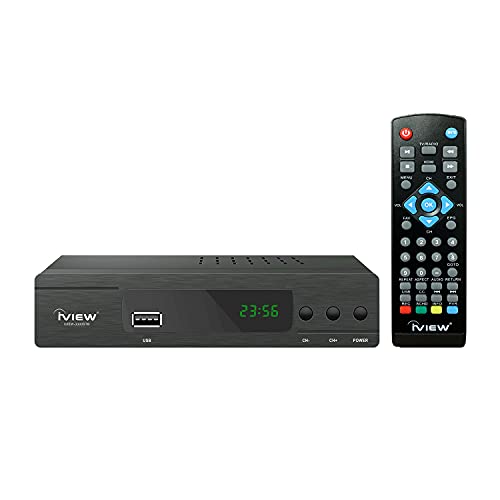
Tape a show, watch it later — that is the draw here. The iView 3300STBA has a clock function and a recording feature, so you can save programs for future viewing instead of rearranging your evening. Plug a USB drive into its port and it also turns into a media player: videos, music, and photos off that drive play through the box. It accepts portable hard drives up to 4TB, which is plenty of room for a season of shows.
Picture and sound travel out over HDMI or through the older A/V connection, and the box reads both ATSC over-the-air signals and unscrambled ClearQAM cable channels. It is aimed at US, Canada, and Mexico regions only, so it is not a travel box for overseas use. The 3.78-inch width means it tucks onto a narrow shelf without claiming much room.
The honest sticker is reliability. This is the pick with the most split feedback of the iView trio — some units hum along fine, others quit early. Treat it as a low-cost first recording box rather than a decade-long workhorse, and keep your warranty paperwork (one year) close.
What you gain: recording plus a USB media player for the lowest outlay of any box here that records — the recording feature is the trade you are making.
Set your expectations: mixed owner feedback on how long it lasts means this is the budget-first choice, not the safe-for-years choice.
Worth it when: you want to try recording shows without a big commitment, and 4TB of USB drive space is more than enough.
Think twice if: you need a box to run untouched for a long stretch — reliability is the soft spot.
3. iView 3500STB III ATSC Converter Box
The iView owners single out for the clearest picture of the three.
Of the three iView boxes on this list, the 3500STB III is the one owners single out for picture quality that lands as strikingly clear on screen. It pulls local over-the-air channels through its ATSC tuner and reads unscrambled ClearQAM cable feeds too. An A/V cable comes in the box, so the old-style hookup works without a store run on setup day.
Recording works the same as its siblings — a USB drive up to 4TB holds your saved shows, and the box doubles as a media player for video, music, and photos off that drive. A learning remote means you can fold your TV’s controls into one handset instead of juggling two.
What you trade for the sharper picture is less breathing room in the wallet department than the plainest box here, and the same plastic-bodied build as the rest of the family. Nothing about the chassis feels armored. But if a crisp image is what you notice first when you switch on, this is the iView that delivers it.
The case for it: the picture is the standout — clear visuals, cable-matching clarity, and a learning remote that collapses two controllers into one, plus 4TB of recording room.
The catch: plastic shell, no metal armor, and it costs more than the budget iView above.
Best for: viewers who care most about how the picture looks on a standard HDTV.
Not for: anyone who wants a heavy-duty metal case — this one is plastic throughout.
4. iView 3500STBA III Converter Box
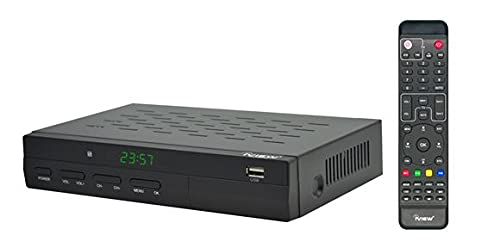
Built for the household replacing a rented cable box with free ClearQAM and antenna channels.
If the goal is to stop paying for channels you barely watch, this box replaces a rented cable box for the free ones. It reads unscrambled ClearQAM cable feeds and over-the-air ATSC signals, so it can replace a rented cable box for the free channels you still get. Owners mention it cuts their monthly cable cost by replacing a rented box for the free channels. Setup is quick — owners describe it as easy to get running.
It records shows to a USB drive up to 4TB and plays media back off that same drive. The box outputs stereo audio and works with both a computer monitor and a television, so it can revive a spare monitor as a small TV. Dimensions of 8.66 by 1.79 by 7.95 inches keep it flat and low on a shelf, and it weighs 1.3 pounds.
The honest note is that the long-run reliability is uneven — mixed feedback on how consistently it keeps working, with the occasional report of a unit that gives out early. Picture quality and value are the parts owners consistently rate positively. Approach it as a strong value box with a bit of luck-of-the-draw on longevity.
Why it makes sense
- Reads both ATSC antenna and unscrambled ClearQAM cable
- Records to a USB drive up to 4TB
- Works with a computer monitor as well as a TV
- Easy setup reported by owners
What to watch for
- Reliability feedback is uneven across units
- Plastic body, not a metal chassis
- Fewer bundled extras than the ZJBOX below
Pick it when: the goal is trimming a cable bill and you want recording in the mix.
skip it if: you want the longest odds of a trouble-free unit — the build is not reinforced.
5. ZJBOX Digital Converter Box for TV
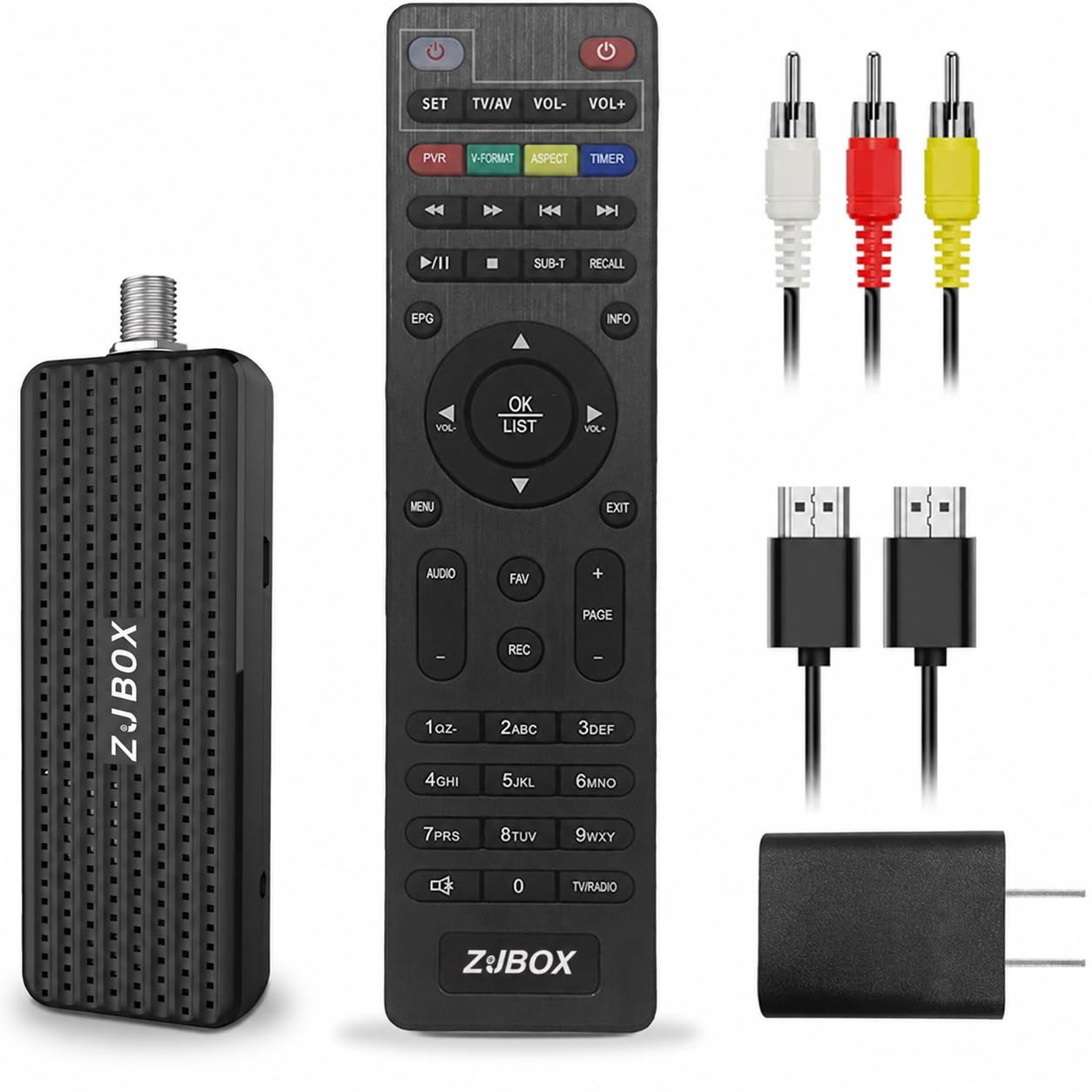
The 4-by-1.4-by-0.7-inch box that hides behind a wall-mounted TV on a 5V USB adapter.
Measuring 4 inches long by 1.4 wide by 0.7 tall, this box is built to hide. It runs on a 5V USB adapter that ships in the box, so it works especially well for a wall-mounted set where there is no shelf to rest anything on. Feed it an ATSC antenna or cable signal and it outputs to a TV, a projector, or a computer monitor. Three video paths are on board — HDMI, 3RCA, and component — and HDMI plus 3RCA cables are included so you are not buying leads separately.
The 1080P output over HDMI keeps the image sharp on a modern panel, assuming your TV supports that resolution. A two-in-one learning remote can control the box and the TV together, though it takes a AAA battery you supply and needs pairing first, using four programmable buttons. Recording to an external hard drive works up to 4TB on FAT32 format, or up to 32GB on a flash stick. Extras include an electronic program guide, channel favorites, scheduled recording, closed captions, timer on/off, and parental controls.
Owners describe it working right from the start and delivering excellent quality for general watching. The honest limits are channel coverage and compatibility, which split between strong and disappointing depending on the household, and occasional reports of a soft screen image. On a wall mount with a modest antenna, it does its job with almost nothing showing.
The real hook: a 4-by-1.4-by-0.7-inch body plus a bundled 5V adapter makes it the tidy choice for a wall-hung set, with 1080P over HDMI and all three video cables in the box.
The trade-off: channel coverage and compatibility land in mixed territory, and you must supply the AAA battery and pair the remote yourself.
Fits best: a wall-mounted TV or projector where the box needs to disappear, with a good antenna attached.
Consider the HomeWorx instead if: you are in a weak-signal spot where reception strength decides everything.
6. Mediasonic HW135STB Dongle Converter

A 1.7-ounce dongle that turns a spare computer monitor into a small TV.
This is the lightweight of the group at just 1.7 ounces, and it is shaped to hang off a TV’s USB port rather than sit on a shelf. It draws power from the TV’s USB-A port or a 5V charger, and the main unit uses a USB-C power connector so you can swap in a longer cable if you need one. An IR receiver with its own display panel shows the channel number and sub-channel, which means you can see what is on without firing up the TV’s full menu.
It outputs 1080P over HDMI with Dolby Digital audio and comes with a 3.3-foot HDMI cable and an A/V cable in the box, plus a large remote. ClearQAM support means it can read unscrambled cable channels too, not just over-the-air ATSC broadcasts. Recording and pausing live TV works when you attach a USB 2.0 or 3.0 external hard drive up to 4TB — a flash drive is not recommended here, and recording may need a 5V/2A charger to power the drive.
The catch is the power accessories: no 5V charger and no AAA battery for the remote are included, so you provide both. It also will not work as a tuner when plugged directly into a computer. Set those two expectations and this becomes an inexpensive way to pull free channels onto a desktop monitor.
What wins: the built-in display panel showing channel and sub-channel, 1080P HDMI with Dolby Digital audio, and 4TB recording support in a 1.7-ounce package.
Grab a charger: no 5V adapter and no remote battery ship with it, so budget for those before setup day.
Made for: a spare monitor or a TV whose USB port is free, where a dongle can hang out of sight.
Pass if: you have no 5V charger on hand or you want to run it straight into a computer.
7. Mediasonic HomeWorx HW250STB Converter Box

The sealed metal box that holds a signal where plastic units start to crack.
It comes in a metal case, unlike the plastic-bodied iView units, and a front display shows channel and sub-channel plus a clock in standby. A 5-foot HDMI cable, a large remote, and a front panel are all part of the latest batch. It outputs 1080P over HDMI with Dolby Digital audio and includes a channel 3/4 hard switch for older TVs.
Recording and pausing live TV works with a USB 2.0 or 3.0 external hard drive up to 2TB — note that figure is lower than the 4TB ceiling on the dongle and iView boxes. An SD front display and ClearQAM support round out the feature set, though ClearQAM channels must be unencrypted to come through. Latest firmware is V1.7. There is no ATSC 3.0 support, and it will not work with TiVo or cable providers like Comcast, DirecTV, DISH, or Time Warner.
Reliability is the split note here: some units work right from the start for the long haul, others fail, so the spread between great and dud is real. The 12.48-ounce metal body gives it more heft than the plastic units, but that does not guarantee a longer life. Buy it for the reception, and check the return terms before you commit.
Where it earns the upcharge: the signal lock and front display — the display shows channel and sub-channel and a standby clock, and reception holds steady in spots where weaker boxes falter.
Don’t count on: a long life guaranteed by the metal case — reliability feedback splits between working right from the start and failing early.
Right choice for: weak-signal areas or a home where the antenna is far from the TV.
Want more recording room? The dongle above gives up to 4TB where this tops out at 2TB.
8. RCA DTA-800B1 Digital to Analog Converter Box

The one that plays nice with the VCR and DVD player still in your rack.
Owners working with VCRs, DVD players, and Blu-ray recorders report this box fits right into their existing stack. The dual-position body lets it stand vertical or lie horizontal to suit your shelf, and it mounts flat against the set. Setup is a plug-in affair: antenna in, coax out to the TV, then flip the CH3/CH4 switch to match your set. A coax cable comes supplied, so the round connection is covered from the start.
It displays all multicast channels and all DTV formats, and its big-button universal remote can drive most TV brands as well as the box itself. That means one handset for both devices, which simplifies a crowded coffee table. The 4-star rating across 550+ owners puts it near the top of the confidence pile in this lineup, and picture quality is reported as close to what a cable feed delivered.
Turn it on when: the living room already has a VCR or DVD recorder and you want the new box to slot in without rewiring everything.
One honest limit: channel-count feedback splits — some scans come back full, others miss stations, so run a manual scan if the first pass feels short.
The right buyer: someone keeping a recorder or VCR in the chain who wants a simple CH3/CH4 handoff.
Look to the HomeWorx instead if: recording and a display panel matter more than stacking alongside old gear.
9. Zenith DTT901 Digital TV Tuner Converter Box

Keeps the low-power local stations a straight digital box quietly drops.
Analog pass-through is the feature that sets this Zenith apart — it lets low-power TV station broadcasts keep coming through even as the box handles digital channels. If a nearby community station or a small local broadcaster still runs an analog signal, a box without pass-through can knock it off your lineup. The DTT901 keeps it. It also carries parental controls for managing what the kids can pull up and advanced closed captioning options, both controlled from the remote.
Connection is simple: the supplied RF cable runs from the box to your TV, and the F-type coax connector does the work. Customers note easy setup and note it is straightforward to manually add channels when a scan misses one. Reception is a strong point — it holds onto signals on channels that come in weak, and pulls in at least 10 solid channels in testing areas. Clear images round out what owners notice. The 1.7-pound body in 6.4-by-8.5-by-1.8-inch dimensions sits flat and low.
This is the premium-priced, older-generation option on the list, so weigh that against the feature set — the same money buys more recording room and newer ports elsewhere. What you are paying for is the stable reception and the pass-through feature that cheaper boxes leave out. For a household with low-power stations in range, that is the whole ballgame.
Why it holds up
- Analog pass-through keeps low-power TV stations visible
- Excellent weak-channel reception that doesn’t drop the signal
- Manual channel add for stations a scan skips
- Parental controls and advanced closed captioning
What you give up
- No USB recording or media-player functions
- Coax-only output, no HDMI
- Premium price against newer features elsewhere
Choose it when: low-power or analog local stations are in range and you refuse to lose them.
Hold off if: you want HDMI or recording — this box sticks to the coax path.
Know the Specs
ATSC and ClearQAM tuners
ATSC is the free over-the-air digital TV standard in the US, and a box with an ATSC tuner pulls those channels out of the air through an antenna. ClearQAM is the mode that reads unscrambled cable channels off a cable line. A box with both can work from either a roof antenna or a wall cable jack; a box with only ATSC needs the antenna to work at all.
RF, coax, and HDMI connections
RF and coax both mean the round screw-on F-type cable that has carried TV for decades — it fits nearly any set, old or new. HDMI is the flat rectangular connector that carries a sharper digital picture at 1080P where your TV supports it. A box with both gives you a fallback if one path does not suit your set. Cables bundled in the box save you a trip to buy leads.
USB recording and drive format
Recording uses an external USB hard drive, not a small flash stick in most cases. Watch the drive ceiling — some boxes here accept up to 4TB, others top out at 2TB. File format matters too: one unit lists FAT32 for its hard drives. A drive that exceeds the ceiling or is formatted the wrong way simply will not mount, so match it to the box’s spec.
Analog pass-through and 1080P output
Analog pass-through keeps low-power TV station broadcasts flowing to your TV even as the box handles digital channels — a feature that boxes without it cannot offer. 1080P output over HDMI sets the sharpest picture the box can send, though it only appears if your TV also supports that resolution. On an older set, the picture falls back to the coax path.
Common Questions
Do I need an antenna for one of these boxes to work?
What is the difference between ATSC and ClearQAM on these boxes?
Can I record shows on a USB flash drive instead of a hard drive?
Will one of these boxes work with my old tube TV?
What does analog pass-through do on a converter box?
Why do some boxes hide behind a wall-mounted TV?
Do these boxes support the newer ATSC 3.0 broadcast standard?
Can I connect a converter box to a computer monitor instead of a TV?
Will a converter box work with a cable provider like Comcast or Dish?
Do I need to buy batteries or a power adapter separately?
The Bottom Line
For most people, the tv receiver box winner is the Magnavox DTV Digital to Analog Converter because it does the plain antenna-to-TV job cleanly through RF in and RF out, needs no fiddling, and holds 4.0+ stars across 500+ owners. If sharp picture and recording are what you care about, the iView 3500STB III brings clearer visuals and 4TB of recording room to the table. And for low-power stations or a weak antenna signal, the Zenith DTT901 with its analog pass-through is the one to reach for.
How we choose
We do not accept paid placement. Every pick is matched to a real buyer and a real use-case; we do not hands-on test units.
Sources
Specifications: manufacturer listings and product documentation. Review insights: verified customer reviews, as of November 2026. Pricing: not shown on this page (it changes often); check the current price via the retailer link.
As an Amazon Associate, Tactical Gear Guy earns from qualifying purchases. This does not affect which products we feature.