Specs are compiled from manufacturer listings and verified buyer reviews and can change over time — please confirm the key details on the product page before buying.
If you want the most reliable typing-and-trackpad setup on a newer iPad Air, the Apple Magic Keyboard is the one most owners keep — 4.5+ stars across 900+ ratings. But it only fits specific iPad Air models. Plenty of buyers get a better fit and a bigger trackpad from a cheaper third-party case. Your real decision depends on three things: your iPad model, your trackpad size, and if you need backlit keys for night typing.
This guide is built by comparing the manufacturers’ published specifications and the patterns across verified customer reviews, so you get each pick’s real strengths and trade-offs instead of marketing spin.
A trackpad keyboard turns an iPad into a laptop-shaped workspace, but the fit, the hinge and the trackpad size decide whether it feels natural. Below you get plain-English picks for trackpad keyboard for ipad.
Top Picks


How To Choose The Best Trackpad Keyboard for iPad
Start with the one thing you cannot change later: your iPad’s model number. Every case here fits a specific set of iPads, and a wrong pick means keys that misalign with your screen or a case that will not snap on at all. Find your model under Settings > General > About, then tap Model Number, and match the A-code to the listing.
Match the case to your iPad generation, not the screen size
An 11-inch iPad Air, an 11-inch iPad Pro and an 11-inch iPad (A16) are three different tablets with three different magnet layouts. The Dexnor case, for example, fits only the iPad 10th Gen and iPad (A16) 11th Gen — it does not fit iPad Air or iPad Pro models at all. Check the A-code list in each listing before you commit.
Decide how big a trackpad you actually want
A larger trackpad means less finger travel for tap, swipe and scroll, and it makes photo editing and spreadsheet work noticeably calmer. The ESR model runs a 65% larger trackpad on a 112 × 70 mm surface with full iOS gesture support. The WIWU lists a trackpad that is 65% larger with 18 gestures. If you mostly type emails, a standard trackpad is fine.
Pick your stand: floating cantilever versus kickstand
A floating cantilever lifts the screen up and off the desk on a hinge, like a laptop. A kickstand props the iPad from behind at an angle. Floating lifts the screen closer to your eyes; a kickstand lets you fold the keyboard away entirely. The RAYMCRAFT and Apple models use the floating style, while the Nillkin and ESR cases use step-stepless kickstands and magnetic supports.
Side-by-Side Comparison
| Model | Best For | iPad Fit | Trackpad / Keys | Battery & Power | Amazon |
|---|---|---|---|---|---|
| Apple Magic Keyboard★ Best Overall | Newer iPad Air owners who want a laptop feel | iPad Air 11″ M2/M3/M4; Air 4th & 5th gen | Built-in trackpad, 14-key function row, scissor keys | No pairing or charging; USB-C pass-through | Amazon |
| DANCESOUL iPad Air 11″ Keyboard CaseWidest Compatibility | Widest iPad compatibility in one case | Air 11″ M4/M3/M2, iPad 11th/10th Gen, Pro 11″ 1st–4th Gen | Larger multi-touch trackpad, 78-key scissor, 1mm travel | Bluetooth 5.3, USB-C recharge | Amazon |
| WIWU iPad Pro 11″ Keyboard CaseNight Typist | Night typists who want RGB backlight | iPad Pro 11″ M4/M5 (2024/2025) | 65% larger trackpad, 18 gestures, scissor 1mm travel | USB-C recharge in 2 hours, up to 100 hours use | Amazon |
| Dexnor Ultra-Light iPad (A16) Case | Commuters who want the lightest carry | iPad (A16) 11th Gen; iPad 10th Gen 10.9″ | Multi-touch trackpad, QWERTY scissor keys, white backlight | 650mAh; up to 200 hours typing, 1200 hours standby | Amazon |
| RAYMCRAFT iPad A16 / 10th Gen Case | Clean, stain-resistant finish with a floating stand | iPad 11th Gen (A16); iPad 10th Gen 10.9″ | Multi-touch trackpad, 11-color backlight, 3 brightness levels | Rechargeable, USB-C | Amazon |
| Nillkin Rugged Detachable Case | Job sites, travel and drop-prone days | iPad Pro 13″ M5 (2025); M4 (2024) | Multi-touch trackpad, 1.4mm travel, 7-color backlight | 500mAh; up to 100 hours typing, 180 days standby | Amazon |
| ESR iPad Pro 13″ Keyboard Case | Big-screen iPad Pro owners who want a large trackpad | iPad Pro 13″ M5/M4 (2025/2024) | Click-anywhere 65% larger trackpad, 112 × 70 mm, 78 keys | USB-C recharge | Amazon |
| Logitech Combo Touch iPad Air 11″ | iPad Air owners who want a detachable kickstand keyboard | iPad Air 11″ (M2); Air 4th & 5th gen | Large multi-touch trackpad, 78 keys, low-profile keys | Apple Smart Connector; no charging required | Amazon |
Detailed Reviews
1. Apple Magic Keyboard: Keyboard and Case — White
Our pick — 4.5+★ from 950+ verified ratings; the strongest balance of quality and price.
The keyboard case that needs no pairing and no charging — it powers off the iPad Air and floats the screen at laptop height.
If you own a newer iPad Air and want the least fiddly setup, this is it. The Magic Keyboard snaps on magnetically and powers straight off the iPad, so there is no Bluetooth pairing screen and no keyboard to recharge. The built-in trackpad sits under your thumbs at laptop height, thanks to the two-cantilever hinge that floats the screen up and off the desk. A full 14-key function row puts brightness, volume and media controls one tap away.
Reviewers keep coming back to how completely it disappears into the workflow, and the rigid two-piece build backs that up. The scissor-mechanism keycaps give real travel under your fingertips, and the USB-C connector on the hinge passes through charging so you top up the iPad without unclipping anything. Build quality is the other headline: this is a rigid two-piece case that folds to protect both the front and back of the screen.
If desk footprint matters to you, one spec comparison stands out. This case measures 10.7 x 10 x 1.1 inches, while the DANCESOUL case comes in at 10.04 x 7.64 x 0.75 inches. So the Apple runs 1.1 inches tall versus 0.75 inches, and 10 inches wide versus 7.64 inches — it takes up more room on a small desk. The catch is compatibility: it fits iPad Air 11-inch (M2, M3, M4) and iPad Air 4th and 5th generation only. If you own an iPad Pro or a base-model iPad, you have to look elsewhere. It also weighs 2.27 pounds, which is a real load in a bag.
What earns it the top slot
- Trackpad and keys work the instant it snaps on — no pairing, no charging
- 14-key function row plus scissor keycaps for laptop-grade typing
- USB-C pass-through charging through the hinge
- Folds to cover front and back of the iPad
Where it asks you to compromise
- Fits iPad Air models only — not Pro or base iPad
- At 2.27 pounds it adds noticeable weight to a commute
- White finish shows marks sooner than darker cases
Reach for this if: you have an iPad Air 11-inch (M2/M3/M4) or Air 4th/5th gen and want a keyboard that needs zero setup.
Look elsewhere if: your iPad is a Pro or a base model — the fit simply is not there.
2. DANCESOUL iPad Air 11 inch Case with Keyboard (M4/M3/M2)
One Bluetooth keyboard case that fits iPad Air 11-inch, iPad 10th/11th Gen and iPad Pro 11-inch 1st–4th Gen.
Here is the case for the mixed-household buyer: this DANCESOUL listing spans iPad Air 11-inch (M4/M3/M2), iPad 11th Gen (A16), iPad 10th Gen 10.9-inch, Air 5th/4th Gen 10.9-inch, and iPad Pro 11-inch 1st through 4th generation. That is the broadest fit list in this lineup by a wide margin. The keyboard itself is a 78-key layout with scissor-structure keys at 1mm travel and a dedicated row of iPadOS shortcuts, paired over Bluetooth 5.3 for a quick, lag-free connection.
The trackpad is the part that sells it. It supports full multi-touch gestures with smart palm rejection, so tap, swipe, scroll and app-switching all work without your palm hijacking the cursor. Quality is what buyers talk about most, and the design details back it up: skin-friendly PU leather, full-edge coverage, and a back stand that adjusts up to 160 degrees in landscape. It also flips to portrait for reading. At 665 g it stays in bag-friendly territory, and the dimensions — 10.04 x 7.64 x 0.75 inches — make it the slimmer of the two against the Apple’s 10.7 x 10 x 1.1 inches.
The honest trade-off lives in the connectivity and durability reports, which are genuinely mixed — some units pair cleanly, others need a retry, and a small number of owners describe the case coming apart early. Treat the hinge and edges with normal care. The QWERTZ keyboard layout is also worth confirming against what you are used to before you buy, since it is not the standard US arrangement.
Best all-rounder value: the compatibility list alone makes this the safest blind buy if you are unsure which iPad generation you are holding. Backlit keys, a detachable magnetic design and a 160-degree stand all land in one package.
Check before you click: the QWERTZ layout and the mixed reports on connection stability are the two things to weigh against the low entry point.
Buy it for: fitting whichever 11-inch iPad is on your desk right now.
Pass if: you insist on a US QWERTY layout or want zero risk on wireless pairing.
3. WIWU iPad Pro 11 inch Case with Keyboard M4 M5
Built for the 2 a.m. typist — RGB backlight in three brightness levels, 100 hours per charge, and a trackpad 65% larger than standard.
This one is laser-targeted: it fits iPad Pro 11 inch M5 and M4 only, models A2836, A3006, A3357, A3358 and A3359. If that is your tablet, you get a 0.25-inch ultra-slim body that slides into a backpack without a bulge. A magnetic 3-in-1 design converts the case into a typing keyboard or a foldable stand anywhere from 0° to 170°. Bluetooth 5.3 (the wireless standard that pairs without a cable) handles pairing instantly.
What owners consistently notice first is the look and the build — appearance and quality are the two things the review pages return to again and again, and the PU leather full-edge coverage with splash protection explains why. The typing feel holds up too: scissor-switch keys with 1mm travel, quiet enough for a library or an office, and a backlight system with multiple RGB colors across three brightness levels (low, medium, high) on laser-engraved keys.
Battery is the sleeper spec. A 2-hour USB-C charge buys up to 100 hours of use, which covers a long-haul flight or a week of classes between plugs. The magnetic attachment is the part to be realistic about — it holds for desk work and viewing, and some owners find it looser than they would like when carrying the tablet by the screen alone. Auto sleep/wake on open and close keeps the draw low.
Why the backlight matters: a dark cabin or a dim cafe is exactly where a standard keyboard forces you to hunt for keys. Three brightness levels and laser-engraved, glare-free keys solve that.
Spec check: the trackpad is 65% larger with 18 gestures, and the whole thing weighs nothing near the Apple’s 2.27 pounds.
Made for: iPad Pro 11-inch M4/M5 owners who type at night or in low light.
Not for: iPad Air or base iPad buyers — the magnet layout will not line up.
4. Dexnor iPad (A16) 11th/10th Generation Case with Keyboard

At 1.16 lbs, this is the case you forget is in the bag — and its 650mAh battery runs 200 hours of typing per charge.
If your iPad lives in a backpack, weight is the spec that matters, and this Dexnor is the lightest option here. It tips the scale at 1.16 lbs, which is roughly half the Apple Magic Keyboard’s 2.27 pounds. The 650mAh lithium polymer battery pushes up to 200 hours of typing without backlight and 1200 hours of standby, so charging becomes a monthly chore rather than a nightly one. Power management is thoughtful: open the case to wake the keyboard and iPad, close it to sleep both, and the backlight sleeps on its own after 45 seconds.
One design detail needs saying plainly: this is not a floating cantilever (a hinge that lifts the screen above the keyboard). The iPad sits flat on the keyboard base and the screen does not lift. In exchange you get a 120-degree ergonomic viewing angle, so the screen tilts to a comfortable spot for typing. An ultra-strong magnet keeps the tablet stable on a desk, couch, bed or lap. A built-in multi-touch trackpad handles multi-finger gestures for document editing and app switching. If your palm keeps triggering the trackpad, you can disable it by pressing FN and spacebar.
Quality and reliability are what reviewers return to most, and the build supports that read. The keyboard switches are responsive scissor style with a full shortcut row for brightness and volume, and a magnetic clasp plus pencil holder keeps the lid shut and your Apple Pencil within reach. The honest limit is the model list: it fits iPad (A16) 11th Gen and iPad 10th Gen 10.9-inch only, and not iPad Air or iPad Pro. A small number of buyers report trackpad jamming near the edge of the keyboard — worth a careful setup.
Why commuters pick it
- 1.16 lbs — the lightest case in this lineup
- Up to 200 hours typing and 1200 hours standby from a 650mAh battery
- Backlight with adjustable brightness for dark rooms and cabins
- Magnetic clasp and pencil holder keep the lid and stylus secure
What the flat design costs you
- No floating screen — the iPad sits flat on the base
- Fits iPad (A16) 11th Gen and 10th Gen only
- Occasional trackpad edge jamming reported on some units
Pick this for: campus life and daily commuting where every ounce counts.
Skip the idea if: you want the screen lifted toward your eyes at laptop height — that is a different case type.
5. RAYMCRAFT for iPad A16 11th/10th Gen Case Keyboard

A floating cantilever stand and 11 backlight colors, wrapped in a stain-resistant SemiSi-tech and PU leather shell.
The RAYMCRAFT opens the floating cantilever style to the base iPad — the screen lifts up on ultra-strong magnets to the angle you want, the way a laptop props its display. It fits iPad 11th Gen (A16) models A3354/A3355/A3356 and iPad 10th Gen 10.9-inch models A2696/A2757/A2777, and nothing else. The surface uses SemiSi-tech combined with PU leather, so spills and stains wipe off, and the fluffy lining guards against scratches on the screen.
The keyboard treatment is the other reason to look here: an 11-color backlight with three adjustable brightness levels, plus a full row of iPadOS shortcuts for brightness, backlight color, media and volume. Quality is the aspect owners lead with most often, and the physical details line up — ergonomic keys, a multi-touch trackpad, and a magnetic buckle at the opening that keeps the case shut in a bag. There is also a slot for the Apple Pencil so you are not fishing for it on a train.
The mixed signals show up around the magnet and the stand. Some owners find the magnetic hold secure; others find it does not grip the device firmly, and the stability reports split between sturdy and flimsy. Sized at 9.94 x 7.78 x 0.71 inches, it is a compact footprint that slips into slim bags. Call the magnet strength the thing to test carefully in the first week while you can still return it.
The draw: floating cantilever plus 11-color backlight plus a stain-resistant finish is a lot of physical case for one package, and it covers both the A16 and 10th Gen base iPads.
The watch-out: magnetic grip and stand rigidity are the two places owners split, so check the hinge tension early.
Great for: base iPad 10th/11th Gen owners who want a floating screen and a colorful backlit keyboard.
Think twice if: you need a rock-solid magnetic lock for one-handed carrying — this one is more desk-friendly.
6. Nillkin Rugged Detachable Keyboard Case with Trackpad iPad Pro 13″

Drop-tested to 1.2 meters with corner air cushions and a heavy-duty TPU frame — the case for job sites and concrete floors.
For anyone who carries an iPad Pro 13-inch onto a job site, into a workshop or on a plane, protection is not a side note. This Nillkin is 1.2-meter drop tested, with corner air-cushion bumpers, a heavy-duty TPU frame and a reinforced polycarbonate back. A sliding camera cover protects the lens and your privacy, and the stain-resistant faux leather wipes clean after mud, grease or coffee. It fits iPad Pro 13-inch M5 2025 (A3360/A3361/A3362) and M4 2024 (A2925/A2926/A3007).
Typing and pointing hold up. Scissor-switch keys at 1.4mm travel give real feedback under your fingers, and iPadOS shortcut keys put brightness, volume and media one tap away. Seven backlight colors across three brightness levels keep the keys readable in a dim lecture hall or a dark cabin. The multi-touch trackpad handles tap, pinch, swipe, scroll and drag with palm rejection, so you stop accidentally highlighting text while you type. The carbon-steel hinge is rated for 10,000+ open-and-close cycles.
The numbers that stand out: a 500mAh battery delivers up to 100 hours of active typing and 180 days of standby, and the whole case weighs 1.8 pounds. Sturdiness is what the review pages lead with, and the four modes — laptop, drawing, stand and tablet — back that up, because you can detach the keyboard and rotate to portrait for reading. The mixed signals come from attachment and connectivity; some units need a retry to reconnect. Check your model number in Settings first, since this does not fit the 12.9-inch Pro or any Air.
Built to take hits: 1.2-meter drop testing, TPU frame, camera cover and a 90°–155° stepless kickstand are the practical answer to a clumsy week.
Practical note: 1.8 pounds is real heft for a 13-inch tablet, and connection stability is the part to keep an eye on.
Best suited to: iPad Pro 13-inch owners who work outdoors or travel rough.
Choose another if: you want maximum lightness or have a 12.9-inch Pro or an Air.
7. ESR for iPad Pro 13 Inch M5/M4 Case with Keyboard
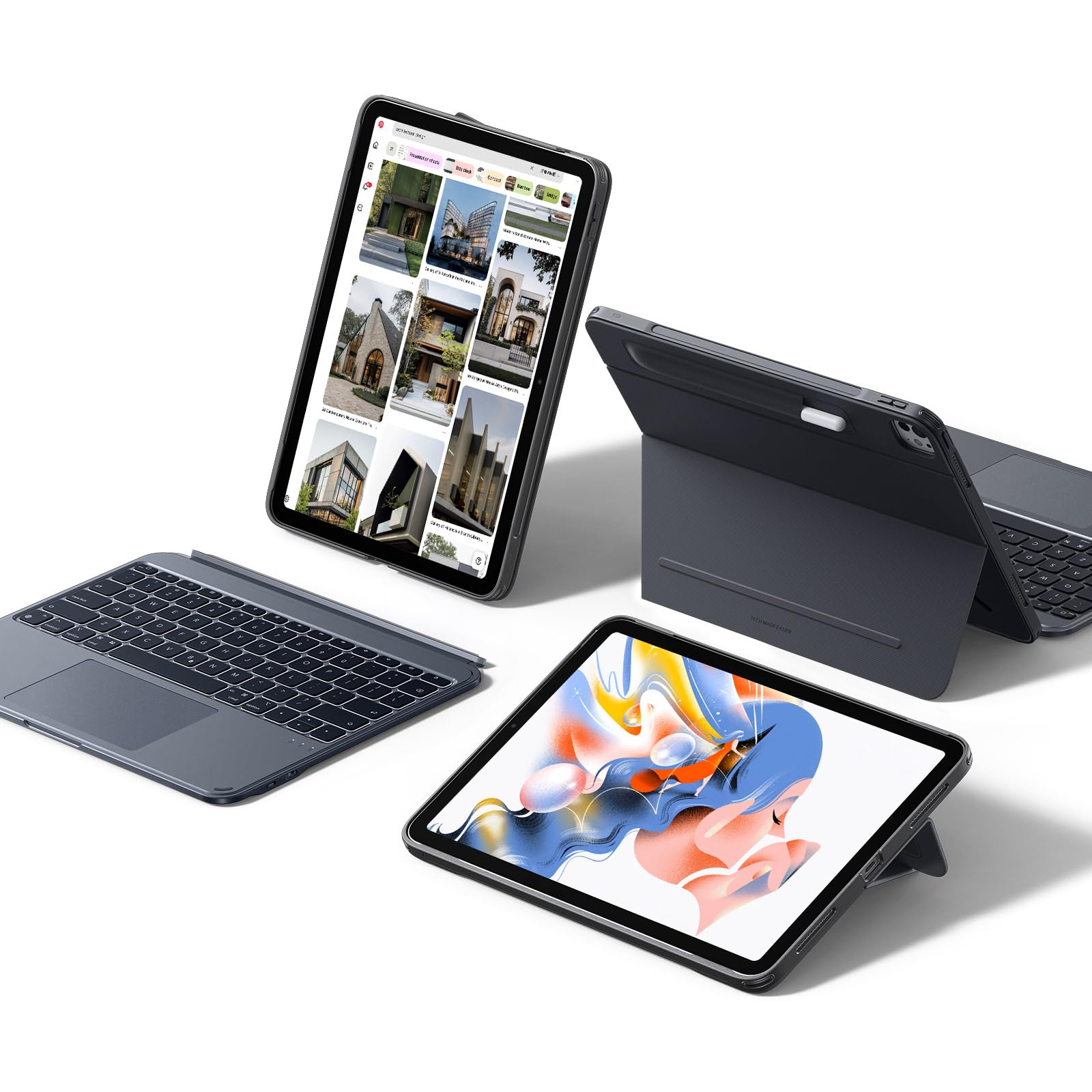
A 112 × 70 mm click-anywhere trackpad for the 13-inch Pro — 65% larger than standard and the biggest pointer surface here.
If you spend your day inside spreadsheets, editing apps or documents on a 13-inch iPad Pro, trackpad real estate is the deciding factor. This ESR case runs a 65% larger click-anywhere trackpad on a 112 × 70 mm surface with full iOS gesture support — swipe, pinch, double-tap, and app switching all land without reaching for the screen. The magnetic detachable design lets you pull the keyboard off for reading, watching or drawing and snap it back for typing.
The stand flexibility is the second selling point. A landscape stand adjusts from 20° to 75°, and a sturdy 20° low-angle magnetic support holds the iPad flat for writing or drawing. Portrait and landscape modes both work, so long documents and scrolling feeds get a comfortable orientation. The durable form-fit cover uses reinforced Air Guard corners and magnets to guard against scratches, drops and dust, and there is a stylus holder so the Pencil does not slide off.
Owners most often praise the quality, functionality and value here — this is described as a genuinely strong alternative to more expensive options. At 950 g, the weight is the price of that full-coverage build. The recurring caveat is magnet strength: the detachable keyboard and attachment are great for desk work, but some owners want a firmer grip. It fits iPad Pro 13-inch M5/M4 (2025/2024) only, with 78 keys on the board.
Where it wins: that 112 × 70 mm click-anywhere trackpad plus a 20°–75° stand plus portrait mode makes it a genuine laptop stand-in for a 13-inch Pro.
Weight trade: at 950 g it is the heavier side of the lineup — fine at a desk, noticeable in a backpack.
Go for it if: you want the roomiest trackpad for a 13-inch iPad Pro and often work in portrait.
Weigh the alternative if: you haul the tablet daily and need it lighter.
8. Logitech Combo Touch iPad Air 11 inch Keyboard Case

The keyboard snaps off and the kickstand stays, so you can sketch or stream without the keys.
This one is for the iPad Air owner who wants a case that changes shape with the task. An ultra-flexible kickstand holds the iPad at whatever angle the moment calls for, and the keyboard detaches entirely for sketching, watching or reading. Multiple use modes handle type, sketch, video and calls without taking the iPad out of the case. The connection runs through the Apple Smart Connector, so there is no Bluetooth pairing and no keyboard to charge — the iPad powers it.
The trackpad is Logitech’s largest yet, with familiar multi-touch gestures for swipe, pinch and double-tap. The keyboard itself has 78 keys with low-profile keys, a wrist rest and an integrated stand, and the aluminum-and-plastic build uses certified post-consumer recycled plastic in the Midnight Black version. Protection is a strength — a form-fit cover that keeps the iPad safe from scuffs and scratches, which is the aspect owners talk about most.
Stay realistic about the reviews here, because they genuinely split. The keyboard draws both enthusiasm and disappointment, and durability is the weakest signal in the block — some units work reliably on the Smart Connector, others do not hold a steady connection. It fits iPad Air 11-inch (M2) and Air 4th and 5th gen, so iPad Pro and base iPad owners need a different case. If you want a detachable kickstand setup and can live with that risk, the design is genuinely clever.
The clever part: a detachable keyboard plus flexible kickstand plus Smart Connector power is a genuinely flexible setup for mixed work and sketching.
The gamble: durability is the weakest signal for this model, so buy where the return policy is friendly.
Right choice for: iPad Air 11-inch owners who want a keyboard they can strip off for drawing.
Not the pick if: you want a proven, long-term-wearing connection — the reports here are mixed.
Know the Specs
Trackpad size and gestures
A bigger trackpad means less finger travel per swipe, and a click-anywhere surface lets you press anywhere on the pad instead of only the bottom edge. Gesture support matters just as much: multi-touch controls for tap, pinch, swipe and app-switching are what make an iPad feel like a laptop. The ESR runs a 112 × 70 mm surface with full iOS gesture support; the WIWU lists 18 gestures on a 65% larger pad. If you mainly type email, a standard trackpad is enough — edit photos and spreadsheets and you will feel the difference immediately.
Connection type: Bluetooth versus Smart Connector
Bluetooth keyboards pair wirelessly and carry their own rechargeable battery, so they work with almost any case design — the DANCESOUL uses Bluetooth 5.3, the WIWU and Dexnor use Bluetooth with their own batteries. The Apple Smart Connector, used by the Logitech, draws power straight from the iPad and pairs with no setup, but only works with cases designed for it. Bluetooth gives you flexibility across models; Smart Connector gives you zero-charging convenience on supported iPads. Neither is better — they solve different problems.
Backlight and brightness levels
Backlit keys matter more than they sound if you type in bed, on a plane or in a dim lecture hall. The RAYMCRAFT runs 11 colors across three brightness levels; the WIWU uses RGB backlight in three levels (low, medium, high) on laser-engraved keys; the Nillkin uses 7 colors across three levels. Brighter and colored backlights help in dark rooms, but always confirm the keyboard has a sleep setting so the backlight does not drain the battery while the case is closed.
Stand type and viewing angle
A floating cantilever lifts the screen up and toward you on a hinge, like a laptop — the Apple and RAYMCRAFT use this design. A kickstand props from behind at a set range: the Nillkin adjusts from 90° to 155°, the ESR from 20° to 75°, and the DANCESOUL stand adjusts up to 160°. The Dexnor is a flat design at 120° where the screen stays on the base. Pick a floating stand for typing comfort and a kickstand for drawing and portrait reading.
Common Questions
Will this keyboard case fit my iPad Air 11-inch?
Does a trackpad keyboard need Bluetooth or can it plug in?
How long does the keyboard battery last between charges?
Can I turn off the trackpad if my palm keeps clicking?
Is a floating cantilever better than a kickstand for typing?
Will a case with a built-in trackpad support my iPad photo editing?
Does the keyboard case protect the iPad screen when in a bag?
Can I use a trackpad keyboard case if my iPad has a screen protector on?
Is a 65% larger trackpad noticeably different in daily use?
What if my iPad is a base model — which case fits?
The Bottom Line
For most buyers, the trackpad keyboard for ipad worth starting with is the Apple Magic Keyboard because it needs no pairing, no charging and no compromise on typing feel. If your iPad is not an Air 11-inch, the DANCESOUL case covers the widest span of 11-inch iPads with a 160-degree stand and backlit keys. And if you carry a base iPad daily, the Dexnor at 1.16 lbs with 200 hours of typing is the lightest route to a trackpad workspace.
One practical nudge: the most satisfying setup is always the one that fits the tablet in your hand right now, so pull up your model number before you buy anything on this list.
How we choose
We do not accept paid placement. Every pick is matched to a real buyer and a real use-case; we do not hands-on test units.
Sources
Specifications: manufacturer listings and product documentation. Review insights: verified customer reviews, as of November 2026. Pricing: not shown on this page (it changes often); check the current price via the retailer link.
As an Amazon Associate, Tactical Gear Guy earns from qualifying purchases. This does not affect which products we feature.