Specs are compiled from manufacturer listings and verified buyer reviews and can change over time — please confirm the key details on the product page before buying.
You want a door that opens for you and stays shut for everyone else — without fishing for keys with an armful of groceries. That is exactly what a good smart lock does, and the gap between a great one and a frustrating one depends on entry method, battery routine, and hub requirements. Below you get nine locks ranked by how they actually behave at the door: what opens them, how long the batteries last, and where each one falls short. The top pick earns its spot on palm-vein scanning that works without a touch.
This guide is built by comparing the manufacturers’ published specifications and the patterns across verified customer reviews, so you get each pick’s real strengths and trade-offs instead of marketing spin.
Every lock here was checked on the things that decide a purchase: entry methods, battery life, weather rating, and hub requirements. Here is the honest rundown of the top rated smart locks.
Top Picks
How To Choose The Best Top Rated Smart Locks
Start with the one question that filters everything else: who needs to get in, and how do they want to do it? A household that comes home with full hands wants biometric entry. A rental host needs scheduled codes that expire on their own. A renter or someone deep in a smart-home setup needs the right hub protocol. Answer that first and the shortlist narrows fast.
Entry method: biometric, keypad, or both
Palm-vein and fingerprint readers let you open the door with no keys and no code — that is the fastest daily experience. Keypads with anti-peep entry (extra random digits you can type before or after your real code) suit guests and family who do not want to enroll a finger. A physical key backup is still worth having for the day the battery dies or the reader gets confused by wet hands.
Power and battery routine
Disposable AA cells are simple, but you buy them again and again. A rechargeable lock or one with USB-C backup saves that errand. An emergency USB-C port (a charging socket that lets a power bank wake the lock) means you can power it up if it runs flat. Check the stated battery window (how long it runs between changes) and decide if you want to swap cells or plug in a cable once in a while.
Connectivity: Wi-Fi, Matter, or Z-Wave
Built-in Wi-Fi means the lock talks to your app directly — no extra box. Matter over Thread and Z-Wave need a compatible hub or border router, but they can extend coverage and mesh reliability across a larger home. If you already run a smart-home system, match the lock to it so you are not buying a bridge you did not plan for.
Side-by-Side Comparison
| Model | Best For | Entry Methods | Battery Window | Weather / Grade | Amazon |
|---|---|---|---|---|---|
| WYZE Palm Lock★ Best Overall | Hands-free daily entry | Palm vein, keypad, app, key | 6-month main + 2-week backup | IP53, BHMA3 | Amazon |
| Veise VE06-LRental-Ready Pick | Landlords and rentals | App, code, IC card, e-key, key | — | IP54, BHMA/ANSI Grade 3 | Amazon |
| ULTRALOQ Bolt SEMatter Ecosystem Pick | Matter smart homes | Fingerprint, code, app, voice, key | Up to 18 months | IP65, ANSI BHMA | Amazon |
| WYZE Auto-Lock Bolt v2 | Fast fingerprint on a budget | Fingerprint, app, code, key | Up to 8 months (8 AA) | IP53, BHMA Grade 2 | Amazon |
| Tapo DL105 | Rechargeable, no AA waste | Fingerprint, code, app, Bluetooth, voice, key | Up to 1 year per charge | IP54, BHMA Certified | Amazon |
| Veise VE027-K | Families with lots of traffic | App, fingerprint, IC card, code, key, voice | Up to 240 days (8 AA) | IP65, BHMA/ANSI Grade 3 | Amazon |
| Kwikset SmartCode 260 | Simple keypad, no app | Keypad, key | 12 months (4 AA) | Grade 2 BHMA | Amazon |
| Kwikset HomeConnect 620 | Ring and Z-Wave setups | Touchscreen keypad, Z-Wave | 12 months (4 AA) | Grade 2 BHMA | Amazon |
| Yale Assure Lock 2 | Wi-Fi without a hub | Keypad, app, Apple Watch | — | Grade 2 BHMA | Amazon |
Detailed Reviews
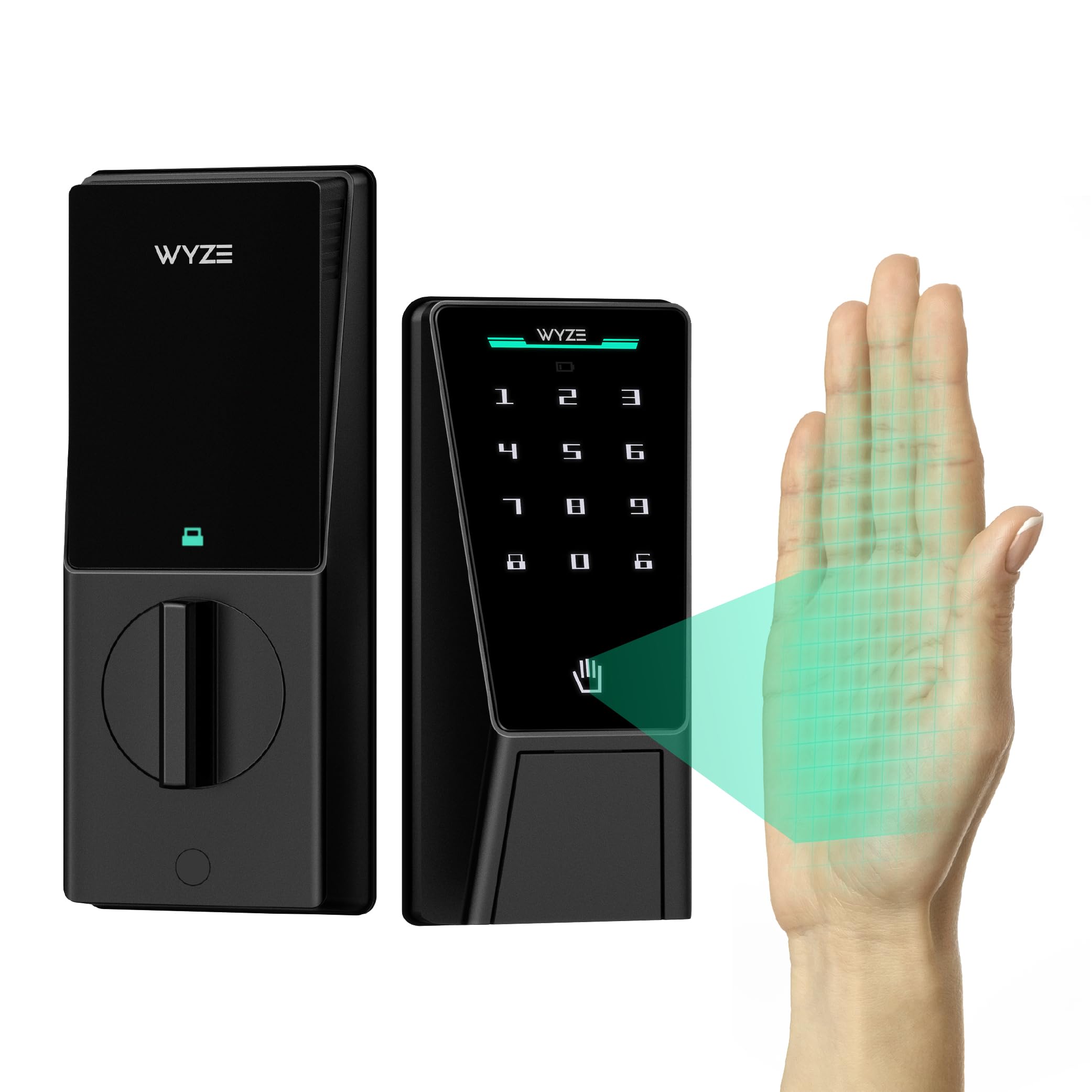
1. WYZE Palm Lock, Smart Door Lock with Palm Vein Recognition
Our pick — 4.5+★ from 850+ verified ratings; the strongest balance of quality and price.
Hover a hand and the door gives way — no touch, no key, no code.
You open the Wyze Palm Lock by holding your palm over a vein-pattern scan, so you never touch the hardware. That helps in winter, when you would otherwise pull off gloves for a fingerprint pad, and when rain leaves your hands wet. A millimeter-wave radar sensor (a motion sensor that detects a person nearby) wakes the lock only when someone is actually standing there. That is why the batteries stretch instead of draining on stray motion.
Power is handled two ways. A 6-month main battery carries a 2-week secondary, and if both give out an integrated USB-C port takes a power bank for an emergency open. The built-in gyroscope watches the door’s angle in real time and locks it once it senses the door has closed, which cuts down on false locks and jammed bolts. You get up to 50 guest codes on the illuminated keypad, and anti-peep entry lets you type extra digits before or after your real PIN so nobody reading over your shoulder learns it.
Rain and dust are covered by an IP53 rating (protection against dust and spraying water), plus BHMA3 certification (a build-quality grade for door hardware). Voice control runs through Alexa and Google Assistant, and you can open up straight from a Wyze Video Doorbell live feed. At 1.9 pounds it is a substantial piece of hardware. One note if you are comparing footprints: the listing dimensions read 12.71 x 8 x 3.62 inches, while the ULTRALOQ Bolt SE lists 2.95 x 1 x 2.95 inches. Check that spec-sheet gap against your door prep rather than taking it at face value.
Where it wins
- Touch-free palm-vein entry beats fumbling for keys with full hands
- Dual battery plus USB-C emergency power means you are not locked out on a dead cell
- Gyroscope-driven auto-lock reacts to the door actually closing, not a timer guess
- Up to 50 guest codes with anti-peep digit padding
What to weigh
- No Matter or Z-Wave option — Wi-Fi only for app control
- Palm scanning is a newer entry method, so some buyers will want the mechanical key backup ready
Built for: anyone who wants the door to open on approach with a hand gesture and never thinks about a key again.
Think twice if: you have already standardized your home on Matter or Z-Wave and want this lock inside that same ecosystem.
2. Veise VE06-L Smart Deadbolt Lock
A lever handle and deadbolt in one kit, built for the front door you rent out.
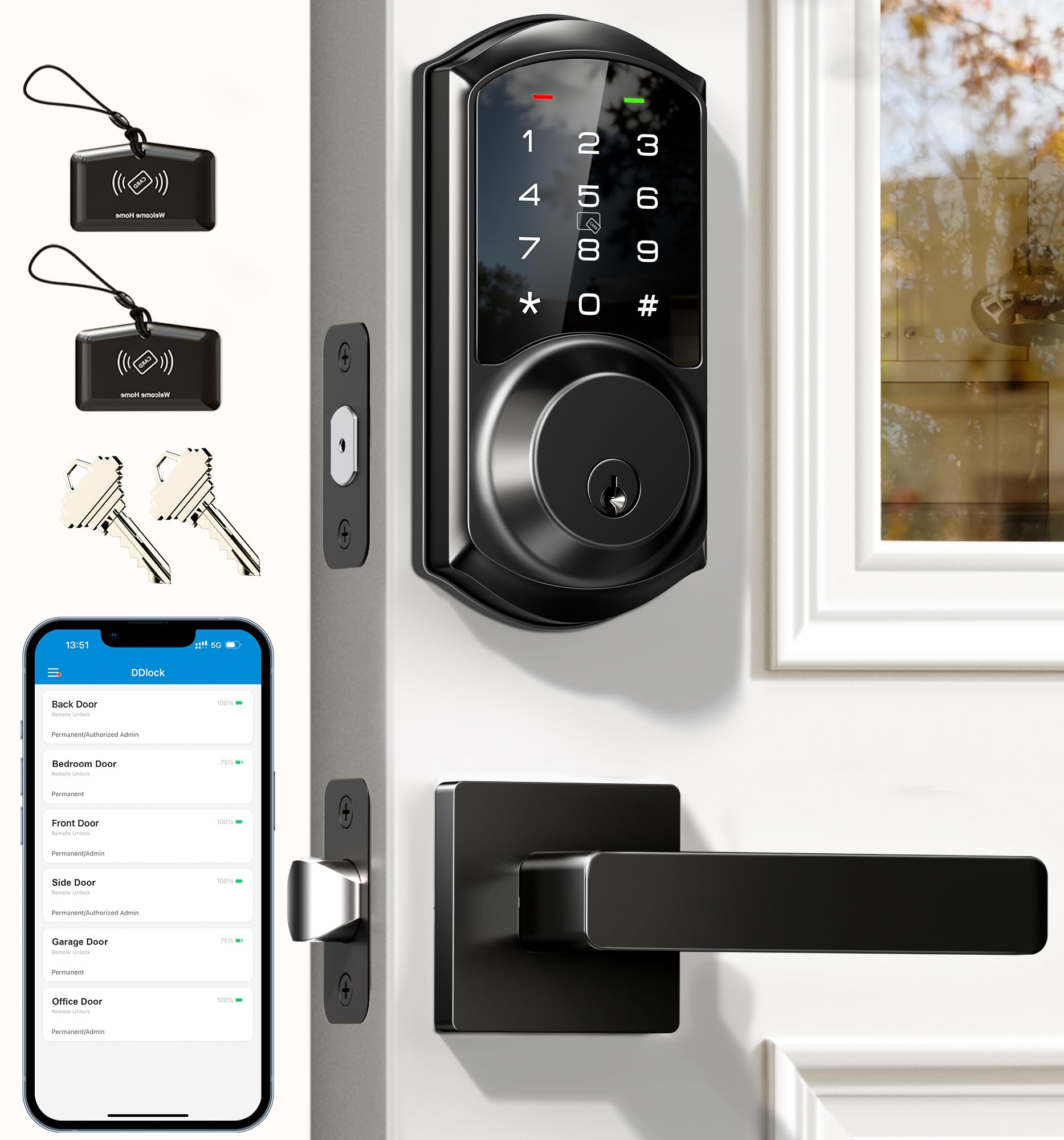
Most smart locks give you the bolt and nothing else. The Veise VE06-L ships with two lever handles plus the deadbolt, so the whole entry swaps out in one go. open up happens eight different ways: app, codes, web portal, IC cards with a 1,000+ capacity, e-key, authorized admin, a physical key, and Apple Watch. Auto-lock is adjustable from 5 to 900 seconds, and holding the “#” key for two seconds locks on demand.
The management side is where landlords will feel the value. The DDlock app and web portal carry no subscription fee, and you can grant or revoke e-keys, set permanent, scheduled, recurring, or one-time codes, and pull access logs remotely. Anti-peeping lets you pad the code with random digits, and the lock disables for two minutes after five wrong attempts. Store 250+ codes and delete one-time entries after use. It all runs on AES encryption stored locally on the lock’s chip rather than the cloud.
Build is solid zinc alloy, rated IP54 weatherproof and BHMA/ANSI Grade 3, with a stated lifespan exceeding 10 years. The catch is connectivity: remote access and Alexa or Google voice control need the G2 gateway, which is sold separately, so budget for that if remote control is the whole point. What wins buyers here is the build quality — it leads the feedback by a wide margin, with installation ease close behind.
Handle-and-bolt value: getting the lever handles in the box saves a separate purchase and a mismatched finish on the same door.
The gateway caveat: without the G2 gateway this is a local keypad and app lock, not a remote-control lock — plan the add-on or accept the limit.
Reach for this if: you manage rentals and want to hand out a code that expires on its own at checkout, no subscription attached.
Look elsewhere if: you want out-of-the-box remote access without buying a separate gateway.
3. ULTRALOQ Bolt SE Wifi Smart Deadbolt Lock
Seven ways in and the longest battery window on this list.
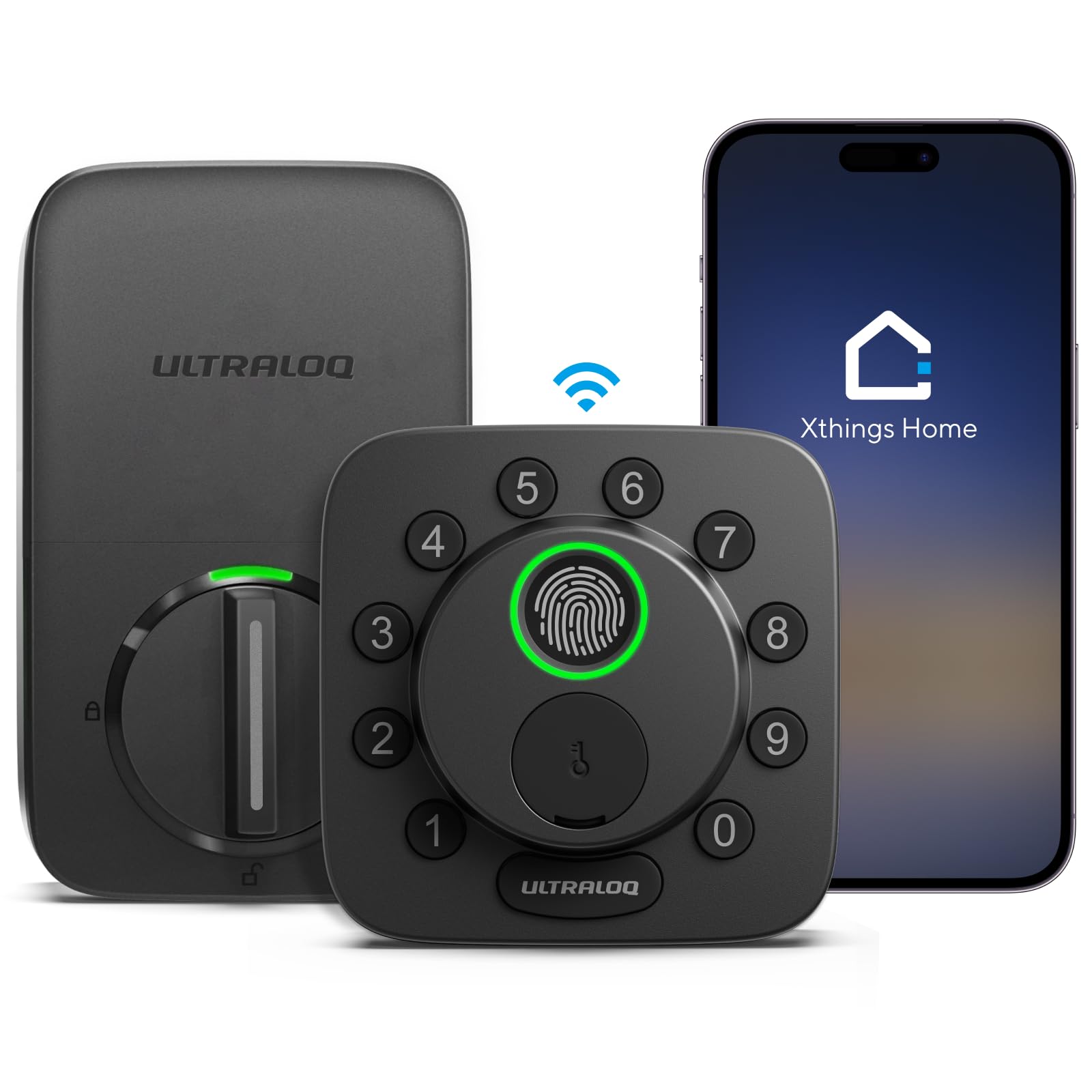
You get plenty of ways in with the Bolt SE: fingerprint ID for up to 50 prints, up to 50 passcodes, the smartphone app for Android and iOS, a web portal, e-key and code sharing, voice control through Siri, Alexa, or Google Assistant, and two mechanical keys. Built-in Wi-Fi handles remote lock and open up without a hub, though it runs on 2.4 GHz only (the slower, longer-range Wi-Fi band). The maker reckons you should keep the router within 70 ft of the lock for the best connection. Install is billed at 10 minutes with a screwdriver.
Battery is the headline. Thread’s low-energy mesh network pushes battery life up to 18 months, so battery swaps are a once-in-a-while errand rather than a routine. Matter over Thread adds remote management through Apple Home or other Matter apps, real-time notifications, and event history — but only if you have a compatible Thread Border Router. Without that hub, the Matter side of this lock sits dark, and you lean on the Wi-Fi and keypad side alone.
Zinc alloy construction, an IP65 weather rating, and ANSI BHMA certification cover the hardware for exterior doors. Auto-lock runs on a preset timer or the ULTRALOQ button for instant lock, and low-battery alerts warn you ahead of time. Fingerprint and auto-open up get mixed reactions — some find it reads on the first try, others find it finicky, so wet or dry hands can shift the experience. The auto-open up proximity feature also draws split feedback.
The draws
- Up to 18 months of battery life — the longest stated window here
- Seven entry routes including 50 fingerprints and 50 codes
- Matter over Thread fits Apple Home, SmartThings, and other Matter apps
- IP65 weather resistance and ANSI BHMA certification
The fine print
- Matter over Thread needs a compatible Thread Border Router to work
- Wi-Fi is 2.4 GHz only, so router distance matters
- Fingerprint and auto-open up behavior splits buyer experience
Best fit for: a household already building a Matter smart home that wants one of the longest battery windows available.
Not the one if: you run no Thread Border Router and want the smart features live on day one.
4. WYZE Auto-Lock Bolt v2, Wi-Fi Fingerprint Smart Deadbolt
Half a second to a fingerprint read, on tempered glass that shrugs off smudges.
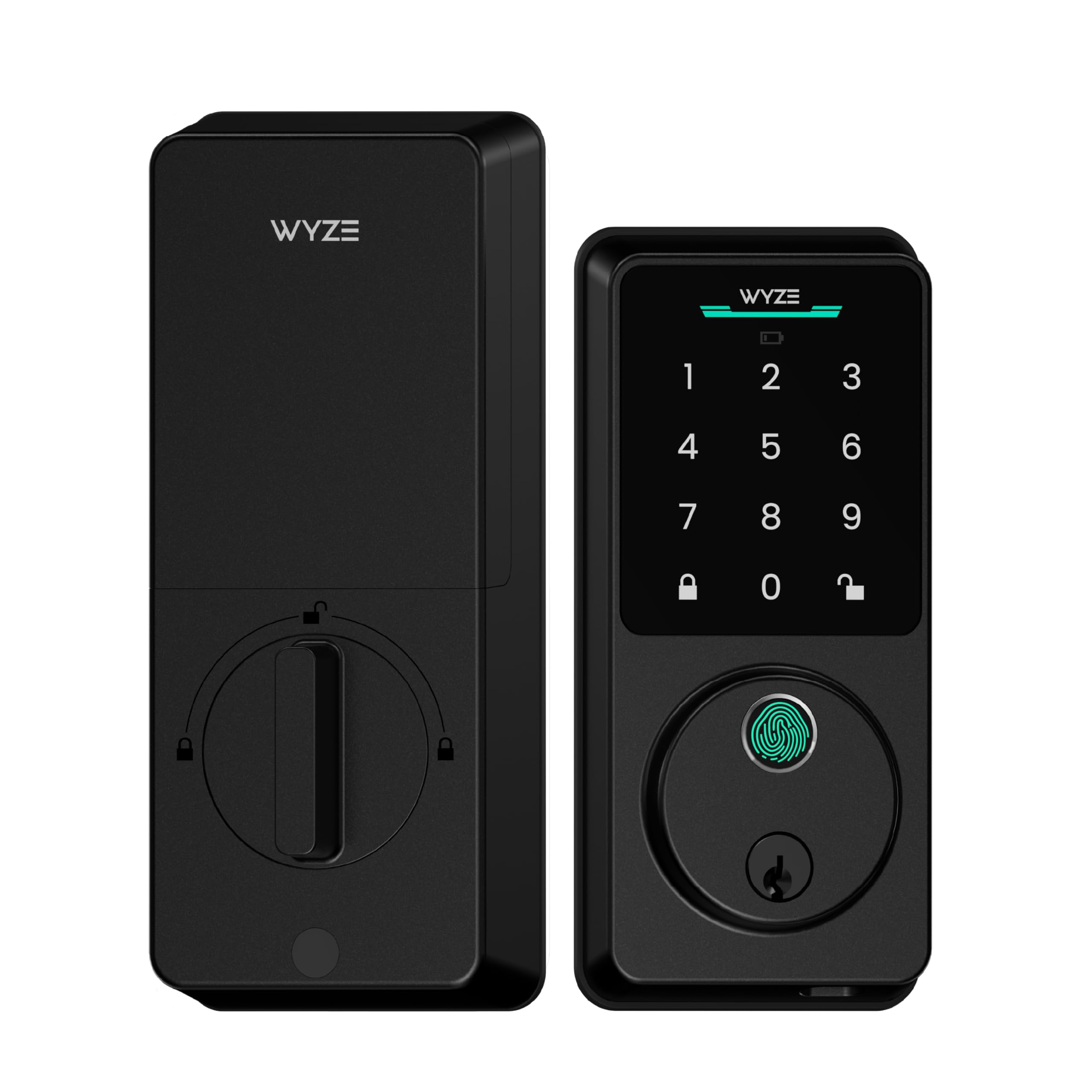
The Lock Bolt v2 open up in 0.5 seconds, and its scanner surface is tempered glass treated to resist scratches and smudges — which keeps reads consistent as fingerprints build up. An AI layer learns from each touch and improves recognition over time, so the scanner adapts to your actual finger rather than a generic template. Four ways in: fingerprint for speed, the Wyze app for control, a keypad code for convenience, and physical keys as backup.
Power comes from 8 AA batteries included in the box, rated for up to 8 months of use. If the cells die, a USB-C port lets any common power bank wake the lock for an emergency open. Built-in Wi-Fi handles remote checks and management through the Wyze app, and pairing with a Wyze Video Doorbell lets you open up straight from the live feed after a visual check.
The hardware is aluminum with glass, rated IP53 and BHMA Grade 2, and it weighs 2.2 pounds. Functionality is what people keep coming back to — it is the most-praised trait by a clear margin — with reliability right behind it. Installation runs about 10 minutes per unit. Responsiveness and connectivity split feedback, so expect the occasional app delay rather than a broken door.
Why the speed matters: a 0.5-second read means you are not standing at the door re-scanning a dry finger while the dog barks behind you.
Worth knowing: this is a fingerprint-first lock — the Wyze app adds Wi-Fi control but there is no palm or Matter option here.
Choose it for: a fast, glass-topped fingerprint reader and Grade 2 hardware without the premium-tier outlay.
Skip it for: a multi-protocol smart home, since this one is Wi-Fi and fingerprint only.
5. Tapo DL105 Smart Wi-Fi Deadbolt Door Lock
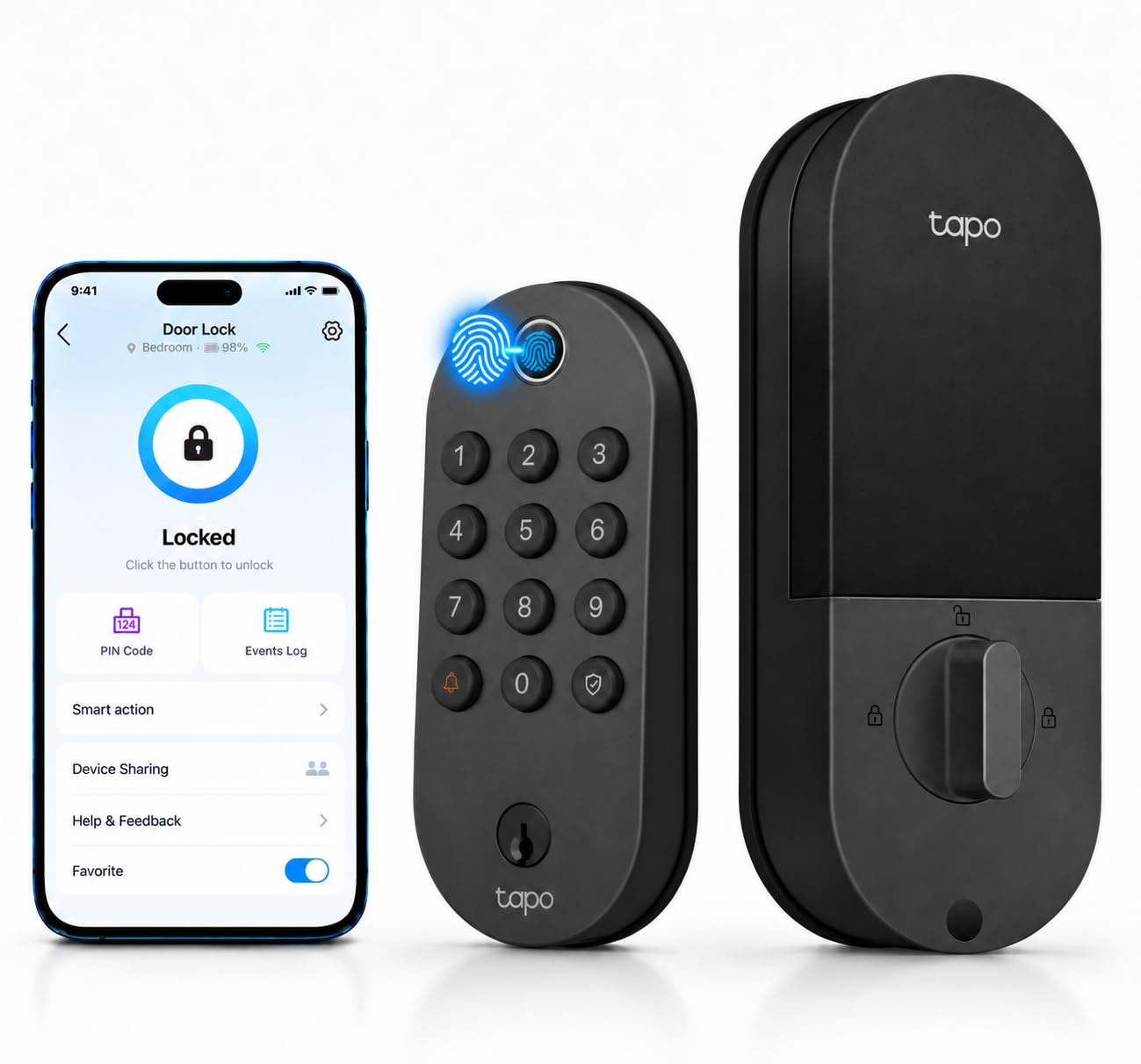
No AA cells to buy — a USB-C charge is stated to last a year.
Six ways to open up the Tapo DL105: fingerprint recognition, custom keypad passcodes, the Tapo app, close-range Bluetooth, your smart-home assistant, and the included backup keys. The fingerprint reader recognizes and opens in 0.5 seconds and stores up to 100 prints, which is more headroom than most households need. Battery life is stated at up to one year per charge, and a built-in USB-C port handles the recharge — no disposable AAs to rebuy.
Access management is granular. Create resident profiles with custom permanent codes, or issue one-time or scheduled codes for guests, sitters, delivery people, contractors, cleaners, and housekeepers. A detailed activity log with timestamps shows who came through and when, and auto-lockout after failed attempts plus real-time alerts flag suspicious activity. Auto-lock can pair with other Tapo or Kasa devices — the door can lock itself once your smart lights turn off, for instance.
Installation fits the standard lock hole sizes of 2-1/8″ and 1-1/2″ with no drilling, billed at under 15 minutes. Operating temperatures span -22°F to 158°F, and the rating is IP54 with BHMA certification. Quality is the trait owners lean on most, with installation ease next. Reliability, though, is the single most-discussed theme and it lands mixed, so treat it as a lock that wants a clean door prep and correct bolt alignment.
Charge-once approach: a year between USB-C charges removes the AA recycling cycle entirely.
Alignment matters: reliability feedback is genuinely mixed here, and a binding bolt is the usual cause — check your strike plate lines up before blaming the lock.
Pick this if: you hate stocking AA batteries and want a fingerprint lock with room for 100 prints.
Rethink it if: your door frame is out of square — this one rewards a well-aligned install.
6. Veise VE027-K WiFi Smart Deadbolt Locks
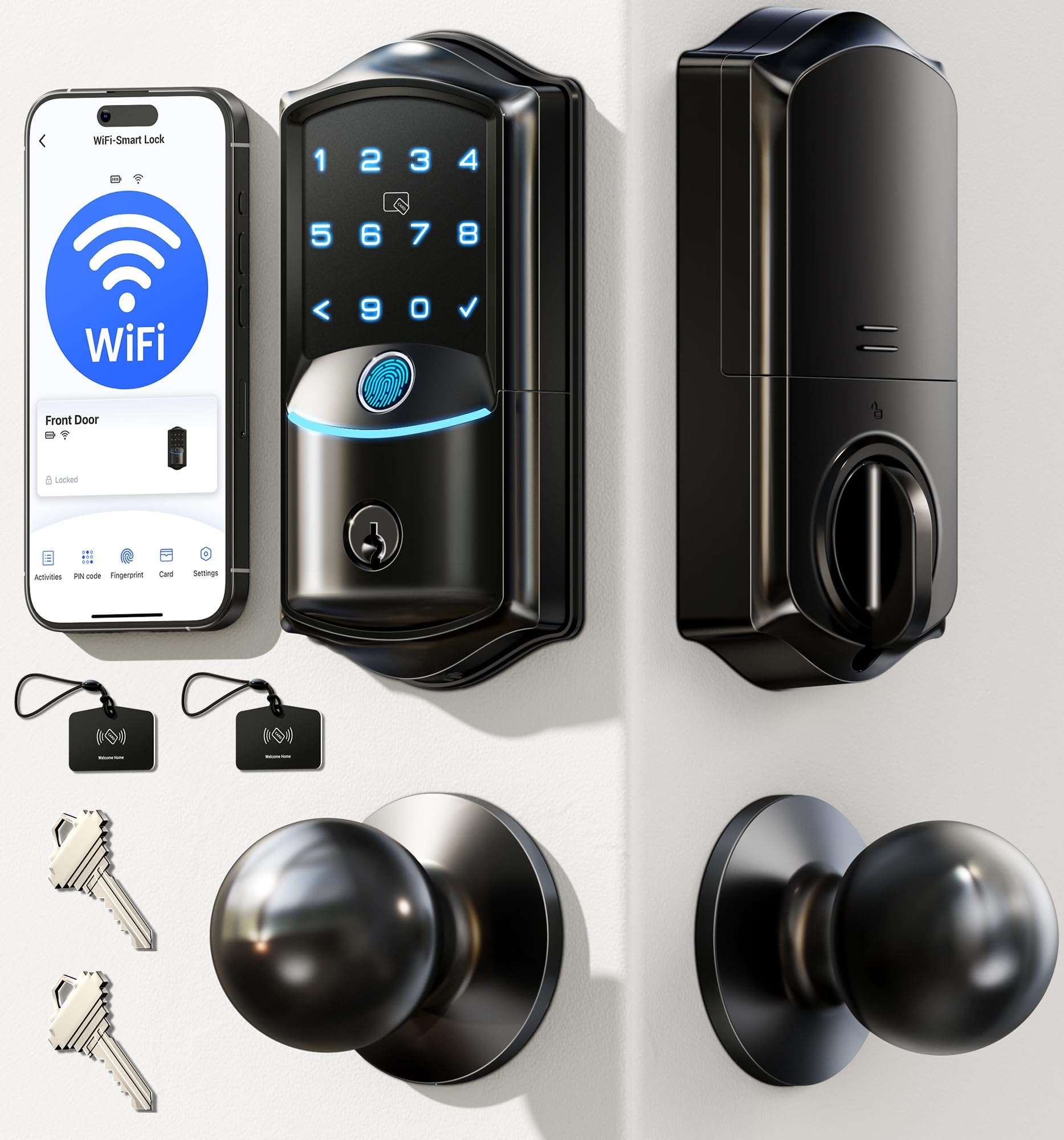
A 0.2-second fingerprint reader built for homes where the door never stops moving.
The VE027-K leads with an AI self-learning fingerprint sensor and 608DPI resolution, stated at 0.2-second recognition with 99.99% accuracy. It stores up to 20 fingerprints, and you name and manage each one in the app — useful when family and a regular helper all come through the same door. Eight entry routes cover remote app, fingerprint, IC card, 100+ PIN codes, key, Alexa or Google voice, user authorization, and code sharing.
It has integrated 2.4GHz Wi-Fi, so no hub is needed for remote control. Instant activity alerts and access logs land on your phone, and you can manage users remotely. Four digital-key types — permanent, scheduled, one-time, and expiring — let you assign access by identity and revoke it instantly, with up to 100 custom passcodes and unlimited one-time passwords. Auto-lock runs on a 10s to 180s timer behind you.
Power is 8 AA batteries (not included) for up to 240 days, backed by IP65 weatherproofing and BHMA/ANSI Grade 3. Install runs 10 to 15 minutes with a screwdriver for standard US doors 1-3/8″ to 2″ thick, and the system detects your door’s left or right swing automatically. Against the ULTRALOQ’s 18-month window, this one’s 240-day figure is a different routine — you swap AAs more often but keep hub-free Wi-Fi control. Voice prompts come in three languages.
What stands out
- 0.2-second fingerprint read with 20 stored prints for a full family
- IP65 rating — the highest weatherproofing on this list alongside the Bolt SE
- Built-in 2.4GHz Wi-Fi means remote control with no gateway purchase
- Four digital-key types including expiring codes for guests
Where it asks more
- Batteries are not included in the box
- 240 days falls well short of the Bolt SE’s 18-month window
Fits best: a busy household that wants a sub-second fingerprint and remote alerts with no hub add-on.
Check first: if you want the longest possible gap between battery swaps, the 240-day figure will feel short next to the Bolt SE.
7. Kwikset SmartCode 260 Keypad Deadbolt Door Lock

Codes on a keypad, a year of battery, and zero app to update.
The SmartCode 260 is a keypad deadbolt first — no Wi-Fi, no app, no hub, just codes you punch in and a key backup. That simplicity is the draw for anyone who wants keyless entry without putting a smart lock on their phone. It manages up to 50 user codes, 10 one-time user codes, and one programming code you use to edit or delete them. Grade 2 BHMA certification covers security, durability, and finish, which the maker rates as up to 2.5x stronger than Grade 3 certified lock sets.
Battery runs at least 12 months on 4x AA alkaline cells (not included). Auto-lock can be customized to 30 seconds, 1 minute, 3 minutes, 5 minutes, or 10 minutes. After three consecutive wrong code entries the lock sounds an alarm and disables the keypad for one minute. Vacation Mode temporarily shuts the keypad so nobody operates the door while you are away.
SmartKey security lets you re-key the lock to any KW1 key yourself in seconds, which is handy after a move or a lost key. Microban treatment on the keypad and hardware is stated as 99.9% cleaner than an unprotected surface. Installation needs only a screwdriver, and the BILT 3D app gives voice, text, and animation guidance. Programming a code takes under a minute, and buyers rate the look and the security features alongside the ease of use.
The no-app case: nothing to pair, nothing to update, nothing to charge — just a keypad that opens the door.
What you give up: there is no remote control, no activity log, and no phone app, so a code handed out is a code you must delete in person.
Ideal for: a rental unit, a spare entrance, or a homeowner who wants keypad entry and none of the app management.
Pass if: you need to let someone in from across town — this lock has no remote path.
8. Kwikset HomeConnect 620 Keypad Smart Lock

For the home that already runs on Z-Wave and wants the deadbolt to join in.
The HomeConnect 620 is a touchscreen keypad deadbolt built around Z-Wave rather than Wi-Fi. Z-Wave 700 Long Range gives a direct connection to your Z-Wave-compatible hub and coverage across the home, and the lock uses S2 encryption plus SmartStart for secure, quick pairing with a compatible hub. It talks to Ring Alarm directly through that system and app, so status checks and controls live in the same place as your alarm.
Code management is generous: up to 250 user codes plus one programming code for edits and deletions. Auto-lock is customizable to 30 seconds, 1 minute, 3 minutes, 5 minutes, or 10 minutes. Battery is stated at least 12 months on 4x AA alkaline cells, this time included in the box. Grade 2 BHMA certification covers security, durability, and finish, rated as up to 2.5x stronger than Grade 3 certified lock sets.
Install is a screwdriver job that fits doors between 1-3/8″ and 2″ thick, with an adjustable deadbolt backset from 2-3/8″ to 2-3/4″ and a SmartKey cylinder you can re-key in seconds. Functionality is the trait that carries the most weight in buyer feedback, with build quality close behind; durability draws some negative notes, so treat the bolt as hardware to check and re-align if it ever drags. A Ring Alarm smart hub is required for the Ring integration, and the Z-Wave hub itself is sold separately.
Hub math: the lock needs a Z-Wave-compatible hub to do anything smart, so this is a purchase you make after you already own the hub.
Code headroom: 250 user codes is the most on this list — enough for a small apartment building or a large family with regular visitors.
Right call for: a Ring Alarm home or an existing Z-Wave network that wants 250 codes on one deadbolt.
Wrong call if: you have no Z-Wave hub and want Wi-Fi control from the start, since this lock has neither.
9. Yale Assure Lock 2 WiFi Deadbolt Smart Lock

Wi-Fi on both bands and an open up that knows when you have walked up.
The Assure Lock 2 connects straight to 2.4 or 5 GHz Wi-Fi with no hub or bridge, and the Yale Access app handles lock, open up, and real-time alerts for the US and Canada. It is the only lock here that lists 5 GHz Wi-Fi support — worth knowing when the ULTRALOQ’s 2.4 GHz-only radio means the lock and router need to stay close. Entry comes by touchscreen keypad, smartphone app, Apple Watch, or Auto-open up that recognizes when you are home and opens the bolt for you.
Codes are unlimited, and you can schedule them — the dog walker gets Tuesday, a parent gets a permanent code, and a guest’s entry expires at checkout. Share, schedule, or revoke in seconds. DoorSense detects when the door is fully closed, and Auto-Lock secures it behind you, which answers the “did I lock up?” question without a trip back. Grade 2 BHMA certification covers durability, and the lock is built to perform from -22°F winters to 140°F summer heat.
It weighs 16 ounces and ships with the Wi-Fi Smart Module, DoorSense, and mounting hardware. The honest sticking point is reliability: buyer feedback splits sharply, with some finding it reliable and others reporting it stops working altogether, which drags this pick to the lowest score here. Low-power alerts warn you before the batteries run out. If a stable track record matters more than hub-free Wi-Fi, the entry-level Veise locks are safer bets.
Best feature: Auto-open up tied to your arrival — you walk up with groceries and the door is already open.
The honest catch: reliability is the weak link in owner feedback, so buy with a clear warranty plan and expect the occasional firmware reset.
Made for: someone who wants 5 GHz Wi-Fi, Apple Watch entry, and scheduled codes without adding a hub.
Weigh first: this is the least consistent performer in the group, so patience with troubleshooting is part of ownership.
Know the Specs
BHMA security grades
BHMA is the trade standard that grades a lock’s security, durability, and finish after testing. Grade 2 is a higher-bar commercial-grade rating than Grade 3, and the Kwikset listings note Grade 2 is up to 2.5x stronger than Grade 3. A higher grade generally means the bolt and internals stand up to more cycles — worth reading when the door sees daily traffic.
IP weather ratings
An IP rating has two numbers: dust and water. IP53 on the Wyze locks resists dust and spraying water; IP54 adds splash resistance on the Veise VE06-L and Tapo DL105; IP65 on the ULTRALOQ Bolt SE and Veise VE027-K adds a jet-water rating for exposed front doors. Match the rating to whether your door sits under a covered porch or takes full weather.
Wi-Fi, Matter, and Z-Wave
Built-in Wi-Fi (2.4 GHz) connects the lock to your app without a hub — the ULTRALOQ adds 5 GHz-free simplicity here while the Yale supports both bands. Matter over Thread and Z-Wave both need a compatible hub or Thread Border Router, but they can extend coverage across a larger home and let the lock join a broader smart-home mesh. No hub, no remote smart features on those two.
Battery windows and backups
Battery life on this list runs from a 6-month main cell on the Wyze Palm (with a 2-week secondary) up to 18 months on the ULTRALOQ Bolt SE and up to a year per USB-C charge on the Tapo DL105. A USB-C emergency port, as on both Wyze locks, means a power bank can open the door if the batteries die. Rechargeable locks skip AA swaps entirely.
Common Questions
Will a smart lock fit my existing deadbolt hole?
Do I need a hub to control these smart locks remotely?
Palm vein vs fingerprint: which is more reliable at the door?
How long do the batteries actually last?
Can I lock or open up the door with my voice?
What happens if a guest’s code needs to expire?
Are these locks weatherproof enough for an exposed front door?
Can I still use a physical key if the electronics fail?
Do these locks work with Ring, Apple Home, and SmartThings?
How much traffic can a keypad code handle before the lock resets?
The Bottom Line
If you want the door to open on a hovering hand and close itself when the bolt aligns, the WYZE Palm Lock is the pick to beat. Its palm-vein reader, dual battery with USB-C backup, and gyroscope auto-lock (a motion sensor that locks the door once it swings shut) cover the whole routine. For a rental setup with expiring codes and a handle kit included, go with the Veise VE06-L. If you already run a Matter home (a smart-home standard that lets devices talk to each other) and want an 18-month battery window, the ULTRALOQ Bolt SE is the reach. And for a touch-free keypad that needs no app at all, the Kwikset SmartCode 260 quietly does the job.
How we choose
We do not accept paid placement. Every pick is matched to a real buyer and a real use-case; we do not hands-on test units.
Sources
Specifications: manufacturer listings and product documentation. Review insights: verified customer reviews, as of November 2026. Pricing: not shown on this page (it changes often); check the current price via the retailer link.
As an Amazon Associate, Tactical Gear Guy earns from qualifying purchases. This does not affect which products we feature.