Specs are compiled from manufacturer listings and verified buyer reviews and can change over time — please confirm the key details on the product page before buying.
A laptop sleeve has one job: keep a very expensive slab of glass and metal safe inside a bag you already own. The wrong sleeve is thin foam wrapped in fabric, and it lets a corner take the hit when your backpack slides off a chair. The right one puts real padding at the corners, fits your exact machine without rattling, and still slips into the same backpack you carried yesterday.
This guide is built by comparing the manufacturers’ published specifications and the patterns across verified customer reviews, so you get each pick’s real strengths and trade-offs instead of marketing spin.
Below you’ll find seven sleeves sorted by what they actually protect and who they fit, from a corner-armored favorite to a quilted case built for style. Every pick here earns its place as one of the top rated laptop sleeves you can buy with confidence.
Top Picks


How To Choose The Best Top Rated Laptop Sleeves
The single biggest mistake buyers make is shopping by the laptop size printed on the listing. A sleeve’s real fit comes from its internal dimensions — the space inside the fabric — not the inch figure in the title. Measure your laptop’s length, width and thickness, then compare against the internal numbers each maker publishes.
Measure inside, not outside
External dimensions tell you how much room the sleeve eats in your backpack. Internal dimensions tell you whether your machine moves around inside. A sleeve that’s too loose lets the laptop slide, and sliding is what cracks corners when the bag drops. Aim for a snug internal fit with a little breathing room for the padding to compress.
Padding type and corner coverage
Flat foam sheeting protects the middle of a laptop well and the corners poorly. Look for reinforced corners, a raised bumper, or a quilted layer that thickens at the edges. Soft fleece or fluffy lining on the inside prevents the zipper and seams from scuffing the lid during daily in-and-out.
Pockets, handles and how you actually carry it
A front pocket turns a sleeve into a one-bag commute solution for a charger, cable, mouse or earbuds. A retractable handle helps if you sometimes carry the sleeve alone instead of dropping it in a backpack. Neither is essential, but both change how often you actually reach for the sleeve.
Side-by-Side Comparison
| Model | Best For | Max Device Size | Exterior Material | Weight | Amazon |
|---|---|---|---|---|---|
| tomtoc 360° Protective Laptop Sleeve★ Best Overall | Everyday MacBook protection | 13.6 inches | Recycled polyester | 8.48 ounces | Amazon |
| Kinmac 360° Protective Sleeve with HandleBest for Travel | 16-inch laptops and travel | 16 inches | Fabric | — | Amazon |
| Pelican Traveler Laptop Bag | Rugged big-laptop carry | 16 inches | Premium | 0.4 kg | Amazon |
| tomtoc Slim Laptop Sleeve Case | Slim MacBook Neo carry | 13 inches | Recycled RPET polyester | — | Amazon |
| MOSISO Laptop Case with Accessory Pouch | MacBook Neo plus extras | 13.6 inches | Polyvinyl chloride | — | Amazon |
| MOSISO Laptop Case 13.3 inch | Wide laptop compatibility | 14 inches | Polyester | 6.4 ounces | Amazon |
| Puffy Laptop Sleeve 13 Inch | Quilted style and light carry | 13 inches | Cotton | 110 g | Amazon |
Detailed Reviews
1. tomtoc 360° Protective Laptop Sleeve for 13-inch MacBook Air
Our pick — 4.5+★ from 27,500+ verified ratings; the strongest balance of quality and price.
The corner-armored sleeve that treats a small drop like a design brief.
If you carry a MacBook Air around campus, on trains, or between meeting rooms, the corners are what die first. tomtoc solves that with CornerArmor Technology (reinforced bumpers built into the sleeve’s corners) and high-resilience edges. The brand states the sleeve passed a Military-Standard-Drop-Test, which is why it tops this list.
What wins people over is the build quality — the fabric, lining and stitching land first in owner feedback, with fit right behind it. The recycled polyester exterior shrugs off spills, and the YKK zippers (a well-known zipper brand known for smooth, long-wearing pulls) don’t snag at the corners. Inside, an interline-designed soft lining keeps the lid from scuffing as you pull the laptop out. At 8.48 ounces, it’s a heavier sleeve than the MOSISO 13.3 at 6.4 ounces, but that extra weight is where the corner padding lives.
The extra front pocket measures 9.45 x 7.68 inches, which is enough room for a charger brick and cable. There’s also a small strap designed for an Airtag or a key. Internal dimensions of 11.97 x 8.46 x 0.61 inches mean you need to check your machine against those numbers before ordering. It’s sized for 13-inch MacBook Air M5, M4, M3, M2 and M1 models and 13-inch MacBook Pro, plus Surface Laptop and Pro 12 to 13 inch and Dell XPS 13 Plus. That also means a thicker 14-inch gaming laptop won’t squeeze in.
What earns it first place
- CornerArmor reinforced corners and high-resilience edges — the parts that break first get the most padding
- Spill-resistant recycled fabric with YKK zippers that don’t fight you
- Internal 11.97 x 8.46 x 0.61 inches fits 13-inch MacBook Air and Pro precisely
- Front pocket at 9.45 x 7.68 inches swallows a charger and cable
- Covered by a 12-month warranty
Where it asks for patience
- At 8.48 ounces it is the heavier choice in this group — padding has a cost
- Sized tight for 13-inch MacBooks; thick 14-inch machines need a different sleeve
Built for: anyone whose laptop lives in a backpack and takes daily knocks — this is the safest all-round sleeve for a 13-inch MacBook Air or Pro.
Think twice if: your laptop is larger than 13.6 inches, because the internal 11.97 x 8.46 inches leaves no room to spare.
2. Kinmac 360° Protective Laptop Sleeve with Handle
A 16-inch sleeve with a retractable handle for days you carry it alone.
Most laptop sleeves assume they’ll live inside a bigger bag. The Kinmac breaks that assumption with a retractable handle, so you can walk from the terminal to the taxi holding nothing but your laptop sleeve. Internal dimensions of 14.98 x 10.8 x 0.79 inches give it room for a 16-inch MacBook Pro or a 16-inch HP, Lenovo, Dell, ASUS or Acer ultrabook. That makes it the pick for the bigger-machine crowd the tomtoc 13.6-inch sleeve simply cannot serve.
Quality leads in what buyers talk about with this one, and the look follows right after — the cactus and floral styling gets attention in a category full of plain black rectangles. Under that, a soft inner cushion and a 360° cushioned build handle shock absorption, and the fabric is water-resistant for outdoor starts and rainy commutes. A dual zipper glides open from either end and seals dust and grit out when closed. The zip front pocket holds a mouse, cables, charger or phone, and the retractable handle sits comfortably in the hand.
The honest catch is size discipline. A 16-inch sleeve this roomy inside will feel generous on a 15.6-inch machine and genuinely loose on a 13-inch one. If your laptop is a small ultraportable, this is more sleeve than you need. For a 16-inch business laptop that has to travel, the extra room and the handle are the whole point.
The case for picking it: 14.98 x 10.8 x 0.79 inches of internal space plus a retractable handle and a zip pocket — the closest thing here to a carryable case rather than a pouch.
The realistic catch: a 16-inch sleeve is a 16-inch sleeve, and a small 13-inch laptop will swim inside it.
Reach for this when: your laptop is a 16-inch work machine and you want one sleeve you can carry without a backpack on short trips.
Look elsewhere if: your daily laptop is 13 inches — the internal 14.98 inches of length is far more than it needs.
3. Pelican Traveler Laptop Bag / Case (16 Inch)

The hardest-wearing exterior here, built like a protective case rather than a pouch.
Pelican built its reputation on hard cases, and the Traveler sleeves carry that DNA into soft fabric. The compression-molded texture gives you real grip in your hand so it’s less likely to slip out from under your arm. Weather-resistant construction and rubberized zipper pulls mean rain and rough handling don’t end the day. It fits up to 16 inches and lists compatibility across a huge spread of MacBook Pro and Air models, plus the Galaxy Book 3 Pro 360, Asus ROG Zephyrus M16 and HP Spectre x360 16.
Durability and quality are the two things owners bring up most, with the anti-scratch liner and padded exterior behind them. Buyers report the 360-degree cushioning on the interior — soft on the laptop, tough on the outside.
The mixed part is fit and padding. Some buyers find it too big for MacBook Pro models, and the padding is described as well-padded by some and not a full hard shell by others. Neither is a defect: this is a sleeve, not a case, and it’s designed to flex around a range of 16-inch machines rather than clamp onto one exact model. If you want a snug, thin sleeve, this isn’t it.
The protection story
- Compression-molded texture and rubberized zipper pulls for a sure grip
- Weather-resistant build with an anti-scratch liner inside
- Fits up to 16 inches and spans most MacBook Pro, Air and 16-inch Windows laptops
- Backed by a one-year limited warranty
Where expectations need adjusting
- Padding is soft, not a rigid hard shell — don’t expect Pelican hard-case armor
- Some buyers find the fit loose on MacBook Pro machines
Right for: 16-inch laptop owners who want a grippy, weather-ready sleeve that feels closer to gear than to a fabric pouch.
Not the one for: anyone expecting a snug, rigid case — the padding here is soft and the fit is generous.
4. tomtoc Slim Laptop Sleeve Case for 13-inch MacBook Neo

Disappears into a backpack without adding a single bulge to it.
If your backpack is already full and you want the sleeve to be the thing that gives, the Light-A18 is the pick. Its external 12.99 x 9.17 x 0.79 inches keep it thin enough to slide into a bag pocket without deforming the pack. That’s the same instinct as the tomtoc 360° above, but tuned for slimness rather than corner armor. Where the 360° carries CornerArmor, this one keeps things lean with shock-absorbing padding and a soft fleece interior that feels silky against the lid.
The exterior is recycled RPET polyester, a fabric made from post-consumer plastic, and it’s water-resistant against scratches, dirt and light rain. Inside, a spacious laptop pocket sits alongside a separate accessory compartment for chargers, cables, hubs, an Apple Pencil or earbuds. That second compartment is what turns a bare sleeve into a commuter’s one-bag solution. Fit and quality are what buyers notice first, with slim design, zipper quality, padding and softness all earning consistent praise.
The honest limit: it’s a 13-inch sleeve designed for the MacBook Neo, and the reviews also describe a snug fit on 14-inch MacBook Pro models. Whether your machine lands well depends on measuring against that 12.99 x 9.17 inches external footprint. If you want a padded fortress for a rough commute, this is the wrong tool — you want the 360° instead.
Why it holds its spot: recycled RPET construction, a fleece-lined interior and a separate accessory compartment, all inside a profile under an inch thick.
The size question to answer first: it’s built around the 13-inch MacBook Neo, and the slim shape leaves little forgiveness if your machine is a different footprint.
Go for it if: you want a thin, well-organized sleeve that stays out of the way inside an already-packed backpack.
Pass if: you want maximum impact padding, which is what the 360° model is built around.
5. MOSISO Laptop Case with Detachable Accessory Pouch
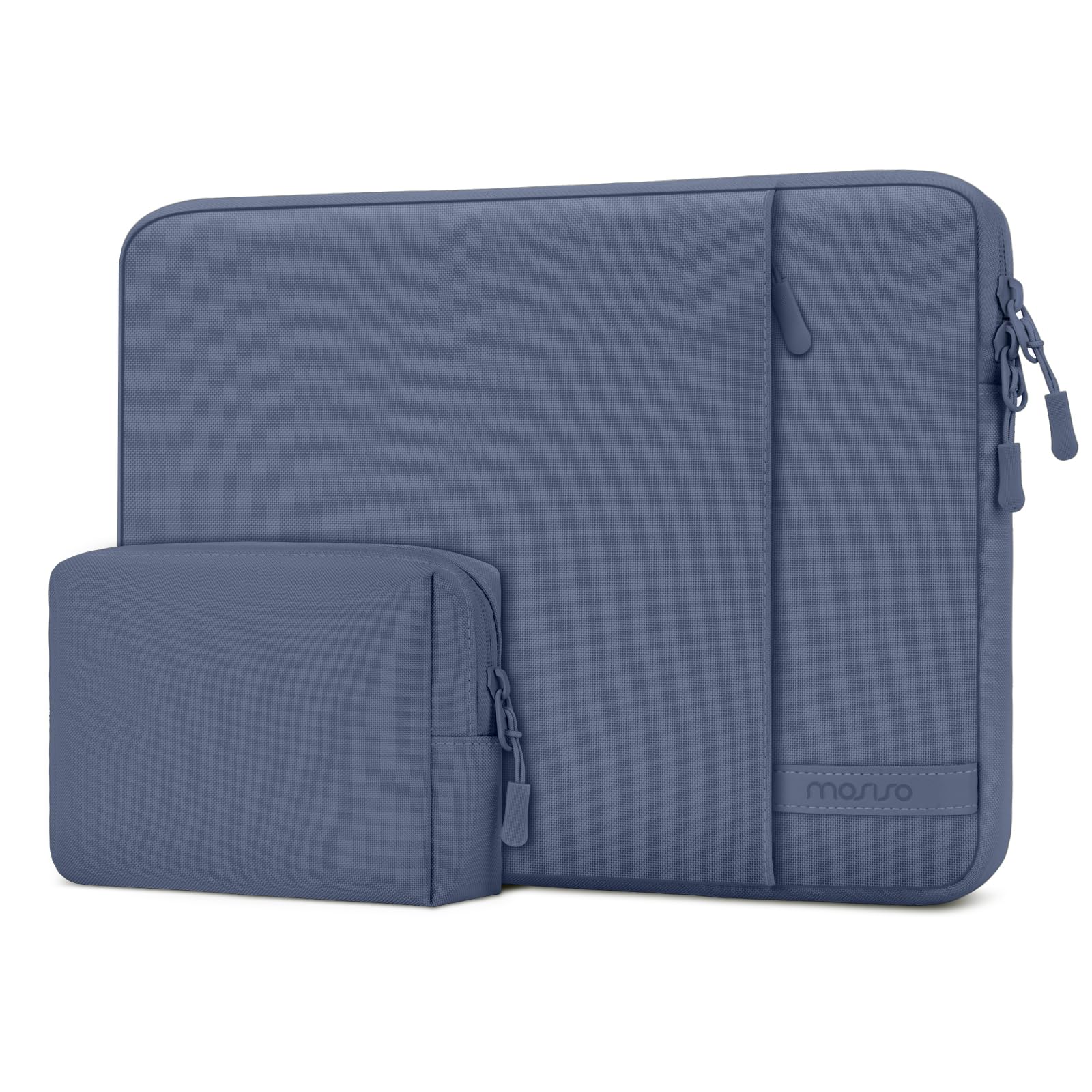
Two bags for the price of one habit: sleeve in the backpack, pouch in the side pocket.
This is the pick for the person who keeps losing their mouse and dongle in the bottom of a bag. Beyond the main sleeve, MOSISO includes a separate small pouch measuring 5.11 x 0.59 x 4.72 inches internally and 5.31 x 0.59 x 4.92 inches externally, in the same Indigo colour. That’s a real second container for a mouse and earbuds rather than another zipped pocket you have to dig through.
The main body offers 360-degree polyester protection with a foam padding layer and fluffy fleece lining to absorb bumps and shocks. Internal dimensions of 12.6 x 0.79 x 9.06 inches fit MacBook Neo 13-inch, MacBook Air 13.6 and 13.3-inch, and MacBook Pro 13-inch M2 and M1. A front vertical side pocket at 9.84 x 9.65 inches takes the flat stuff. Quality and fit are what owners rate highest, with protection and padding close behind.
Worth knowing before you buy: the enclosure material is listed as polyvinyl chloride, and the form factor is a pouch. That means this leans toward a lighter protective shell than the fabric-heavy Kinmac or Pelican. It’s also a MacBook-focused fit — the internal 12.6 x 9.06 inches won’t suit a 16-inch work laptop. Within its size lane, the extra pouch is the detail that makes it feel more complete than a plain sleeve.
Why it makes the cut
- Includes a detachable 5.11 x 0.59 x 4.72 inch pouch for a mouse and earbuds
- 360-degree polyester protection with a foam layer and fleece lining
- Front vertical pocket at 9.84 x 9.65 inches for flat accessories
- Colour-matched Indigo pouch keeps the set looking intentional
Things to weigh first
- Fits MacBook Neo, Air 13.6 and 13.3, and Pro 13 — not 16-inch laptops
- PVC shell feels lighter-duty than the fabric sleeves on this list
Pick it if: you carry a 13-inch MacBook plus a mouse and earbuds, and want one purchase that covers all three.
Skip if: your machine is bigger than 13.6 inches, because the internal 12.6 x 9.06 inches won’t accommodate it.
6. MOSISO Laptop Case 13.3 inch with Pocket

The sleeve that plays nice with nearly every 13 and 14-inch laptop on the shelf.
If your work laptop isn’t a MacBook, this MOSISO sleeve is the one to check first, because it fits more machines than any other sleeve here. It takes a MacBook Pro 14-inch, MacBook Air 13 and Pro 13, Surface Book 3, 2 and 1 at 13.5 inches, Surface Laptop 13.5 and 13.8, Dell Latitude and Chromebook 13.3, HP Elitebook, Spectre, Envy and Stream 13.3, Lenovo IdeaPad and ThinkPad Yoga 13.3, and Acer Chromebook Spin 13.3. In practice, that covers most of the office laptops people actually carry to work. It holds a device up to 14 inches, the largest maximum of the small sleeves in this group, and the outside measures 14.17 x 0.79 x 10.63 inches, which is where that extra room comes from.
At 6.4 ounces, this is the one that keeps the bag light — noticeably lighter than the tomtoc 360° at 8.48 ounces. You feel the difference on a long walk to a train. Inside, a polyester foam padding layer and fluffy fleece fabric lining absorb bumps and shocks, and a top-opening zipper glides the full width for easy access. The front vertical pocket at 9.25 x 9.84 inches holds a mouse, earphone, pens and a notepad. Quality and fit again top the owner feedback, with 6-9 months of daily use showing up as a realistic durability expectation.
The honest trade-off: to fit this many laptop models, the internal space at 13.58 x 0.79 x 10.04 inches is a touch generous for a slim MacBook Air. If a snug, glove-tight sleeve is what you want, the tomtoc 360° is the tighter choice. If your machine is one of the many non-Apple models on that list, this is the safest fit you’ll find.
The compatibility argument: support for MacBook Pro 14, Air 13, Surface, Dell, HP, Lenovo and Acer 13.3-inch machines, plus 6.4 ounces of weight that keeps the pack light.
The fit caveat: that wide compatibility means the 13.58 x 0.79 x 10.04 inch interior is roomy rather than snug.
The match for: a Dell, HP, Lenovo, Acer or Surface owner who’s tired of sleeves built only around MacBooks.
Not for: someone buying for a slim 13-inch MacBook who wants the tightest possible fit.
7. Puffy Laptop Sleeve 13 Inch Quilted Floral Case
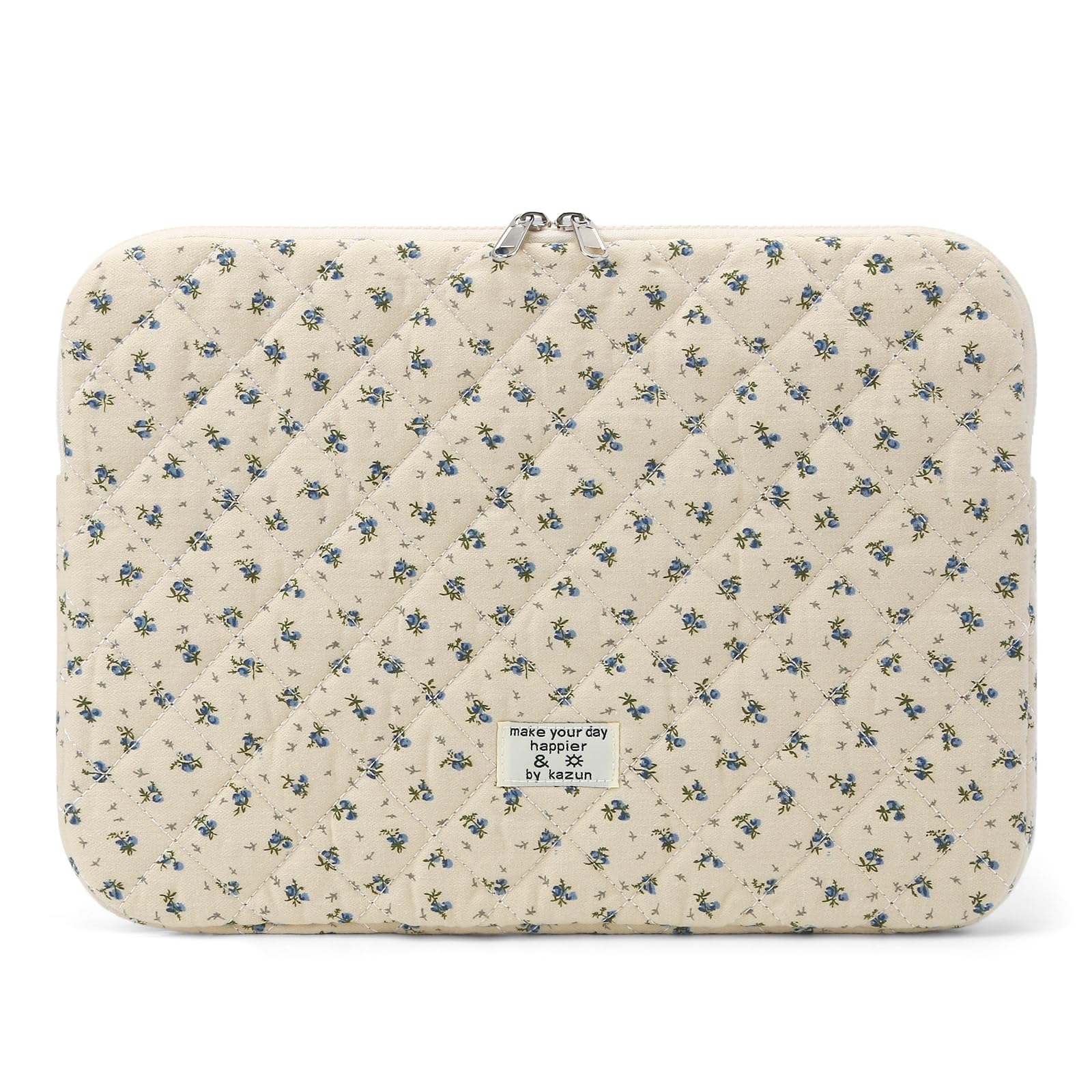
Soft puffy quilting and a floral print that makes a plain laptop look personal.
Most laptop sleeves look like office equipment. This one doesn’t, and for a lot of buyers, that’s the whole reason to pick it. The puffy quilted shell and floral print give a laptop personality, while the soft interior lining keeps the lid free of scratches, dust and daily bumps. External 11 x 8.27 x 1.18 inches is the smallest footprint here, so it slides easily into a tote, backpack or suitcase. If your commute is a canvas tote and a coffee, that small footprint matters.
Look and feel drive the love for this one, with quality and fit following closely. Padding and protection come up next — plenty of buyers find the quilted layer does the job against the bumps and knocks a school or coffee-shop day throws at a laptop. A big selling point is how the quilted shell softens with daily use, molding to the shape of the machine rather than thinning out. The 13-inch size also has room for a MacBook plus a charger and mouse, for buyers who want one bag instead of two.
Here’s the trade-off to know: this is a 110 g cotton sleeve with a soft shell, which means it’s built for styling and light protection, not for surviving a drop onto concrete. The external 11 x 8.27 inches is also the tightest footprint here, so a thicker machine will be a squeeze. Check the internal fit before committing if your laptop runs thick.
What draws people in
- Quilted floral design that makes a laptop look less like office gear
- Soft interior lining protects against scratches, dust and bumps
- External 11 x 8.27 x 1.18 inches slips into a tote or backpack
- Available in 11, 13 and 15.6-inch sizes
Where it stops short
- 110 g cotton shell is a style-first sleeve, not a drop-proof one
- External 11 x 8.27 inches is the tightest footprint in this group
Perfect for: students and lighter-carry days when the sleeve is really about the look and the soft interior rather than surviving a fall.
Not for: anyone who wants reinforced corner protection, because the cotton shell and quilted padding favour softness over impact armor.
Know the Specs
Internal vs external dimensions
External dimensions set how much bag room the sleeve eats. Internal dimensions decide whether your laptop fits snugly or slides. The tomtoc 360° lists 11.97 x 8.46 x 0.61 inches internally, so measure your machine’s thickness as well as its length and width. A sleeve that’s a quarter-inch too small won’t zip, and one that’s an inch too large lets the laptop shift corner-to-corner.
Padding, lining and corner design
Look for three things: a foam or quilted layer for impact, a soft fleece or fluffy lining for scratch protection, and reinforced or raised corners for the spots that take the hit. The lining is what touches the lid every single time you slide the laptop in and out, so a fleece or fluffy interior pays for itself in avoiding scuffs.
Material and weather resistance
Polyester and recycled polyester are the workhorses — light, water-resistant and hard-wearing. Cotton reads soft and stylish but is not built for weather. PVC leans towards a lighter-duty protective shell. Water-resistant is not the same as waterproof: it means a spilled drink or a light rain will roll off, not that the sleeve can be submerged.
Zippers, pockets and handles
A smooth-gliding top zipper is the difference between a one-hand pull and a fight every morning. Front pockets range from a flat panel to a zip pouch that holds a mouse, cable and charger — check the pocket dimensions rather than trusting the product name. A retractable handle only makes sense if you actually carry the sleeve alone.
Common Questions
Will a 13-inch laptop sleeve fit a 14-inch MacBook Pro?
What is CornerArmor and does it matter for daily carry?
Is water-resistant the same as waterproof on a laptop sleeve?
How much protection does a quilted cotton sleeve actually give?
Do I need a front pocket on my laptop sleeve?
Can I fit a 15.6-inch laptop in a 13-inch sleeve?
What is RPET fabric and is it durable?
How do I stop my laptop sliding around inside the sleeve?
Does a laptop sleeve with a handle replace a laptop bag?
Are YKK zippers worth caring about on a sleeve?
The Bottom Line
For most people, the winner is the tomtoc 360° Protective Laptop Sleeve — the corner padding, recycled fabric and YKK zippers make it the most complete everyday sleeve for a 13-inch MacBook. If you carry a 16-inch machine and want a handle, reach for the Kinmac 360° with Handle. For a machine that isn’t a MacBook, the MOSISO 13.3 inch covers more laptop brands than anything else here. And if the sleeve is as much about how it looks as how it protects, the Puffy 13 Inch brings the quilted style the rest of this list doesn’t.
How we choose
We do not accept paid placement. Every pick is matched to a real buyer and a real use-case; we do not hands-on test units.
Sources
Specifications: manufacturer listings and product documentation. Review insights: verified customer reviews, as of November 2026. Pricing: not shown on this page (it changes often); check the current price via the retailer link.
As an Amazon Associate, Tactical Gear Guy earns from qualifying purchases. This does not affect which products we feature.