Specs are compiled from manufacturer listings and verified buyer reviews and can change over time — please confirm the key details on the product page before buying.
An iPad Mini is the one tablet you actually carry everywhere — which is exactly why it gets dropped, sat on, and shoved into bags that already hold keys. A fitted folio or rugged shell absorbs that abuse so the glass doesn’t have to. Below are nine covers that fit the 8.3-inch Mini properly, sorted by what each one is genuinely good at, so you can match one to how you actually use the thing.
This guide is built by comparing the manufacturers’ published specifications and the patterns across verified customer reviews, so you get each pick’s real strengths and trade-offs instead of marketing spin.
Fit is the whole game here: a Mini 7 (A17 Pro) cover and a Mini 6 cover look alike until you check the model numbers on the back of the tablet. This breakdown covers the covers worth your attention and the ones to grab for a kid, a commute, or a sketchbook, and it ends with a clear verdict on the top rated ipad mini covers.
Top Picks

How To Choose The Best Top Rated iPad Mini Covers
The single biggest mistake Mini owners make is buying for looks before they check the model number. A case cut for an older Mini will snap on and then sit slightly wrong over the camera, the buttons, or the Pencil slot. Get the fit right first, then pick the shape that matches your day.
Start with the model code, not the photos
Flip your iPad Mini over and read the tiny model number near the bottom: A2993, A2995, or A2996 means the 7th-gen A17 Pro model, while A2567, A2568, or A2569 means the 6th-gen. Every cover in this list spells out which of those codes it supports, so match yours before anything else.
Folio or rugged shell — two different jobs
A folio-style cover is a thin front flap plus a folding back that props the screen up, and it keeps the Mini slim enough to slide into a jacket pocket. A rugged shell wraps the whole tablet in silicone and hard plastic, adds a kickstand and often a handle, and trades slimness for real drop protection. Neither is better — they answer different questions.
Decide if you need a kickstand, a handle, or neither
If the Mini lives on a desk or a kitchen counter for video and recipes, an adjustable kickstand saves your wrist. If a child carries it around, a chunky handle and a shoulder strap earn their bulk. If you mostly read and sketch, a folding folio that lies flat is the lighter answer.
Check how the Apple Pencil is handled
Some covers cut a recessed groove so the Pencil snaps on and charges wirelessly through the case, while others add a holder with a push-out hole so the stylus cannot fall off in a bag. If you sketch daily, confirm the case supports magnetic charging — several here do, and one notes the USB-C Pencil does not charge through the shell.
Side-by-Side Comparison
| Model | Best For | Style | Weight | Stand / Handle | Amazon |
|---|---|---|---|---|---|
| Antbox Case for iPad mini 7 / 6★ Best Overall | Everyday all-rounder | Faux leather folio | 238 g | Typing + viewing stand | Amazon |
| Fintie Kid-Friendly CaseBest for Kids | Kids and travel | 3-layer rugged | 0.28 kg | 2-mode kickstand + shoulder strap | Amazon |
| Grifobes Shockproof CaseBest Grip | Grip and drop protection | Silicone + PC rugged | 0.2 kg | 2-mode kickstand | Amazon |
| Feams Slim Trifold Case | Pattern lovers | PU leather trifold | 6 oz | Tri-fold viewing + typing | Amazon |
| LeiJue Kids Case with Handle | Toddlers and classrooms | EVA foam shell | — | Handle doubles as stand | Amazon |
| Telaso Magnetic Case | Mounting on metal | Matte acrylic + TPU | 0.12 kg | Magnetic multi-position | Amazon |
| BRAECN Case for iPad mini 7 / 6 | Kitchen and workshop | 3-layer silicone rugged | — | 360° rotating grip + strap | Amazon |
| SUPCASE with Aluminum Stand | Desk productivity | Clear PC + TPU | 118.3 g | 9°–60° alloy stand | Amazon |
| PITAKA Folio2 | Reading and travel | PU leather origami folio | 5.01 oz | 4 folding angles | Amazon |
Detailed Reviews
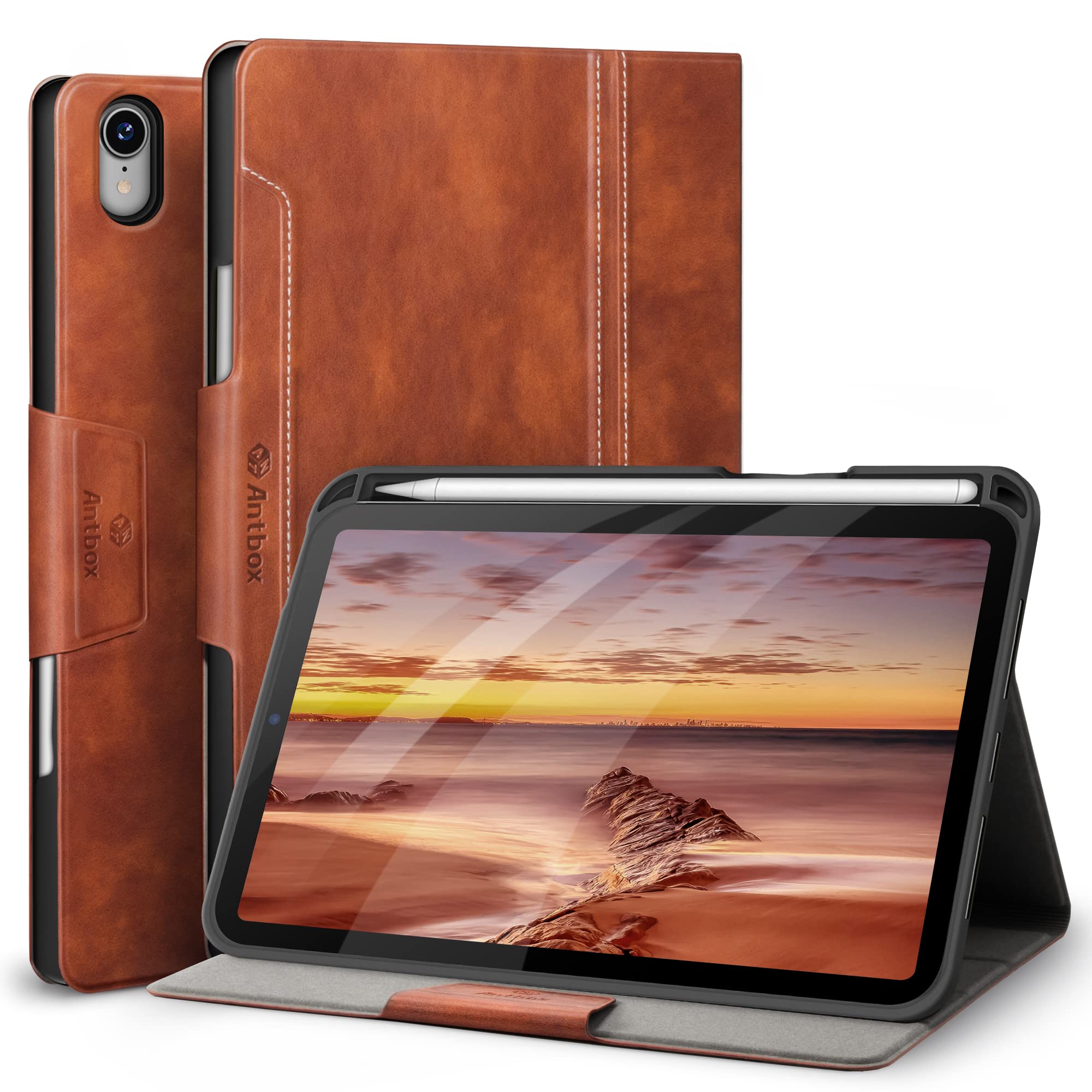
1. Antbox Case for iPad mini 7 A17 Pro / mini 6
Our pick — 4.5+★ from 850+ verified ratings; the strongest balance of quality and price.
A faux leather folio with a built-in Pencil dock, typing and viewing stand, and auto sleep/wake.
What wins people over here is sheer build quality, and it shows in the small stuff. The back is flexible TPU rather than a stiff plastic shell, so it bends instead of cracking when you press it into a bag. A faux leather front covers the screen, and the magnets inside respond in 0.1 seconds to wake or sleep the tablet — you open the flap and the screen is already on.
It is the heaviest folio in this lineup at 238 g, and it measures 8.27 x 6.3 x 0.79 inches, so it is a touch chunkier than the slim Feams cover at 9.09 x 6.81 x 0.59 inches. In exchange you get a genuine built-in Pencil dock: the 2nd-gen stylus sits tight, and a small hole behind it lets you push the pencil out with one finger instead of digging at it.
For propping up, the cover folds into typing and viewing positions, which owners put to work for wrist comfort during long sessions. The magnetic closure keeps the whole thing shut in a bag. If you want one cover that handles desk work, couch video, and travel without a second thought, this is the one — the crowd favorite at 4.5+ stars across 800+ owners, and it has earned the top spot.
What earns it first place
- Flexible TPU back resists cracking where hard shells fail
- Built-in Pencil holder with a push-out hole for easy removal
- 0.1-second auto sleep/wake from stronger magnets
- Typing and viewing stand modes for wrist comfort
Where it asks for patience
- At 238 g it is the heaviest folio here — noticeable in a small bag
- Faux leather front needs care around sharp keys
Reach for this if: you want a single folio that covers protection, a Pencil dock, and a stand without babying it.
Look elsewhere if: shaving every gram matters more to you than the built-in stylus holder.
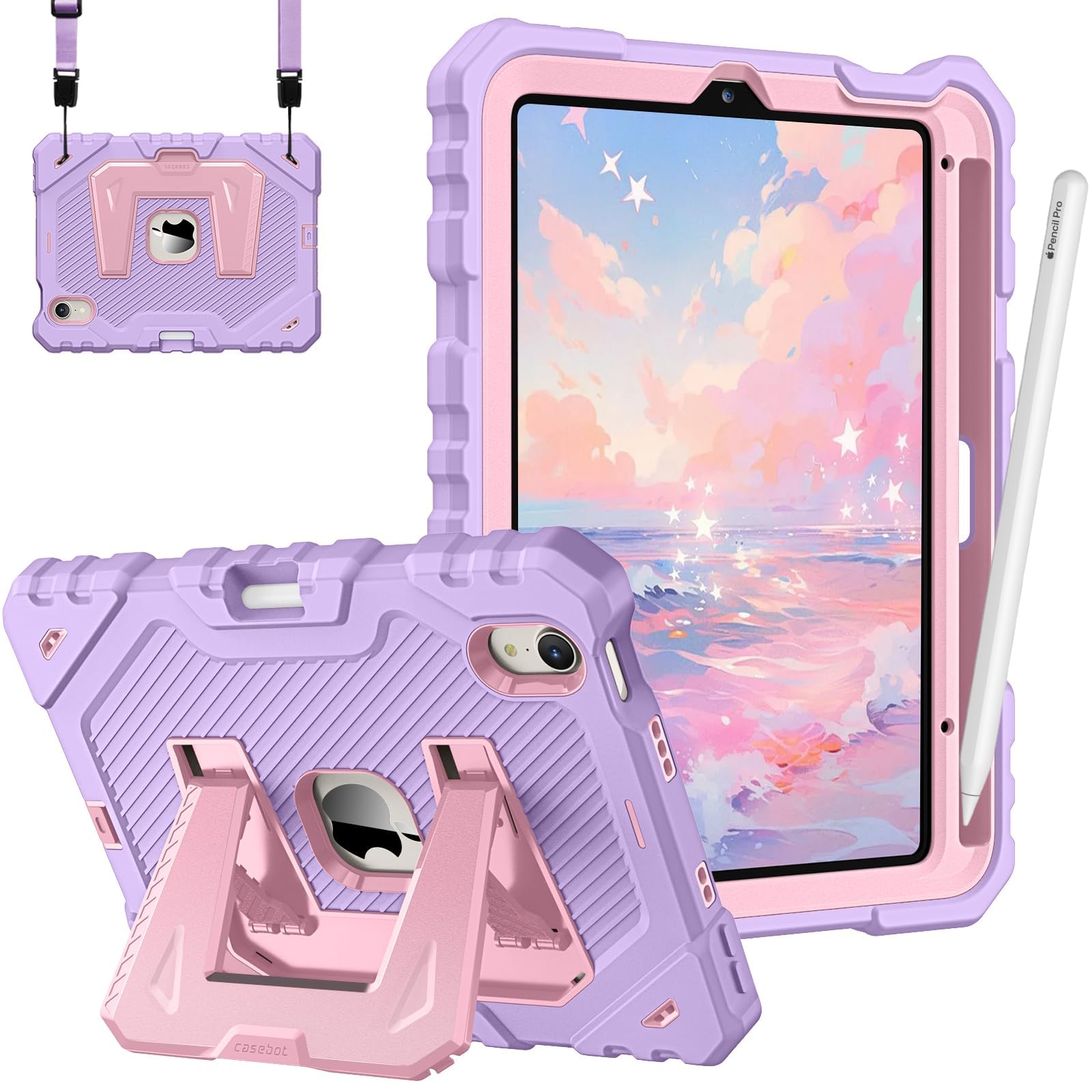
2. Fintie Kid-Friendly Case for iPad mini 7 / mini 6
A three-layer shell with a shoulder strap — the cover built for small hands and back-seat car rides.
This one is unapologetically chunky: a 3-layer shockproof body made from flexible silicone wrapped around impact-resistant hard PC plastic, weighing 0.28 kg. That is heavier than the Grifobes rugged case at 0.2 kg, and you feel it — but that extra mass is the point when the tablet is going to hit a tile floor.
The kickstand adjusts to two modes, vertical and horizontal, so a child can set it up for a show or lay it flat to draw. The removable shoulder strap is the feature that actually earns its keep: clip it around a car headrest and the Mini hangs where the back seat can see it, hands free. It supports Apple Pencil Pro and the 2nd-gen Pencil with magnetic and wireless charging through the case, and there is a holder plus a push-out hole for storage.
The honest catch is the kickstand. Quality is the thing owners praise most here, but a few buyers report “others report the kickstand breaking after a couple of weeks” — treat that hinge as the weak link and it will hold up. Bright colors and a grab-friendly bumper shape make it a natural fit for school and travel duty.
The trade that matters: weight and bulk buy you real drop protection and a strap that works in a moving car. If the Mini never leaves a desk, that bulk is wasted.
Suits: parents, students, and anyone who wants the tablet strapped to something instead of balanced on a knee.
Skip the strap life if: you need the case to disappear into a slim pocket.
3. Grifobes Shockproof Case for iPad mini 7 / 6
A 0.2 kg silicone-over-PC shell with a two-mode kickstand and a snug Pencil slot.
At 0.2 kg and built from outer soft silicone over an inner hard PC tray, this case is the lightest of the rugged trio in this list. The three-part construction — silicone outside, hard plastic inside, plus a hard PC edge around the screen — means the part your palm touches is soft and grippy, while the part that hits the ground is rigid. In a room full of slippery folios, that grip is the quiet win.
The kickstand clicks into two positions, portrait and landscape, so you can stand it up for video in bed or lay it flat for drawing. The built-in Pencil slot holds the stylus snug and lets you pull it out in about a second — no fumbling. Just note the Pencil support is split by generation: USB-C Pencil and 2nd-gen on the Mini 6, and USB-C or Pencil Pro on the Mini 7.
Everything is cut cleanly — buttons, speakers, cameras, and ports all line up, and owners find it simple to pop off for cleaning. If you want the protection of a rugged case without a handle or a strap adding bulk, this is the cleanest version of that idea, and the black-and-red scheme keeps it from looking like a toy.
Why it earns its place: soft silicone makes it easy to hold one-handed for long reads, and the hard inner tray does the actual protecting.
Small thing to know: the geometric pattern is bold — this is not a case that hides in a professional meeting.
Best fit: commuters and one-handed readers who want shock protection and a solid grip without a chunky handle.
Think twice if: you want a slim folio that folds completely flat — this one stays a shell.
4. Feams Slim Trifold Case for iPad mini 7 / 6

A printed PU leather trifold over a transparent acrylic back that shows the Mini’s finish.
Appearance is what this case sells, and it delivers: a printed PU leather front paired with a transparent acrylic back so your iPad Mini’s actual color shows through. At 6 ounces it is one of the lighter folios here, and it stays slim enough to slip into a tote. The front folds into two standing positions — one for viewing, one for typing — and the lid triggers auto sleep and wake as it opens and closes.
Inside, a pencil holder keeps your Pro, USB-C, or 2nd-gen Pencil in a secure spot (the Pencil itself is not included). The clear back arrives with inner and outer films that you peel off before first use — leave them on and you will wonder why the back looks smudged.
The honest trade-offs both come down to surface feel. The grip is the weak spot for some people, and the magnet strength could be stronger, so it can slide on a smooth table during use. Quality and fit draw most of the praise, and a soft pastel print is the reason people pick it. It is a lovely cover for a reader or note-taker — just not the one to throw in a backpack with no care.
Where it shines: the printed front and see-through back make it the most personal-looking cover here, and the tri-fold stand is genuinely useful.
Where it slips: weak grip and modest magnets mean it can shift on glass or polished desks.
Made for: anyone who wants their Mini’s color visible and a cover that looks like a notebook.
Not the one for: hiking, workshops, or anywhere the tablet needs to stay put on a tilted surface.
5. LeiJue Kids Case with Handle for iPad mini 7 / 6

A molded EVA foam shell with a chunky handle that doubles as a stand for small hands.
This is the one the toddler cannot destroy. The body is molded EVA foam — the squishy, dense material used in foam mats — which shrugs off drops in a way hard plastic cannot. The chunky handle doubles as a kickstand and gives small hands something real to grab. Owners talk about it surviving high-impact falls and being a favorite with toddlers, which is the whole job description for a case like this.
It also covers the ports, so dust, sand, and splashes stay out of the openings. Quality is what gets praised most here, followed by durability, and the fit is close but deliberately bulky rather than precise. A note before you buy: the black inner frame is a shipping insert and must be removed before use, and there is no built-in screen protector, so you will want to add one.
The bulk is the price of admission. This case is not meant for an adult’s briefcase, and the profile is much larger than a folio like the PITAKA. But for a classroom, a car seat, or a kid who has already sent one tablet to the floor, the trade is simple and it works.
Why parents choose it
- EVA foam absorbs drops that crack rigid shells
- Handle doubles as a stand and a carry grip
- Covers ports against dust and sand
- Bright purple color kids pick themselves
The fine print
- No built-in screen protector — add one
- Remove the black frame before first use
- Very bulky for adult carry
Reach for this if: a young child uses the Mini in the car, classroom, or living room floor.
Look elsewhere if: you want a case that looks like grown-up gear.
6. Telaso Magnetic Case for iPad mini 7 / 6

A 0.12 kg matte acrylic shell with N52 magnets that hold the Mini to any iron surface.
Industrial-grade N52 magnets are the reason this case exists, and they change how you use the tablet. Slap the Mini onto any iron surface — a refrigerator door, a metal shelf, a magnetic stand — and it stays put, hands free. Combine that with the multi-angle support and you have a kitchen recipe screen that does not need a stand at all. At 0.12 kg it is the lightest case in this lineup.
The back is matte acrylic with a soft TPU bumper, so it resists fingerprints and scratches while keeping a slim profile. Three heat dissipation holes vent the tablet from behind, and raised lips front and back keep the screen and camera off whatever surface it lands on. Support for magnetic Apple Pencil charging and a magnetic clasp rounds out the package.
The magnetic strength is the standout in owner feedback, with strong hold on metal and a quick snap-on fit. It is a protection shell, not a drop-proof tank — there is no thick silicone cage here — so pair it with a screen protector if the Mini travels. The black matte finish is the one color, and a 1-year manufacturer warranty backs it.
what separates it: the magnets hold the tablet’s full weight, so you can stick it to a fridge, metal stand, or tool cabinet and it stays put.
The catch: slim acrylic protection is fine for scratches and bumps, not for a toddler’s tantrum.
Suits: cooks, mechanics, and anyone who wants the Mini stuck to a metal surface mid-task.
Not for: rough handling or clumsy drops — this is a slim protective shell first.
7. BRAECN Case for iPad mini 7 (A17 Pro) / 6
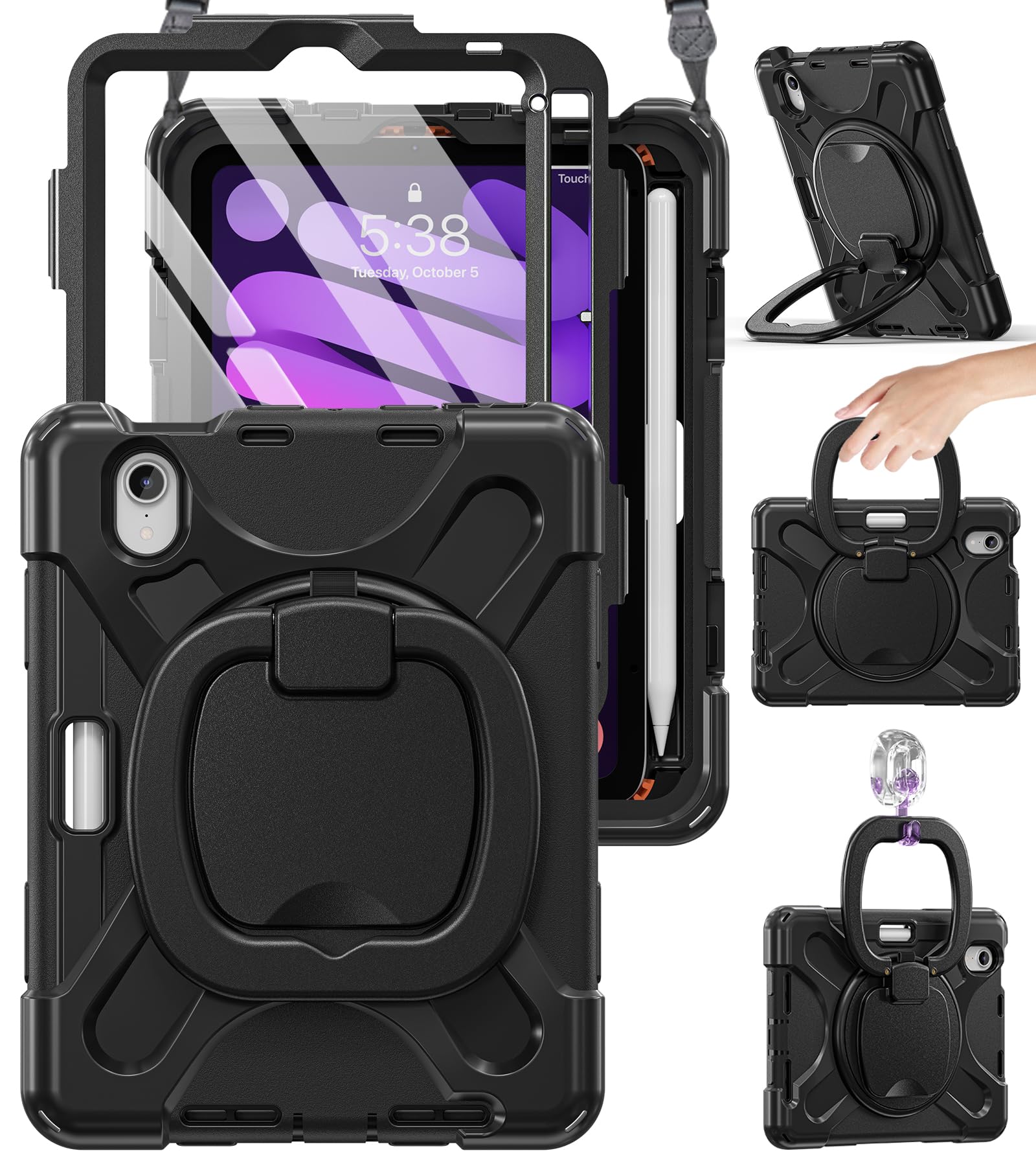
A three-layer silicone shell with a 360° rotating handle and an adjustable shoulder strap.
A 360° rotating and 180° folding grip is the feature that defines this case. That handle hangs on a hook in the kitchen, the washroom, or the bedroom, and it also folds flat to act as a stand on any surface. Toss in the adjustable shoulder strap and the Mini becomes a wearable screen — good for hands-free video while you cook or for keeping a kid occupied in a car seat.
Protection runs three layers deep: non-toxic shock-absorbing silicone over a hard frame, with button and port covers to block dust. The Pencil holder supports 2nd-generation Apple Pencil charging (the Pencil is not included). The case also ships with a screen protector, which is rare among rugged shells and saves you a separate purchase.
The honest note is durability — the build is what gets praised most, and protection ranks second, but the long-term toughness of the moving parts is the trade-off to watch. The grip mechanism and strap anchors are what take the strain, so use the swivel deliberately and it holds. If you want one case that works in the kitchen, the car, and the workshop, this is the most flexible build in the group.
What it open up
- 360° rotating, 180° folding handle hangs anywhere
- Adjustable shoulder strap for hands-free carry
- Three-layer silicone and PC body
- Screen protector included
- Port and button covers block dust
The honest caveat
- Moving grip and strap anchors are the parts to treat with care
- Bulkier profile than a folio — not a slim-pocket case
Best for: kitchens, workshops, road trips, and anyone who wants to hang or strap the Mini instead of holding it.
Choose a folio instead if: you want the Mini to stay thin and pocketable.
8. SUPCASE for iPad mini 6 / 7 with Aluminum Stand

A 3kg torque alloy hinge that adjusts from 9° to 60° in landscape and stands at 55° in portrait.
The rear alloy stand is the headline, and it is a genuinely different idea from a folding folio. It ranges from 9° to 60° in landscape for writing and drawing, and stands at 55° in portrait for reading. A 3kg torque hinge carries 3,000 cycles of opening and closing, and embedded magnets add snap force so it does not drift. If you type, sketch, or take video calls at a desk, this stand alone justifies the pick.
Drop protection is serious without the bulk: rugged TPU and PC construction with corner air cushions, 1.6mm screen bezels, and 1.7mm camera guards. It meets SGS MIL-STD-810H standards to survive 1.22m drops. The whole thing is 118.3 g and 11.5mm thick — that is lighter than the Antbox folio at 238 g and the Fintie at 0.28 kg — so it stays close to a bare-tablet feel.
A clear back lets your Mini’s finish show through, and a pencil groove charges the Pencil 2 and Pencil Pro wirelessly while holding the USB-C model magnetically (that model does not charge through the case). Owners mention a sturdy build that does not tip over, and they note it stays light. It works fine on most desks — but if you need a folio that covers the screen in a bag, look at the PITAKA instead.
The stand story: a 3kg torque alloy hinge with a 9°–60° range is the most adjustable desk setup here, and 118.3 g keeps the overall feel near-naked.
One thing to note: the USB-C Apple Pencil holds magnetically but does not charge through this case.
This is your pick if: the Mini is a desk companion for calls, notes, and sketching at a range of angles.
Pick a full folio instead if: your Mini lives loose in a bag without a screen cover.
9. PITAKA Folio2 for iPad mini A17 Pro

An origami-fold folio that packs four viewing angles into a featherweight flap.
Four standing angles out of a two-way fold is the trick here. The triangle structure of the multi-fold front holds the Mini steady in portrait and landscape, which covers Zoom calls, browsing, and drawing without a separate stand. And it does all that at just 5.01 oz — the lightest case in this entire lineup — so it disappears into a bag.
The skin-friendly polyurethane leather resists dust and scratches and gives the folio a leather-notebook look the Antbox and Feams covers also chase, but with more flexibility. Strong magnets hold the tablet firmly, a magnetic clasp secures the Apple Pencil, and you can fold the clasp away when the stylus is not in use. Pencil 2 attaches and charges as normal, and the lid wakes and sleeps the screen automatically.
What wins people over is the magnetic design and the sleek fold, and owners find it ideal for on-the-go use. The honest limit is protection — this is a slim folio, so it guards the screen and back from scratches but is not the case you choose for a hiking trip. For reading in bed and carrying to a café, though, the weight and the angle range are hard to argue with.
What you’ll appreciate
- Four angles from a two-way origami fold
- 5.01 oz — lightest here by a wide margin
- Strong magnetic hold plus Pencil clasp
- Auto sleep/wake on the lid
Set your expectations
- Slim folio protection, not rugged drop armor
- The lighter build trades impact absorption for portability
Made for: readers, commuters, and travelers who want angles and negligible weight.
Look elsewhere if: the Mini goes camping, gets tossed to a child, or works in a dusty shop.
Know the Specs
Model numbers (A2993, A2995, A2567, A2568)
Each iPad Mini generation has its own model codes printed on the back of the tablet, and a case is cut to match a specific set. The 7th-gen A17 Pro model uses A2993, A2995, or A2996, while the 6th-gen uses A2567, A2568, or A2569. If your code is not on the case’s list, the camera or buttons will not line up correctly, no matter how right the photos look.
Enclosure material (silicone, TPU, PC, EVA)
Silicone is the soft, grippy outer layer that absorbs shock, and TPU is a flexible plastic that bends rather than cracking. PC (polycarbonate) is the hard, rigid plastic that spreads impact across the shell, and EVA is a dense foam that shrugs off drops entirely. Most rugged cases use two or more together — soft outside, hard inside — which is why they protect without feeling like a brick.
Stand types (kickstand vs tri-fold vs alloy hinge)
A kickstand is a hinged flap that props the tablet in portrait or landscape, usually at two fixed positions. A tri-fold or origami folio folds the front cover into a triangle to create an angle. An alloy hinge stand is a metal arm with an adjustable range, and it holds its position without collapsing. The more angles a stand offers, the more it feels like a laptop and the less it feels like a folded notebook.
Weight and thickness
Weight decides whether you notice the case in a bag, and thickness decides whether it slips into a pocket. Slim folios tend to land around 5 to 6 ounces, while rugged shells climb well past that because of the silicone and hard plastic. If you carry the Mini in a jacket pocket, weight comes first; if it rides in a backpack or a car, a heavier rugged shell asks nothing from you.
Common Questions
Will an iPad Mini 6 case fit the iPad Mini 7 A17 Pro?
Does a case stop the Apple Pencil from charging wirelessly?
How much weight does a rugged iPad Mini case add?
Do I need a screen protector if the case covers the screen?
Can a magnetic iPad Mini case stick to a fridge or metal shelf?
Is a kickstand case better than a folding folio?
What does MIL-STD-810H mean on an iPad Mini case?
Will a thick iPad Mini case still fit in a car headrest mount?
How do I remove the inner film on a clear-back iPad Mini case?
The Bottom Line
The right pick depends on where your Mini goes. The Antbox is the one to beat for most people — a flexible TPU back, a built-in Pencil dock, and a typing stand in a 238 g faux leather folio that shrugs off daily life. If a child carries the tablet, the Fintie adds a shoulder strap and three-layer shockproofing for the car and the classroom. And if the Mini lives on a desk, the SUPCASE alloy stand gives you laptop-style angles at only 118.3 g.
One gentle nudge: the Antbox stands out in this group with 4.5+ stars from 800+ owners, so if you are undecided, start there. Branch out only if a strap or a stand matters more to you than the all-rounder.
How we choose
We do not accept paid placement. Every pick is matched to a real buyer and a real use-case; we do not hands-on test units.
Sources
Specifications: manufacturer listings and product documentation. Review insights: verified customer reviews, as of November 2026. Pricing: not shown on this page (it changes often); check the current price via the retailer link.
As an Amazon Associate, Tactical Gear Guy earns from qualifying purchases. This does not affect which products we feature.