Specs are compiled from manufacturer listings and verified buyer reviews and can change over time — please confirm the key details on the product page before buying.
The catch you need to understand up front is the connector. Older iPhones use a Lightning port, newer ones use USB-C, and the wrong plug makes a great camera completely useless to you. This guide sorts every pick by port type, resolution, and temperature range so you buy the one that actually fits the phone in your hand.
This guide is built by comparing the manufacturers’ published specifications and the patterns across verified customer reviews, so you get each pick’s real strengths and trade-offs instead of marketing spin.
You will learn which sensor numbers actually matter, how far each camera reads temperatures, and which app each one requires. Every pick below has been matched to its iPhone generation, so you can choose a thermal camera for iPhone without guessing at the plug. Below is the full breakdown of the best thermal camera for iPhone, ranked by what each one genuinely does well.
Top Picks

How To Choose The Best Thermal Camera for iPhone
The first decision is not resolution, brand, or temperature range. It is the port on the bottom of your phone. A Lightning iPhone cannot run a USB-C camera, and a USB-C iPhone cannot run a Lightning camera without a workaround. Lock that down before you compare anything else, because a camera that will not connect has zero value no matter how good its sensor is.
Match the connector to your iPhone generation
Lightning covers the iPhone 7 through the iPhone 14 line. USB-C starts at the iPhone 15 and carries forward. Several cameras in this list ship in two versions for exactly that reason, and one popular model explicitly tells buyers to pick its newer USB-C variant if they own an iPhone 15 or 16. Read the listing title carefully — the same camera name can hide two different plugs. If you plan to upgrade your phone soon, buying the USB-C version now saves you from replacing the camera later.
Read the native sensor number, not the headline number
A thermal sensor captures heat as a grid of tiny squares called pixels. More pixels means finer detail — you can tell a hot wire from a warm pipe. Many listings quote a big “super resolution” figure like 512×384, but that is upscaled from a smaller native grid, often 256×192. Both numbers are real; the native one is what the hardware actually sees. The gap matters for close inspection work like finding a single overheating breaker.
Temperature range and sensitivity tell you what you can detect
Range is the hottest and coldest surface the camera can read without error. A range reaching over 1000°F lets you check brake rotors, kilns, and engine components. Sensitivity, written in mK or mk, is the smallest temperature difference the sensor can pick up — a lower number means it separates two nearly identical surfaces. For home work like finding a draft, sensitivity usually matters more than the top-end range.
Side-by-Side Comparison
| Model | Best For | iPhone Connection | Thermal Resolution | Temp Range | Amazon |
|---|---|---|---|---|---|
| TOPDON TC002★ Best Overall | Most buyers | Lightning | 512×384 super res | -4°F to 1022°F | Amazon |
| VANTRUE POWER TS1Best Flexibility | Lightning and USB-C flexibility | Lightning and USB-C | 512×384 super res | -4°F to 1022°F | Amazon |
| Flir OneBest App Guidance | Air-leak hunting in a familiar app | USB-C | 240×180 super res | — | Amazon |
| TOPDON TC002C Duo | Mixed iPhone and Android households | USB-C | 512×384 super res | -4°F to 1022°F | Amazon |
| Flir One Pro | Jobsites and rough handling | USB-C | 480×360 super res | — | Amazon |
| Fluke TC01B | Real-time team sharing | iOS | 256×192 | Up to 1022°F | Amazon |
| MILESEEY TR256i | Electrical and HVAC inspection | USB-C | 512×384 super res | 5°F to 1112°F | Amazon |
| Seek Thermal Compact | DIY home and jobsite basics | Lightning | 206×156 | -40°F to 626°F | Amazon |
| Seek Thermal Nano 300 | Highest native detail | USB-C | 320×240 | -4°F to 626°F | Amazon |
Detailed Reviews
1. TOPDON TC002 Thermal Imaging Camera for iOS
Our pick — 4.5+★ from 500+ verified ratings; the strongest balance of quality and price.
The Lightning-phone pick that punches far above its class on detail.
If your iPhone still uses a Lightning port, this is the camera that gives you the most thermal detail for the money. Its sensor reads heat at a native 256×192 grid and then upscales the picture to 512×384 using TOPDON’s TISR processing. That means a wall stud shows up as a crisp vertical band rather than a grey smudge, and a single warm wire stands out from the surrounding insulation. In plain terms, that is enough resolution to aim at one breaker or stud and read it cleanly.
Smooth motion is the second win. A 25Hz refresh rate (25 picture updates per second) means you can sweep the camera across a room and watch the image track your hand instead of stuttering. Heat sensitivity sits at 40mK, a very small difference the sensor can resolve, so a slow draft behind a window frame becomes visible. The range runs from -4°F all the way to 1022°F, which covers everything from a frozen pipe to a hot engine block. You pick your reading type — a single point, a line, or a whole surface — right in the app.
The app side is where this camera wins over its own sibling, the TC002C Duo. Quality is the thing owners talk about most, and the sentiment lines up with why: the TopInfrared app makes the readout feel like proper inspection gear rather than a toy. Downside you need to hear: this model is Lightning-only, and the listing itself points iPhone 15 and 16 owners to the TC002C instead. If you already own a newer phone, this one will not plug in.
Why It Earns The Top Spot
- 512×384 upscaled detail from a 256×192 native sensor gives sharper edges than a plain low-res grid
- 25Hz refresh keeps moving heat readable instead of jerky
- -4°F to 1022°F range covers home, auto, and electrical work
- 6-8 hours of runtime on a charged iPhone, so a full morning of inspection is realistic
What To Know Before You Buy
- Lightning-only — iPhone 15 and newer need the separate USB-C version
- The shutter clicks audibly unless you close it manually in the app
Grab this one: iPhone 7 through 10+ owners who want real inspection detail without stepping into premium territory.
Step away if: your phone has a USB-C port — the Duo is the version built for you.
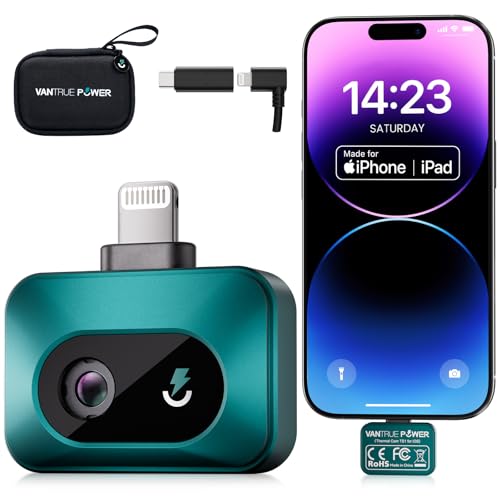
2. VANTRUE POWER TS1 Thermal Camera for iPhone
One camera that follows you from an old iPhone to a new one.
Here is a camera that takes the port anxiety out of the equation. The TS1 plugs into a Lightning port for iPhone SE and later, or a USB-C port for iPhone 15 and newer — both in the same box, with no second purchase needed. It also happens to be the lightest camera in this roundup, at 0.32 ounces. The Flir One, for comparison, is listed at 1.28 ounces. That weight gap matters when you hold the phone overhead to scan a ceiling for a minute or more.
The imaging story is the same upscale trick you see on the TOPDON — a native 256×192 sensor lifted to 512×384 super resolution. Where the TS1 steps out is its low draw of 0.33W, which means it runs for hours without flattening your phone battery. Twelve colour palettes let you switch how heat is displayed, useful when a warm pipe blends into a background on the default view. Temperature runs -4°F to 1022°F with ±3.6°F (±2°C) or 2% precision. You can still pick point, line, or surface readings.
Reliability is the trait that earns the most goodwill here — owners reach for it for finding a heat source on nearly anything and it just works. Temperature monitoring also earns steady praise, with the app automatically flagging the hottest and coldest spots on screen. The honest framing: it works across both port types, but this is a newer listing, so the track record is shorter than the old standbys in this group.
Fresh but capable: the dual-port support plus 0.33W draw makes the TS1 the safest pick if you are unsure which phone you will own next year.
Reach for it if: you might swap between an older iPad and a newer iPhone — this handles both ports without an adapter.
Hold off if: you want years of owner history behind your purchase before you commit.
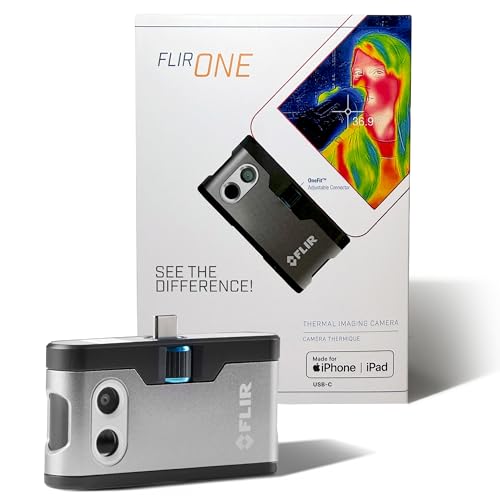
3. Flir One Thermal Imaging Camera for iOS (USB-C)
The beginner-friendly route, with the app teaching you as you go.
Flir built this one for the person who has never read a thermal image before. The Flir One app contains step-by-step inspection guides that walk you through the usual household faults — an air leak around a door, moisture building up in a wall. You are not left staring at a coloured blob wondering what the orange means. Owners describe it as easy to use for exactly that reason, and finding air leaks on doors comes up as its clear strong suit.
The picture is upscaled to 240×180 from an 80×60 native sensor, and Flir’s MSX technology overlays the heat map onto a normal visual image so edges of windows, studs, and pipes show up sharp. Accuracy is stated at ±3°C or ±5% when the unit sits between 15°C and 35°C and the scene is in the 5°C to 120°C band. The body is rated to survive a drop from 1.5 meters, which is real news if this lives in a toolbox.
On detail, though, it trails the TOPDON TC002 clearly — 240×180 super resolution against 512×384. You feel that when you are inspecting a small circuit board rather than a room. For broad home troubleshooting it is plenty; for fine electronics work it is the weaker tool. A single AA battery is included, so you are never hunting for a spare before a job.
Ideal for: first-time thermal users who want the app to hold their hand through a home inspection.
Think twice if: you need to resolve tiny components — the coarser upscaled grid will frustrate you.
4. TOPDON TC002C Duo Thermal Imaging Camera

Shared across an iPhone and an Android tablet without a second purchase.
The “Duo” name is the whole point. This camera connects to any USB-C smartphone or tablet running iOS, Android, or Windows. In a house where one person carries an iPhone 15 and another carries an Android, one camera serves everyone. That is a practical edge the Lightning-bound TOPDON TC002 cannot match. The listing notes one caveat: it does not work with Mac devices or Android 16 devices as of now, so check your own gear before ordering.
Performance does not drop for the shared compatibility. The 256×192 sensor upscales to 512×384 with 25Hz refresh and 40mK sensitivity, the same sharp-and-smooth combination that carries the top pick. Temperature runs -4°F to 1022°F with ±2°C or 2% error, and you can record photos and video straight from the app. Reading a surface from up to 16.4ft (5m) away means you can check a hot breaker box without standing right next to it.
Effectiveness is the trait that comes through strongest, and it is easy to see why: finding insulation gaps is the everyday job this thing was built for. A word of honest sizing — the image quality and compatibility aspects draw split opinions rather than pure praise. Some users hit connection quirks. It is a small slice of the picture, but worth knowing if you demand zero fiddling. The TopInfrared app keeps the controls clear once you are connected.
The household-sharing angle: if more than one phone in your home might need a thermal check, this is the only pick here that covers both major platforms on one USB-C plug.
Perfect match: mixed iOS-and-Android families who want one camera to cover all their devices.
Not for you if: you only ever use an iPhone — the Lightning TOPDON is cheaper and equally sharp for your case.
5. Flir One Pro Thermal Imaging Camera for iOS
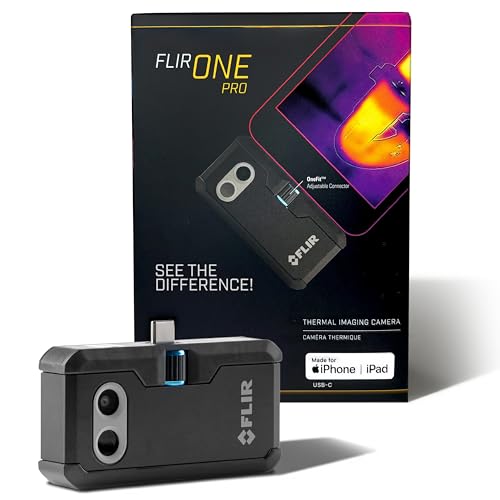
The Flir grown up for people who work where phones get dropped.
Think of this as the Flir One after it spent a season on a jobsite. The picture climbs to 480×360 super resolution from a 160×120 native sensor — noticeably finer than the standard Flir One’s 240×180. The same MSX blending overlays thermal data on a visual image, so a wall stud reads as a real edge rather than an abstract gradient. If you inspect machinery, plumbing, or electrical panels for a living, that extra detail earns its keep.
The durability claim is concrete: built to take a drop from 1.5 meters, same as its smaller sibling. Accuracy is stated at ±3°C or ±5% within the same 15°C to 35°C unit temperature and 5°C to 120°C scene window. Flir lists it for home inspection, automotive, chemical, plastics, and machinery work — a broad remit for a camera that plugs into your phone’s USB-C port. One AA battery is included. Compared with the standard Flir One, you get the sharper sensor; you do not get a different app or connection style.
What comes through loudest is functionality — it locates cold and hot spots in walls and insulation reliably, which is the core job. Fair warning on the rest: the overall sentiment on this model splits in two, with some users finding it excellent and others hitting quirks, and value draws a similar divide. It sits in premium territory, so it needs to earn that with detail. For those who need the finer grid on a rugged body, it does.
The jobsite answer: working inspectors and contractors who need the sharper 480×360 view and expect a knock or two.
Look elsewhere if: you are a homeowner doing occasional checks — the standard Flir One saves you the premium for the same guided app.
6. Fluke TC01B iSee Mobile Thermal Camera for iOS
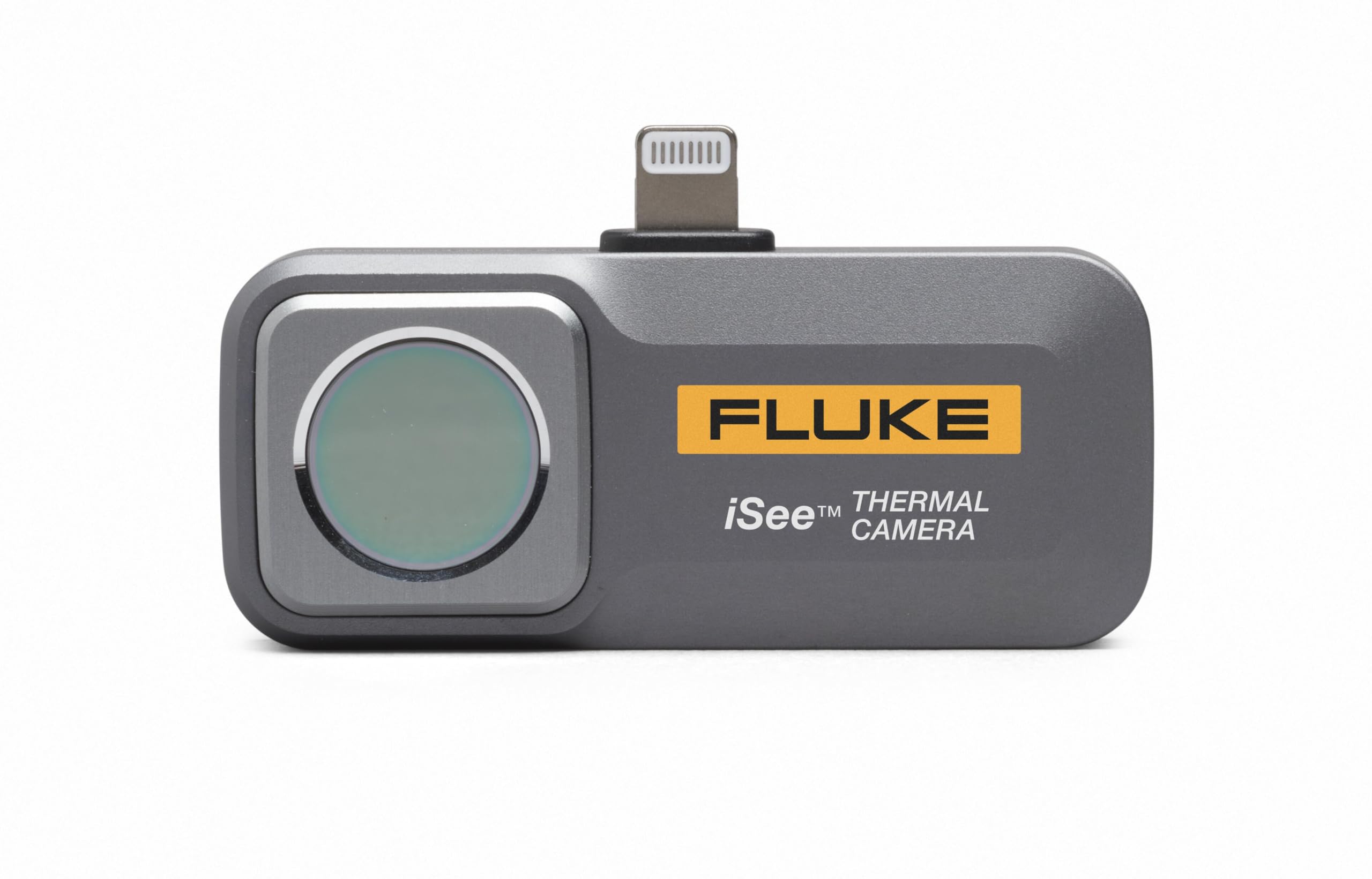
For teams that need to pass a thermal image around in real time.
Fluke brings its professional reputation into a phone accessory, and the standout feature is not resolution — it is communication. This camera records thermal video at 25Hz and shares images in real time, so a technician on site can send a live heat view to a colleague or client without exporting a file first. It does spot, line, and area temperature analysis, the same three reading modes the rest of this list offers. Temperature reaches up to 1022°F, covering the electrical and mechanical extremes.
The sensor is a true 256×192 grid, so what you see is what the hardware captures — no super-resolution upscaling to untangle. It weighs 22g, light enough to leave attached to the phone between jobs. Fluke describes the image quality as comparable to professional thermal imagers, and for the price tier that is the promise you are buying into. It connects over Wi-Fi to your iOS device instead of plugging into the port.
Performance is the clear strong point here — the camera simply does what it is asked and holds a solid quality read. The honest caveat concerns fit: several users note it does not work well with a phone case still attached. If your iPhone lives in a thick case, plan to pop it off. That is a fit issue, not a fault in the camera, but it is the thing to check before you commit.
Why the pros reach for it: live video sharing at 25Hz turns a solo inspection into a two-person conversation, which is where Fluke earns its name.
Buy it if: you routinely need to show someone else what you are seeing in the moment.
Skip the case: if your phone wears a heavy cover, expect to remove it for a clean connection.
7. MILESEEY TR256i Thermal Imaging Camera for iOS
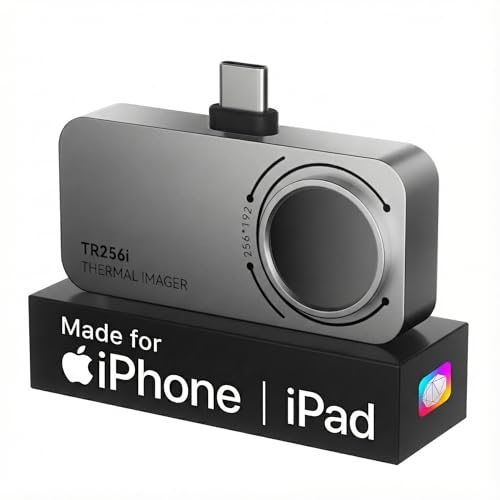
The inspection specialist, with calibration controls the others leave out.
For electrical and HVAC work, the TR256i gives you the tools a pro actually tweaks. You can manually enter ambient temperature, target emissivity, and target distance, and the camera compensates its readings to match. That is the difference between a rough heat read and a corrected number you would put in an inspection report. Emissivity, in plain terms, is how readily a surface gives off heat — shiny metal and drywall behave very differently, and this lets you correct for it.
The sensor upscales to 512×384 from 256×192 using MILESEEY’s Matrix III processing, with a wide field of view over 56° so you can sweep a whole wall or panel in one pass. Temperature runs 5°F to 1112°F — the highest top end in this group. A large F1.1 aperture pulls in more heat signal for a clearer image. An Isotherm Mode colourises your chosen temperature band and greys out the rest, so an anomaly jumps out at a glance. Twelve palettes and a 2-year warranty round it out.
Plug-and-play over USB-C for iPhone 17, 16, 15 and iPad 10th generation and later, with photo and video capture in the MILESEEY Thermal app. At 0.7 oz (20 g) it vanishes into a pocket. The knock on this camera is its shorter track record — it is new to the market, so the long-term owner consensus is still forming. What is there reads positively on quality and value, but this is a buy on specs and warranty rather than a long history.
Best for the trade: HVAC and electrical techs who want emissivity control and the widest temperature range available here.
Pause if: you prefer a camera with years of owner feedback behind it before you spend.
8. Seek Thermal Compact Thermal Imaging Camera for iOS

The veteran workhorse that never needs a charge and just keeps going.
This is the old reliable of the group, and its appeal is simpler than any spec sheet. A 206×156 thermal sensor turns your iPhone into a heat camera for home, jobsite, and DIY checks — energy loss, electrical faults, water damage and the like. It does not require batteries or charging, because it draws its power straight from the phone. That alone removes an entire failure point: no dead camera the morning of a job. A waterproof case is included, and the Seek app is free.
The numbers are modest on paper: a 36° field of view, under 9Hz frame rate, a focusable lens, and a detection range from -40°F to 626°F. A focusable lens is note — you twist it to sharpen the image, which can beat a fixed lens on close work if you are patient. Detection reaches 1,000 ft. You get spot temperature, high-low readout, threshold mode, and 9 color palettes for spotting what you need.
This is the crowd favourite here by sheer owner volume, and quality is the aspect that stands behind that. Functionality runs close behind, with users finding it a capable all-purpose tool. Sized honestly: image quality and temperature accuracy draw mixed notes, so this is a broad-strokes finder rather than a precision instrument. For DIY discovery — finding the cold draft or the warm outlet — it does the job. For a calibrated, reportable temperature, look higher up this list.
Standout Strengths
- Runs entirely off the phone — no battery to charge or replace
- -40°F to 626°F range and a focusable lens for adaptable close work
- Waterproof case included, so it survives a damp basement
Honest Limits
- Under 9Hz frame rate is slower than the 25Hz cameras above, so panning looks less fluid
- Image quality and accuracy draw mixed feedback — treat it as a finder, not a measuring tool
Smart buy for: DIY homeowners who want to find the problem without a battery headache.
Know the ceiling: if your work needs precise, reportable numbers, this is a discovery tool and not a lab instrument.
9. Seek Thermal Nano 300 Thermal Camera for iOS

The genuine 320×240 sensor for buyers who refuse upscaled numbers.
Every camera above leans on super resolution to boost its headline figure. The Nano 300 does not need to. Its sensor captures a real 320×240 grid at over 25Hz, and the picture quality shows the difference — finer heat detail you can trust without wondering how much is software smoothing. A wide 57° x 42° field of view captures a whole room in a frame, and you can view your phone’s normal camera alongside the thermal image to compare what you are looking at.
Temperature runs -4°F to 626°F with sensitivity of under 35 mk and accuracy of ±5%. You see the center spot temperature plus the hottest and coldest points on screen instantly. Images and video save straight to your phone to share. Connects to all USB-C iPhones from the iPhone 15 onward via the Seek Nano app. It is designed and assembled in the USA, backed by lifetime online customer support — a real comfort if you keep gear for years.
The quality and reliability of this sensor are what owners rate highest, and a true native grid explains why it holds up under close inspection. Do note the app itself draws criticism for being minimal — it works, but it is not loaded with features. That is the trade-off for the sensor. If you want true 320×240 detail and can live with a bare-bones app, this is the sharpest native sensor here.
Where it wins: a true 320×240 sensor and 25Hz motion make this the pick for anyone who distrusts upscaling and wants the cleanest raw thermal image here.
Choose it when: image fidelity is your priority and you would rather have a real sensor than a software-boosted number.
The trade-off: the companion app is basic, so expect function over frills.
Know the Specs
Thermal Resolution and Super Resolution
Resolution is the grid of heat pixels the sensor reads, written as width by height. A 256×192 sensor captures that many points of temperature. Super resolution is software that upscales that grid to a larger number, like 512×384, to sharpen edges. Both are useful; the native number is the honest hardware spec, and the upscaled figure tells you the sharpened output. Higher native resolution means finer visible detail, which helps when you inspect small components rather than whole walls.
Refresh Rate in Hz
Refresh rate is how many times per second the image updates, written in Hz. A 25Hz camera updates 25 times a second, so sweeping across a room looks fluid and moving heat stays readable. A slower camera under 9Hz updates less often, which is fine for a still wall but less smooth when you pan. If you check moving machinery or scan quickly, higher Hz helps you catch the source instead of a blur.
Temperature Range and Sensitivity
Range is the coldest and hottest surface the camera reads accurately, like -4°F to 1022°F. Sensitivity, shown in mK or mk, is the smallest temperature difference between two surfaces the sensor can separate — a lower number means sharper detection of subtle drafts and heat loss. Wide range covers extreme jobs; tight sensitivity covers subtle ones. Match whichever one your work leans on.
Connector and App Compatibility
The connector is the physical plug on the camera, either Lightning for older iPhones or USB-C for iPhone 15 and newer. The app is the software you download to view the image. A camera is only as useful as the port it fits and the app it runs, so confirm both before buying. Some cameras ship in two versions for exactly this reason, and a few do not work with a phone case attached.
Common Questions
Will a Lightning thermal camera work on my iPhone 15?
Do I need a battery or charging for these cameras?
What does super resolution actually do compared with native resolution?
Can a thermal camera see through walls?
How far away can these cameras read temperature?
Which thermal camera is best for finding a water leak or air draft?
Will these cameras work with a phone case on?
Can I use one of these on an iPad as well as an iPhone?
Is higher refresh rate worth paying for?
The Bottom Line
For most people, the thermal camera for iphone winner is the TOPDON TC002 — 512×384 detail, 25Hz motion, and a 1022°F range give you real inspection capability on a Lightning phone. If your iPhone is USB-C, grab the TOPDON TC002C Duo for the same sharpness plus Android support. And for the homeowner who wants a battery-free finder that just works, the Seek Thermal Compact is the one to reach for. The one honest nudge: match the port before anything else — a camera that plugs into your iPhone beats a sharper one that does not.
How we choose
We do not accept paid placement. Every pick is matched to a real buyer and a real use-case; we do not hands-on test units.
Sources
Specifications: manufacturer listings and product documentation. Review insights: verified customer reviews, as of November 2026. Pricing: not shown on this page (it changes often); check the current price via the retailer link.
As an Amazon Associate, Tactical Gear Guy earns from qualifying purchases. This does not affect which products we feature.