Specs are compiled from manufacturer listings and verified buyer reviews and can change over time — please confirm the key details on the product page before buying.
You want your Switch on the big screen without hauling the official dock around, and the short answer is that a good USB-C to HDMI adapter does that job in a pocket-sized package. What matters most is that the adapter actually outputs video from your specific console — Switch 1, Switch 2, or OLED — and that it can pass through enough power to keep the battery alive while you play. Get those two things right and the rest is convenience.
This guide is built by comparing the manufacturers’ published specifications and the patterns across verified customer reviews, so you get each pick’s real strengths and trade-offs instead of marketing spin.
One honest note before you read: this list uses flexible, human-like matching for USB-C input to HDMI output, so not every pick is the exact model number you searched — the nearest same-type adapter serves the same purpose. Below you’ll find the honest breakdown of each Switch USB-C to HDMI option, including output resolution, charging wattage, and where each one falls short.
Top Picks

How To Choose The Best Switch USB-C to HDMI Adapter
A Switch USB-C to HDMI adapter is a small bridge that takes the video signal out of your console’s USB-C port and sends it to a TV or monitor through HDMI. The tricky part is that not every USB-C port can send video, and not every adapter can keep your console charged while it does. Here is what actually separates a good one from a frustrating one.
Check the charging passthrough wattage first
Your Switch draws power while it outputs video, so the charging port on the adapter needs to pass through enough juice. The Switch 1 needs a 15V/2.6A PD charger and the Switch 2 needs 20V/3A, according to the specs on these adapters. That PD label stands for Power Delivery — a charging standard that negotiates voltage between your charger and device. If the adapter can’t pass that through, you get a black screen or a dead battery mid-session.
Match the output resolution to what your console sends
Many adapters here advertise 4K@60Hz output, but the Switch 1 only outputs native 1080P at 60Hz — the 4K figure matters for Steam Deck, laptops, and phones. The Switch 2 can push higher refresh rates on supported displays. Buying for the highest number is fine, but buy for the device you actually own.
Decide between a full dock replacement and a bare adapter
A full dock replacement gives you extra USB-A ports for wired controllers, ethernet for a stable connection, and a stand for the console. A bare adapter just carries video and charging in a tiny package. If you travel light, the bare adapter wins on size. If you play at a desk with wired accessories, the port count matters more than the footprint.
Side-by-Side Comparison
| Model | Best For | Max Output | Charging Passthrough | Ports | Amazon |
|---|---|---|---|---|---|
| 4 in 1 Switch TV Dock (RREAKA)★ Best Overall | Best all-round travel dock | 4K@60Hz / 1080P | PD 100W | 4 | Amazon |
| Portable Switch Dock Conversion Cable (RREAKA)Travel Cable | Budget cable-style travel pick | 4K@30Hz | PD 100W | — | Amazon |
| USB C to HDMI Adapter (Microwoo)Phone Mirror | Phone and tablet mirroring | 4K HDMI | USB-C 100W | 2 | Amazon |
| Switch 2 Dock (PURBHE) | Multi-console dock mode | 4K@60Hz / 1080P60Hz | 15V input | 1 | Amazon |
| Switch Dock Charger (Mirabox) | Dock plus charger in one | 4K@60Hz / 1080P | 31W max PD | 3 | Amazon |
| Apple USB-C to HDMI Adapter (Wahbite) | iPhone and Mac mirroring | 4K@60Hz | 100W PD | 2 | Amazon |
| Switch 2 Dock HDMI Cable 8K (ACAQAUI) | High-refresh desktop gaming | 8K@60Hz / 4K@240Hz | 100W PD input | — | Amazon |
| USB C Switch 2 Dock (YEEKRNOW) | Ethernet and multi-port desk setup | 4K@60Hz | 100W PD | 5 | Amazon |
| Cable Matters 48Gbps Adapter | High-resolution laptop and monitor | 8K@60Hz / 4K@240Hz | No pass-through | 1 | Amazon |
Detailed Reviews
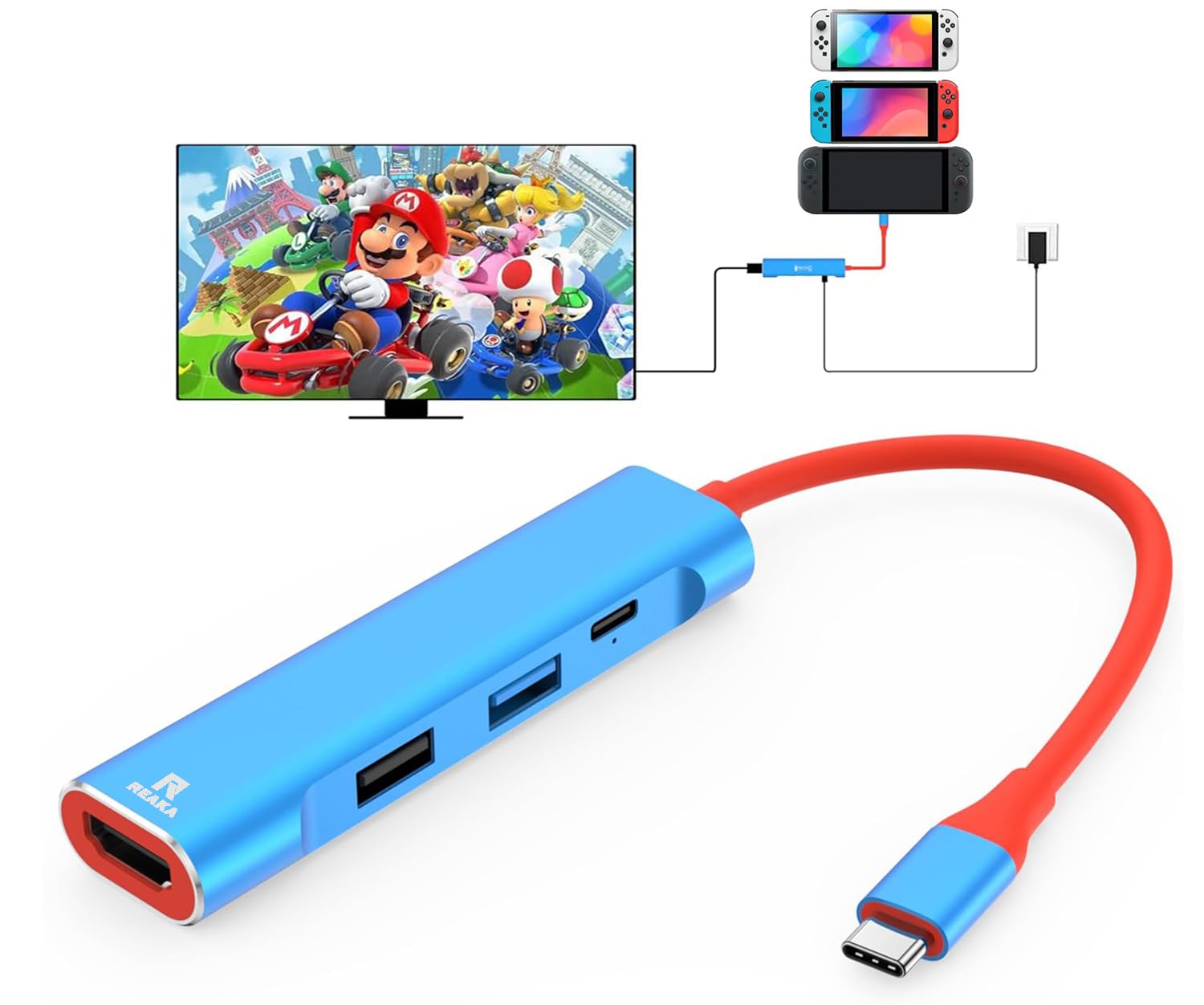
1. 4 in 1 Switch TV Dock for Nintendo Switch 2/1/OLED
Our pick — 4.0+★ from 5,000+ verified ratings; the strongest balance of quality and price.
Four ports, an aluminum body at 1.5 ounces, and a console-to-TV bridge that fits in a backpack pocket.
The 4 in 1 Switch TV Dock from RREAKA is the pick that covers the most ground for the money — it handles Switch 2, Switch 1, and OLED, and it does it with four ports instead of one. That’s a meaningful step up from the bare adapters further down this list: the PURBHE dock gives you a single USB-C port, while this one spreads the load across USB 3.0, USB 2.0, HDMI 2.0 output, and a PD charging port. The 4K@60Hz HDMI output sends 3840 by 2160 pixels at 60 frames per second to a modern TV. And a 5 gigabit-per-second data rate on the USB 3.0 port keeps wired accessories responsive.
Owners praise the functionality above all: the dock just works the moment you plug it in. The aluminum body weighs 1.5 ounces, and the 4K@60Hz output holds up on a 50-inch living room TV or a hotel screen. The 4-port layout separates it: USB 3.0 for a wired controller, USB 2.0 for accessories, and a 100W PD charging port so you can play and charge at once. The built-in chip guards against short-circuit, overcurrent, and overheating, so a long session doesn’t end in a dead dock.
The catch worth knowing: this dock is built for your main console, not for a Switch Lite, and a small number of buyers report reliability issues over time. The bigger recurring gripe is that plugging in while the console is in sleep mode can freeze the system and lose unsaved progress — so wake the console first, then dock it. Value and charging both draw mixed notes in the reviews, mostly from buyers expecting the dock to behave exactly like the official one. It doesn’t, and that’s fine as long as you know it going in.
What Works Well
- 4 ports (USB 3.0, USB 2.0, HDMI 2.0, PD charging) — more connectivity than any single-port adapter on this list
- 4K@60Hz output for Switch 2 and 1080P for Switch 1/OLED
- PD 100W passthrough keeps the console charged during long sessions
- Aluminum alloy at 1.5 ounces — compact enough for a backpack
Where It Gives Ground
- Not compatible with Switch Lite
- Docking while the console is asleep can freeze it and lose unsaved progress
- Some owners mention units that stop working over months of use
Reach for this if: you want one dock that covers Switch 2, Switch 1, and OLED with room for a wired controller and a phone charger at the same time.
Worth knowing: wake the console before you plug in — the sleep-mode freeze is the one quirk that catches people out.
2. RREAKA Portable Switch Dock
A cable-shaped dock replacement that weighs 0.08 kg and folds into a travel pouch without a second thought.
If the official dock feels like a brick in your carry-on, this conversion cable is the antidote. At 0.08 kg it’s the heavier of the two RREAKA cable-style options here — the portable Microwoo adapter below weighs 0.01 kg — but it carries a PD 100W charging port that keeps your Switch topped up while the 4K HDMI signal travels to the TV. The 4K output runs at 30Hz, which is a step below the 60Hz docks on this list. For Switch gaming that mostly matters on fast-motion scenes, but the resolution itself lands sharp on a big screen.
The honest picture on this one: functionality gets mixed reviews, and the recurring theme is that the connection needs to be unplugged and replugged more often than you’d like. It works well when it works — some owners get a stable run on a new Samsung TV, others get nothing on an older set. It also doesn’t work on a Switch Lite, which is worth flagging since that’s the one console in the Switch family without TV output. Charging speed draws a note too: one buyer found it doesn’t charge as fast as advertised. These are real limits, not dealbreakers, and they’re the trade you make for a foldable cable that takes up almost no room.
The PD 100W spec is the number to hold onto here — it’s the same passthrough rating as the 4-port dock above, in a package that disappears into a pocket. The USB 3.0 port runs at 5 Gbps, fast enough to keep a wired controller responsive. If you’re the kind of traveler who wants a second screen option for a hotel TV without a bulky dock, this is the leanest way to do it.
The lean travel pick: this is a cable that turns any TV into a Switch screen, with PD 100W charging so the console doesn’t die mid-session. It’s the lightest way to replace the official dock, and that’s the whole point.
The honest caveat: the 30Hz output and the occasional need to replug mean it’s a travel convenience, not a permanent living-room dock — it works well, but not every time, and not on a Switch Lite.
Best for the light packer: someone who wants a TV option in a hotel room and doesn’t mind a cable over a dock.
Look elsewhere if: you need guaranteed 60Hz output or you own a Switch Lite.
3. USB C to HDMI Adapter with 100W PD Multiport (Microwoo)
The pocket adapter that treats your phone and iPad as seriously as your Switch, at 0.01 kg.
This Microwoo adapter is the featherweight of the group — 0.01 kg, which is the lightest weight in this entire comparison. It’s a 2-port dongle: one HDMI out, one USB-C PD in, and that’s the whole design. The PD port handles 100W of passthrough charging, so you can mirror a phone or iPad to a projector and keep it charged at the same time. Plug-and-play is the whole setup story — no driver, no software, no Wi-Fi, just 10 seconds to a live connection. The TPE cable and nickel-plated connector survive being yanked out of a backpack pocket, and the ABS case dissipates heat during long sessions.
What the adapter does best is the everyday mirroring job: iPad Air M2 to a projector for a lesson, iPhone to a work monitor for live TV, Galaxy to a hotel screen. Owners spend the most energy on the functionality side and it holds up — connection happens instantly, the picture is clean, and the iPad stays charged while it’s plugged in. Quality gets steady praise, with one long-term user reporting six months of constant use with no issues. The adapter is also compatible with a wide spread of devices — iPhone 15 through 17, MacBook Pro and Air, iPad Pro, Galaxy S24 down to S20, Surface, XPS — so it’s a genuine one-cable answer for a mixed-device desk.
The trade-off is in the details. Streaming services don’t always cooperate with mirrored output, and the adapter needs a USB-C port that supports DisplayPort Alternate Mode to send video at all — a plain USB-C charging port won’t do it. Durability is the honest worry: a minority of long-term users report adapters dying after a few months of heavy use, which for a dongle this small is worth a gentle-handling habit. None of that changes what it is — a cheap, tiny bridge that makes a phone or tablet behave like a console on any HDMI screen.
Best for the multi-device house: one dongle that covers iPad, iPhone, Switch, and MacBook mirroring without a dock on the desk.
Keep in mind: it needs a DisplayPort Alt Mode port and won’t magically open up streaming apps that block mirroring.
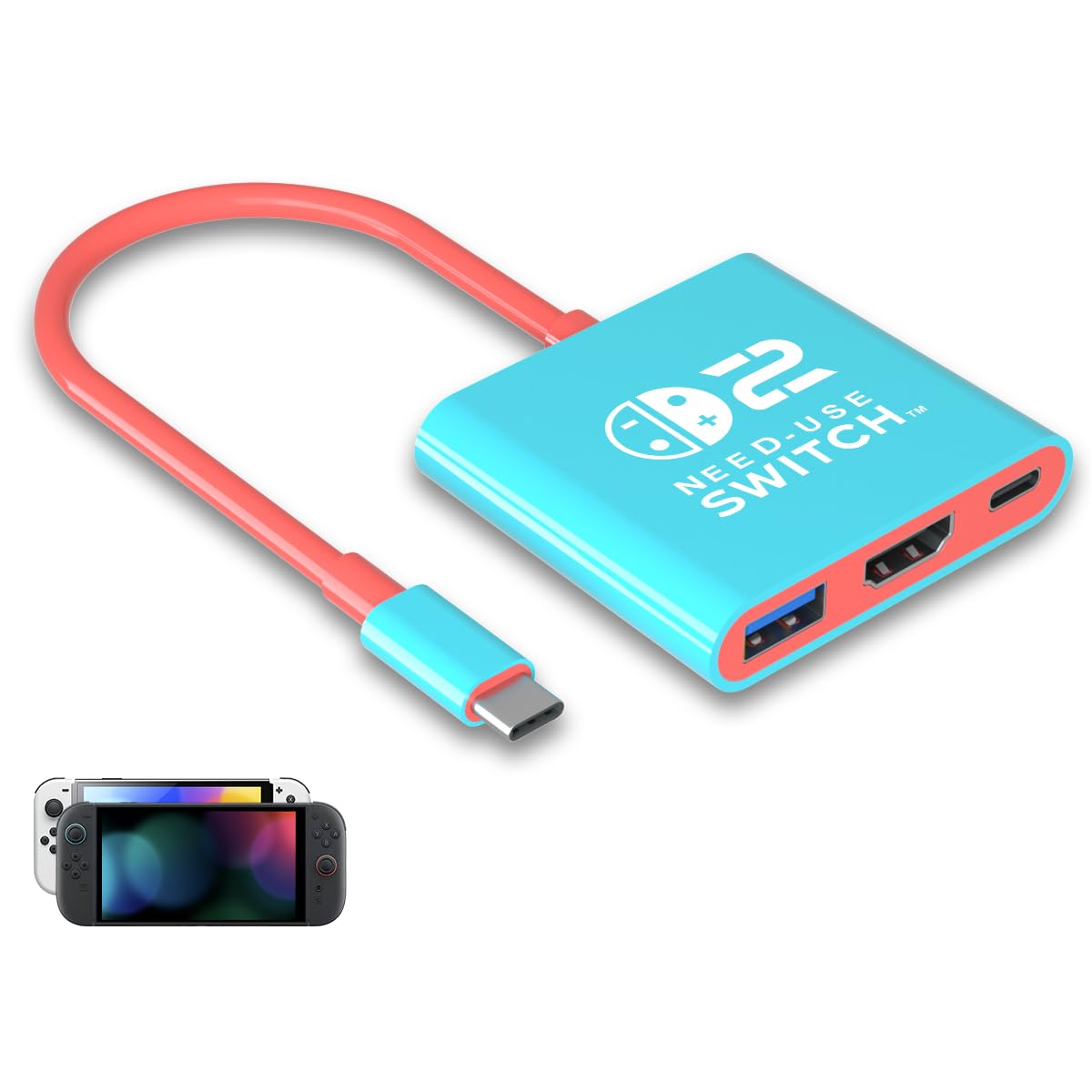
4. PURBHE Switch 2 Dock
One dock that flips between a Switch 2, a Steam Deck, and a Legion Go — and asks for the right charger first.
Most docks on this list play favorites. This PURBHE unit is the one that wants to sit under all your handhelds — Switch 1, Switch 2, OLED, Steam Deck, ROG Ally, Legion Go, and Samsung DeX are all on the compatibility sheet. It supports the Switch 2’s latest firmware 21.0.0, which matters because a dock that falls behind a system update turns into a paperweight. The output spec splits by console: 4K@60Hz for Switch 2 and Steam Deck, and native 1080P at 60Hz for the older Switch 1. There’s a single USB-A 3.0 port for a wired controller, dance pad, or GameCube adapter, and the whole unit is about as portable as a deck of cards.
The connectivity story is where this dock earns its place — it hooks up quickly and stays stable across a Switch 2 and a Steam Deck in the same session. Owners describe the picture as clear, with no difference in video, sound, or input delay compared to the default dock. That’s the best possible outcome for a dock replacement: nothing changes except the size. The extra USB-A port gets mentioned as a handy touch for wired accessories, and the compact footprint fits neatly into a Switch case for travel.
Here’s the thing people trip over: this dock needs a specific charger to go into TV mode. Switch 1 wants a 15V/2.6A PD supply and Switch 2 wants 20V/3A — a generic phone charger will leave you staring at a black screen. The company is also a small startup, and the warranty is 1 year. For a dock that handles multiple consoles, that’s a fair deal as long as you start with the right power brick in hand.
The multi-console bridge: this is the dock that doesn’t make you choose between a Switch and a Steam Deck — it works with both at 4K@60Hz, and the compatibility sheet covers Switch 1, Switch 2, OLED, ROG Ally, Legion Go, and DeX.
The requirement it won’t negotiate: the right PD charger — 15V/2.6A for Switch 1, 20V/3A for Switch 2 — is what makes TV mode work at all.
The right call if: you own more than one handheld and want a single dock that switches between them without fuss.
skip it if: you’re not prepared to match the PD charger to the console — that’s the rule this dock lives by.
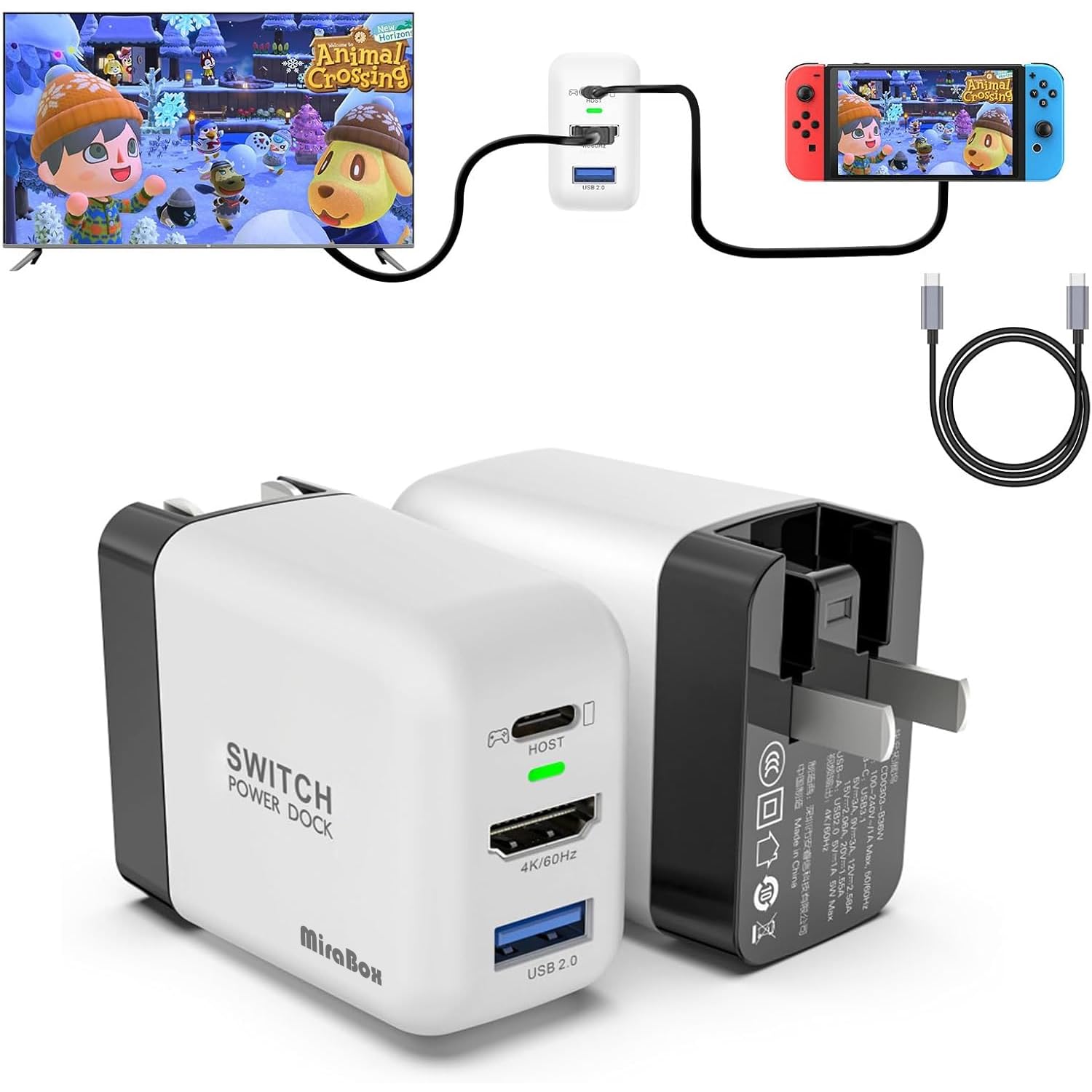
5. Mirabox Switch Dock Charger 36W
It swallows the official dock and the AC charger into one palm-sized block — a genuinely different idea.
The Mirabox isn’t just a dock replacement — it’s the charger, too. The 36W brick and the TV dock share one body that the maker says is about one tenth the size of the official dock and charger combined, and it ships with a full USB-C to USB-C cable in the box. The HDMI output runs at 4K@60Hz and drops to 1080P HD when that’s what your screen wants. The PD port maxes out at 31W and supports a range of fast-charge profiles: 5V at 3A, 9V at 3A, 12V at 2.58A, 15V at 2.06A, and 20V at 1.55A. A GaN chipset inside handles overcurrent, overheating, and overvoltage protection.
Travel is the clear strength here. The one-piece design means you leave the wall charger at home — one block in the bag instead of two, and owners who travel with it say that’s the difference between packing light and packing a cable nest. Setup is quick, the dock works with the Switch and Switch OLED, and it also drives an iPad mini, iPad Air, iPad Pro, and a long list of Samsung Galaxy phones through the same USB-C port. The 4K@60Hz output keeps the big-screen picture steady, and the compact block fits beside a laptop in a carry-on.
The honest counterweight: functionality and compatibility draw mixed notes. A chunk of that centers on the latest Nintendo software update, where some units stop behaving as expected — worth checking the firmware on the dock before a trip. The 31W charging ceiling is also lower than the 100W passthrough on the docks above, though for a Switch that’s more than enough. And a few customers note the prongs loosening over time with normal travel use. It’s a compact one-piece solution with a real convenience payoff, as long as you treat the plug with some care and confirm the software version works with your console.
Why Travelers Like It
- Combines the AC charger and TV dock in one 36W block — one item in the bag instead of two
- 4K@60Hz HDMI output for TVs, monitors, and projectors
- Ships with a USB-C to USB-C cable and an 18-month warranty
- Works with Switch, Switch OLED, iPad mini, iPad Air, iPad Pro, and Galaxy phones
What To Watch
- 31W PD ceiling — enough for the Switch, but lower than the 100W docks
- Some units stop working after a Nintendo software update
- Prongs can loosen over repeated travel packing
Pick it if: your bag is already full and you’d rather carry one block than a dock plus a charger.
Fair warning: confirm it plays nicely with your console’s current software before you rely on it for a trip.
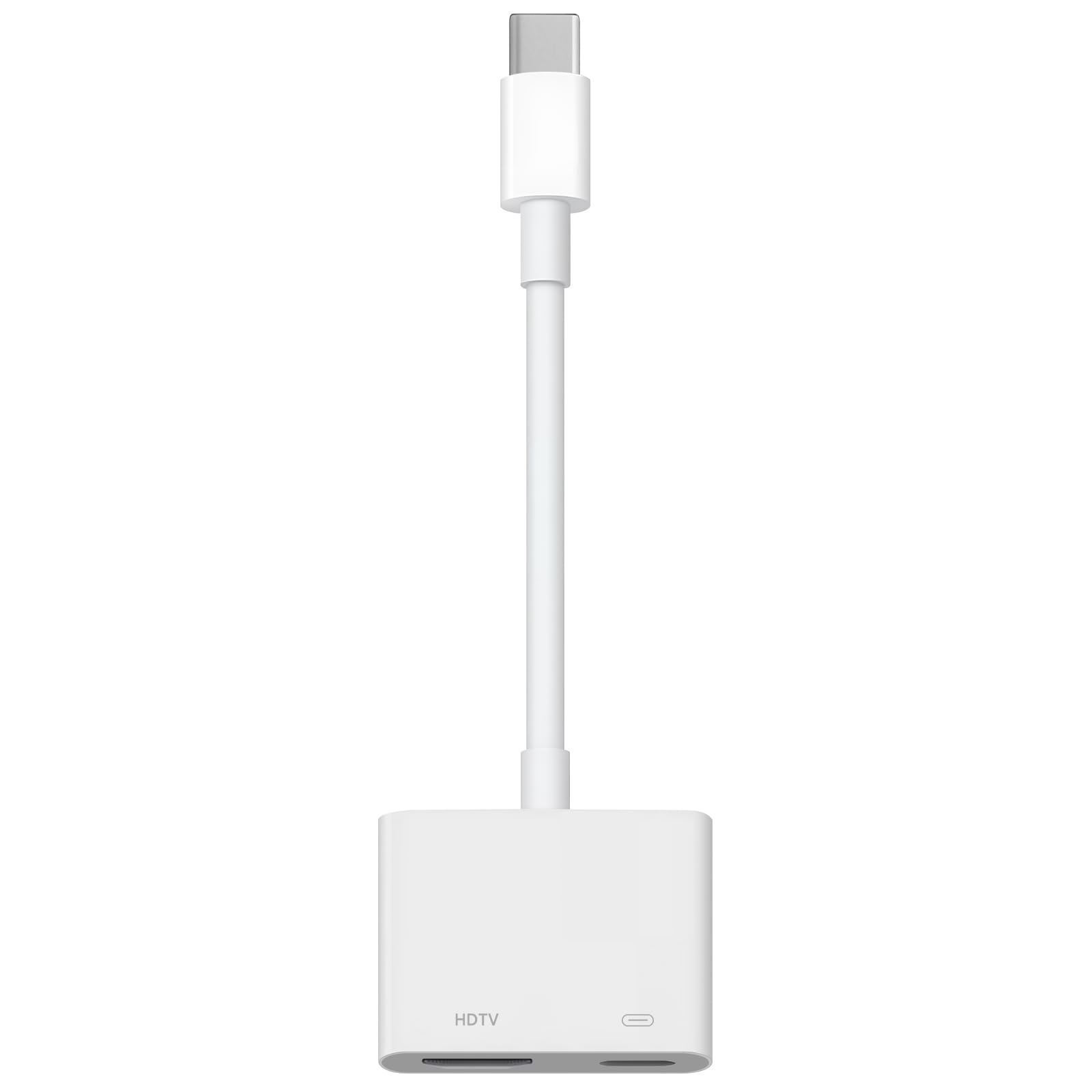
6. Apple USB-C to HDMI Adapter 4K@60Hz, MFi Certified (Wahbite)

A 4K@60Hz mirroring adapter with an MFi chip, aimed at iPhone and MacBook screens rather than consoles.
For iPhone, iPad, and MacBook mirroring, this Wahbite adapter leans on an Apple MFi certified chip — the certification that says the hardware passed Apple’s compatibility test. It supports mirroring and extending: apps, videos, pictures, presentations, websites, slides, and whatever else is on your screen. The HDMI output runs at 4K@60Hz — 3840 by 2160 pixels at 60 refreshes per second — with support for HDCP 2.2, the copy-protection standard that lets Netflix, HBO Max, Disney+, and Hulu stream to your TV. Plug and play, no app or driver needed, and the 100W PD port handles fast charging on a USB-C laptop or phone.
What owners lean on most is how easy it makes the everyday handoff: connect it to a TV or projector and the picture and sound land right away. The portability is a real plus — it moves from home to office without fuss, and it’s the kind of adapter you can hand to someone else and have them figure out in seconds. Mac users find the HDMI connection reliable, and the adapter earns solid value marks against the branded alternative. The 24-month warranty is also longer than most of the dongles on this list.
The complication is that “MFi certified” isn’t the same as “made by Apple” — a few buyers expected an Apple-branded product and were disappointed to find a third-party adapter inside. For Apple product compatibility, you need to double-check that your specific device is on the list, because a compatibility mismatch is the most common reason this adapter disappoints. A small number of users also report the HDMI cable not seating properly in the port. Buy it for what it is: a certified mirroring adapter for a recent iPhone, iPad, or MacBook, not an Apple-made accessory.
For the Apple-heavy desk: 4K@60Hz mirroring with HDCP 2.2, so streaming apps that block other adapters still work — plus a 100W PD port that keeps the laptop or phone charged while it mirrors.
The label confusion: MFi certified means it passed Apple’s compatibility check; it doesn’t mean Apple manufactured it, and a handful of buyers expected otherwise.
Choose it if: you’re mirroring a recent iPhone, iPad, or MacBook to a TV and want HDCP 2.2 support so the streaming apps cooperate.
Think twice if: you want an Apple-made product — this is a certified third-party adapter, and a few buyers missed that distinction.
7. ACAQAUI Switch 2 Dock HDMI Cable
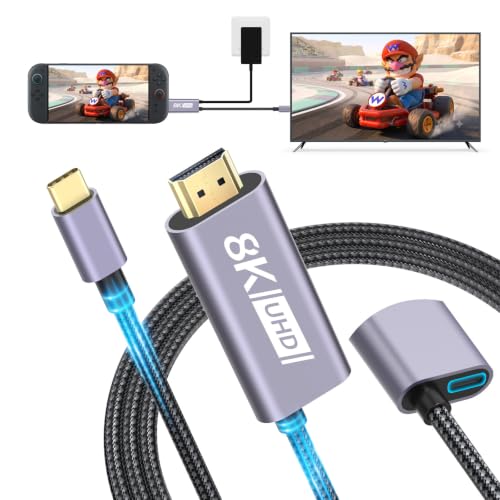
An 8K@60Hz cable-dock with 48Gbps of HDMI 2.1 headroom, built for people who take refresh rate seriously.
This is the highest-bandwidth option on the list, and that’s its whole identity. The HDMI 2.1 output carries 48Gbps — nearly triple the 5Gbps data pipes you see on the smaller adapters — and that headroom lets it push 8K at 60Hz, or 4K at 240Hz, 144Hz, 120Hz, or 60Hz depending on the display. For the Switch 2 specifically, the 120Hz support is the number that matters: it’s what makes fast-action scenes feel steady on a compatible TV. HDR10+ support adds richer contrast and deeper blacks, provided your display and source support it. The integrated 6.7-foot cable is triple-shielded with gold-plated connectors and a metal housing, and the nylon braiding is rated for 35,000 bends. It weighs 2.9 ounces.
The power side is just as serious: 100W PD passthrough keeps the console charged during long sessions, and the internal dual-chip design and triple-path cooling are there to keep the output stable under heat. One rule to understand before you buy — TV mode needs a 20V/3A (60W) PD power source. A low-spec phone charger or power bank will drop the signal to a black screen. The dock also won’t work with a Switch Lite, and the manufacturer notes that ongoing firmware updates are part of keeping it compatible with future system versions, which suggests you should check the version note before a big trip.
What this dock is really for is a stationary setup: a 4K TV or high-refresh gaming monitor where the extra bandwidth pays for itself. If your plan is casual TV gaming on a hotel screen, the 8K spec is overkill and the 4K@60Hz docks above are the smarter buy. If you want your desktop monitor to run at its full refresh rate while the Switch 2 sits at 120Hz, this is the one that can carry it.
The bandwidth play: 48Gbps of HDMI 2.1 with 8K@60Hz and 4K@240Hz capability, for a display that can actually use it.
Consider the alternative if: your screen tops out at 4K@60Hz — you’d be paying for headroom you’ll never see.
8. USB C Switch 2 Dock with Gigabit Ethernet (YEEKRNOW)
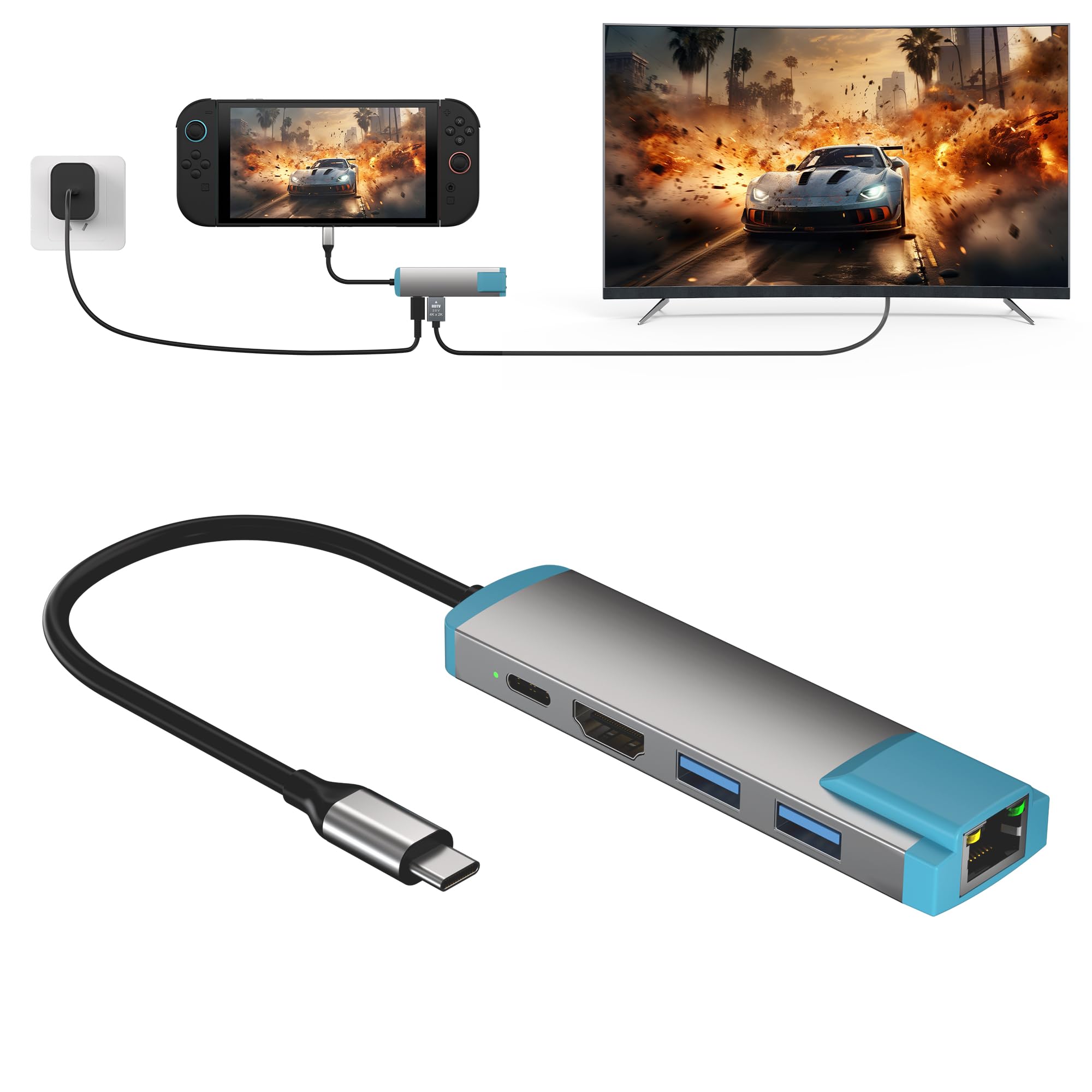
Five ports, a hardwired 1000M ethernet jack, and a 45g body — the wired gaming dock on the list.
Ethernet on a Switch dock is the feature almost nobody thinks about until they’ve dropped a ranked match on hotel Wi-Fi. This YEEKRNOW dock puts a 1000M wired ethernet port next to a 4K@60Hz HDMI output, two USB 3.0 ports, and a 100W PD USB-C charging port. That’s five ports total, the most on this list — and the only dock here with a dedicated ethernet jack. The shell is gray and the whole thing weighs 45g (1.5oz), small enough to drop in a pocket. The video output runs at 3840 by 2160 pixels at 60Hz.
Charging is handled through PD passthrough with a 100W ceiling, though the maker suggests keeping continuous charging within 60W, and the official Switch charger (20V/3A 60W) will charge a Switch 2 handheld at full speed. Compatibility is broad: Switch 2, Switch 1, Switch OLED, Steam Deck, Steam Deck OLED, and any USB-C device with video output, including Thunderbolt 3 and 4 machines, MacBook Pro 2016–2022, MacBook Air 2018–2022, Mac mini 2018/2020, Surface, and Dell XPS. There’s a 1-year warranty on the dock.
Two things to know before you commit. The PD charging port only works with devices that support the PD protocol — a generic charging brick won’t do it. And the dock is brand new to the market with a small review base, so the long-run reliability picture isn’t there yet. What is clear is the spec sheet: five ports, wired ethernet, 4K@60Hz, and a 45g body make it the strongest answer for a fixed desk where stability matters more than portability.
Built for the wired desk: a 1000M ethernet port plus 4K@60Hz HDMI and two USB 3.0 ports, all packed into 45g — it’s the only dock on this list that gives you a hardwired network connection.
Check before you buy: your charger needs PD support, and the dock is new enough that long-term reliability is still an open question.
Best for the fixed setup: a desk or living room where you want wired ethernet, a controller, and a monitor on one hub.
Not the pick if: you need a proven long-run track record or you don’t own a PD charger.
9. Cable Matters USB C to HDMI 2.1 Adapter

A single-purpose 8K adapter for high-end laptops — no hub, no dock, no compromises on bandwidth.
This Cable Matters adapter is the specialist of the group. It’s a unidirectional USB-C to HDMI 2.1 adapter — one direction only, no hub, no dock, no power passthrough — and it exists to push the maximum resolution a high-end laptop can output. The 48Gbps HDMI 2.1 bandwidth carries 8K at 60Hz or 4K at 240Hz, with HDR support and Auto Low Latency Mode for gaming. The braided cable and aluminum enclosure are built for a lifetime on a desk, and at 0.02 kg it disappears behind the monitor.
The compatibility sheet is where this adapter separates from the dongles: reaching 8K@60Hz or 4K@240Hz needs a compatible graphics card — NVIDIA RTX 2060/30/40 series, AMD RX 6000/7000 series, or Intel 11th/12th Gen with Iris Xe or newer — an HDMI 2.1 display, and a certified HDMI 2.1 cable. On macOS it’s limited to 4K@60Hz; the higher refresh rates on a Mac need a separate firmware-enhanced version. It works with USB-C ports that support DisplayPort Alt Mode, and it’s Thunderbolt 5, 4, and 3 compatible. Variable refresh rate is not supported — no G-Sync or FreeSync.
Where it shines is on a desktop with the right hardware. It runs 8K at 60Hz with RGB 4:4:4 — full color fidelity, no chroma compromise — and it handles 4K at 120Hz for gaming monitors without breaking a sweat. It’s also a plug-and-play adapter with no external power, so a single cable is the whole setup. The honest limits: it’s not a Switch dock (your console won’t get its charging passthrough here), macOS caps it at 4K@60Hz, and skipping the firmware update on a Mac leaves performance on the table. For a laptop or desktop driving a high-resolution display, this is the cleanest path to full bandwidth.
Where It Leads
- 48Gbps HDMI 2.1 bandwidth for 8K@60Hz and 4K@240Hz on supported hardware
- RGB 4:4:4 color with no picture-quality loss at 8K 60Hz
- Auto Low Latency Mode for gaming and HDR support
- Plug and play with no external power required
What It Won’t Do
- No charging passthrough — not a Switch dock replacement
- Limited to 4K@60Hz on macOS without the firmware-enhanced model
- No VRR, G-Sync, or FreeSync support
- Needs a compatible GPU and an HDMI 2.1 display to hit its rated speeds
Made for the monitor: a high-end laptop or desktop with a 4K@240Hz or 8K display, where full HDMI 2.1 bandwidth is the point.
Not for the Switch bag: with no power passthrough, this one stays on the desk.
Know the Specs
PD Charging Passthrough (Power Delivery)
PD stands for Power Delivery — a charging standard that lets your charger and device negotiate the right voltage. On a Switch USB-C to HDMI adapter, this is the port that keeps the console alive while it sends video to the TV. Without enough passthrough, the console drains and the screen goes dark mid-session. The Switch 1 wants 15V/2.6A and the Switch 2 wants 20V/3A — a generic phone charger may not supply either. Look for a PD port rated at 100W if you plan to charge other devices through the same adapter, or a 31W–36W block if you want a one-piece travel charger and dock in one.
HDMI Output Resolution and Refresh Rate
Resolution is the pixel count — 1080P means 1920 by 1080, 4K means 3840 by 2160, and 8K means double that again. Refresh rate is how many times per second the picture updates: 60Hz is standard smooth, 120Hz and 240Hz are for fast-motion gaming. The Switch 1 outputs native 1080P at 60Hz no matter what the adapter can carry. The Switch 2 can push 4K@60Hz and 120Hz on a supported display. Buying higher output than your console can send is fine — it just means the adapter has headroom for other devices like a Steam Deck or a laptop.
Common Questions
Will a USB-C to HDMI adapter work with a Switch Lite?
Does the adapter charge the Switch while it plays on TV?
Why does my Switch show a black screen on the TV?
Can I use a USB-C to HDMI adapter with an iPhone or iPad?
What’s the difference between a dock replacement and a bare adapter?
Do these adapters work with a Steam Deck as well as a Switch?
Will a 4K@60Hz adapter give me 4K on my original Switch?
Why do some adapters need a firmware update?
Can I charge a laptop through the same adapter I use for my Switch?
Is it worth paying more for an 8K adapter over a 4K one?
Can I run a wired ethernet connection through a Switch dock?
The Bottom Line
For most people, the winner is the 4 in 1 Switch TV Dock from RREAKA because it covers Switch 2, Switch 1, and OLED with four ports, a 4K@60Hz output, and PD 100W charging — the most complete dock replacement on this list. If you want the leanest travel option, grab the RREAKA conversion cable. And for a wired desk setup with ethernet, the YEEKRNOW USB C Switch 2 Dock is the one to reach for.
Before you buy, two things worth a final check: wake the console before plugging in to avoid the sleep-mode freeze, and confirm your charger matches the PD voltage your console needs. Those two habits are the difference between a smooth session and a black screen.
How we choose
We do not accept paid placement. Every pick is matched to a real buyer and a real use-case; we do not hands-on test units.
Sources
Specifications: manufacturer listings and product documentation. Review insights: verified customer reviews, as of November 2026. Pricing: not shown on this page (it changes often); check the current price via the retailer link.
As an Amazon Associate, Tactical Gear Guy earns from qualifying purchases. This does not affect which products we feature.