Specs are compiled from manufacturer listings and verified buyer reviews and can change over time — please confirm the key details on the product page before buying.
If you want to change how your Nintendo Switch 2 looks without covering it in stickers, a replacement shell is the answer — and the one most people end up happy with is the eXtremeRate Essence Version in Emerald Green. It swaps the actual plastic panels rather than layering on a skin. Before you buy anything, though, check one thing first: every kit here is built for the Switch 2 and explicitly will not fit the original Switch, the Switch Lite, or the Switch OLED. Get that wrong and nothing on this page will help you.
This guide is built by comparing the manufacturers’ published specifications and the patterns across verified customer reviews, so you get each pick’s real strengths and trade-offs instead of marketing spin.
Shell swaps are tool-and-patience jobs, not sticker jobs — you need fine screwdrivers, a steady hand, and a tolerance for tiny springs. Below you’ll find full-set options, a back-plate-only kit for people who just want the rear panel changed, and a D-pad build for fighting and platformer players. Every pick here is a genuine fit for the Switch 2, and this breakdown covers the switch 2 shell kits worth your bench time.
Top Picks
How To Choose The Best Switch 2 Shell
The first decision is not color — it is scope. Some kits replace the whole housing set (console faceplate, rear back plate, and Joycon shells). Others replace only the rear back plate of the handheld. Buy the wrong scope and you will end up with half a new console and a colour mismatch on the other half.
Full set versus rear back plate only
A rear-back-plate-only kit is the cheapest and simplest route: it changes the panel you actually look at while holding the console, and it does not touch the Joycon. A full-set kit covers the console and both Joycon housings in matching plastic, so the whole device reads as one custom build. Full sets cost more and take longer to install, but they’re the only way to get a consistent look.
Check the Switch 2 fit line before anything else
Every kit on this list is cut specifically for the Nintendo Switch 2 and is not compatible with the original Switch, Switch Lite, or Switch OLED. The plastic is precision cut to match the original accessories, and the good kits keep the Joycon 2 magnetic release & lock working plus Dock mode after installation. If a listing can’t confirm Switch 2 and Joycon 2 compatibility, move on.
Disassembly experience is a real requirement
These are not sticker kits. Installation demands moderate electronic disassembly and installation experience — screwdrivers, a prying tool, tiny springs, and a tolerance for patience. eXtremeRate points buyers to a YouTube installation video for each kit, and watching it fully before you pick up a screwdriver makes the difference between a clean build and stripped screws.
Side-by-Side Comparison
These three columns are the ones that decide whether a kit is right for you: how much of the console it covers, what plastic it is made from, and whether it keeps the Joycon 2 magnetic release working.
| Model | Best For | Coverage | Material | Joycon 2 Magnetic Release | Amazon |
|---|---|---|---|---|---|
| eXtremeRate Essence Version (Emerald Green)★ Best Overall | Best overall full customization | Console faceplate + back plate + ABXY direction keys | Polycarbonate (PC) | Fully compatible | Amazon |
| eXtremeRate Deluxe Joycon 2 (Clear Slate Black)Best Value | Controller-only rebuild | Full Joycon 2 housing + middle bracket + buttons | PC plastic | Fully compatible | Amazon |
| eXtremeRate Full Set (Clear Atomic Purple) | Matching console and Joycon makeover | Console rear back plate + full Joycon 2 set | Polycarbonate | Fully compatible | Amazon |
Detailed Reviews
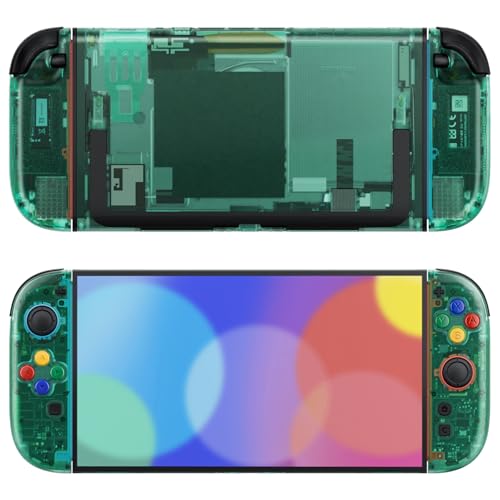
1. eXtremeRate Shell Buttons Nintendo Switch 2 Emerald Green
Our pick — 4.0+★ from 60+ verified ratings; the strongest balance of quality and price.
The emerald-green kit that swaps both the face you see and the back you grip.
This is the kit for the player who wants the console itself to look different, not just the controller. It gives you a replacement faceplate and rear back plate for the console, plus colourful ABXY direction buttons and decorative strips — a set that changes the entire front-facing silhouette. Polycarbonate (a tough, slightly flexible plastic that resists cracking under pressure) is what the housing is moulded from, and the finish is matte, so fingerprints sit less visibly than they do on the glossy factory panels.
Compatibility is the part that actually matters here. The plastic is precision cut to match the original accessories, and it stays fully compatible with the Joycon 2 magnetic release & lock plus Dock mode after installation. In other words, you do not give up docking or the magnetic Joycon snap to get a new colour. The matte finish and precision cut make the shell read as stock plastic rather than a stuck-on accessory.
The catch is the installation itself, and it is the honest limit of this pick. The listing states plainly that you need moderate electronic disassembly and installation experience, and the box ships with screwdrivers, a tweezer, a prying tool and spare screws and springs — a workbench kit, not a courtesy. If you have never opened a console, watch the eXtremeRate YouTube tutorial for this shell in full before you commit. skip it if the kickstand needs replacing, because the kit includes a sticker for the kickstand but the kickstand itself is not in the box.
What This Kit Nails
- Faceplate and back plate both change, so the console looks custom from every angle.
- Polycarbonate housing with a matte finish that hides fingerprints better than a glossy panel.
- Keeps Joycon 2 magnetic release & lock and Dock mode working after the swap.
- Includes tools and spare screw and spring hardware so you are not hunting for them mid-build.
Where It Pushes Back
- Needs moderate electronic disassembly skill — not a first-time-with-a-screwdriver job.
- Kickstand is not included; you only get a sticker for it.
- Every electronic part stays on your existing console, so nothing gets replaced inside.
Built for: the tinkerer who wants a matched console face and back panel in one box.
Think twice if: you have never disassembled a console — the tutorial is mandatory, not optional.
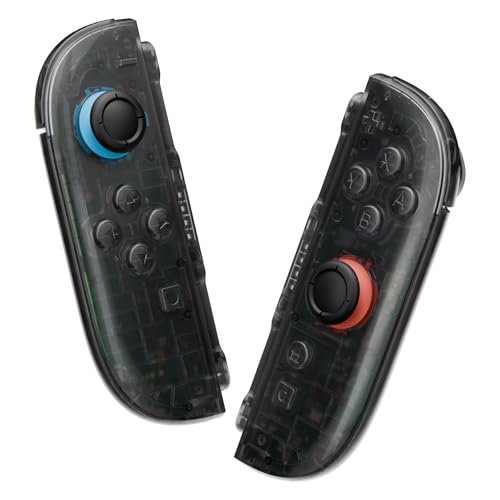
2. eXtremeRate Rear Back Plate Nintendo Switch 2 Clear Blue
A controller-only rebuild — the parts that slide off, not the console itself.
This is the pick for someone whose Joycon 2 controllers take the wear while the console body stays protected. The kit replaces the full housing set on the controllers, and the middle bracket is included — a part that some controller kits leave out, and one you’d otherwise have to handle separately. The buttons come with it, so the controller rebuild is complete. The plastic is PC with a precision-crafted finish, and the clear slate black shade reads as smoky rather than simply dark.
Because it is designed for the Joycon 2, it stays fully compatible with the magnetic release & lock, and Dock mode still works after installation. The package ships with the full replacement shells and buttons, screwdrivers, a prying tool, and spare screws and springs. Note that, unlike the full-set kits on this page, this one does not touch the console body at all — its scope is the two controllers, and the console’s own rear panel is not included.
The honest caution is that controller housings are the fiddliest of the lot to swap. The Joycon shell is small, the components inside are densely packed, and the magnetic release parts need careful handling when you reseat the housing. eXtremeRate’s own guidance is that you need moderate electronic disassembly experience and should watch the “replacement shell for Joycon 2” tutorial patiently before starting. If you want one kit to cover console and controller, this is not it; if the controller is your focus, it is a clean match.
Scope and Fit
- Complete controller rebuild: full housing, buttons, and middle bracket in one box.
- Keeps the Joycon 2 magnetic release & lock and Dock mode intact after installation.
- Full tool set included, including screwdrivers, prying tool, and spare springs.
What It Does Not Cover
- Console body is untouched — no rear back plate or faceplate for the handheld.
- The densest teardown of the five kits; the small Joycon shell packs a lot into a tight space.
- Requires the controller device and all electronic parts from your existing Joycon.
The right build for: players whose Joycon take the daily abuse and want a controller-focused custom look.
The limitation: your console itself stays stock — this is a controller project, not a console project.
3. eXtremeRate Shell Buttons Nintendo Switch 2 Clear Atomic Purple
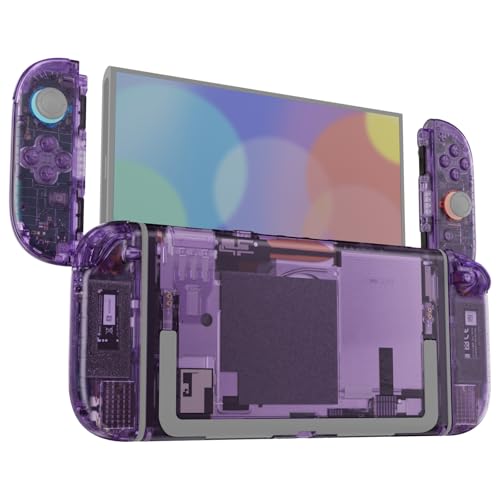
The full makeover: console back plate and both Joycon in one matching clear purple.
If a matching look across the whole device is the goal, this is the kit that delivers it. It replaces the console rear back plate and gives you the full Joycon 2 housing and button set in the same clear atomic purple polycarbonate — a translucent purple that lets the internals show through rather than hiding them under solid plastic. One colour, whole device. That is the difference between this and the controller-only kit above, which leaves your console in its original finish.
What wins people over is the look of the thing — the clear purple housing is the reason this kit exists, and the colour consistently lands well. The finish is described as a precision-crafted cut over polycarbonate, and the fit is designed to work exactly like the original accessories. It stays fully compatible with Joycon 2 magnetic release & lock and Dock mode, so the magnetic Joycon snap and docking both survive the swap.
The honest catch is that this is the deepest teardown of the group and asks the most of your patience. The build brings console and both Joycon into one job, and the Joycon side is fiddly — the ZR and ZL buttons and the power button alignment are the fiddliest points, so treat them gently and watch the eXtremeRate tutorial in full first. A few builds report hairline cracks at the thin edges of the clear purple shell, so inspect the panels before you start the swap. The kit ships with screwdrivers, a tweezer, a prying tool and spare screws and springs; the kickstand and all electronic parts stay with your console.
The appeal: a single clear purple colour across the console back plate and both Joycon, in polycarbonate, with the magnetic release and Dock mode still working — a total look change rather than a partial one.
What to brace for: the longest install here, and the Joycon button reseating is the fiddly stretch — plan an unhurried session and watch the tutorial end to end.
Made for: the player who wants the whole console to wear one colour, not just the controllers.
Worth pausing on: if your patience for a long teardown is thin, the rear-plate-only kit will get you a visible change with far less work.
Know the Specs
Housing Material: Polycarbonate (PC) versus ABS
Polycarbonate is a tough, slightly flexible plastic that resists cracking under pressure; ABS is a rigid plastic that holds a moulded shape well. Most of these kits use PC, some use ABS, and one uses both. The material matters because a slightly flexible shell reseats more easily around the Joycon 2 magnetic release and cracks less at stress points than a purely rigid one. In plain terms: PC flexes under pressure, ABS stays rigid.
Coverage: Full Set versus Rear Back Plate
“Full set” means the console rear back plate plus the Joycon housings and buttons — the whole device gets a new look. “Rear back plate” means the single panel your palms rest on, and nothing else. Coverage is the single biggest factor in how long the install takes and how consistent the final look is. A full set is the only way to avoid a visible seam between a new back and a stock front or stock controllers.
Joycon 2 Magnetic Release & Lock Compatibility
The Joycon 2 controllers attach with magnets rather than a slide rail. A housing that is not cut for that magnetic release will either refuse to seat or lose the snap. Every kit here states compatibility with the Joycon 2 magnetic release & lock, which is the spec that keeps your controllers attaching properly after the swap. Check for this line before you buy any housing kit.
Dock Mode After Installation
Dock mode means the console still drops into its TV dock and charges. A shell that is a fraction too thick at the bottom edge can block the dock connector or make the fit tight. Every kit on this list states it stays fully compatible with Dock mode, so the dock connection and charging survive the swap. Still worth confirming for any kit not on this page.
Common Questions
Will these shells fit the original Switch or the Switch OLED?
Do I need tools and experience to install a Switch 2 shell?
Does a new shell break the Joycon 2 magnetic attachment?
Will the console still fit in its dock after I swap the shell?
What is the difference between a full set and a rear back plate kit?
Is the D-pad version worth it over the standard button layout?
What plastic are these Switch 2 shells made from?
Can I buy a whole-console shell and the D-pad together?
Does the kickstand come with these kits?
The Bottom Line
If you want a single decisive answer, start with the eXtremeRate Essence Version in Emerald Green. It changes the console faceplate and the back plate, keeps the Joycon 2 magnetic release and dock working, and comes with the tools to do it — the most complete single-kit result here. If a matching console-and-controller makeover in one colour is what you’re after, the Clear Atomic Purple full set is the one to reach for. And if you play d-pad-heavy games and want a white build, the D-Pad Version adds a left-Joycon D-pad that no other pick on this page includes.
How we choose
We do not accept paid placement. Every pick is matched to a real buyer and a real use-case; we do not hands-on test units.
Sources
Specifications: manufacturer listings and product documentation. Review insights: verified customer reviews, as of November 2026. Pricing: not shown on this page (it changes often); check the current price via the retailer link.
As an Amazon Associate, Tactical Gear Guy earns from qualifying purchases. This does not affect which products we feature.