Specs are compiled from manufacturer listings and verified buyer reviews and can change over time — please confirm the key details on the product page before buying.
The short answer: if you want one box on your desk that charges a laptop, a phone, a watch, and earbuds at the same time without a rat’s nest of cables, the Anker Prime 200W 6-Port GaN Desktop Charger is the pick worth building around. It has the power headroom to run six devices at once, and it does it in a body about the width of a phone. The other eight picks below cover every desk and nightstand personality — the retractable-cable tidiers, the Apple-only magnetic stands, the bamboo organizer, and one splurge with a live touchscreen.
This guide is built by comparing the manufacturers’ published specifications and the patterns across verified customer reviews, so you get each pick’s real strengths and trade-offs instead of marketing spin.
A stylish charging station is really a decluttering tool that happens to deliver power: fewer cables, one wall socket, and a fixed spot where every device lands at night. Here is what matters across the stylish charging stations worth putting on your desk.
Top Picks


How To Choose The Best Stylish Charging Stations
A charging station earns its spot on your desk in two ways: it disappears visually, and it stops you hunting for the right cable. Most buyers get the first part right by picking a good-looking box, then discover the box can only push a trickle to their laptop. The fix is to decide your two or three hardest devices first, then buy the hub with enough total wattage to feed them together.
Start with total wattage, not port count
The total wattage figure is the shared pool every plugged-in device draws from. A 200W hub can push 100W to each of two USB-C ports at the same time, which is enough to run a 14-inch laptop at full speed. A 60W hub spreads that same pool thinner, so a laptop and a tablet will each charge slower. If your desk has a laptop on it, look for a hub with a high single-port ceiling rather than a long row of small ports.
Decide how much of your clutter is cable-shaped
Retractable-cable hubs pull a cord out of the base and snap it back when you are done, so nothing is left dangling. Magnetic docks solve a different problem — they hold the phone upright at a viewing angle while it charges. Bamboo and solid-body organizers hide the chargers and cables inside a tray. You are choosing a tidying style as much as a power spec, so match the mechanism — retractable cords, magnetic dock, or hidden tray — to how messy your surface actually gets.
Check the connector mix your devices need
A USB-C port (the small reversible oval connector) now covers most phones, tablets, and laptops. USB-A (the older rectangular port) still shows up on older accessories and some cables. AC outlets are the standard three-prong wall sockets built into strip-style stations — useful for a desk lamp or a monitor brick. Count your USB-C devices and your AC plugs before you buy, and make sure the strip does not short you on whichever you have more of.
Side-by-Side Comparison
| Model | Best For | Total Power | Ports | Form Factor | Amazon |
|---|---|---|---|---|---|
| Anker Prime 200W 6-Port GaN Desktop Charger★ Best Overall | Charging a laptop and phone together | 200W | 6 USB | Desktop block | Amazon |
| Kioson 12-in-1 200W GaN Power StripMost Versatile | Home office with mixed plugs | 200W | 4 AC + 8 USB | Flat desktop strip | Amazon |
| Anker Prime 3-in-1 Qi2.2 MagSafe StationTop Performer | Apple-only nightstand showpiece | 25W wireless | 3 device pads | Adjustable stand | Amazon |
| Acer 3-in-1 Magnetic Foldable Charger | Travel and small desks | 15W iPhone | 3 device pads | Foldable stand | Amazon |
| HATALKIN 8-in-1 Retractable Charger | Retractable cable tidying | 105W | 4 cables + 4 USB | Retractable dock | Amazon |
| Gitryin 12-in-1 160W Retractable GaN Charger | Larger desk setups | 160W | 4 AC + 8 USB | Modular diagonal strip | Amazon |
| Pezin & Hulin Bamboo Charging Station | Warm wood-look organizers | 2.4A USB | 5 USB | Bamboo tray | Amazon |
| SooPii HomeHub H1 60W Retractable Station | Bedside cable-free charging | 60W | 6 retractable cables | Low-profile tray | Amazon |
| kakyanill 100W Power Strip with 14 Ports | Dorm and bedroom value | 100W | 6 AC + 8 USB | Flat plug strip | Amazon |
Detailed Reviews
1. Anker Prime Charging Station 200W
Our pick — 4.5+★ from 3,500+ verified ratings; the strongest balance of quality and price.
The desk brick that pushes 100W to two laptops at once without breaking a sweat.
The 200W of shared output is what earns this the top spot. Split across two USB-C ports at the same time, each one still delivers up to 100W — enough to run a 14-inch MacBook Pro at full speed. Anker’s own figure is 50 percent in 28 minutes for two 14-inch MacBook Pros charging at once, and buyers report the same. That is the difference between a hub you tolerate and one that genuinely replaces your laptop charger.
It handles six devices at once, so a phone, a tablet, a watch, and earbuds can sit alongside those two laptops without anyone getting starved. The build is GaN (gallium nitride — a chip material that keeps chargers smaller and cooler than older silicon internals), and Anker’s safety system continuously monitors temperature while you charge. In the real world that means a box that stays put on the desk and does not become a warm brick you avoid touching.
What wins people over is the build quality and reliability: reviewers report no dropped ports and no fuss, just steady charging. The trade-off is weight: Anker says it is not intended for travel, and at 4.4 × 3.0 × 1.4 inches and 1.24 lb it lives on the desk, not in a bag. That footprint is roughly the width of a phone, so it tucks neatly beside a monitor.
Why It Leads The Pack
- 200W shared, and 100W to each of two USB-C ports at once
- Six devices at a time from one plug
- Temperature monitoring built into the charging system
- Compact 4.4 × 3.0 × 1.4 in body that stays stable on a desk
Where It Stays Put
- Anker says it is not intended for travel, and at 1.24 lb you would not want to
- Designed as a desk fixture, not a pocket charger
Built for: anyone who parks a laptop on a desk every day and wants one box to feed it plus three or four gadgets.
The one string: it is a stay-at-home charger — leave it plugged into your desk and it will not follow you on a trip.
2. 12-in-1 Charging Station USB C Power Strip
A flat strip that hides behind your monitor and feeds twelve things at once.
This is the one to buy if your desk has real wall plugs to satisfy, not just USB. Four AC outlets (standard three-prong sockets) sit on top, joined by four USB-C and four USB-A ports sharing 200W. That is a genuinely different animal from a pure USB hub — it lets you run a monitor brick, a laptop charger, and a desk lamp beside your phone and tablet, all from one 5-foot cord with a 0.7-inch flat plug that tucks against the wall.
The 200W pool is the same headline figure the Anker Prime carries, and the USB-C1 port alone pushes 65W — enough to take a MacBook Pro to 50 percent in 30 minutes. GaN IV circuitry handles the conversion, and a built-in voltage sensor steps the output to whatever each device wants. The housing is a fire-resistant PC shell, and the cord is 14AWG pure copper rated for better current carrying.
Where the quirks appear is per-port consistency: some owners mention a USB-A port that does not behave, and a few find the charge slows after a month of use. Those are single-unit grumbles, not a pattern across the board — the quality and reliability of the strip itself earn the most consistent praise. If you mostly need steady USB-C power, a dedicated hub is simpler; if you want the outlet count, this earns its place.
Value read: four AC sockets plus eight USB ports in a 5.04 × 3.02 × 1.18 inch body is a lot of charging in a small footprint, and it frees the socket behind your desk.
Fit note: if you only ever charge phones and earbuds, the AC outlets are wasted surface area.
Reach for this if: your monitor, laptop, and phone all fight for outlets and you want one flat strip to end the argument.
Look elsewhere if: you want the simplest possible single-purpose USB charger with no wall sockets to manage.
3. Anker Prime 3-in-1 Wireless Charging Station
The only wireless dock here with a live screen that tells you wattage and temperature in real time.
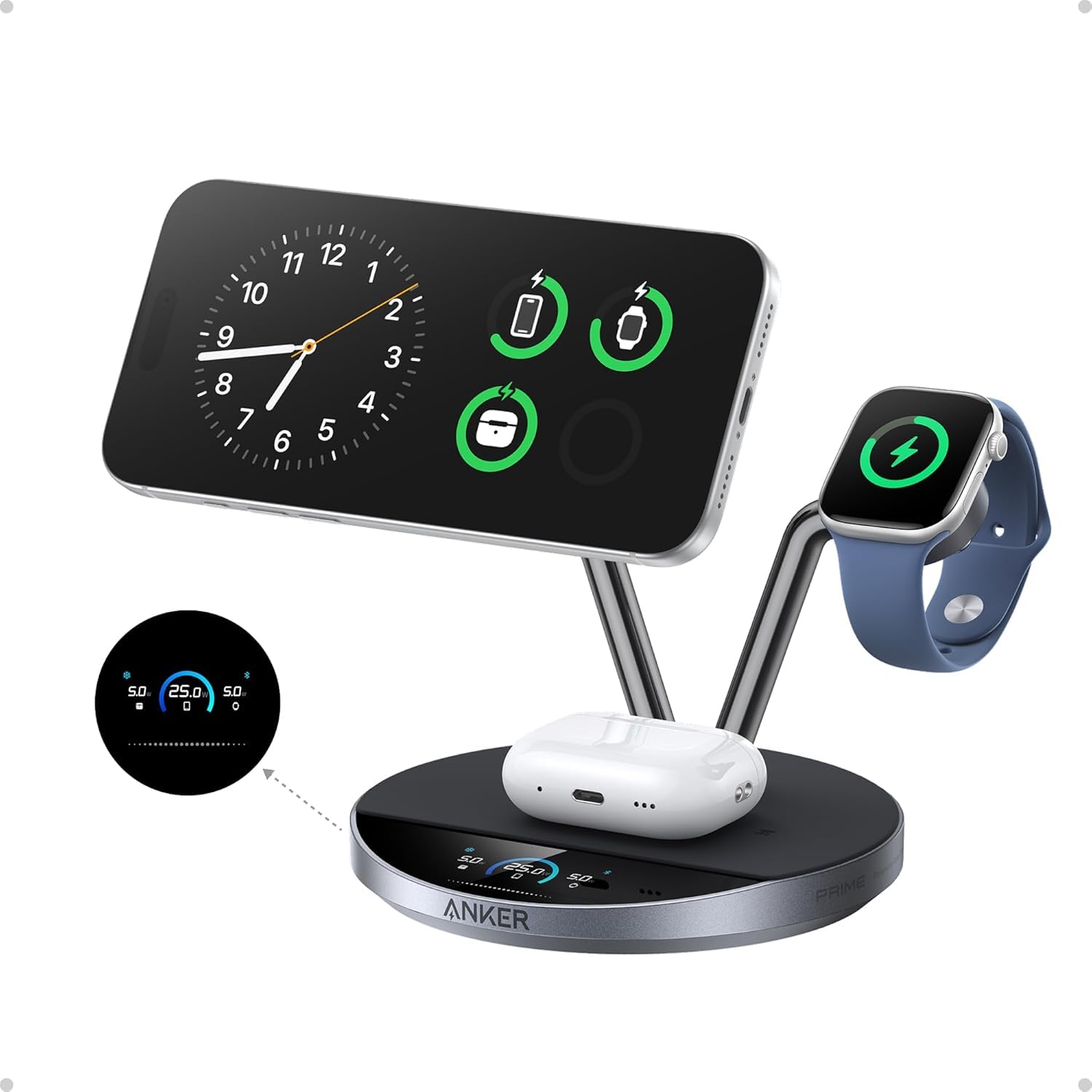
Wireless charging creates heat, and heat is what makes a phone slow down mid-charge. Anker’s answer is active TEC cooling, which the maker says holds an iPhone’s surface below 89°F at peak output, plus ActiveShield 5.0 running over 10 million safety checks a day. That is the technical case; the practical one is a stand that fast-charges an iPhone, Apple Watch, and AirPods at the same time from one outlet — and the review pages back up that triple-charge simultaneously.
The 1.65-inch HD touchscreen is the showpiece. It shows live wattage, temperature, and charging status per device, so you never guess whether your phone is actually charging. Three modes are selectable — Boost for quick top-ups, Ice for cooler charging while you use the phone, and Sleep for a silent overnight run — and the 80° adjustable stand puts the screen at a comfortable video-call angle. It ships with a 65W USB-C adapter, so nothing extra is needed.
The build is the other half of the story: stainless-steel arms, a weighted base, and a precision hinge. What people rave about is how it looks on a nightstand — stainless-steel arms and a weighted base read as minimal and elegant rather than a plastic cradle. The honest catch is the wireless ceiling: 25W is great for a phone, but there is no USB-C port to charge a laptop, so this is a phone-and-watch dock, not a desk hub. The 21.87 oz weight and 6.65 × 4.92 × 5.43 inch stance also mean it wants a stable spot, not a sliding laptop-lap tray.
What earns the price: a Qi2 25W charger, active TEC cooling, and a live touchscreen in one dock — there is nothing else in this list with that combination.
Who it is not for: anyone who needs to fast-charge a laptop from the same station.
Built for: an Apple-only nightstand where looks matter as much as speed, and you want proof on screen that the phone is charging.
The honest limit: no USB-C output means a laptop has to charge elsewhere.
4. Acer 3 in 1 Charging Station
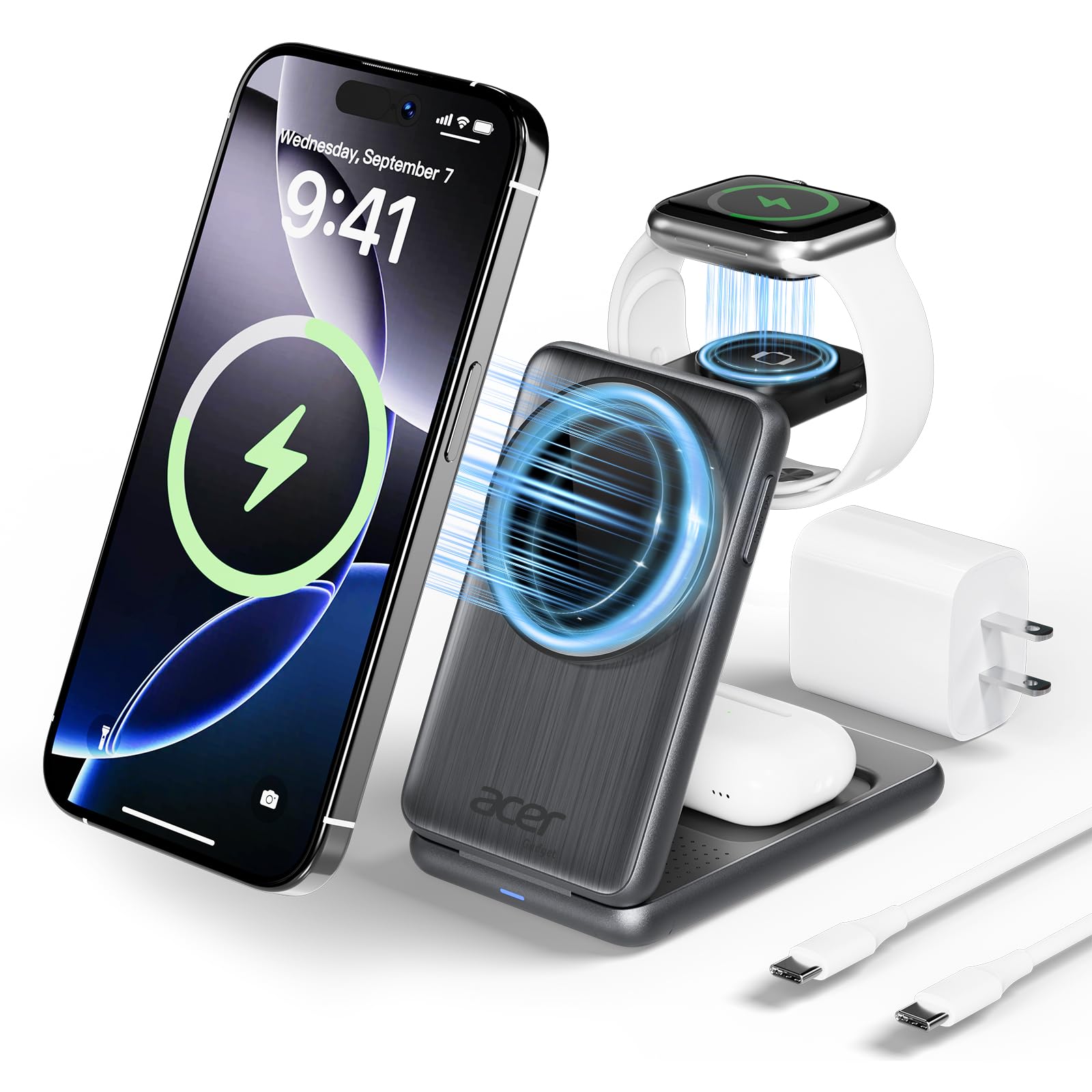
Folds flat enough for a suitcase, then pops open to charge iPhone, Watch, and AirPods together.
The number that defines this one is 15W — the maximum a MagSafe-compatible iPhone will take from a magnetic pad. It is 15W versus the Anker Prime block’s 200W, but that is not a fair fight: this is a wireless stand, not a laptop charger. What it does well is charge three Apple devices at once, with 5W for earbuds and 3W for a watch, from a body that folds and slips into a bag. That foldability is the whole point — it is a travel charger that also lives on a desk.
It ships with a 27W USB-C adapter and a 3.3-foot cable, so there is no mystery about what to plug in. An intelligent chipset guards against overcurrent, overvoltage, and overheating, and a non-slip surface keeps the phone from sliding. It works with most phone cases up to 0.08 inches (2mm) thick, though Acer suggests skipping metal rings or built-in magnets for the best magnetic grip. Owners consistently call the quality and functionality the strong points, with the compact size keeping cord clutter down.
The caveat is compatibility: it is built for iPhone 12 through the iPhone 17/18 series and Apple Watch Series 1 through 11, so an Android phone will not charge on the magnetic pad. AirPods also need a MagSafe-compatible charging case on the non-Pro models. If your household is all Apple, that is no problem at all — the compact footprint and portability are exactly why it travels well folded in a suitcase.
What It Delivers
- 15W MagSafe charging for a compatible iPhone
- Three devices at once — phone, watch, earbuds
- Folds flat, with the 27W adapter and cable included
- Works with cases up to 0.08 inches (2mm) thick
Who It Leaves Out
- Apple-only — no Android phone support
- AirPods need a MagSafe-compatible case unless they are the Pro models
- Wireless only, so no laptop charging
Matches up with: the iPhone-and-Watch traveler who wants one folding stand in a backpack and one at home.
Not the answer for: a mixed Apple/Android household or anyone needs to top up a laptop.
5. HATALKIN 8-in-1 Retractable Charger
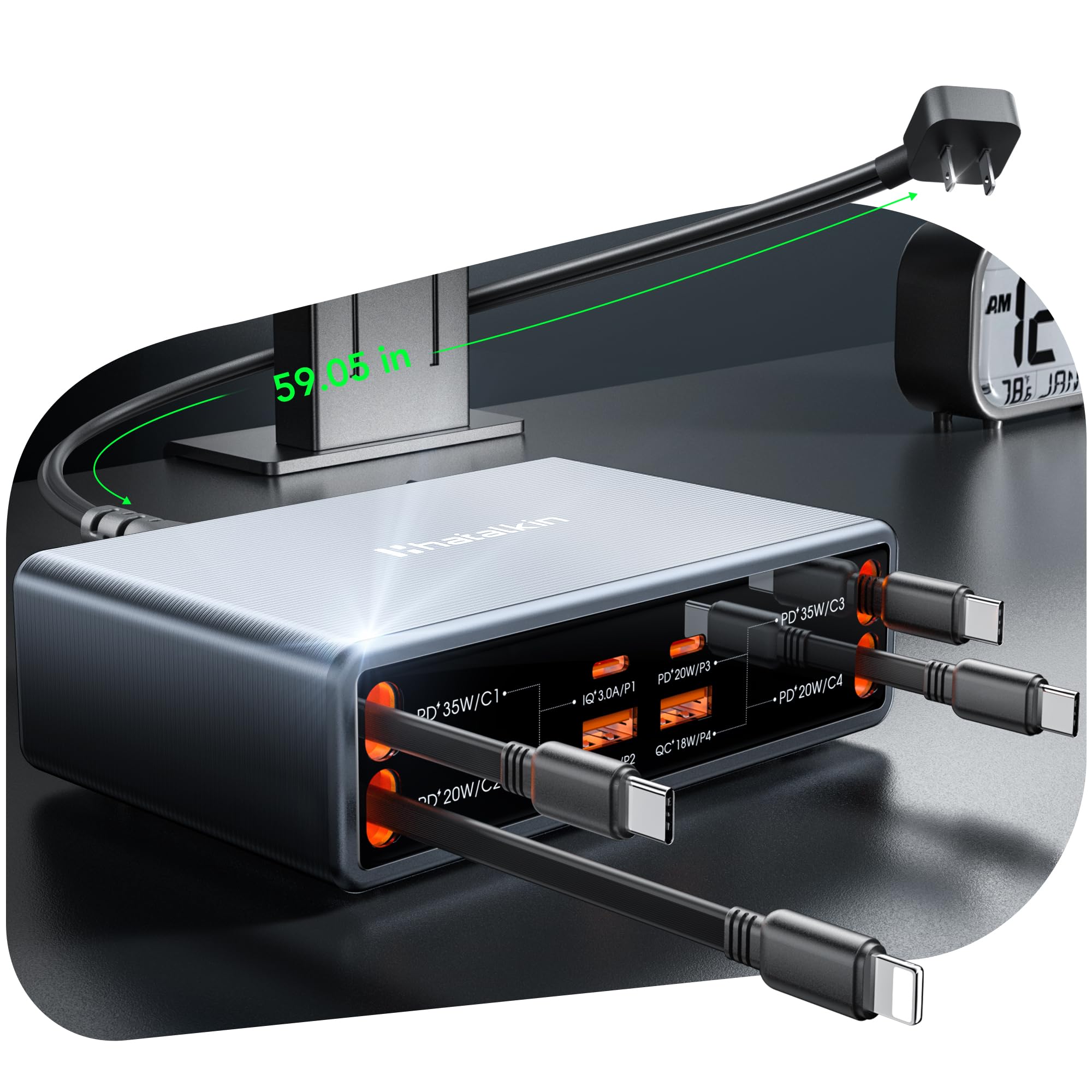
Four cords that pull out to 31.5 inches and vanish back into the base when you let go.
Most charging stations still leave you plugging in a cable. This one builds four retractable cables into the body — two PD 35W USB-C, one USB-C 20W, and one PD 20W Lightning — plus two USB-C 20W ports and two USB-A ports, for eight devices on a 105W budget. The retractable cords reach 80cm (31.5 inches) at full extension, which is enough to reach a phone on a nightstand or a tablet across a desk. When you are done, they retract back into the base, so there is no loop of cable left lying around.
GaN internals keep the 105W output efficient and cool. The maker’s figure is 58 percent in 30 minutes for an iPhone 18 Pro or Pro Max, and customers note a 20 to 80 percent climb in about 40 minutes. Cord management and the retractable-cable mechanism both earn praise, which is the whole reason you would pick this over a plain hub.
The unit measures 13.3 × 8.7 × 3.9 cm and weighs 442 grams, so it can sit on a nightstand without dominating it. The honest caveat is durability over time: a handful of reviewers point out the retraction losing some snap, the way any spring-loaded mechanism eventually can. Treat the cords gently and pull straight out rather than yanking sideways, and this is the most satisfying clutter fix in the list.
Where it shines: four built-in cables that retract out of sight, plus four USB ports, is real clutter relief in a 442-gram package.
What to know: a retractable cable is a moving part, so give it a straight pull and it lasts longer.
Go for this if: your nightstand is a nest of dangling cords and you want them gone without buying a separate cable organizer.
Think twice if: you expect a laptop-class 100W-per-port charger — the ceiling here is 105W shared.
6. Gitryin 12-in-1 Desktop Charging Station
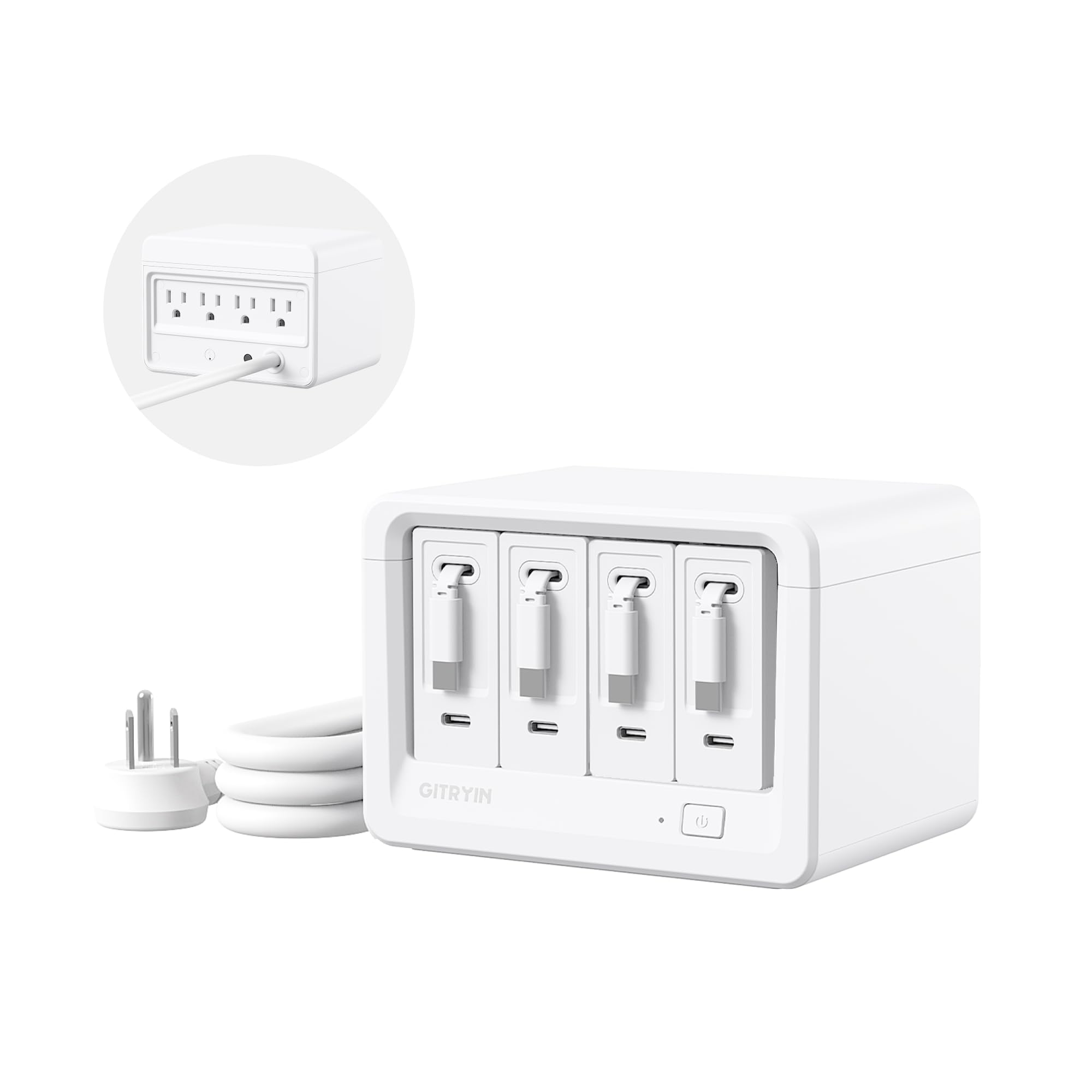
A modular diagonal strip that replaces your whole outlet bar instead of adding to it.
Twelve ports on a 160W budget is the headline, and the layout is what sells it. Four AC outlets sit on the body, with four USB-C ports and four retractable 40W Type-C cables built in. The four retractable cords reach 33.5 inches, and the maker rates them at 40W each — enough for 50 percent in 20 minutes. The 45° angled plug is a smart detail — it fits behind furniture and tight wall sockets without forcing the strip away from the wall.
Safety is where this one pulls ahead of the cheaper strips: it is ETL-certified with 1020J surge protection, and the fire-resistant casing plus automatic shutoff guard against voltage spikes and short circuits. That matters if your desk runs expensive gear.
The design is genuinely modular — if one of the four retractable chargers dies, the maker dispatches a single replacement rather than swapping the whole station, and the 2-year warranty covers it. The honest catch is the retraction mechanism: some users say the cords do not always retract cleanly. Treat it as a fantastic-but-occasionally-finicky cord tidy and the value holds together. The functionality and appearance are what most people notice first.
The Case For It
- 12 ports — 4 AC, 4 USB-C, 4 retractable 40W cables
- 1020J surge protection with ETL certification
- Modular design with single-charger replacement under a 2-year warranty
- 45° angled plug fits behind furniture
The Small Print
- Some cords do not retract cleanly every time
- Not for low-power devices — the USB-C ports may not wake for light loads
Suits you when: you run a big desk — monitor, laptop, phone, tablet, watch — off one hidden strip and want warranty backup.
Not necessary if: you only charge one or two devices and the retractable cords would go unused.
7. Pezin & Hulin Bamboo Charging Station

A warm bamboo tray that turns a pile of phones and tablets into a tidy row.
Not everyone wants a plastic brick on the desk. This station is a single piece of bamboo — a real wood material that holds up better than plastic baffles, per the maker — with a 5-port USB charger and five short charging cables included (two Lightning, two USB-C, one Android), plus a bonus hanging stand for a smartwatch. Everything nests inside the dock, so the cables stop being visible.
It is designed to charge up to seven devices at once across its ports. The removable charging stand cover and stronger magnetic base make it easy to install and keep stable, and the compact footprint saves surface area. Reviews focus on the organization — it corrals phones, a tablet, and a watch into one tidy spot, and the wooden look cleans up the messy cord view that a plain plastic hub leaves behind.
Be clear about what this is: an organizer with a modest USB charger built in, not a fast-charging powerhouse. The 2.4A output per port means phones and tablets charge at a steady, everyday pace, so a modern phone will not hit its fastest speed here. If speed is your priority, look at the Anker Prime block or a GaN strip. If your goal is a calm, natural-looking landing spot for the family’s phones, this is the most attractive option in the list.
What you actually get: a bamboo tray, a 5-port USB charger, five short cables, and a watch stand — a complete set that works the moment it arrives.
The speed reality: 2.4A USB output is fine for overnight charging but not for rapid top-ups.
It fits: a home where several phones, a tablet, and a watch need a calm, good-looking home base.
Skip if: you need fast USB-C charging for a laptop or a modern high-draw phone.
8. SooPii HomeHub H1 Charging Station
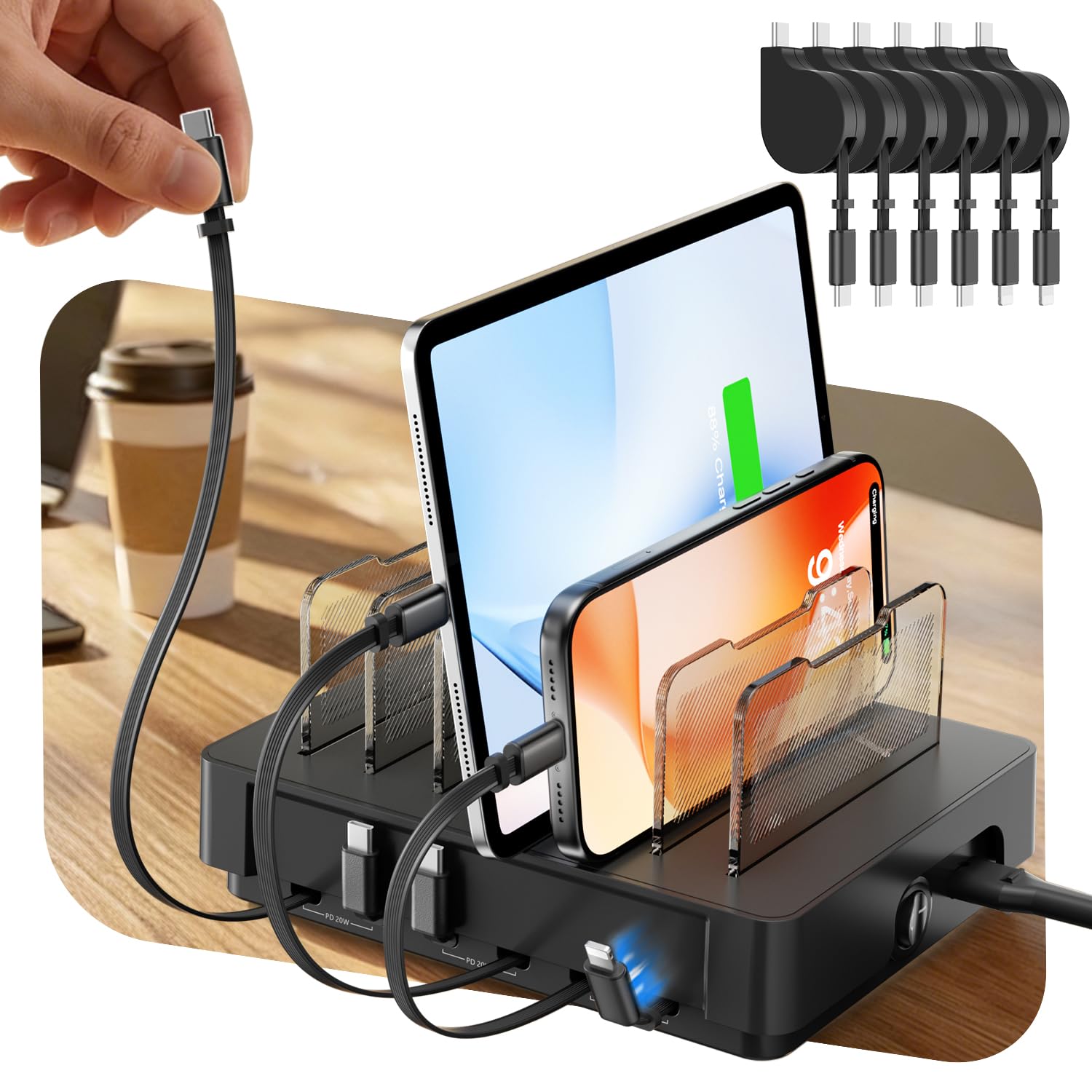
Six cords built into one low-profile base, each one vanishing the moment you let go.
The cable spaghetti problem gets solved here with six built-in retractable cables — four USB-C and two Apple-style — that pull out to charge and snap back into the base when finished. Front and center is the magnetic docking: the connectors snap onto the tray’s surface, and seven adjustable dividers hold phones and tablets in a row. The whole thing sits in 3A of output on a 120V input, which keeps it in bedside-tidy territory rather than desk-hub power.
The design includes a patented swappable cable hub — an open-case system that lets you swap or replace a cable without tossing the whole station. That is a real longevity idea: you are less likely to outgrow it as your device mix changes. It is built from aluminum, plastic, and silicone, and SooPii backs it with a 24-month warranty. What works best is the organization and the tidy look — it turns a chaotic nightstand into a neat row of devices.
Charging speed is the mixed part. Some owners say it charges fast, others find it slower than expected, so treat this as an overnight-charging station for phones and tablets rather than a fast top-up machine. It supports a long list of phone models — iPhone, Galaxy, Pixel, Moto, and TCL among them — so it is not locked to one ecosystem. If your priority is neatness at the bedside, the speed limit rarely bites.
What It Brings
- Six built-in retractable cables that disappear into the base
- Magnetic docking plus seven adjustable dividers
- Swappable cable hub for easy future replacement
- Works with iPhone, Galaxy, Pixel, Moto, and TCL phones
What To Expect
- Charging speed draws mixed feedback — steady, not rapid
- 3A output, so it is a bedside charger, not a laptop hub
Worth it for: a nightstand or shared bedside where several devices need one tidy home and overnight charging is fine.
skip it if: you want fast high-wattage top-ups throughout the day.
9. kakyanill 100W Charging Station
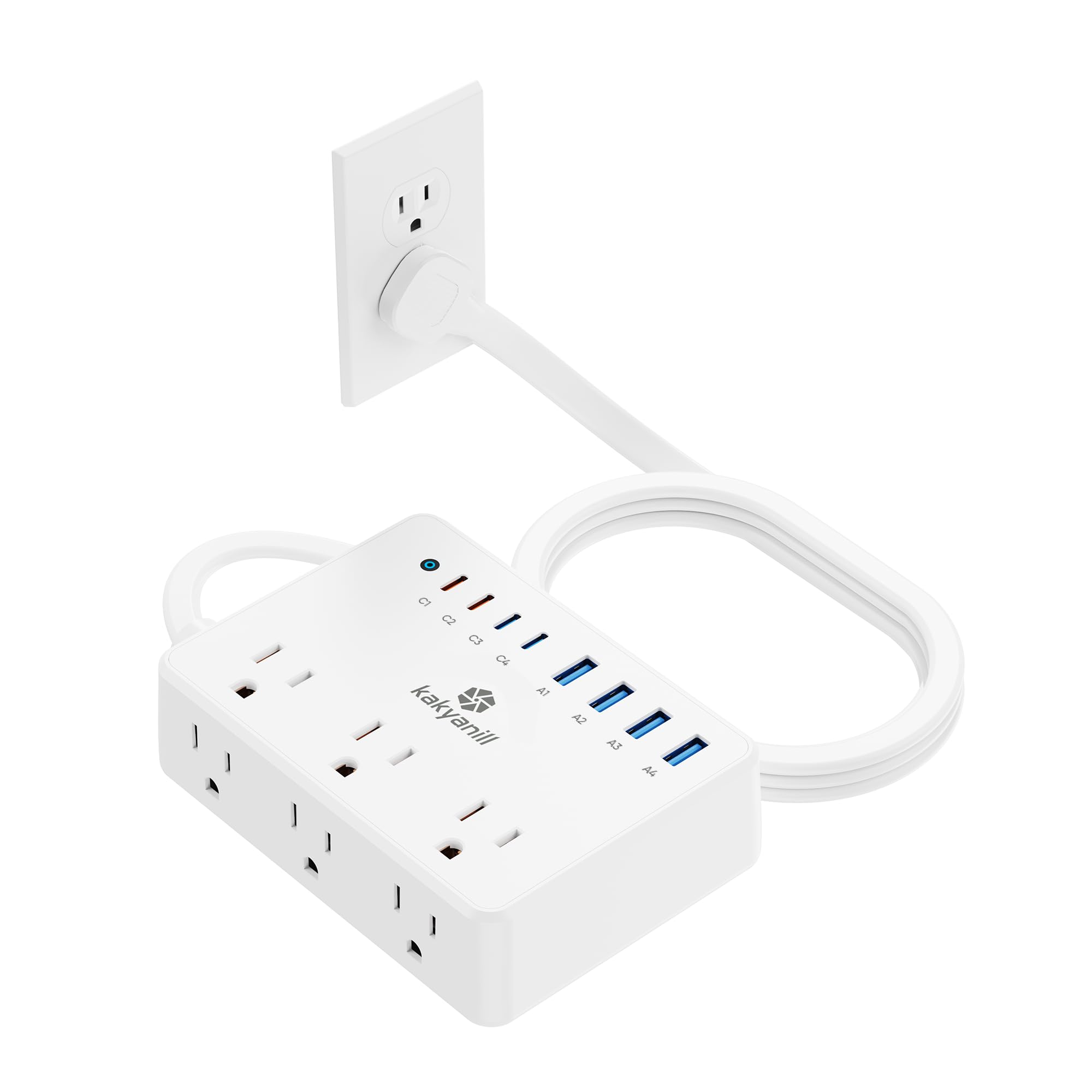
Fourteen ports on one flat plug, ready to disappear behind a sofa or bed.
The count is the pitch: 6 AC outlets and 8 USB ports add up to 14 charging points from a single 5-foot cord. The USB-C1 and C2 ports top out at 65W, with two 20W USB-C ports and four 15W USB-A ports alongside — enough to run a laptop at speed on the main ports while slower accessories sip from the rest. The flat plug angles 45 degrees so it hides behind furniture, and mounting holes on the back let you hang it.
Surge protection is rated at 1080J with an overload switch, and the 3-side layout with wide-spaced outlets keeps bulky adapters from crowding each other. It is designed for a dorm room, bedroom, or apartment where one strip has to do the work of a whole room’s worth of sockets. Reviews call out the outlet count and USB mix as the reason it works on a bedside table or beside a couch.
Compared with the 200W Anker Prime block, this is a different tool — you get AC sockets and a larger port count (14 vs 6) but a 100W USB pool instead of 200W, so a heavy laptop setup will feel the limit if you split the port across several devices. The USB-A ports are rated at 15W, which is fine for cables and older accessories but not for fast-charging a modern phone. For dorm and bedroom tidying, the port count per dollar is hard to argue with.
Where the money goes: 6 AC outlets and 8 USB ports from a single flat plug — the most charging points on this list by a wide margin.
The trade-off: 100W total is split across all the USB ports, so power per device drops as you add gadgets.
Pick it for: a dorm or bedroom where the outlet is behind the bed and you need wall plugs plus a row of USB ports.
Look past it if: you need to fast-charge two laptops at once — the 100W pool will not stretch that far.
Know the Specs
Total Wattage And Shared Power
Total wattage is the shared pool every plugged-in device draws from at once. A 200W hub can hand 100W to each of two USB-C ports simultaneously, which is what makes a laptop charge at full speed. A 100W or 60W hub splits a smaller pool, so the more devices you add, the slower each one charges. If a laptop is on your list, look for a high single-port ceiling, not just a big port count.
GaN Versus Older Charger Internals
GaN (gallium nitride) is a chip material that lets chargers run cooler and smaller than older silicon-based designs. It is why a 200W desk block can be roughly the width of a phone instead of the size of a brick. The practical benefit is less heat on the desk and a more compact footprint — not a magic speed boost. Wattage and port count still decide how fast each device charges.
Wireless MagSafe Charging
A MagSafe-compatible pad uses magnets to line the phone up and charges at up to 15W or 25W depending on the standard. It removes the cable entirely, so the phone sits upright at a viewing angle and just charges. The trade-off is reach: a wireless stand cannot charge a laptop, so these models suit a bedside or a phone-first desk rather than a full workstation.
Surge Protection And Outlet Ratings
Joule ratings on a surge-protected strip measure how much energy it can absorb before your devices see it. A strip rated at 1080J or 1020J is built to handle a household spike; a plain USB hub has no wall-socket surge protection at all. If you are plugging a monitor or a pricey laptop into the strip’s AC ports, the joule figure is worth checking alongside the USB wattage.
Common Questions
Will a 200W charging station charge two laptops at the same time?
Do retractable charging stations break after a while?
Is a GaN charging station better than a regular one?
Can a charging station hold both an iPhone and an Apple Watch?
What is the difference between AC outlets and USB ports on a power strip?
Will a wireless charging station work with a phone case on?
How many devices can a stylish charging station realistically power at once?
Is it safe to leave a charging station plugged in all night?
Can I travel with a foldable wireless charger?
Do these charging stations support Android phones as well as iPhone?
The Bottom Line
For most desks, the stylish charging stations winner is the Anker Prime 200W 6-Port GaN Desktop Charger because it hands 100W to each of two USB-C ports at once and still runs six devices — a laptop pair plus your phone, tablet, watch, and earbuds from one plug. If your desk needs wall sockets as well as USB, grab the Kioson 12-in-1 200W GaN Power Strip with its 4 AC and 8 USB ports. And for a nightstand that has to look good, the Anker Prime 3-in-1 Qi2.2 MagSafe Station is the one to reach for, with its live touchscreen and active cooling. Whichever you pick, start by counting your hardest devices — the station that fits them is the one that actually clears your surface.
How we choose
We do not accept paid placement. Every pick is matched to a real buyer and a real use-case; we do not hands-on test units.
Sources
Specifications: manufacturer listings and product documentation. Review insights: verified customer reviews, as of November 2026. Pricing: not shown on this page (it changes often); check the current price via the retailer link.
As an Amazon Associate, Tactical Gear Guy earns from qualifying purchases. This does not affect which products we feature.