Specs are compiled from manufacturer listings and verified buyer reviews and can change over time — please confirm the key details on the product page before buying.
You want one screen on the wall that turns off the kitchen light without making you dig your phone out of your pocket. That is the whole job of a smart panel for home, and it is where most of them fail — slow taps, dropped devices, or a hub you still have to buy. The four panels below were chosen for how little they demand of you day to day: whether they need a hub (a separate box that connects your devices), whether they need a neutral wire (the extra wire some switches require), and whether your existing switches and speakers actually show up on that glass.
This guide is built by comparing the manufacturers’ published specifications and the patterns across verified customer reviews, so you get each pick’s real strengths and trade-offs instead of marketing spin.
A wall panel earns its place only if the relay fires on the first tap, every tap, even when the Wi-Fi is down.
Top Picks
How To Choose The Best Smart Panel for Home
The wrong first question is “which screen is biggest” — the right one is what wiring is already in the box. The right one is “what is already behind my wall.” A panel that needs a neutral wire (the extra wire some switches require) and a panel that can run off a USB-C cable (a standard charging cable) are two completely different installation days, and you only find out which one you bought after the box is open.
Does it actually switch a load, or only send commands?
A relay is the part inside the panel that physically cuts power to a light or fan. If your panel has one, you can tap the screen and the fixture goes dark even when the internet is down. If it does not, the panel is really a remote control — it sends a message to a smart bulb or a plug, and that device does the switching. Both are useful. Only one of them replaces the switch that is already on your wall.
The neutral wire question
Older switch boxes often hold only a live wire and a switched live, with no neutral tucked in the back. A panel that needs a neutral will not power up in that box, so check before you order. A panel that can be fed from a USB-C cable gives you a way out — you mount it where a cable can reach.
Protocols decide what shows up on the glass
Zigbee, Wi-Fi, Bluetooth, and Matter are the languages your devices speak to each other. A panel with a Zigbee gateway built in can talk to Zigbee sensors and bulbs directly, without a separate hub box in the closet. A Wi-Fi-only panel leans on your router and your cloud account. Match the panel’s radio to the bulbs, sensors, and locks you already own, not to the product photos.
Do you want a voice microphone on the wall?
A panel with Alexa built in can answer you from across the room, but it also becomes a microphone in your hallway. Panels without voice are quieter and more private, and they still control everything by touch. Decide if you want a microphone in the hallway before you fall for a feature list.
Side-by-Side Comparison
| Model | Best For | Screen | Built-In Relay | Hub Or App | Amazon |
|---|---|---|---|---|---|
| Shelly Wall Display XL★ Best Overall | Whole-room control with no hub | 10.1 in | 5 A | Shelly app / Home Assistant | Amazon |
| SONOFF NSPanel Pro 120 | Camera feeds and energy tracking | 4.7 in | — | Controller only | Amazon |
| MOES Smart Home Control Panel L | Zigbee homes that want voice on the wall | 5 in | — | Zigbee gateway built in | Amazon |
| Brilliant Smart Home Control | Replacing a single switch with a screen | — | — | Wi-Fi, multi-brand | Amazon |
Detailed Reviews
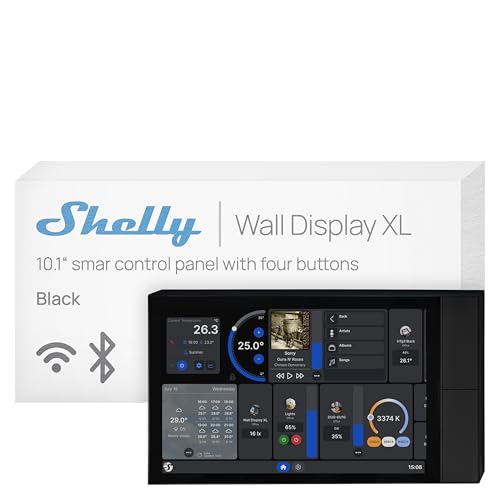
1. Shelly Wall Display XL Black
Our pick — 4.0+★ from 70+ verified ratings; the strongest balance of quality and price.
The one that replaces your light switch instead of needing extra hardware beside it.
A 10.1-inch touch display is the number that earns this panel its place. That is roughly the size of a small tablet sitting flush on your wall, so device names, scenes, and a music widget all fit without you squinting from the doorway. It is the biggest screen in this group by a clear margin — the MOES panel next in line carries a 5-inch screen, and the SONOFF sits at 4.7 inches. If a 4.7-inch screen left you squinting from the doorway, the 10.1-inch glass here is the fix.
What makes it a real switch rather than a pretty remote is the 5 A relay inside. Amps are a measure of electrical current, and 5 A is the ceiling this panel can switch directly. Lights, fans, heaters, and a coffee maker can hang off that relay, and you turn them on with a tap, one of the four buttons, or a schedule. No hub and no phone app are needed for that basic job. That is the difference between this and the SONOFF unit, which acts as a controller and needs power wires only to feed its display — it has no switch inside it. Configuring this one runs through the Shelly Smart Control App or Home Assistant, and the panel also works with Alexa, Google, HomeKit, and Home Assistant by name.
The part that catches people is the wiring. A neutral wire is required, and the panel installs in a standard electrical wall box. Plenty of older switch boxes simply do not have that neutral waiting in the back, so check before you buy or budget for an electrician. The other thing to know is the scale of it: at 920 g it is a substantial chunk of hardware, far heavier than the small SONOFF panel. That weight is what a 10.1-inch glass front costs you, and it is a fair trade if you want the screen this big.
Where it pulls ahead
- 10.1-inch touch display — the largest in this group, so labels stay readable from across a room
- 5 A relay built in, so it switches lights and appliances itself with no extra hub in the loop
- Four customizable buttons plus a lux sensor (a light sensor that can trigger scenes as the room dims)
- Talks to Bluetooth and Sonos speakers for play, pause, skip, and volume from the same screen
What to plan around
- Needs a neutral wire in the wall box, which not every older home has
- 920 g is heavy for a wall device — the box has to be well anchored
Reach for this if: you want one big glass panel switching real lights and music with no hub box in the closet.
Check your wall first: no neutral wire in that box means this panel will not power on.
2. SONOFF NSPanel Pro 120 Smart Control Panel

A small screen that watches the driveway while it runs the lights.
Most wall panels make you choose between control and security. This one puts four live camera feeds on a 4.7-inch display — that is its real argument. You can check the living room, the garage, or the bedroom from the hallway without pulling out a phone, and add up to four camera types to the viewer. The same screen tracks daily energy use on selected devices across a week and runs three customizable security modes, where a triggered sensor sets off an alarm and pushes a notification to your phone.
It also browses the web, which sounds like a gimmick until you save a music page or a video feed as a one-click shortcut. Here is the honest limit, and it is a big one: this is a controller, not a switch. It has power wires only to feed the display, so it cannot cut power to a light on its own. You are using it to boss around other smart devices, not to replace the switch plate. For anyone expecting a relay like the Shelly panel above, that is a genuine mismatch.
What buyers keep circling back to is the speed. The panel responds slowly enough that people describe wanting it rebuilt around a better processor, and some units reboot on their own or drop paired devices offline after configuration. Others have had the opposite experience — an upgrade from an older panel, with Home Assistant dashboards running well on it. The best check is your own setup: if your automations are already built and you mainly want a wall-mounted viewer, this earns its spot. If you need a fast, always-on switch, the lag will wear on you.
Honest read: the camera viewer and weekly energy tracking are the reasons to pick this over a plain control panel, and no other pick here puts four feeds on the wall. The display size trails the others though — 4.7 inches against 5 inches on the MOES and 10.1 inches on the Shelly.
Fit note: the most-discussed area is functionality, and the mood is split. Some setups run cleanly, and others report slow taps and reboots.
Worth it for: a Home Assistant or camera-heavy home that wants eyes on the driveway from the hallway.
Not the one for: anyone who needs the panel to physically switch a light — it only has power wires for the display.
3. MOES Smart Home Control Panel

One box that replaces your hub and answers you from across the kitchen.
A Zigbee gateway inside the panel is the reason this one exists. Zigbee is a low-power wireless language that smart sensors, bulbs, and locks use to talk to each other, and it normally needs its own hub box plugged in somewhere. Here the gateway lives in the panel, so you skip that separate purchase entirely and get localized control. Around it sits a 5-inch full touch screen paired with Smart Life and Tuya devices — switches, bulbs, sockets, cameras, and door locks all land on one interface.
Alexa is built in, so your lights and scenes answer to your voice without a separate speaker on the counter. Installation gives you two routes: a wired circuit connection, or a USB-C cable feeding the panel with either wired or wireless network. That USB-C option is the practical escape hatch for a wall box with no neutral, and it is something the Shelly pick above cannot offer at all.
Where it gets complicated is Alexa itself. The panel can override the other Alexa devices in earshot, which surprises people who expected it to sit quietly alongside them. Speak to it and the whole room’s Echo setup may react instead of just the wall panel. Setup also asks some patience — Alexa routine control and certain brand integrations such as Hue lights do not always behave the way the feature list implies. Treat it as a Zigbee hub with a voice microphone bolted on, not as a replacement for the Echo speakers already in your rooms.
Why it earns a slot: the built-in Zigbee gateway is real money saved and one fewer box humming in a closet, and the USB-C power option makes it viable in older wiring.
The friction: Alexa is the most-discussed topic and opinions split — sometimes it works well, sometimes routines and third-party bulbs will not cooperate.
Pick this if: you run Smart Life or Tuya gear and want a hub plus a voice microphone in a single wall unit.
Think twice if: you already have Echo devices in every room and do not want a panel that talks over them.
4. Brilliant Smart Home Control 1-Switch Panel

Swaps into a single switch box and starts speaking to nearly everything you own.
The compatibility list is the whole pitch. This panel works with Alexa, Ring, Sonos, Hue, Google Nest, Wemo, SmartThings, and Apple HomeKit, so a house built across four different brands ends up on one touchscreen. At 8 ounces it drops into a single-gang switch box far more easily than the 920 g Shelly panel — that weight gap is the difference between a straightforward swap and a careful anchoring job. Viewing a Ring camera and switching a Sonos speaker from the same screen is the everyday win.
Installation is the part buyers bring up most, and it lands well. The panel goes into a one-way circuit (a single switch controlling one load) using screw terminals, and the physical setup comes together quickly. The interface gets the same warm reception — screens are easy to swipe, dimming runs off the touchscreen, and the built-in features get used daily rather than fished out of a menu. Appearance gets its share of attention too; this is a panel people leave visible on purpose.
Two things to weigh honestly. The first is that device compatibility shows up differently from one Brilliant panel to the next in the same house — a light that renders on one may not appear on another. The second is that this is the premium option of the group, and the cost sits well above the rest, which a number of buyers point to when they mention limited app functions. If you need Ring, Sonos, Hue, Nest, and HomeKit on one in-wall screen, the compatibility list justifies the premium. If you want a big display or a relay for the price, the Shelly XL is the better fit.
Standout: works with more smart-home systems than the other panels here, plus a one-way switch design that fits a standard single switch box.
Caveat: the same-brand panels can render devices inconsistently, and the premium tier is the steepest in this group.
Best fit for: a mixed-brand smart home — Ring doorbell, Sonos speakers, Hue bulbs, and HomeKit all on one screen.
Weigh against: inconsistent device rendering across multiple panels and the highest tier of the group.
Know the Specs
Relay Rating in Amps
Amps measure how much electrical current a panel can switch on its own. A 5 A relay means lights, fans, and small appliances can be wired through the panel and controlled from the screen. No relay at all means the panel is a remote — it tells a smart bulb or plug what to do, and that device does the actual switching.
Display Size in Inches
The diagonal measurement of the touchscreen decides how much you can read from a few feet away. Ten-inch class screens show device names and widgets comfortably, while 5-inch and smaller screens ask you to stand close. Bigger glass also means more weight on the wall box, so the trade-off runs both ways.
Zigbee Gateway vs Wi-Fi Only
A Zigbee gateway is a radio built into the panel that talks directly to Zigbee sensors, bulbs, and locks. It replaces a separate hub box. A Wi-Fi-only panel relies on your router and usually a cloud account, so it depends on your network staying up.
Neutral Wire and Power Options
A neutral wire is the return path in your wall box that many panels need to run. Older switch boxes often omit it. A panel that accepts a USB-C cable gives you a way to power it when the neutral is missing.
Common Questions
Does a smart panel for home need a neutral wire?
Can a wall panel control lights without a smart bulb?
Will the MOES panel work with my Hue lights?
Can the SONOFF NSPanel Pro 120 show my security cameras?
Is the Brilliant panel compatible with Apple HomeKit?
How much weight can my wall box handle for a panel?
Does a wall panel with Alexa override my Echo speakers?
Can I power a smart panel from USB-C instead of wiring it to the mains?
Which panel works best with Home Assistant?
The Bottom Line
For most homes, the smart panel for home decision depends on if you want a switch or a viewer. The Shelly Wall Display XL takes the top slot because its 10.1-inch screen and 5 A relay (a switch that handles up to 5 amps of power) let it replace a light switch outright — no hub, no separate app required for the basic job. If camera feeds and energy tracking matter more than switching a light, the SONOFF NSPanel Pro 120 puts four live views on the wall. And if your home is a mix of Ring, Sonos, Hue, and HomeKit (popular smart-home brands and systems), the Brilliant Smart Home Control speaks to all of them from a single switch box. Check your neutral wire (the extra wire some switches require) before you order anything — that one detail decides which of these four you can actually install.
How we choose
We do not accept paid placement. Every pick is matched to a real buyer and a real use-case; we do not hands-on test units.
Sources
Specifications: manufacturer listings and product documentation. Review insights: verified customer reviews, as of November 2026. Pricing: not shown on this page (it changes often); check the current price via the retailer link.
As an Amazon Associate, Tactical Gear Guy earns from qualifying purchases. This does not affect which products we feature.