Specs are compiled from manufacturer listings and verified buyer reviews and can change over time — please confirm the key details on the product page before buying.
The reader that actually earns its place on your desk is the one that swallows every card you own and moves the files before you get bored. That is the whole job. A card reader is a tiny adapter that lets your computer see a memory card — an SD, microSD, CompactFlash or an older format like xD or Memory Stick — as if it were a USB drive. Buy the wrong one and you get a slot that fits nothing, a cable that will not reach, or a transfer crawling along at old USB 2.0 pace while your shoot sits unedited. Below you get seven readers sorted by what each one is genuinely good at, plus the plain-English spec guide so you can match a slot list to your own camera bag.
This guide is built by comparing the manufacturers’ published specifications and the patterns across verified customer reviews, so you get each pick’s real strengths and trade-offs instead of marketing spin.
Slot count, transfer speed and connector type decide almost everything here, and the gap between a fast reader and a slow one is the difference between a coffee break and an afternoon. The shortlist below covers what matters in a smart media card reader without the filler.
Top Picks


How To Choose The Best Smart Media Card Reader
Start with your card drawer, not the spec sheet. Open it, look at every memory card you still use, and write down the formats. If a CompactFlash card from an older DSLR is in there, you need a CF slot — a microSD-only reader is useless to you no matter how fast it claims to be. The same rule applies to Memory Stick Pro Duo, xD Picture Card and SmartMedia, which are the formats that quietly get dropped from modern readers.
Match the connector to the device you plug into
A USB-A plug (the classic rectangular one) fits desktops and older laptops. USB-C (the small oval one) fits newer laptops, iPads and most current Android phones. Lightning is the Apple iPhone connector used before USB-C arrived on the iPhone 15 series. If you shoot on a camera and edit on a phone, the connector matters as much as the slots — a reader with a USB-C plug cannot go straight into a Lightning iPad.
Understand the two ways speed gets quoted
Some listings quote megabytes per second (MB/s), which measures how much file data moves each second. Others quote gigabits per second (Gbps), which measures the link rate of the USB connection itself. These are different units, so do not compare a 312MB/s figure directly against a 5Gbps figure. What you can trust is this: a USB 3.0 or USB 3.1 reader will feel substantially quicker than an old USB 2.0 unit when you are dragging a folder of raw files.
Decide if you need simultaneous slots
Reading several cards at once is genuinely handy if you come home from a wedding with four full SD cards and want them all copying while you shower. For a single camera and a single card, a plain one-slot reader does the same job. Pay attention to the slot layout too — a reader with two SD and two TF slots handles a two-camera kit without any card swapping.
Side-by-Side Comparison
| Model | Best For | Slots | Stated Speed | Connector | Amazon |
|---|---|---|---|---|---|
| Lexar Multi-Card 3-in-1★ Best Overall | Everyday camera and phone cards | SD, microSD, CompactFlash | Up to 312MB/s (SD/microSD) | USB-C cable plus USB-A adapter | Amazon |
| ProGrade Digital PG08Top Performer | Fast dual-card photo and video work | Dual SD UHS-II | Up to 1.25GB/s | USB 3.2 Gen 2 | Amazon |
| Transcend RDF9 | Compact UHS-II SD and CF transfers | SD, microSD, CompactFlash | 260MB/s | USB 3.1 Type A | Amazon |
| Rocketek 7-in-1 USB3.0 | Covering nearly every card format at once | 7 slots including CF, xD, MS | 5Gbps | USB 3.0 Type A | Amazon |
| Ardaddyn 8-in-1 | Phone, tablet and laptop in one | SD, TF, MS, CF, XD plus 3 USB 2.0 | 480Mbps | Lightning, USB-C, USB-A | Amazon |
| Yeemie Pro 7-in-1 USB-C | Modern USB-C laptops and iPad | 2 SD, 2 TF, CF, MS, XD | 5Gbps | USB Type C | Amazon |
| INDMEM All-in-1 | Legacy and vintage memory cards | SM, xD, SD, MS, CF, MMC and more | 480Mbps | USB 2.0 Type A | Amazon |
Detailed Reviews
1. Lexar Multi-Card 3-in-1 Card Reader
Our pick — 4.5+★ from 850+ verified ratings; the strongest balance of quality and price.
Three slots, a braided double-ended cable and speed that clears a card folder fast.
If you own one camera, a phone and a drawer full of SD and microSD cards, this reader covers all of them from a single compact body. It reads SD, microSD and CompactFlash (the older, chunkier card type) without swapping adapters. Speed is up to 312MB/s (megabytes per second, the rate files actually copy) for SD and microSD, and up to 160MB/s for CompactFlash. In practice, a full card of raw photos copies in about the time it takes to make a coffee.
The cable setup is what really sells it. You get a USB-C to USB-C cable plus a USB-C to USB-A adapter in the box, which covers a modern laptop, an older desktop and everything between without buying a dongle. It also works with USB 3.1 and USB 2.0 ports and steps back down to older UHS-I SD cards at up to 170MB/s rather than refusing them. Against the Transcend RDF9 below, the Lexar edges ahead on quoted transfer rate — 312MB/s versus 260MB/s — though it weighs a little more at 3.52 ounces versus 2.8 ounces.
What wins people over is reliability across Windows versions and Thunderbolt setups. The reader is the piece of kit owners describe as just working, across different Windows versions and in Thunderbolt setups, and one buyer clocked roughly 2000 pictures moving in under two minutes. The recurring gripe is durability at the cable joint, so treat the connector with a little care and store it unplugged. This is where the crowd has landed: 4.5+ stars across 800+ ratings on Amazon.
The case for the Lexar
- Three slots cover SD, microSD and CompactFlash from one body
- Up to 312MB/s on SD and microSD, up to 160MB/s on CF
- USB-C to USB-C cable and USB-C to USB-A adapter both included
- Backwards compatible with UHS-I cards at up to 170MB/s
- Two-year limited warranty
Where it asks for care
- The cable joint is the weak point owners raise — unplug by the plug, not the wire
- No xD, Memory Stick or SmartMedia slot, so legacy cards need a different reader
- Heavier than the Transcend at 3.52 ounces versus 2.8 ounces
Reach for this if: you want one dependable reader that handles the SD and CF cards from a real camera bag and plugs into old and new laptops alike.
Look elsewhere if: your drawer holds xD or Memory Stick Pro Duo cards — the slot list here does not reach them.
2. ProGrade Digital SD UHS-II Dual-Slot Card Reader PG08
Two SD slots pulling at once, built for the shooter who comes home with cards full.
If your day is high-resolution video and raw stills, this is the reader that keeps pace. It has two SD UHS-II slots (UHS-II is the faster tier of SD card, built with an extra row of contact pins) and moves data at up to 1.25GB/s from both cards at the same time. That means a pair of cards can download together instead of one after the other, which is the actual time saver on a heavy shoot.
The design detail that makes it a road tool is the adhesive metal plate in the box. You stick the plate to your laptop lid and the reader snaps on magnetically, giving you a compact workstation at a café table or in the back seat of a car. It is also Refresh Pro enabled, a maintenance feature for ProGrade cards, and it comes with a two-year warranty that the maker says covers replacement, repair or refund.
The honest catch is format coverage. There are two SD slots and nothing else — no microSD, no CompactFlash, no xD. If your second camera shoots CF cards, this reader cannot help with that half of the job. Within its lane, though, it delivers: owners talk about getting true USB 3 speeds, and the dual slots show up on the computer as two separate drives, so you can drag from both at once. This is the premium buy for a dedicated SD workflow.
Speed above all: up to 1.25GB/s across two UHS-II SD slots is the fastest quoted figure in this group, and the magnetic laptop mount is a genuinely useful extra rather than a gimmick.
Narrow by design: both slots are SD, so a microSD-only action camera or a CF-shooting body needs a second reader in the bag.
Best fit for: working photographers and videographers who shoot SD UHS-II and want both cards moving at once.
One limitation: no microSD or CF slot anywhere on the body — this is a specialist, not an all-rounder.
3. Transcend RDF9 Card Reader

A pocket-sized reader that still takes high-speed UHS-II SD and full-size CompactFlash.
At 2.66 inches long, 1.77 inches wide and 0.6 inches tall, this thing disappears into a camera bag pocket. That small footprint matters because the Memory Stick Pro Duo reader in this list runs to 17.7 inches of length — a different order of size entirely. The Transcend pairs that compactness with three slots for SD, microSD and CompactFlash, including UHS-II SD support for the fast cards used in high-resolution video.
It connects over USB 3.1 Type A, the standard rectangular plug, so it suits a desktop tower or an older laptop without an adapter. Quoted transfer rate is 260MB/s, which puts it behind the Lexar above at 312MB/s but still comfortably in USB 3 territory for raw image transfers and post-production work. The maker also offers its RecoveRx data recovery software as a download from the Transcend site — a small extra for the day a card misbehaves.
What earns it a spot is CF and UHS-II SD support in a 2.66-inch body. Owners treat it as a set-and-forget reader that pulls files off CF (CompactFlash) and SD cards without drama. It takes up so little room that you can leave it permanently plugged into a desktop. The one trade-off is the fixed Type A plug (the classic rectangular USB connector) — there is no USB-C, so a modern USB-C-only laptop needs a separate adapter.
Pick it when: desk space is tight and you still shoot both SD and full-size CompactFlash.
Think twice if: your laptop has only USB-C ports — you will need an adapter for the Type A plug.
4. Rocketek USB3.0 Multi-Card Reader
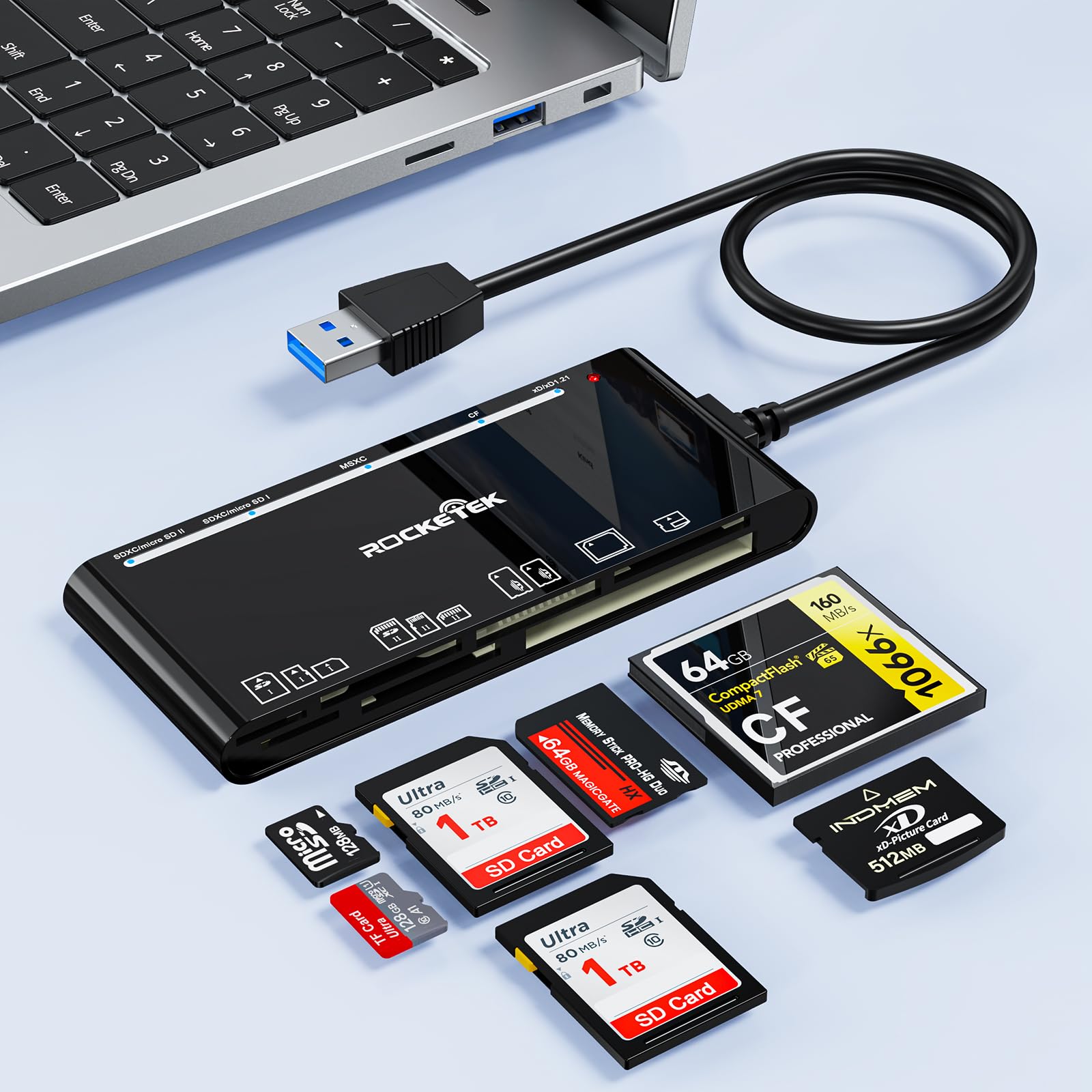
Seven slots and five cards reading at once — the kitchen-sink option for mixed card drawers.
Nobody buys this reader for elegance. You buy it because it has a slot for almost every card you own: one CompactFlash, two SD, one TF, one Micro SD, one xD and one MS. That MS slot takes Memory Stick Pro Duo and related formats, and the TF slot doubles as the M2 slot, which is worth knowing before you assume a card is unsupported. It can read and write five cards at the same time, so a multi-camera job clears in one pass.
Speed is quoted at 5Gbps over USB 3.0, and it steps back to USB 2.0 and 1.1 ports without complaint. It handles SDXC cards up to 2TB and covers CF with UDMA, SDHC, microSDXC and a long list of Memory Stick variants. System support is broad — Mac OS, Linux, Chrome OS and Windows XP through 11 — and it is plug and play with no driver install. The maker backs it with a 12-month warranty.
What wins people over is slot coverage: it reads CF, SD, TF, xD and MS cards, and most owners never think about it again. Two honest notes. Feedback on connectivity and transfer speed is mixed, so a rare unit may need replugging before the computer sees it. And the built-in cable runs short, which is the one physical complaint that shows up — plan for the reader to sit right next to the port.
Slot coverage worth paying for
- Seven slots span CF, SD, TF, Micro SD, xD and MS
- Reads and writes five cards simultaneously
- Handles SDXC up to 2TB and CF with UDMA
- Plug and play across Mac OS, Linux, Chrome OS and Windows XP to 11
Two things to plan around
- The attached cable is short, so positioning is limited
- Connectivity and transfer-speed feedback is mixed across the range
- No USB-C plug — Type A only
Go with this one if: your card drawer is a jumble of formats and you want one brick that handles all of them.
Consider another pick if: you need a long cable reach or a USB-C connector built in.
5. Ardaddyn Memory Stick Pro Duo Adapter Reader 8-in-1
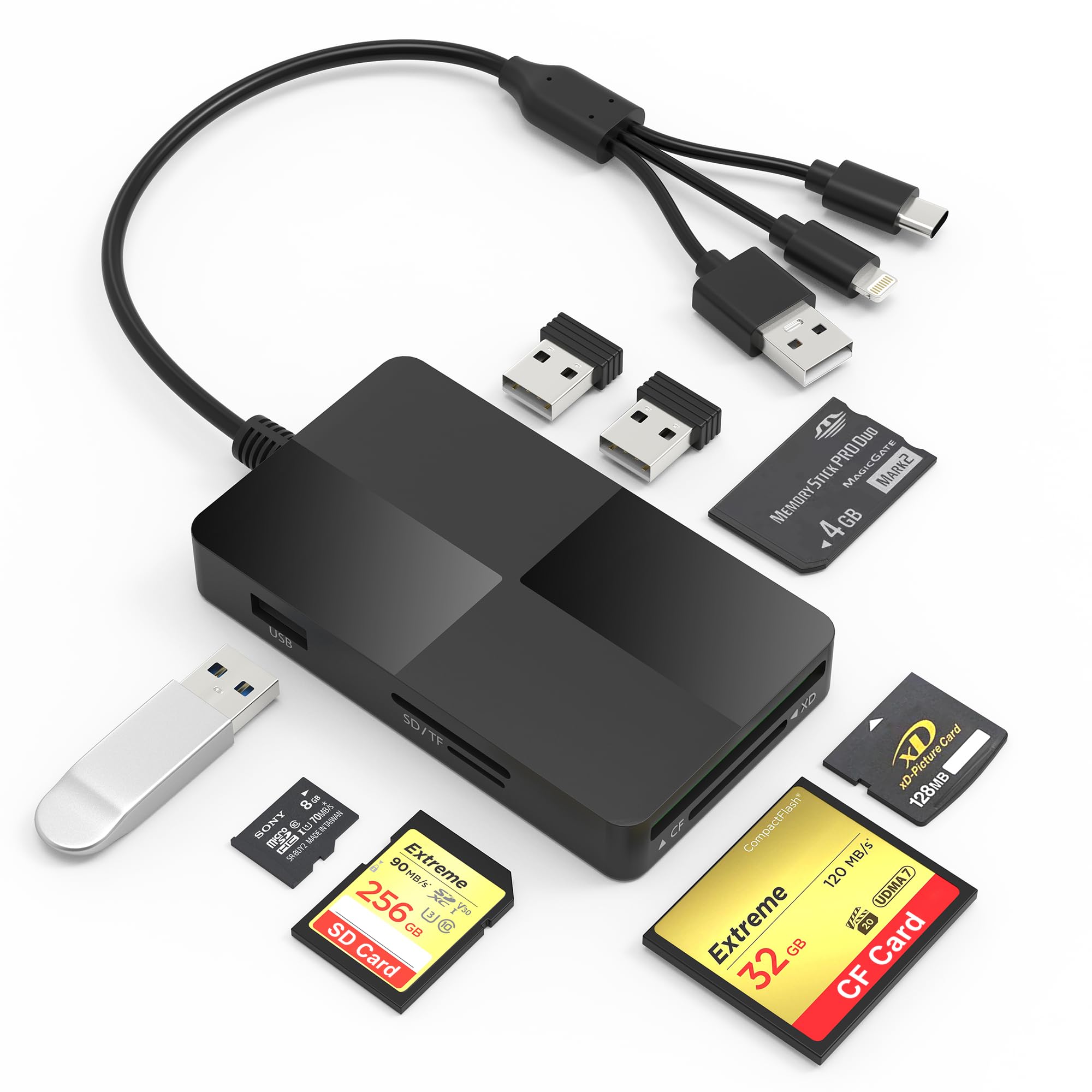
Lightning, USB-C and USB-A on one body — the reader that follows you between phone and laptop.
This is the pick for the hybrid editor: someone who pulls photos off a card onto an iPhone in the field and onto a laptop at the desk. It carries three interface plugs — Lightning, USB-C and USB-A — so the same reader serves an older iPad, a USB-C phone or tablet, and a desktop. Copy files with no Wi-Fi, no network and no drivers, thanks to OTG support (on-the-go, meaning the phone or tablet acts as the host for the card).
The slot set is SD, TF, MS, CF and XD, which covers Memory Stick Pro Duo and xD Picture Card alongside the common formats. On top of that you get three extra USB 2.0 ports for a mouse, keyboard or flash drive, which turns it into a small hub. It measures 3.93 by 2.24 inches, so it drops into a jacket pocket. Quoted transmission is 480Mbps — slower than the 5Gbps readers here, so this is a convenience tool rather than a speed tool.
Buyers lean on it for the three built-in plugs, and reliability is its strongest point — a multi-gigabyte photo transfer that simply completes is what this reader is for. Two things to weigh honestly. First, compatibility and value feedback are mixed: some buyers call it excellent for the money, others are less convinced. Second, at 480Mbps (megabits per second, the link speed of the USB connection) it is not the reader to pick for a 4K video dump.
One reader, three plugs: Lightning, USB-C and USB-A on a single body removes the dongle shuffle between phone, tablet and laptop.
Know the ceiling: 480Mbps moves photos comfortably but will feel slow on big video files — pair it with a faster reader for that job.
Made for: iPhone, iPad and Android editors who want one pocket reader that plugs into everything they own.
Not the one for: high-volume 4K video work, where the 480Mbps ceiling becomes the bottleneck.
6. Yeemie Pro Memory Stick Pro Duo Card Reader

Two SD and two TF slots on a USB-C body, with an LED per slot so you see the transfer running.
For a USB-C household this reader covers the lot without adapters. It has seven ports — two SD, two TF, one CompactFlash, one MS and one XD — and reads five cards at once, so you are not pulling cards in and out to get through a shoot. The doubled SD and TF slots are the practical detail here: a two-camera kit goes in without any swapping.
It transfers at up to 5Gbps over the USB-C interface, and it reads cards up to 2TB, so large-capacity cards are not a problem. The build uses heat-resistant aluminium alloy casting with reinforced cabling and a tin-plated pure copper core, which sounds like brochure copy until you handle it — the aluminium body feels more solid than plastic. Each slot has its own green LED, so you can glance down and see which card is busy.
The compatibility list reaches iPhone 15 series, USB-C iPads, MacBooks, Samsung and Google devices, plus cameras, dash cams and trail cameras — the trail camera crowd is exactly who needs the Memory Stick and XD slots. What owners praise most is compatibility across iPhone 15, USB-C iPads, MacBooks and trail cameras, with the aluminium build running it a close second. The honest catch is that the stated dimensions on the listing read oddly long, so judge it by the photos and expect a compact unit, not a long bar.
Suits you if: you are fully on USB-C and want SD, TF, CF, MS and XD all in one aluminium body.
Worth a second look if: you need a USB-A plug or a Lightning connection — this reader is USB-C only.
7. INDMEM SmartMedia Card Reader Writer

The reader that still takes SmartMedia and xD — cards almost everything else gave up on.
This is the rescue kit for a drawer of old cards. The slot list runs to SmartMedia, xD Picture Card, SD, SDHC, SDXC, miniSD, Memory Stick in all its variants including Pro Duo and PRO-HG Duo, CompactFlash, MicroDrive, MMC and RS-MMC. If a camera from the early digital era is still in your cupboard, this is very likely the reader that can still pull from it. It handles four card slots working at once.
The connections are modest and honest about it: USB 2.0 with a 19-inch attached cable, backwards compatible with USB 1.1, quoted at 480Mbps. That long cable is a genuine convenience the short-cable readers cannot match — the unit can sit on the desk while the plug reaches a tower underneath. It is USB powered with no external supply, and the listing includes drive-letter recognition software for telling each inserted card apart on a PC.
What owners rely on is that it reads SmartMedia, xD and Memory Stick Pro Duo cards, with plug-and-play simplicity and no driver hunts. Two caveats worth knowing. USB connectivity draws negative feedback, so expect USB 2.0 pace rather than modern speed. And compatibility feedback is mixed, with some computers failing to recognise it — check the system list (Windows 2000 through 10, Mac OS X 10.2 through 10.6) before you count on it for a current machine.
What makes it the legacy answer
- SmartMedia, xD, Memory Stick Pro Duo, CF, MicroDrive and MMC all covered
- 19-inch attached cable reaches a desktop tower easily
- Four slots usable at the same time
- USB powered, no external supply needed
Set expectations here
- USB 2.0 at 480Mbps — old-card pace, not modern pace
- Some machines do not recognise it, so verify your OS first
- Not a pick for everyday SD card dumping
The right tool when: you have SmartMedia or xD cards nobody else will read and files you still need.
Skip the upgrade if: all your cards are modern SD — a faster reader will serve you better.
Know the Specs
MB/s versus Gbps — the two speed languages
Megabytes per second (MB/s) counts actual file data moved each second. Gigabits per second (Gbps) counts the link capacity of the USB connection. They are not the same unit, so you cannot compare a 312MB/s reader and a 5Gbps reader as raw numbers. Use the tier instead: USB 3.0 and USB 3.1 readers clear a card folder quickly, while a USB 2.0 reader at 480Mbps is the slow lane — fine for a handful of photos, tedious for video.
Slot formats and why legacy slots matter
SD and microSD are the everyday formats. CompactFlash is the larger card used in pro DSLRs. Memory Stick Pro Duo and xD Picture Card belong to older Sony, Olympus and Fujifilm cameras, and SmartMedia goes back further still. A reader is only as useful as its slot list matches your drawer — a seven-in-one with an xD and MS slot saves you buying a second reader for one old camera.
Connector types: USB-A, USB-C and Lightning
USB-A is the rectangular plug on desktops and older laptops. USB-C is the small reversible oval used on current laptops, iPads and most Android phones. Lightning is the older iPhone and iPad connector. A reader with a fixed plug only fits that port, and readers that include a USB-C to USB-A adapter or multiple built-in plugs cover more devices without dongles.
Simultaneous reading and hub extras
Some readers can read and write several cards at once, which matters when you return from a shoot with more than one card. Others add extra USB ports so the reader doubles as a small hub for a mouse or flash drive. Neither feature speeds up a single card transfer, so weigh them on whether your workflow actually involves multiple cards at the same time.
Common Questions
Will a USB-C card reader work with my older USB-A laptop?
Can I read a Memory Stick Pro Duo card on a modern computer?
What is the difference between MB/s and Gbps on a card reader?
Do I need a reader that reads multiple cards at once?
Will a card reader drain my phone battery?
Can a card reader read CompactFlash cards from a pro DSLR?
Does a faster card reader actually speed up my transfers?
Do card readers need drivers installed?
What card formats will a reader not accept?
Is a long attached cable better than a short one on a card reader?
The Bottom Line
For most people, the smart media card reader to buy is the Lexar Multi-Card 3-in-1. It covers SD, microSD and CompactFlash at up to 312MB/s and ships with both cable types, so it plugs into old and new laptops alike. If your work is high-resolution video on SD UHS-II cards (a faster SD standard) and you need both slots moving at once, the ProGrade Digital PG08 is the specialist for that job at up to 1.25GB/s. And if you are rescuing SmartMedia, xD or Memory Stick cards from an old camera, the INDMEM All-in-1 is the one that still reads them. One last nudge: the Lexar holds 4.5+ stars, and the crowd that bought it came for the same reason you would — it just works, every time you plug it in.
How we choose
We do not accept paid placement. Every pick is matched to a real buyer and a real use-case; we do not hands-on test units.
Sources
Specifications: manufacturer listings and product documentation. Review insights: verified customer reviews, as of November 2026. Pricing: not shown on this page (it changes often); check the current price via the retailer link.
As an Amazon Associate, Tactical Gear Guy earns from qualifying purchases. This does not affect which products we feature.