Specs are compiled from manufacturer listings and verified buyer reviews and can change over time — please confirm the key details on the product page before buying.
You want to walk into a room and have the lights do what you expect — dim smoothly, come on at sunset, work when you tap the switch on the wall. Most smart lighting systems make that harder than it needs to be. This guide breaks down nine real options so you can pick the one that fits your wiring, your voice assistant, and the way your house actually runs.
This guide is built by comparing the manufacturers’ published specifications and the patterns across verified customer reviews, so you get each pick’s real strengths and trade-offs instead of marketing spin.
Some of these are wall switches you replace yourself, some are hubs that tie everything together, and one is a touchscreen panel with a built-in relay. Below you’ll find the wiring facts and protocol details that actually decide whether a pick works in your home, laid out for smart house lighting control.
Top Picks

How To Choose The Best Smart House Lighting Control
Before you shop for an app or a voice assistant, check your wall box. Pop the cover off a switch and look for a white or grey bundle of wires capped together at the back. That bundle is the neutral wire, and whether you have one decides which switches on this list can even work in your home.
Start with your wiring, not the features
A neutral wire gives a smart switch a steady return path for power, which is why some models insist on it. Lutron’s Caseta line skips that requirement entirely, so it drops into older homes where the box has only a hot wire and a load wire. Others, including the LCD panel-style switches, need that neutral present. If you’re unsure, a quick look inside the box settles it before you buy anything.
Hub versus Wi-Fi: what actually differs day to day
A hub is a small box that talks to your switches on its own low-power radio network and hands instructions to the internet. Because it isn’t sharing your Wi-Fi with phones, laptops and TVs, commands tend to land faster and keep working when the router is busy. Lutron’s hub runs without Wi-Fi at all for the switch network, and Philips Hue’s hub is the bridge for its bulbs. Wi-Fi switches skip the extra box and connect straight to your router, which is simpler but puts more devices on the same network.
Match the load rating to your actual bulbs
Dimmers publish a limit — commonly something like 150W of dimmable LED or 600W of incandescent and halogen. That figure is the total draw the switch can handle safely, not a per-bulb number, so add up the wattage of every bulb on that circuit. A row of recessed LEDs usually sits well under the LED figure; a chandelier full of old incandescent bulbs can climb toward the higher one.
Side-by-Side Comparison
| Model | Best For | Type | Neutral Wire | Key Rating | Amazon |
|---|---|---|---|---|---|
| Lutron Caseta Smart Dimmer Starter Kit★ Best Overall | Whole-home dimming without rewiring | Dimmer + hub + remote | Not required | 150W LED / 600W incandescent | Amazon |
| Lutron Caseta Diva Smart Dimmer SwitchClosest To Normal | A familiar wall dimmer look | Dimmer switch | Not required | 150W LED / 600W incandescent | Amazon |
| L10 Large LCD Smart Light SwitchMost Unusual | Multi-load rooms and curtains | Touchscreen switch | Required | 10 A | Amazon |
| Amazon Echo Hub | One dashboard for every device | Control panel | Not applicable | 8-inch display | Amazon |
| Philips Hue Bridge Pro | Large Hue bulb installations | Lighting hub | Not applicable | 150+ lights, 50+ accessories | Amazon |
| Aeotec Smart Home Hub | Mixing many device brands | Multi-protocol hub | Not applicable | Matter, Z-Wave, Zigbee, Wi-Fi | Amazon |
| MOES Smart Home Control Panel | Voice control from the wall | Panel + Zigbee hub | Not stated | 5-inch touchscreen | Amazon |
| Shelly Wall Display XL | Whole-room control on one screen | Panel with built-in relay | Required | 10.1-inch display, 5 A relay | Amazon |
Detailed Reviews
1. Lutron Caseta Smart Dimmer Starter Kit
Our pick — 4.5+★ from 2,500+ verified ratings; the strongest balance of quality and price.
The box that makes an old house smart without touching the wiring
If your switch boxes are old enough that you’re not sure a neutral wire even exists back there, this is the set to start with. Lutron builds the Caseta dimmer to run without a neutral, so it drops into homes of any age where other smart switches would stall at the wiring stage. You get the dimmer, the Pico remote, the wall plate bracket and the Caseta Smart Hub in one box — everything needed to make your first room smart in a single order.
The hub is the quiet hero here. It runs the lighting network on its own radio link rather than leaning on your Wi-Fi router, which is why the lights respond fast and keep responding when the house network is loaded with phones and streaming. From the Lutron app you get scenes, schedules, geofencing, Smart Away and timers, and it talks to Alexa, Apple HomeKit, Google Home, Ring and Sonos. That spread of support is broader than most single-brand switch systems manage, so you’re not locked to one assistant.
The Pico remote is the part buyers end up loving most in practice. It’s a battery-powered button you can stick on a nightstand, mount over a junction box, or use to build a three-way setup with no extra wiring pulled through the walls. One remote can reach the dimmer from across the house, so a second “switch” costs nothing in electrician time. Dimming holds steady from bright down to low without the flicker cheap dimmers show on LED bulbs.
What earns its keep
- Installs without a neutral wire, so older homes aren’t ruled out
- Dedicated hub keeps lighting off your Wi-Fi for quicker response
- Works with Alexa, Apple HomeKit, Google Home, Ring and Sonos
- Pico remote adds a second control point with zero wiring
What to weigh first
- The wall plate itself is not in the box, so budget for one
- Every Caseta device needs the included hub nearby to be smart
- A single dimmer is the ceiling — expanding rooms means buying more switches
The right call: Anyone with a no-neutral home who wants dependable dimming and a remote without an electrician visit.
Look elsewhere if: You only need one switch and already own a hub from another brand.
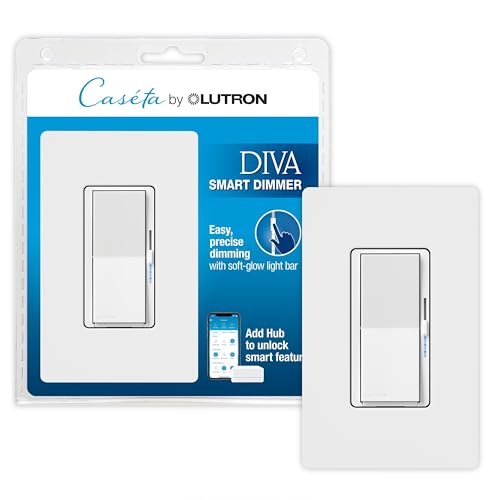
2. Lutron Caseta Diva Smart Dimmer Switch
A smart dimmer that guests will never notice is smart
Most smart switches announce themselves with a glowing panel and a logo. The Diva does the opposite — it looks like a standard paddle switch with a slider beside it, so anyone walking into the room can dim the lights without instructions. That slider gives you physical control of brightness, and a preset lets you jump straight to your preferred level with one tap. The soft-glow light bar shows where the level sits without lighting up the whole wall.
Behind that plain face is the same Lutron ecosystem as our top pick, minus the hub in the box. You’ll need the Lutron Smart Hub to open up the app, scheduling, Smart Away and voice control through Alexa, Apple Home, Google Assistant, Ring, Serena shades and Sonos. It also handles up to 150W of dimmable LED or 600W of incandescent and halogen. Note that it’s not rated for low-voltage use, so track and landscape lighting are out. Its 1.25 A rating is what caps it at that 150W LED load.
If you already run a Caseta hub, this is the switch to add — it matches the existing family and installs without a neutral wire. Buying it cold means adding the hub cost on top. One thing buyers consistently notice is that the Diva feels like a normal switch in the hand; the spring-loaded paddle and slider means no learning curve for family members or guests.
The wall plate is included, which softens that. If you’re building a system from scratch, the starter kit bundles the hub and saves you a separate purchase.
Pick this one if: You’re already on Caseta and want a switch the whole household can use without thinking.
Think twice if: You’re starting from zero and don’t want a second hub purchase.
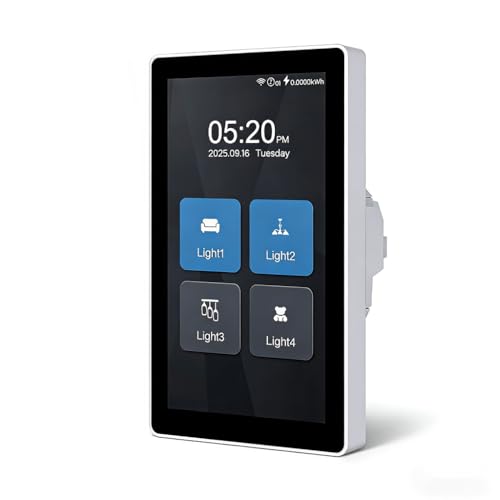
3. L10 Large LCD Smart Light Switch, Custom Display & Icons
One wall plate that runs four light circuits or your curtains
Where a standard smart switch replaces one switch, the L10 lets you pick a mode and run one, two, three or four light loads from a single point — or hand that slot to curtain control instead. At 10 A it carries a heavier circuit than the 1.25 A Diva above, which matters if you’re putting several fixtures on one switch. The large color touchscreen shows custom headers, icons and labels, so you can name each load and see the state at a glance.
Wiring is the gate. This one needs a neutral wire and a single-gang box at least 2 inches deep, with 2.5 inches recommended for three- or four-load setups where the extra conductors need room. It’s a 1-way circuit type, not a dimmer, and it won’t serve as a central control panel. It connects on 2.4GHz Wi-Fi — no separate gateway needed — and talks to Alexa, Google Assistant and the LANBON Smart Living or Tuya Smart Life apps.
What sets this apart from plain Wi-Fi switches is its mesh feature (a way for each switch to relay the signal to the next one). Each L10 passes the connection along to the next nearby unit, so adding switches through the house builds more connection points. Keep each neighboring pair within about 26 feet, because walls and interference eat into that range. If a gap is too wide, add an intermediate switch or flip to Standard Wi-Fi Mode for a direct router link. The screen also wakes when you walk up, thanks to short-range detection at about one meter, and the app offers optional light triggering.
Where the value sits: Four circuits or curtains from one touchscreen plate is a lot of control per device, and the customizable labels mean each screen reads the way your household thinks about its rooms.
The honest catch: Neutral wire and a deep box are non-negotiable, and with only a couple of these spread across a large house the 26-foot mesh gap can bite. Plan switch placement with that distance in mind before you commit.
Built for: Anyone who wants visible, labeled control of several loads in one spot — a kitchen with three zones, or a living room with curtains to run.
Not the fit: Old homes without a neutral, or rooms where you’d hoped for dimming.
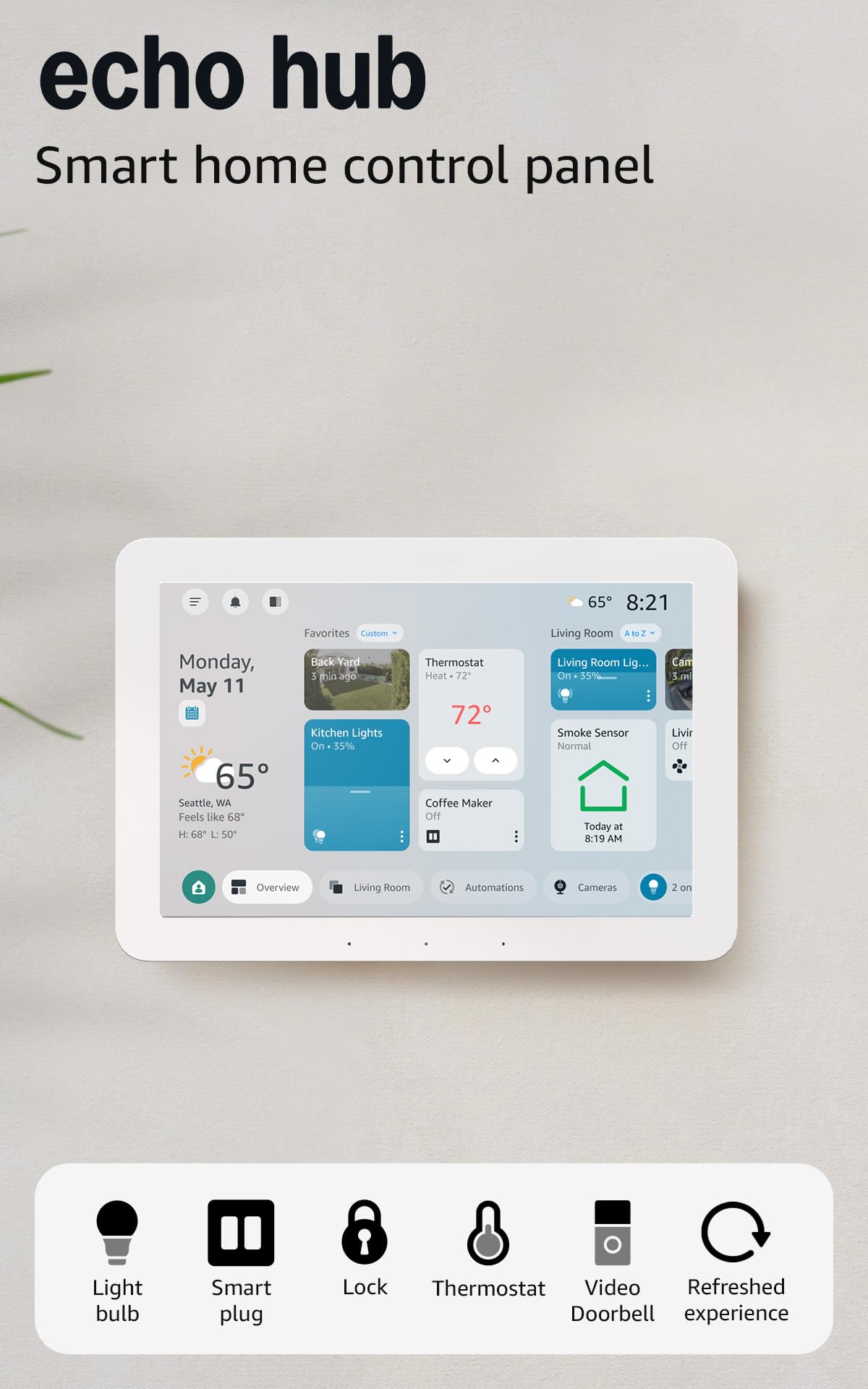
4. Amazon Echo Hub (newest model), 8″
The wall panel that pulls every brand onto one screen
This isn’t a switch — it’s the thing you look at when you want to see the whole house at once. The 8-inch touchscreen runs a customizable dashboard you arrange into sections, with each device resized so the controls you touch most sit front and center. Wall-mount it wherever there’s an outlet, using in-wall cable pass-throughs or a power-over-ethernet adapter to hide the cord, or set it on a tabletop stand (both sold separately).
The built-in hub is the reason it belongs on this list. It syncs with Wi-Fi, Bluetooth, Zigbee, Matter, Sidewalk and Thread devices, so a mixed house of bulbs, switches, locks and sensors can be managed from one place rather than five apps. With an Alexa+ and compatible Ring subscription you get camera event summaries and can search footage by voice. You can also arm and disarm a compatible security system from the panel, which makes it easy for the whole family to manage.
Its reputation is genuine but not spotless. Owners who like it point to easy setup and the way it consolidates a scattered smart home. The appliance side of it — running as a dependable always-on control center — draws the most divided feedback, with some finding it flawless and others wrestling with reliability. Treat it as a control surface that works best alongside a proper hub, not as a replacement for one.
What sells it: An 8-inch dashboard that speaks Zigbee, Matter and Thread from the start gives you one screen for cameras, lights, locks and routines — the tidy front end of a messy smart home.
Be realistic about: The hub inside covers a lot of protocols but runs through the Alexa ecosystem. If you’re committed to Apple Home or Google as your main assistant, the wall panel will feel like a second home for your lights.
Suits you if: You live in Alexa’s world and want one touchscreen to glance at the whole house.
Better to pass if: You want a panel that never depends on a subscription or a cloud account to feel useful.
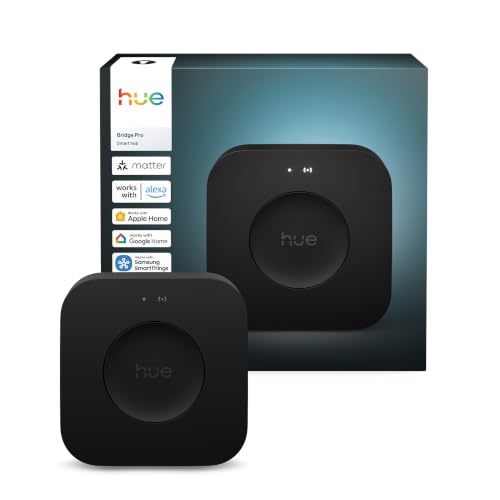
5. Philips Hue Bridge Pro Smart Lighting Hub
For the house that’s gone all-in on Hue bulbs
If your lights are Hue bulbs rather than smart switches, this box is what makes them cooperate. The Bridge Pro supports 150+ lights and 50+ accessories, which is a serious step up from a single-bridge limit and the reason people upgrade. Running the show is the Hue Chip Pro — a quad-core Cortex-A35 CPU at 1.7 GHz, paired with 4 GB of DDR4 SDRAM that holds up to 500 personalized scenes.
That extra memory and processing isn’t marketing garnish. More scenes and more automations can live on the bridge itself, so routines fire faster and don’t drag. You can migrate existing Hue devices over, which means you don’t rebuild your setup from scratch. Hue MotionAware adds motion-based lighting rules using just three Hue devices and no separate sensors — handy for hallways and stairs where a light that follows you beats a switch you have to find.
Where it gets fussy is the everyday reliability. The upgrade itself wins people over, and setup is straightforward, but the broader functionality and connectivity picture is less settled — a slice of owners run into quirks. Plan for the hub to want to be on Ethernet near your router, and accept that this is a Philips Hue-only bridge. It won’t talk to Z-Wave or Zigbee devices from other brands the way the Aeotec hub below will.
The one-line case: 150+ lights and 500 scenes on a 1.7 GHz quad-core chip makes the Bridge Pro the natural center of a large Hue home.
The trade-off: It’s a closed ecosystem. Every bulb and sensor it runs needs to be Hue, so if you’ve mixed brands, the Aeotec or Lutron hubs are a better starting point.
Reach for it if: You have a Hue-heavy home and need headroom for more lights, scenes and motion rules.
skip it if: Your smart lighting is switch-based or spread across several brands.
6. Aeotec Smart Home Hub, Works as a SmartThings Hub

One hub that speaks to almost any device you already own
Every smart home eventually collects orphans — a Zigbee sensor from one brand, a Z-Wave lock from another, a Matter bulb from a third. The Aeotec hub is built to absorb them all, joining Matter, SmartThings, Z-Wave Plus, Zigbee and Wi-Fi under one roof. It sits at 1.1 pounds and connects through either Ethernet or Wi-Fi, so you can wire it in for stability or place it wirelessly where the radio coverage is best.
Lighting is the main event here. You build automations in the SmartThings app to coordinate lights, sensors and switches around your day, and many routines run locally on the hub rather than waiting on a cloud round-trip. That local processing matters for a hallway light that needs to respond the moment motion is detected. The hub pairs with Alexa and Google Home for voice, and it supports Android, iOS and iPadOS for setup.
Worth knowing: it transmits on 908.42 MHz, which is the frequency Z-Wave uses in North America, so this unit is designed for that market. Setup can go either way — plenty of users find it quick, others hit friction getting devices to join, and connectivity is the area where feedback splits most. Budget a little patience for the first few devices; once a network is built it tends to settle.
Strongest suit: Certified for Matter, SmartThings, Z-Wave Plus, Zigbee and Wi-Fi, it’s the pick when no single brand can cover your house.
Worth weighing: The hub leans on the SmartThings app for everything, so its usefulness depends on you liking that app. Local automations soften that, but it’s not a neutral hub.
Your match if: You’ve got a mix of Zigbee, Z-Wave and Matter gear and want one brain to run it.
Look elsewhere if: You want a plain switch-level solution or only live inside Apple Home.
7. MOES Smart Home Control Panel

Talk to the wall and the room listens back
This is the one panel here with Alexa living inside it, not just on the other side of a speaker. You say the command and the panel handles it, no separate Echo required. The 5-inch full touchscreen also lets you tap through your lights, scenes and devices directly, so voice and touch cover the same ground. Because it has a Zigbee gateway built in, it can replace a separate hub for Zigbee switches and bulbs.
The device list it works with is broad — Smart Life switches, bulbs, sockets, cameras and door locks all fall under its umbrella. That means a single panel can run the lights and check the camera feed without opening another app. Power it over USB-C or hard-wire it to the circuit, and connect it over wired or wireless network. It’s a black panel, so it suits a modern room better than a plain white wall plate.
The catch is maturity. This is the newest design on the list with the smallest track record, and the Alexa integration is the area where feedback splits — some find it smooth, others hit snags setting and controlling routines. Functionality draws similar mixed notes. Treat it as a promising one-box controller for a Smart Life house, and give yourself time to test voice commands on day one.
The panel for: A Smart Life or Tuya home that wants voice plus touch on one wall-mounted screen without another hub.
Pause if: You need proven Alexa reliability from the start, since that’s the part still finding its feet.
8. Shelly Wall Display XL Black 10.1 Inch Touchscreen
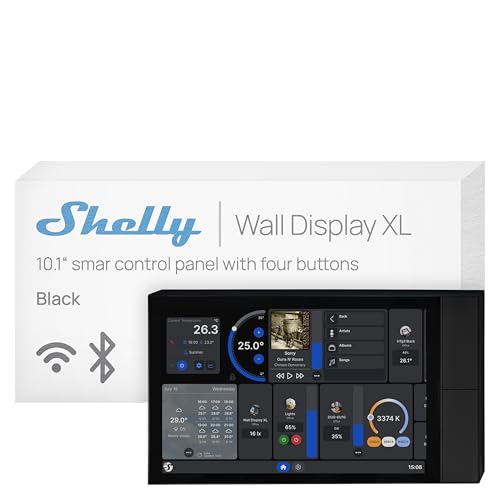
A whole room’s controls on a tablet-sized wall screen
At 10.1 inches this is the biggest display in this group — closer to a small tablet on the wall than a switch. It mounts in a standard electrical wall box and gives you a full screen for your Shelly devices, with four customizable buttons beside it for the things you touch every day. There’s a built-in 5 A relay, so the panel itself can switch a load directly — a light, a fan, a heater, a coffee maker — without a separate smart plug.
The panel connects to Bluetooth or Sonos speakers for media control, so you can play, pause, skip and adjust volume from the touchscreen or the assigned buttons. The Shelly Smart Control App or Home Assistant pulls all your devices into one interface for automations and routines. A lux sensor adjusts what the screen shows based on ambient light, and the whole unit mounts on the wall at 920 grams.
Be ready for the wiring and the ecosystem. It needs a neutral wire and it runs on the Shelly platform, so it’s at its best in a home already using Shelly gear. The 5 A relay rating means you’re switching small loads, not an array of high-draw appliances, so check what you plan to plug into it. Shelly backs it with a 3-year warranty.
Worth the money for: A kitchen or living room where a big touchscreen with four tactile buttons and a relay in the box replaces a tangle of switches and apps.
Know this going in: Neutral wire required and Shelly-centric — a Home Assistant setup is its natural partner, but a Hue or Alexa-first home will find it hard to justify.
Right for you if: You run Shelly devices or Home Assistant and want one generous screen for each room.
Not the pick if: Your home isn’t wired with a neutral or you need to control a large heating or cooling load.
Know the Specs
Load Rating (150W LED / 600W Incandescent)
This is the total wattage one smart dimmer can switch safely, filled in differently for LED bulbs and for old incandescent or halogen ones. A dimmer like the Lutron sets it at 150W for dimmable LED and 600W for incandescent. Add up the bulbs on that circuit before you buy. A row of LED recessed lights usually sits well under the LED figure, while a fixture full of traditional bulbs can push toward the higher one.
Neutral Wire Requirement
A neutral wire gives a smart switch a steady path back to the panel, and some models won’t power up without one. Others, like the Lutron Caseta dimmers, are designed to run without it — which is why they work in older homes where the box holds just two wires. Check inside your wall box before you commit: if there’s no neutral and the switch needs one, the install stops there.
Hub Versus Wi-Fi Switch
A hub runs your lights on its own low-power radio network apart from your Wi-Fi, then passes commands to the internet. That’s why a hub-based system responds fast even when the house network is crowded, and why Lutron’s hub keeps working without Wi-Fi for the lighting side. Wi-Fi switches skip the extra box and connect to your router directly, which is simpler but puts more devices on the same network your phones and TVs use.
Protocols and Compatibility
Protocols are the languages devices speak to each other. Matter, Zigbee, Z-Wave, Thread and Wi-Fi are the big ones, and a hub that supports more of them can run more brands from one app. The Aeotec hub covers Matter, Z-Wave, Zigbee and Wi-Fi; the Hue Bridge Pro runs Hue bulbs only. Match the hub’s languages to the devices you already own, or you’ll end up running parallel apps.
Common Questions
Will a smart dimmer work in my house without a neutral wire?
Can one dimmer switch control several recessed lights at once?
Do I need a hub, or can I just use a Wi-Fi switch?
Why do my LED bulbs flicker on a dimmer?
Can I create a three-way switch without running new wire?
How many lights can a Hue Bridge Pro handle?
Does the Echo Hub replace a smart home hub?
How much load can a wall display panel switch on its own?
Which smart lighting control works with Apple HomeKit?
Can I dim the lights with the L10 LCD switch?
The Bottom Line
For most homes, the smart house lighting control winner is the Lutron Caseta Smart Dimmer Starter Kit. It installs without a neutral wire, runs on its own hub instead of your Wi-Fi, and includes the Pico remote that adds a second control point with no wiring. Dimmer, hub and remote in one box covers a first room without extra purchases.
If you already run a Caseta hub and just want the most familiar-looking switch on the wall, the Diva Dimmer is the one to add. And for a house full of mixed Zigbee, Z-Wave and Matter gear, reach for the Aeotec Smart Home Hub to pull it all into one app.
How we choose
We do not accept paid placement. Every pick is matched to a real buyer and a real use-case; we do not hands-on test units.
Sources
Specifications: manufacturer listings and product documentation. Review insights: verified customer reviews, as of November 2026. Pricing: not shown on this page (it changes often); check the current price via the retailer link.
As an Amazon Associate, Tactical Gear Guy earns from qualifying purchases. This does not affect which products we feature.