Specs are compiled from manufacturer listings and verified buyer reviews and can change over time — please confirm the key details on the product page before buying.
Most people shopping for a small robot arm get burned by the same thing: they buy the cheapest desktop kit, then discover it cannot lift what they hoped or that the software fights them for a weekend. The fix is knowing three numbers before you buy — how many axes of movement the arm has, how much weight it can actually hold, and whether the kit includes the brain (a Raspberry Pi or Arduino board) or expects you to supply one. Get those right and a desk-sized arm becomes a genuinely useful learning tool or project platform instead of a shelf ornament.
This guide is built by comparing the manufacturers’ published specifications and the patterns across verified customer reviews, so you get each pick’s real strengths and trade-offs instead of marketing spin.
Below you will find the desktop-scale arms worth your bench space, sorted by what each one does best, plus the spec terms that actually change how an arm behaves in your hands. The right pick depends on if you want to learn code, move small parts, or build a vision robot, and each pick below is matched to one of those paths.
Top Picks


How To Choose The Best Small Robot Arm
A desktop robot arm is a purchase you make once and live with for years, so the decision depends on matching the arm’s movement, lifting ability, and control options to the job you have in mind. Here are the four things that separate a satisfying kit from a frustrating one.
Count the axes before anything else
Each axis, or DOF (degree of freedom), is one joint that can move independently. A 4DOF arm can reach most tabletop positions but has limited wrist angles. A 6DOF arm adds enough wrist rotation to turn an object over in its gripper, which is why 6DOF kits are the ones used for grasping and repositioning tasks. If you only need to sweep a pen or push a block, a lower axis count keeps the build simpler.
Match the servo type to the job
Analog micro servos are inexpensive and fine for hobby movement, but they drift slightly under load. Serial bus servos talk back to the controller and report position, voltage, and temperature, which is what lets an arm repeat a recorded path accurately. Bus-servo kits cost more and reward you with smoother, more repeatable motion.
Check what is actually in the box
Some kits are the arm and nothing else — no Raspberry Pi, no battery, no printed manual. Others bundle the controller board and code library. Read the included-components list carefully, because a kit missing its brain means an extra purchase and an extra weekend before the arm moves at all.
Decide how you want to program it
Graphical block programming suits younger builders and first-time coders. Python and Arduino C++ suit anyone who wants to add sensors, cameras, or their own logic. A kit with both paths gives you room to grow without buying a second arm.
Side-by-Side Comparison
| Model | Best For | Axes / DOF | Controller Platform | Payload | Amazon |
|---|---|---|---|---|---|
| LewanSoul LeArm 6DOF Kit★ Best Overall | Learning robotics with a full six-axis build | 6DOF | PC software and app | — | Amazon |
| Hiwonder xArm1SBest Servo Feedback | Six-axis precision with full servo feedback | 6DOF | PC, app, mouse, PS2 controller | 500 g | Amazon |
| Freenove Robot Arm KitBest Drawing Accuracy | High-accuracy drawing and clamping on Raspberry Pi | — | Raspberry Pi 5 / 4B / 3B+ | — | Amazon |
| Waveshare RoArm-M2-S | Mobile mounting on a robot platform | 4DOF | ESP32 with WEB app | 0.5 kg at 0.5 m | Amazon |
| Hiwonder MasterPi | Vision-driven sorting on a moving chassis | 5DOF | Raspberry Pi 5 8GB (included) | — | Amazon |
Detailed Reviews
1. Robotic Arm Kit 6DOF
Our pick — 4.0+★ from 300+ verified ratings; the strongest balance of quality and price.
Six axes of motion on your desk for less than most five-axis kits — that is the LeArm’s whole pitch.
If you want to learn how a six-joint arm behaves before spending xArm1S money, the LeArm is the cheaper place to start. Six independent joints — a shoulder, elbow, and multi-part wrist — let the gripper approach an object from an angle a four- or five-axis arm simply cannot reach. The metal bracket and industrial-grade bearings in the base keep it planted while the arm swings out to full extension.
The thing that wins people over is build quality, and it shows in the details: three of the end servos carry gear clutches that slip instead of stalling when the claw jams, which protects the motors from burning out mid-session. Plan on roughly two hours of assembly before your first movement. The video tutorial carries most of the weight there — the printed hardware bags are not labeled, so you will be sorting screws by eye and by patience.
Control is where it earns its keep for a mixed household. PC software, a phone app, mouse control, and a wireless handle all drive the same arm, so a teenager can block-program while an adult writes custom actions. At 18.31 x 4.7 x 11.22 inches assembled it takes real desk depth — noticeably longer front-to-back than the compact miniArm below, which measures 5 x 13 x 8 inches. If your bench is shallow, measure before you commit. This is the crowd favorite at 4.0+ stars across 300+ ratings, and it sits at the top of this list on that strength.
What holds up under use
- Six joints with a multi-axis wrist gripper that can angle in from the side
- Gear-clutch anti-stall protection on three end servos saves the motors from jams
- Four separate control paths — PC, app, mouse, wireless handle
- Metal bracket and bearing-fortified base stay stable at full reach
Where patience is required
- Roughly two hours of assembly, with unlabeled screw bags to sort
- Long 18.31-inch footprint eats desk depth
- Motion tuning takes a few sessions before moves feel clean
Reach for this if: you want a true six-axis arm to learn on, with four control options and protected servos at a mid-range outlay.
Think twice if: your workbench is shallow or you want to unbox and run in ten minutes — the two-hour build and long chassis both bite.
2. Hiwonder-xArm1S Robotic Arm
Six smart servos that report back — and enough torque to lift half a kilo.
The xArm1S answers a question the cheaper kits cannot: how much can a desk arm actually pick up? Its six high-precision intelligent serial bus servos — motors that send position, voltage, and temperature data back to the controller — deliver enough torque to grasp objects weighing up to 500g. That is a loaded mug, a small tool, or a chunk of stock, not just a foam block.
Feedback is the real story here. Because each joint reports where it is, you can record an action and have the arm replay it accurately instead of drifting off course. The aluminum alloy bracket and industrial-grade bearing base keep the whole structure rigid, and one practical warning surfaces again and again in owner experience: mind the center of gravity if you have not secured the base to your surface. An arm this strong will tip a loose stand.
What buyers rate most highly is the overall quality of the thing — it feels like a precision instrument rather than a toy. The honest friction is documentation and hardware. The supplied instructions are thin enough that owners consistently dock it, and the machine screws are genuinely tiny, so a magnetic driver and good light are not optional. A rare unit has shown a control-board fault, which is worth knowing if you are buying for a course with a deadline. At 1.1 kg it is a substantial desk presence for its 6.1 x 5.5 x 9.68 inch frame.
Why it climbs the list: six serial bus servos with position, voltage, and temperature feedback plus a 500g grasp ceiling put it above the analog-servo kits on repeatability.
The honest catch: plan on sourcing your own build guidance and handling very small fasteners — the instructions and hardware are the weak links, not the mechanics.
The pick for: anyone who wants six-axis precision and real lifting ability and can supply their own patience for documentation.
Better elsewhere for: first-time builders who need hand-holding through every step.
3. Freenove Robot Arm Kit
The arm that draws a line where you told it to — within a millimeter.
Stepper motors instead of micro servos are what set this kit apart. A stepper motor moves in fixed, countable increments rather than swinging to an approximate angle, so the Freenove achieves 1mm end accuracy when there is no load. That precision is the reason it can run a drawing mode — tracing pictures or custom lines on paper — as well as a standard clamping mode with replay.
Build quality follows the same logic: a metal structure carries the joints instead of plastic, which holds alignment over time. The tutorial is step-by-step with complete Python code, but it lives at a link printed on the box rather than on paper, so keep the packaging. You will need your own Raspberry Pi — it runs on a Pi 5, 4B, 3B+, 3B, or 3A+, with older boards needing extra parts — plus a battery. None of that is in the box.
Control runs wirelessly from Android, iPhone, or a computer on Windows, macOS, or Raspberry Pi OS through the Freenove app, and the kit ships with a 1-year warranty. Weighing 2100 g, it is the heaviest arm in this group and wants a stable surface. The accuracy figure comes with a caveat the maker states plainly: the inaccuracy increases as the load increases, so treat 1mm as the no-load benchmark, not a promise while gripping something heavy.
Where it earns its place
- 1mm end accuracy with no load, thanks to stepper motors
- Two working modes — clamping with replay, and line drawing
- Metal structure keeps joints aligned over time
- Full Python code plus a 1-year warranty
What to line up first
- Raspberry Pi and battery both sold separately
- Tutorial lives behind a box link, not on paper
- Accuracy falls off as you add load
The one to grab if: precision drawing or repeatable clamping on a Raspberry Pi is your goal and you already own the board.
Hold off if: you want a complete, ready-to-run package — this is a kit that assumes a Pi and battery on your shelf.
4. MaxArm Robotic Arm Kit
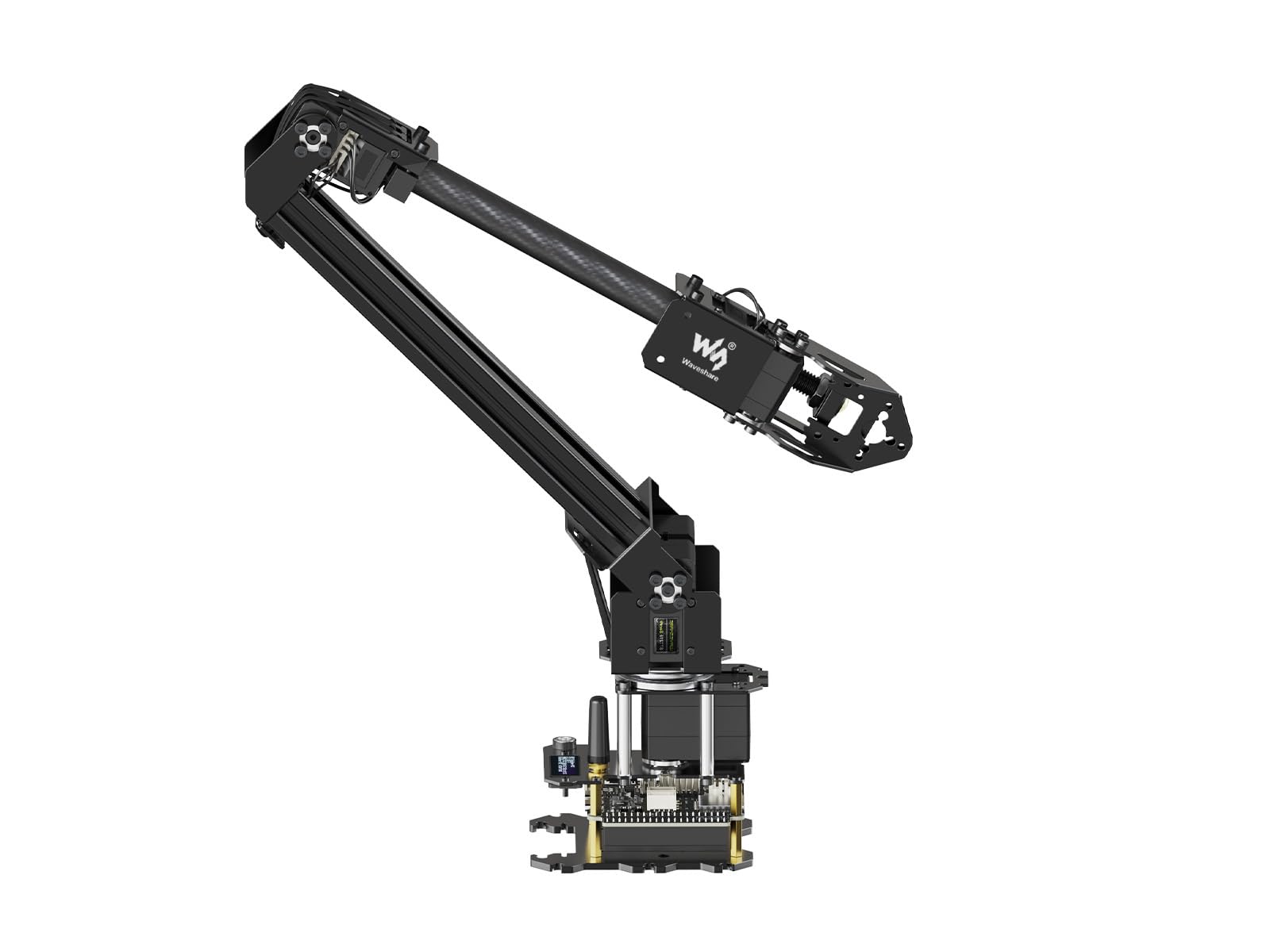
A four-axis arm light enough to bolt onto a moving robot and still lift half a kilo.
Most desk arms are bolted to a bench and stay there. This one is designed to travel. The RoArm-M2-S weighs in under 850g and takes an effective payload of 0.5kg at 0.5m, so it can ride on a mobile platform without dragging the chassis down. A 360° omnidirectional base combined with three flexible joints opens a workspace with a 1-meter diameter — more sweep than its compact weight suggests.
The ESP32 main control module brings multiple wireless control modes and rich communication protocols for tying the arm into other devices. A cross-platform WEB application offers a visual coordinate control mode, which makes the first steps easier than diving into raw code. Compatibility with ROS2 and various host computers means it slots into a robotics stack if you are building one.
Openness is a clear strength: the control codes and communication interface documents are fully open source, and an expansion plate supports customizing the end-of-arm tooling. The trade-off worth naming is axis count — at 4DOF it moves with fewer wrist angles than the six-axis arms in this guide, so intricate reorienting is not its job. It is the right tool when reach, low weight, and mountability beat wrist dexterity. Graphical and video tutorials help you get moving without prior ESP32 experience.
Built for motion
- Under 850g total weight for mounting on mobile platforms
- 0.5kg payload at 0.5m with a 1-meter diameter workspace
- 360° omnidirectional base plus three flexible joints
- Open-source codes and ROS2 compatibility
Know before you buy
- Only 4DOF, so fewer wrist angles than six-axis arms
- Custom end-effectors mean you design and fit them
Reach for this when: the arm has to ride on a robot car or a moving platform and reach matters more than wrist freedom.
Not your arm if: you need six axes for complex reorientation — look at the 6DOF picks instead.
5. MasterPi 5DOF Robotic Arm

An arm, a camera, and a car in one kit — the full vision-robot build with the Pi included.
The MasterPi is the most complete system here, and the only one that arrives with the brain already installed. It ships with a Raspberry Pi 5 8GB, so you skip the separate board purchase that the Freenove kit expects. On top of that sits a five-axis arm on a Mecanum-wheel chassis — wheels angled so the car can slide forward, sideways, diagonally, or rotate for full 360° movement.
Vision is the differentiator. An HD camera mounted at the end of the arm gives a first-person view, and the OpenCV library lets the robot recognize and locate target objects. That is what powers color sorting, target tracking, and line following as real behaviors rather than demos. Metal gear servos do the lifting, and everything programs in Python.
Owner experience points to the build being approachable — the parts are well machined and the assembly is beginner-friendly, with written instructions plus videos that get you running in about half an hour. What to expect afterward is calibration: the robot does what it says, but it may need adjustment to hit the behavior you envisioned. Python comfort helps once you move past the guided tutorials, and at 13.7 x 7.3 x 6.4 inches it needs clear floor room to show off its movement.
What makes it unique: a 5DOF arm, HD end-effector camera, and Mecanum chassis with the Raspberry Pi 5 8GB in the box — a complete vision-robot platform.
The fair caveat: a kit this capable still wants calibration and some Python time before the sorting and tracking behaviors feel dialed in.
The complete-package pick: anyone who wants a vision arm that moves and sorts, with the Pi supplied and a thirty-minute assembly.
Weigh first: if you only need a stationary arm, the driving chassis and camera are capability you would be paying for.
Know the Specs
DOF (Degrees of Freedom)
Each DOF is one independently moving joint, so a 6DOF arm has six. More joints mean more wrist angles and the ability to turn an object over, while a 4DOF arm keeps the build simpler with fewer approach angles. Match the count to your task — drawing and pushing need fewer, grasping and reorienting want more.
Servo Type — Analog vs. Serial Bus
An analog micro servo moves to an approximate angle and is inexpensive. A serial bus servo reports its position, voltage, and temperature back to the controller, which is what allows accurate record-and-replay of a motion path. Bus-servo kits cost more and deliver repeatability the cheaper motors cannot.
Payload and Reach
Payload is the weight the gripper can hold, often quoted at a specific reach — the RoArm-M2-S states 0.5kg at 0.5m, for example. Accuracy and grip fall off as load or distance increases, so treat the headline figure as a best-case benchmark. The xArm1S and xArmUno both list a 500g grasp ceiling.
Controller Platform
The controller is the arm’s brain. Arduino boards (like the Atmega328 in the miniArm) suit C++ coding and sensor work. Raspberry Pi boards run Python and handle cameras and vision like the MasterPi. ESP32 modules add WiFi and Bluetooth. Check whether the board is included — some kits list it separately.
Common Questions
Does a small robot arm kit include the Raspberry Pi or Arduino board it needs?
How much weight can a desk robot arm actually lift?
What is the difference between 4DOF, 5DOF, and 6DOF on a small robot arm?
Can I program a small robot arm in Python?
Why do some robot arm kits need assembly and how long does it take?
Is a stepper motor better than a servo in a small robot arm?
Can these small robot arms connect by WiFi or Bluetooth?
Do I need a separate battery to run a small robot arm kit?
Are these robot arm kits suitable for kids?
What can a desktop robot arm with a camera actually do?
The Bottom Line
For most first-time buyers, the best small robot arm is the LewanSoul LeArm 6DOF Kit, because six axes, four control methods, and protected servos give you the full learning curve without the premium outlay. If repeatable precision and a real 500g grasp matter most, the Hiwonder xArm1S is the step up. And for a vision robot that drives, sorts, and ships with the Raspberry Pi already installed, the MasterPi is the one to reach for. Match the axes, payload, and controller platform to your own projects, and any of these desk-scale arms will earn its space.
How we choose
We do not accept paid placement. Every pick is matched to a real buyer and a real use-case; we do not hands-on test units.
Sources
Specifications: manufacturer listings and product documentation. Review insights: verified customer reviews, as of November 2026. Pricing: not shown on this page (it changes often); check the current price via the retailer link.
As an Amazon Associate, Tactical Gear Guy earns from qualifying purchases. This does not affect which products we feature.