Specs are compiled from manufacturer listings and verified buyer reviews and can change over time — please confirm the key details on the product page before buying.
Most server rack letdowns come from a tape measure, not a bad product. Three things go wrong again and again: the panel is the wrong depth, the shelf sags under weight, or the piece you bolted in does not line up with the holes in your cabinet. Nail those three and the rest is simple.
This guide is built by comparing the manufacturers’ published specifications and the patterns across verified customer reviews, so you get each pick’s real strengths and trade-offs instead of marketing spin.
Power, cable control, shelving and backup are the four jobs you are actually shopping for, so the list below is grouped the way you would build a rack in real life. These are the server rack accessories worth putting in your cart — and the reasons each one earns its slot.
Top Picks


How To Choose The Best Server Rack Accessories
Start by counting your free U slots, then decide which of the four jobs those slots need to do: deliver power, tame cables, hold gear on a shelf, or keep equipment running through a power cut. That decision narrows the field faster than reading any spec sheet. Every piece below mounts to a 19-inch rack, so compatibility is a given and the real differences live in depth, build material and load rating.
Height, depth and the number that gets missed
Rack gear is sized in U, where 1U is one unit of vertical height that lines up with a set of holes in your cabinet. Depth is the trap. A 1U shelf and a 1U cable manager are both “1U,” yet one takes 10 inches of front-to-back space and the other sits almost flush. So measure the clear depth inside your cabinet before you buy anything that carries equipment.
Depth also decides whether a rackmount power strip or UPS clears the back door of a short cabinet. A very shallow unit slides into places a deep one simply cannot go, which is why the short-depth option below is worth knowing about even if you do not need it yet.
Steel, coating and what handles weight
Look for cold rolled steel, which means sheet steel that holds its shape instead of bending under a load. A powder coating on top resists rust in a humid closet. When a shelf or tray carries gear, the load rating is the number that matters. 1U shelves in this range often list figures from about 44 lbs up to 50 lbs, so match the rating to what you plan to sit on it.
Detachable mounting ears and welded corner joints are two build choices that keep a shelf square during transport and under load. A shelf that arrived bent or tweaked at the corners never lines up with the rack holes again.
Pass-through versus punch-down
A patch panel either has cables terminated onto its back by hand with a punch-down tool, or it brings pre-built RJ45 couplers you simply plug into at the front and back. The pass-through type removes all the wire stripping and tooling, which makes it the quicker choice for anyone adding network ports to a rack without a termination kit. Speed is not the only factor — a pass-through panel also lets you move a cable without redoing a connection.
Side-by-Side Comparison
| Model | Best For | Rack Height | Depth | Material | Amazon |
|---|---|---|---|---|---|
| BTU 12-Outlet Rack-Mount PDU★ Best Overall | Powering a whole bench or rack | 1U | 20″L x 3.75″W | Metal | Amazon |
| QiaoYoubang 2-Pack 24-Slot Cable ManagerBest Cable Control | Taming cable runs at the back | 1U | 1.8″D | Cold rolled steel | Amazon |
| Cable Matters 2-Pack Brush PanelCleanest Entry Point | Sealing cable entry points | 1U | — | Metal | Amazon |
| QiaoYoubang 5-Pack Venting Blank Panel | Filling empty slots with airflow | 1U | 0.39″D | Cold rolled steel | Amazon |
| Jadaol 24-Port Patch Panel | Organizing Ethernet by plug-in | 1U | — | Cold-rolled steel frame + ABS panel | Amazon |
| VEVOR 4-Pack 1U Vented Shelf | Stacking routers and switches | 1U | 10″D | Q235 carbon steel | Amazon |
| RIVECO 2-Pack 10″ Vented Shelf | Small gear in tighter cabinets | 1U | 10″D | Alloy steel | Amazon |
| Tecmojo 2U Rack Drawer | Locking storage for tools and spares | 2U | 13.31″D | Alloy steel | Amazon |
| CyberPower CP1500PFCRM2U UPS | Keeping gear alive through outages | 2U | 10.5″D | Plastic enclosure | Amazon |
Detailed Reviews
1. BTU Power Strip Surge Protector Rack-Mount PDU, 12-Outlet
Our pick — 4.5+★ from 450+ verified ratings; the strongest balance of quality and price.
Twelve wide-spaced outlets on a metal bar that bolts straight into your rack.
This is the piece most racks need first. It gives you twelve outlets in a single 1U strip, and the sockets are spaced wide enough that bulky transformer plugs do not block the neighbour beside them. That spacing is the difference between using all twelve and using six — a detail that quietly ruins cheaper strips.
Power protection comes from a 15A circuit breaker (a switch that trips itself if you draw too much current) plus a 160 Joules surge rating (the amount of excess energy it can absorb before passing it to your gear). The covered on/off switch sits over the rocker, so it will not get knocked on a shelf. The build is all metal at 2.1 pounds across a 20-inch body, and the mounting brackets rotate so you can angle them to your cabinet rather than fighting a fixed ear.
Buyers report the all-metal bar and 15A breaker hold up through years of constant draw in a rack, a garage or a church audio install. The one recurring snag is fit: some cabinets line up perfectly and others need patience with the brackets, so measure your hole spacing before you torque anything down. It holds 4.5+ stars across 400+ ratings, so the outlet spacing and metal build are well tested by owners.
Where it earns its slot
- Twelve wide-spaced outlets, so bulky plugs do not steal their neighbour’s space
- Built-in 15A circuit breaker and 160 Joules of surge protection in one metal bar
- Rotating mounting brackets adapt to cabinets that do not line up straight
The honest catch
- Mounting fit is the one thing it gets marked down on, so check your hole pattern first
- At 20 inches long it needs real width inside the cabinet
Reach for it if: you want one metal bar to power a full rack, workbench or shop install without outlet gymnastics.
Think again if: your cabinet is shallow — the 20-inch body wants room front to back.
2. QiaoYoubang 2-Pack 1U 19″ Cable Manager, 24 Slot
Two full-width cable combs that turn a back-of-rack tangle into labelled lanes.
Twenty-four slots across a 19-inch face, and each slot is 0.28 inches wide — enough for a single cable to drop through and sit where you left it. You get two in the pack, which is the point: one at the top of your cable run and one below it keeps runs from collapsing into a bundle.
The whole unit is all-metal cold rolled steel with no plastic anywhere, and the edges are rounded so a patch cable pulled through does not get nicked. Each one is 1.75 inches tall by 1.85 inches deep, so it takes a full U of height but almost nothing front to back. Four sets of M6 screws and cage nuts come in the box, which means no second trip for hardware.
Here is the honest part: the cable manager sits nearly flush at 1.8 inches deep, against 0.39 inches for the venting blank panel below. That shallow profile is exactly why it fits into cabinets where a deep tray would not, but it also means it supports cables rather than hiding deep bundles. Two together weigh 1.16 kg, lighter than the five-pack of blank panels at 1.27 kg, so shipping is easy and dropping one in the rack barely registers.
Why it is here: a properly designed finger duct is the cheapest fix for the mess behind your rack, and this one is steel with no plastic to snap.
What to know: you get 24 slots per unit, so a rack stuffed with patch cables may want two managers stacked rather than one.
The verdict: buy it when the back of your rack looks like spaghetti and you want steel, not plastic, holding the fix.
One caveat: it holds cables in lanes rather than enclosing them, so plan on a second unit for very dense runs.
3. Cable Matters 2-Pack 1U 19″ Rack Mount Brush Panel
The soft-brush slot that lets cables in and keeps dust and cold air where they belong.
A brush panel does one job: it gives cables a soft grommet to pass through so the hole in your rack is not a permanent open door. Feed patch leads and power cords through the brush strip and it closes around them. That matters in a server room where you want to keep dust off the front of the gear and keep the airflow path where you designed it.
Two panels come in the pack, each a 1U, 19-inch passthrough that mounts to an unused panel position. Eight rack screws and cage nuts are included, so it bolts on the moment it arrives. Finish is a matte black that blends into a cabinet instead of drawing the eye.
The matte black finish and steel build match brush panels in a higher price bracket. The build matches brush panels that sit in a higher price bracket, and the finish looks the part once it is screwed in. Fitting is straightforward on a standard rack, and the same panel works for a wall-mount arrangement if your cabinet is set up that way.
Best use case: the top or bottom U of a cabinet where cables enter, so the run disappears into the rack cleanly.
Small trade-off: a brush strip is a dust-and-airflow barrier, not a strain relief, so do not hang a heavy cable bundle off it.
Pick this for: tidy cable entry points on a standard 19-inch rack.
skip it if: you have no spare panel position free — it takes a full U.
4. QiaoYoubang 5-Pack 1U Venting Blank Panel

Five perforated steel blanks that close open slots without blocking the air.
An empty 1U slot is really a hole in your airflow plan. These panels screw in to seal that gap and force the cooled air through the gear that needs it, and the perforated pattern keeps circulation moving rather than dead-ending it. Five in the pack means you can close every open slot in one order instead of buying them one at a time.
Each panel is 19 inches across and a hair under half an inch deep at 0.39 inches, so it mounts almost flush at the front of the cabinet. All five together weigh 1.27 kg.
The finish is powder-coated cold rolled steel, so it should stay looking sharp in a closed cabinet. Five perforated panels for the price of a couple of singles is the value here — they seal open slots and keep air moving without fuss. If you are staring at three or four open slots and a hot rack, this is the cheapest airflow fix in this list.
What you get
- Five panels per pack, so one order closes a whole cabinet
- Perforated venting keeps air moving through the closed slots
- Powder-coated cold rolled steel, 0.39 inches deep
What to weigh up
- Filled slots are blocked slots — buy only what you actually need to fill
- Requires rack screws and cage nuts, which are easy to run short on
Does the job if: you want to seal up open rack slots and stop air escaping through them.
Hold off if: you plan to add more gear next month — those slots may be needed.
5. Jadaol 24-Port Patch Panel
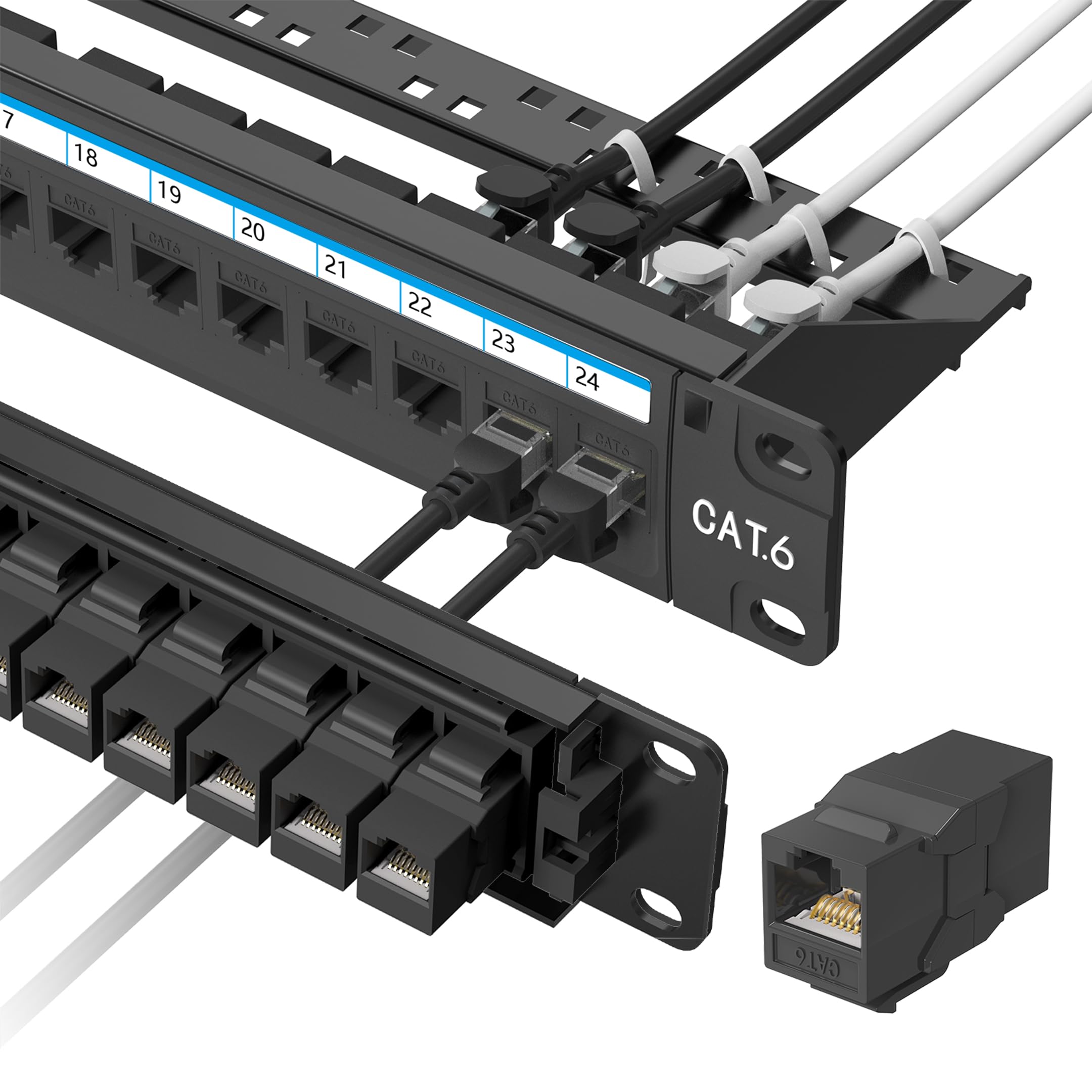
Twenty-four couplers already installed, so you plug in cables instead of terminating them.
This is a pass-through panel, not a punch-down panel, and that is the single most important thing to know before you buy. Instead of stripping wires and pressing them into a block with a tool, you plug a pre-terminated Ethernet cable into the back and another into the front. The panel brings 24 Cat6 RJ45 couplers already installed, plus one spare in case one ever fails.
The number to notice is 10Gbps. That is the network speed the couplers are built to carry with compatible Cat6 cabling and gear, and the panel also accepts Cat5e and Cat5 cables. Real speed still depends on your cable category, the run length and what is plugged in at each end. The frame is cold-rolled steel with an ABS panel and polycarbonate couplers, at 16 ounces all in.
A removable back bar sits behind the panel to hold the connected cables and take strain off the plugs. That bar is the detail that separates this from a bare passthrough plate — it keeps the back of your rack from sagging under its own cable weight. Owners credit the steel frame and strain-relief bar with keeping 10Gbps runs stable, so a network closet ends up looking deliberate rather than improvised.
Who it is built for: anyone who wants network ports in a rack without owning a punch-down tool.
The honest limit: it is not a punch-down panel, so if you already run bare bulk cable and terminate it yourself, this is the wrong part.
Buy it if: you want clean, plug-in Ethernet organization in a 19-inch rack.
Wrong part if: your plan is to terminate raw cable into a punch-down block.
6. VEVOR 4-Pack 1U Server Rack Shelf, Vented

Four vented shelves rated to fifty pounds each, for a rack that keeps growing.
Fifty pounds is the figure that earns this shelf its place. Each 1U tray is rated to that load on Q235 carbon steel with a 0.06-inch (1.5 mm) thickness, and the vented base keeps a router or switch from sitting in its own hot air. Four come in the pack, which is how a rack fills up in practice — one for the router, one for the switch, one for the modem and one spare.
Each shelf is 10 inches deep across an 18.9-inch width, in a standard 1U profile. That depth handles a router, switch or firewall comfortably without pushing into the back of the cabinet. Screws and nuts are included, and the whole install is a Phillips screwdriver job.
The one thing to plan around is width. The shelves fit standard 19-inch racks, but some buyers find them narrower than expected inside a cage, so check the clear opening of your cabinet before you tighten the last screw. Owners keep praising the sturdiness of the 1.5 mm Q235 steel, and 450+ ratings make it among the most proven shelves here.
Value read: four shelves rated to 50 lbs each covers the whole rack for the cost of buying singles, and the vented base keeps gear cooler.
The catch to know: depth is 10 inches, so deep gear or a full-depth cabinet may want a deeper tray.
Best for: a rack that needs several shelves for routers, switches and modems.
Not ideal if: the equipment you are stacking is deeper than 10 inches.
7. RIVECO 2-Pack 10″ 1U Vented Rack Shelf

Flip the lips up for small gear, down for deeper gear — one shelf, two jobs.
Two mounting positions on the same shelf is the trick here. The detachable ears can be fixed with the lips facing up to stop a small device sliding off the edge, or facing down when you are loading something deeper. That flexibility is what you want when the shelf serves double duty across a rack.
Each shelf measures 19 inches wide, 10 inches deep and 1.7 inches tall, in alloy steel with welded corner joints to resist deformation under load. Detachable ears also protect the shelf in transit, which is why it arrives square. Vented base for airflow, pre-drilled cable tie holes for routing, and two years of warranty coverage.
The honest detail is that the sturdiness gets described both ways — solidly built for small routers and switches, but not built like a heavy-duty rack tray for dense equipment. Assembly also takes a few minutes with the ears. Two shelves, plus mounting screws and cage nuts, make this a practical pick for a smaller 19-inch cabinet or a home setup that needs a second shelf later.
Sensible design touches
- Two lip orientations suit both shallow and deeper devices
- Welded corners and detachable ears keep it square in transit
- Vented base with pre-drilled cable tie holes
Before you buy
- Firmer feedback on small gear than on heavy, dense equipment
- The detachable ears need assembling before installation
The right fit for: small routers, modems and stereo gear in a 19-inch cabinet.
Look elsewhere if: the shelf needs to carry something dense and heavy.
8. Tecmojo 2U Rack Drawer, Sliding and Lockable

A lockable steel drawer that gives all your rack tools and spares a home.
Most racks collect loose screws, spare patch cables and a console cable that nobody can find when a switch dies. This 2U drawer fixes that with 13 inches of inner depth in cold-rolled steel with a powder-coated finish. The lock and keys keep the contents away from anyone who should not be in there — spare parts, network tools, whatever you would rather not have walking off.
The load side is worth reading carefully: it is rated to 22 pounds, or 44 pounds with the upgraded back supports fitted. That is plenty for tools and spares, and it is not a shelf for heavy equipment. Rear cable management holes route power and data cables behind the drawer so it slides without dragging a bundle along with it.
Owners describe the cold-rolled steel drawer as solidly constructed and well made for holding tools and spares. The lock is where the gripes land: some find it does not hold the drawer shut as firmly as expected, so treat the latch as a deterrent rather than a safe. Standard 19-inch racks take it without drama, and mounting hardware is in the box.
Where it shines: 2U of organized, lockable storage with cable pass-throughs, in alloy steel, backed by a 3-year manufacturer warranty.
The recurring note: the lock keeps honest people honest; it is not the strongest catch you will ever use.
Worth it for: keeping tools, spares and sensitive odds and ends secure inside the rack.
Pair it with care: load it with what fits the 22–44 lb rating rather than filling it with hardware.
9. CyberPower CP1500PFCRM2U PFC Sinewave UPS

Short-depth battery backup that bolts into a 2U slot and keeps gear alive through a brownout.
The figure to start with is 1500VA/1000W. That is the capacity this rackmount UPS carries, in sine wave output — a clean power shape that suits Active PFC power supplies and conventional ones alike. If you run security gear, AV equipment or networking hardware that must stay up, that is the job this unit does.
Eight NEMA 5-15R outlets cover the load, with a right-angle input plug and a six-foot cord. The short-depth body is the design choice that matters in a compact cabinet: 10.5 inches deep means it fits into spaces where a full-length UPS would simply not close the door. Automatic Voltage Regulation corrects minor dips and spikes without draining the battery, which is the setting that extends battery life.
The color LCD panel shows battery and power status at a glance, so a problem shows up before it takes something down. Battery is lead acid and rated at three years, with an 8-hour charge time. Protection extends beyond the box: three years of warranty including the battery, a UL safety certification, and PowerPanel software for free download. Owners mention the 1500VA/1000W capacity holds up under real draw, and the color LCD makes setup and status checks easy.
The big advantage: 1500VA/1000W and sine wave output in a 10.5-inch depth, which is what makes it a fit in a short rack.
Worth knowing: the battery is lead acid and time-limited — plan on the three-year mark as a maintenance point, not a forever unit.
The one to buy for: anyone who needs clean sine wave backup inside a shallow cabinet.
Not the cheap option: capacity and AVR justify the premium tier, but it is the biggest spend on this list.
Know the Specs
What 1U, 2U and 19-inch actually mean
U is a unit of vertical height, where 1U lines up with one set of rack holes. “19-inch” describes the width, not the depth, which is why two 1U parts can behave completely differently in the same cabinet. A 1U cable manager at 1.8 inches deep and a 1U rackmount PDU 20 inches long both occupy one U, but only one of them needs real front-to-back room. Measure the clear depth inside your cabinet before adding anything that carries gear or power.
PDU, surge rating and why joules matter
A PDU (power distribution unit) is a rack-mounted power strip with better mounting and usually better protection. The 15A figure is the circuit breaker limit — draw more and it trips before your gear does. The 160 Joules figure is the surge energy it can absorb from a spike. For a rack full of gear, a built-in breaker and a surge rating give you a first line of defence that a plain extension lead does not.
Common Questions
Will a 1U rack shelf fit my cabinet if it is not a full server rack?
Is a pass-through patch panel better than a punch-down panel?
What does a 160 Joules surge rating protect against?
How deep should my rack accessories be?
Do I need cage nuts and screws for my rack accessories?
Who should buy a rackmount UPS instead of a regular surge protector?
Can venting blank panels improve cooling in my rack?
What is the difference between a cable manager and a brush panel?
How much weight can a 1U rack shelf hold?
Should I fill every empty slot in my rack?
The Bottom Line
For most people building out a rack, the server rack accessories winner is the BTU 12-Outlet Rack-Mount PDU. Its 12 wide-spaced outlets, 15A breaker and 160 Joules of surge protection power and protect a whole cabinet from one 1U bar. Want tidy cable runs? Grab the QiaoYoubang 24-Slot Cable Manager two-pack. And if you cannot afford a second of downtime, the CyberPower CP1500PFCRM2U keeps everything else running.
How we choose
We do not accept paid placement. Every pick is matched to a real buyer and a real use-case; we do not hands-on test units.
Sources
Specifications: manufacturer listings and product documentation. Review insights: verified customer reviews, as of November 2026. Pricing: not shown on this page (it changes often); check the current price via the retailer link.
As an Amazon Associate, Tactical Gear Guy earns from qualifying purchases. This does not affect which products we feature.