Specs are compiled from manufacturer listings and verified buyer reviews and can change over time — please confirm the key details on the product page before buying.
If your drives keep dropping out of an array or your rebuilds crawl along overnight, the bottleneck is usually the SAS RAID controller in the slot, not the disks. A SAS RAID controller is the circuit board that sits between your drives and your motherboard, ties those drives into a single logical volume, and adds a chunk of onboard memory so writes do not stall. This guide covers seven SAS RAID controllers, sorted by port count, cache size and connector type.
This guide is built by comparing the manufacturers’ published specifications and the patterns across verified customer reviews, so you get each pick’s real strengths and trade-offs instead of marketing spin.
You will see which card suits a small home server and which one only makes sense inside a rack with a cache battery. Every pick below is rated on port count, cache size, and how cleanly it talks to your operating system, so match the card’s port count and connector type to your drive bays before you buy.
Top Picks

How To Choose The Best SAS RAID Controller
The first decision is not brand or speed — it is how many drives you need to attach and what kind of enclosure they sit in. Get the port count or connector type wrong and the card sits in a box while you order adapters.
Count your drives before you count ports
A controller with 8 internal ports (often written as 8 channels) can host eight drives directly on the card. Past that you need a SAS expander (a hub that lets one port serve several drives) or a card with more ports. The Adaptec 5805, for example, is listed as supporting up to 256 SATA or SAS drives when expanders are used — but only has 8 physical ports of its own.
Match the connector, or budget for cables
Newer cards route their internal ports through x4 Mini-SAS HD connectors, also called SFF-8643. Older cards use SFF-8087 breakouts. These two do not plug into each other. The Broadcom 9460-16i runs 16 internal ports across four x4 Mini-SAS HD connectors, so you need breakout cables sized for that standard specifically.
Decide whether cache and battery backup matter
Cache is the card’s own memory buffer — it holds incoming writes so the operating system is not left waiting on the disks. A 512MB cache card and a 4GB DDR4 card are doing the same job at very different scale. If a power cut during a write would ruin your data, look for a card that supports a cache protection module; the Broadcom 9460-16i supports the optional CacheVault module to protect cached data through a sudden outage.
Side-by-Side Comparison
| Model | Best For | Ports | Drive Link Speed | Cache | Amazon |
|---|---|---|---|---|---|
| LSI MegaRAID SAS 9361-8i★ Best Overall | Balanced home and small office arrays | 8 | 12Gb/s | — | Amazon |
| HP Smart Array P408i-a SR Gen10Best for Gen10 Servers | HPE Gen10 server builds | 8 | 12Gb/s | 2GB | Amazon |
| HighPoint RocketRAID 3720C | Cross-platform desktop workstations | 8 | 12Gb/s | — | Amazon |
| HighPoint RocketRAID 3740C | Dense 16-drive builds | 16 | 12Gb/s | — | Amazon |
| Broadcom MegaRAID SAS 9460-8i | Mixed SAS and NVMe workstations | 8 | 12Gb/s | — | Amazon |
| Adaptec 2244100-R 5805 | Legacy expander-based storage | 8 | 3Gb/s | 512MB | Amazon |
| Broadcom MegaRAID 9460-16i | Large arrays with power-loss protection | 16 | 12Gb/s | 4GB DDR4 | Amazon |
Detailed Reviews
1. LSI MegaRAID SAS 9361-8i 8-Port 12Gb/s RAID Controller
Our pick — 4.0+★ from 40+ verified ratings; the strongest balance of quality and price.
Eight 12Gb/s ports, seven RAID levels, and a card narrow enough to disappear into a 2U chassis.
This is the card to buy when you want a straightforward internal array of up to eight drives without paying for enterprise bells. It runs eight SAS ports at 12Gb/s (12 gigabits per second — the link speed between the card and each drive) so mechanical drives are never the bottleneck on the cable side. The RAID list covers 0, 1, 5, 10, 50, 6 and 60, which means you can run a two-drive mirror, a five-drive parity array, or a striped pair of mirrors depending on how much redundancy you want.
Physically it is a low-profile card at 2.54″ wide, and that is the number worth pausing on. The Broadcom 9460-8i below measures 5.63″ across the same dimension — this LSI is a slimmer board that clears tighter server layouts and short-depth cases more easily. It talks over a PCIe 3.0 x8 slot (eight lanes of the third-generation expansion bus), a slot almost any modern desktop or server board still provides.
The honest caveat sits with the software side. The listing names Linux as its operating system, and the driver situation on newer kernels is the part to verify before you commit — server-grade LSI cards are happiest when the driver you need is already in your distribution. It holds 4.0+ stars across 40+ ratings, with the 2.54″ slim board and the seven-level RAID menu behind that score.
What earns it the top slot
- Eight 12Gb/s SAS ports handle a full eight-drive array on the card alone
- Covers RAID 0, 1, 5, 6, 10, 50 and 60 in one board
- At 2.54″ wide it is far slimmer than the Broadcom 9460-8i at 5.63″
- PCIe 3.0 x8 interface fits mainstream server and workstation slots
Worth knowing upfront
- OS support on the listing is Linux — confirm your driver before buying
- No cache size stated, so heavy write buffering is not its selling point
Reach for this if: you are building an eight-drive internal array and want proven LSI RAID handling in a slim, low-profile board.
Look elsewhere if: your plan leans on the newest kernels or on large write caching — check driver and cache needs first.
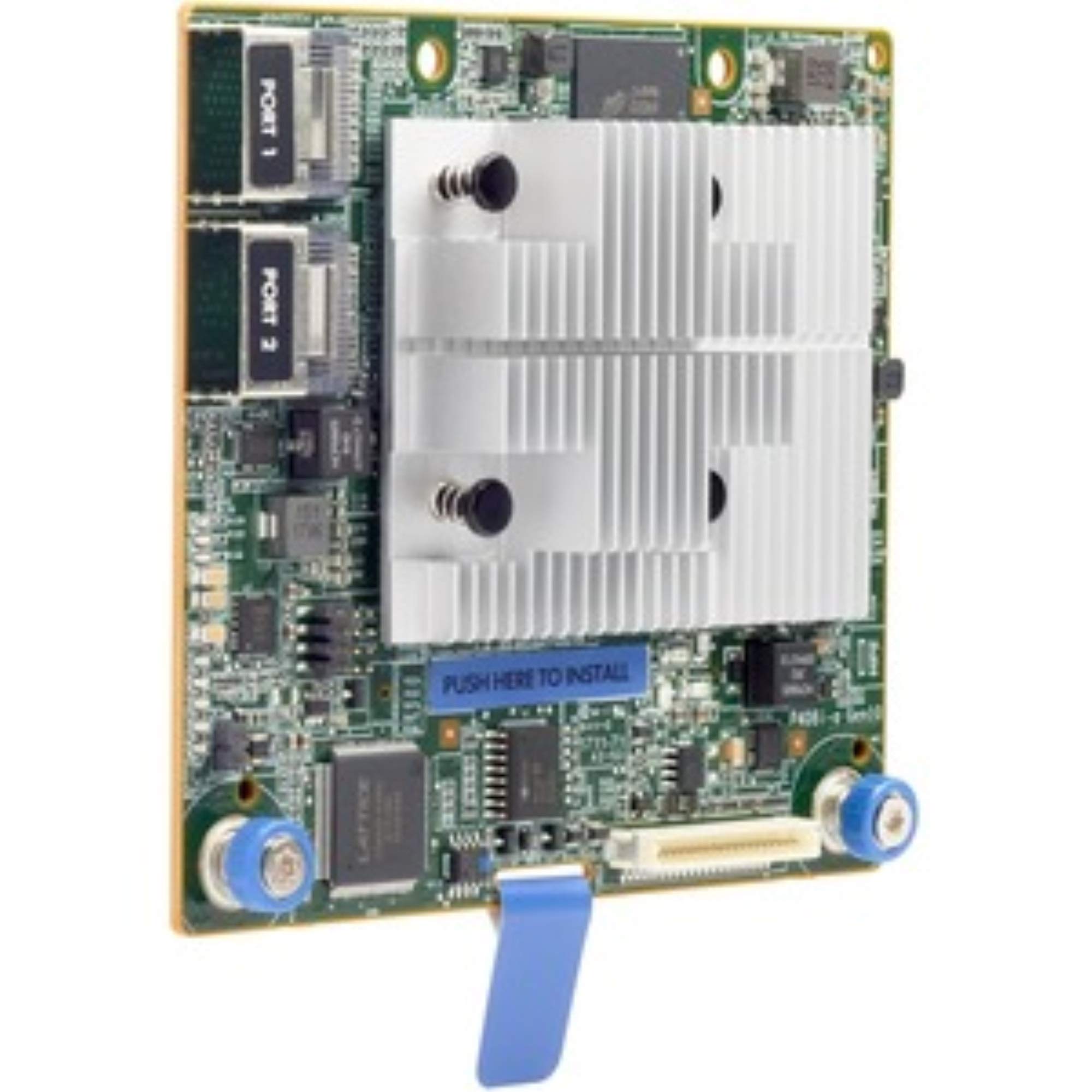
2. HP 804331-B21 Smart Array P408i-A SR Gen10 RAID Controller
A modular card built to slide into an HPE Gen10 chassis, cache already onboard.
Buy this one only if you are populating an HPE Gen10 server with the modular slot waiting for it — that is the entire reason it exists. The card carries 2GB of cache (its own memory buffer for holding writes before they hit the disks), which is the kind of headroom that keeps a busy array from stalling during bursts. It handles eight internal lanes over SAS at 12Gb/s and supports RAID 0, 1, 5, 6, 10, 50 and 60.
Compare that cache figure with the Broadcom 9460-16i below, which carries 4GB of DDR4 — the HPE gives you half the buffer for a fraction of the port count. Both have their place; the HPE wins on chassis integration, not raw capacity. At 8.64 ounces the module is light enough that the mounting bracket, not the weight, is what holds it in place.
The part worth flagging is the fit. It lists support across Windows, macOS and Linux, but this is a modular controller shaped for a specific server family rather than a free-standing PCIe card for a desktop build. If you own the right Gen10 machine it drops in cleanly; if you do not, no adapter will save you. Its rating reflects that narrow Gen10-only fit rather than any weakness in the 2GB cache or 12Gb/s lanes.
Built-in headroom: 2GB of cache on a card managing eight 12Gb/s lanes means write bursts land in memory first instead of waiting on spindle speed, which is exactly what a small busy server wants.
One condition before purchase: confirm the card physically matches your HPE modular bay — this is a chassis-specific module, not a universal slot card.
The straight answer: for an existing HPE Gen10 server that needs eight internal drives and 2GB of cache, this is the drop-in pick.
The trade-off: outside that chassis it has nowhere to go, so desktop builders should keep reading.
3. HighPoint RocketRAID 3720C 8-Port RAID Controller

Eight 12Gb/s ports with driver support written out for Windows, macOS and Linux down to the kernel.
Most cards in this list tell you which operating systems they like in one short line. HighPoint spells it out. This card names RedHat, Ubuntu, Fedora, Arch Linux at kernel 5.17.5 and above, macOS 10.9 through Monterey 12.x, and Windows 7 and later including Windows Server. It also lists Microsoft Hyper-V — and notes that it is 64-bit only, which matters if you were planning to run it on an older 32-bit install.
On the hardware side you get eight 12Gb/s SAS/SATA ports over a PCIe 3.0 x8 slot, with RAID 0, 1, 5, 6, 1/0, 5/0, JBOD and Single Disk on the menu. The JBOD and Single Disk options are genuinely useful — they let you pass a bare drive through to the OS instead of putting it in an array. The card also carries a stated 2-year warranty, which is longer than several others here spell out.
The catch is the Apple silicon note. macOS drivers on the M1 platform have to be downloaded and installed from HighPoint’s site rather than arriving embedded — so budget an extra setup step if you are on an Apple machine. Windows and mainstream Linux installs get the driver embedded, with no manual download step.
Where it pulls ahead
- Documented driver support across Windows, macOS and five Linux families
- JBOD and Single Disk modes let drives bypass the array entirely
- Stated 2-year warranty
- 64-bit operating systems only, stated clearly up front
The setup wrinkle
- Mac M1 users must download the driver manually from the vendor site
- No cache size listed, so it is not a write-buffering card
Verdict: the pick for a workstation that may end up running Windows today and a Linux distribution tomorrow — the driver list covers both without a shopping trip.
Not for: anyone expecting a plug-and-play Mac experience on Apple silicon.
4. HighPoint RocketRAID 3740C 16-Port RAID Controller

Twice the ports of its 8-port sibling, for the build where every bay is already spoken for.
Sixteen 12Gb/s SAS ports on one PCIe 3.0 x8 card. That is the headline, and for a dense storage box it is the number that removes a whole expander from your shopping list. Put it beside the LSI 9361-8i above and the difference is blunt: 16 ports versus 8, for a build that needs every one of them.
RAID coverage is the same broad menu as the 8-port version — 0, 1, 5, 6, 1/0, 5/0, JBOD and Single Disk — so you can stripe, mirror, or hand a drive straight to the operating system. The driver story is also identical: RedHat, Ubuntu, Fedora, Arch Linux at kernel 5.17.5 and above, macOS 10.9 through Monterey 12.x, and Windows 7 and later including Hyper-V, all 64-bit only. The 2-year warranty carries over too.
What you give up is nothing you were promised — but read the port count honestly. Sixteen ports only pay off if you actually have sixteen drives to attach; buy this for a four-drive box and you have bought headroom you will never use. It also has no stated cache, so treat it as a connector-and-RAID card rather than a write accelerator.
Port math: 16 SAS ports at 12Gb/s means a full shelf of drives connects directly, no expander needed and no daisy chain to troubleshoot.
Skip-ahead note: the same 64-bit-only rule applies here, so check your OS bit depth before the card arrives.
Pick it when: your chassis is packed and eight ports would leave drives unplugged.
Leave it when: you are under eight drives — the 3720C above does the same job for less port count you would never touch.
5. Broadcom MegaRAID SAS 9460-8i RAID Controller

Server-room RAID logic on a low-profile board, rated at 1200 MBps across eight channels.
Where most cards here give you a port count and a RAID list, this one adds a throughput figure: 1200 MBps (megabytes per second — the sustained data rate the controller is rated to move). That number is the reason it sits in the premium tier. It handles eight channels of SATA and SAS at 12Gb/s over a PCIe 3.1 x8 slot, and the RAID menu goes 0, 1, 5, 6, 10, 50, 60 and JBOD.
One measurement to note: this board measures 5.63″ across, the same figure that makes the LSI 9361-8i above the slimmer choice at 2.54″. If your chassis is generous, that width is irrelevant. If it is tight, check it against your slot before ordering.
The Broadcom name means the management tooling and driver ecosystem you would expect from an enterprise brand, and the listing names Windows, macOS and Linux. The trade-off is simply that you are paying premium-tier money for a board with the same eight ports as several cheaper picks — the 1200 MBps rating and the Broadcom platform are what you are buying.
The premium justification
- Stated 1200 MBps throughput rating
- PCIe 3.1 x8 host interface — the newest bus revision here
- Wide RAID menu including JBOD passthrough
- Windows, macOS and Linux support listed
What to weigh
- At 5.63″ wide it takes more room than the slim LSI board
- Eight ports at a premium tier — port count is not the reason to choose it
Why buy it: the 1200 MBps rating and Broadcom platform suit a workstation where the array is the bottleneck and you want the enterprise management stack behind it.
Why look past it: if you only need eight ports and nothing else, the LSI above gets you there on a narrower board.
6. Adaptec 5805 8-Channel RAID Controller

A dual-core RAID processor, a 512MB buffer, and cables already in the box.
What this card does differently is give you a dedicated processor for the RAID work: a 1.2 GHz dual-core ROC (RAID on Chip — the chip that calculates parity and manages the array so your main processor does not have to). It carries up to 512MB of DDR2 cache and is built for RAID 5 and 6 in particular. Eight internal ports sit on a low-profile MD2 board, with a cable kit included — a small thing that saves an order.
The expander support is the standout spec. Adaptec lists this card as supporting up to 256 SATA or SAS drives when SAS expanders are used. That is a scale no other card in this list claims, and it makes this the pick for an old expander-backed enclosure rather than a fresh desktop build.
Be clear-eyed about the link speed, though. Each drive port runs at 3 Gb/s throughput, where the 12Gb/s cards above connect at four times that figure on paper. For spinning disks that is often fine; for modern fast SAS drives it leaves the link as the limiter. At 16 ounces it is also the heaviest card here — the HP module above weighs 8.64 ounces by comparison. It lists Linux and Windows support, and its 3.0+ rating tells you the fit varies with the build it lands in.
Scale over speed: up to 256 drives through expanders is real capacity, and the 512MB cache paired with a dedicated ROC keeps parity maths off your main processor.
The honest limit: 3 Gb/s per port is a generation behind — fine for mechanical drives, tight for anything modern and fast.
Best matched to: an older expander-based storage box where you need many drives behind one card and the drives are mechanical.
Mismatched to: a new build with fast SAS drives, where the 12Gb/s cards are the better use of the slot.
7. Broadcom MegaRAID 9460-16i 16-Channel RAID Controller

Sixteen channels, 4GB of DDR4 cache, and a protection module path for power cuts.
This is the card for a large array where losing a write during a power blip is not acceptable. It carries 4GB of DDR4 SDRAM as cache — twice the 2GB the HP P408i-a holds above — and supports the optional CacheVault flash cache protection module (CVPM05), which preserves cached data through an unexpected power outage. Sixteen internal ports run across four x4 Mini-SAS HD (SFF-8643) connectors at 12Gb/s over PCIe 3.1 x8.
The drive ceiling is the widest here: up to 255 SAS or SATA devices, or 24 NVMe devices. RAID levels cover 0, 1, 10, 5, 50, 6 and 60. Put the 16 channels beside the HP’s 8 and the Broadcom’s 4GB beside the HP’s 2GB, and you can see exactly where the extra money goes — more ports and more cache buffer on a single board.
The catch to weigh honestly: this is the lowest-rated card in the list at 2.5+ stars, and it is the most expensive, so the value question is fair. It earns its place only if you genuinely need sixteen channels plus cache protection. For a smaller array, the 8-channel Broadcom above or the LSI at the top of this list will do the same job for fewer channels and less outlay.
What sixteen channels buy you
- 16 internal ports via four SFF-8643 Mini-SAS HD connectors
- 4GB DDR4 cache — double the HP P408i-a’s 2GB
- Optional CacheVault module guards cached data through power loss
- Supports up to 255 SAS/SATA or 24 NVMe devices
Before you commit
- Lowest rating in this list at 2.5+ stars
- Highest tier cost of any card here
- CacheVault protection listed as an optional extra, not included
Choose it for: a large production array where sixteen channels, 4GB of cache, and the CacheVault path together justify the premium.
Think twice if: your array fits in eight drives — you would be paying top tier for ports and protection you will not use.
Know the Specs
Ports and Channels
A port (sometimes written as a channel) is one physical drive connection on the card. Eight ports host eight drives directly; sixteen host sixteen. Past that limit you need a SAS expander to fan one port out to several drives. The Adaptec 5805 shows the extreme case: eight ports of its own, but up to 256 drives when expanders are attached.
Drive Link Speed
The 12Gb/s figure is the speed of the link between the card and each drive, in gigabits per second. Older cards run 3Gb/s per port. For mechanical drives the slower link is often enough; for fast SAS drives it becomes the limiter. Match the card’s speed to the drives you actually own.
Cache Size
Cache is the card’s own memory buffer, measured in megabytes or gigabytes. It holds incoming writes briefly so the operating system is not left waiting on the disks. A 512MB buffer and a 4GB DDR4 buffer do the same job at very different scale, and the larger buffer matters most under heavy write load.
RAID Levels
RAID 0 stripes data across drives for speed with no redundancy. RAID 1 mirrors two drives. RAID 5 and 6 add parity across three or more drives so one (or two) can fail. RAID 10 and 50 combine mirroring and striping. Check that the level you want appears on the card’s own list — not every card here includes every level.
Common Questions
Will a SAS RAID controller work with regular SATA hard drives?
What is the difference between 12Gb/s and 3Gb/s on these cards?
Do I need a cache battery or CacheVault module?
What connector type do these cards use for internal drives?
Can a SAS RAID controller push more than eight drives without an expander?
Is a low-profile card going to fit my server chassis?
Which operating systems do these controllers support?
Do I need a hardware RAID controller or can my motherboard handle it?
Can these cards pass a bare drive straight to the operating system?
The Bottom Line
For most builds the sas raid controller to buy is the LSI MegaRAID SAS 9361-8i, because eight 12Gb/s ports, a full RAID 0/1/5/6/10/50/60 menu, and a 2.54″ slim board cover the common case without overspending on channels you will not fill. If your workstation may shift between Windows and Linux, the HighPoint RocketRAID 3720C spells out driver support down to the kernel. And for a large array that needs sixteen channels plus a cache protection path, the Broadcom MegaRAID 9460-16i is the one to reach for.
How we choose
We do not accept paid placement. Every pick is matched to a real buyer and a real use-case; we do not hands-on test units.
Sources
Specifications: manufacturer listings and product documentation. Review insights: verified customer reviews, as of November 2026. Pricing: not shown on this page (it changes often); check the current price via the retailer link.
As an Amazon Associate, Tactical Gear Guy earns from qualifying purchases. This does not affect which products we feature.