Specs are compiled from manufacturer listings and verified buyer reviews and can change over time — please confirm the key details on the product page before buying.
Three RX 560 4GB cards, three totally different jobs — and picking wrong costs you a return label. One drives four screens for a stock-trading desk, one is a tiny single-slot card for a small-form-factor office PC, and one is a standard dual-monitor board. The 4GB of GDDR5 memory (video memory the card keeps its own working image in) is the reason all three exist: 4GB keeps a 4K desktop and multiple windows from spilling over into system RAM. Below, each card is matched to the setup it actually suits.
This guide is built by comparing the manufacturers’ published specifications and the patterns across verified customer reviews, so you get each pick’s real strengths and trade-offs instead of marketing spin.
Port count, slot thickness and power draw decide which card fits your case — not the badge. Our breakdown of the best RX 560 4GB covers four-HDMI desks, low-profile office towers, and the quiet middle ground between them.
Top Picks
How To Choose The Best RX 560 4GB Card
Start with your monitor count, not the clock speed. An RX 560 is a modest chip — the buying decision on this shelf is almost entirely about how many displays you need to light up and how much room your case gives you.
Count your HDMI ports before anything else
Every display needs its own output unless you add an adapter or a splitter, and a splitter mirrors the same image instead of extending it. A four-HDMI card drives four independent screens straight off the back of the card. A two-HDMI card drives two. If you run a trading desk or a design station with three panels, that port count is the whole purchase.
Check the slot width against your case
A single-slot card leaves the neighbouring slot free for another add-in card, while a wider board can block it. If you own a small-form-factor or slim office tower, look for a low-profile card that ships with a short bracket. Standard mid-towers generally take a full-height board without trouble.
Match the power draw to your power supply
All three of these cards pull their power straight from the PCIe slot, with no six-pin cable to run. That keeps the install simple and avoids hunting for a spare connector on an office power supply. Check the maker’s stated power-supply recommendation for your exact card before you buy.
Decide what you are actually doing with it
For spreadsheets, video calls, 4K video playback and browser tabs spread across several screens, 4GB of GDDR5 is the useful part — it holds the desktop image for each display without leaning on system memory. For modern games at high settings, an RX 560 is a legacy-tier card and will not keep up.
Side-by-Side Comparison
| Model | Best For | Outputs | GPU Clock | Slot / Interface | Amazon |
|---|---|---|---|---|---|
| QTHREE Radeon RX 560 4GB★ Best Overall | Everyday mixed use — one card, three port types | DP / HDMI / DVI | 1176 MHz | PCIe 3.0 x8 | Amazon |
| RX560 4GB GDDR5 4 HDMI Multi Monitor | Four-screen desks — trading, design, monitoring walls | 4x HDMI | 1070 MHz | PCIe x16 | Amazon |
| VisionTek AMD Radeon RX 560 4GB | Small-form-factor and slim office PCs | 2x HDMI | 1150 MHz | Single-slot, PCIe 3.0 x8 | Amazon |
Detailed Reviews
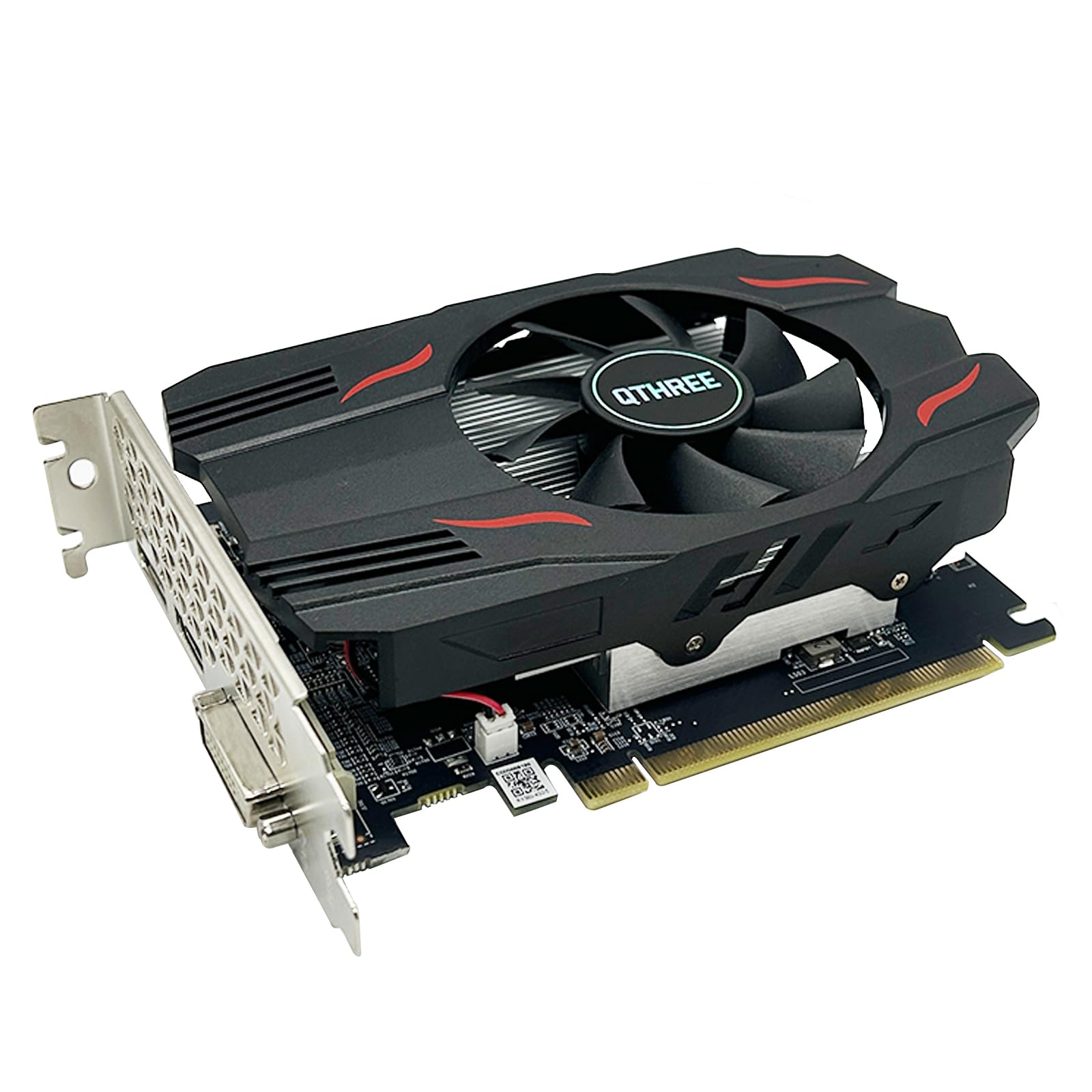
1. QTHREE Radeon RX 560 4GB GDDR5 Graphics Card
Three different port types on one card, so you never hunt for an adapter.
The QTHREE takes the top spot because it covers the most ground with the least fuss. You get a DisplayPort, an HDMI and a DVI output on the same bracket — three ways to connect a screen, so a new monitor and an older office panel can both live on one card without a converter in the chain. Its 1176 MHz GPU clock (how many times per second the graphics chip runs through its work) is the highest of this trio, and it reads a 6000 MHz memory speed off the same board.
For a mixed desk — a main panel for spreadsheets, a second for email, a spare for video calls — this is the most natural fit. The card outputs up to 3840×2160, meaning a 4K screen runs off a single cable, and it lists support for DirectX 12 and OpenGL 4.6, so lighter titles and older games install and run without a fight. It slots into a PCIe 3.0 x8 interface (the short connector on the motherboard that feeds the card data), and with no external power connector there is nothing extra to wire up. Compared head-to-head, it clocks at 1176 MHz against the VisionTek’s 1150 MHz — a modest edge on paper, but it is the faster clock of the group.
The catch worth knowing up front: this is a compact ITX-style board, so measure your case and confirm a free slot before ordering. There is no included bracket listed and no low-profile option quoted, which makes it a straightforward fit for a mainstream tower but a question mark for a slim one. The 896 stream processors (the small compute units that do the graphics math) suit office work and light gaming rather than demanding new releases.
Why this one leads the trio
- DP, HDMI and DVI on a single card — no adapter needed for mixed-age monitors
- 1176 MHz GPU clock, the highest of the three cards here
- 6000 MHz memory speed across 4GB of GDDR5
- Runs straight from the PCIe slot with no external power cable
- 3840×2160 output for a 4K display over one connection
Where it asks you to check first
- No low-profile bracket quoted — confirm clearance in a slim case
- Not a card for demanding new games at high settings
Reach for this if: your desk mixes a modern 4K panel with an older DVI or HDMI monitor and you want one card to serve all of them.
Measure first if: you run a slim or small-form-factor tower, since no low-profile bracket is listed for this board.
2. RX560 4GB GDDR5 4 HDMI Multi Monitor Graphics Card
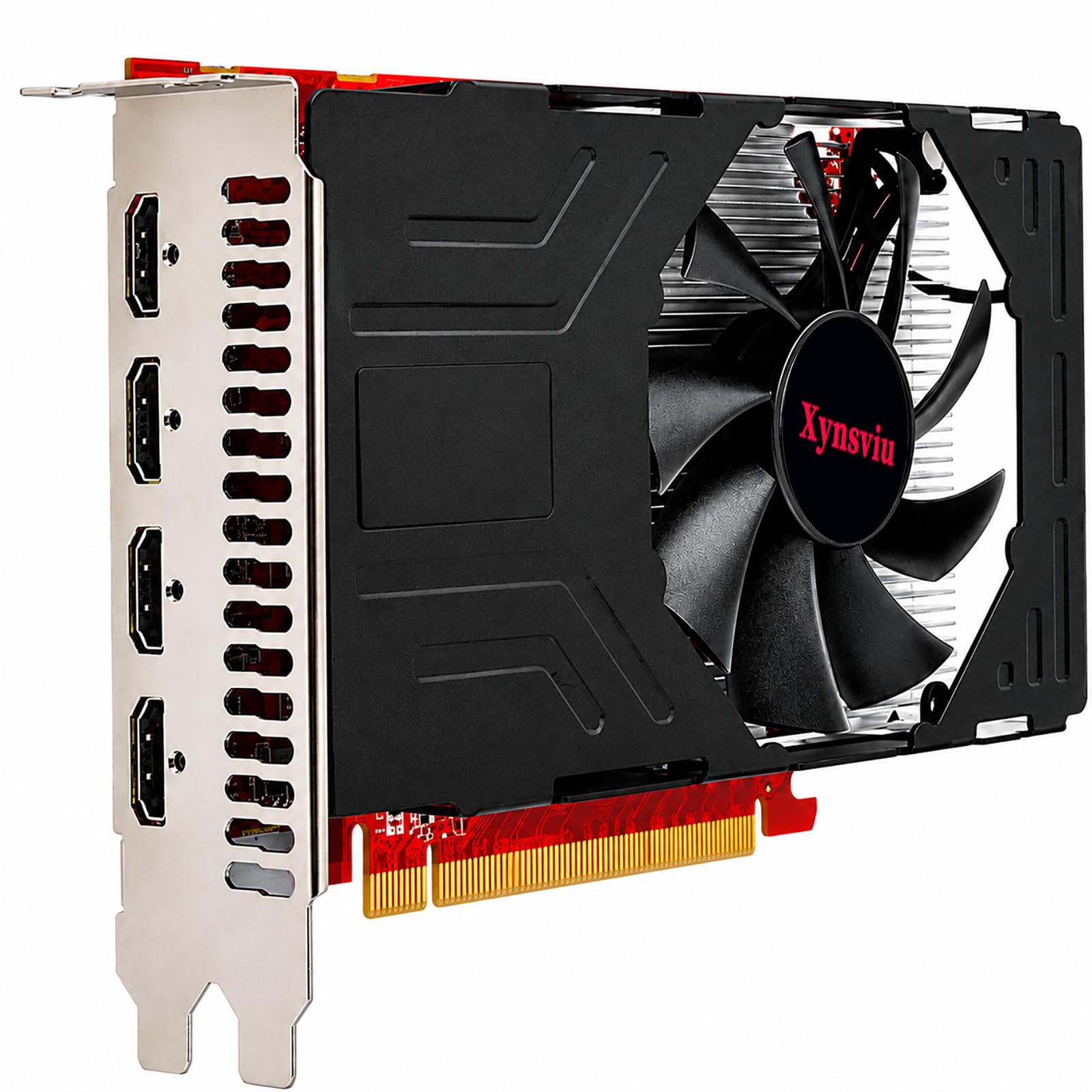
Four HDMI sockets on one board — a trading desk solved without a splitter.
Four HDMI outputs is the entire reason this card exists, and it is the only one on this list that will drive four independent screens straight off its own bracket. That is the difference between extending your desktop across four panels and mirroring the same window four times. If you watch live quotes, run a design station, or keep a laser cutter and a 3D printer dashboard open alongside your main work, this is the board those jobs are shaped for.
The 4 HDMI count is also where the comparison sharpens. This card sits on a PCI-Express x16 interface — a longer slot than the x8 connection both the QTHREE and the VisionTek use — so it needs a full-length motherboard slot rather than a short one. Its GPU runs at 1070 MHz, the lowest clock in the group (the QTHREE sits at 1176 MHz), and its listed power ceiling is 60W drawn from the PCIe slot alone with no external connector. It tops out at 3840×2160 at 60Hz, so four 4K panels at that refresh is the stated maximum, not four high-refresh gaming displays.
What makes this pick tick with owners is the install side: drivers install automatically and the card is plug-and-play in Windows 11. Multi-monitor workers report it driving a 32-inch 4K Samsung cleanly, with all four outputs working as intended in design, 3D printing and laser cutting setups. The honest catch is long-term stability — some buyers report fuzzy image output developing after a couple of months, so treat it as a working card to keep ventilated rather than a permanent fixture. It also will not pass HDR through to a monitor that supports it.
Small detail with a real consequence: the board measures 7.09 inches long and 4.72 inches wide, the widest card here and well clear of the VisionTek’s 2.7-inch width, so check that the bracket and cooler clear your case’s drive cages before you commit.
The four-port payoff: four independent HDMI displays from one slot, with automatic driver install and Windows 11 plug-and-play, makes it the least fiddly path to a wall of screens.
What you live with: the widest board on the list at 4.72 inches, a 1070 MHz clock that trails the other two cards, no HDR passthrough, and enough long-run reliability noise that prudent buyers will keep it cool and back up nothing critical to it.
Pick it when: you genuinely need three or four extended displays and want them all on HDMI with no adapters in between.
Step back when: two screens is your ceiling — the VisionTek fits a tighter case and the QTHREE leaves you more port flexibility.
3. VisionTek AMD Radeon RX 560 4GB GDDR5 2x HDMI Graphics Card
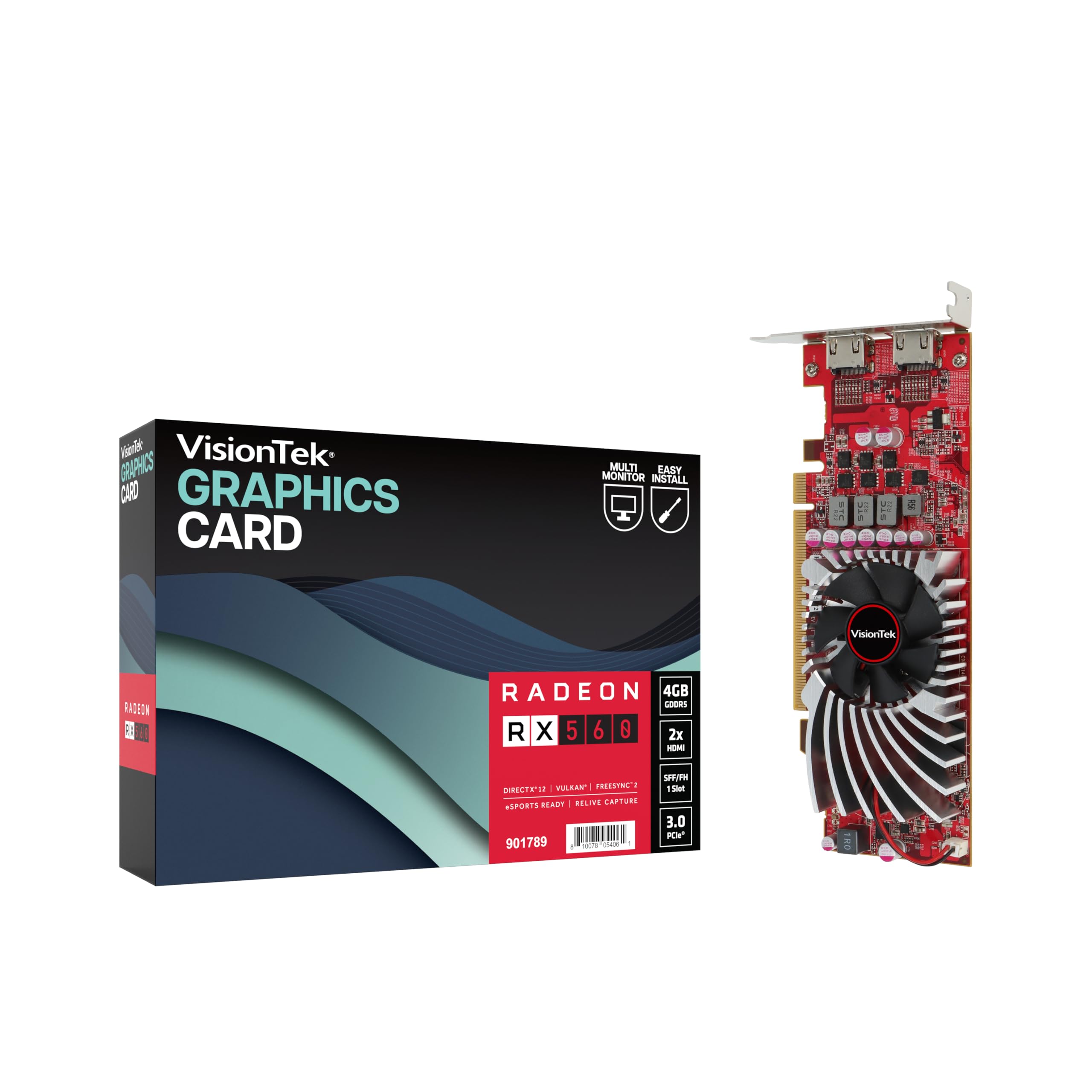
The only card here built to slide into a slim office tower without a fight.
VisionTek’s board is the narrowest of the three at 2.7 inches wide, and it comes single-slot and low-profile with the short bracket already installed — plus a full-height bracket in the box for a standard tower. If your PC is a small-form-factor business machine with one free slot and barely any clearance, this is the card that asks the fewest questions of your case. The 7-inch length is within a tenth of an inch of the four-HDMI card, so length is not the differentiator; width and slot count are.
Power is the quiet win. A 50W TDP (the card’s rated heat and power draw) comes entirely through the PCIe slot with no external cable, and VisionTek recommends a 350W-or-larger power supply. Its two HDMI outputs each carry a 3840×2160 signal, so two 4K displays run at once — enough for a main panel plus a reference screen. The GPU clock sits at 1150 MHz, between the QTHREE’s 1176 MHz and the four-HDMI card’s 1070 MHz. Unlike the four-HDMI board, this one works on a PCIe 3.0 x8 slot, a shorter connection that many compact motherboards offer.
What the spec sheet does not cover is gaming. Two HDMI outputs and a legacy chip put this firmly in productivity territory — spreadsheets, video calls, live data feeds and 4K playback, which is exactly the workload VisionTek advertises it for. The 3-year limited warranty is the only multi-year coverage stated among the three cards here.
Before you order, look inside the case and confirm a free PCIe x8 slot and the clearance for a low-profile board — that check matters more than any clock figure on this card.
The fit story: single-slot, 2.7 inches wide, low-profile bracket pre-installed with a full-height bracket included, 50W drawn from the slot and a 3-year limited warranty — a compact-card purchase with nothing left to guess at except clearance.
Ceiling to accept: two HDMI displays only, and no DisplayPort or DVI for an older panel, so a third screen means a different card.
Built for: a small-form-factor or slim business PC that needs a 4K-capable card in one slot with no power cable.
Not your card if: you run three or more monitors, where the four-HDMI board earns its place instead.
Know the Specs
4GB GDDR5 — the memory, not the megapixels
GDDR5 is the fast video memory the card fills with the image it is sending to each screen. The 4GB figure is the one to check: a card with only 2GB runs out of room faster when several 4K displays are open at once, and the desktop starts leaning on slower system RAM. All three cards here carry the full 4GB, which is why they are worth comparing at all.
HDMI port count — how many screens, no splitter
Each output drives one independent display. A two-HDMI card means two extended screens; a four-HDMI card means four. A splitter fed from one port mirrors the same picture rather than adding a screen, so the port count is a hard limit, not a suggestion.
Single-slot and low-profile — the case question
Single-slot means the card takes one expansion slot, leaving the one below it free. Low-profile means a short bracket for slim towers, often swapped for a full-height bracket in a standard case. If your PC is a small business machine, this is the spec that decides whether the card goes in at all.
GPU clock and bus power — the quieter specs
The GPU clock, measured in megahertz, is how many cycles the graphics chip completes per second; higher is faster on paper but rarely the deciding factor for office work. Bus power means the card draws its electricity through the motherboard slot instead of a six-pin cable, which keeps the install to one step and suits an office power supply.
Common Questions
Can an RX 560 4GB run four monitors at once?
Does an RX 560 4GB need a power cable from the power supply?
Will a low-profile RX 560 fit a slim office PC?
Is the RX 560 4GB enough for gaming?
What resolution can an RX 560 4GB drive?
Does the four-HDMI RX 560 support HDR?
Which slot does each card need on the motherboard?
Will an RX 560 4GB work in Windows 11?
Is a DVI port still useful on a graphics card?
How do I know the card is a real 4GB RX 560 and not a 2GB version?
The Bottom Line
Most desks are best served by the QTHREE Radeon RX 560 4GB, because its DisplayPort, HDMI and DVI trio lets a modern 4K panel and an older monitor share one card with no adapter, and its 1176 MHz clock leads this group. If your job runs on three or four extended screens, the four-HDMI RX 560 4GB is the one that removes the splitter from your desk entirely. And for a slim office tower with one free slot, the VisionTek earns the nod on its single-slot low-profile build, 50W bus power and included full-height bracket.
How we choose
We do not accept paid placement. Every pick is matched to a real buyer and a real use-case; we do not hands-on test units.
Sources
Specifications: manufacturer listings and product documentation. Review insights: verified customer reviews, as of November 2026. Pricing: not shown on this page (it changes often); check the current price via the retailer link.
As an Amazon Associate, Tactical Gear Guy earns from qualifying purchases. This does not affect which products we feature.