Specs are compiled from manufacturer listings and verified buyer reviews and can change over time — please confirm the key details on the product page before buying.
You want the floor of your case to glow without drilling, rewiring, or frying a header. That is exactly what an RGB insert for the bottom of a PC case does: it is a magnetic or adhesive light strip you drop into the lower chamber to light up your GPU, cables, and PSU shroud. The catch most first-timers hit is voltage — a 5V addressable strip plugged into a 12V header can be destroyed instantly. Every pick below is sorted by what actually matters for bottom mounting: how it attaches, how long it is, and whether it talks to your motherboard’s lighting software.
This guide is built by comparing the manufacturers’ published specifications and the patterns across verified customer reviews, so you get each pick’s real strengths and trade-offs instead of marketing spin.
Most buyers assume the longest strip wins, but length only helps if the magnets or adhesive hold on the case floor. The sections below break down mounting, voltage, and LED count so you can match a strip to your exact case, and this is the practical shortcut to the rgb insert for bottom of pc case that fits.
Top Picks


How To Choose The Best RGB Insert for Bottom of PC Case
The bottom of a case is the hardest spot to light: it sits away from the glass and collects dust. It sits away from the glass side panel, it collects dust, and the metal there is often the one flat surface your magnets will actually grab. Get three things right — voltage, mounting, and length — and the strip drops in without a fight.
Match the voltage to your header first
Your motherboard has one of two RGB headers, and they are not interchangeable. A 5V 3-pin addressable header (often labeled ADD_HEADER or ARGB) lets you control each LED on its own. A 12V 4-pin header runs every LED the same color at once. Wiring a 5V strip into a 12V header can kill the strip, so check the header label on your board before you buy anything.
Magnetic or adhesive, and why the floor changes things
Magnets are the easiest way to mount a strip on a steel case floor — no screws, no cleanup. But not every case bottom is magnetic, and some owners find the magnets on a given strip weaker than they hoped. Double-sided tape holds firm on clean, flat metal, yet it can be a chore to peel. A kit with both magnets and tape lets you pick per surface.
Length, LED count, and the smoothness question
A longer strip covers more of the floor, but the light itself looks smoother when the LEDs are packed closer together. Total LED count on the strip, and how far apart they sit, decide whether you get an even wash of color or a dotted line. If you are lighting a full-size tower, measure the floor run before you commit to a length.
Side-by-Side Comparison
| Model | Best For | Length | LED Count | Header Type | Amazon |
|---|---|---|---|---|---|
| airgoo Addressable RGB PC LED Light Bar★ Best Overall | Overall bottom-case glow | 11.81 in | 30 | 5V 3-pin ARGB | Amazon |
| GIM RGB PC Light Strip for Gaming CasePlug and Play | Simple plug-and-play bar | 11.81 in | — | 5V ARGB 4-pin / GIM hub | Amazon |
| DS leddess RGB LED Strip Computer LightingBudget Control | Remote-controlled color changes | 11.8 in | — | SATA + remote | Amazon |
| Speclux Addressable PC RGB LED Strip (2-Pack) | Two-strip coverage, both sides | 13.7 in | 21 per strip | 5V 3-pin ARGB | Amazon |
| AsiaHorse ARGB Light Strip for Motherboard | Small mATX builds | 9.4 in | 24 | 5V 3-pin ARGB | Amazon |
| Speclux PC RGB Strip (3-Pack) | Full case runs on a 12V board | 11.5 in | — | 12V 4-pin RGB | Amazon |
| BTF-LIGHTING WS2812B IC PC Light Strip | Cut-to-length custom runs | 19 in | — | 5V 3-pin ARGB | Amazon |
| EZDIY-FAB Premium LED Strip Kit | Curved and uneven corners | 400 mm (15.7 in) | 40 per strand | 5V ARGB | Amazon |
Detailed Reviews
1. airgoo Addressable RGB PC LED Light Bar
Our pick — 4.5+★ from 400+ verified ratings; the strongest balance of quality and price.
The aluminum-clad light bar that gives your case floor a real diffused glow, not a row of dots.
A genuine light bar, not a bare flexible strip — that is the difference here. The airgoo packs its LEDs behind a diffused acrylic shade inside a metal shell, so the glow reads as one continuous band instead of individual beads. Each bar is 11.81 inches long and holds 30 LEDs, and every one of them can be addressed separately through a 5V 3-pin ARGB header. That means you get gradients and moving effects on your bottom panel rather than one flat color.
Compare that to the Speclux two-pack, which runs 21 LEDs per strip — 30 versus 21 is a real jump in how finely the color can flow. The whole thing weighs 3.2 ounces and grabs a steel case floor through a built-in magnetic fixture, so install is a lift-and-place job with no tools. Owners repeatedly come back to the build itself; the shell and shade feel solid rather than flimsy. Plug it into a 5V header, set your color, and it stays put.
Here is the part to know before buying: this strips runs on +5V only. The listing is blunt about it — do not feed it any other voltage. Also plan your visibility: the LEDs sit on two sides of the bar, so how you orient it under the GPU decides how much light actually lands on the shroud. One thing buyers wish for: a black version, since this one is built around the neon look.
Where it earns its keep
- 30 individually addressable LEDs across an 11.81-inch bar for smooth gradients
- Aluminum shell with a diffused acrylic shade blends the light into one band
- Magnets mount to any steel surface inside the case with no screws
- Works with SignalRGB and motherboard ARGB headers for full color control
Before you commit
- 5V only — a wrong-voltage supply will damage it
- Light emits from two sides, so placement direction matters
- Advanced multi-strip setups lean on a separate controller sold on its own
Reach for this if: you want a clean, diffused strip of color along the bottom of a mid-tower and your board has a 5V 3-pin ARGB header.
Pair it elsewhere if: you need a black-out aesthetic or a remote-controlled strip with no software tie-in.
2. GIM RGB PC Light Strip
One rectangular bar, magnets on both ends, and a straight path into your ARGB header.
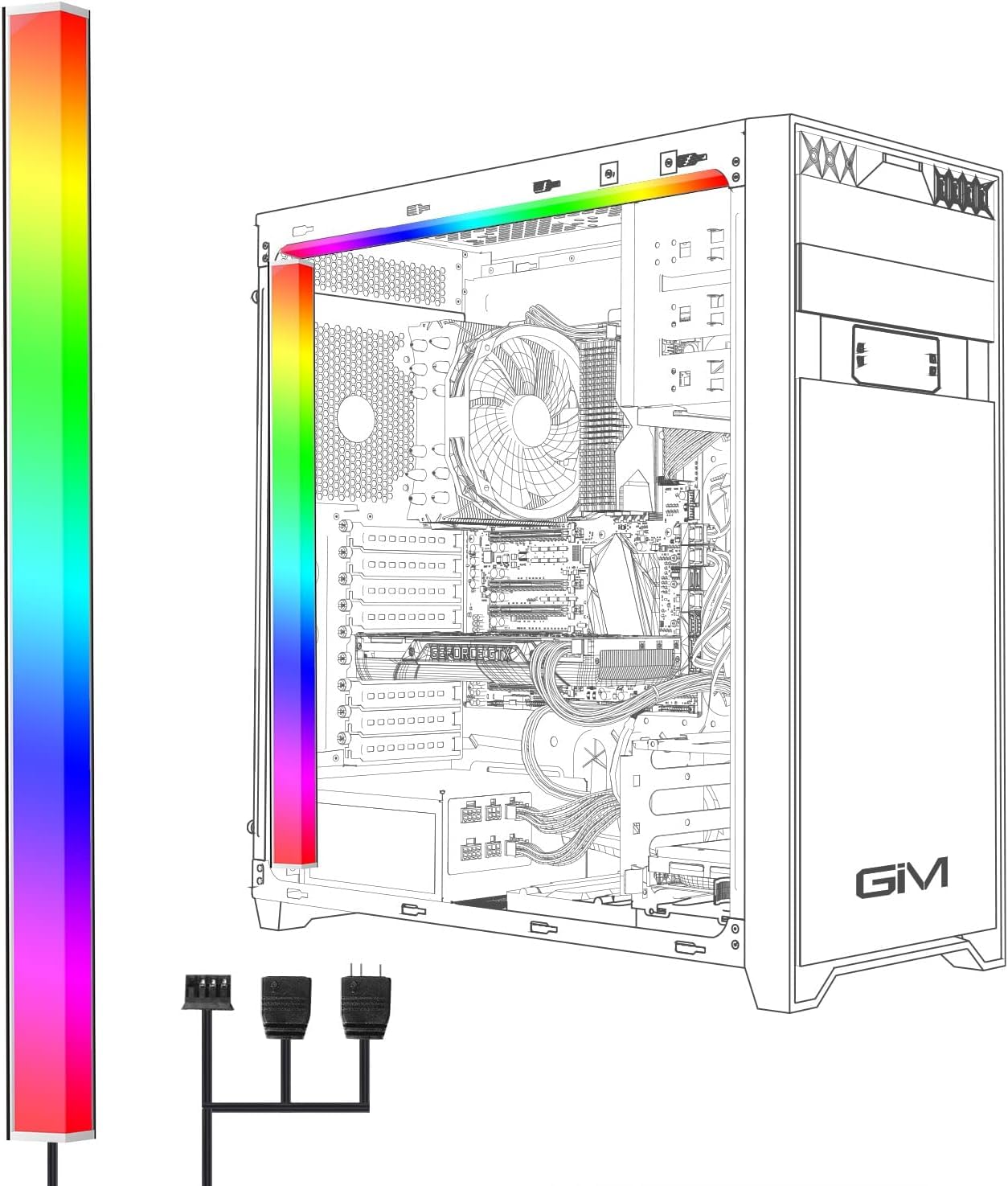
If you want the shortest possible path from box to glow, the GIM bar is built for exactly that. It is a rectangular bar 11.81 inches long with magnets on both sides, so it drops onto your case floor or side rail and holds. Two ways to control it: run it into the GIM hub through a 4-pin header, or straight to your motherboard’s 5V ARGB 4-pin header. Owners describe the install as plug and play, and the light runs corner to corner across the bar.
The build is the thing that gets talked about most, and it holds up — the whole unit feels solid in hand and the metal body stands up to being moved around inside a case. It is 11.81 inches, which is the same length as the airgoo above, so both cover a comparable floor run. A small ARGB header means it fits other brands’ hubs too, which is handy if you already own one.
The honest caveat: a couple of units have been reported to quit after about a week, which is a reliability gamble you are taking on a budget bar. Also, the last stretch of the bar can go dark — one owner measured the dead zone at the final two inches. Neither is universal, but confirm your return window before the install is permanent.
The read: a magnetic bar that gets you lit in minutes. Brightness, appearance, and build quality all come in positive, and the connector fits a range of ARGB hubs without fuss.
The trade: the light does not always reach the very end of the bar, and there are reports of early failures. Snag a warranty-friendly order and check the full length the day it arrives.
Best for: builders who want a magnetic bar that connects to an existing ARGB hub or a motherboard 5V header without extra wiring.
Think twice if: you want an evenly lit bar all the way to the tip or need a remote controller in the box.
3. DS leddess RGB LED Strip Computer Lighting
No ARGB header required — this kit runs off SATA power and a remote, so any board can drive it.
Not every motherboard has a spare 5V header, and that is where the DS leddess kit earns its place. It powers from a SATA cable straight off your power supply, so it works with any build. You get two 30CM strips with magnets built in, a 24-key remote, an IR receiver box, and a 4-pin extension cable — a complete kit for a case floor. The remote gives you 4 dynamic modes and 16 static colors, with no software to configure.
On top of the remote, the kit supports software control through Asus Aura or MSI Mystic Light, so you can sync it with the rest of the build later if you want. The flexible strip bends easily, which makes it handy for tucking around a bottom chamber or angling up toward the GPU.
The catch is the remote setup. Owners use words like “nice and bright” to describe the output, but a few note the strips do not always remember their last setting — colors can switch on their own after a reboot. Brightness and color control both land in mixed territory for that reason. If you set one color and leave it, the remote is enough; if you want saved lighting scenes, a motherboard-synced strip is the better fit.
Choose it when: your board has no ARGB header and you want remote color control on a SATA-powered strip.
The catch: settings may not survive a power cycle, so treat the saved scene as a bonus rather than a guarantee.
4. Speclux Addressable PC RGB LED Strip 2Pcs
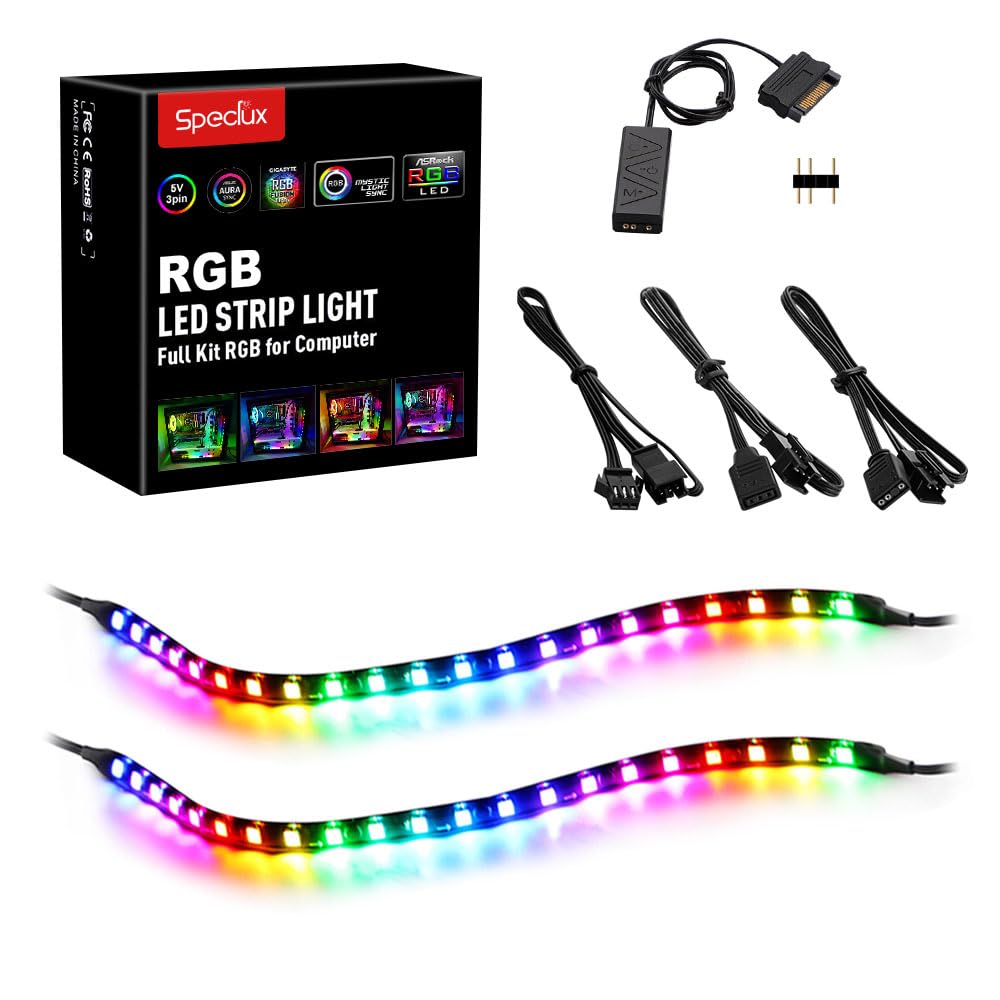
Two long magnetic strips that let you light the floor and the front edge at once.
One strip rarely covers a full case bottom, and the Speclux two-pack solves that in one box. Each strip measures 13.7 inches with 21 addressable LEDs, and you get a remote, two extension cables, and a 5V SATA connection cable to link them. That is a lot of reach for a bottom-mounted setup — run one along the floor and one up the front rail, or put both strips on opposite sides.
These are 5V 3-pin strips that work with Asus Aura, Gigabyte RGB Fusion, MSI Mystic Light, and ASRock RGB LED, so your board controls the color. You get five brightness levels in static mode and adjustable speed in dynamic mode, which is more fine-tuning than most kits at this level. Owners call the individual control amazing and note the strips can light a full tower effectively.
The mixed note is the magnets. Owners find them weaker than they would like — the strip can slide or sag on a smooth floor. The included double-sided adhesive is the fix, and most people just peel and stick instead. Worth knowing: 21 LEDs is fewer per strip than the airgoo’s 30, so the light on a single strip is less fine-grained, but you are getting two strips to its one.
What buyers lean on
- Two 13.7-inch strips cover floor and edges from one kit
- 21 addressable LEDs per strip with individual control
- Works with the major motherboard lighting suites
- Five brightness levels and adjustable animation speed
Where it bends
- Magnets are weaker than the strip deserves
- Fewer LEDs per strip than a premium bar
- You will lean on the adhesive tape for a flush bottom mount
Pick this if: you want two strips of addressable color to cover a wide case floor in one purchase.
Pass if: you want the strongest magnetic grip from the start — plan to use the tape on this one.
5. AsiaHorse ARGB Light Strip

Short bars built for cramped mATX floors where standard strips are simply too long.
Tight builds are the whole point of the AsiaHorse. Each bar runs 9.4 inches with 24 addressable LEDs split between them, designed to sit short and shadow a Micro-ATX layout without jamming against the side panel. Installation is a screw-down job on the standoffs: set the strip in place, plug in the connector, and screw it down. No tools beyond that.
Compare it to the GIM bar at 11.81 inches — the AsiaHorse is the shorter option by a noticeable margin, which matters most in a small case. It works with Asus Aura Sync, Gigabyte RGB Fusion, MSI Mystic Light Sync, ASRock Polychrome Sync, and SignalRGB, so software support is broad. The diffused color design keeps the effect smooth rather than harsh.
Honest size-up: the brightness and color quality split in the reviews. Some buyers find it bright and vivid, others say it is dimmer than expected, and a handful report one side failing after a stretch of use. The plug can be tight on some boards too. It is fine for accent lighting, but if you want maximum output, the airgoo’s brightness is the safer bet.
Why it fits: 9.4 inches with 24 addressable LEDs, purpose-built for mATX cases where length is the problem.
Why it might not: brightness is inconsistent across units and reliability is a mixed bag. Buy it as an accent, not a primary light source.
Suits: small-form-factor builders who need a short, screw-down bar and use motherboard sync for color.
Look elsewhere if: you need proven brightness and rock-solid reliability above all else.
6. Speclux PC RGB Strip 3pcs

Three bright strips for the many builds that only have a 12V 4-pin header to spare.
Plenty of motherboards skip addressable headers and only offer the older 12V 4-pin. If yours is one of them, this Speclux set is the practical answer. You get three 11.5-inch strips, seven magnets per strip, and a 12V 3-way splitter cable to chain them off one header. Run one along the bottom, one up the back, one across the front — full-case coverage from a single connection.
The value read is strong. These strips work like pricier equivalents and are among the cheapest in their class, which is why owners call them a no-brainer for budget builds. Brightness is the standout, and the full control of color through your motherboard software is easy to set up. With a mid-tower, three strips give you room to light the floor and still have coverage left over.
Two things to know before you buy. First, these are 12V strips — no addressable per-LED effects, so every LED shows the same color at once. If you want flowing gradients, go with a 5V ARGB strip like the airgoo above. Second, the magnets are mixed in the reviews and the adhesive gets mixed feedback too, so a clean, dry mounting surface is essential for a secure hold.
The wins
- Three 11.5-inch strips bring full-case coverage
- Works with Asus Aura, Asrock, Gigabyte Fusion, and MSI Mystic Light
- Seven magnets per strip plus a 12V splitter in the box
- Ringed brightness and color control straight from your board software
The caveats
- 12V means one color per strip, no per-LED gradients
- Magnets and adhesive both get mixed marks
- You need a free 12V 4-pin header on the board
Right call for: a 12V-only board where you want three strips of bright, synced color covering the whole case.
Wrong tool if: you have a 5V ARGB header and want those individual color effects — this is not that strip.
7. BTF-LIGHTING WS2812B IC PC Light Strip

Four long strips you can literally snip to length — the pick for custom floor runs.
When no pre-cut strip fits your case’s floor exactly, the BTF-LIGHTING set ends the guessing. You get four 19-inch WS2812B strips, each one cuttable between every LED, so you can dial in the exact run for your bottom panel. That is 76 inches of addressable lighting in total, and they chain together if you want a continuous loop under the shroud.
Per-LED control means rainbows, waves, breathing, and music-sync effects, controlled through a 5V 3-pin ADD header on your board. Owners light up gaming rigs and electronics projects alike, and the included cables get the job done. The IP30 rating means these are dry-area only — fine for a PC case interior, not for anything that gets splashed.
The warnings here are real and worth repeating. These run on 5V and must never touch a 12V RGB header, or the whole strip is destroyed. Reliability and adhesive both land mixed in owner reports — some strips arrive with a dead section, and the tape’s grip varies. The double-sided adhesive works best on a newly cleaned surface; wipe the floor with isopropyl and let it dry first.
What it brings: four 19-inch cuttable addressable strips for exact-length floor runs, with strong brightness and smooth color.
What to watch: the connector shape may not match some hubs, and adhesive grip is inconsistent. Keep it on dry flat metal and clean before you stick.
Best for: custom builders who want to cut strips to exact lengths for an irregular bottom chamber.
Not for: anyone who wants a plug-and-play single bar or has only a 12V header to connect to.
8. EZDIY-FAB Premium LED Strip Kit

The kit that actually handles corners, with clips for 90-degree turns and uneven surfaces.
Most strips fight a bottom chamber because the case has angles. The EZDIY-FAB kit is built around that: it ships with three kinds of mounting brackets — 90-degree, 180-degree, and flat — plus 3M adhesive, so you can shape the light to the case instead of forcing the strip flat. Two 400mm diffused strips run 40 LEDs per strand, and the light-diffusing casing blends it into a continuous glow.
These are 5V ARGB strips for your motherboard header, and daisy-chaining means both strips can run off one connection. Owners say the bend reaches tight corners well and the light is bright enough that some had to dial brightness down to 40% to match other LEDs. If you have a glass side panel and want the bottom of the case to read cleanly, that extra output helps.
The one fiddly bit is the 3M adhesive — getting the protective backing off can be stubborn, so set aside a few minutes and a little patience at install. Beyond that, the flexible build and the mounting clip variety make it the most adaptable kit in this batch for awkward case geometry.
Why it stands out
- 90, 180, and flat mounting clips fit any case angle
- Two 400mm diffused strips with 40 LEDs each
- Bends to follow curved or uneven surfaces
- Daisy-chains both strips off one 5V ARGB header
Small snags
- The adhesive backing is tough to peel
- Brightness can overwhelm if not dialed down
- 5V only, so no 12V boards
Worth it when: your bottom chamber has bends and straight strips keep peeling up at the corners.
Skip if: you hate fiddly adhesive and want a bar that drops in with magnets alone.
Know the Specs
5V ARGB vs 12V RGB headers
A 5V 3-pin ARGB header controls each LED separately, so a strip can show gradients, waves, and per-bead color. A 12V 4-pin RGB header runs the whole strip in one color at once. They are not cross-compatible; a 5V strip wired to a 12V header can be permanently damaged. Check your motherboard manual for the header type before you buy.
LED count and spacing
More LEDs packed tighter creates a smoother, less-dotted wash of color. A strip with 30 LEDs across 11.81 inches spaces them closer than one with 21 LEDs across a similar length. That density matters most for smooth gradients, and less for solid single-color glow.
Magnetic vs adhesive mounting
Magnets suit any steel surface and let you reposition without residue, but strength varies by strip. Double-sided adhesive holds firm on clean, dry metal, though it can be stubborn to peel and leaves less room for error. A kit with both magnets and tape lets you pick per surface.
Daisy-chaining and splitters
Many kits include a 1-to-2 splitter or extension cables so multiple strips run off one header. That keeps your cable runs tidy along a bottom chamber. Check that the total current of chained strips stays within what your header can supply.
Common Questions
Can I plug a 5V ARGB strip into my 12V RGB header?
What is the difference between a 3-pin ARGB and a 4-pin RGB header?
Will a magnetic strip hold on the bottom of my case?
How many LEDs do I need to light the bottom of a full tower?
Can I cut these strips to fit my case?
Do I need a separate controller if my motherboard has ARGB?
Why does one end of my strip stay dark?
Will the adhesive hold under case heat?
Can I connect two strips to one ARGB header?
What does IP30 mean on an LED strip?
The Bottom Line
For most builds, the rgb insert for bottom of pc case winner is the airgoo Addressable RGB PC LED Light Bar because its 30 addressable LEDs across an 11.81-inch bar deliver a smooth, diffused glow that reads as one band rather than a row of dots. If your board only has a 12V header, grab the Speclux PC RGB Strip for three strips of bright single-color coverage. And for a bottom chamber full of angles, the EZDIY-FAB Premium LED Strip Kit is the one to reach for — its 90, 180, and flat clips shape the light to the case. Match the header first, secure the mount second, and the floor of your case lights up clean.
How we choose
We do not accept paid placement. Every pick is matched to a real buyer and a real use-case; we do not hands-on test units.
Sources
Specifications: manufacturer listings and product documentation. Review insights: verified customer reviews, as of November 2026. Pricing: not shown on this page (it changes often); check the current price via the retailer link.
As an Amazon Associate, Tactical Gear Guy earns from qualifying purchases. This does not affect which products we feature.