Specs are compiled from manufacturer listings and verified buyer reviews and can change over time — please confirm the key details on the product page before buying.
Buying an Asus replacement battery is mostly a fit question, not a shopping question. The one you want is the one whose part number and voltage match the battery already inside your laptop — everything else is secondary. The short answer: the mid-range X550 pack is the most proven pick here, while VivoBook 14, TUF Gaming and Zephyrus owners each need their own specific model. Here is the whole field, sorted so you can match your machine and stop overpaying.
This guide is built by comparing the manufacturers’ published specifications and the patterns across verified customer reviews, so you get each pick’s real strengths and trade-offs instead of marketing spin.
A part number, the voltage and the watt-hour rating decide whether a battery drops in cleanly, and a mismatch in any of the three is what turns a cheap fix into a return. That is the whole game with the replacement battery for asus laptop hunt.
Top Picks


How To Choose The Right Replacement Battery for Asus Laptop
Most people buy the wrong Asus battery for one reason: they search by the laptop’s marketing name instead of the code printed on the pack itself. Asus uses different batteries across models that share a name, and it sometimes uses two incompatible batteries under one part-number family.
Start with the code, not the model name
Flip the laptop over, open the back cover, and read the part number stamped on the old battery. A pack marked C21N1818-1, for example, will not accept a C21N1818 — those two are different shapes and different connectors despite near-identical names. Write the code down exactly and match it against the listing’s compatibility list before you buy anything.
Match the voltage and the cell count
Voltage is the figure your laptop’s charging circuit expects — 7.6V, 11.4V, 14.8V or 15V depending on the machine. A pack at the wrong voltage either reads as unknown or refuses to charge. Cell count (2-cell, 3-cell or 4-cell) shapes the physical pack, so it decides whether the battery sits flush in its compartment.
Compare watt-hours, not just milliamp-hours
A battery’s real energy is its watt-hours (Wh), which combines volts and capacity. Two packs can list wildly different milliamp-hour numbers and still store similar energy, because higher-voltage packs need fewer amp-hours to hold the same charge. If you want to compare run time across two listings, compare the Wh figures side by side.
Expect a calibration cycle
Many replacement packs need a wake-up ritual: discharge to a low percentage (not to zero), then charge fully, and repeat a few times. Several of the makers here print that instruction in the box, and it is normal — the laptop has to learn the new battery’s full and empty points.
Side-by-Side Comparison
| Model | Best For | Capacity (Wh) | Voltage | Cell Type | Amazon |
|---|---|---|---|---|---|
| Futurebatt A41-X550 (X550 / K550 series)★ Best Overall | Aging X550 and K550 family laptops | —(2200mAh, 4-cell) | 14.8V | Li-ion | Amazon |
| Mobik B31N1912 (VivoBook 14)Top Performer | VivoBook 14 E410 / L410 / L510 | —(42Wh, 3550mAh) | 11.55V | Li-ion | Amazon |
| BRTONG B31N1726 (TUF Gaming) | TUF Gaming FX504 / FX505 / FX80 | —(48Wh, 4100mAh) | 11.4V | Li-ion | Amazon |
| Dentsing C21N1347 (X555 series) | X555 / A555 / F555 laptops | —(38Wh, 7280mAh) | 7.6V | Li-ion | Amazon |
| JIAZIJIA A41N1501 (Rog G752 / GL752) | Rog G752, GL752, N552, N752 | —(48Wh, 3100mAh) | 15V | Li-ion | Amazon |
| ZTHY C41N1837 (Zephyrus GA502) | Zephyrus GA502 / GU502 / GX502 | 76Wh (4-cell) | 15.4V | Li-Polymer | Amazon |
| Dentsing C21N1818-1 (VivoBook 15) | VivoBook 15 F512 / X512 / S512 | —(37Wh, 4850mAh) | 7.7V | Li-ion | Amazon |
Detailed Reviews
1. Asus X550 Series A41-X550 Battery
Our pick — 4.0+★ from 900+ verified ratings; the strongest balance of quality and price.
A drop-in 14.8V, 4-cell pack that revives a dead X550 without a repair-shop visit.
This is the battery for the sprawling X550 family — X550, X550A, X550C, X550D, X550E, X550X and the A550, F550, F552, K450, K550, P450, P550, R409, R510 and X452 lines. It is a 4-cell Li-ion pack rated 14.8V at 2200mAh, and it is built to the same footprint as the original, so it drops into the same cavity and uses the same connector.
It holds the highest score in the group at 4.0+ stars across 900+ ratings, and the crowd favorite status is earned on fit and function rather than raw capacity. What wins people over is how well it matches the original shape — the pack seats flush, the connector lines up, and the laptop behaves as though nothing was ever swapped. Value runs a close second in owner feedback: it is widely described as an inexpensive fix for a laptop that otherwise still works fine.
Here is the trade-off worth knowing before you commit. Run time is the most-discussed topic in owner feedback, and it cuts both ways — some packs hold up for a long stretch, but a share of buyers find the charge fades badly after a couple of months. Against the C21N1347 lower in this list, this pack’s 2200mAh is the far smaller capacity figure, so if raw stamina is your priority and your laptop takes the 7.6V C21N1347 instead, that model is the stronger pick. For X550 owners there is no such choice — this is the correct pack.
Buyers also single out the install as a five-minute job: no tools beyond a small screwdriver, and the pack seats without force. The maker backs it with a 12-month replacement warranty and claims up to 600 recharge cycles, the figure that matters if you charge daily.
What earns it the top slot
- Drop-in footprint matched to the original pack, so no bracketry or trimming
- 14.8V, 4-cell build gives the voltage stability the X550 chassis expects
- Covers a wide spread of X550, A550, F550, K550 and R510 models
- 12-month replacement warranty and a claimed 600-cycle service life
- Works out as a low-cost way to keep a working laptop in service
The catch to weigh
- 2200mAh is modest — this restores the laptop, it does not extend run time beyond original
- Charge retention after a few months is the split point in owner experience
- Will not fit VivoBook, TUF Gaming or Zephyrus machines — those take different part numbers
Best fit for: anyone with an X550-family, A550, F550, K550 or R510 Asus whose original pack has stopped holding charge.
Look elsewhere if: your battery code reads C21N1347 or anything outside this list — the X550 pack is the wrong shape for those machines.
2. Mobik B31N1912 Battery
VivoBook 14 owners get the highest-energy pack in this lineup, at 42 watt-hours.
If the sticker on your VivoBook reads B31N1912 or C31N1912, this 3550mAh, 42Wh, 3-cell Li-ion pack is the direct swap. It covers the VivoBook 14 E410, E410MA and E410KA lines, the L410 family, the F414MA, the E510 and E510KA, and the L510 and L510MA series.
Reliability is what people talk about most with this one — the pack is repeatedly described as behaving like a factory part rather than a knock-off. Battery quality is the second theme, backed by the maker’s claim of grade-A cells rated for up to 500 recharge cycles. Installation lands as the third recurring theme, partly because a screwdriver kit comes in the box so there is no dash to the tool drawer.
Now the part to plan around. Run time is the one split subject: some VivoBook 14 owners get close to a full 6-hour working stretch, while others find it drops to around 90 minutes. The maker’s own instructions explain part of it — a new pack may need a discharge to 5% (not flat), then a full charge, cycled 3-4 times before the laptop reads it properly. If your first-day numbers look poor, finish those cycles before judging it.
It carries UL, CE, FCC and RoHS certification with short-circuit, overheat and overload protection built in, plus a 1-year manufacturer warranty. At 42Wh it holds more energy than the A41N1501 flagship pack lower in this list — 42Wh versus 48Wh is a closer race than the mAh figures suggest, so compare watt-hours before assuming one is bigger.
Where it shines: a complete kit — battery plus screwdrivers — for a VivoBook 14 that has stopped charging, with a 1-year warranty behind it and 42Wh of usable energy on tap.
The honest wrinkle: the battery percentage may misreport until you complete the maker’s activation cycle, and the 11.55V output only suits the VivoBook 14 chassis it was built for.
Reach for this if: your VivoBook 14 carries a B31N1912 or C31N1912 pack and you want the biggest watt-hour figure in the group.
Not your part if: you own a TUF Gaming or Zephyrus machine — both take different batteries with different connectors.
3. BRTONG B31N1726 Battery
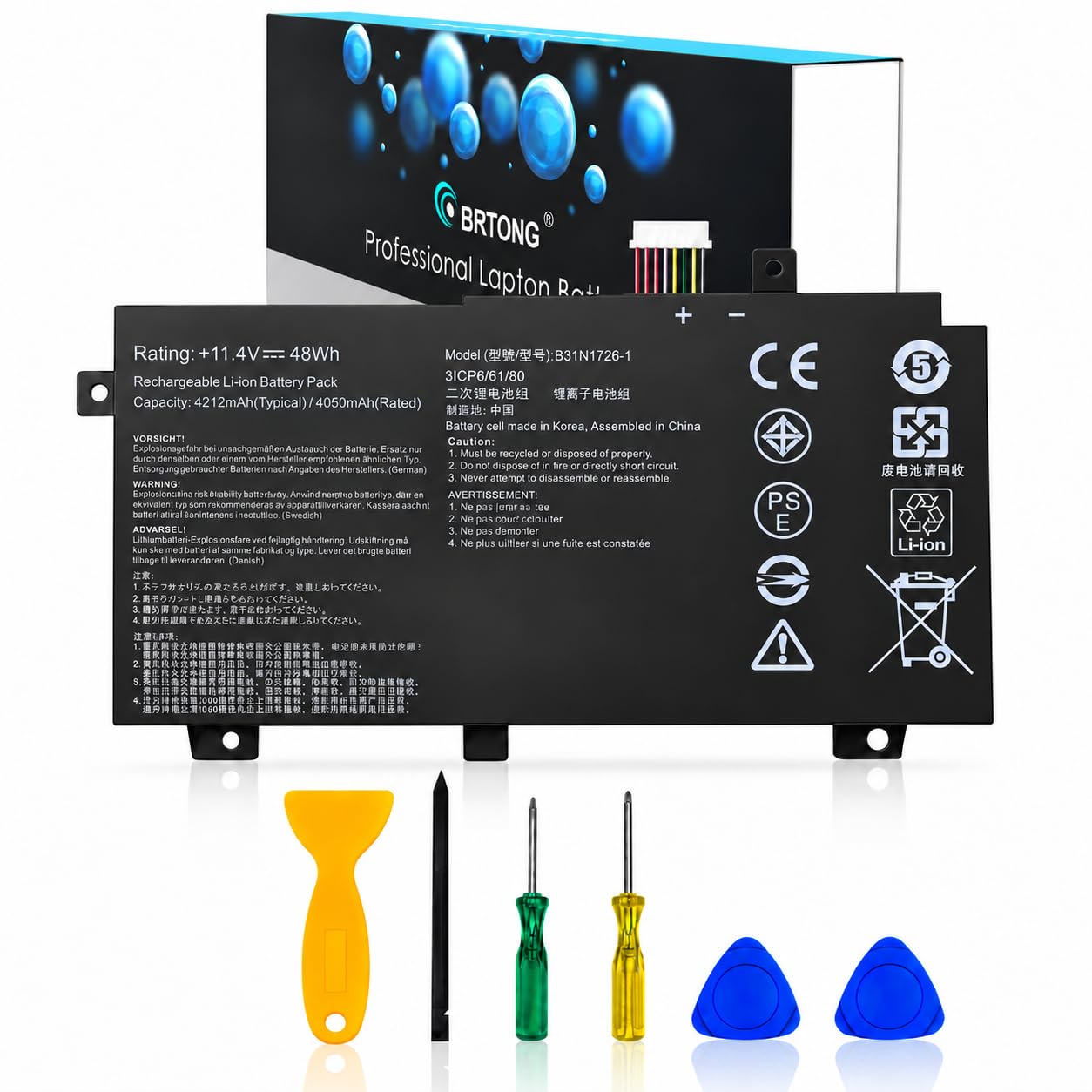
Built for the TUF Gaming family that lives plugged in but still needs a working cell.
TUF Gaming FX504, FX505 and FX80 owners — plus the A15 FA506 line — get their own pack here: 48Wh, 4100mAh, 11.4V, in a black 3-cell body. It replaces the B31N1726 and cross-references 3ICP7/60/80, 0B200-02910000 and 0B200-02910200.
Reliability leads the conversation with this battery — the pattern is a TUF rig that runs on battery the way it did when new, fan noise and frame rates included. Owner feedback on quality agrees, and the maker uses grade-A cells plus a built-in circuit-protection board to steady output. That circuit protection matters on a gaming laptop that pulls hard and runs hot.
The honest limit: run time is the mixed line. A stretch of 6-10 hours shows up in some accounts, and a pack failing inside three months shows up in others. That is the nature of aftermarket cells, and the 12-month warranty is the safety net if your unit lands in the second camp. For a machine that mostly sits on the desk plugged into the wall, that risk is small.
Do the compatibility check first — TUF Gaming and the plain FX80 series share this code, but an FX505GT needs confirmation against its exact model number before you buy. Support quotes a 24-hour email response, useful if the first install throws a not-recognized warning.
The value read: 48Wh of energy in the correct 11.4V form for a TUF Gaming chassis, with grade-A cells and circuit protection, all wrapped in a 12-month warranty.
What to keep in mind: gaming laptops are hard on batteries, so expect the pack to serve as a backup for plugged-in play rather than a full all-day untethered run.
Pick this one: when your TUF Gaming FX504, FX505 or FX80 has lost its charge and you want the correct 48Wh replacement.
Keep shopping if: your machine is a VivoBook — this pack will not physically connect to those models.
4. Dentsing C21N1347 Battery

The X555 replacement that carries the biggest milliamp-hour number in this lineup.
For X555, X555LA, X555LD, X555LN, X555LJ, X555LP and the A555 and F555 lines, this 38Wh pack at 7.6V and 7280mAh is the matching part. It also cross-references 2ICP4/63/134 and PP21AT149Q-1.
Functionality is the runaway strength here — the pack behaves as a direct replacement, and the install runs about 10 minutes with a small screwdriver. On the raw numbers, 7280mAh is the largest milliamp-hour figure in this entire group, versus 2200mAh in the X550 pack at the top. The lower 7.6V is why: fewer volts means more amp-hours to store the same energy, so do not read the big number as double the run time — both packs sit in the same general class.
Battery quality is the second most-mentioned subject with this model, and the pattern is owners who find it better than the original they pulled out. Value is the third thread — the price-to-capacity relationship lands well. Where it gets murky is run time: some X555 buyers report an extremely noticeable upgrade over their dying original, while others find the improvement modest. If your old pack was holding 20 minutes, almost any working replacement will feel like a leap.
You get 30 days for a refund and a 12-month warranty handled through the seller, so keep the order email — Amazon’s own return window closes at one month, but the seller channel stays open longer. It is a sensible pick for an X555 that is otherwise sound.
Reasons it earns the mid spot
- 7280mAh is the highest milliamp-hour rating in the lineup
- Direct-replacement fit for the X555 and A555 families, roughly a 10-minute swap
- Seller-backed 30-day refund plus 12-month warranty
- Owners regularly call it an upgrade over the original pack
- 38Wh of energy in a lighter 100g body than most rivals here
Points to think through
- 7.6V is specific to the X555 family — wrong for X550 or VivoBook machines
- 7.6V at 7280mAh does not equal double the run time of a 14.8V 2200mAh pack
- Run-time results vary; some buyers see only a small gain over their old battery
Made for: X555 and A555 owners who want the highest capacity number on the shelf and don’t mind a 7.6V-specific part.
Wrong turn if: your laptop is a VivoBook 15 or a TUF Gaming — those need the C21N1818-1 or B31N1726 instead.
5. JIAZIJIA A41N1501 Battery

The higher-voltage Rog pack — 15 volts is the number that rules this one in or out.
This is the 15V, 48Wh, 3100mAh A41N1501 pack for the Rog G752VW, GL752 and GL752JW, plus the N552 and N752 series. It swaps in for A41N1501, A41LK9H and L41LK2H part numbers, and it is a plug-and-play Li-ion design.
Installation is easy and the fit is right, and the positive thread is that the laptop boots clean on the new pack without any warnings or BIOS messages. Getting a Rog to accept a third-party battery without complaint is the real test, and this one passes it.
The caution is on run time. Some owners find it holds charge like the original, while others find it drains and will not hold at all — that split is the most-discussed topic with this battery. Value is a second, milder mixed note. Plan on buying from a listing with a clear return policy so an under-performing unit is easy to swap.
Before you install, read the manual and check that the model code on your original pack matches the new one. The G752 pack weighs 183g, which is heavier than the X555 pack’s 100g frame. More importantly, the G752 pack is a different shape entirely, so don’t expect it to drop straight into an X555.
What it does best: 15V, 48Wh and 3100mAh matched to the Rog G752 and GL752 chassis, with a plug-and-play install that boots clean.
Honest caveat: the run-time story is a coin flip, so treat it as a like-for-like replacement and keep a return option open.
Go with it when: your Rog G752 or GL752 carries an A41N1501, A41LK9H or L41LK2H part number and needs a 15V pack.
Step back if: you own a Zephyrus — that takes the 15.4V C41N1837 below, not this one.
6. ZTHY C41N1837 Battery

A 76 watt-hour pack that out-holds everything else on this list by a wide margin.
Battery type tells you a lot here: Li-Polymer rather than Li-ion, 15.4V, and a 76Wh, 4-cell build for the Zephyrus GA502, GA502D, GA502DU, GA502GU, the GU502 line, and the GX502 and GX532 series. It also fits the TUF DASH F15 FX516PR and ProART StudioBook 15 H500GV machines.
Performance is what owners rave about, with the new pack behaving like the factory one, and quality is the second thread. The connector on these Rog boards is short and awkward to seat, so this maker added an extended guide tab, and that shows up as a real-world installation win.
The honest wrinkle: run time is the split point. Some Zephyrus owners see 5-10 hours, while others hit a pack that stops charging after a few hours. If yours lands badly, the maker’s activation tip covers it — discharge to 10-20% (never 0%), charge fully, repeat 3-4 cycles, and recheck the connector seating. That resolves most not-recognized cases.
You get two screwdrivers in the box, so the swap runs in minutes with nothing extra to buy. On price-to-energy this is a premium option priced in line with a gaming-grade pack. If capacity is your goal and your machine takes the Zephyrus code, this wins on the raw number.
Why the price tag holds up
- 76Wh is the largest energy rating in the whole group
- Li-Polymer chemistry in a 15.4V, 4-cell form for Zephyrus boards
- Extended connector guide makes alignment easier on tight Rog chassis
- Two screwdrivers included — no extra tools needed
- Fits Zephyrus, TUF DASH F15 and ProART StudioBook 15 models
The buyer’s trade-off
- Charge stability is the open question; a share of units stop charging inside a few hours
- Needs a calibration cycle before it reads correctly
- 15.4V and a specific connector mean it’s Rog-only — not a universal pack
The right buy for: Zephyrus GA502 or GU502 owners who want maximum watt-hours and the smoothest install in the series.
Think twice if: your laptop is a G752 or GL752 — that takes the 15V A41N1501, not this 15.4V pack.
7. Dentsing C21N1818-1 Battery

The VivoBook 15 part with a hyphen sensitivity problem you must check first.
Read the warning carefully: C21N1818 and C21N1818-1 are different batteries that will not swap. This listing is the hyphenated -1 version, at 7.7V, 37Wh and 4850mAh, for the VivoBook 15 F512 and X512 series, the R564, K512, S512 and A512 lines.
Battery life is where this one earns its place — the new pack runs the laptop like new, and exact-match fit is a strong thread. The compartment takeup is snug with no rattle, and the install is genuinely simple. The maker includes tools to make that easy. Quality is the second strong thread, and owners regularly describe it as better than the original pack they pulled out. On the raw spec, 37Wh and 4850mAh sit at 7.7V — a different voltage point from the 14.8V X550 pack at the top, so treat the mAh numbers as non-comparable across those two models.
The recurring gripe is the naming trap, not the battery itself: buying a C21N1818 when your laptop needs a C21N1818-1 is the mistake buyers make. Durability is a mild mixed note, so a pack that loses capacity faster than expected is possible but not the norm. Seller-side service covers 30 days for a refund and a 12-month warranty via the store, so keep the receipt.
For VivoBook 15 owners who get the hyphen right, this is the exact match. Double-check the part number on the old pack before you add it to the cart — the difference is one character, and it is the difference between a working fix and a return.
The standout: 37Wh, 4850mAh at 7.7V in an exact-match body for VivoBook 15 F512 and X512 machines, with tools included and a snug compartment fit.
The one caution: the C21N1818 and C21N1818-1 are not interchangeable — confirm your code before ordering, or you will be packing it back up.
Best for: VivoBook 15 owners whose original pack reads C21N1818-1 and who want a snug, exact replacement with tools in the box.
skip it if: your pack reads C21N1818 without the -1 — you need the other version of this battery.
Know the Specs
Watt-hours (Wh) vs milliamp-hours (mAh)
Watt-hours are the real measure of how much energy a pack stores. Milliamp-hours only mean something alongside the voltage: a 7.6V pack can list a bigger mAh number than a 14.8V pack and still hold similar energy. When you compare two listings, line up the Wh figures to see which pack truly runs longer.
Voltage match
Voltage is the figure your laptop’s charging circuit is built around — commonly 7.6V, 7.7V, 11.4V, 11.55V, 14.8V, 15V or 15.4V depending on the machine. A pack at the wrong voltage may not be recognized, may fail to charge, or may not physically seat. Always match the voltage stamped on the original battery.
Cell count and pack shape
A 2-cell, 3-cell or 4-cell pack has a different thickness and mounting arrangement. Cell count determines whether the battery sits flush in its bay. It also shapes the pack’s weight: here they range from 100g to 300g, which matters on thin laptops more than thick gaming rigs.
Part number and certification
The part number on the old battery is the single most reliable buying guide — C21N1818 and C21N1818-1 are different products. Look for CE, RoHS, FCC or UL certification on the listing; those marks mean the pack has been through basic safety testing for short circuits, overheating and overload.
Common Questions
How do I find the right battery for my Asus laptop?
Will a C21N1818 battery work in a laptop that needs a C21N1818-1?
Is a higher mAh number always a bigger battery?
My new Asus battery isn’t being recognized — is it defective?
How long does a replacement Asus battery last before it needs replacing again?
Can I use the same battery in a VivoBook 14 and a TUF Gaming FX505?
Do replacement Asus batteries come with the tools I need?
Is a Li-Polymer Asus battery better than a Li-ion one?
What does the 12-month warranty actually cover?
Will a replacement battery restore my Asus laptop’s original run time?
The Bottom Line
For most Asus laptop owners shopping this list, the winner is the Futurebatt A41-X550 because its 4.0+ star standing, 14.8V/2200mAh 4-cell build and drop-in footprint make it the best-proven X550-family fix in the group. If you want maximum energy in a thin-and-light, the Mobik B31N1912 gives VivoBook 14 owners 42Wh with screwdrivers included. And for a gaming rig, the ZTHY C41N1837 packs 76Wh into the Zephyrus bay.
To choose, match the part number on your old battery, confirm the voltage, and pick the pack built for that code. If two models both fit, buy the one with the longer warranty. Every option here carries a 12-month warranty, so a pack that fails to charge in year one is covered.
How we choose
We do not accept paid placement. Every pick is matched to a real buyer and a real use-case; we do not hands-on test units.
Sources
Specifications: manufacturer listings and product documentation. Review insights: verified customer reviews, as of November 2026. Pricing: not shown on this page (it changes often); check the current price via the retailer link.
As an Amazon Associate, Tactical Gear Guy earns from qualifying purchases. This does not affect which products we feature.