Specs are compiled from manufacturer listings and verified buyer reviews and can change over time — please confirm the key details on the product page before buying.
If you want to run a PC from the sofa, the thing that decides whether you succeed or give up is the remote in your hand. A mouse needs a flat surface, a keyboard needs your lap, and neither likes a ten-foot gap to the screen. The right remote turns your wrist into the cursor, keeps volume and playback under your thumb, and holds its connection across the room. Below are the nine remotes worth owning for that job, sorted by what each one is genuinely good at.
This guide is built by comparing the manufacturers’ published specifications and the patterns across verified customer reviews, so you get each pick’s real strengths and trade-offs instead of marketing spin.
The two families here — a presenter clicker or an air-mouse media remote — solve different problems, so the first job is matching the remote to the room, then checking range, buttons and connection mode. This breakdown of the remote for pc covers which one suits a sofa, a lectern, or a keyboard-free HTPC.
Top Picks


How To Choose The Best Remote for PC
Start with the job you actually want done. If you stand at a lectern and only need the next slide, a clicker with a laser pointer is the lightest, simplest tool. If you sit on a couch and need to move a cursor, launch apps and type a search, you want an air mouse with a gyroscope (a motion sensor that turns the tilt of your wrist into cursor movement). Pick the wrong family and no amount of extra buttons will fix it.
Connection type decides your setup pain
A 2.4G remote talks to the PC through a small USB receiver you plug in, and it works the moment you plug it in — no pairing menu. Bluetooth skips the dongle and frees up a port, but on Windows you need to pair it once, and one of the remotes here only works over Bluetooth on certain systems. If your laptop has two USB ports and you use both, Bluetooth is the friendlier choice.
Range, buttons and the gyroscope
Range is quoted as a maximum in feet or meters, and it is the spec that decides whether the remote reaches the back of a room or the far end of your sofa. Button count tells you how much control lives under your thumb: a five-button presenter covers slides only, while a thirty-four-button model adds a full QWERTY keyboard. The gyroscope is what makes cursor control possible at all, so check that it is listed before you assume a remote can act like a mouse.
Side-by-Side Comparison
| Model | Best For | Max Range | Connection | Buttons | Amazon |
|---|---|---|---|---|---|
| UBUYONE Presentation Clicker with Case★ Best Overall | Lectern and slide control | 328 feet | 2.4G USB receiver | — | Amazon |
| LBBYDDLL Powerpoint ClickerBest Value | Tight budgets | 50 meters | 2.4G dual USB-A/USB-C receiver | 5 | Amazon |
| BOXPUT BPR1S Plus Air MouseMost Versatile | Android box and PC monitor control | 10 meters | 2.4G + Bluetooth + IR | 10 | Amazon |
| Dupad Story G20S Voice Remote | Shield and HTPC setups | 32.8 feet | 2.4G USB receiver | 18 | Amazon |
| RUPA G20BTS Plus Backlit Remote | Dark rooms | 50 feet | 2.4G + Bluetooth 5.0 | — | Amazon |
| Dupad Story G20S Pro Plus | Voice + backlit combo | 10 meters | 2.4G + Bluetooth 5.0 | — | Amazon |
| Lenovo Portable Rechargeable Presentation Remote | Traveling presenters | 30 meters | Bluetooth 5.3 | — | Amazon |
| Pepper Jobs Fly Mouse | Full keyboard control | 10 meters | 2.4G USB receiver | 34 | Amazon |
| SilverStone ES02-PCIE | Power and reset only | 20 meters | 2.4G PCIe receiver | — | Amazon |
Detailed Reviews
1. Presentation Clicker with Case
Our pick — 4.5+★ from 150+ verified ratings; the strongest balance of quality and price.
A slide remote that reaches the back wall and points at the screen from there.
If your PC time is spent standing in front of a screen rather than sitting behind it, this is the one to grab. Two separate ranges tell the story: the buttons control the deck up to 98FT/30M, while the red laser pointer reaches 328FT/100M — so you can turn slides from the back of a hall and still put a dot on the exact chart you mean. That laser figure is the longest reach in this group; the G20S Voice Remote tops out at 32.8 feet.
What wins people over is that the buttons respond on the first press, every time. Plug the USB receiver in and the buttons respond as if you were pressing laptop keys, with page up/down, black screen on/off and laser on/off all sitting where your thumb expects them. There is no software to install and no driver hunting. The USB dongle stows in the end of the remote instead of under the battery door, which is the sort of small design choice you only appreciate when you are packing up in a hurry.
Two AAA batteries come in the box, so nothing extra is needed before a session. The soft-touch grip stays comfortable through a long talk, and the included drawstring bag keeps it clean in a laptop bag. The honest limit is scope: this is a presentation tool, not a cursor. There is no gyroscope, so it will not fly a mouse pointer around a Windows desktop or drive a media center. If you need couch control of a PC, look at an air mouse instead.
The reasons it takes the top spot
- 328 feet of laser reach — point at the screen from the back of the room
- Plug-and-play receiver that behaves like your laptop’s own keys
- Batteries and a storage pouch both included
- Dongle stores inside the remote, so it does not get lost
Where it stops
- No gyroscope — it cannot move a cursor on your desktop
- Slide and laser control only; no media or volume keys listed
Reach for it when: you present from a laptop or PC and want the slide deck under your thumb with a laser that hits the far wall.
Pass it by if: your goal is browsing a media library or moving a cursor from the sofa — this remote was not built for that.
2. Presentation Clickers Wireless Presenter Remotes
The entry-level clicker that still reaches the far end of the room and takes a USB-C laptop.
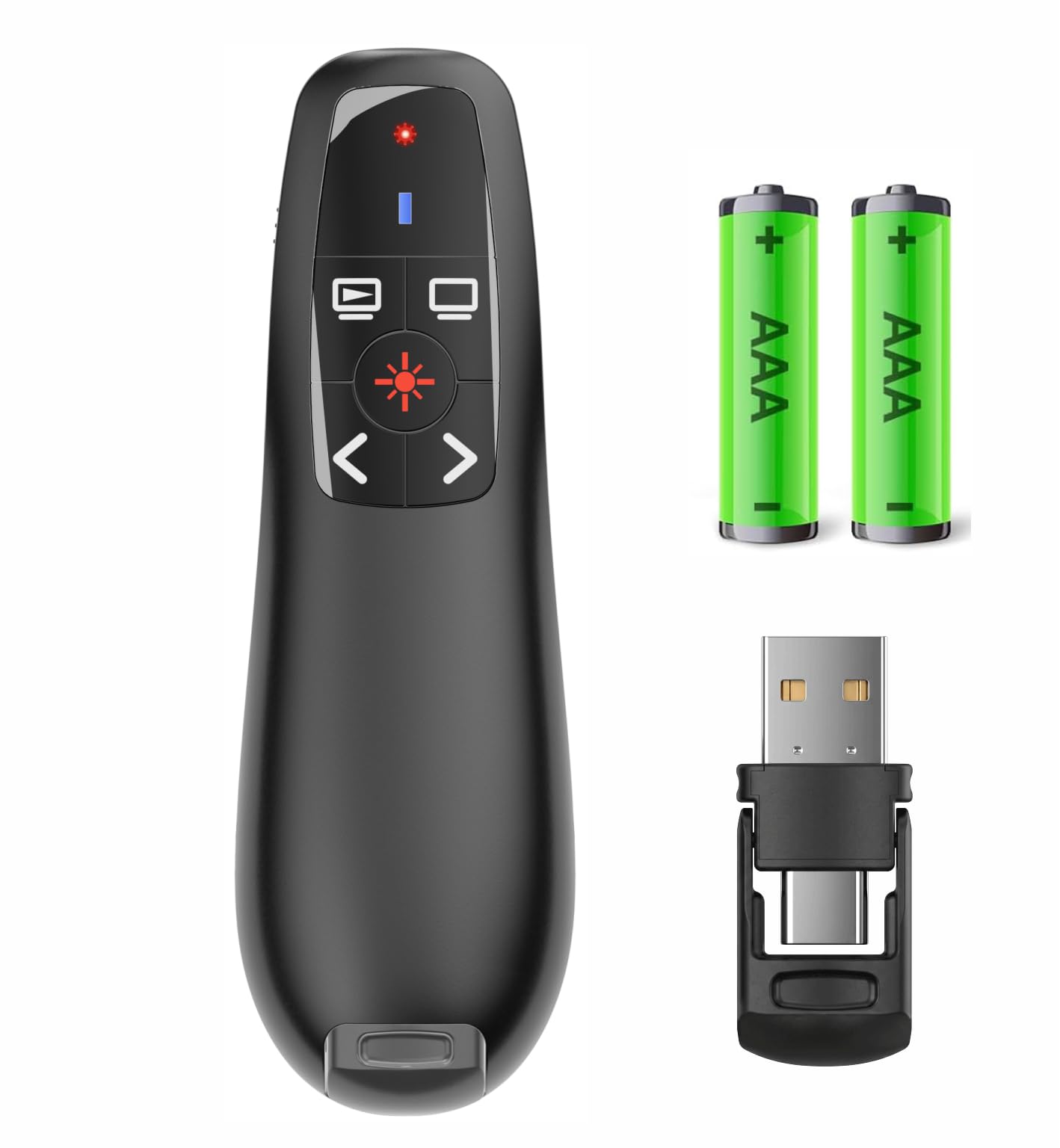
The detail that saves the most frustration here is the receiver: it carries both USB-A and USB-C plugs, so it plugs straight into a modern laptop with no adapter in the chain. Range runs up to 50 meters, and the buttons cover forward, back, start, end plus volume adjustment — five in total. That is five buttons against eighteen on the G20S Voice Remote, but for driving slides and nudging the volume it is the whole job.
Setup is a plug-and-play USB receiver with no software install, and the listing names support for Windows, Mac OS, Linux, Android and Chromebook, plus PowerPoint, Keynote, PDF, Word, Excel, Google Slides and Prezi. It runs on two AAA batteries that come in the box. In classroom and meeting use, buyers report the clicker “works well” in both settings — exactly the environment where a dead remote or an unrecognized dongle would be most awkward.
At two ounces, it disappears into a laptop bag until you need it. Be clear about what it is not: there is no laser pointer and no gyroscope, so it advances slides but will not point at them or fly a cursor. It is the sensible pick when the budget is tight and slides are the only task.
Pick it for: budget-minded presenters on a USB-C laptop who want reliable slide and volume control with batteries included.
Look elsewhere if: you need a laser to point at the screen or a cursor to control the desktop.
3. BOXPUT BPR1S Plus Air Mouse Remote
Wrist-tilt cursor control, voice search and a PC mode tucked behind two button presses.
This is the pick for someone who wants one remote to manage an Android box, a TV stick and a PC monitor. A 6-axis gyroscope turns the tilt of your wrist into cursor movement, so you can point at icons on screen without a mouse mat in sight. There is a dedicated PC firmware mode: hold the OK and Mouse buttons together until the indicator blinks, and the remote switches to computer-and-tablet duty. That PC mode earns it a place even though it lists 10 meters of range while the budget clicker covers 50 meters.
Voice input works through the built-in assistant, and in the 2.4G mode it is listed for Android TV and ATV devices, while Bluetooth mode reaches select sets like TCL Smart TV, Shield TV, HAKO mini and Google TV. Full IR learning means it can absorb the commands of the remote you are replacing. Setup is plug-and-play over the USB receiver — no drivers, no programming.
The fair warning is compatibility, and the listing is unusually candid about it. This remote does not work with Fire Stick, ROKU, MAG Box, Apple Box, DVB Box, or LG and Samsung TVs. Connections are the most-discussed topic in its feedback and split both ways — plenty of smooth setups, plus some that would not pair or had a stubborn center button. Check your device against that list before you buy; ignore it and you may be the one returning the remote.
The trade worth knowing: the PC switch and gyro cursor make it the most adaptable remote here, but the compatibility list is narrow and the connection stories are mixed, so confirm your box or TV first.
Best matched to: Android TV box and HTPC owners who want an air mouse with IR learning and a real PC mode.
Wrong tool for: Fire Stick, Roku or Samsung and LG TV households — the listing rules those out.
4. Dupad Story G20S Voice Remote Control

Eighteen buttons, a gyro air mouse and voice search — for the couch that runs a Shield or HTPC.
A 2.4GHz USB receiver gives this one plug-and-play control up to 10 meters / 32.8ft, which is the shortest quoted reach among the air-mouse picks and still plenty for a living room. The built-in 6-axis gyroscope reads direction and speed so you can move the cursor by moving your hand. With eighteen buttons — well beyond the five on the budget clicker — you get more functions under your thumb without reaching for a second device. IR learning lets it stand in for an old infrared remote.
The voice button works through a built-in microphone for search and text entry. Be realistic about it: the listing says plainly that voice search does not behave like an Alexa remote and cannot reach across apps — it works in the built-in search box or supported apps. The system support covers Linux, Android, MAC OS, IOS and Nvidia Shield, with a caveat that some factory-encrypted Shield versions will not connect, so reach out to the seller if yours is one of them.
The recurring honest note in the feedback is reliability and button feel, which split both directions rather than settling on one side — build quality gets a fair share of both praise and gripes, and so does button responsiveness. It works with a wide range of boxes and HTPCs, and the 30-day money-back plus lifetime support policy takes some of the risk out of trying it on an unsupported Shield. Two AAA batteries are not included, so add those to the order.
What it brings: a genuinely large button set and an air-mouse gyro at a modest outlay, aimed squarely at Shield and HTPC owners.
The catch: button feel and long-term reliability are the split-down-the-middle parts of its story, and Shield units from 2019 onward are outside the versions it lists.
Right for you if: you run an Nvidia Shield or mini PC and want a big-button air mouse with IR learning and voice input.
Skip the hassle if: you need voice to work across apps like an Alexa remote — the manufacturer is clear that it will not.
5. RUPA G20BTS Plus Wireless Bluetooth 5.0 Voice Backlit Remote Control

Lights up in the dark, and switches between Bluetooth and a 2.4G dongle.
Two connection modes set this apart from the single-receiver crowd: you can pair over Bluetooth 5.0 or use the 2.4G USB route, up to a listed 50 feet. The backlight is the feature worth paying attention to — it lets you find the right button in a dark room without turning on a lamp. A 6-axis gyroscope handles air-mouse cursor control, and the 2-button IR learning can replace the infrared remote you already own.
Voice input runs through a built-in high-fidelity microphone for searching and typing, and the manufacturer states plainly that it does not work like an Alexa remote and cannot reach across apps. System support is broad on paper — Linux, Android 2.x and 4.x, the full spread of Windows 7 and 8 builds, Windows 2000 and Vista, plus MAC OS X. The compatibility caveat is a real one, though: the listing excludes Smart TVs from Sony, Samsung, LG, Panasonic and the Fire TV Stick.
Color is listed as white, and two AAA batteries are not in the box. The feedback splits on whether it plays nicely with every Android box — some setups work first time, others do not — so matching it to the supported boxes matters more than any spec sheet. It is a good second remote for a dim room where you need to see which button you are pressing.
Worth grabbing if: you watch in a dark room and want a backlit remote that can run over Bluetooth or a 2.4G dongle.
Think twice if: your TV is a Sony, Samsung, LG or Panasonic — the listing excludes those brands outright.
6. Dupad Story G20S Pro Plus Backlit Air Mouse

Backlight, gyro and voice in one remote — with a Bluetooth caveat that matters on Windows.
Built-in backlighting lets you read the buttons in a dark room, and the 6-axis gyroscope turns hand movement into cursor control so you can drive a screen from the couch. The dual connection spec covers 2.4G wireless and Bluetooth 5.0 with a maximum distance of 10 meters, which may be less depending on the room. That is 10 meters versus the 50 meters the budget clicker reaches, so if the PC sits far from the sofa, plan the distance.
Here is the important system rule the listing spells out: in Bluetooth mode this remote cannot be used with Windows computers — it only works over 2.4G there. It still handles Linux, Android, MAC OS and IOS. Voice input runs through a built-in high-fidelity microphone but, as with the rest of this family, it does not work like an Alexa remote and cannot reach across apps. Two-button IR learning can absorb an older infrared remote’s commands.
The setup experience is well liked, and the backlight gets specific praise. Where it divides is button coverage — some units have every button working, others report a button or two that will not respond, and older Bluetooth versions and Android 14 cause connection trouble. For a Windows desktop, plug the dongle in and stay on 2.4G; that sidesteps the Bluetooth limitation entirely. Two AAA batteries are not included.
Where it shines: backlit keys plus voice plus an air-mouse gyro, all over a 2.4G dongle that Windows accepts.
The honest limit: Bluetooth is off the table for Windows, and the button-doesn’t-work reports make this a slight gamble on older Android hardware.
Fits the household that: wants a backlit, voice-capable air mouse for an Android box or mini PC and will stay on the 2.4G dongle.
Steer clear if: you were counting on Bluetooth to connect to a Windows laptop — the maker rules that out.
7. Lenovo Portable Rechargeable Presentation Remote
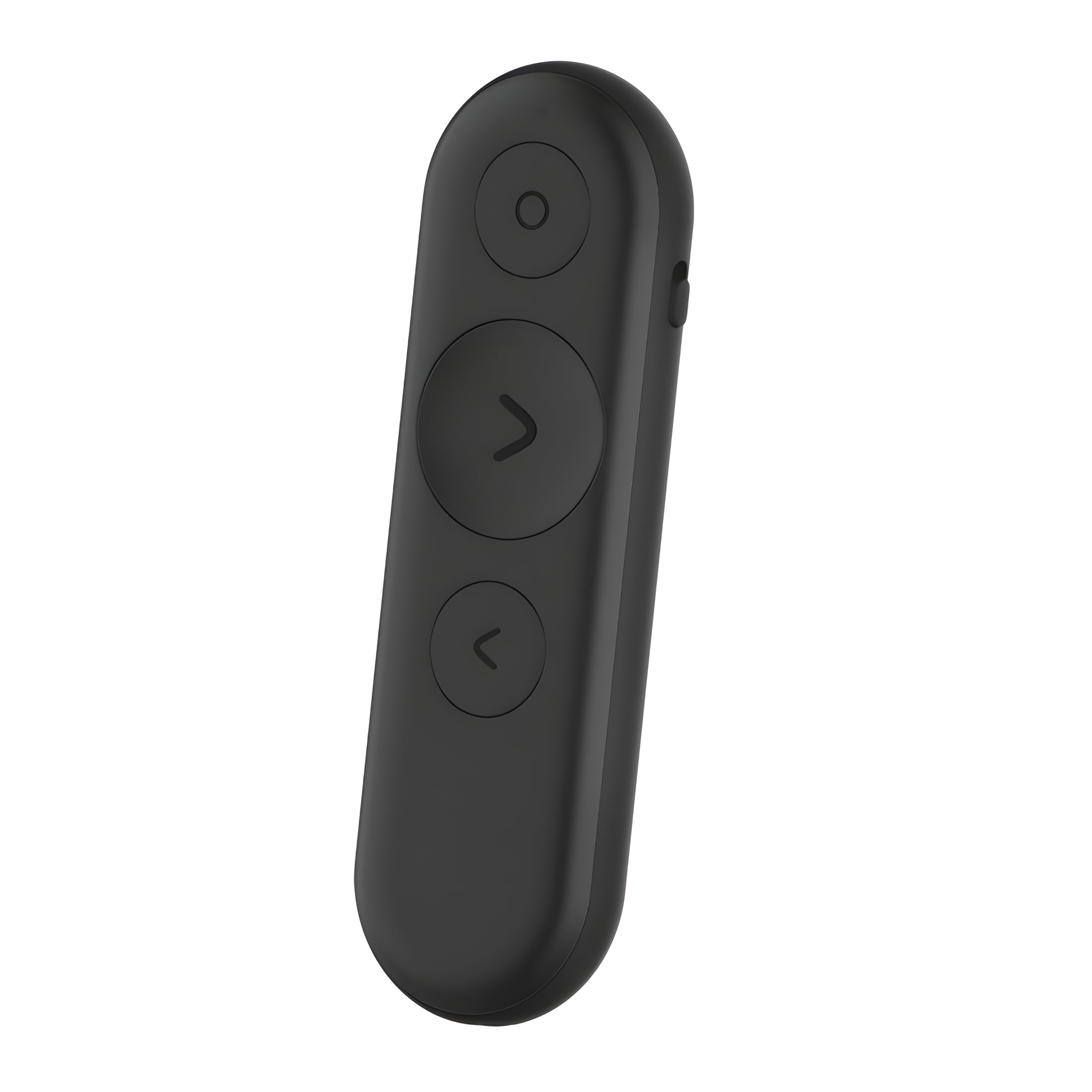
An 18.8-gram pocket clicker that recharges over USB-C and needs no batteries.
At just 18.8g this thing vanishes into a jacket pocket, which is exactly what a presenter who travels wants. It connects over Bluetooth 5.3 with up to a 30 meter range, so you are not tied to a dongle or a USB port. The built-in 135 mAh lithium polymer battery delivers up to one month of use on a single charge and tops up over USB-C — no AAA run to the shop before a talk.
Instead of a laser, it uses a digital pointer with on-screen cursor, highlight, magnify and marker modes to draw the audience’s eye to a specific part of the slide. Those advanced modes switch on through the Lenovo Accessories and Display Manager (LADM) app, where you can also customize the buttons. It is listed for Windows 10 or later and macOS 12 or later, with no claim of Linux or Android support. Bluetooth pairing replaces the plug-and-play dongle, which trades a one-time setup step for the freedom of no receiver.
Feedback centers on the small size, the Bluetooth link and straightforward operation, with presentations called out as its clear purpose. The catch is scope again: this is a slide remote, not a cursor mover for a desktop. If you need an air mouse to run a media center, this is the wrong tool — but for the lectern-and-carry-on crowd it is the neatest option on this list.
Made for: traveling presenters who want a rechargeable Bluetooth clicker that takes up almost no bag space.
Not for: anyone wanting to fly a cursor across a media-center desktop — the digital pointer guides slides, not a mouse.
8. Pepper Jobs Fly Mouse

A full QWERTY keyboard, backlit, folded into a TV remote for your Windows HTPC.
For a PC that lives under the television, this is the tool that makes typing possible from the sofa. It has a full QWERTY keyboard with double-sided backlit LEDs, and a power-saving timer switches the lights off after 5 seconds of no action. The 3-in-1 design does remote, mouse and keyboard in one handset, with a switching key that flips it between TV remote and mouse/keyboard. With 6-axis gyroscope control, the cursor follows your hand rather than a flat surface — the sort of thing that decides whether a Windows 10 or 11 HTPC is actually usable on a couch.
The keyboard mapping is the clever part: WIN and TV modes run independent key mappings, so one remote can drive a Windows PC and a television without confusing the two. A 2.4G USB receiver handles the connection up to 10 meters, and buttons are soft and tactile. Owners mention the “soft tactile buttons” are comfortable to type on, and the dual PC-and-smart-TV usefulness is a recurring positive.
The honest note is button responsiveness and connectivity, which are the parts of the feedback that split down the middle. It is a 34-button remote doing three jobs, so expect a little patience while your fingers learn the layout. Button feel and build quality are where it earns its keep; the occasional intermittent connection report is the trade-off for squeezing a keyboard into a remote this size.
Why the HTPC crowd keeps it
- Full QWERTY keyboard, so typing a search from the couch works
- Double-sided backlight with a 5-second power-saving timer
- One handset covers TV remote, mouse and keyboard
- Separate WIN and TV key mappings on 34 buttons
The parts to expect
- Connectivity and button responsiveness are mixed in the feedback
- A dense 34-button layout takes getting used to
- Needs a free USB port for its 2.4G receiver
Buy it for: a Windows 10 or 11 HTPC where you want to type and browse from the sofa without a separate keyboard.
Go another route if: you want a minimal button count — this is a dense, three-in-one layout and not a one-thumb clicker.
9. SilverStone Tek ES02-PCIE 2.4G Wireless Power Remote

A remote that does one thing: power up and reset a PC you cannot easily reach.
This is not a cursor remote and it is not a media remote — it is a power and reset switch for a desktop box, delivered wirelessly. A 2.4GHz PCIe receiver card slots into your motherboard and drives the power/reset Y cable, and the included remote controls the computer from up to 20 meters / 65 feet. For a machine tucked into a cabinet or a hard-to-reach corner, that 65-foot reach means no more crawling behind the desk to switch it on.
The receiver has an integrated PC speaker that gives auditory feedback — a beep so you know the command landed even when you cannot see the case. The kit includes the PCIe card, the power/reset switch Y cable and an optional low-profile slot cover for slim cases. The included remote takes a CR2032 battery. There is one real requirement to check before you buy: your motherboard needs the “Resume by PCI-E Device” function enabled.
Installation is called out as a positive in the feedback, and the usefulness for hard-to-reach power buttons comes up as the reason people keep it. The honest trade-offs are battery life, which is a common criticism, and range that several people found unreliable — so treat the 20 meters as a best-case figure. It is small, cheap-feeling and single-purpose, but for turning a hidden media server on and off it does the one job the others here cannot.
The singular job: power and reset from across the room, with an audible beep to confirm, for a PC that is awkward to reach.
Honest caveat: battery life and real-world range are weak spots, and it only works if your motherboard supports Resume by PCI-E Device.
The fit for: a desktop PC with an awkward-to-reach power button and a motherboard that supports Resume by PCI-E Device.
Not compatible if: you want to control slides or a cursor — this unit only handles power and reset.
Know the Specs
Maximum Range
Range is quoted as a maximum reach between the remote and the receiver, and it is the spec that decides whether your remote works from the back row. A presenter clicker like the UBUYONE’s 328 feet covers a lecture hall, while an air mouse quoted at 10 meters covers a living room. Treat the number as a best case: walls, distance and interference all shorten it in practice, and some feedback on the SilverStone notes the real reach falls short of the quoted 20 meters.
2.4G Versus Bluetooth
A 2.4G remote talks through a small USB receiver you plug in, which means instant plug-and-play with no pairing menu, but it occupies a USB port. Bluetooth skips the dongle but needs a one-time pair, and not every system plays nicely — the G20S Pro Plus states outright that its Bluetooth mode cannot be used with Windows, only the 2.4G mode. Choose 2.4G for the simplest setup and Bluetooth for a port-free connection.
Gyroscope and Air Mouse
A gyroscope is a motion sensor that turns the tilt and swing of the remote into cursor movement on screen. That is what separates an air-mouse media remote from a plain slide clicker — with a gyro you can point at icons, scroll a library and click, with no mouse mat or flat surface needed. The five-button presenters here skip it, and that is why they cannot drive a desktop cursor.
Buttons and IR Learning
The button count is a rough measure of how much control lives under your thumb: a five-button clicker covers slides only, while a thirty-four-button model adds a full QWERTY keyboard and separate TV and PC modes. IR learning lets a remote take over the commands of an older infrared remote, so you can drop the spare from the coffee table. Check both before you buy.
Common Questions
Will a presentation clicker work as a PC remote for the desktop cursor?
Does an air mouse remote work with Windows 10 and Windows 11?
What is the difference between 2.4G wireless and Bluetooth on these remotes?
Do these remotes need batteries or are they rechargeable?
Is the SilverStone ES02-PCIE a normal PC remote for controlling media?
Which remote reaches farthest across a large room?
Can I use one of these remotes with an Android TV box and a PC at the same time?
Why do some of these remotes say voice search does not work across apps?
Do I need line of sight for the laser pointer and IR learning to work?
Will a USB-C laptop work with these remotes without an adapter?
The Bottom Line
The remote that earns first place in this remote for pc roundup is the UBUYONE Presentation Clicker, because its laser reaches 328 feet while the buttons control the deck up to 30 meters and it runs plug-and-play with batteries in the box. If you want cursor control from the couch, grab the Dupad Story G20S Pro Plus for its backlight and gyro air mouse on the 2.4G dongle. And for a Windows HTPC where you want to type, the Pepper Jobs Fly Mouse puts a backlit QWERTY keyboard in your hand.
How we choose
We do not accept paid placement. Every pick is matched to a real buyer and a real use-case; we do not hands-on test units.
Sources
Specifications: manufacturer listings and product documentation. Review insights: verified customer reviews, as of July 2026. Pricing: not shown on this page (it changes often); check the current price via the retailer link.
As an Amazon Associate, Tactical Gear Guy earns from qualifying purchases. This does not affect which products we feature.