Specs are compiled from manufacturer listings and verified buyer reviews and can change over time — please confirm the key details on the product page before buying.
Buying memory for an older laptop or desktop is mostly a matching game, not a shopping spree. You need a stick that is DDR3L (the low-voltage 1.35V version of DDR3), the right physical shape for your machine, and nothing more. Get the voltage and the form factor right and the machine boots faster and stops stuttering. Get either wrong and the stick will not seat or boot. This guide separates the laptop-sized SODIMM sticks from the desktop-sized DIMM sticks, flags the low-voltage rule that trips people up, and points you to the capacities and speeds that actually matter for a machine you are trying to keep alive.
This guide is built by comparing the manufacturers’ published specifications and the patterns across verified customer reviews, so you get each pick’s real strengths and trade-offs instead of marketing spin.
Every pick here is confirmed DDR3L low-voltage SDRAM, sorted by what it fits and how much it opens up. Inside you’ll find the best RAM DDR3L SDRAM for laptops, desktops, and aging Macs that still deserve a second wind.
Top Picks


How To Choose The Best RAM DDR3L SDRAM
The two most common mistakes are buying 1.5V DDR3 when your slot needs DDR3L, and buying a 204-pin SODIMM for a 240-pin desktop DIMM slot. Both failures happen before the machine ever powers on. Start with the form factor, then the voltage, then capacity.
Laptop stick or desktop stick first
A SODIMM is the short, wide module a laptop, mini PC, or all-in-one takes. A DIMM is the long, tall module a full desktop tower takes. They are not interchangeable and the slot will not accept the wrong one. The pins count is your second check: 204 pins for SODIMM, 240 pins for DIMM.
The 1.35V rule that protects your board
DDR3L runs at 1.35 volts, while standard DDR3 runs at 1.5 volts. Many DDR3L sticks also handle 1.5 volts, which gives you flexibility. A laptop built for DDR3L is the machine where the low-voltage stick is the safe, correct buy.
Capacity and open slots
A single 8GB stick is the safe entry. A two-stick 16GB kit only pays off if your machine actually has two free slots and supports that ceiling. Check your model’s max RAM before you order a second stick, because a kit you cannot fully seat is wasted.
Side-by-Side Comparison
| Model | Best For | Form Factor | Capacity | Speed / Voltage | Amazon |
|---|---|---|---|---|---|
| Silicon Power DDR3L 16GB (2x8GB)★ Best Overall | Best overall laptop upgrade | SODIMM 204-pin | 16GB (2x8GB) | 1600MHz / 1.35V | Amazon |
| Motoeagle 8GB SODIMMBudget Champion | Single-stick laptop refill | SODIMM 204-pin | 8GB | 1600MHz / 1.35V | Amazon |
| Rasalas 8GB SODIMMMac Specialist | Mac upgrade on a budget | SODIMM 204-pin | 8GB | 1600MHz / 1.35V | Amazon |
| Samsung 8GB M471B1G73EB0-YK0 | Factory-grade single stick | SODIMM 204-pin | 8GB | 1600MHz | Amazon |
| Motoeagle 16GB (2x8GB) UDIMM | Desktop dual-channel kit | DIMM 240-pin | 16GB (2x8GB) | 1600MHz / 1.35V | Amazon |
| TEAMGROUP Elite 16GB (2x8GB) | High-volume laptop kit | SODIMM 204-pin | 16GB (2x8GB) | 1600MHz / 1.35V | Amazon |
| SK Hynix 16GB (2x8GB) | Original-chip replacement | SODIMM 204-pin | 16GB (2x8GB) | 1600MHz / 1.35V | Amazon |
| G.SKILL Ripjaws 16GB (2x8GB) | Tighter-latency laptop kit | SODIMM 204-pin | 16GB (2x8GB) | 1600MT/s / CL9 / 1.35V | Amazon |
| Timetec 32GB (4x8GB) UDIMM | Big desktop capacity build | DIMM 240-pin | 32GB (4x8GB) | 1600MHz / 1.35V | Amazon |
Detailed Reviews
1. Silicon Power DDR3L 16GB (2x8GB) 1600MHz SODIMM
Our pick — 4.5+★ from 4,000+ verified ratings; the strongest balance of quality and price.
Two sticks that wake a tired MacBook Pro without a single compatibility fight.
Most old-laptop upgrades die on the Mac question. This Silicon Power kit — a 16GB set of two 8GB sticks at 1600MHz — lists its MacBook Pro 13-inch and 15-inch Mid 2012 and iMac 21.5-inch Late 2012 through Late 2013 compatibility right in the specs. If you are reviving one of those machines, that is the whole reason to start here.
It runs at 1.35V, the low-voltage DDR3L spec, which matters on a laptop because lower voltage means less power pulled off the battery. The latency sits at CL11, a perfectly normal figure for 1600MHz DDR3L that you will never feel in everyday use. What people actually notice is boot times and app loading, and that is exactly where this kit earns its keep. The kit weighs 27 g in total, so it changes nothing about how the machine carries.
The honest catch: this is a two-stick kit, so it only fully pays off if your machine has two open slots and a 16GB ceiling. Buy it for a single-slot laptop and one stick sits in a drawer. Also confirm you are buying for a laptop, because this is a 204-pin SODIMM and will not go near a desktop.
What earns the top slot
- Explicit Mid 2012 MacBook Pro and 2012–2013 iMac fit — rare in this price tier
- 1.35V DDR3L keeps battery draw down on a portable
- 16GB as a 2x8GB pair opens up heavy browser and photo work
- Lifetime warranty from the maker
The fine print
- Two sticks only help if you have two free SODIMM slots
- CL11 latency — no faster than the standard DDR3L figure
Made for: anyone nursing a Mid 2012 MacBook Pro or 2012–2013 iMac back to usable speed.
Not for: single-slot laptops or any desktop tower — the 204-pin shape rules them out.
2. Motoeagle 8GB DDR3L 1600MHz SODIMM
The single stick that turns a six-year-old laptop from a chore into a machine again.
One 8GB module, 204 pins, dual rank (2Rx8, meaning the chips are arranged in two groups for smoother data flow). That is the plain spec sheet for the Motoeagle 8GB SODIMM, and it is the safest first purchase in this whole list if you are unsure how many slots your laptop has. Buyers report it making a six-year-old laptop run like new at 8GB, which is exactly the upgrade this single stick targets.
The dual-voltage design is the quiet win here. It can operate at 1.35V and 1.5V, so it will sit happily in machines that expect either. Motoeagle also says the chips are 100% tested and the memory uses original IC chips, and Dell Latitude E7450 owners have had it hit straight away as a drop-in fit. In practice you unscrew the hatch, click it in, and boot.
The catch is capacity. At 8GB in one stick you are getting a sensible bump, not a transformation, so pair two of these only if your board allows two 8GB sticks. Wipe the gold contact edge with an eraser before seating it, as the maker instructs, and you avoid the classic no-boot scare.
Where it shines: the lowest-risk 8GB refill — dual voltage, dual rank, and a fit confirmed clean in a Dell Latitude E7450.
What to weigh: 8GB is one step up, not a full rebuild, so two sticks are the real upgrade if slots allow.
Grab this one if: you want one simple 8GB stick and do not want to open the machine twice.
Hold off if: your laptop only has one slot and you already have 8GB seated.
3. Rasalas 8GB PC3L-12800S DDR3L-1600 SODIMM
A Mac-by-Mac compatibility list you can actually match against your own machine.
Here is a spec sheet that reads like a parts catalogue. Rasalas names the exact Macs this 8GB stick fits: MacBook Pro 9,1 and 9,2 from Mid 2012, iMac 13,1 through 14,3, and Mac mini 6,1 and 6,2 from Late 2012. If your machine’s model number is on that list, you have your answer before you ever lift a screwdriver.
The stick itself is CL11, dual rank, 204 pins, and dual voltage — 1.35V for low-power boards and 1.5V for older ones. Rasalas says it sources high-quality granules from Hynix, Kingston, Micron, Elpida, and Nanya, which is worth knowing if you have been burned by off-brand chips. For older HP laptops and Late 2013 21.5-inch iMacs, owners mention immediate speed gains. At 8.53 g it is about as physically forgettable as you would want.
The thing to keep in mind: this is one 8GB stick, so two of these is the real 16GB path — and the Macs it targets cap out based on their own board, not this stick. Verify your model number against the list before ordering, because Mac fit is unforgiving.
Why Mac owners reach for it
- Named compatibility for MacBook Pro 9,1 / 9,2, iMac 13,1–14,3, Mac mini 6,1 / 6,2
- Dual voltage 1.35V / 1.5V broadens board fit
- Granules from Hynix, Kingston, Micron, Elpida, Nanya per the maker
Before you click buy
- One 8GB stick — a 16GB result needs two
- Mac slot count varies by model, so check yours first
Best fit for: the 2012-era MacBook Pro, iMac, or Mac mini owner who wants a documented match.
Look elsewhere if: your model number is not on the list — this is not a universal stick.
4. Samsung 8GB 2Rx8 PC3L-12800S RAM M471B1G73EB0-YK0

A factory-grade stick for the buyer who trusts the name on the chip inside.
When the machine’s original memory was Samsung to begin with, matching it is the least dramatic way to upgrade. This 8GB module carries the part number M471B1G73EB0-YK0, runs at 1600MHz, and uses a 2Rx8 dual-rank layout across 204 pins. For buyers who recognise that Samsung part code as the exact stick that sat in their laptop from the factory, there is no ambiguity here.
What this gets bought for is reliability of data, not speed thrills. The performance gains reported centre on doubling a laptop’s memory to 16 gigabytes when a second stick goes in, and it is regarded as a straightforward upgrade that installs without fuss. Accuracy of the spec is the reason to pick it — the part number tells you exactly what you are getting.
One caution: the product data lists this model’s memory generation as DDR3L, so pair it with a board that expects low-voltage memory or a dual-voltage setup. And like any single 8GB stick, it caps your ceiling at the number of slots your board offers.
The draw: a recognised Samsung M471B1G73EB0-YK0 part number at 1600MHz — the confidence of a matching, factory-style replacement.
The trade-off: 8GB per stick, so doubling to 16GB means buying and seating a second module.
Reach for it if: you want to match the Samsung memory your laptop shipped with.
Skip the single and buy two if: you are chasing 16GB and have two slots.
5. Motoeagle 16GB (2x8GB) PC3L-12800U DDR3L-1600 UDIMM

A desktop tower kit in the tall 240-pin shape, built for the PC under the desk.
This is the first desktop-only pick on the list, and the shape is the whole point. It is a 240-pin DIMM, the long tall module a tower takes, so it will not fit a laptop of any kind. You get two 8GB sticks for 16GB total, both DDR3L at 1.35V that also run at 1.5V, which keeps them flexible across older Intel and AMD desktop boards.
Motoeagle says the modules use original SK Hynix IC chips, are 100% tested, and are RoHS and JEDEC compliant. Customers note it performs well, with Windows Memory Diagnostic returning no errors — the sort of clean bill of health a desktop builder wants before trusting a fresh kit. CL11 latency keeps it in line with standard DDR3L.
The catch you have to respect: this is a desktop DIMM, and buyers must confirm the PC model, the max RAM, and the empty slots before ordering. Seating two sticks means two free DIMM slots, so an older four-slot tower is the natural home.
The case for the kit
- 240-pin DIMM sized for full desktop towers
- 16GB across two 8GB sticks for dual-channel pairing
- Dual voltage 1.35V / 1.5V for older Intel and AMD boards
The caveat to plan around
- Desktop only — no laptop will take a 240-pin DIMM
- Needs two free DIMM slots to reach 16GB
Built for: the desktop owner with two open DIMM slots and an older Intel or AMD board.
Wrong pick if: you are working on a laptop, a mini PC, or an all-in-one — check the pin count first.
6. TEAMGROUP Elite DDR3L 16GB Kit (2 x 8GB) 1600MHz SODIMM
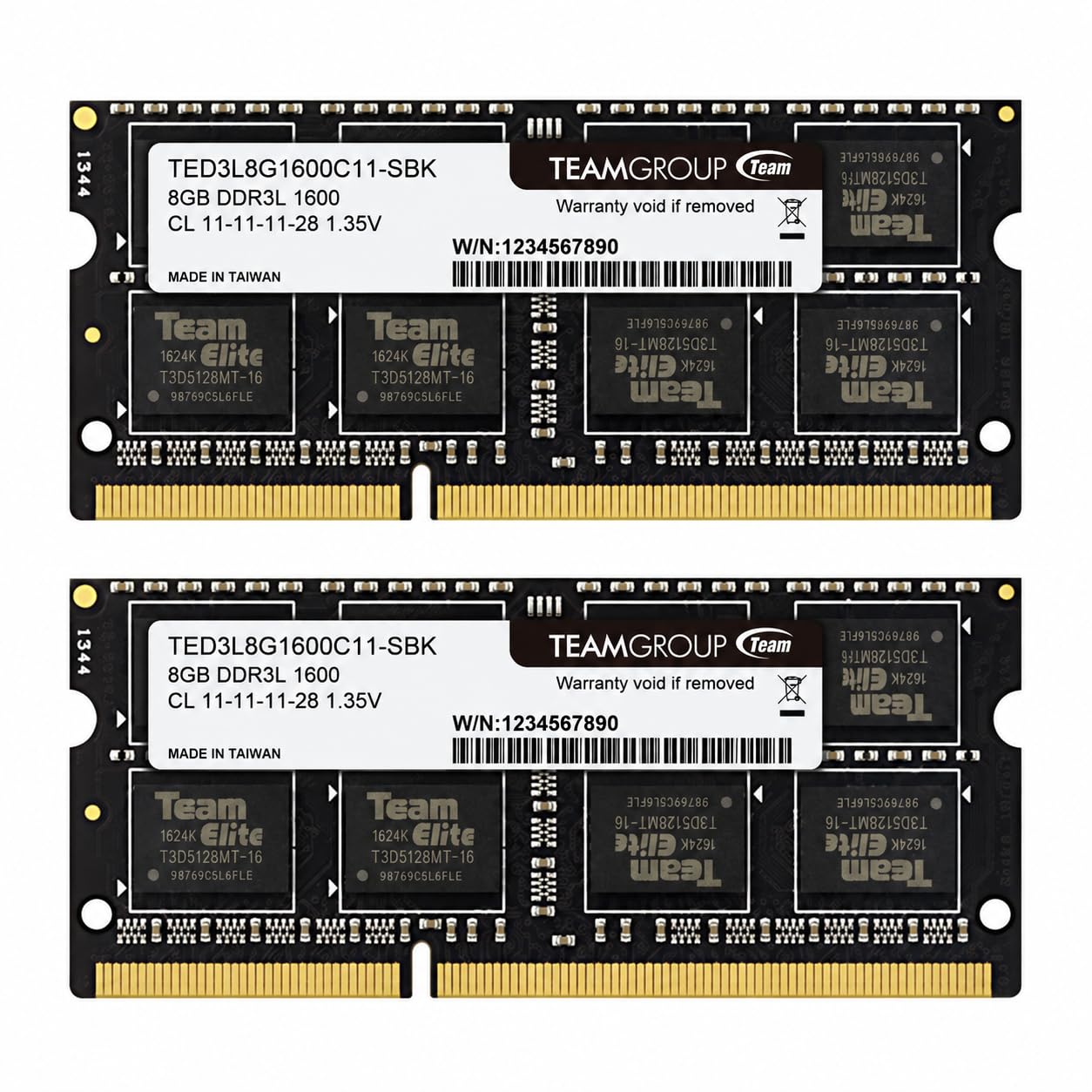
A 16GB laptop SODIMM kit with 2,000+ Amazon ratings and a lifetime warranty.
Two 8GB sticks at 1600MHz, CL11, 204 pins, JEDEC and RoHS compliant, with a lifetime warranty. That is the TEAMGROUP Elite kit in one breath. It is built for laptops and notebooks, and the spec sheet is deliberately boring — which is exactly what you want from memory you are going to forget about.
What makes it the crowd favourite here is how reliably it just works. Reviewers point out it reviving five-year-old laptops, with the sticks seating and booting cleanly on the first try. The 16GB total is the balance for a work laptop running a heavy browser, a spreadsheet, and a video call at once. TEAMGROUP even attaches an installation video in the product image if you want a walk-through.
The limitation to know: this is a laptop SODIMM kit, so it will not go into a desktop tower or a Mac mini that takes a DIMM. Confirm your model number and its RAM ceiling first, because a two-stick kit needs two free slots to pay off.
What wins people over: steady reliability across thousands of owners — this is the kit that keeps old workhorses chugging for years.
The one thing to check: two free SODIMM slots and a 16GB max on your laptop, or the second stick goes to waste.
Your move if: you want the 16GB laptop upgrade with the strongest track record behind it.
Think twice if: your machine is a desktop — this is a 204-pin laptop stick.
7. SK Hynix 16GB (2 x 8GB) PC3L-12800 1600MHz SODIMM

The brand that made the memory your machine shipped with, sold as a matched pair.
SK Hynix builds memory for the manufacturers, so a kit carrying the HMT41GS6BFR8A-PB part number is as close to a factory original as a retail buyer gets. This one is a 16GB set of two 8GB sticks, PC3L-12800, 1600MHz, 2Rx8, 1.35V, in the 204-pin SODIMM shape. For a MacBook Pro owner who wants the machine running like it did new, this is the label-on-the-chip answer.
What these sticks are chosen for is fit and familiarity. Shoppers say the modules match the factory-installed SK Hynix parts, with MacBook Pros running better than new once seated. That is a strong signal for anyone replacing failing original memory rather than upgrading into new territory.
The honest limit: at CL11 and 1600MHz it is not a performance special, and the kit wants a machine with two SODIMM slots to be worth it. Compatibility here means matching your board’s existing spec, not pushing past it.
Why it earns the label
- Genuine SK Hynix modules with a citable part number
- 16GB as a matched 2x8GB pair at 1.35V
- Matches factory-original memory for a true like-new restore
Where it stops short
- CL11 / 1600MHz — no speed edge over standard DDR3L
- Needs two SODIMM slots to deliver the full 16GB
The right call if: you are replacing failing factory memory and want the same silicon back.
Not the priority if: you are chasing faster timings — a tighter-latency kit is the better bet.
8. G.SKILL Ripjaws DDR3L 16GB (2x8GB) 1600MT/s CL9 SODIMM

The one kit on this list that runs tighter timings than the rest of the field.
Almost every DDR3L stick here is CL11. This G.SKILL Ripjaws kit is CL9-9-9-28 — a lower latency figure, which means it has a marginally quicker response time at the same 1600MT/s speed. On a laptop you will not feel that in a browser tab, but for a buyer who wants the fastest-spec DDR3L SODIMM available, this is the standout number on the page.
It is a 16GB matched pair of two 8GB modules, 204 pins, 1.35V, non-ECC, and each module weighs 9 g. G.SKILL ships the pair as a matched set designed to run together, and warns against mixing kits — advice worth following, because mixed sticks cause exactly the stability headaches the warning mentions. It also includes a JEDEC default profile, so it boots at a safe standard speed from the start.
The honest catch: matched-kit pricing and the CL9 advantage are for buyers who specifically value the timing edge. If you just want more memory, a CL11 kit does the same everyday job. And keep it as a pair — do not drop one Ripjaws stick next to a leftover module.
The standout spec: CL9 latency against the CL11 field — the single fastest DDR3L SODIMM timing here.
Read this before ordering: it is a matched pair, so treat both sticks as one purchase and never mix them with other kits.
Go for it if: tighter CL9 timings and a factory-matched pair are worth the premium to you.
You can pass if: you only need more memory and a CL11 kit already does the job.
9. Timetec 32GB KIT (4x8GB) DDR3L/DDR3 1600MHz UDIMM

Four sticks, 32GB, and enough headroom to run a virtual machine without a stutter.
This is the capacity monster of the list. A 32GB kit made of four 8GB modules, each a 240-pin DIMM for desktop towers, at 1600MHz, CL11, dual voltage 1.35V or 1.5V, built for Intel and AMD CPUs. It is not for laptops — a 240-pin DIMM will not enter a SODIMM slot — and Timetec states that plainly.
Owners put this capacity to real work. Reports include running virtual machines, Android coding, gaming, and streaming all in one go, on systems including an Optiplex 990. That is the buyer this kit is for: the desktop user who has outgrown 8GB or 16GB and wants 32GB of DDR3L in one move. The JEDEC standard 1.35V low-voltage and the lifetime warranty round it out.
What you must respect is the slot math. Four sticks need four free DIMM slots, so verify your board has them and supports 32GB before you order. Note too that the PCB colour may arrive black or green depending on batch, per Timetec, which changes nothing about the performance.
Why the capacity crowd picks it
- 32GB total from four 8GB DIMMs — the largest kit here
- Dual voltage 1.35V / 1.5V for older Intel and AMD boards
- Lifetime warranty with US-based support
Plan your board first
- Needs four free DIMM slots to reach the full 32GB
- Desktop only — no laptop use
Reach for this if: you run virtual machines or heavy multitasking on a four-slot desktop tower.
Look elsewhere if: your board has fewer than four slots — a two-stick kit serves you better.
Know the Specs
DDR3L vs DDR3 (the voltage difference)
DDR3L is the low-voltage version of DDR3, running at 1.35V instead of 1.5V. Lower voltage means less power drawn, which matters on a battery-powered laptop. Many DDR3L sticks are dual-voltage and will run at either 1.35V or 1.5V, so check whether yours does before assuming it is locked to one figure.
SODIMM vs DIMM (the shape difference)
A SODIMM is the short 204-pin module a laptop or all-in-one uses. A DIMM is the long 240-pin module a desktop tower uses. They are physically different sizes and never interchange, so match the shape to your machine before anything else.
Speed, latency, and rank
1600MHz is the common DDR3L speed here. CL11 and CL9 describe how many clock cycles the memory waits before responding — lower is tighter but the difference is tiny in everyday use. 2Rx8 means dual rank, meaning the chips are arranged in two groups for steadier data flow.
Capacity and slot count
A single stick raises your total by that stick’s size. A multi-stick kit only pays off if your board has the free slots and the maximum RAM to seat all of them, so check your model’s ceiling before buying a kit.
Common Questions
Will a DDR3L stick work in a laptop that expects standard DDR3?
Does DDR3L SODIMM fit in a desktop computer?
How do I know if my Mac takes DDR3L memory?
Is 16GB better than two separate 8GB sticks for a laptop?
What does CL11 mean on a RAM stick?
Do I need to wipe the contacts before installing my new RAM?
Can I mix a DDR3L stick with the DDR3 already in my machine?
How long does a DDR3L memory stick last?
Will adding RAM to an old laptop really speed it up?
Is 2Rx8 dual rank better than single rank?
The Bottom Line
The crowd favourite is the TEAMGROUP Elite 16GB kit, a 2x8GB 1600MHz SODIMM pair with a lifetime warranty and 2,000+ ratings behind it. If you want the safest all-round laptop upgrade, though, the Silicon Power DDR3L 16GB kit is our pick because it names its MacBook Pro and iMac compatibility and runs at the low 1.35V. For a single-stick refill, the Motoeagle 8GB SODIMM handles dual voltage and a clean Dell fit. Desktop movers should grab the Timetec 32GB kit for raw capacity, or the Motoeagle 16GB UDIMM for a tidy dual-channel pair.
How we choose
We do not accept paid placement. Every pick is matched to a real buyer and a real use-case; we do not hands-on test units.
Sources
Specifications: manufacturer listings and product documentation. Review insights: verified customer reviews, as of November 2026. Pricing: not shown on this page (it changes often); check the current price via the retailer link.
As an Amazon Associate, Tactical Gear Guy earns from qualifying purchases. This does not affect which products we feature.