Specs are compiled from manufacturer listings and verified buyer reviews and can change over time — please confirm the key details on the product page before buying.
The console is not your problem. A projector that takes a fifth of a second to react is. Play a round of Mario Kart or Splatoon on a beamer with sluggish input lag and every jump lands late, every shot drifts wide, and you will swear the controller is broken. The fix is a gaming projector with measured latency under 16ms, a dedicated game mode, and an HDMI port that accepts your dock’s 1080p signal. Below are eleven that fit that brief, sorted by what each one does best.
This guide is built by comparing the manufacturers’ published specifications and the patterns across verified customer reviews, so you get each pick’s real strengths and trade-offs instead of marketing spin.
Three specs decide how a projector feels under a controller: input lag in milliseconds, refresh rate in hertz, and brightness in ANSI lumens. This guide leads with those numbers and what each one means during play, so you can pick the right projector for nintendo switch.
Top Picks


How To Choose The Best Projector for Nintendo Switch
Buying for a Switch is a different job from buying for movie night. The Switch dock outputs over HDMI at 1080p when docked, so a projector needs a clean HDMI handshake first and picture tricks second. Nail these five specs and the remaining choices come down to budget and room.
Input lag, measured in milliseconds
Input lag is the delay between your button press and the picture changing. It is quoted in milliseconds (ms), and lower is better under a controller. A projector at 6ms to 8ms feels wired. One that leaves out the number, or quotes it only inside a dedicated game mode, is a gamble for fast games.
Refresh rate, in hertz
Refresh rate is how many times per second the picture redraws, written in Hz. A 60Hz panel redraws 60 times a second and handles most Switch titles fine. A 120Hz or 240Hz projector can show smoother motion, but only when the source feeds it that rate — check what your dock and game actually output before paying for headroom.
Brightness, in ANSI lumens
ANSI lumens is the standard brightness measure for projectors. A dim room tolerates a few hundred lumens. A room with the curtains open or a lamp on needs far more, which is why the outdoor-friendly picks here sit in the thousands.
Throw distance, in feet and inches
Throw distance is how far the lens must sit from the wall to make a given image size. A short-throw projector makes a 100-inch picture from a few feet away, which keeps the console cable short and stops people walking through the beam. Standard throw needs more room behind the couch.
Picture setup you will actually use
Auto focus and auto keystone correction (the software that squares up a tilted image) save you from fiddling with dials every time someone bumps the table. For a Switch setup that gets moved between rooms, these are the features that decide whether you play or tinker.
Side-by-Side Comparison
| Model | Best For | Input Lag | Brightness | Resolution | Amazon |
|---|---|---|---|---|---|
| LYNCAST 1200 ANSI Google TV Projector★ Best Overall | All-round family gaming | — | 1200 lm | 3840 x 2160 | Amazon |
| HAPPRUN Native 1080P Google TVBest Value | Cord-free streaming nights | — | 400 lm | 1920 x 1080 | Amazon |
| Philips GamePix 900Fastest Response | Genre-specific game presets | 6 ms | 1000 lm | 3840 x 2160 | Amazon |
| Samsung The Freestyle 2nd Gen | Portable Gaming Hub access | — | 230 lm | 1920 x 1080 | Amazon |
| BenQ TH575 | Bright rooms and backyards | 16 ms | 3800 lm | 1920 x 1080 | Amazon |
| Optoma GT1080HDR | Tight rooms, short throw | — | 3,800 lm | 1920 x 1080 | Amazon |
| Hisense M2 Pro | Triple-laser color depth | — | 1300 lumen | 3840 x 2160 | Amazon |
| Valerion StreamMaster Plus2 | Competitive-speed response | 4 ms | 2000 ISO lm | 3840 x 2160 | Amazon |
| BenQ TH685 | Long warranty, fast refresh | 8.3 ms | 3500 lm | 1920 x 1080 | Amazon |
| ViewSonic LX700-4K | 4K laser with Xbox tuning | 4.2 ms | 3500 lm | 3840 x 2160 | Amazon |
Detailed Reviews
1. LYNCAST 1200 ANSI Google TV-Licensed Projector
Our pick — 4.5+★ from 400+ verified ratings; the strongest balance of quality and price.
The pick that skips the dongle, the soundbar and the setup fuss in one box.
Most gaming projectors hand you a blank HDMI socket and walk away. This LYNCAST arrives with licensed Google TV already installed, so your Switch dock plugs in once and Netflix, Prime Video and YouTube sit in the same menu. It also carries 1200 ANSI lumens against the HAPPRUN’s 400 lm further down the list — three times the brightness on paper, which is the difference between a dim-room-only toy and a projector that shrugs off a lamp.
You get a sharp picture up to 3840 x 2160 (4K resolution, four times the detail of 1080p) and it accepts 4K and 8K input, so fine game text stays crisp. The dual 36W stereo speakers with certified Dolby Audio (a surround-sound standard) are loud enough to skip a soundbar. Setup is where it earns its keep: auto focus, auto keystone correction (squares the tilted image), screen alignment and auto obstacle avoidance all fire at once when you power it on, so the picture lines up against the wall without you touching a dial. Bluetooth 5.4 lets you pair headphones for late sessions and keep the house asleep.
What buyers keep returning to is the picture — sharp, steady and bright enough for daylight viewing. Wi-Fi 6 handles mirroring without the stutter that plagues older wireless chips. The catch is the bundled smart remote, which needs two AAA batteries that are not in the box, so pick those up before your first movie night. Pairing a Switch dock is a plain HDMI job, and the auto-keystone keeps the image level even when the unit gets nudged mid-round.
What earns the top slot
- 1200 ANSI lumens keeps a Switch session visible with the curtains half-open.
- Google TV built in — no Fire Stick hanging off the back of the case.
- Dual 36W speakers with Dolby Audio mean no extra soundbar to wire up.
- Four automatic picture adjustments fire on power-up, so a bumped table fixes itself.
What to plan around
- The smart remote ships without the two AAA batteries it needs.
- No published input lag figure, so treat it as a family-gaming pick rather than a competitive one.
The verdict: If you want one box that plays Mario Kart, streams Netflix and fills a wall without extra gadgets, this is the simplest route to that room.
The honest limit: With no quoted latency, competitive online shooters are not what it was tuned for — casual and co-op play is.
2. HAPPRUN Native 1080P Bluetooth Google TV Projector
A backpack-sized 1080p set with Google TV inside and no dongle required.
The HAPPRUN runs at 1920 x 1080 native, which is exactly what your docked Switch pushes out. That match means no upscaling guesswork — the pixels line up one-to-one. It stretches to a 300-inch image if you have the wall, and the 7.8-inch square body drops into a bag for a friend’s house.
Brightness is the trade-off you accept here: 400 ANSI lumens against the LYNCAST’s 1200 lm. In a dark room that reads bright and clear. In afternoon sun it disappears. Buyers consistently rate the picture highly, and the value angle comes up again and again — the picture quality at this tier is the reason people keep it. Setup takes minutes, and Wi-Fi 6 keeps streaming stable while Bluetooth 5.2 pairs a speaker or headphones.
The honest follow-up: the fan is audible and the 5W speaker is not going to fill a big room, so headphones or a paired speaker do a lot of work. Reliability is the thing to keep an eye on, since the longer-term reports thin out. For a bedroom or a dark den where the Switch lives, though, this is a serious amount of picture for a mid-tier outlay.
Where it wins: Native 1080p matches your dock’s output exactly, and Google TV sidesteps the streaming dongle entirely.
What it asks in return: At 400 ANSI lumens it needs a dark room, and the fan and 5W speaker are the parts buyers mention when they want more.
Reach for this if: your gaming happens after dark in one room and you want Google TV without a second remote on the table.
Look elsewhere if: your setup is a bright living room — the brightness ceiling here is real.
3. Philips GamePix 900
Six milliseconds of latency — the number a competitive player buys a projector for.
Six milliseconds is the whole pitch. That is the lag between your thumb moving and the screen answering, and at 6ms the GamePix 900 feels close to a monitor rather than a beamer. It pairs that with a 240Hz refresh rate, so fast pans stay legible instead of smearing. For a Smash session or a shooter, this is the spec sheet you want to see.
Philips splits the picture into three gaming presets — Action Gaming, Adventure Gaming and Sports Gaming — each tuning the image for that genre’s demands. The DLP engine from Texas Instruments brings 1000 ANSI lumens and a 1800:1 contrast ratio, a fraction of the 15000:1 the LYNCAST claims, and the black levels show it in dark scenes. At 2kg in the body it moves between rooms without a second trip for a dolly.
HDMI is the single input, plus a USB-A port for power-out and a 3.5mm audio socket. That means your Switch dock connects cleanly and nothing else needs to. The catch is brightness: 1000 lumens rewards a dim room, so plan a curtain pull before the match. A 4K image at 3840 x 2160 keeps UI text and menus crisp at large sizes.
The case for it: the lowest published latency in this group, so it is the pick for players who care about frames more than fistfuls of lumens.
The trade-off: 1000 ANSI lumens and 1800:1 contrast want a dark room — this one earns its keep after the lights go down.
4. Samsung The Freestyle 2nd Gen with Gaming Hub

A tilting cylinder you point at the ceiling, with Samsung’s game hub baked in.
The cradle stand rotates 180 degrees, so you point the lens wherever you like — a wall, a slanted ceiling, the inside of a tent. Auto Leveling, Auto Focus and Auto Keystone take over once it is placed, and the picture adjusts itself without you opening a settings menu. Samsung’s Gaming Hub pulls streaming games and console access into one screen, which changes how you start a session.
The image is 1920 x 1080 Full HD across a 30-to-100-inch range, with 360-degree audio from the built-in speakers. You can add a Bluetooth speaker or a Samsung soundbar for more weight. It takes a USB-C portable battery, so outdoor play is possible if you bring your own power.
Brightness is where this one asks patience: 230 ANSI lumens is the lowest in this article, and it wants near-total darkness. Picture and sound draw split opinions — some love the form factor and the interface, others find the output thin for the cost. It is the projector for a suitcase or a bedroom ceiling, not a living-room mainstay.
Why people buy it: the 180-degree cradle turns any surface into a screen, and Gaming Hub means your library travels with the projector.
What you trade: 230 ANSI lumens demands a genuinely dark room, and the value question nags once you compare it to brighter rivals.
Best fit: travel, bedrooms and ceiling projection — anywhere the shape of the room fights a normal projector.
Not the one for: a bright lounge, where 230 lumens simply cannot compete.
5. BenQ TH575

3800 lumens that punch through daylight and still clock 16ms under a controller.
Start with the brightness. At 3800 ANSI lumens this is the projector you wheel out for a backyard Switch tournament at 4pm, when the sun is still up and every other option on this list is a grey rectangle. The 15000:1 contrast ratio holds dark scenes together, and a 1080p image stays crisp at 100 inches.
Gaming performance is the second half of the story. Sixteen milliseconds at 1080p/60Hz is a responsive number — well inside the range that feels immediate under a controller. The microsecond DMD response keeps motion clean. For co-op platformers, racing and party games this is plenty fast. For frame-perfect competitive play, the 4ms and 6ms picks above are the ones tuned for that.
The recurring gripe is fan noise — the cooling is audible and can intrude on quiet scenes. Buyers otherwise praise the picture clarity and the value, and a Switch plugged into HDMI lands sharp on a sunny patio.
Why it earns a mid-list spot
- 3800 ANSI lumens handles ambient light that kills dimmer projectors.
- 16ms input lag at 1080p/60Hz keeps gameplay responsive.
- 15000:1 contrast ratio keeps dark game scenes readable.
- Short-throw projection makes 100 inches from 10.8ft.
Fair warnings
- The fan noise is the most common complaint — noticeable in quiet moments.
- No lens cap in the box, which buyers find odd for a projector this size.
Grab this if: your gaming happens in daylight or a lamp-lit room and you need the picture to survive it.
Think twice if: you play in a silent room and fan hum bothers you more than a dim image would.
6. Optoma GT1080HDR

A 100-inch picture from just over three feet — no long cable run needed.
Small rooms and long cables are the two headaches short throw solves. This Optoma makes a 100-inch image from just over 3 feet away, so the projector sits close to the wall, your Switch dock stays near the couch, and nobody walks through the beam. At 3,800 lumens it also has the brightness to survive a lights-on gaming session.
The 50,000:1 contrast ratio is the highest in this group, and dual HDMI inputs mean the console and a streaming stick can both stay plugged in. There is USB power for a streaming device, VGA for older gear, and a built-in 10W speaker for quick setups. Eco+ mode runs the lamp to a rated 15,000 hours.
Reliability is the mixed note. Some long-term reports mention units stopping and lamps failing early, which is why it lands mid-list rather than higher. On a fresh unit, the gaming feel is responsive and the picture stays bright and clear even in a small room.
The short-throw payoff: 3 feet for 100 inches means no ceiling mount and no cable spaghetti across the floor.
The long-term caveat: reports of early lamp failures and units that quit are the reason it is not the top recommendation.
Matches best with: an apartment or a dedicated game room where the sofa is close to the screen wall.
The consumer caution: check the return window carefully — long-term reliability is the one soft spot here.
7. Hisense M2 Pro
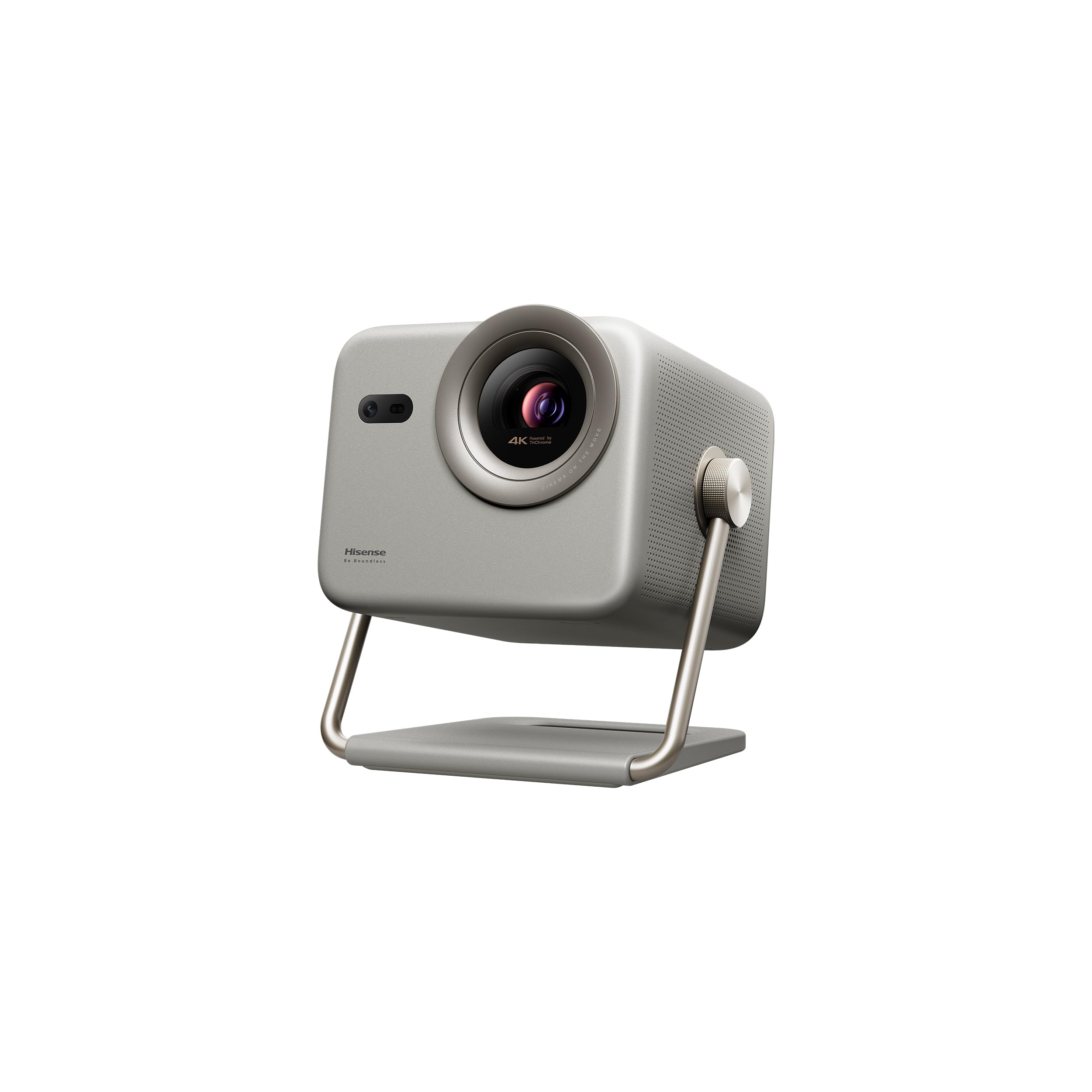
Triple-laser color in a portable shell, with Dolby Vision handling the grade.
A triple-laser light source is the reason this one looks different from every lamp projector above. The MCL38 engine pushes 1300 ANSI lumens of color without the color-wheel artifacts that can leave flickers in fast motion. Dolby Vision then tunes brightness and contrast frame by frame, which matters for games with dark corridors and bright explosions in the same scene.
The projection size runs 65 to 200 inches at 3840 x 2160, and the optical zoom holds 4K sharpness through its 1.0-1.3:1 range — you can resize the image without losing detail. AI PQ enhancement uses 2.07 million micro mirrors to keep large images tight, and the AI color pass lifts skin tones and shadows. VIDAA OS carries Netflix, YouTube and Disney+ without a stick.
Buyers describe it as a solid performer right from the start, portable enough to take outside with the included case, and quiet in use. The one recurring note is that it may not be the brightest projector out there — in a fully dark room it looks superb, and in a bright one it asks cooperation. It is the pick for someone who wants 4K color quality and a bag to carry it in.
For the color purist: triple-laser output and Dolby Vision, in a chassis light enough to move into the yard.
The one caveat: 1300 ANSI lumens performs beautifully in a dark room and less so in a sunlit one.
8. Valerion StreamMaster Plus2

Four milliseconds and 240Hz from a 4K laser — the speed king of the list.
This Valerion clocks 4ms of input lag (the delay before your action shows on screen) and pairs it with 240Hz (the screen redraws 240 times a second) — faster than the Philips GamePix 900 at 6ms. That combination is the fastest in this guide, and the RPG, FPS and night-vision-crosshair gaming modes back it up with picture tuning for each style. The AI-9618 chipset (the projector’s main processor) with 4GB RAM and 128GB of storage gives it headroom that the 2GB/32GB designs do not have, so menus and 4K streams open without stutter.
The laser engine runs 2000 ISO lumens with a 10000:1 contrast ratio and Enhanced Black Level, and the 110% Rec.2020 color gamut with ISF-Certified calibration is the widest color claim in this article. IMAX Enhanced preserves up to 26% more image content in the taller 1.9:1 or 1.43:1 aspect ratios. Google TV, AirPlay 2, Miracast and Chromecast all live inside.
Owners love the picture — the color depth and the sharpness get the most praise, and one summed it up as “the best” after five projectors. Setup is largely automatic: focus, keystone, obstacle avoidance and alignment handle themselves, and Alexa, Google Home or Apple HomeKit can turn it on. The one snag is laser convergence, which you can notice up close if you are sitting hard on the screen.
What makes it the performance leader
- 4ms input lag and 240Hz refresh rate are the fastest pair here.
- RGB triple laser with 110% Rec.2020 covers more color than any other pick.
- Google TV, AirPlay 2, Miracast and Chromecast built in.
- Auto focus, keystone, alignment and obstacle avoidance run hands-free.
The honest footnote
- Laser convergence is visible if you sit very close to the screen.
- Stationary form factor means it wants a permanent home, not a backpack.
Worth it for: anyone building a serious 4K game room who wants the fastest response and the widest color on this list.
Not needed by: casual players who will never feel the gap between 4ms and 16ms.
9. BenQ TH685

A three-year warranty attached to an 8.3ms, 120Hz gaming engine.
BenQ backs this one with a three-year warranty against a top competitor’s one-year, and that coverage is the quiet feature that matters most on a device you leave running for hours. Under the hood, 8.3ms input lag at 1080p/120Hz keeps the controller feeling connected, and 3500 ANSI lumens means the picture holds up with a lamp on.
The console story is clean: your PS5 runs at 1080p/120Hz, and 4K 2160p input at 60Hz is accepted for a sharper signal. A 95% Rec.709 color coverage keeps game art faithful, and the built-in 5W treVolo speaker with an equalizer handles audio without extra gear. Game Mode and Game Sound Mode retune the image and sound together. LumiExpert adjusts for room light to ease eye strain across long sessions.
It projects a 100-inch image from 8.2 feet, which suits most living rooms. Around the edges, some units develop stuck pixels, which is the recurring note in the color discussion. Stuck pixels aside, 8.3ms latency, 3500 lumens and a three-year warranty make this a fast, bright, well-covered projector.
What stands out: an 8.3ms latency, 3500 lumens and a three-year warranty is a combination that is hard to match in this tier.
The occasional issue: a few units ship with stuck pixels, so inspect the panel during the return window.
Designed for: the buyer who wants gaming performance plus long-term cover, not just the lowest lag figure.
Note before you commit: the 1080p native panel shows a 4K/60Hz signal, but fine on-screen text at the smallest sizes is capped by that native resolution.
10. ViewSonic LX700-4K

A 4K laser with Xbox tuning, 4.2ms lag and a 3,000,000:1 contrast claim.
Four-point-two milliseconds at 240Hz is elite territory, and ViewSonic tunes this one for Xbox with 1440p at 120Hz support as well. A laser light source never needs a lamp replacement, and 3500 ANSI lumens keeps a 4K picture alive in a room with the lights on. The 3,000,000:1 contrast ratio is the boldest figure here, and with HDR/HLG plus SuperColor it makes dark scenes look black.
Screen size runs 80 to 150 inches, and a 100-inch image needs only 7.7 feet — shorter than most standard-throw rivals. There is a dedicated Golf Mode for simulator setups that lifts greens and blues, which shows the gaming focus extends beyond consoles.
Owners praise the brightness and the value at this tier, and the jump from 1080p to 4K is visible. The notes that come up: the internal speaker can develop noise after a week, and the HDR handshake can be fussy on some sources, with colors flickering until the signal settles.
The strong side: 4.2ms lag, 240Hz and a laser light source with 3500 lumens make this a fast, long-lived 4K machine.
The fiddly side: HDR handshake flakiness and occasional speaker noise are the things that turn up in longer use.
Fits: a serious 4K game room where the projector stays plugged into one source and never moves.
Look past it if: you need a built-in speaker for your main audio and expect clean HDR on every input first try.
Know the Specs
Input lag in milliseconds
Input lag is the time between your button press and the picture responding, quoted in ms. Under about 10ms the delay stops registering as delay for most players. Between 15ms and 20ms you can feel a slight softness in fast games but co-op and racing stay fine. Above that, competitive shooters start to feel disconnected. Always check whether the quoted figure applies at the resolution and refresh rate your console will actually output, since some projectors only hit their best number in a dedicated game mode.
Refresh rate in hertz and what feeds it
Refresh rate is how often the image redraws per second, written in Hz. A 60Hz projector redraws 60 times a second; 120Hz and 240Hz panels redraw more often for smoother motion. The important part is the source: a projector only shows 120Hz or 240Hz if the device feeding it sends that rate. Check the projector’s own spec sheet for which resolution and console it supports at which rate before you buy on the refresh number alone.
ANSI lumens and real-room brightness
ANSI lumens measures light output in a standardised way — think of it as how much brightness the projector throws onto the wall. A few hundred lumens suits a dark bedroom, while thousands of lumens keep a picture readable with daylight in the room. Match lumens to your room instead of chasing the biggest number: 3800 lumens overwhelms a small dark den, and 230 lumens washes out in a sunlit lounge.
Throw ratio and screen distance
Throw distance is how far the lens must sit from the wall to fill a given screen size. Short-throw models make a 100-inch image from a few feet, which suits apartments and keeps the console cable short. Standard throw needs more room behind the seating. Measure the distance from your planned projector spot to the wall before you order, then check the model’s stated image size at that distance.
Common Questions
What input lag do I need for a Nintendo Switch projector?
Will a Switch dock plug straight into these projectors?
Do I need a gaming mode on the projector?
Is 240Hz worth it for Switch gaming?
How bright does a projector need to be for daytime Switch play?
How far from the wall should a projector sit for a 100-inch screen?
Can I connect wireless headphones to a gaming projector?
Do I have to buy a streaming stick with these projectors?
How long will a gaming projector last before the lamp needs changing?
Is a 4K projector worth it for Switch games that cap at 1080p?
Why does a projector with high contrast still look grey in my room?
The Bottom Line
For most people building a Switch setup, the projector for nintendo switch that gets the balance right is the LYNCAST 1200 ANSI Google TV Projector. Its 1200 ANSI lumens keep the picture clear in a lamp-lit room, and its dual 36W Dolby speakers mean no soundbar is needed. Auto focus, keystone, alignment and obstacle avoidance square the picture on power-up — the whole box in one without extra gear. If fast competitive play is the point, reach for the Philips GamePix 900 at 6ms, or the Valerion StreamMaster Plus2 if you want the fastest pair on this list at 4ms and 240Hz. And for daylight or backyard sessions, the BenQ TH575 and its 3800 ANSI lumens are the ones to reach for.
One last nudge before you decide: if you are unsure, match the projector to the room you actually play in. A dark den rewards the HAPPRUN’s 1080p native picture and its value, while a bright lounge or a patio rewards the brightness of the BenQ and Optoma picks. Match the projector’s lumens to your room’s light and keep latency under 16ms, and a Switch on a big screen becomes your default way to play.
How we choose
We do not accept paid placement. Every pick is matched to a real buyer and a real use-case; we do not hands-on test units.
Sources
Specifications: manufacturer listings and product documentation. Review insights: verified customer reviews, as of November 2026. Pricing: not shown on this page (it changes often); check the current price via the retailer link.
As an Amazon Associate, Tactical Gear Guy earns from qualifying purchases. This does not affect which products we feature.