Specs are compiled from manufacturer listings and verified buyer reviews and can change over time — please confirm the key details on the product page before buying.
Port count is the number everyone shops by, and it is the number that matters least. A powered USB 3.0 hub earns its place on your desk with its power adapter — the brick that lets every port run at 5Gbps without a spinning external drive brown-out dragging the rest down. Buy for ports alone and you end up with a splitter that complains the moment you connect a hard drive and a webcam at the same time.
This guide is built by comparing the manufacturers’ published specifications and the patterns across verified customer reviews, so you get each pick’s real strengths and trade-offs instead of marketing spin.
Everything below is sorted by what the adapter can actually feed: the desk that never gets unplugged, the laptop that travels, the streaming rig with six peripherals screaming for juice. This is the shortlist that answers powered usb 3.0 hub without the guessing game.
Top Picks


How To Choose The Best Powered USB 3.0 Hub
Two hubs can both say “7 ports, USB 3.0, 5Gbps” and behave nothing alike. The split happens at the power adapter — the wall brick that tops up the ports so they don’t have to borrow current from your motherboard. A laptop port supplies a trickle; a dedicated adapter supplies a lot more.
Start with what your adapter can feed, not how many holes you get
External hard drives are the honest test. One 2.5-inch spinning drive can pull more current than a laptop port wants to give. Two of them on a weak adapter and one disappears from your file manager. Look at the adapter’s stated output — 15W, 60W, 66W — and match it to the number of power-hungry devices you plan to leave plugged in.
Separate your data ports from your charging ports
Most hubs here mix two jobs under one shell. Data ports move files at 5Gbps. Charging ports deliver higher current to refill a phone or tablet. A hub with three dedicated charging ports at one end means you stop sacrificing a data slot every time you top up your phone overnight.
Decide whether per-port switches are worth it to you
A switch per port sounds like a gimmick until you own one. It lets you kill a printer, a microphone, or a spare drive without crawling under the desk to yank a cable. The trade-off is more moving parts — switches get pressed thousands of times over a hub’s life.
Know when 5Gbps stops being enough
For keyboards, mice, printers, webcams, and external drives you use for backups, 5Gbps is plenty. If you shuttle 4K RAW footage or large project files all day, a 10Gbps hub cuts the wait. That is the only reason to pay more for the faster tier.
Side-by-Side Comparison
| Model | Best For | Ports | Power Adapter | Data Speed | Amazon |
|---|---|---|---|---|---|
| SABRENT 10-Port Powered USB 3.0 Hub (HB-B7C3)★ Best Overall | Anchor hub for a full desk | 10 (7 data + 3 charging) | 60W (12V/5A) | 5Gbps | Amazon |
| RSHTECH RSH-ST07 7-Port HubMost Versatile | Laptop users mixing USB-A and USB-C | 7 | 15W (5V/3A) | 5Gbps | Amazon |
| vantisan 11-Port USB 3.0 Hub SplitterMax Ports For Less | Maximum ports on a mid-size budget | 11 (10 data + 1 charging) | 5V/4A | 5Gbps | Amazon |
| atolla 7-Port USB 3.0 Hub | Streaming rigs with labelled switches | 7 (6 data + 1 charging) | 12V/3A | 5Gbps | Amazon |
| j5create 7-Port Powered Hub (JUH377) | MacBook desks that want a slim shell | 7 | 20W | 5Gbps | Amazon |
| RSHTECH 10-Port 66W Hub (RSH-ST10P) | High-speed data plus laptop pass-through charging | 10 | 66W (24V/2.75A) | 10Gbps | Amazon |
| TP-Link 7-Port Ultra Slim Hub (UH700) | Party-night peripherals and sleep-mode charging | 7 (3 BC 1.2 charging) | — | 5Gbps | Amazon |
| atolla 16-Port USB Splitter | Workstations with many permanently wired devices | 16 | 12V/6A | 5Gbps | Amazon |
| intpw 16-Port USB 3.2 Hub (YH16A) | Video and 3D workflows moving huge files | 16 | 65W | 10Gbps | Amazon |
Detailed Reviews
1. SABRENT 10-Port Powered USB 3.0 Hub HB-B7C3
Our pick — 4.5+★ from 6,500+ verified ratings; the strongest balance of quality and price.
The aluminum brick with a 60W adapter big enough to stop your drives from arguing.
This is the hub for the desk that never gets cleared — the one with the external drive, the printer, the webcam, and a phone cable all live at once. Ten openings split into 7 USB 3.0 data ports and 3 dedicated charging ports. The charging trio sits at one end so you are not reaching past a spinning drive to plug in your phone.
The reason it lands first is that 60W 12V/5A adapter. Compare that with the RSHTECH RSH-ST07’s 15W (5V/3A) supply — a fourfold gap in stated output. That headroom is what keeps a full row of devices stable when they all draw at once. Data runs up to 5Gbps, which is fast enough for backups and file shuffles without watching a progress bar crawl.
The feature that wins people over is the row of individual power switches. Every port has its own switch and its own LED, so you can kill the printer between jobs or shut off a spare drive without unplugging anything. The aluminum shell is 44 g and compact at 5.7 inches long, so it tucks behind a monitor. What the review pages sum up: the three power-only ports at one end make charging feel separate from data, which is exactly the split most desks need. Across thousands of owner reviews, the 60W adapter and per-port switches make this the easiest recommendation on the page.
What earns it the top spot
- 60W 12V/5A adapter feeds a fully loaded row of devices without dropout
- 7 data ports plus 3 charging ports at one end keep charging off your data slots
- Individual switch and LED per port end the cable-yanking routine
- Works on Windows, macOS, and Linux with no driver install
Where it asks for care
- Ten ports and a chunky adapter make it a desk fixture, not a bag item
- Charging is capped around 2.4A per port — fine for phones, not a laptop charger replacement
Built for: a permanent desktop setup where a hard drive, printer, and phone cable all share one hub without drama.
Think twice if: you want something to toss in a laptop bag — this is a stay-put anchor.
2. RSHTECH Powered USB Hub RSH-ST07
One detachable cable that ends the USB-A versus USB-C argument before it starts.
If your household has a modern laptop with only USB-C and an older desktop with the familiar rectangular USB-A ports, this is the hub that serves both from the same box. The detachable 3.3-foot cable carries a 2-in-1 connector — plug the USB-C end into a MacBook or Surface Pro, or the USB-A end into a tower, and the seven ports behave the same either way.
What makes it easy to live with is that it stays small. This is 5.1 inches long and 1.9 inches wide — slim enough to sit on a laptop stand or slide into a bag sleeve. Compare that footprint with the atolla 7-port hub’s larger 8.26-inch body, and you can see where this one wins for travel. Aluminum and ABS housing keeps it sturdy without adding weight you notice.
The honest limit is power. The included adapter is 15W (5V/3A) and supports BC 1.2 charging, which is enough for a keyboard, a mouse, a webcam, and a flash drive. Reliability comes up as a fit question in the reviews, too — some units have had ports go intermittent over time. For a light desk and a shared cable, this earns its place.
The travel-friendly read: a 5.1-inch aluminum shell with a detachable 2-in-1 USB-A/USB-C cable is the version you actually carry, and Plug-and-Play with no driver step makes it a two-minute setup.
The honest caveat: 15W is modest next to the SABRENT’s 60W, so treat this as a peripheral hub, not a drive farm.
Reach for this if: you swap between a USB-C laptop and a USB-A desktop and want one hub that works on both.
Look elsewhere if: several external hard drives are part of your daily setup.
3. Powered USB Hub 11-Port USB 3.0 Splitter
Eleven openings on a mid-range budget — more holes per dollar than anything else here.
Where the SABRENT tops out at ten, this one gives you eleven: 10 USB 3.0 data ports plus a single smart charging port. Compare 11 ports with the atolla 7-port hub’s 7 total, and the math is obvious for anyone wiring a lot of devices. Ten devices can be live and transferring at up to 5Gbps at the same time, which is more than most home desks will ever use.
The build is an aluminum-and-plastic shell 7.87 inches long — wider than the compact RSHTECH RSH-ST07 at 5.1 inches, so give it room on the desk. A 5V/4A adapter supplies the juice, and the dedicated charging port pushes up to 2.4A for a phone or tablet. Every port has its own LED switch, so you are never crawling behind a monitor to unplug a headset.
Two things to weigh. The adapter is 5V/4A — enough for peripherals, less headroom than the bigger bricks on this list for power-hungry drives. Owners praise the connectivity and the 11-port count, but long-term durability isn’t the story here; treat it as a value workhorse and it holds up. If you want 11 ports without paying for a premium aluminum shell, this is the compromise that pays off.
Where the value lands: 11 total ports, individual LED switches, and a 2.4A charging port for the price of a smaller-name branded 7-port.
The trade-off to accept: the 5V/4A supply is lighter than the top picks — fine for mixers, keyboards, and flash drives, tighter for stacked spinning disks.
A smart fit for: the small-office or gaming desk that needs a lot of devices connected at once and wants switches on every port.
Skip if: you need heavy per-port power for multiple external drives.
4. atolla 7-Port USB 3.0 Hub

Six spare buttons with tiny icons, so every device on your stream is labelled at a glance.
For the streamer juggling a mic, a headset, a ring light, a capture card, a keyboard, and a mouse, this is the hub built for exactly that chaos. The six data ports and one fast charging port each get an illuminated icon switch. The kit includes six spare swappable buttons with different icons, so you can label the mic switch with a mic symbol and the light switch with a light symbol instead of memorizing positions.
Power comes from a 12V/3A adapter built to keep high-draw peripherals and external drives stable. The dedicated 18W charging port refills a phone quickly while your streaming gear stays connected to the data side. It is the same six-plus-one split as several hubs here, but no other pick lets you label the switches. That tiny detail turns a mild annoyance — guessing which switch is which at 1 a.m. — into a non-issue.
At 8.26 inches long it takes real desk space — noticeably bigger than the slim RSHTECH RSH-ST07 at 5.1 inches. The plastic shell keeps weight down to 13.12 ounces, so it will not slide around. Reliability is a mixed point in the review data — a handful of units have gone flaky over time — but the labelled switches and button accessibility win far more often than not. If your workspace is a game streaming setup, the fit is direct.
What the button kit changes: six swappable icon buttons and an 18W charging port mean your rig is labelled and your phone is topped up without stealing a data slot.
One thing to plan for: the 8.26-inch body wants a clear stretch of desk — it is not the one you hide in a laptop bag.
Chosen for: game streaming and podcast desks where you want to see and toggle each device by name.
Wrong pick if: you mostly need ports on the go rather than a labelled desktop station.
5. j5create 7-Port Powered USB 3.0 Data Hub

A 2.4-ounce aluminum slip of a hub that disappears next to a MacBook.
This is the answer for a desk that wants the hub to vanish. The aluminum housing weighs 2.4 ounces and measures a hair over half an inch thick, so it slides next to a laptop or slips into a sleeve without a bump. One USB plug extends your MacBook or notebook by seven USB 3.0 ports, and the 3.3-foot extended cable gives you enough reach to route it away from the machine.
Data runs at 5Gbps — ten times what USB 2.0 offered — and it is backward compatible with USB 2.0 and USB 1.0 accessories, so older gear still works. One port is set up for fast charging at up to 2.4A for a phone, tablet, or iPad. A 20W adapter is part of the package, and the hub supports either bus power or DC self-power, meaning it can run off your laptop alone or from the wall adapter when you want more headroom.
The limit is on the power side. The 20W supply handles phones, tablets, and standard peripherals well, but the reviews flag that it does not always carry high-draw gear like LED-heavy setups. If your kit is light and your priority is a 2.4-ounce aluminum hub that looks like it belongs next to a MacBook, this is the match — heavier power needs live elsewhere on this list.
The low-profile choice: 7 ports, 2.4A charging, and a 2.4-ounce aluminum body that barely registers on the desk.
Know before you buy: 20W is modest for power-hungry peripherals — this is a laptop-desk companion, not a drive farm engine.
Made for: MacBook and Surface users who want an understated aluminum hub with real reach from the 3.3-foot cable.
Not the one if: your peripherals pull serious current and you need a bigger power brick.
6. RSHTECH 10-Port 66W Powered USB 3.2 Hub RSH-ST10P
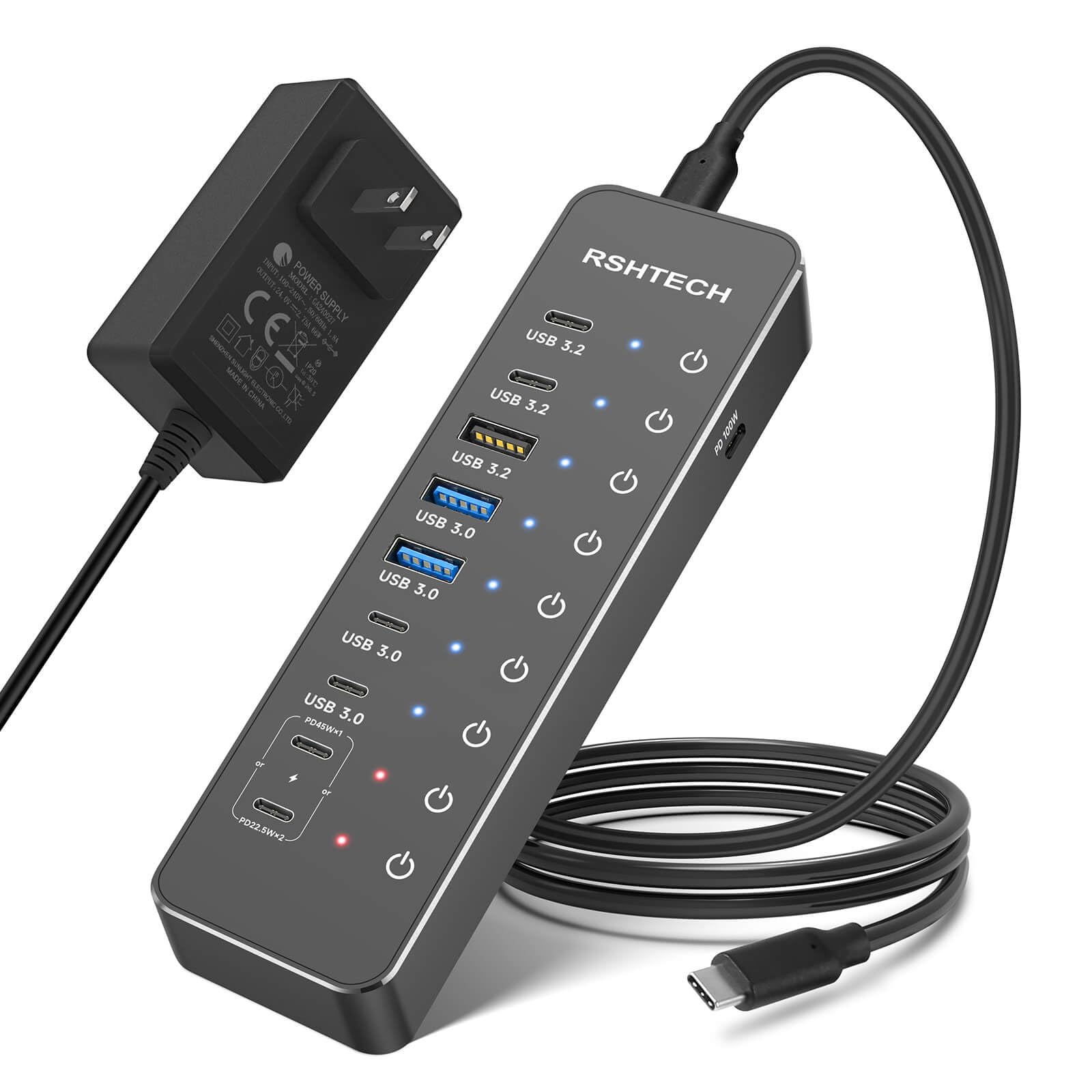
The hub that moves files at 10Gbps and keeps your laptop topped up while it does.
This is the pick for someone who is past the keyboard-and-mouse stage. Ten ports arrange into 3 USB 3.2 data ports at 10Gbps, 4 USB 3.0 data ports at 5Gbps, 2 USB-C PD fast-charging ports, and one 100W PD pass-through port. The 10Gbps tier doubles what the SABRENT’s 5Gbps ports can move — that gap matters if you shuttle HD video or large files regularly.
The 66W 24V/2.75A adapter is the stable heart of the thing, with built-in surge protection plus over-voltage and over-current protection. The two USB-C PD charging ports deliver up to 45W single-port, and the side-mounted 100W pass-through keeps a laptop charged during a full workday — you supply the charger for that port yourself. Touch-sensitive switches with blue LEDs let you toggle any port on with a touch and off with a two-second press.
The catch to plan around: this hub does not support video output. It is a data and charging machine, not a display dock. The detachable 3.3-foot USB-C host cable is easy to store and carry, and compatibility covers USB-C laptops, MacBooks, and Chromebooks. Fast transfer is the headline, and it earns it.
Why it stands out: 10Gbps USB 3.2 ports, 66W of steady supply, and 100W pass-through charging for the laptop you plug in all day.
The line to remember: no video output — connect a monitor through a different tool.
Built for: photographers, editors, and multi-device users who want 10Gbps transfer plus laptop pass-through charging in one hub.
Wrong pick if: you need the hub to drive an external display.
7. TP-Link 7-Port USB 3.0 Ultra Slim Hub UH700
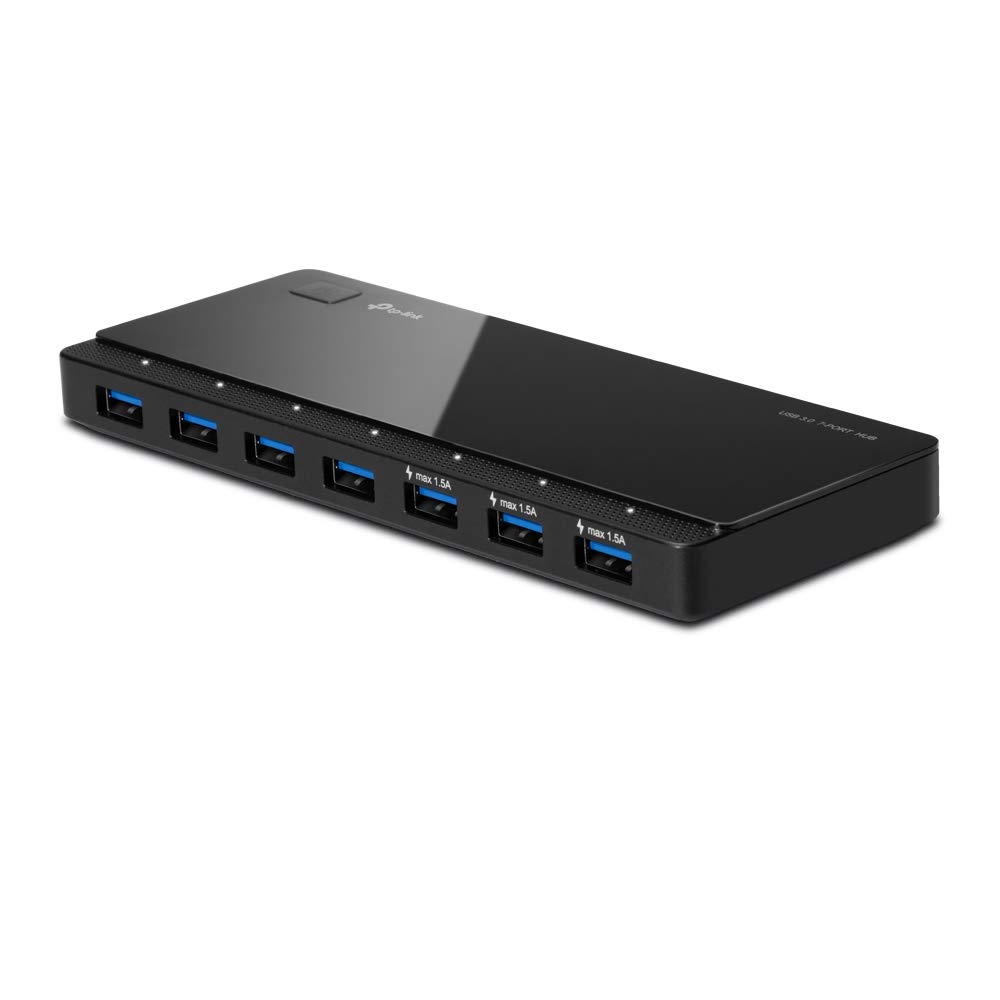
Keeps delivering power when your PC is asleep or shut down — a detail most hubs miss.
Your phone keeps charging overnight even after you close the laptop lid, and that is the one spec that sets this hub apart. This second-generation version ships with updated firmware (the built-in software that runs the hub) that lets it keep working when the computer is asleep or fully shut down. So the desk port still feeds your phone all night. If you have ever woken to a dead phone because the hub cut out with the PC, this fixes that.
Seven USB 3.0 ports run at up to 5Gbps, backward compatible with USB 2.0 and 1.1. Three of the ports are BC 1.2 charging ports delivering up to 5V/1.5A each — TP-Link states that charges 1.5x faster than a 5V/1A original charger. Dim white LEDs on the power button and on each port show what is connected, so you can read status without squinting in the dark.
It is a plastic shell at 7.4 ounces, and reliability reads as a mixed point in the review data — a subset of units lose a port over long use. The seven-port capacity and sleep-mode charging carry the day for most owners, even where the plastic build draws complaints. Treat it as a lighter-duty desk hub and it does its job.
The differentiator: charging that continues through sleep mode or shutdown, plus three BC 1.2 ports at 5V/1.5A each.
Fair warning: the plastic build and long-term port reliability are the things to keep an eye on — not the out-of-box experience.
Worth it if: you want your phone charging overnight even when the desktop is off, and you want an established brand behind the firmware.
Look past it if: you need the heaviest power delivery for stacked drives.
8. atolla 16-Port USB 3.0 Splitter

Sixteen ports on a single bar, for the workstation that has run out of openings.
If you sit at a bench with a drive, a printer, a mouse, a keyboard, a headset, a card reader, and a pile of flash drives, sixteen openings is the point. This bar turns one computer port into sixteen USB 3.0 ports, transferring at up to 5Gbps — ten times what USB 2.0 gave you. No driver is needed; plug and play across Windows 11 and 10, Mac OS, and Linux.
The 12V/6A adapter is the largest supply on this list except the intpw’s 65W, and it protects against overload, overvoltage, and overcurrent. That means it will hold steady when you connect power-hungry devices that would trip a small hub. Every port has its own switch and a blue LED, so you can shut off a printer between jobs without touching a cable.
The 1-meter USB cable gives you room to route it across the desk. At 1.7 pounds and 12.36 inches tall in its standing frame it needs real space and is not the one to move around. But for a fixed workstation that keeps adding devices, the port count and the beefy adapter make the case.
The argument for sixteen
- 16 ports on one bar for permanently wired device collections
- 12V/6A adapter with overload, overvoltage, and overcurrent protection
- Individual switch and blue LED on every port
- 1-meter cable gives reach across a bench
What it asks in return
- 1.7 pounds and a standing footprint of 12.36 inches — it owns its corner of the desk
- Not a hub you carry; this lives where you set it
Right answer for: a fixed workstation or lab bench with more devices than free ports, where the beefy 12V/6A adapter earns its keep.
Not for you if: you want something portable.
9. intpw 16-Port USB 3.2 Hub YH16A
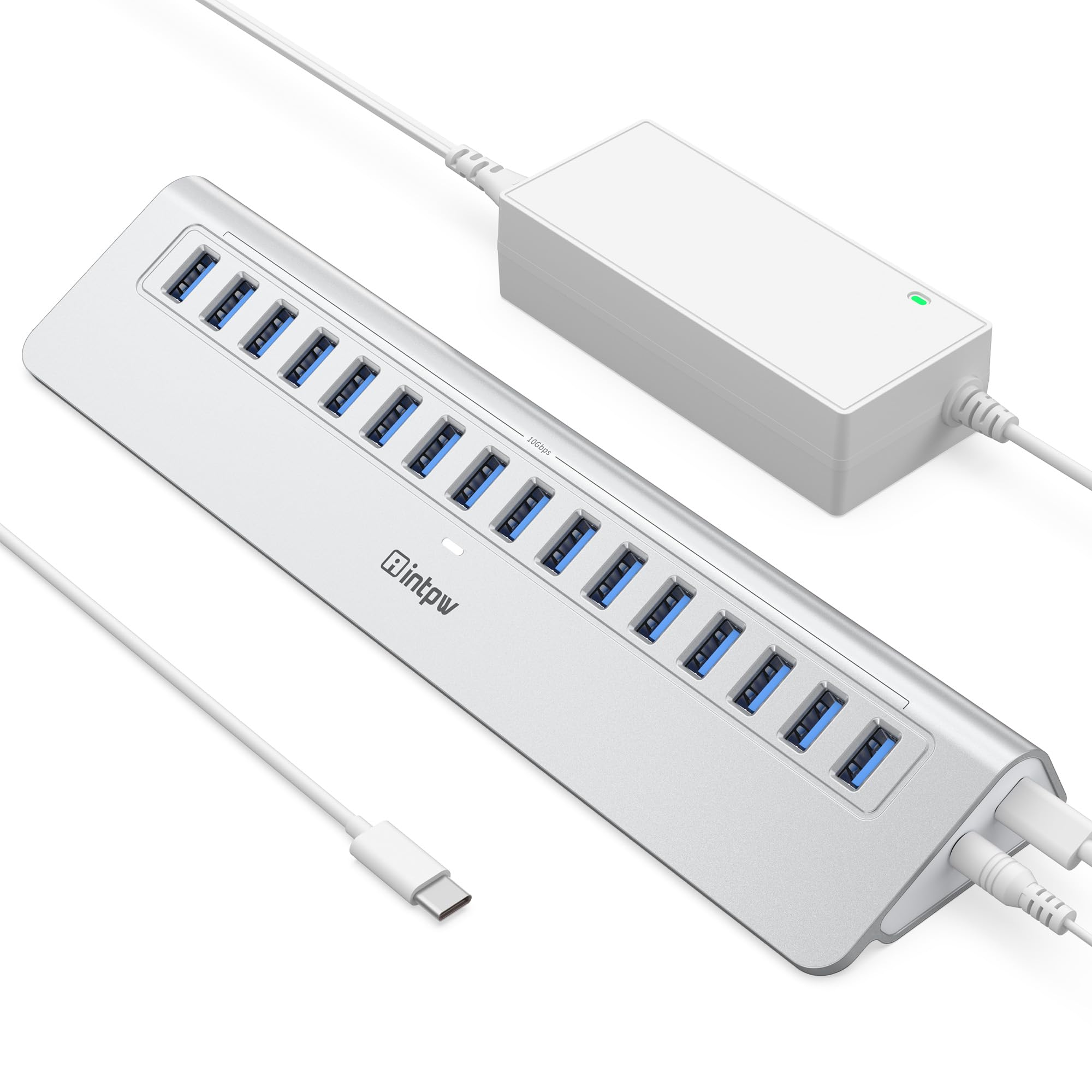
Sixteen ports at 10Gbps, machined into a body angled so you plug in without lifting it.
This one is aimed squarely at the people who move enormous files all day — video editors, 3D designers, IT engineers. Sixteen USB-A ports run at 10Gbps. The listing states lab-tested speeds of 999.4MB/s write and 886.5MB/s read, which is the kind of transfer rate you notice when a 4K RAW clip lands in seconds rather than minutes.
The 28-degree angled port face is a real ergonomic detail. The one-piece aluminum body tilts the ports toward your hand, so you plug and unplug without lifting the hub off the desk. The 65W adapter feeds the whole bar, and the heat-resistant aluminum is built to manage warmth during extended use. What wins people over is the 28-degree angled face, which lets you plug and unplug all sixteen ports without lifting the hub.
Two limits worth knowing before you commit. This is a data-transfer tool — it does not support video output or fast phone charging. And it needs desk room at 11.3 inches wide and 3.78 deep, so it will not hide. But for 4K video and 3D workloads, its sixteen 10Gbps ports make it the fastest hub on the page.
The heavy-workload pick: 16 ports at 10Gbps, 999.4MB/s write and 886.5MB/s read on the listing, and a 65W adapter to keep them fed.
Set expectations: no video output and no fast phone charging — this is engineered for data.
Designed for: editors and engineers moving 4K and large project files who want sixteen 10Gbps ports in an angled aluminum body.
Look elsewhere if: you need the hub for displays or phone charging.
Know the Specs
Power Adapter Wattage
The adapter’s wattage is how much current the hub can spread across all its ports at once. A 15W unit is fine for keyboards and flash drives; a 60W or 66W unit holds steady when several hard drives draw at once. Match the adapter to your worst-case load, not your average one.
USB 3.0 vs USB 3.2 Data Speed
USB 3.0, also called USB 3.2 Gen 1, runs at up to 5Gbps — about 10 times USB 2.0. USB 3.2 Gen 2 doubles that to 10Gbps. The faster tier only matters if you shuttle large files. For peripherals and steady backups, 5Gbps is plenty.
BC 1.2 Charging Ports
BC 1.2 is a charging standard that lets a port deliver up to 5V/1.5A — often faster than a basic 5V/1A charger. Dedicated charging ports on a hub mean you top up a phone without sacrificing a data slot, and the current rating tells you how quickly.
Per-Port Switches and LEDs
A switch per port cuts power to one device without unplugging it, and a small LED shows whether it is live. This keeps a printer or spare drive from drawing all day, and it makes the hub readable at a glance in a dim room.
Common Questions
Do I really need a powered hub instead of a cheap unpowered splitter?
Will a 5Gbps hub slow down my USB 3.2 external SSD?
Can the hub charge my laptop as well as my phone?
What does the individual switch on each port actually do?
Do these hubs work with a MacBook that only has USB-C ports?
Is 5Gbps fast enough for a webcam and microphone running at the same time?
Will a powered hub still charge my phone when my PC is asleep?
How many external hard drives can I safely run on one of these hubs?
Do these hubs need driver software installed?
Can I use a powered hub to connect a monitor or display?
The Bottom Line
For most desks, the powered usb 3.0 hub winner is the SABRENT 10-Port (HB-B7C3) because its 60W adapter, three dedicated charging ports, and per-port switches give you the most headroom and control for a full-time setup. If your priority is fast data and laptop pass-through charging, the RSHTECH RSH-ST10P moves files at 10Gbps while keeping a laptop topped up. And for a desk drowning in devices, the atolla 16-Port Splitter with its 12V/6A adapter is the one to reach for — that is what a bigger adapter buys you when port count stops being the only question.
How we choose
We do not accept paid placement. Every pick is matched to a real buyer and a real use-case; we do not hands-on test units.
Sources
Specifications: manufacturer listings and product documentation. Review insights: verified customer reviews, as of November 2026. Pricing: not shown on this page (it changes often); check the current price via the retailer link.
As an Amazon Associate, Tactical Gear Guy earns from qualifying purchases. This does not affect which products we feature.